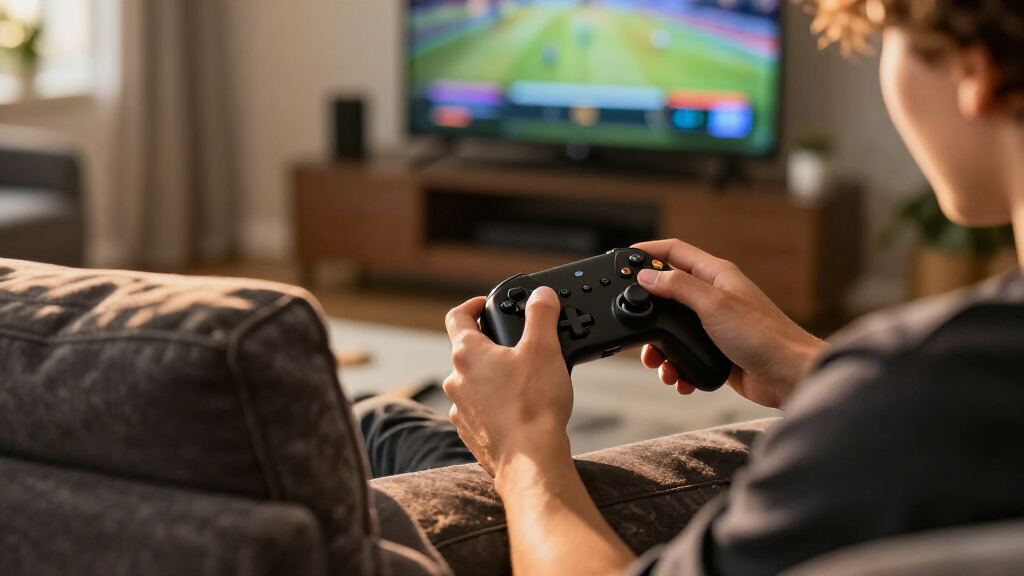

Choosing the best wireless gaming controllers requires balancing latency, battery life, and platform compatibility. The Xbox Wireless Controller remains the safest bet for Windows users due to its native driver support, while the 8BitDo Ultimate 2C offers exceptional value for Android and PC gamers seeking Hall Effect sticks. The main tradeoff lies between proprietary ecosystem integration and cross-platform flexibility. This guide breaks down the top contenders to help you match a controller to your specific gaming setup.

Play games on Amazon Luna for your game nights, included with Prime
- A rotating selection of games, no download needed
- Play on TV, laptop or phone
- Fast, free delivery for your gear, too
Complete the kit



Key Takeaways
- Hall Effect sticks are now standard on mid-range models, eliminating stick drift concerns.
- Cross-platform compatibility often comes at the cost of native haptic feedback quality.
- Charging docks are becoming a standard inclusion for premium wireless controllers.
- Low-latency 2.4GHz dongles outperform Bluetooth for competitive play.
- Software remapping capabilities vary drastically between console-first and PC-first brands.
| Manba One Wireless Gaming Controller with Interactive Screen, Black | 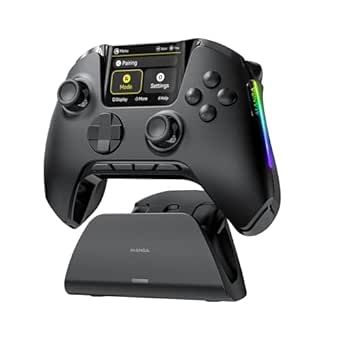 | Best for On-Controller Customization | Compatibility: Switch, Switch 2, iOS, Android, Windows PC | Connection modes: Wired, Bluetooth, wireless dongle | Display: 2-inch interactive screen | VIEW LATEST PRICE | See Our Full Breakdown |
| VOYEE Wireless Controller for Nintendo Switch, Switch Lite, OLED, and PC | 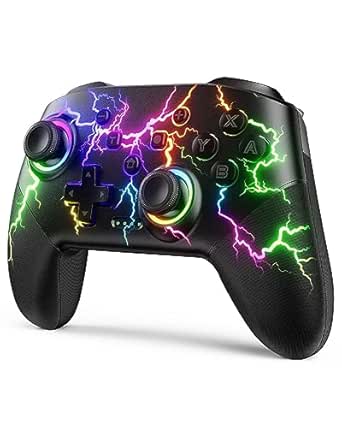 | Best for Switch Players Who Want Lighting and Turbo | Compatible devices: Nintendo Switch, Switch Lite, Switch OLED, Windows PC | Connectivity: Wireless; PC connection is wired | Battery runtime: 10–15 hours | VIEW LATEST PRICE | See Our Full Breakdown |
| AceGamer Aurora II Wireless Bluetooth Gaming Controller | 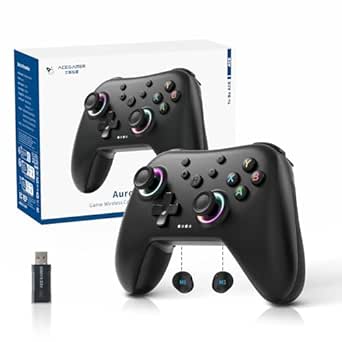 | Best Multi-Platform Compact Pick | Compatible devices: PC, Nintendo Switch, Nintendo Switch 2, Steam Deck, iOS, Android | Connectivity: 2.4G wireless, Bluetooth | Joystick technology: Hall Effect sensors | VIEW LATEST PRICE | See Our Full Breakdown |
| 8Bitdo Ultimate 2C Wireless Controller for Windows and Android (Green) |  | Best for Fast Windows and Android Play | Compatible devices: Windows, Android | Connectivity: Wireless, USB | Polling rate: 1000 Hz over 2.4 GHz and wired connections | VIEW LATEST PRICE | See Our Full Breakdown |
| EasySMX X05Pro Wireless Gaming Controller |  | Best for Quiet, Adjustable Controls | Compatible devices: PC, Nintendo Switch, Android, iOS | Connectivity: USB-C, 2.4 GHz wireless, Bluetooth | Joystick technology: 11-bit Hall Effect | VIEW LATEST PRICE | See Our Full Breakdown |
| ManbaOne Interactive Screen Wireless Gaming Controller for PC, Switch, iOS, and Android – Hall Effect Joystick, RGB Lighting, Remappable Buttons, 1800mAh Battery with Charging Dock (White) |  | Best for On-Controller Customization | Compatible devices: Switch, Switch 2, iOS, Android, Windows PC | Connection options: Bluetooth, wired, USB dongle | Configuration screen: 2-inch interactive screen | VIEW LATEST PRICE | See Our Full Breakdown |
| VOYEE Wireless Controller for Nintendo Switch, Switch Lite, OLED, and Windows PC |  | Best Switch Pick for Custom Controls | Compatible devices: Nintendo Switch, Switch Lite, Switch OLED, Windows PC | Connectivity: Wireless for Switch; USB for PC | Wireless range: 10 m | VIEW LATEST PRICE | See Our Full Breakdown |
| EasySMX X15 Wireless Gaming Controller for PC, Steam, Switch, Android, and iOS | 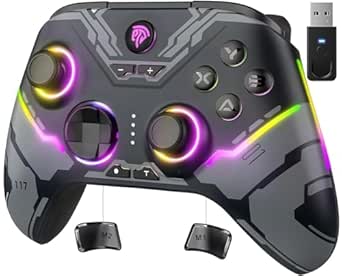 | Best Multi-Platform Value | Compatible devices: Windows PC, Steam, Nintendo Switch, Android, iOS | Connection modes: 2.4G wireless, Bluetooth, USB-C wired | Joystick and trigger technology: Hall effect | VIEW LATEST PRICE | See Our Full Breakdown |
| GameSir G7 Pro Controller for Xbox, PC, and Android | 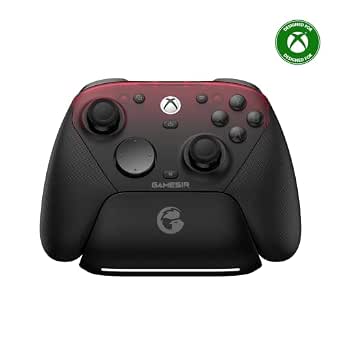 | Best for Xbox and PC Players | Compatible devices: Android, PC, Xbox One, Xbox Series X|S | Connectivity: USB wired, 2.4 GHz wireless, Bluetooth | Stick technology: TMR | VIEW LATEST PRICE | See Our Full Breakdown |
| 8Bitdo Ultimate 2 Wireless Controller for PC, Apple, Steam, and Android – Black |  | Best for Low-Latency PC Play | Compatibility: PC, Apple, Steam, Android | Wireless technology: 8Speed 2.4 GHz | Wireless range: 10 m | VIEW LATEST PRICE | See Our Full Breakdown |
| 8BitDo Ultimate 2C Wireless Controller for Windows and Android (Transparent Black) |  | Best for Competitive PC & Android Gamers | Compatibility: Windows and Android | Polling Rate: 1000 Hz (2.4G wireless and wired) | Joysticks: Hall Effect | VIEW LATEST PRICE | See Our Full Breakdown |
| Xbox Wireless Controller – Carbon Black |  | Best for Universal Console & PC Compatibility | Connectivity: Xbox Wireless, Bluetooth, USB-C | Compatible Devices: Xbox Series X|S, Xbox One, Windows, Android, iOS | Battery Life: Up to 40 hours (AA batteries) | VIEW LATEST PRICE | See Our Full Breakdown |
| Xbox Elite Series 2 Core Wireless Gaming Controller – White |  | Best Premium Modular Design | Compatible Devices: Xbox Series X|S, Xbox One, Windows, Android, iOS | Connectivity: Xbox Wireless, Bluetooth, USB-C | Battery Life: Up to 40 hours | VIEW LATEST PRICE | See Our Full Breakdown |
| 8Bitdo Ultimate 2C Wireless Gamepad for Windows and Android (Purple) | 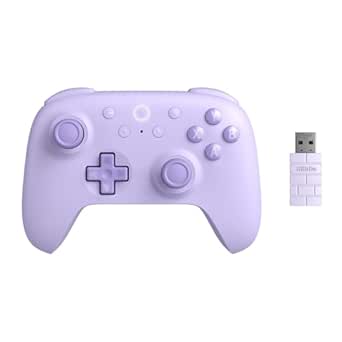 | Best for Customizable Aesthetics | Compatible Devices: Windows, Android | Connectivity: 2.4 GHz wireless, USB wired | Polling Rate: 1000 Hz | VIEW LATEST PRICE | See Our Full Breakdown |
| GameSir Nova Lite 2 Wireless PC Controller |  | Best Multi-Platform Value | Compatible Devices: PC, Switch, Switch 2, Android, iOS | Connectivity: Bluetooth, 2.4 GHz dongle, Wired | Polling Rate: 1000 Hz | VIEW LATEST PRICE | See Our Full Breakdown |
| wireless gaming controller | Compatible devices | Connectivity | Weight | Polling rate |
|---|---|---|---|---|
| Manba One Wireless Gaming Cont | — | — | — | — |
| VOYEE Wireless Controller for | Nintendo Switch, Switch Lite, Switch OLED, Windows PC | Wireless; PC connection is wired | 6.88 ounces | — |
| AceGamer Aurora II Wireless Bl | PC, Nintendo Switch, Nintendo Switch 2, Steam Deck, iOS, Android | 2.4G wireless, Bluetooth | — | — |
| 8Bitdo Ultimate 2C Wireless Co | Windows, Android | Wireless, USB | 280 g | 1000 Hz over 2.4 GHz and wired connections |
| EasySMX X05Pro Wireless Gaming | PC, Nintendo Switch, Android, iOS | USB-C, 2.4 GHz wireless, Bluetooth | — | 1000 Hz wired/2.4 GHz; 125 Hz Bluetooth |
| ManbaOne Interactive Screen Wi | Switch, Switch 2, iOS, Android, Windows PC | — | 630 g | 800 Hz or higher when wired |
| VOYEE Wireless Controller for | Nintendo Switch, Switch Lite, Switch OLED, Windows PC | Wireless for Switch; USB for PC | 0.28 kg | — |
| EasySMX X15 Wireless Gaming Co | Windows PC, Steam, Nintendo Switch, Android, iOS | — | — | 1000 Hz |
| GameSir G7 Pro Controller for | Android, PC, Xbox One, Xbox Series X|S | USB wired, 2.4 GHz wireless, Bluetooth | 272 g | Up to 1000 Hz on PC |
| 8Bitdo Ultimate 2 Wireless Con | — | — | — | 1000 Hz over 2.4 GHz and wired connections |
| 8BitDo Ultimate 2C Wireless Co | — | — | — | 1000 Hz (2.4G wireless and wired) |
| Xbox Wireless Controller | Xbox Series X|S, Xbox One, Windows, Android, iOS | Xbox Wireless, Bluetooth, USB-C | 13.12 ounces | — |
| Xbox Elite Series 2 Core Wirel | Xbox Series X|S, Xbox One, Windows, Android, iOS | Xbox Wireless, Bluetooth, USB-C | 1.7 pounds | — |
| 8Bitdo Ultimate 2C Wireless Ga | Windows, Android | 2.4 GHz wireless, USB wired | 0.33 kg | 1000 Hz |
| GameSir Nova Lite 2 Wireless P | PC, Switch, Switch 2, Android, iOS | Bluetooth, 2.4 GHz dongle, Wired | 0.24 kg | 1000 Hz |
More Details on Our Top Picks
Manba One Wireless Gaming Controller with Interactive Screen, Black
The Manba One is the most self-contained choice here: its 2-inch screen lets you adjust controls, lighting, and vibration on the controller rather than relying on an app. That makes it a stronger fit for players who want to tune a setup across Switch, mobile, and Windows PC. Its Hall Effect sticks and triggers, four programmable rear buttons, and included charging station also give it more built-in control options than the AceGamer Aurora II, which has two rear buttons and no listed dock. The tradeoff is platform reach: Manba One does not work with Xbox, PlayStation, or GeForce Now, and it cannot wake a Switch. For PC, the dongle is the better wireless choice; Bluetooth is described as less stable.
Pros:- On-controller screen adjusts controls, lighting, and vibration without an app
- Hall Effect joysticks and linear Hall Effect triggers are designed to reduce wear-related drift
- Four programmable rear buttons support macros
- Includes a smart charging station and offers wired, Bluetooth, and dongle connections
Cons:- Does not support the Switch wake-up function
- Incompatible with Xbox, PlayStation, and GeForce Now
- Bluetooth PC connection is described as less stable than the dongle connection
Best for: Switch, mobile, and Windows PC players who want to change controller settings without opening an app and value extra programmable controls.
Not ideal for: Xbox, PlayStation, or GeForce Now players, and Switch owners who want to wake the console from the controller.
- Compatibility:Switch, Switch 2, iOS, Android, Windows PC
- Connection modes:Wired, Bluetooth, wireless dongle
- Display:2-inch interactive screen
- Battery capacity:1800 mAh
- Joystick technology:Hall Effect
- Trigger technology:Linear Hall Effect
- Back buttons:4 programmable buttons with macro support
- Motion control:6-axis gyroscope
- Included accessory:Smart charging station with wireless receiver
Our verdict“Choose the Manba One if app-free customization and four programmable rear buttons matter more to you than broad console compatibility.”
VOYEE Wireless Controller for Nintendo Switch, Switch Lite, OLED, and PC
The VOYEE S08 is a Switch-focused pick for players who want extra controls and visual flair without stepping up to the Manba One’s on-controller screen and charging station. It combines programmable M1/M2 buttons, three turbo rates, motion control, and adjustable vibration, so it covers a useful range of play styles. Its wireless connection is suited to Nintendo Switch consoles, while PC use is wired only—a more limited computer setup than the Bluetooth and 2.4G options listed for the AceGamer Aurora II. The 10–15-hour runtime is practical for regular sessions, but a full charge takes 3–4 hours. I’d choose this for a Switch setup where lighting and turbo matter more than wireless PC flexibility.
Pros:- M1/M2 buttons can be programmed for alternate inputs
- Three turbo speeds offer different rapid-input rates
- Six-axis motion control and four vibration settings
- Customizable nine-color lighting with four modes
Cons:- PC connection requires a cable
- Charging takes 3–4 hours
- Listed battery runtime is 10–15 hours
Best for: Nintendo Switch, Switch Lite, and OLED owners who want programmable buttons, adjustable vibration, and customizable lighting in one controller.
Not ideal for: PC players who want a wireless controller, or buyers who prioritize faster recharging over lighting and turbo options.
- Compatible devices:Nintendo Switch, Switch Lite, Switch OLED, Windows PC
- Connectivity:Wireless; PC connection is wired
- Battery runtime:10–15 hours
- Charging time:3–4 hours
- Buttons:14
- Turbo speeds:5, 12, or 20 shots per second
- Motion control:6-axis gyroscope
- Lighting:Nine-color LED with four modes
- Weight:6.88 ounces
Our verdict“Pick the VOYEE for a feature-rich wireless Switch controller, but choose the AceGamer Aurora II if wireless PC connectivity is a priority.”
AceGamer Aurora II Wireless Bluetooth Gaming Controller
The AceGamer Aurora II earns its place through broad device support and a straightforward mix of Bluetooth and 2.4G wireless. It covers PC, Switch, Switch 2, Steam Deck, iOS, and Android, making it a flexible option for someone who moves between a handheld, computer, and phone. Its Hall Effect joysticks and two programmable rear buttons add useful control features, though the Manba One provides twice as many rear buttons and a screen for on-controller adjustments. The listed 1000mAh battery capacity is smaller than the Manba One’s 1800mAh, and the product notes that pairing requires a specific button sequence. Xbox owners should skip it altogether; Xbox compatibility is not supported.
Pros:- Supports PC, Switch, Switch 2, Steam Deck, iOS, and Android
- Offers both 2.4G wireless and Bluetooth connectivity
- Hall Effect joysticks
- Two programmable rear buttons
Cons:- Not compatible with Xbox
- Pairing requires a specific button sequence
- 1000mAh listed battery capacity is lower than the Manba One’s 1800mAh
Best for: Players who want one wireless controller for PC, Switch, Steam Deck, and mobile devices, with two extra programmable rear buttons.
Not ideal for: Xbox players or anyone who wants the Manba One’s on-controller screen and larger listed battery capacity.
- Compatible devices:PC, Nintendo Switch, Nintendo Switch 2, Steam Deck, iOS, Android
- Connectivity:2.4G wireless, Bluetooth
- Joystick technology:Hall Effect sensors
- Programmable rear buttons:2
- Button quantity:12
- Battery capacity:1000mAh
- Xbox compatibility:Not compatible
- Color:Midnight Black
Our verdict“Choose the Aurora II for broad wireless device support, unless you need Xbox compatibility or more extensive onboard customization.”
8Bitdo Ultimate 2C Wireless Controller for Windows and Android (Green)
The 8Bitdo Ultimate 2C is the clearest performance-focused pick in this group for Windows and Android: it specifies 1000 Hz polling over 2.4 GHz and wired connections, alongside Hall Effect sticks and triggers. That combination suits players who want responsive input and wear-resistant controls without relying on software for button mapping. Its remappable L4/R4 bumpers offer an alternate control layout, while the Manba One is the more versatile choice for Switch and mobile ecosystems beyond Android. The 8Bitdo’s narrower compatibility is the main tradeoff—it is listed for Windows and Android only—and the highest polling rate applies to wired and 2.4 GHz modes, not every connection type. Buyers wanting a multi-platform controller should look to the AceGamer Aurora II instead.
Pros:- 1000 Hz polling rate over 2.4 GHz and wired connections
- Hall Effect joysticks and triggers
- Remappable L4/R4 bumpers and button mapping without software
- Turbo function for supported play styles
Cons:- Compatibility is limited to Windows and Android
- The specified 1000 Hz polling rate applies to wired and 2.4 GHz connections
Best for: Windows and Android players who prioritize fast polling on 2.4 GHz or wired connections and want remappable extra bumpers without software.
Not ideal for: Switch, iOS, or console players who need wider platform support, or anyone expecting the 1000 Hz polling rate across all connection modes.
- Compatible devices:Windows, Android
- Connectivity:Wireless, USB
- Polling rate:1000 Hz over 2.4 GHz and wired connections
- Joysticks and triggers:Hall Effect
- Buttons:14
- Remappable controls:L4/R4 bumpers; button mapping without software
- Weight:280 g
- Color:Green
Our verdict“Choose the Ultimate 2C for responsive Windows or Android gaming, but pick the AceGamer Aurora II if you need broader device compatibility.”
EasySMX X05Pro Wireless Gaming Controller
The EasySMX X05Pro stands out for players who want quieter button presses and more control over trigger feel. Its dual-stage adjustable triggers, two programmable top buttons, and Hall Effect joysticks give it a useful mix of customization without the Manba One’s screen-driven setup. Connection choice matters here: the X05Pro lists a 1000 Hz polling rate for wired and 2.4 GHz play, but Bluetooth drops to 125 Hz, so Bluetooth convenience comes with a lower specified rate. It supports PC, Switch, Android, and iOS, but not Xbox, PlayStation, Luna, or GeForce Now. Compared with the VOYEE, it adds 2.4 GHz and Bluetooth options for PC, though it does not list the VOYEE’s lighting modes or turbo speeds.
Pros:- Quiet buttons suit shared spaces and late-night sessions
- 11-bit Hall Effect joysticks
- Dual-stage adjustable triggers and two programmable top buttons
- Offers USB-C, 2.4 GHz wireless, and Bluetooth connections
Cons:- Not compatible with Xbox, PlayStation, Luna, or GeForce Now
- Bluetooth polling rate is 125 Hz, below the 1000 Hz wired and 2.4 GHz rate
Best for: PC and Switch players who game late, prefer quieter buttons, and want adjustable triggers with wired, 2.4 GHz, and Bluetooth options.
Not ideal for: Xbox, PlayStation, Luna, or GeForce Now players, and buyers who want the same listed polling rate over Bluetooth as over wired or 2.4 GHz.
- Compatible devices:PC, Nintendo Switch, Android, iOS
- Connectivity:USB-C, 2.4 GHz wireless, Bluetooth
- Joystick technology:11-bit Hall Effect
- Polling rate:1000 Hz wired/2.4 GHz; 125 Hz Bluetooth
- Triggers:Dual-stage adjustable
- Programmable buttons:2 top-mounted
- Rumble motors:2 + 2
- Battery capacity:1000 mAh
- Compatibility limitations:Not compatible with Xbox, PlayStation, Luna, or GeForce
Our verdict“Choose the X05Pro if quiet controls and adjustable triggers matter most, and use wired or 2.4 GHz mode when you want its higher specified polling rate.”
ManbaOne Interactive Screen Wireless Gaming Controller for PC, Switch, iOS, and Android – Hall Effect Joystick, RGB Lighting, Remappable Buttons, 1800mAh Battery with Charging Dock (White)
The built-in 2-inch screen gives the ManbaOne a distinct advantage for players who want to adjust controls, vibration, joysticks, or lighting without opening a companion app. Its Hall-effect joysticks and linear triggers are designed to resist drift, while four programmable back keys add options for games that benefit from extra inputs. Compared with the EasySMX X15, it offers a larger battery and a charging dock, but the X15 lists a higher 1000 Hz polling rate and also supports three connection modes. ManbaOne’s wired, Bluetooth, and USB-dongle connections suit a mixed-device setup; still, it does not work with Xbox or PlayStation, and Bluetooth on iOS may be less stable than the dongle. Its 630 g listed weight is also worth noting for long sessions.
Pros:- On-controller screen handles configuration without external software.
- Hall-effect joysticks and linear triggers are designed to reduce drift.
- Bluetooth, wired, and USB-dongle connectivity covers several setups.
- Four programmable back keys and a charging dock add flexibility.
Cons:- Not compatible with Xbox or PlayStation.
- Switch 2 wake-up is unavailable, and Bluetooth iOS mode may be less stable.
- Listed weight of 630 g is relatively substantial for a gamepad.
Best for: Players who switch among PC, Switch, and mobile devices and want to remap controls directly on the controller.
Not ideal for: Xbox or PlayStation owners, and Switch 2 players who rely on controller wake-up; iOS players who want to use Bluetooth rather than the dongle may also prefer another option.
- Compatible devices:Switch, Switch 2, iOS, Android, Windows PC
- Connection options:Bluetooth, wired, USB dongle
- Configuration screen:2-inch interactive screen
- Joystick technology:Hall effect
- Battery capacity:1800 mAh
- Programmable controls:Four back keys
- Polling rate:800 Hz or higher when wired
- Weight:630 g
- Charging dock:Included
Our verdict“Choose the ManbaOne if screen-based setup and broad device support matter more to you than low weight or Xbox compatibility.”
VOYEE Wireless Controller for Nintendo Switch, Switch Lite, OLED, and Windows PC
The VOYEE suits Switch players who want programmable buttons, turbo, and motion controls without paying for a more elaborate multi-platform setup. Its M1 and M2 buttons, adjustable vibration, and six-axis gyro give players room to tailor the controls, while five lighting modes add visual personalization. Unlike the ManbaOne Interactive Screen Wireless Gaming Controller, it has no onboard screen for changing settings; in return, its layout is more straightforward and its stated 10–15 hours of play with lighting on gives a useful runtime reference. The main limitation is PC use: this controller connects to Windows by USB cable rather than wirelessly. The listed battery life may also call for more frequent charging than the EasySMX X15, which claims up to 20 hours.
Pros:- Works wirelessly with the Switch family and by USB with Windows PC.
- M1 and M2 programmable buttons provide extra control options.
- Six-axis gyro, adjustable vibration, and turbo settings support varied play styles.
- Lighting offers eight colors plus a rainbow option and five modes.
Cons:- Windows PC connection requires a cable.
- Battery life is listed at about 10–15 hours with lighting on.
- No charging dock is listed among the included components.
Best for: Nintendo Switch, Switch Lite, and OLED owners who want gyro aiming, turbo settings, and two programmable buttons.
Not ideal for: PC players who need wireless play, or long-session users who want more than the stated 10–15 hours with lighting on.
- Compatible devices:Nintendo Switch, Switch Lite, Switch OLED, Windows PC
- Connectivity:Wireless for Switch; USB for PC
- Wireless range:10 m
- Programmable buttons:M1 and M2
- Motion control:Six-axis gyro
- Turbo settings:5, 12, or 25 shots per second
- Battery life:About 10–15 hours with lighting on
- Charging:USB Type-C; about 3–4 hours
- Weight:0.28 kg
Our verdict“Pick the VOYEE for a feature-rich Switch controller if wired PC play and its stated battery runtime fit your setup.”
EasySMX X15 Wireless Gaming Controller for PC, Steam, Switch, Android, and iOS
The EasySMX X15 is a practical pick for players who want one controller for PC, Steam, Switch, and mobile, with both wireless and wired connection options. Its Hall-effect sticks and triggers are designed to resist drift, and the listed 1000 Hz polling rate makes it a strong choice for players who prioritize responsive input on compatible setups. Compared with the ManbaOne Interactive Screen Wireless Gaming Controller, the X15 has no configuration screen or charging dock, but it does offer a longer stated playtime of up to 20 hours and a lighter feature set to manage. Two programmable back buttons and RGB lighting add customization, though the missing gyro sensor limits motion-controlled games, and there is no microphone jack. The listed 0.35 g weight appears questionable, so I would not use it to judge how it feels in hand.
Pros:- Supports PC, Steam, Switch, Android, and iOS.
- Hall-effect joysticks and triggers are designed to resist drift.
- Offers 2.4G wireless, Bluetooth, and USB-C wired modes.
- Up to 20 hours of listed playtime and two programmable back buttons.
Cons:- No gyro sensor for motion-controlled games.
- No microphone or headset jack.
- The listed 0.35 g weight appears inaccurate.
Best for: Players who move between PC, Steam, Switch, and mobile devices and want drift-resistant controls with several connection choices.
Not ideal for: Players who need gyro aiming, a headset connection through the controller, or a verified weight figure before buying.
- Compatible devices:Windows PC, Steam, Nintendo Switch, Android, iOS
- Connection modes:2.4G wireless, Bluetooth, USB-C wired
- Joystick and trigger technology:Hall effect
- Polling rate:1000 Hz
- Battery capacity:1000 mAh
- Playtime:Up to 20 hours
- Programmable controls:Two back buttons
- Listed weight:0.35 g
Our verdict“Choose the X15 if broad platform support and drift-resistant controls matter more than gyro, a headset jack, or an onboard setup screen.”
GameSir G7 Pro Controller for Xbox, PC, and Android
The GameSir G7 Pro stands out for buyers who want Xbox compatibility alongside PC and Android support, a platform mix that sets it apart from the Switch-focused VOYEE and the broader mobile-and-PC EasySMX X15. Its TMR sticks and Hall-effect analog triggers pair drift-conscious control with micro-switch trigger stops, while a charging station and three connection modes make it adaptable to different setups. On PC, the 1000 Hz polling rate and gyro aiming add appeal for players who value fast input or motion-based aiming. That gyro feature is limited to PC, however, and the product data does not state battery runtime, making it harder to plan for long wireless sessions. The 272 g listed weight is lighter than the ManbaOne’s listed 630 g, though those figures alone do not establish how either controller feels in hand.
Pros:- Supports Xbox, PC, and Android with wired, 2.4 GHz wireless, and Bluetooth modes.
- TMR sticks and Hall-effect analog triggers with micro-switch trigger stops.
- Offers up to 1000 Hz polling on PC and PC-only gyro aiming.
- Includes a charging station.
Cons:- Gyro aiming is available on PC only.
- Battery runtime is not specified.
- Compatibility is narrower than the EasySMX X15, which also supports Switch and iOS.
Best for: Xbox and PC players who want TMR sticks, adjustable trigger behavior, and multiple connection modes, with Android support as a bonus.
Not ideal for: Players who need gyro aiming on Xbox or Android, or buyers who require a clearly stated battery runtime before choosing a wireless controller.
- Compatible devices:Android, PC, Xbox One, Xbox Series X|S
- Connectivity:USB wired, 2.4 GHz wireless, Bluetooth
- Stick technology:TMR
- Triggers:Hall-effect analog with micro-switch trigger stops
- Polling rate:Up to 1000 Hz on PC
- Battery capacity:1200 mAh
- Weight:272 g
- Gyro aiming:PC only
- Charging station:Included
Our verdict“Pick the G7 Pro if Xbox and PC support with advanced stick and trigger hardware matters more than a stated runtime or cross-platform gyro.”
8Bitdo Ultimate 2 Wireless Controller for PC, Apple, Steam, and Android – Black
The 8Bitdo Ultimate 2 is tailored to players who want fast wireless input and a dense set of controls for PC, Steam, Apple devices, and Android. Its stated under-1 ms latency and 1000 Hz polling rate over 2.4 GHz or wired connections make it the most performance-focused choice here on paper; the GameSir G7 Pro also lists 1000 Hz on PC, but this 8Bitdo adds a stated low-latency figure and customizable six-axis motion controls. Switchable Hall-effect linear and non-linear tactile trigger modes let players favor travel or a more immediate feel, while back paddles and extra bumpers offer more inputs than the EasySMX X15’s two back buttons. The tradeoff is setup: advanced customization may require Ultimate Software V2, and 2.4 GHz wireless may depend on the included adapter. Xbox compatibility is not listed.
Pros:- Lists under 1 ms latency and 1000 Hz polling over 2.4 GHz and wired connections.
- Switchable Hall-effect linear and non-linear tactile trigger modes.
- Back paddles, extra bumpers, turbo, and customizable six-axis motion controls.
- Includes a charging dock and USB-C adapter.
Cons:- The 2.4 GHz connection may require the included adapter.
- Advanced features may require setup in Ultimate Software V2.
- Xbox compatibility and Bluetooth connectivity are not listed.
Best for: PC and Steam players who want low-latency 2.4 GHz play, trigger-mode choices, motion controls, and extra programmable inputs.
Not ideal for: Xbox owners, players who want plug-and-play customization without companion software, or buyers who need Bluetooth connectivity.
- Compatibility:PC, Apple, Steam, Android
- Wireless technology:8Speed 2.4 GHz
- Wireless range:10 m
- Latency:Under 1 ms
- Polling rate:1000 Hz over 2.4 GHz and wired connections
- Joystick technology:TMR
- Trigger modes:Switchable linear Hall-effect and non-linear tactile
- Additional controls:Two back paddles, R4/L4 bumpers, turbo
- Included accessories:Multifunctional charging dock and USB-C adapter
Our verdict“Choose the 8Bitdo Ultimate 2 for a highly configurable, low-latency PC and Steam setup if adapter-based wireless and software tuning suit you.”
8BitDo Ultimate 2C Wireless Controller for Windows and Android (Transparent Black)
This controller stands out for its 1000 Hz polling rate, which delivers ultra-low latency critical for competitive play on PC and Android. Unlike the standard Xbox Wireless Controller, which relies on Bluetooth for mobile use and often suffers from higher input lag, the 8BitDo Ultimate 2C maintains consistent timing via its 2.4 GHz dongle. The inclusion of Hall Effect joysticks prevents stick drift, a common failure point in traditional carbon-pot controllers. However, the Transparent Black aesthetic is a stylistic choice that may not appeal to everyone, and the lack of native console support limits its utility if you also play on PlayStation or Xbox consoles. For PC players, the software-free button mapping is a significant convenience.
Pros:- 1000 Hz polling rate for minimal input lag
- Hall Effect sensors prevent stick drift
- Button remapping requires no software installation
- Includes extra L4/R4 bumpers for custom controls
Cons:- No support for Xbox or PlayStation consoles
- Transparent casing shows internal components visibly
- Requires a dongle for low-latency wireless play
Best for: Competitive PC and Android gamers who prioritize low latency and durability over console compatibility.
Not ideal for: Console players or those who dislike the see-through industrial design.
- Compatibility:Windows and Android
- Polling Rate:1000 Hz (2.4G wireless and wired)
- Joysticks:Hall Effect
- Triggers:Hall Effect
- Additional Controls:L4/R4 bumpers, Turbo function
- Button Mapping:Customizable without software
- Color:Transparent Black
Our verdict“Choose this if you want competitive-grade latency and drift-proof sticks for PC or Android without needing extra software.”
Xbox Wireless Controller – Carbon Black
The Xbox Wireless Controller remains the benchmark for universal compatibility, working seamlessly across Xbox Series X|S, PC, and mobile devices via Bluetooth or Xbox Wireless. While the 8BitDo Ultimate 2C offers faster polling for competitive PC play, the Xbox controller provides the most consistent, lag-free experience on Xbox consoles thanks to proprietary wireless tech. Its textured grips and hybrid D-pad offer a familiar, comfortable feel that many gamers prefer over the slightly smaller footprint of third-party alternatives. A notable drawback is the reliance on AA batteries rather than an internal rechargeable cell, which adds ongoing cost and hassle. However, the ease of swapping batteries ensures you never run out of power mid-game if you keep spares on hand.
Pros:- Seamless connectivity with Xbox Series X|S and Windows
- Ergonomic shape with textured grips for long sessions
- 3.5 mm headset jack for direct audio connection
- Widely supported button mapping via Xbox Accessories app
Cons:- Uses disposable AA batteries instead of rechargeable internal cell
- Bluetooth latency is higher than 2.4 GHz dongle solutions
- Plastic construction feels less premium than Elite models
Best for: Gamers who play across Xbox consoles, Windows PC, and mobile devices and prefer the standard industry ergonomics.
Not ideal for: Those who want built-in rechargeable batteries or ultra-low latency for competitive esports.
- Connectivity:Xbox Wireless, Bluetooth, USB-C
- Compatible Devices:Xbox Series X|S, Xbox One, Windows, Android, iOS
- Battery Life:Up to 40 hours (AA batteries)
- Weight:13.12 ounces
- Dimensions:6.91 x 5.61 x 2.76 inches
- Audio:3.5 mm headset jack
- Color:Carbon Black
Our verdict“The safe, reliable choice for anyone in the Xbox ecosystem who values ease of use over niche competitive features.”
Xbox Elite Series 2 Core Wireless Gaming Controller – White
This model offers the Elite Series 2 build quality at a lower entry point by removing the carrying case and extra accessories. Compared to the standard Xbox Wireless Controller, the Elite Core features adjustable-tension thumbsticks and hair trigger locks, allowing for rapid-fire shooting and finer aim control. The wrap-around rubberized grip provides superior traction, which is a clear advantage during intense gaming sessions. However, the Core designation means you miss out on the swappable paddles and carrying case included in the full Elite Series 2, requiring separate purchases if you want those features. The weight is also noticeably heavier at 1.7 pounds, which may cause fatigue for smaller-handed users compared to lighter options like the GameSir Nova Lite 2.
Pros:- Adjustable thumbstick tension for personalized resistance
- Shorter hair trigger locks for faster response times
- Premium rubberized grip for enhanced handling
- Up to 40 hours of battery life on a single charge
Cons:- Core kit lacks carrying case and swappable paddles
- Heavier weight (1.7 lbs) may cause hand fatigue
- Higher price point compared to standard controllers
Best for: Enthusiasts who want elite-grade customization and build quality but already own the full accessory kit.
Not ideal for: First-time buyers who need a complete package with case and paddles, or those with smaller hands.
- Compatible Devices:Xbox Series X|S, Xbox One, Windows, Android, iOS
- Connectivity:Xbox Wireless, Bluetooth, USB-C
- Battery Life:Up to 40 hours
- Weight:1.7 pounds
- Dimensions:7.23 x 7.29 x 3.07 inches
- Features:Adjustable thumbsticks, trigger locks
- Color:White
Our verdict“Ideal for gamers who want the precise control and premium feel of the Elite series without paying for accessories they don’t need.”
8Bitdo Ultimate 2C Wireless Gamepad for Windows and Android (Purple)
Functionally identical to the Transparent Black version, this Purple variant appeals to gamers who want a controller that matches their setup’s color scheme without sacrificing performance. It retains the 1000 Hz polling rate and Hall Effect sensors, ensuring the same drift-free precision and low latency found in the standard model. When compared to the Xbox Elite Series 2 Core, it lacks the adjustable tension and premium rubberized grip, but it offers a more lightweight and portable form factor. The remappable L4/R4 bumpers provide extra control options for complex games. The main tradeoff is the limited ecosystem support; unlike the Xbox controller, this is strictly for Windows and Android, making it a poor choice for multi-console households.
Pros:- Vibrant Purple color matches gaming setups
- 1000 Hz polling rate for competitive responsiveness
- Hall Effect joysticks and triggers for longevity
- Lightweight design (0.33 kg) for comfortable portability
Cons:- Limited compatibility (Windows and Android only)
- No native support for Xbox or PlayStation
- Plastic build lacks the premium heft of Elite controllers
Best for: PC and Android users who want high-performance specs with a distinct, colorful aesthetic.
Not ideal for: Console players or those who prefer a neutral, professional-looking controller design.
- Compatible Devices:Windows, Android
- Connectivity:2.4 GHz wireless, USB wired
- Polling Rate:1000 Hz
- Joysticks:Hall Effect
- Weight:0.33 kg
- Dimensions:2.91 x 4.96 x 5.98 inches
- Color:Purple
Our verdict“A high-performance option for PC and Android gamers who prioritize style and competitive specs over console versatility.”
GameSir Nova Lite 2 Wireless PC Controller
The GameSir Nova Lite 2 distinguishes itself with broad compatibility, supporting Nintendo Switch in addition to PC, Android, and iOS. This makes it a more versatile alternative to the 8BitDo Ultimate 2C, which ignores console platforms entirely. It features Hall Effect joysticks and a 1000 Hz polling rate, ensuring competitive-grade performance across all supported devices. The inclusion of dual asymmetric vibration motors offers more nuanced haptic feedback than the basic rumble found in many budget controllers. However, the battery life is not explicitly specified, which introduces uncertainty for players who dislike frequent charging. While the Xbox Wireless Controller offers clearer battery expectations, the Nova Lite 2 wins on platform flexibility and modern anti-drift technology.
Pros:- Wide compatibility including Nintendo Switch and PC
- Hall Effect joysticks prevent drift over time
- 1000 Hz polling rate for low-latency gaming
- Dual asymmetric vibration motors for immersive feedback
Cons:- Battery life specifications are not clearly defined
- App-based customization may feel intrusive to some
- Plastic build quality is lighter than premium competitors
Best for: Multi-platform gamers who need one controller for Switch, PC, and mobile devices.
Not ideal for: Users who require guaranteed long battery life or prefer the tactile feel of Xbox triggers.
- Compatible Devices:PC, Switch, Switch 2, Android, iOS
- Connectivity:Bluetooth, 2.4 GHz dongle, Wired
- Polling Rate:1000 Hz
- Joysticks:Hall Effect
- Weight:0.24 kg
- Dimensions:6.1 x 4.09 x 2.24 inches
- Features:Programmable back buttons, macro recording
Our verdict“A versatile, drift-proof controller for gamers who switch between Switch, PC, and mobile frequently.”

How We Picked
I evaluated these controllers based on connectivity stability, input latency, and build ergonomics. Products were ranked higher if they offered consistent wireless performance across multiple platforms without requiring third-party adapters. Durability features, such as Hall Effect sensors and replaceable battery options, were prioritized over aesthetic features like RGB lighting.
Value was assessed by comparing feature sets against price tiers. A controller with basic features and low price was not automatically ranked below a premium model; instead, each was judged on how well it served its specific target audience, whether that be competitive PC gamers, casual Switch players, or mobile users.
Factors to Consider When Choosing Best Wireless Gaming Controllers
Selecting a wireless controller involves more than just picking a brand. Understanding the underlying technology and your own usage habits will prevent buyer’s remorse.Understanding Connection Types
Most modern controllers offer both Bluetooth and 2.4GHz wireless dongle connectivity. 2.4GHz dongles provide lower latency and stronger interference resistance, making them ideal for competitive shooters. Bluetooth is convenient for mobile devices and laptops without USB ports but can introduce input lag. Gamers who play fast-paced titles should prioritize models with a dedicated dongle. If you primarily play turn-based or casual games, Bluetooth is sufficient. Avoid controllers that rely solely on Bluetooth if you play on PC.
The Importance of Hall Effect Sticks
Traditional potentiometer-based analog sticks wear out over time, leading to stick drift. Hall Effect sticks use magnets to detect movement, resulting in no physical contact and no wear. This technology has moved from premium to mid-range controllers. If you play games that require precise aiming, investing in a controller with Hall Effect sensors saves money on replacements. However, some older titles may not map these sensors correctly without software adjustments. Check community forums for compatibility before buying.
Platform Compatibility and Drivers
Not all controllers work seamlessly on all platforms. Xbox controllers work natively on Windows but require adapters for PlayStation or Switch. Third-party controllers often require software like Steam Input or XInput wrappers. Native support reduces setup time and potential driver conflicts. If you switch between PC, Switch, and mobile, look for controllers with explicit multi-platform certification. Verify that the manufacturer provides firmware updates for new consoles. Lack of driver support can render a controller useless on newer systems.
Battery Life and Charging Solutions
Battery life varies from 10 to 40 hours depending on the model and features used. Removable batteries allow for immediate replacement, while built-in batteries require charging breaks. Charging docks add convenience but increase the initial footprint. Consider your play schedule; long sessions benefit from hot-swappable batteries. Controllers with RGB lighting consume more power. If you forget to charge, a controller with a low-battery warning or fast-charging capability is preferable. Always check the charging port type, as USB-C is now standard.
Ergonomics and Weight Distribution
A controller that fits your hand size prevents fatigue during long sessions. Weight distribution affects how a controller feels in motion; top-heavy models can strain wrists. Textures on grips and triggers improve control when hands sweat. Smaller hands may struggle with large controllers like the Xbox Elite. Test the button placement; some controllers place shoulder buttons too far away. Adjustable stick tension is a premium feature that allows customization but adds complexity. Comfort is subjective, so read reviews focused on hand size.
Frequently Asked Questions
Do wireless controllers cause input lag compared to wired?
Modern 2.4GHz wireless controllers have negligible input lag, often indistinguishable from wired connections. Bluetooth, however, can introduce noticeable delay, typically between 5ms and 15ms. For competitive gaming, always use the included 2.4GHz dongle rather than Bluetooth. Some premium controllers offer polling rates up to 1000Hz wirelessly, matching wired performance. Casual players will not notice the difference in most genres.
Is it worth buying a controller with a charging dock?
Charging docks add convenience by keeping the controller ready for use without plugging in cables. They reduce wear on the charging port and keep your desk organized. However, they take up space and may require a dedicated outlet. If you play infrequently, a standard USB-C cable is more cost-effective. Docks are most beneficial for households with multiple players sharing one controller or for those who hate searching for cables.
Can I use an Xbox controller on Nintendo Switch?
Nintendo Switch does not natively support Xbox controllers. You need a third-party adapter or a specific bridge software to connect them. This adds latency and potential compatibility issues with certain games. For seamless Switch play, it is better to buy a controller designed for Switch or a multi-platform model with explicit Switch support. Native Switch controllers also support unique features like HD Rumble, which adapters often lack.
How do I prevent stick drift on my wireless controller?
Stick drift is caused by wear on internal potentiometers. Regular cleaning of the stick base can delay onset but not prevent it. Using a controller with Hall Effect sensors is the most effective prevention method, as they have no physical contact. Avoid exposing controllers to dust and sand. If drift occurs on a traditional controller, replacement parts are often available, but warranty claims are the safest route for new purchases.
Are expensive controllers better than cheap ones?
Expensive controllers offer better build quality, additional buttons, and software customization. However, mid-range controllers now include high-end features like Hall Effect sticks and low-latency wireless. You pay extra for premium materials like metal components or interchangeable back paddles. For most gamers, a mid-range controller provides 90% of the performance of a premium model. Only buy expensive controllers if you need specific pro-level features or extreme durability.
Conclusion
For most PC and Xbox users, the Xbox Wireless Controller is the Best Overall choice due to its reliability and native integration. Android and budget-conscious gamers should select the 8BitDo Ultimate 2C as the Best Value option, offering premium features at a lower cost. Switch owners will find the VOYEE Wireless Controller to be the Best for Beginners, providing solid ergonomics and compatibility without a high price tag. If you demand premium customization, the Xbox Elite Series 2 Core remains the Best Premium pick. Choose based on your primary platform and whether you value native support over cross-platform flexibility.
Halloween Picks
halloween
As an affiliate, we earn on qualifying purchases.