
Choosing the best 27-inch gaming monitors requires balancing resolution, refresh rate, and panel technology against your GPU capabilities. My top overall pick is the ASUS ROG Strix XG27ACMES, which delivers exceptional motion clarity and color accuracy through its Fast IPS panel. For those seeking premium immersion, the LG UltraGear QHD OLED offers infinite contrast and near-instant response times that LCDs cannot match. However, budget-conscious gamers should look at the Sceptre E275B-FW180T for high refresh rates without the premium price tag. The main tradeoff lies between paying for perfect blacks in OLED or high sustained brightness in LCDs. Continue reading to see how these options stack up against each other.

Play games on Amazon Luna for your game nights, included with Prime
- A rotating selection of games, no download needed
- Play on TV, laptop or phone
- Fast, free delivery for your gear, too
Complete the kit



Key Takeaways
- OLED panels like the LG 27GX704A-B and Samsung Odyssey G5 OLED dominate in contrast but require careful static image management to avoid burn-in risks.
- QHD (1440p) has become the baseline for serious 27-inch gaming, with FHD options only making sense for competitive esports titles where frame rates exceed 200 FPS.
- Refresh rates above 165Hz offer diminishing returns for casual gamers, making 144Hz-165Hz models the sweet spot for value.
- Curved monitors like the LG UltraGear 27GS60QC-B provide better peripheral immersion at 1000R curvature but can introduce geometry distortion in strategy games.
- Brand reliability varies; established manufacturers like ASUS and Dell generally offer better warranty support and panel quality control than budget-focused brands.
| Acer KB272 G0bi 27-Inch Full HD IPS Monitor, 120Hz |  | Best Budget Entry-Level | Screen Size: 27 inches | Resolution: 1920 x 1080 (Full HD) | Panel Type: IPS LCD | VIEW LATEST PRICE | See Our Full Breakdown |
| Samsung 27-Inch Odyssey OLED G5 QHD Gaming Monitor (G50SF) |  | Best Premium Visuals | Display Type: QD-OLED | Resolution: 2560 x 1440 (QHD) | Refresh Rate: 180 Hz | VIEW LATEST PRICE | See Our Full Breakdown |
| ASUS TUF Gaming VG27AQ3A 27-Inch QHD 180Hz Gaming Monitor |  | Best Balanced Performance | Panel Type: Fast IPS | Resolution: 2560 x 1440 (QHD) | Refresh Rate: 180 Hz | VIEW LATEST PRICE | See Our Full Breakdown |
| Sceptre 27-Inch Full HD Gaming Monitor, 180Hz (E275B-FW180T Series) |  | Best Value for High Refresh | Resolution: 1920 × 1080 (Full HD) | Refresh Rate: 180 Hz | Response Time: 1 ms | VIEW LATEST PRICE | See Our Full Breakdown |
| Samsung 27-Inch Odyssey G5 QHD Gaming Monitor (G50F) |  | Best Ergonomic QHD | Resolution: 2560 × 1440 (QHD) | Panel Type: IPS | Refresh Rate: 180 Hz | VIEW LATEST PRICE | See Our Full Breakdown |
| LG UltraGear 27GS60QC-B 27-Inch Curved QHD Gaming Monitor |  | Best Immersive Curved Experience | Screen Size: 27 inches | Resolution: 2560 × 1440 (QHD) | Panel Type: VA LCD | VIEW LATEST PRICE | See Our Full Breakdown |
| AOC Q27G41ZE 27-Inch QHD Gaming Monitor |  | Best High-Refresh Value | Screen Size: 27 inches | Resolution: 2560 × 1440 (QHD) | Panel Type: IPS | VIEW LATEST PRICE | See Our Full Breakdown |
| Samsung 27-Inch Odyssey G5 G51F QHD Gaming Monitor |  | Best Ergonomic Stand | Screen Size: 27 inches | Resolution: 2560 × 1440 (QHD) | Panel Type: VA LCD | VIEW LATEST PRICE | See Our Full Breakdown |
| ASUS ROG Strix XG27ACMES 27-Inch QHD 255Hz Fast IPS Gaming Monitor |  | Best Connectivity and Premium Build | Screen Size: 27 inches | Resolution: 2560 × 1440 (QHD) | Panel Technology: Fast IPS | VIEW LATEST PRICE | See Our Full Breakdown |
| Acer Nitro XV272U 27-Inch QHD 240Hz IPS Gaming Monitor |  | Best All-Around Package | Screen Size: 27 inches | Resolution: 2560 x 1440 (QHD) | Panel Type: IPS | VIEW LATEST PRICE | See Our Full Breakdown |
| Samsung 27-Inch Odyssey G3 (G30D) FHD Gaming Monitor |  | Best High-Refresh Value | Resolution: 1920 x 1080 (FHD) | Refresh Rate: 180 Hz | Response Time: 1 ms MPRT | VIEW LATEST PRICE | See Our Full Breakdown |
| Sceptre E275W-FW100T 27-Inch Full HD 100Hz Gaming Monitor |  | Best Entry-Level All-Rounder | Resolution: 1920 x 1080 (Full HD) | Refresh Rate: 100 Hz | Response Time: 1 ms | VIEW LATEST PRICE | See Our Full Breakdown |
| Acer Nitro KG271U 27-inch QHD IPS Gaming Monitor | 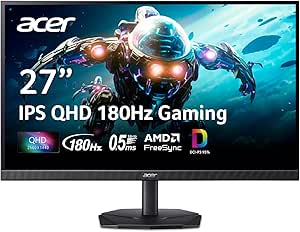 | Best Balanced QHD Performance | Resolution: 2560 x 1440 (QHD) | Refresh Rate: 180 Hz | Response Time: 0.5 ms GTG | VIEW LATEST PRICE | See Our Full Breakdown |
| Dell SE2726HG 27-Inch FHD 240Hz Gaming Monitor |  | Best for Pure Speed | Resolution: 1920 x 1080 (FHD) | Refresh Rate: 240 Hz | Panel Type: IPS | VIEW LATEST PRICE | See Our Full Breakdown |
| LG 27-inch UltraGear QHD OLED Gaming Monitor (27GX704A-B) |  | Best Premium OLED Experience | Resolution: QHD (2560 x 1440) | Panel Type: OLED | Refresh Rate: 240 Hz | VIEW LATEST PRICE | See Our Full Breakdown |
| 27-inch gaming monitor | Resolution | Refresh Rate | Response Time | Panel Type |
|---|---|---|---|---|
| Acer KB272 G0bi 27-Inch Full H | 1920 x 1080 (Full HD) | Up to 120Hz | 1ms VRB | IPS LCD |
| Samsung 27-Inch Odyssey OLED G | 2560 x 1440 (QHD) | 180 Hz | 0.03 ms (GTG) | — |
| ASUS TUF Gaming VG27AQ3A 27-In | 2560 x 1440 (QHD) | 180 Hz | 1 ms | Fast IPS |
| Sceptre 27-Inch Full HD Gaming | 1920 × 1080 (Full HD) | 180 Hz | 1 ms | LED |
| Samsung 27-Inch Odyssey G5 QHD | 2560 × 1440 (QHD) | 180 Hz | 1 ms (GtG) | IPS |
| LG UltraGear 27GS60QC-B 27-Inc | 2560 × 1440 (QHD) | Up to 180 Hz | 1 ms GtG | VA LCD |
| AOC Q27G41ZE 27-Inch QHD Gamin | 2560 × 1440 (QHD) | 240Hz native; up to 260Hz overclocked | 0.3ms MPRT | IPS |
| Samsung 27-Inch Odyssey G5 G51 | 2560 × 1440 (QHD) | 180Hz | 1ms (MPRT) | VA LCD |
| ASUS ROG Strix XG27ACMES 27-In | 2560 × 1440 (QHD) | 255Hz (overclocked) | 0.3ms minimum | — |
| Acer Nitro XV272U 27-Inch QHD | 2560 x 1440 (QHD) | Up to 240Hz via DisplayPort | Up to 0.5ms (G to G) | IPS |
| Samsung 27-Inch Odyssey G3 | 1920 x 1080 (FHD) | 180 Hz | 1 ms MPRT | LED |
| Sceptre E275W-FW100T 27-Inch F | 1920 x 1080 (Full HD) | 100 Hz | 1 ms | — |
| Acer Nitro KG271U 27-inch QHD | 2560 x 1440 (QHD) | 180 Hz | 0.5 ms GTG | IPS |
| Dell SE2726HG 27-Inch FHD 240H | 1920 x 1080 (FHD) | 240 Hz | 0.5 ms (advertised) | IPS |
| LG 27-inch UltraGear QHD OLED | QHD (2560 x 1440) | 240 Hz | 0.03 ms (GtG) | OLED |
More Details on Our Top Picks
Acer KB272 G0bi 27-Inch Full HD IPS Monitor, 120Hz
This monitor serves as the gateway option for gamers who prioritize high refresh rates over pixel density. While it lacks the sharpness of QHD panels like the ASUS TUF Gaming VG27AQ3A, the 120Hz refresh rate and IPS panel deliver smooth motion and consistent colors at a fraction of the cost. The matte finish reduces glare effectively, though the 250 nits brightness may feel dim in brightly lit rooms compared to brighter competitors. Connectivity is sparse, offering only HDMI and VGA, which limits its utility for modern GPU setups that prefer DisplayPort. I recommend this for those building their first rig or upgrading from a standard 60Hz office monitor, where the jump in fluidity matters more than resolution clarity.
Pros:- Affordable entry into high refresh rate gaming
- IPS panel provides wide viewing angles and decent color
- Includes basic ergonomic tilt adjustment
- FreeSync compatibility reduces tearing
Cons:- Full HD resolution looks pixelated at 27 inches
- Limited connectivity lacks DisplayPort
- Lower brightness makes HDR ineffective
Best for: Casual gamers and budget-conscious buyers upgrading from standard 60Hz displays who value smooth motion over sharp text.
Not ideal for: Competitive esports players or content creators who need QHD resolution and DisplayPort connectivity for better color accuracy.
- Screen Size:27 inches
- Resolution:1920 x 1080 (Full HD)
- Panel Type:IPS LCD
- Refresh Rate:Up to 120Hz
- Response Time:1ms VRB
- Connectivity:HDMI, VGA
- Color Gamut:99% sRGB
Our verdict“A solid starting point for smooth gameplay on a tight budget, provided you don’t mind the lower resolution.”
Samsung 27-Inch Odyssey OLED G5 QHD Gaming Monitor (G50SF)
The QD-OLED panel sets this monitor apart from the standard IPS options like the Samsung Odyssey G5 G50F by delivering infinite contrast and perfect blacks. With a 0.03ms response time, motion clarity is exceptional, far surpassing the 1ms specs of LCD competitors. However, the 280 cd/m² brightness is modest for HDR content, meaning highlights may not pop as intensely as on higher-nit panels. The inclusion of OLED Safeguard features addresses burn-in concerns, but the single HDMI port is a significant bottleneck for console gamers who also use PC. This is for enthusiasts who demand the best possible image quality and accept the connectivity trade-off.
Pros:- QD-OLED offers superior contrast and color
- 0.03ms response time eliminates motion blur
- Built-in burn-in protection features
- Glare Free matte coating reduces reflections
Cons:- Only one HDMI port limits device switching
- Peak brightness is lower than mini-LED alternatives
- Higher price point than standard LCDs
Best for: Enthusiasts who prioritize deep blacks, vibrant colors, and near-instant response times for immersive single-player gaming.
Not ideal for: Users who need multiple HDMI inputs for consoles or those who work in bright environments where higher brightness is required.
- Display Type:QD-OLED
- Resolution:2560 x 1440 (QHD)
- Refresh Rate:180 Hz
- Response Time:0.03 ms (GTG)
- Contrast Ratio:1,000,000:1
- HDR Support:HDR10
- Connectivity:1 HDMI, DisplayPort
Our verdict“The definitive choice for visual fidelity, assuming you can live with limited port selection.”
ASUS TUF Gaming VG27AQ3A 27-Inch QHD 180Hz Gaming Monitor
This model strikes a compelling balance between QHD sharpness and competitive speed. Unlike the Sceptre E275B-FW180T, which sacrifices resolution for price, the ASUS maintains 1440p clarity while delivering a 180Hz refresh rate. The ELMB Sync feature is a standout, allowing motion blur reduction to work simultaneously with variable refresh rates, a capability often missing in cheaper panels. While the 1000:1 contrast ratio is typical for IPS and lacks the depth of the Samsung Odyssey OLED G5, the 130% sRGB gamut ensures vibrant colors. It is the sensible middle ground for gamers who want future-proof resolution without the premium cost of OLED.
Pros:- ELMB Sync enhances motion clarity with VRR
- Wide 130% sRGB color gamut
- Built-in speakers offer basic audio convenience
- Strong adaptive sync compatibility (G-Sync/FreeSync)
Cons:- Standard IPS contrast ratio limits HDR impact
- HDR10 support is basic and lacks local dimming
- No USB hub for peripheral connectivity
Best for: Competitive gamers and general users who want high refresh rates and QHD resolution without paying for OLED technology.
Not ideal for: Users who prioritize deep blacks and HDR impact over motion clarity and wide viewing angles.
- Panel Type:Fast IPS
- Resolution:2560 x 1440 (QHD)
- Refresh Rate:180 Hz
- Response Time:1 ms
- Color Gamut:130% sRGB
- Special Features:ELMB Sync
- Connectivity:HDMI, DisplayPort, Audio Out
Our verdict“A well-rounded QHD monitor that excels in motion handling and color, making it a safe bet for most gamers.”
Sceptre 27-Inch Full HD Gaming Monitor, 180Hz (E275B-FW180T Series)
The Sceptre prioritizes raw speed and connectivity over pixel density. It offers a 180Hz refresh rate at a price point significantly lower than the Acer KB272 G0bi, which maxes out at 120Hz. The inclusion of two HDMI and two DisplayPort inputs is a major advantage for users juggling multiple devices, a feature the Acer lacks entirely. However, the Full HD resolution at 27 inches results in visible pixelation for text and detailed games, making it less ideal for mixed productivity work. The built-in speakers are basic, but the Blur Reduction feature helps sharpen motion. This is for budget-focused gamers who need high frames and multiple inputs above all else.
Pros:- Extremely affordable for 180Hz performance
- Four video inputs (2x HDMI, 2x DP) offer flexibility
- VESA mountable for custom setups
- Blur Reduction helps with motion clarity
Cons:- 1080p resolution is low for a 27-inch screen
- Built-in speakers are low quality
- Stand adjustability is limited compared to premium models
Best for: Budget gamers who need multiple video inputs and high refresh rates, and don’t mind lower resolution for cost savings.
Not ideal for: Users who do text-heavy work or want crisp image quality, as 1080p at 27 inches lacks sharpness.
- Resolution:1920 × 1080 (Full HD)
- Refresh Rate:180 Hz
- Response Time:1 ms
- Connectivity:2 HDMI, 2 DisplayPort, Audio Out
- Panel Type:LED
- Mounting:VESA Compatible
- Color Gamut:94% sRGB
Our verdict“The best option for pure value, delivering high refresh rates and versatile connectivity at a low cost.”
Samsung 27-Inch Odyssey G5 QHD Gaming Monitor (G50F)
This monitor differentiates itself from the ASUS TUF Gaming VG27AQ3A through its superior stand ergonomics, offering full height, tilt, swivel, and pivot adjustments. While both panels are QHD IPS, the Samsung provides a more comfortable long-term viewing experience without requiring a separate monitor arm. The 180Hz refresh rate matches the ASUS, but the Samsung’s Black Equalizer helps in dark game scenes, though the 1000:1 contrast ratio still limits true HDR depth compared to the Samsung Odyssey OLED G5. Connectivity is standard with HDMI and DisplayPort. I recommend this for users who value physical adjustability and a sleek design over specific motion-handling features like ELMB Sync.
Pros:- Fully adjustable stand (height, pivot, tilt, swivel)
- Black Equalizer improves visibility in dark scenes
- Virtual Aim Point aids in aiming precision
- Sleek, modern design fits well in setups
Cons:- Limited connectivity (only HDMI and DisplayPort)
- Standard IPS contrast ratio affects HDR performance
- No built-in speakers or USB hub
Best for: Gamers who prioritize ergonomic flexibility and a clean aesthetic, and want QHD resolution at a competitive price.
Not ideal for: Users who need advanced motion blur reduction features or superior HDR brightness for cinematic content.
- Resolution:2560 × 1440 (QHD)
- Panel Type:IPS
- Refresh Rate:180 Hz
- Response Time:1 ms (GtG)
- Stand Features:Height, Tilt, Swivel, Pivot
- Connectivity:DisplayPort, HDMI
- Brightness:300 cd/m²
Our verdict“A strong QHD contender that wins on ergonomics and design, ideal for those who want comfort without extra accessories.”
LG UltraGear 27GS60QC-B 27-Inch Curved QHD Gaming Monitor
This monitor stands out for its aggressive 1000R curvature, which wraps the display around your peripheral vision more tightly than the flat panels found on the Acer Nitro XV272U. The VA panel delivers a 3000:1 contrast ratio, meaning dark scenes in horror games appear deeper and more atmospheric than on the IPS alternatives. However, this immersion comes at the cost of ergonomics; unlike the Samsung Odyssey G5 G51F, the stand here only offers tilt, forcing you to buy a separate arm if you need height adjustment. It is a solid choice for players who prioritize visual wrap-around and contrast over flexible mounting options.Pros:- 1000R curvature provides superior immersion for single-player titles
- VA panel offers deeper blacks and higher contrast than IPS competitors
- 180Hz refresh rate keeps motion smooth in fast-paced shooters
Cons:- Stand lacks height adjustment and pivot capabilities
- VA panel may exhibit slight ghosting in very fast motion compared to IPS
Best for: Gamers who prefer immersive curved screens and high contrast for dark-themed games
Not ideal for: Users who need height or pivot adjustment without buying a third-party monitor arm
- Screen Size:27 inches
- Resolution:2560 × 1440 (QHD)
- Panel Type:VA LCD
- Refresh Rate:Up to 180 Hz
- Response Time:1 ms GtG
- Curvature:1000R
- Adaptive Sync:AMD FreeSync
Our verdict“Choose this for its immersive curve and contrast if you can mount it to an arm or don’t mind the limited stand.”
AOC Q27G41ZE 27-Inch QHD Gaming Monitor
The 240Hz native refresh rate (overclockable to 260Hz) makes this one of the fastest options in this grouping, surpassing the 180Hz limits of the LG UltraGear 27GS60QC-B. The IPS panel ensures consistent colors and wide viewing angles, avoiding the color shifting sometimes seen on VA panels. However, the glossy screen finish is a significant drawback compared to the matte finishes on the ASUS ROG Strix XG27ACMES and Acer Nitro XV272U, as it reflects more light in bright rooms. Like the LG, it also suffers from limited ergonomic adjustments, offering only tilt.Pros:- Native 240Hz refresh rate with overclocking to 260Hz
- IPS panel provides accurate colors and wide viewing angles
- 0.3ms MPRT response time reduces motion blur effectively
Cons:- Glossy finish causes significant reflections in bright environments
- Stand adjustment is limited to tilt only
- No built-in speakers or USB hub
Best for: Competitive gamers who need the highest possible refresh rate on a budget
Not ideal for: People gaming in sunlit rooms due to the reflective glossy coating
- Screen Size:27 inches
- Resolution:2560 × 1440 (QHD)
- Panel Type:IPS
- Refresh Rate:240Hz native; up to 260Hz overclocked
- Response Time:0.3ms MPRT
- Screen Finish:Glossy
- Adaptive Sync:Adaptive-Sync; NVIDIA G-SYNC compatible
Our verdict“This is the speed king for competitive play, but the glossy screen and basic stand limit its versatility.”
Samsung 27-Inch Odyssey G5 G51F QHD Gaming Monitor
While it shares the 180Hz refresh rate with the LG UltraGear 27GS60QC-B, this Samsung model wins decisively on ergonomics. The stand offers tilt, pivot, and height adjustment, allowing you to rotate the screen to portrait mode for coding or reading—a feature absent on both the AOC and LG picks. The VA panel delivers strong contrast, though it may not match the color accuracy of the Acer Nitro XV272U‘s IPS panel. It strikes a balance between performance and usability, making it a practical choice for mixed-use setups where the monitor doubles as a work screen.Pros:- Fully adjustable stand with height, tilt, and pivot
- VA panel provides strong contrast for dark game environments
- 180Hz refresh rate supports smooth gameplay
Cons:- Limited connectivity with only one HDMI and one DisplayPort
- No built-in speakers or USB hub
Best for: Users who need a flexible stand for work and play without extra accessories
Not ideal for: Color-critical professionals who require the wide color gamut of high-end IPS panels
- Screen Size:27 inches
- Resolution:2560 × 1440 (QHD)
- Panel Type:VA LCD
- Refresh Rate:180Hz
- Response Time:1ms (MPRT)
- Contrast Ratio:3000:1
- Stand Adjustments:Tilt, pivot, height
Our verdict“A versatile 180Hz VA monitor that prioritizes physical adjustability over extra connectivity features.”
ASUS ROG Strix XG27ACMES 27-Inch QHD 255Hz Fast IPS Gaming Monitor
This monitor distinguishes itself with USB-C with DisplayPort Alt Mode, a feature missing from the AOC Q27G41ZE and Acer Nitro XV272U. This single cable solution is ideal for laptop users who want to connect a device and charge it simultaneously. The Fast IPS panel achieves a 255Hz refresh rate, beating the native 240Hz of the AOC, while maintaining a matte finish that avoids the glare issues of the AOC. It also offers a longer 3-year warranty compared to the standard 1-year coverage on the LG. The tradeoff is the need to overclock to reach peak speed, which can introduce instability if not configured correctly.Pros:- USB-C with DisplayPort Alt Mode for single-cable laptop connections
- 255Hz overclocked refresh rate with Fast IPS technology
- Matte finish reduces glare compared to glossy alternatives
- Includes a 3-year manufacturer warranty
Cons:- Peak refresh rate requires overclocking via settings
- HDR performance is limited to VESA DisplayHDR 400
Best for: Laptop gamers and professionals who need USB-C connectivity and premium build quality
Not ideal for: Budget-conscious buyers who don’t need USB-C or advanced ergonomics
- Screen Size:27 inches
- Resolution:2560 × 1440 (QHD)
- Panel Technology:Fast IPS
- Refresh Rate:255Hz (overclocked)
- Response Time:0.3ms minimum
- Connectivity:USB-C with DisplayPort Alt Mode, HDMI, DisplayPort
- Warranty:3 years
Our verdict“The best choice for connectivity and build quality, especially if you use a laptop or value a long warranty.”
Acer Nitro XV272U 27-Inch QHD 240Hz IPS Gaming Monitor
The Acer Nitro XV272U offers the most complete package in this lineup. Unlike the Samsung Odyssey G5 G51F which lacks speakers, the Acer includes built-in 2W speakers, which, while basic, save desk space and cable clutter. Its stand offers height, tilt, swivel, and pivot adjustments, matching the Samsung’s flexibility and surpassing the tilt-only stands of the AOC and LG. The IPS panel delivers vibrant colors and wide viewing angles, though it lacks the deep blacks of the VA panels in the Samsung and LG. It hits 240Hz natively, providing a sweet spot between the 180Hz entry models and the overclocked extremes of the ASUS.Pros:- Fully adjustable stand with height, swivel, and pivot
- Built-in speakers reduce desk clutter
- 240Hz IPS panel balances speed and color accuracy
- Includes DisplayPort and HDMI cables in the box
Cons:- HDMI input is limited to 144Hz, requiring DisplayPort for 240Hz
- Built-in speakers are low quality and lack bass
Best for: Gamers who want a balanced feature set including good ergonomics and basic audio
Not ideal for: Audiophiles who require high-quality sound without external speakers
- Screen Size:27 inches
- Resolution:2560 x 1440 (QHD)
- Panel Type:IPS
- Refresh Rate:Up to 240Hz via DisplayPort
- Response Time:Up to 0.5ms (G to G)
- Stand Adjustments:Tilt, height, swivel, pivot
- Speakers:2 x 2W
Our verdict“A well-rounded monitor that combines high speed, excellent ergonomics, and convenience features like speakers.”
Samsung 27-Inch Odyssey G3 (G30D) FHD Gaming Monitor
This monitor occupies a strange but useful niche: it delivers 180 Hz refresh rates and a 1 ms MPRT at a 1080p resolution. While the glossy finish can be distracting in bright rooms, the ergonomic stand offers height, tilt, swivel, and pivot adjustments, which is rare for budget-oriented high-refresh panels. Compared to the Sceptre E275W-FW100T, which caps out at 100Hz, the Odyssey G3 provides significantly smoother motion for competitive shooters. However, the 1920×1080 resolution on a 27-inch screen means pixel density is low, making text and fine details appear softer than on QHD alternatives. It is a machine built for frame rates, not clarity.
Pros:- 180 Hz refresh rate and 1 ms MPRT provide fluid motion for fast-paced games.
- Full ergonomic stand with height, tilt, swivel, and pivot adjustments.
- Gaming-specific features like Black Equalizer and Virtual Aim Point enhance visibility.
- AMD FreeSync support effectively reduces screen tearing during variable frame rates.
Cons:- 1920×1080 resolution on a 27-inch screen results in low pixel density and blurry text.
- Glossy screen finish causes noticeable reflections in brightly lit environments.
- Contrast ratio of 3000:1 is decent for a TN/VA hybrid but lacks the punch of premium panels.
Best for: Competitive gamers on a budget who prioritize high frame rates over image sharpness and need robust stand adjustments.
Not ideal for: Users who work with text or detailed graphics daily, as the low pixel density on a 27-inch FHD panel results in blurry fonts and coarse details.
- Resolution:1920 x 1080 (FHD)
- Refresh Rate:180 Hz
- Response Time:1 ms MPRT
- Panel Type:LED
- Screen Finish:Glossy
- Stand Adjustments:Height, Tilt, Swivel, Pivot
- Connectivity:DisplayPort, HDMI
Our verdict“This is the go-to choice for budget-conscious competitive gamers who want high refresh rates and ergonomic flexibility without paying for QHD resolution.”
Sceptre E275W-FW100T 27-Inch Full HD 100Hz Gaming Monitor
The Sceptre E275W-FW100T serves as an accessible entry point into gaming monitors, balancing a 100 Hz refresh rate with 100% sRGB coverage. Unlike the Samsung Odyssey G3, which prioritizes raw speed with a glossy finish, this Sceptre model uses a matte screen that handles ambient light better, making it more suitable for mixed-use setups. The inclusion of built-in speakers and VESA mount compatibility adds convenience for users who want a tidy desk without extra peripherals. However, the 170-degree viewing angle is slightly narrower than industry standards, which may cause color shifts when viewing from extreme side angles. It is less about peak performance and more about providing a complete, no-fuss package for casual gamers.
Pros:- Matte screen finish reduces glare and reflections in typical room lighting.
- 100% sRGB color gamut ensures accurate colors for media and casual gaming.
- Built-in speakers and multiple video inputs reduce the need for external audio.
- VESA mount compatibility allows for easy integration into custom arm setups.
Cons:- 100 Hz refresh rate is insufficient for modern competitive gaming standards.
- Viewing angle of 170 degrees is narrower than the typical 178 degrees, affecting off-center viewing.
- Full HD resolution on a 27-inch panel lacks the sharpness of QHD alternatives.
Best for: Casual gamers and office users who need a versatile monitor with built-in audio and decent color accuracy for everyday tasks.
Not ideal for: Competitive FPS players who need refresh rates above 144Hz and deep blacks for immersive single-player experiences.
- Resolution:1920 x 1080 (Full HD)
- Refresh Rate:100 Hz
- Response Time:1 ms
- Color Gamut:100% sRGB
- Screen Finish:Matte
- Audio:Built-in speakers
- Mounting:VESA mountable
Our verdict“This monitor is a practical choice for casual users who value a matte finish and built-in speakers over high-end gaming specifications.”
Acer Nitro KG271U 27-inch QHD IPS Gaming Monitor
The Acer Nitro KG271U strikes a strong balance between gaming speed and visual fidelity, offering QHD resolution and a 180 Hz refresh rate. Its 95% DCI-P3 color coverage and HDR 10 support make it far superior for content creation and cinematic games compared to the Dell SE2726HG, which is limited to FHD and basic sRGB. The zero-frame bezel design also enhances immersion and multi-monitor setups. However, the 1000:1 contrast ratio means blacks will appear grayish in dark scenes, a noticeable drawback when compared to the OLED capabilities of the LG 27-inch UltraGear QHD OLED. It remains a solid all-rounder for those who need sharpness and speed without the premium price of OLED.
Pros:- QHD resolution provides significantly sharper images and more desktop real estate than FHD options.
- 180 Hz refresh rate and 0.5 ms response time ensure smooth motion for competitive play.
- 95% DCI-P3 color gamut offers vibrant colors suitable for creative work.
- Zero-frame bezel design maximizes screen area and aids in multi-monitor configurations.
Cons:- Brightness is limited to 250 nits, making HDR effects less impactful.
- Standard 1000:1 contrast ratio results in washed-out blacks compared to VA or OLED panels.
- Built-in speakers are basic and likely require external audio for a quality experience.
Best for: Gamers who play a mix of competitive titles and visually rich single-player games and need QHD sharpness with high refresh rates.
Not ideal for: Users who prioritize deep blacks and high HDR impact in dark rooms, as the standard IPS contrast ratio struggles in low-light environments.
- Resolution:2560 x 1440 (QHD)
- Refresh Rate:180 Hz
- Response Time:0.5 ms GTG
- Color Gamut:95% DCI-P3
- Panel Type:IPS
- HDR Support:HDR 10
- Connectivity:2x HDMI, DisplayPort
Our verdict“This monitor is ideal for users who want a sharp, colorful QHD experience with high refresh rates, accepting standard IPS contrast limitations.”
Dell SE2726HG 27-Inch FHD 240Hz Gaming Monitor
Designed strictly for velocity, the Dell SE2726HG boasts a 240 Hz refresh rate on a Fast IPS panel. This makes it faster than the Acer Nitro KG271U and the Samsung Odyssey G3, offering the fluid motion required for top-tier esports titles. The FreeSync Premium and HDMI VRR support ensure tear-free gameplay across various platforms. However, the trade-off is significant: it is locked to 1920×1080 resolution, meaning you lose the crispness found in QHD models. Additionally, the stand only offers tilt adjustment, lacking the height and swivel options found on the Samsung Odyssey G3. It is a specialized tool for players who sacrifice image detail for every possible frame per second.
Pros:- 240 Hz refresh rate provides ultra-smooth motion for competitive gaming.
- FreeSync Premium and HDMI VRR ensure compatibility and tear-free performance.
- IPS panel maintains wide viewing angles and consistent colors despite the high speed.
- TÜV Rheinland 3-star certification reduces eye strain during extended gaming sessions.
Cons:- FHD resolution on a 27-inch screen lacks the detail of QHD alternatives.
- Stand adjustment is limited to tilt only, offering no height or swivel options.
- 1,000:1 contrast ratio provides average black levels typical of standard IPS panels.
Best for: Esports athletes and competitive gamers who demand the highest possible refresh rates and prioritize motion clarity over resolution.
Not ideal for: Users who need ergonomic flexibility for long sessions or those who want a sharper image for single-player games and productivity.
- Resolution:1920 x 1080 (FHD)
- Refresh Rate:240 Hz
- Panel Type:IPS
- Response Time:0.5 ms (advertised)
- Color Gamut:99% sRGB
- Stand Adjustments:Tilt only
- Eye Comfort:TÜV Rheinland 3-star
Our verdict“This is the definitive choice for esports-focused gamers who prioritize 240Hz speed above all else and can accept FHD resolution and limited ergonomics.”
LG 27-inch UltraGear QHD OLED Gaming Monitor (27GX704A-B)
The LG 27-inch UltraGear QHD OLED represents the pinnacle of current gaming technology, combining QHD resolution with OLED panel advantages. Its 0.03 ms response time and 240 Hz refresh rate outperform every other monitor in this lineup, including the Acer Nitro KG271U, delivering motion clarity that feels instantaneous. The VESA DisplayHDR True Black 400 certification ensures perfect blacks and vibrant highlights, a stark contrast to the grayish blacks of standard IPS panels. However, the glossy finish reflects light aggressively, and OLED burn-in risks require careful usage habits. This is an investment piece for those who want the absolute best visual experience and have the hardware to drive it.
Pros:- OLED panel delivers perfect blacks and infinite contrast for immersive visuals.
- 0.03 ms response time and 240 Hz refresh rate provide unmatched motion clarity.
- Dual HDMI 2.1 ports support next-gen consoles and high-bandwidth PC connections.
- Fully adjustable stand offers height, tilt, swivel, and pivot for maximum comfort.
Cons:- Glossy screen finish causes significant reflections in bright environments.
- OLED panels require active pixel care settings to mitigate potential image retention.
- Achieving maximum refresh rates requires high-end graphics hardware and specific cables.
Best for: Enthusiasts with high-end GPUs who demand the best possible motion clarity, color accuracy, and HDR performance for gaming.
Not ideal for: Users in brightly lit rooms without control over ambient light, as the glossy OLED screen will suffer from severe reflections.
- Resolution:QHD (2560 x 1440)
- Panel Type:OLED
- Refresh Rate:240 Hz
- Response Time:0.03 ms (GtG)
- HDR Certification:VESA DisplayHDR True Black 400
- Color Gamut:98.5% DCI-P3
- Connectivity:2x HDMI 2.1, 1x DisplayPort 1.4
- Stand Adjustments:Height, Tilt, Swivel, Pivot
Our verdict“This monitor is the ultimate choice for enthusiasts who want the best motion performance and HDR impact, provided they can manage reflections and burn-in risks.”
How We Picked
I evaluated these monitors based on three core pillars: visual fidelity, motion performance, and value proposition. Visual fidelity assessed color accuracy, brightness levels, and contrast ratios, with a heavy weighting on panel technology differences between IPS, VA, and OLED. Motion performance focused on refresh rates and response time specifications, prioritizing models that minimize ghosting and black smearing during fast-paced gameplay. I also considered build quality and ergonomics, as a monitor is a daily-use device that affects comfort during long sessions.
Ranking logic prioritized overall gaming experience over raw spec sheets. A monitor with 240Hz but poor color accuracy ranks lower than a 165Hz model with superior panel calibration. I excluded products with significant user-reported reliability issues or poor warranty terms. This approach ensures the recommendations reflect real-world usability rather than just marketing numbers.
Factors to Consider When Choosing Best 27-inch Gaming Monitors
Selecting the right monitor involves more than picking the highest number on the box. Here are the critical factors to weigh before making your purchase.Panel Technology: OLED vs. IPS vs. VA
Understanding panel types is the single most important decision factor. OLED panels offer perfect blacks and infinite contrast, making them ideal for dark, atmospheric games and HDR content, but they come with a higher price tag and potential burn-in risks. IPS panels provide the best balance of color accuracy and viewing angles, making them the safe choice for mixed gaming and productivity. VA panels often have higher contrast than IPS but suffer from slower response times and ‘black smearing’ in dark scenes. If you play competitive shooters, IPS is usually preferred for its speed. If you play single-player narrative games, OLED or high-quality VA provides a more immersive visual experience.
Resolution and GPU Synergy
A 27-inch screen hits a sweet spot where QHD (2560×1440) resolution offers significantly sharper text and images than FHD without requiring the massive GPU power needed for 4K. However, you must ensure your graphics card can drive 1440p at your target refresh rate. If your GPU struggles to maintain 60 FPS in AAA titles at 1440p, an FHD (1080p) monitor might provide a smoother experience. Conversely, if you have a high-end GPU, settling for FHD on a 27-inch panel will result in visible pixelation and underutilized hardware. Match your monitor resolution to your system’s sustained performance capabilities, not just its peak theoretical output.
Refresh Rate and Adaptive Sync
While 144Hz is the current standard for gaming, going higher requires a strong GPU to take advantage of the extra frames. For most gamers, 144Hz to 165Hz provides the most noticeable improvement over 60Hz. Jumping to 240Hz or 360Hz is primarily beneficial for professional esports players who can consistently sustain those frame rates in competitive titles. You must also verify that the monitor supports Adaptive Sync (FreeSync for AMD or G-Sync for NVIDIA) to eliminate screen tearing. Without adaptive sync, high refresh rates can actually introduce visual artifacts if your frame rate fluctuates wildly.
Ergonomics and Connectivity
Many budget monitors compromise on stands, offering only tilt adjustment. If you spend hours at your desk, invest in a monitor with height adjustment, swivel, and pivot capabilities, or be prepared to buy a VESA mount. Connectivity matters too; ensure the monitor has the right ports for your setup. HDMI 2.1 is necessary for 4K120 on consoles, while DisplayPort 1.4 or 2.1 is often required for high-refresh-rate PC gaming. Check if the monitor includes a USB hub if you plan to connect peripherals directly to the screen, as this can declutter your desk significantly.
HDR Performance Realities
Not all HDR labels are created equal. Many mid-range monitors feature HDR400 certification, which is often little more than a marketing term for increased brightness without local dimming zones. For true HDR impact, look for monitors with mini-LED backlighting or OLED panels that can achieve high peak brightness and deep blacks simultaneously. If a monitor lacks local dimming, enabling HDR may actually wash out colors and make dark scenes look gray. Don’t pay a premium for HDR features on budget LCDs unless you are certain the implementation includes effective dimming zones.
Frequently Asked Questions
Is a 27-inch QHD monitor too demanding for my PC?
Whether 27-inch QHD is too demanding depends entirely on your graphics card. A mid-range GPU like an NVIDIA RTX 4060 or AMD RX 7600 can handle 1440p at medium-to-high settings in most modern titles, often hitting 60-90 FPS. If you have an older entry-level GPU, you might struggle with high settings at this resolution, making FHD a more viable option for consistent frame rates. However, upscaling technologies like DLSS or FSR help bridge the gap, allowing lower-end cards to render at lower resolutions and upscale to 1440p, maintaining image quality while boosting performance.
Should I worry about OLED burn-in on a gaming monitor?
Burn-in is a valid concern for OLED monitors, especially if you use them for productivity tasks with static elements like taskbars or HUDs left on for hours. Modern OLED panels include pixel shifting, logo dimming, and screen cleaning routines to mitigate this risk. For pure gaming use where images constantly change, the risk is low. However, if you plan to use the monitor for coding, spreadsheet work, or console gaming with static HUDs for extended periods, an IPS or Mini-LED monitor might be a safer long-term investment despite the inferior contrast ratio.
Do I need HDMI 2.1 for a PC gaming monitor?
For PC gaming, HDMI 2.1 is rarely necessary unless you are connecting a console or want to use a single cable for high-bandwidth audio and video. PC gamers typically rely on DisplayPort for high-refresh-rate gaming because it often supports higher bandwidths and features like G-Sync compatibility more reliably on the PC side. HDMI 2.1 becomes important if you plan to connect a PS5 or Xbox Series X to the same monitor. If you are strictly a PC user, prioritize a monitor with DisplayPort 1.4 or higher.
Is a curved monitor better than a flat one for 27 inches?
At 27 inches, the benefit of a curve is less pronounced than on ultra-wide screens. A 1000R curve can provide a more immersive feel and reduce eye strain by keeping the edges of the screen at a consistent distance from your eyes. However, curved monitors can introduce geometric distortion in strategy games or creative applications where straight lines matter. Flat monitors remain the standard for competitive gaming and productivity due to their neutral geometry. Choose curved for immersive single-player experiences and flat for versatility and precision.
How important is response time compared to refresh rate?
Response time and refresh rate work together to define motion clarity. A high refresh rate (like 240Hz) only helps if the pixels can change colors fast enough to match that speed. If a monitor has a 165Hz refresh rate but slow pixel response times (over 5ms gray-to-gray), you will see ghosting or motion blur. Look for monitors advertising 0.5ms to 1ms GtG response times. Fast IPS and OLED panels excel here, ensuring that the high refresh rate actually translates into crisp, clear motion rather than just a smoother but blurry image.
Conclusion
The landscape of best 27-inch gaming monitors offers distinct winners for every type of player. The ASUS ROG Strix XG27ACMES stands out as the Best Overall choice, balancing speed, color, and build quality for the majority of gamers. For those seeking the ultimate visual experience, the LG UltraGear QHD OLED is the Best Premium pick, delivering contrast levels that LCDs cannot touch. Budget-conscious buyers should turn to the Sceptre E275B-FW180T as the Best Value option, offering high refresh rates at an accessible price point. Beginners or those with limited GPU power will find the Acer KB272 G0bi a Best for Beginners friendly entry into 120Hz gaming without the complexity of high-resolution scaling. Ultimately, your choice should align with your GPU’s strength and your primary gaming genre.