
TL;DR
The supplied guide says GTA 6 safe codes can be found in the environment or obtained by threatening employees during robberies. It also describes four-digit safe entry, map details about targets, and a Focus Mode control; the information has not been independently confirmed in the material provided.
A guide to GTA 6 safe codes says players can find combinations in the environment or force employees to reveal them during robberies, offering two ways to open safes and collect their contents. The instructions also describe a four-digit entry and a Focus Mode control for searching nearby objects, but the supplied information does not establish whether these mechanics have been verified in a released version of the game.

Play games on Amazon Luna for your game nights, included with Prime
- A rotating selection of games, no download needed
- Play on TV, laptop or phone
- Fast, free delivery for your gear, too
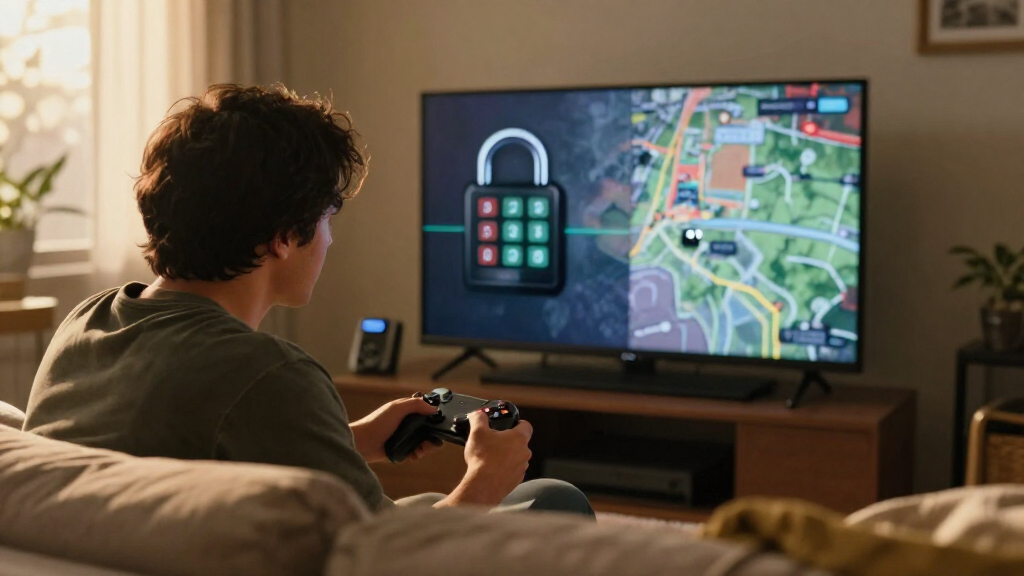
According to the guide, codes needed for main-story missions are provided to players, while safes encountered during exploration or robbery activities may require investigation. The guide identifies two approaches: look for a written code at the location, or threaten an employee and use an on-screen prompt to request the combination.
Possible hiding places include notes in back offices and papers carried by incapacitated guards. The guide says players can press L3 and R3 to activate Focus Mode and help search for clues. In one pictured example, a trailer safe’s code is concealed among pictures on a wall. The instructions do not specify whether these controls apply to every platform or can be changed.
For the second approach, players are told to aim a weapon at an employee and choose either “Threaten” or “Safe Code?” if the prompt appears. The guide says some robberies may also let players make cashiers empty a register. After obtaining a code, players enter its four digits at the safe. It advises searching the wider location for additional valuables rather than assuming the safe is the only source of loot.
How to find safe codes
The guide describes searching for clues or asking employees during robberies. These instructions have not been independently confirmed in the supplied material.
Two ways to get a code
The guide says story mission codes are provided, while other safes may require investigation.
- Look for notes in back offices
- Check papers carried by guards
- Inspect pictures and nearby objects
- Aim a weapon at an employee
- Choose “Threaten” or “Safe Code?” if prompted
- Enter the code’s four digits at the safe
Plan the target
Before a robbery, the guide recommends checking the map for a safe, security rating and approximate contents value.
Review the target details described in the guide.
Look around the location and try Focus Mode with L3 and R3 if those controls apply.
The safe may not be the only place with valuables.
What remains uncertain
The material does not identify a tested platform or game version.
Focus Mode
The guide names L3 and R3 but does not confirm every control scheme.
Prompts and clues
It is unclear whether employees always respond or every safe has a discoverable code.
Specific interactions
The parrot stash and other examples remain guide claims, not independently confirmed mechanics.
Planning a Faster Robbery
If these mechanics work as described, finding a combination quickly could reduce the time spent exposed during a robbery and help players collect more before leaving. The distinction between searching a location and threatening staff also gives players a choice about how to approach an activity, although the guide does not quantify the risks or rewards of either method.
The map information described in the guide could help players decide which locations to target. Selecting an establishment reportedly shows whether it has a safe, a broad security rating from low to high, and an approximate value for its contents. Those indicators could make it easier to compare potential targets, but they should be treated as guidance rather than a guarantee of a particular payout.
The advice also points to robberies as more than a safe-opening task: extra cash may be hidden elsewhere or obtained through interactions. One example cited is the Exotic Animals Front robbery in Key Lento, where speaking with a parrot in a yard is said to reveal another money stash. That example is a claim in the guide, not independent confirmation of a universal game mechanic.
Popular right now

De'Longhi Classic Signature Espresso Machine with Adjustable Milk Frother

De'Longhi Rivelia Automatic Espresso Machine with Milk Frother

Apple AirPods Pro (2nd Generation) Wireless Earbuds with USB-C MagSafe Charging Case
As an affiliate, we earn on qualifying purchases.
Codes, Clues and Target Selection
The guide separates story mission safes from safes encountered while exploring or taking part in robberies. It says mission-specific combinations are supplied, while other situations may call for searching the premises or questioning someone. This distinction means players may not need to use the same method in every activity.
It also recommends checking a target on the map before starting a robbery, looking for information about whether a safe is present, the security level and the approximate value of goods. The advice to take a mask is presented as a way to remain anonymous during crimes. The provided material does not explain how anonymity is tracked, what consequences follow from being identified, or whether masking changes the outcome of a robbery.
““Threaten” or “Safe Code?””
— The guide
How Confirmed Are These Mechanics?
The material provided describes gameplay instructions but does not establish their verification status, the version or platform on which they were tested, or whether they reflect final game behavior. It is also unclear whether every safe has a discoverable code, whether employees always respond to threats, and whether the stated Focus Mode controls are consistent across control schemes.
The guide gives no exact values for safe contents, security levels or the time available during a robbery. It also does not say how often codes appear in notes, what happens if players enter an incorrect combination, or whether the parrot interaction is available in all playthroughs. These details should not be treated as confirmed beyond the claims described in the guide.
Check Details Against Gameplay
Players looking to use the advice should first check whether the map lists a safe and review the target’s security and estimated value. During the activity, they can search nearby rooms and objects for written clues, try Focus Mode if the stated controls apply, and watch for employee interaction prompts. Once a code is found, the guide says to enter its four digits at the safe and continue checking the area for other loot.
Further confirmation would require gameplay footage or testing that establishes the relevant platform, game version and conditions. Until those details are available, the code-finding methods and specific robbery examples remain guide claims rather than independently verified instructions.
Key Questions
How does the guide say to get a safe code in GTA 6?
It describes two methods: searching the location for a written clue or threatening an employee and using an on-screen prompt to request the code. It says main-story mission codes are provided to players.
Where might a safe code be hidden?
The guide gives examples including a note in a back office, a paper carried by a guard, or a clue hidden among pictures on a wall. It recommends searching the premises rather than checking only the safe itself.
What controls activate Focus Mode?
The instructions say to press L3 and R3. The provided information does not confirm whether that combination applies to every platform or control setup.
Can players find more than money in a safe?
The guide focuses on cash and other valuables but does not list the possible contents of individual safes. It also says extra loot may be found elsewhere during robberies.
Are these GTA 6 safe-code instructions confirmed?
The supplied material does not identify a tested platform or game version, so the described mechanics and examples are not independently confirmed here.
Source: Google Trends