The best gaming systems depend on where and how you want to play: my best overall pick is the PlayStation 5 Slim for its straightforward living-room experience and broad appeal. For a more flexible PC setup, the CyberPowerPC Gamer Master brings a newer processor and RTX 5060 Ti graphics, while the Nintendo Switch 2 is a standout for portable and shared play. The main tradeoff is between plug-and-play simplicity, PC flexibility, and specialized formats such as handheld, VR, or motion-controlled gaming. Storage, game compatibility, and the need for a display or other accessories can also change which system makes sense. Read on for the full breakdown of all 14 options and the buyer each one suits best.

Play games on Amazon Luna for your game nights, included with Prime
- A rotating selection of games, no download needed
- Play on TV, laptop or phone
- Fast, free delivery for your gear, too
Complete the kit



Key Takeaways
- The PS5 Slim is the clearest all-around console choice for buyers who want familiar living-room gaming without choosing PC components or a specialized format.
- The CyberPowerPC Gamer Master and KOTIN desktop pair an AMD Ryzen 7 8700F with RTX 5060 Ti graphics, while the Alienware Aurora moves up to RTX 5070 graphics for buyers prioritizing a higher-performance desktop.
- The Xbox Series S is the compact, digital-first option, but its 512GB SSD gives buyers less room for a large installed game library than the 1TB Xbox Series X special edition.
- Meta Quest 3 and Quest 3S serve different VR priorities: the Quest 3 has 512GB of storage, while the Quest 3S has 128GB and comes with GOLF+.
- Portability and family play are distinct strengths in this group: the Switch and Switch 2 suit handheld or shared play, the ROG Xbox Ally is a Windows handheld, and Nex Playground focuses on active family games.
| ZYNEEX Prebuilt Gaming Desktop PC – AMD Ryzen 5 5500, RTX 3050 6GB, 16GB DDR4, 1TB NVMe SSD, Wi-Fi, Black |  | Best Entry-Level Gaming Desktop | Processor: AMD Ryzen 5 5500, 6-core, 12-thread, up to 4.2GHz | Graphics: NVIDIA GeForce RTX 3050 6GB GDDR6 | Memory: 16GB DDR4 3200MHz, expandable to 64GB | VIEW LATEST PRICE | See Our Full Breakdown |
| Meta Quest 3S 128GB VR Headset with GOLF+ |  | Best Standalone VR System | Processor: Snapdragon XR2 Gen 2 | Memory: 8GB RAM | Storage: 128GB | VIEW LATEST PRICE | See Our Full Breakdown |
| Xbox Series S Digital Gaming Console, 512GB SSD |  | Best Compact Console | Storage: 512GB custom NVMe SSD | Processing power: 4 teraflops | Maximum frame rate: Up to 120 FPS with supported content and display | VIEW LATEST PRICE | See Our Full Breakdown |
| ASUS ROG Xbox Ally 7-Inch 1080p 120Hz Gaming Handheld, AMD Ryzen Z2 A, 16GB RAM, 512GB SSD, White |  | Best for Portable PC Gaming | Processor: AMD Ryzen Z2 A | Operating system: Windows 11 | Display: 7-inch 1080p touchscreen | VIEW LATEST PRICE | See Our Full Breakdown |
| Nintendo Switch Console with Neon Blue and Neon Red Joy-Con | 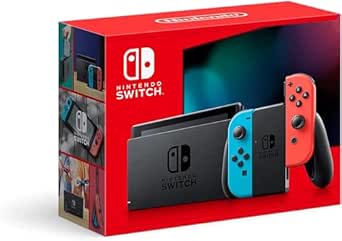 | Best for Flexible Family Play | Screen: 6.2-inch LCD | Play modes: TV, tabletop, and handheld | Storage: 32GB | VIEW LATEST PRICE | See Our Full Breakdown |
| PlayStation 5 Slim Console, 1TB | 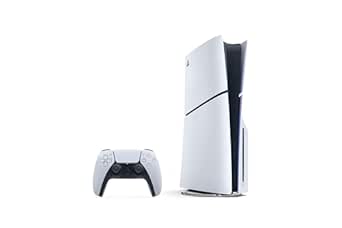 | Best Disc-Based Console | Model: PlayStation 5 Slim, CFI-2100 | Storage: 1TB SSD | Disc drive: Included | VIEW LATEST PRICE | See Our Full Breakdown |
| CyberPowerPC Gamer Master Gaming Desktop, AMD Ryzen 7 8700F, GeForce RTX 5060 Ti 8GB, 16GB DDR5, 1TB SSD, Windows 11 Home |  | Best All-Round Gaming Desktop | Processor: AMD Ryzen 7 8700F, 8 cores, 4.1 GHz | Graphics: NVIDIA GeForce RTX 5060 Ti, 8GB | Memory: 16GB DDR5, 4800 MHz; maximum supported 192GB | VIEW LATEST PRICE | See Our Full Breakdown |
| Byte Depot Gamer Xtreme Gaming Desktop, Intel Core i7, 32GB RAM, 1TB SSD, GeForce RTX 3050, Wi-Fi 6, Windows 11 Pro |  | Best for Memory-Heavy Multitasking | Processor: Intel Core i7 quad-core, 3.4GHz base, up to 3.9GHz Turbo Boost | Graphics: NVIDIA GeForce RTX 3050 with GDDR6 memory | Memory: 32GB | VIEW LATEST PRICE | See Our Full Breakdown |
| KOTIN Gaming Desktop PC with Ryzen 7 8700F and GeForce RTX 5060 Ti |  | Best for Future Upgrades | Processor: AMD Ryzen 7 8700F, 8 cores, 4.1 GHz base, up to 5 GHz | Graphics: GeForce RTX 5060 Ti, 8GB GDDR7 | Memory: 16GB DDR5; 4 DIMM slots | VIEW LATEST PRICE | See Our Full Breakdown |
| Nex Playground Active Play System for Kids and Families | 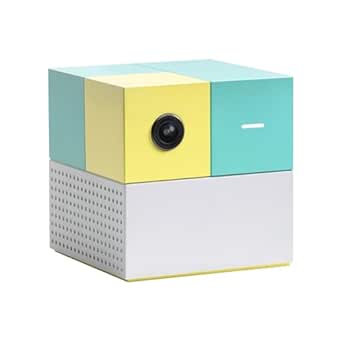 | Best for Family Motion-Controlled Play | Included games: Fruit Ninja, Starri, Whac-a-Mole, Go Keeper, Party Fowl | Players: Up to 4 | Controls: Built-in wide-angle motion-tracking camera; no controller required | VIEW LATEST PRICE | See Our Full Breakdown |
| Meta Quest 3 512GB VR Headset – Golf+ Included |  | Best Standalone VR System | Platform: Standalone | Processor: Snapdragon XR2 Gen 2 | Memory: 8GB RAM | VIEW LATEST PRICE | See Our Full Breakdown |
| Xbox Series X25 Special Edition Gaming Console, 1TB SSD |  | Best Collector Edition Console | Platform: Xbox Series X | Storage: 1TB SSD | Resolution: Up to 4K | VIEW LATEST PRICE | See Our Full Breakdown |
| Nintendo Switch 2 System |  | Best for Flexible Play | Display: 7.9-inch 1080p LCD touchscreen with HDR | Display frame-rate support: Up to 120 fps | TV output: Up to 4K; maximum 60 fps at 4K | VIEW LATEST PRICE | See Our Full Breakdown |
| Alienware Aurora Gaming Desktop with Intel Core Ultra 7 265KF and NVIDIA GeForce RTX 5070 |  | Best Premium Gaming Desktop | Processor: Intel Core Ultra 7 265KF | Graphics card: NVIDIA GeForce RTX 5070 | Graphics memory: 12GB GDDR7 | VIEW LATEST PRICE | See Our Full Breakdown |
| gaming system | Storage | Processor | Memory | Connectivity |
|---|---|---|---|---|
| ZYNEEX Prebuilt Gaming Desktop | 1TB NVMe SSD | AMD Ryzen 5 5500, 6-core, 12-thread, up to 4.2GHz | 16GB DDR4 3200MHz, expandable to 64GB | Wi-Fi, Bluetooth, USB, HDMI, DisplayPort, and DVI |
| Meta Quest 3S 128GB VR Headset | 128GB | Snapdragon XR2 Gen 2 | 8GB RAM | Standalone wireless |
| Xbox Series S Digital Gaming C | 512GB custom NVMe SSD | — | — | — |
| ASUS ROG Xbox Ally 7-Inch 1080 | 512GB SSD | AMD Ryzen Z2 A | 16GB LPDDR5 6400MHz | — |
| Nintendo Switch Console with N | 32GB | — | — | HDMI and Wi-Fi |
| PlayStation 5 Slim Console | 1TB SSD | — | — | Wi-Fi, Bluetooth 5.1, HDMI, USB, Ethernet |
| CyberPowerPC Gamer Master Gami | 1TB PCIe 4.0 NVMe SSD | AMD Ryzen 7 8700F, 8 cores, 4.1 GHz | 16GB DDR5, 4800 MHz; maximum supported 192GB | Wi-Fi 6, Bluetooth 5.3, Ethernet |
| Byte Depot Gamer Xtreme Gaming | 1TB SSD; listing describes it as both SATA and M.2 NVMe | Intel Core i7 quad-core, 3.4GHz base, up to 3.9GHz Turbo Boost | 32GB | Wi-Fi 6, Bluetooth 5.2, Gigabit LAN |
| KOTIN Gaming Desktop PC with R | 1TB PCIe Gen4 NVMe SSD; 3 M.2 SSD slots | AMD Ryzen 7 8700F, 8 cores, 4.1 GHz base, up to 5 GHz | 16GB DDR5; 4 DIMM slots | — |
| Nex Playground Active Play Sys | 64GB | — | — | — |
| Meta Quest 3 512GB VR Headset | 512GB | Snapdragon XR2 Gen 2 | 8GB RAM | — |
| Xbox Series X25 Special Editio | 1TB SSD | — | — | — |
| Nintendo Switch 2 System | 256GB internal; expandable with microSD Express cards | — | — | Wi-Fi |
| Alienware Aurora Gaming Deskto | 2TB SSD | Intel Core Ultra 7 265KF | 32GB DDR5 RAM | Bluetooth, Wi-Fi 802.11ax, and Ethernet |
More Details on Our Top Picks
ZYNEEX Prebuilt Gaming Desktop PC – AMD Ryzen 5 5500, RTX 3050 6GB, 16GB DDR4, 1TB NVMe SSD, Wi-Fi, Black
The ZYNEEX S5 makes sense for players who want a ready-to-play Windows desktop for 1080p gaming without assembling parts. Its Ryzen 5 5500 and RTX 3050 are a more modest pairing than the CyberPowerPC Gamer Master with an RTX 5060 Ti, so demanding newer games may call for lower graphics settings. The payoff is a simpler fit for lighter games, esports, and everyday use, backed by 16GB of RAM and a 1TB NVMe SSD for responsive loading and room for a useful game library. Built-in Wi-Fi and Bluetooth also reduce setup friction. The tradeoff is limited headroom for high-resolution gaming, and the ARGB air cooling may be more audible under sustained load than a quieter cooling setup.
Pros:- Ryzen 5 5500 and RTX 3050 provide a suitable foundation for 1080p gaming.
- 1TB NVMe SSD offers fast loading and useful storage capacity.
- 16GB DDR4 supports gaming alongside routine multitasking.
- Preinstalled Windows 11 Home, Wi-Fi, and Bluetooth simplify setup.
Cons:- RTX 3050 may require reduced settings in demanding newer games.
- Less graphics performance and upgrade headroom than the RTX 5060 Ti desktops.
- Air cooling can become audible during heavy workloads.
Best for: First-time PC gamers focused on 1080p play, esports, and everyday desktop tasks who want Windows and Wi-Fi ready out of the box.
Not ideal for: Players targeting demanding AAA games at high settings or higher resolutions; the RTX 3050 is less capable than the RTX 5060 Ti systems in this roundup.
- Processor:AMD Ryzen 5 5500, 6-core, 12-thread, up to 4.2GHz
- Graphics:NVIDIA GeForce RTX 3050 6GB GDDR6
- Memory:16GB DDR4 3200MHz, expandable to 64GB
- Storage:1TB NVMe SSD
- Operating system:Windows 11 Home
- Connectivity:Wi-Fi, Bluetooth, USB, HDMI, DisplayPort, and DVI
- Cooling and form factor:ARGB air cooling; black tower
Our verdict“Choose the ZYNEEX S5 for an approachable 1080p gaming desktop, but step up to an RTX 5060 Ti system for more demanding games.”
Meta Quest 3S 128GB VR Headset with GOLF+
The Meta Quest 3S is the pick for players who want gaming to feel immersive and untethered, rather than centered on a TV or desk. Its standalone design needs no gaming PC or external sensors, while the Snapdragon XR2 Gen 2 chip and full-color passthrough support both virtual reality and mixed-reality play. The included GOLF+ gives the headset an immediate game to try, a different kind of entry point from the conventional Xbox Series S. That freedom comes with limits: the 128GB capacity leaves less room for a large VR library than the 512GB Meta Quest 3, and roughly 2.5 hours of battery life can interrupt longer sessions. Its 60Hz LCD display is also less fluid than higher-refresh gaming screens.
Pros:- Standalone wireless play does not require a PC or external tracking sensors.
- Full-color passthrough supports mixed-reality experiences.
- Snapdragon XR2 Gen 2 processor and 8GB RAM power headset games.
- GOLF+ is included for immediate play.
Cons:- Approximately 2.5 hours of battery life limits extended sessions.
- 128GB storage offers less room for games than the 512GB Meta Quest 3.
- 60Hz LCD display is less fluid than higher-refresh gaming displays.
Best for: VR-curious players who want a standalone headset for room-scale games, mixed-reality experiences, and the included GOLF+ game.
Not ideal for: Players who prefer long uninterrupted sessions, need a large installed VR library, or want the higher storage capacity of the Meta Quest 3.
- Processor:Snapdragon XR2 Gen 2
- Memory:8GB RAM
- Storage:128GB
- Display:LCD, 1832 x 1920 per eye, 60Hz
- Field of view:110 degrees
- Connectivity:Standalone wireless
- Battery life:Approximately 2.5 hours
- Weight:515g
- Included game:GOLF+
Our verdict“Pick the Quest 3S for accessible standalone VR and mixed reality, but choose the 512GB Quest 3 if storage capacity matters more.”
Xbox Series S Digital Gaming Console, 512GB SSD
The Xbox Series S suits players who want a small, straightforward console for digital gaming and fast switches between titles. Quick Resume can return you to several games without starting each from scratch, and backward compatibility covers digital games from four Xbox generations. Compared with the Xbox Series X special edition, the Series S gives up a disc drive and has a smaller 512GB SSD, making it a better fit for a compact setup than for collectors with physical libraries. Its advertised support for up to 120 FPS applies only to compatible games and displays, not every title. Games are digital purchases, so buyers should be comfortable relying on downloads and available storage. The included controller and cables make the core setup simple.
Pros:- Compact console design fits easily into smaller setups.
- Quick Resume makes switching among supported games convenient.
- Backward compatibility includes digital games from four Xbox generations.
- Includes a wireless controller, HDMI cable, and power cable.
Cons:- No disc drive; games must be accessed digitally.
- 512GB SSD can restrict how many large games are installed at once.
- 120 FPS depends on supported games and a compatible display.
Best for: Digital-first players with limited entertainment-center space who want Quick Resume and access to compatible games from older Xbox generations.
Not ideal for: Players with physical disc collections or large game libraries who want a disc drive and more built-in storage, as offered by the Xbox Series X.
- Storage:512GB custom NVMe SSD
- Processing power:4 teraflops
- Maximum frame rate:Up to 120 FPS with supported content and display
- Disc drive:None; digital games only
- Game compatibility:Digital Xbox Series X|S, Xbox One, Xbox 360, and Original Xbox games
- Audio and video:Dolby Vision, Dolby Atmos, and 3D Spatial Sound support
- Included accessories:Xbox Wireless Controller, high-speed HDMI cable, power cable, and two AA batteries
Our verdict“Choose the Series S for compact, digital Xbox gaming, but opt for the Series X if you need discs or more storage.”
ASUS ROG Xbox Ally 7-Inch 1080p 120Hz Gaming Handheld, AMD Ryzen Z2 A, 16GB RAM, 512GB SSD, White
The ASUS ROG Xbox Ally is for players who want a handheld PC library rather than a console tied to one storefront. Windows 11 opens access to games from Xbox, Steam, Epic, and other PC platforms, while the 7-inch 1080p, 120Hz FreeSync display is built for responsive play on the move. That flexibility sets it apart from the simpler Xbox Series S, but it also brings a more PC-like setup and game-management experience. At 1.47 pounds, it is portable, though it is heavier than a small dedicated console, and the 60Wh battery still has to power a Windows gaming device. The 512GB SSD can fill quickly with large games, so players with broad libraries may need to manage installations more often.
Pros:- Windows 11 supports games from Xbox, Steam, Epic, and other PC platforms.
- 1080p touchscreen with 120Hz refresh and FreeSync Premium.
- 16GB LPDDR5 memory supports handheld PC gaming.
- Dual USB-C ports and a 60Wh battery support portable and connected play.
Cons:- 512GB SSD may require frequent game-library management.
- Windows gaming setup is less console-simple than the Xbox Series S.
- At 1.47 pounds, it is a substantial device to hold during long sessions.
Best for: PC gamers who want to play across Xbox, Steam, and Epic libraries on a handheld with a high-refresh screen.
Not ideal for: Players who want a simple fixed-console setup or plan to keep many large games installed; the 512GB SSD may feel limiting.
- Processor:AMD Ryzen Z2 A
- Operating system:Windows 11
- Display:7-inch 1080p touchscreen
- Refresh rate:120Hz with FreeSync Premium
- Memory:16GB LPDDR5 6400MHz
- Storage:512GB SSD
- Battery:60Wh
- Ports and weight:Dual USB-C; 1.47 lbs
Our verdict“Choose the ROG Xbox Ally for portable access to multiple PC game stores, but pick the Series S for a simpler living-room console.”
Nintendo Switch Console with Neon Blue and Neon Red Joy-Con
The Nintendo Switch is the most adaptable choice here for households that want one system for TV, tabletop, and handheld play. Its detachable Joy-Con controllers make local multiplayer easier to start than on the Xbox Series S, which is designed for a TV setup and sold as an all-digital console. The Switch’s appeal depends more on its hybrid format and Nintendo game library than on high-end display specifications: the built-in screen is a 6.2-inch LCD, and storage is just 32GB. That limited capacity can mean managing downloads or adding storage, while the listed 4K compatibility should not be mistaken for a 4K handheld screen. Players after Nintendo’s latest system should also compare it with the Switch 2, rather than choosing this model by portability alone.
Pros:- Supports TV, tabletop, and handheld play in one system.
- Detachable Joy-Con controllers support local multiplayer.
- Portable form factor works for play away from the TV.
- Wi-Fi supports online and local wireless multiplayer.
Cons:- 32GB built-in storage is limited for downloaded games.
- The 6.2-inch LCD screen is less advanced than newer system displays.
- The listed 4K compatibility does not make the handheld screen a 4K display.
Best for: Families and friends who want to move between TV and handheld play and start local multiplayer with detachable controllers.
Not ideal for: Players seeking a high-resolution display, substantial built-in storage, or the newer features of the Nintendo Switch 2.
- Screen:6.2-inch LCD
- Play modes:TV, tabletop, and handheld
- Storage:32GB
- Connectivity:HDMI and Wi-Fi
- Resolution compatibility:Listed as 4K compatible
- Controllers:Detachable neon blue and neon red Joy-Con
- Weight:3.2 pounds
Our verdict“Choose this Switch for flexible family play and detachable local multiplayer, but consider the Switch 2 if you want Nintendo’s newer system.”
PlayStation 5 Slim Console, 1TB
The PlayStation 5 Slim is the strongest fit here for players who want a straightforward living-room system with both digital downloads and compatible game discs. Its 1TB SSD and fast loading make it easy to keep a library ready, while 4K support, ray tracing, haptic feedback, and adaptive triggers add console-specific polish. Compared with the Windows desktops in this roundup, it asks less of buyers on setup and hardware choices, but it offers less flexibility for upgrades and PC games. The included disc drive is useful for physical collections, though the console needs an internet connection to pair that drive during setup. I would also account for the separately sold vertical stand and the stated shift to digital-only releases for newly released games from January 2028.
Pros:- 1TB SSD provides space for installed games and supports fast loading.
- Included disc drive plays compatible game discs.
- Supports 4K gaming, ray tracing, haptic feedback, and adaptive triggers.
- Wireless controller and horizontal stand feet are included.
Cons:- Vertical stand is sold separately.
- Internet connection is required to pair the disc drive and console during setup.
- Newly released PlayStation games from January 2028 will be available digitally only.
Best for: Living-room players who want a 4K-capable console, physical game discs, and an included wireless controller without choosing PC components.
Not ideal for: PC players who want upgradeable hardware or access to Windows game storefronts, and collectors focused on newly released physical PlayStation games after January 2028.
- Model:PlayStation 5 Slim, CFI-2100
- Storage:1TB SSD
- Disc drive:Included
- Resolution:4K
- Controller:Wireless controller included
- Connectivity:Wi-Fi, Bluetooth 5.1, HDMI, USB, Ethernet
- Audio:3D Audio via built-in TV speakers or analog/USB stereo headphones
- Included accessories:2 horizontal stand feet, HDMI cable, AC power cord, USB cable
Our verdict“Choose the PS5 Slim if you want a disc-capable living-room console with modern gaming features, rather than a desktop you can upgrade.”
CyberPowerPC Gamer Master Gaming Desktop, AMD Ryzen 7 8700F, GeForce RTX 5060 Ti 8GB, 16GB DDR5, 1TB SSD, Windows 11 Home
This CyberPowerPC earns its place as a versatile desktop pick by pairing an 8-core Ryzen 7 8700F with an RTX 5060 Ti 8GB, giving buyers a stronger graphics-focused starting point than the Byte Depot system with its RTX 3050. The 1TB PCIe 4.0 NVMe SSD keeps game loading brisk, and the included keyboard and mouse make the package easier to put into service. Wi-Fi 6 and Bluetooth 5.3 cover common wireless needs, while the glass side panel and RGB lighting suit buyers who want a visible gaming-tower look. Its main compromise is 16GB of DDR5 memory: enough for a capable starting configuration, but less roomy for heavy multitasking than the Byte Depot’s 32GB. The listing also limits display connections to one HDMI and two DisplayPort outputs.
Pros:- Ryzen 7 8700F and RTX 5060 Ti 8GB provide a strong gaming-focused hardware pairing.
- 1TB PCIe 4.0 NVMe SSD offers fast storage for games and applications.
- Wi-Fi 6 and Bluetooth 5.3 are built in.
- Keyboard and mouse are included, along with RGB lighting and a tempered-glass side panel.
Cons:- 16GB of DDR5 memory may constrain demanding multitasking compared with the Byte Depot’s 32GB configuration.
- Display outputs are limited to one HDMI and two DisplayPort connections.
Best for: PC gamers seeking a ready-to-use Windows tower with a current dedicated graphics card, fast storage, and included basic peripherals.
Not ideal for: Buyers who regularly run memory-heavy workloads, need several HDMI displays, or want a console-style setup with minimal desktop footprint.
- Processor:AMD Ryzen 7 8700F, 8 cores, 4.1 GHz
- Graphics:NVIDIA GeForce RTX 5060 Ti, 8GB
- Memory:16GB DDR5, 4800 MHz; maximum supported 192GB
- Storage:1TB PCIe 4.0 NVMe SSD
- Operating system:Windows 11 Home
- Connectivity:Wi-Fi 6, Bluetooth 5.3, Ethernet
- Video outputs:1 HDMI, 2 DisplayPort
- Included accessories:Keyboard, mouse, power cord
Our verdict“Pick this CyberPowerPC for a well-equipped Windows gaming desktop, provided 16GB of memory and its display-output mix suit your setup.”
Byte Depot Gamer Xtreme Gaming Desktop, Intel Core i7, 32GB RAM, 1TB SSD, GeForce RTX 3050, Wi-Fi 6, Windows 11 Pro
The Byte Depot stands apart from the CyberPowerPC and KOTIN desktops by supplying 32GB of memory out of the box, which can suit players who keep many apps open or combine gaming with everyday work. That advantage comes with a clear graphics compromise: its RTX 3050 is a lower-tier gaming option than the RTX 5060 Ti in those two systems, so buyers prioritizing graphics headroom should look there instead. Windows 11 Pro, Wi-Fi 6, Bluetooth 5.2, and a keyboard and mouse round out a usable desktop package. I would pause over the storage listing, which describes the 1TB SSD as both SATA and M.2 NVMe; that ambiguity makes it harder to know what storage performance and interface to expect. Its quad-core Core i7 and single HDMI/DisplayPort pair also make this a less balanced gaming choice.
Pros:- 32GB of memory provides more multitasking capacity than the 16GB CyberPowerPC and KOTIN configurations.
- RTX 3050 supports ray tracing and DLSS in compatible games and applications.
- Includes Wi-Fi 6, Bluetooth 5.2, and Gigabit LAN.
- Windows 11 Pro and gaming keyboard and mouse are included.
Cons:- RTX 3050 is a less capable graphics option than the RTX 5060 Ti in the CyberPowerPC and KOTIN desktops.
- The 1TB SSD is described inconsistently as SATA and M.2 NVMe.
- Quad-core processor and one HDMI plus one DisplayPort limit the appeal for more demanding gaming and multi-display setups.
Best for: Players who multitask heavily and want 32GB of memory, Windows 11 Pro, and included keyboard and mouse in a preassembled tower.
Not ideal for: Gamers prioritizing graphics performance or buyers who need clearly specified SSD interface and multiple display connections.
- Processor:Intel Core i7 quad-core, 3.4GHz base, up to 3.9GHz Turbo Boost
- Graphics:NVIDIA GeForce RTX 3050 with GDDR6 memory
- Memory:32GB
- Storage:1TB SSD; listing describes it as both SATA and M.2 NVMe
- Operating system:Windows 11 Pro
- Connectivity:Wi-Fi 6, Bluetooth 5.2, Gigabit LAN
- Video outputs:1 HDMI, 1 DisplayPort
- Included accessories:Gaming keyboard and mouse
Our verdict“Choose the Byte Depot if 32GB of memory matters more to you than the stronger graphics hardware offered by the CyberPowerPC and KOTIN.”
KOTIN Gaming Desktop PC with Ryzen 7 8700F and GeForce RTX 5060 Ti
The KOTIN combines the same key processor and graphics class as the CyberPowerPC with a more explicit path for later expansion. Its four DDR5 DIMM slots and three M.2 SSD slots give owners room to add memory or storage, while Wi-Fi 7 and a 650W Gold-rated power supply round out a modern desktop foundation. Five 120mm ARGB fans and a six-heat-pipe air cooler are specified for cooling, though the data does not establish noise levels or real-world temperatures. Like the CyberPowerPC, it starts with only 16GB of DDR5, so upgrade plans may matter for demanding workloads. Compared with the simpler PS5 Slim, this is a more configurable PC, but it also requires a monitor and comfort with desktop maintenance. Older VGA or DVI displays need an adapter.
Pros:- Ryzen 7 8700F and RTX 5060 Ti 8GB provide a strong gaming and creative-work foundation.
- Four DDR5 DIMM slots and three M.2 slots allow memory and storage expansion.
- Wi-Fi 7 and a 650W 80 PLUS Gold power supply are included.
- Six-heat-pipe air cooler and five 120mm ARGB fans are specified.
Cons:- 16GB of DDR5 may be limiting for demanding multitasking or some creative workloads.
- VGA and DVI monitors require an HDMI or DisplayPort adapter.
- Unlike the PS5 Slim, this desktop needs a separate display and involves PC setup.
Best for: PC gamers who want RTX 5060 Ti-class graphics now and expect to expand memory or SSD capacity later.
Not ideal for: Buyers who want a plug-and-play console, already rely on VGA or DVI monitors without adapters, or need ample memory immediately.
- Processor:AMD Ryzen 7 8700F, 8 cores, 4.1 GHz base, up to 5 GHz
- Graphics:GeForce RTX 5060 Ti, 8GB GDDR7
- Memory:16GB DDR5; 4 DIMM slots
- Storage:1TB PCIe Gen4 NVMe SSD; 3 M.2 SSD slots
- Operating system:Windows 11 Home
- Wireless connectivity:Wi-Fi 7, Bluetooth
- Power supply:650W 80 PLUS Gold
- Cooling:Air cooler with 6 copper heat pipes and 5 120mm ARGB fans
- Dimensions:12.36 x 8.5 x 15.59 inches
Our verdict“Choose the KOTIN over a fixed-hardware console if you want a gaming desktop with clear memory and SSD expansion options.”
Nex Playground Active Play System for Kids and Families
The Nex Playground serves a different purpose from the PS5 Slim and gaming desktops: it turns a TV or projector into a controller-free motion play space for up to four people. Its built-in wide-angle camera tracks movement, and five included games—Fruit Ninja, Starri, Whac-a-Mole, Go Keeper, and Party Fowl—give families a starting library without extra controllers. The system is designed for ages 5 and up, with no ads, mature content, or cloud storage of motion-tracking data stated in the listing. It is not a substitute for the graphics-heavy PC titles available on the CyberPowerPC or KOTIN. Buyers should also factor in that additional games require a separately purchased Play Pass, and the unit is intended for indoor use. This makes it a focused family activity system, not an all-purpose gaming machine.
Pros:- Motion controls work through a built-in camera, with no controller required.
- Supports up to four players for shared family play.
- Connects to a TV or projector through HDMI.
- Includes five games and states that motion-tracking data is not stored or processed in the cloud.
Cons:- Access to additional games requires a separately purchased Play Pass.
- Designed for indoor use.
- Its motion-game focus does not replace a traditional console or gaming desktop.
Best for: Families with children aged 5 and up who want group-friendly, active games on a TV without handing out controllers.
Not ideal for: Solo players seeking a broad library of traditional console or PC games, and households wanting outdoor play or a full game catalog without a separate subscription.
- Included games:Fruit Ninja, Starri, Whac-a-Mole, Go Keeper, Party Fowl
- Players:Up to 4
- Controls:Built-in wide-angle motion-tracking camera; no controller required
- Connection:HDMI
- Storage:64GB
- Recommended age:5 years and up
- Use:Indoor
- Dimensions:3 x 3 x 3 inches
- Play Pass:3-month or 12-month subscription options for additional games
Our verdict“Pick the Nex Playground for active, shared family gaming, not for the broad traditional game libraries of the PS5 Slim or PC desktops.”
Meta Quest 3 512GB VR Headset – Golf+ Included
The Meta Quest 3 is the pick here for buyers who want a gaming system that puts them inside the action rather than in front of a TV. Its Snapdragon XR2 Gen 2 processor, 8GB of RAM, and high-resolution display support detailed VR play, while the color passthrough cameras add mixed-reality experiences that the more affordable Meta Quest 3S does not match as closely. It also works as a standalone headset, so there is no console or gaming PC to connect. The included Golf+ trial gives golfers an immediate way to try the format, but it does not change the headset’s main tradeoff: active play lasts about two hours per charge. Fixed 512GB storage also means managing installed games rather than adding a memory card.
Pros:- Standalone operation avoids needing a PC or console.
- High-resolution display with a refresh rate of up to 120Hz.
- Dual RGB passthrough cameras enable mixed-reality experiences.
- 512GB storage and an included Golf+ trial provide room and content to get started.
Cons:- About 2.2 hours of battery life can interrupt longer sessions.
- Storage is fixed and cannot be expanded.
- VR gaming is a different format from the conventional console play offered by Nintendo Switch 2.
Best for: Players seeking a self-contained VR system for immersive games and mixed-reality play, especially golfers interested in trying Golf+.
Not ideal for: Gamers who want long uninterrupted sessions, expandable storage, or a traditional console library and TV-first setup.
- Platform:Standalone
- Processor:Snapdragon XR2 Gen 2
- Memory:8GB RAM
- Storage:512GB
- Display resolution per eye:2064 × 2208 pixels
- Refresh rate:Up to 120Hz
- Battery life:About 2.2 hours
- Operating system:Meta Horizon OS
Our verdict“Choose the Meta Quest 3 if immersive standalone VR and mixed reality matter more to you than long battery life or traditional console gaming.”
Xbox Series X25 Special Edition Gaming Console, 1TB SSD
This Xbox Series X earns its place for buyers who want a conventional living-room console with a design that feels distinct from the standard black hardware. The translucent OG Green finish, illuminated X, and individually numbered engraving make it the standout collector pick here; the 1TB SSD and support for 4K gaming at up to 120 FPS keep its appeal practical, too. It is a more performance-focused TV console than the portable Nintendo Switch 2, but it cannot match that system’s handheld and tabletop flexibility. The included wireless controller and Halo: Campaign Evolved provide an out-of-box starting point, though the game bundle will matter less to players uninterested in Halo. Its limited run of 25,000 units also makes availability a defining constraint, not a gaming advantage.
Pros:- Distinctive translucent green design with an illuminated X.
- Individually numbered engraving gives the console collector appeal.
- Supports 4K gaming and frame rates up to 120 FPS.
- Includes a wireless controller and Halo: Campaign Evolved.
Cons:- Limited production of 25,000 units may restrict availability.
- The special design does not add gaming performance over a standard Xbox Series X.
- Listed software update support date is unknown.
Best for: Xbox fans and collectors who want Series X performance paired with a numbered, visually distinctive console and included Halo campaign.
Not ideal for: Players who prioritize handheld play, a broad included game selection, or a console without limited-edition availability constraints.
- Platform:Xbox Series X
- Storage:1TB SSD
- Resolution:Up to 4K
- Frame rate:Up to 120 FPS
- Color:Translucent OG Green
- Included:Wireless controller and Halo: Campaign Evolved
- Edition size:25,000 numbered consoles
Our verdict“Pick this edition if you want Xbox Series X gaming and value its numbered Halo-themed design more than portability or wider bundle variety.”
Nintendo Switch 2 System
The Nintendo Switch 2 is the most adaptable system in this group: it moves between TV, tabletop, and handheld play without making buyers choose one setup. Its 7.9-inch 1080p touchscreen gives portable games more room than a smaller handheld, and the Joy-Con 2 controllers attach magnetically and add mouse controls in compatible titles. Compared with the Xbox Series X25, this is the better fit for play away from a TV, while Xbox offers a more straightforward route to 4K output at up to 120 FPS. The Switch 2 also has 256GB of internal storage with microSD Express expansion, though extra storage may be needed for a larger library. Compatibility with original Switch games is broad but not universal, so owners should check specific favorites before upgrading.
Pros:- Supports TV, tabletop, and handheld modes.
- Large 7.9-inch 1080p touchscreen supports HDR and up to 120 fps.
- 256GB internal storage can be expanded with microSD Express cards.
- Magnetic Joy-Con 2 controllers offer mouse controls in compatible games.
Cons:- 4K TV output is limited to a maximum of 60 fps.
- Some original Nintendo Switch games may not be supported or fully compatible.
- MicroSD Express cards and some online or camera features may require separate purchases or requirements.
Best for: Players who want one system for handheld, tabletop, and docked gaming, including households that share play across different settings.
Not ideal for: Buyers focused on high-frame-rate 4K TV gaming or those who need guaranteed compatibility with every original Switch title.
- Display:7.9-inch 1080p LCD touchscreen with HDR
- Display frame-rate support:Up to 120 fps
- TV output:Up to 4K; maximum 60 fps at 4K
- Storage:256GB internal; expandable with microSD Express cards
- Play modes:TV, tabletop, and handheld
- Controllers:Joy-Con 2 left and right; magnetic attachment and mouse controls in compatible games
- Connectivity:Wi-Fi
- Game compatibility:Physical and digital Nintendo Switch games; some titles may not be supported or fully compatible
Our verdict“Choose the Switch 2 if flexible handheld and shared play matter more than the Xbox Series X25’s higher 4K frame-rate ceiling.”
Alienware Aurora Gaming Desktop with Intel Core Ultra 7 265KF and NVIDIA GeForce RTX 5070
For buyers who want a Windows gaming system with room for demanding graphics and a sizable installed library, the Alienware Aurora brings together an RTX 5070 with 12GB of GDDR7 memory, 32GB of DDR5 RAM, and a 2TB SSD. That gives it a stronger on-paper graphics and memory setup than the listed desktop with an RTX 3050, while its 2TB drive leaves more space for games before storage management becomes a routine task. Unlike the Nintendo Switch 2, this is a stationary tower rather than a portable, plug-and-play system; its appeal is PC gaming and Windows flexibility. The tradeoffs are physical and practical: the tower weighs 33.9 pounds, occupies desk or floor space, and draws up to 1000 watts. Buyers should also confirm the cooling configuration, since the 240mm heat exchanger is optional.
Pros:- NVIDIA GeForce RTX 5070 graphics with 12GB GDDR7 memory.
- 32GB DDR5 RAM supports gaming alongside other demanding applications.
- 2TB SSD offers more installed-game space than the 1TB console and desktop options listed.
- AlienFX lighting is customizable, and the design is intended to balance airflow and acoustics.
Cons:- The 33.9-pound tower is bulky and difficult to move.
- The 240mm heat exchanger is optional, so the cooling configuration needs checking.
- Up to 1000 watts of power consumption makes it less suited to buyers prioritizing a low-power setup.
Best for: PC players who want a ready-to-use Windows desktop with an RTX 5070, substantial memory, and ample SSD space for a large game library.
Not ideal for: Buyers seeking a portable or low-power system, a compact desk setup, or certainty that the optional 240mm heat exchanger is included.
- Processor:Intel Core Ultra 7 265KF
- Graphics card:NVIDIA GeForce RTX 5070
- Graphics memory:12GB GDDR7
- Memory:32GB DDR5 RAM
- Storage:2TB SSD
- Operating system:Windows 11 Home
- Dimensions and weight:18.05 × 7.76 × 16.46 inches; 33.9 pounds
- Connectivity:Bluetooth, Wi-Fi 802.11ax, and Ethernet
Our verdict“Choose the Aurora if you want a powerful, storage-rich Windows gaming desktop and have room for a large tower and its power demands.”
How We Picked
I compared these systems by how well they fit their intended gaming setting: living-room console, desktop PC, portable handheld, VR headset, or active-play system. Within each group, I weighed the listed processor and graphics hardware, memory, storage, screen or display needs, and how much setup or ongoing management buyers should expect. I also considered whether a system offers a clear use-case advantage, such as portability, family play, digital-only simplicity, or a more powerful graphics tier.
The ranking favors broadly useful systems first, then options whose strengths serve a more specific buyer. That puts the PS5 Slim ahead as a straightforward general-purpose console, while the CyberPowerPC Gamer Master earns a high place among PCs for its Ryzen 7 8700F, RTX 5060 Ti, DDR5 memory, and 1TB SSD. The Alienware Aurora sits in the premium tier because its RTX 5070 targets buyers seeking stronger graphics, not because every player needs that added capability. Lower placements reflect narrower use cases, constrained storage, older or entry-level graphics, or more specialized play—not a claim that those systems cannot be the right choice for their intended audience.
| gaming system | Operating system |
|---|---|
| ZYNEEX Prebuilt Gaming Desktop | Windows 11 Home |
| Meta Quest 3S 128GB VR Headset | — |
| Xbox Series S Digital Gaming C | — |
| ASUS ROG Xbox Ally 7-Inch 1080 | Windows 11 |
| Nintendo Switch Console with N | — |
| PlayStation 5 Slim Console | — |
| CyberPowerPC Gamer Master Gami | Windows 11 Home |
| Byte Depot Gamer Xtreme Gaming | Windows 11 Pro |
| KOTIN Gaming Desktop PC with R | Windows 11 Home |
| Nex Playground Active Play Sys | — |
| Meta Quest 3 512GB VR Headset | Meta Horizon OS |
| Xbox Series X25 Special Editio | — |
| Nintendo Switch 2 System | — |
| Alienware Aurora Gaming Deskto | Windows 11 Home |
Factors to Consider When Choosing Best Gaming Systems
Before choosing among these systems, I would start with your room, your preferred games, and how much setup you want to handle. The right pick is not automatically the one with the most powerful listed hardware; it is the system that fits your play habits without adding costs or compromises you did not expect.
Choose the Platform Around Your Existing Games
Game libraries are tied to platforms, so check where the games you already own or plan to play are available before comparing hardware. Console exclusives and saved progress may make staying with PlayStation, Xbox, or Nintendo more valuable than switching for a modest hardware difference. A Windows gaming PC has broad compatibility, but it may require more attention to launchers, settings, and controller support. Handheld PCs add portability without making them equivalent to a console experience in every game. A common mistake is choosing by a headline spec and only afterward finding that favorite games or accessories do not carry over. I would treat library compatibility as a first-pass filter, not a detail to settle after purchase.
Match Performance to Your Screen and Games
Graphics hardware matters most when your games and display can make use of it. A system with a stronger GPU may suit demanding games or higher-resolution screens, while casual, family, and many console-focused games may not benefit enough to justify prioritizing that capability. Check the resolution and refresh rate of your monitor or television, along with the types of games you play. The 120Hz display listed for the ROG Xbox Ally, for example, is relevant to portable play, but it does not make every game run at that rate. Buyers often pay attention to a processor name while overlooking the graphics card, which usually has a larger impact on PC game visuals. Pick the performance level for your actual display and game library rather than a future setup you may never buy.
Plan for Storage and Expandability
Listed storage is not all available for games: the system software and updates take some space, and large installs can fill a drive sooner than expected. That makes the 512GB Xbox Series S a tighter fit for a rotating library than a system with a 1TB drive, while the Quest 3’s 512GB offers more room for VR content than the Quest 3S’s 128GB. Before buying, check how each platform handles storage expansion, whether installed games can be moved, and whether added storage supports direct play. Cloud streaming or uninstalling and reinstalling can help, but neither suits every connection or household. A frequent misstep is treating a digital library as storage-free; downloads still occupy local space. If you keep many games installed at once, storage should influence your choice from the start.
Be Honest About Setup and Maintenance
Consoles generally offer a simpler path from unboxing to play, while gaming desktops give buyers more control over settings, peripherals, and future upgrades. That flexibility comes with practical demands: a desk, monitor, keyboard and mouse, room for the tower, and comfort with software updates or troubleshooting. A prebuilt PC reduces the need to assemble components, but buyers should still check its physical dimensions, ports, warranty terms, and whether memory or storage can be upgraded. Handhelds avoid a dedicated desk but depend on battery management and a comfortable screen size for long sessions. VR adds headset fit, play space, and motion comfort to the setup checklist. Choosing the simplest system you will actually maintain can be smarter than buying flexibility you do not plan to use.
Account for Accessories and Household Sharing
The system itself may not be the full setup. A PC often needs a separate display and peripherals, a VR headset needs room to move and may benefit from additional accessories, and a family system may need extra controllers for group play. Check what is included in the exact bundle rather than assuming every pictured accessory comes in the box. For households, also look at account controls, multiplayer access requirements, parental settings, and whether players can use the system at the same time. Nex Playground’s active-play focus is different from a conventional console, so its fit depends on available room and whether the family wants movement-based games. A lower-complexity device can still call for more planning if several people will share it.
Decide When Premium Hardware Is Worth It
Paying for a higher graphics tier makes sense when you play demanding PC games, use a capable screen, and want more room for visual settings or future releases. It is less compelling if you mainly play lighter games, prefer console exclusives, or value portability over desktop performance. The Alienware Aurora’s RTX 5070 separates it from the RTX 5060 Ti desktops, but that difference only matters if your games and display can use the added capability. Similarly, more headset storage is useful for a large VR library, while buyers focused on a small set of games may not need it. Avoid treating premium components as a guarantee that every experience will be better; system cooling, configuration, display quality, and the games themselves also shape the result. Spend more for a need you can name, not simply for the highest specification in the lineup.
Frequently Asked Questions
Should I choose a gaming PC or a console if I mostly play on a TV?
If you want a system that connects to a TV and gets you into games with little setup, a console such as the PS5 Slim or Xbox Series X is usually the more direct fit. A gaming PC can also connect to a TV, but you may need to manage a keyboard, mouse, controller setup, launchers, and settings from the couch. The PC route makes more sense if you also want desktop use, adjustable graphics options, or a broad Windows game library. Check which platform has the games and multiplayer features your household uses before deciding. Your existing display and controllers can also affect how much extra setup the PC requires.
Is the Xbox Series S enough, or should I choose the Xbox Series X?
The Series S is a fit for buyers who want a compact, digital-only console and do not need a large number of games installed at once. Its 512GB SSD is the main practical limitation compared with the 1TB Series X special edition in this roundup. The Series X is the better match if you want more built-in storage or prefer a higher-end Xbox console tier. Both choices still depend on your game library and display, so extra capacity alone is not a reason to upgrade if your play habits are modest. Also check whether your existing games and accessories work with the model you choose.
Which Meta Quest should I choose for a first VR headset?
Choose based on your VR library plans and the bundle that fits your interests. The Quest 3S has 128GB of storage and includes GOLF+, making it a specific option for buyers interested in that game and a smaller library. The Quest 3 provides 512GB, which gives more space for downloaded content before storage management becomes a concern. Neither storage figure tells you whether you will enjoy wearing a headset, so think about comfort, motion sensitivity, and access to a clear play area. If possible, try a headset before committing, especially if you are unsure about extended VR sessions.
Are the Ryzen 7 8700F desktops interchangeable because they share an RTX 5060 Ti?
No. The CyberPowerPC Gamer Master and KOTIN desktop share the listed Ryzen 7 8700F and RTX 5060 Ti, but a short component list does not reveal every difference that affects ownership. Compare the exact memory configuration, storage, cooling, power supply, case dimensions, ports, wireless features, warranty, and upgrade access for the specific listings. The CyberPowerPC listing specifies 16GB DDR5 and a 1TB SSD, while the KOTIN listing provided here does not give those same details. Do not assume that matching processor and graphics names mean matching system quality or expandability. If those details are missing, confirm them before choosing between the builds.
What should a family check before choosing Switch, Switch 2, or Nex Playground?
Start with the kind of shared play the household wants: the Switch and Switch 2 offer Nintendo console and handheld play, while Nex Playground is built around active, movement-based games. Check game availability and compatibility rather than assuming a newer Nintendo system plays every title from an older one in the same way. For motion-focused play, measure the available room and consider whether the floor and surrounding area are safe for movement. Also review parental controls, player profiles, and whether extra controllers or accessories are needed for the number of people who will join. The best family choice is the one that matches both the games everyone wants and the space you actually have.
Conclusion
For most buyers seeking a familiar living-room setup, I would start with the PlayStation 5 Slim as the best overall pick. The Xbox Series S is the best value-style choice for a compact, digital-first setup, provided its 512GB storage suits your library. For a premium gaming desktop, the Alienware Aurora stands apart with its RTX 5070; buyers who want a less demanding route into gaming should look to a mainstream console such as the PS5 Slim rather than a PC that needs more setup. For portable play, compare the Nintendo Switch 2 with the Windows-based ROG Xbox Ally according to your game library and preference for console simplicity or PC flexibility. Choose the Meta Quest 3 for a larger VR storage allotment, the Quest 3S if its 128GB and GOLF+ bundle fit your plans, or Nex Playground for active family play. The right system is the one that matches your games, space, and appetite for setup—not simply the one with the longest spec sheet.
Evergreen bestsellers Picks

Apple AirPods Pro 3 Wireless Earbuds

Shark PowerDetect Robot Vacuum and Mop Combo with 60-Day Self-Emptying Base (AV2800ZE)

Samsung 55-Inch M70H Series 4K HDR Mini-LED Smart TV with HDMI Cable and 12-Month CPS Warranty
As an affiliate, we earn on qualifying purchases.