
TL;DR

Play games on Amazon Luna for your game nights, included with Prime
- A rotating selection of games, no download needed
- Play on TV, laptop or phone
- Fast, free delivery for your gear, too
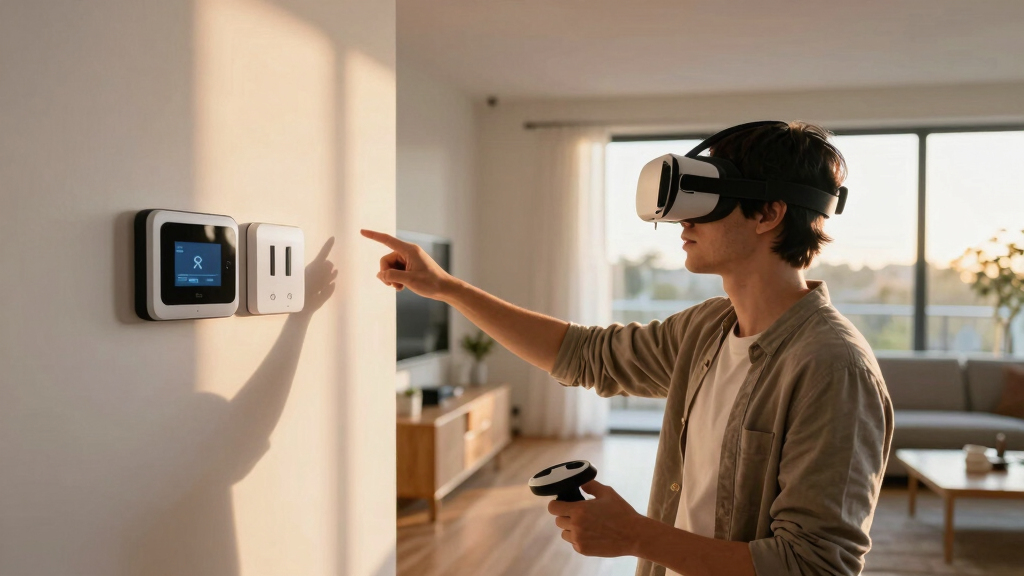
Some VR games need room setup because they expect you to physically step, duck, swing, crouch, or reach across real space. Others skip it because they keep you seated or standing in one spot and use thumbsticks, teleport movement, or cockpit controls instead.
The first time you hit a coffee table in VR, you learn fast: the game may be virtual, but your shin is not.
That is the real reason this topic matters. If you play on PC, Steam, or a headset linked to SteamVR, room setup tells the system where your safe space ends and your desk, chair, wall, or sleeping dog-free hallway begins.
You will learn why some VR games ask you to map your room, why others let you play from a chair, and how to spot the difference before you buy, install, or clear half your apartment.
Virtual Worlds Still Need Real-World Clearance
Some VR games ask you to map the room because they expect your body to step, duck, crouch, swing, and reach across physical space. Others keep you seated or standing in one spot while thumbsticks, teleport movement, or cockpit controls move the world around you.
The game may be virtual, but your shin is not.
Safety is the real featureRoom Setup Follows Interaction Design
Room setup is less about graphics power and more about trust. If a game asks you to reach left, lean back, or swing wide, the headset needs to know where the safe space ends and where the desk, wall, chair, or pet-free hallway begins.
Real Feet, Real Floor
You step, dodge, crouch, and swing through a mapped area. Sword fighting, boxing, rhythm, and fitness games usually live here.
Reach, Turn, Grab
You may stay near one spot, but shelves, levers, drawers, and floor objects still demand arm clearance around your body.
Hands Stay Local
The vehicle, camera, or thumbstick moves you while your body stays planted. Racing, flight, theater, and tabletop games can often skip room-scale setup.
How a Room-Scale Game Turns Space Into Gameplay
A boundary is not decoration. It is the system’s map of where the performance can happen before the real room interrupts the virtual one.
Map Floor
The headset learns the playable area and defines the boundary.
Track Body
Head and controller positions update as you move through space.
Ask Motion
The game prompts steps, reaches, crouches, punches, or wide swings.
Warn Edges
Boundary visuals appear when your body approaches a wall or object.
Prevent Impact
The setup buys you time before immersion turns into collision.
What the Labels Usually Mean
Steam play-area labels are the quickest way to judge whether you need to clear a rug-sized area or simply pull up a chair. Treat them as a first safety check before buying or installing.
| Game Style | Typical Setup Need | Why It Matters | Real-World Example |
|---|---|---|---|
| Room-scale action | ✓ Setup | You step, dodge, crouch, and swing your arms through real space. | You clear a rug-sized area before a sword-fighting level. |
| Object-heavy puzzle | ~ Often | You reach into shelves, drawers, panels, and levers around your body. | You bend down for a tool and almost tap the desk. |
| Fitness or rhythm | ✓ Setup | Fast repeated movement makes it easy to lose exact position. | You sidestep during a song and drift toward furniture. |
| Cockpit or seated sim | ✗ Usually not | The vehicle moves while your body stays in one place. | You sit with a wheel, HOTAS, or gamepad. |
Movement Intensity Predicts Setup Needs
Inside-out tracking made setup faster by removing many external sensors, but it did not make physical clearance meaningless. Active games still need a boundary because cameras, controllers, and human limbs all have limits.
Clearance Spectrum
Most room-scale guidance clusters around roughly 6.5 by 6.5 feet of open space, while seated games can work with an arm-span buffer.
Five Clues That Reveal Space Needs
A store page can usually tell you whether the game expects a room, a standing spot, or a chair. Screenshots matter too: cabinets, floor objects, body dodging, and wide hand interaction are all hints.
Look for seated, standing, or room-scale labels before checkout.
Motion-controller games often need more space than gamepad games.
“Works seated but better standing” matters in a cramped room.
Mentions of walls, mats, or cables usually reveal real space needs.
Steam Deck compatibility does not automatically mean VR readiness.
From Game Design to Room Setup
Why Some VR Games Need Room Setup and Others Do Not is a chain of decisions: how the player moves, how tracking works, how much space the body uses, and how much safety margin the game needs.
Key Takeaways
- Room setup is needed when a VR game expects real stepping, ducking, reaching, or fast arm movement.
- Seated and cockpit-style VR games can skip room-scale setup because the controller or vehicle moves you through the world.
- Inside-out tracking removes external sensors for many headsets, but it still needs a safe boundary for active games.
- Steam labels such as seated, standing, and room-scale are the fastest way to judge space needs before buying.
- Steam Deck compatibility does not equal VR readiness; check headset support, SteamOS notes, and current player reports.
As an affiliate, we earn on qualifying purchases.
You Need Room Setup When the Game Uses Your Real Body
Why Some VR Games Need Room Setup and Others Do Not comes down to tracking, movement, and safety. A game needs room setup when it expects your real feet, hands, shoulders, and head to move through physical space. If the game only needs your head direction and controller buttons, it can often work seated or standing still.
Think of your room as the stage. In a room-scale game, the headset is the spotlight, your controllers are props, and the floor marks tell the system where the performance can happen without a wooden desk corner joining the scene.
A boxing game, for example, may ask you to lean away from punches, step into range, and throw hooks wide enough to brush the air beside your monitor. A cockpit game can keep you in a chair because your body stays planted while the virtual ship, car, or plane does the moving.
Room setup is less about graphics and more about trust. The game needs to trust that when it asks you to reach left, there is not a lamp waiting there.
As an affiliate, we earn on qualifying purchases.
Room-Scale Games Need a Clear Patch of Floor
Why Some VR Games Need Room Setup and Others Do Not is easiest to see with room-scale games. Room-scale VR treats your real floor like part of the level, so the headset needs a mapped boundary before you start moving. According to SteamVR room setup guidance, room-scale play often starts around 6.5 feet by 5 feet, while many players prefer about 6.5 by 6.5 feet for comfort [1].
That space disappears faster than you expect. One step forward, one sword swing, one crouch to grab a glowing object from the floor, and suddenly your body has crossed half the room while your brain is busy chasing neon sparks.
Here is a simple comparison for Steam players checking a store page:
| Game style | Why it may need room setup | Common real-world example |
|---|---|---|
| Room-scale action | You step, dodge, crouch, and swing your arms through real space. | You clear a rug-sized area before playing a sword-fighting level. |
| Object-heavy puzzle | You reach into shelves, drawers, panels, and levers around your body. | You bend down to pick up a tool and almost tap the side of your desk. |
| Fitness or rhythm | You move fast, repeat motions, and lose track of your exact position. | You sidestep during a song and feel the cable brush your ankle. |
| Cockpit or seated sim | The game moves the vehicle while you stay in one spot. | You sit with a wheel, HOTAS, or gamepad and rarely move past arm length. |
If the game asks for room-scale, do not squeeze it between a bed and a bookcase just because the loading screen lets you continue. Your boundary is not decoration; it is the thin blue line between immersion and a loud crash.
As an affiliate, we earn on qualifying purchases.
Seated Games Skip Setup by Moving the World Around You
Seated VR games often skip room setup because they make the world move while your body stays put. The game may still track your head and hands, but it does not expect you to walk across the carpet. Your chair becomes the anchor, and the controller does the traveling.
Flight sims, racing games, virtual theaters, tabletop games, and many puzzle games work this way. You turn your head to check a mirror, reach a short distance to press a cockpit switch, or use a thumbstick to glide through a hallway.
That design can feel calmer. You hear the soft fan noise of your PC, feel the chair under your legs, and still watch a planet roll past the windshield. The magic comes from scale and presence, not from clearing the living room.
- Use seated mode when the game lists it on Steam or inside its comfort settings.
- Keep one arm span clear even for seated play, because menus and inventory screens can still ask you to reach.
- Recenter often if your view drifts and the dashboard starts sitting inside your shoulder.
As an affiliate, we earn on qualifying purchases.
Inside-Out Tracking Made Setup Faster, Not Meaningless
Why Some VR Games Need Room Setup and Others Do Not has changed because modern headsets can track themselves with built-in cameras. Inside-out tracking removes the need for external sensors in many setups, but it does not remove the need for safe space when a game asks you to move.
Older PC VR systems often used external base stations or sensors placed around the room. Those boxes watched the headset and controllers from the outside, like stage lights tracking performers. Newer standalone headsets, including popular Quest models, use cameras on the headset to read the room from your face outward.
According to Meta boundary guidance, roomscale play on Quest-class devices commonly expects about 6.5 by 6.5 feet of clear space [2]. That number is not magic; it is a practical buffer for steps, swings, crouches, and the tiny drift that happens when you play for more than a few minutes.
Inside-out tracking can still struggle with glossy mirrors, blank white walls, dim rooms, or controllers hidden behind your back. If your hands vanish while you reach over your shoulder, the game did not break physics; the cameras simply lost sight of what they needed.
Check These 5 Clues Before You Buy on Steam
You can usually tell whether a VR game needs room setup by checking the play-area labels, input support, and store notes before you install it. Steam pages often tell you whether a game supports seated, standing, or room-scale play. Treat those labels as your first safety check, not fine print.
- Read the VR support box. Look for seated, standing, or room-scale labels before you click buy.
- Check the control scheme. A game built around motion controllers and hand interaction may need more space than one built for a gamepad or wheel.
- Scan developer notes. Some games say they work seated but feel better standing, which matters in a cramped bedroom.
- Look at recent user posts carefully. If players mention punching walls or needing a mat, you have your hint.
- Treat leaks and rumors as unconfirmed. If a forum post claims a new VR mode is coming, wait for the developer or store page to confirm it.
Here is a real scenario: you see a stylish VR puzzle game on sale. The screenshots show hands opening cabinets, pulling drawers, and grabbing objects from the floor. Even if the game supports standing play, you should clear more than a dinner-plate circle around your feet.
Also check age ratings such as ESRB, PEGI, or IARC when you buy for a younger player. Age ratings speak to content like violence, fear, or language; they do not tell you whether the player has enough room to swing safely.
Steam Deck Players Should Treat VR as a PC Setup Problem
Steam Deck players should treat VR room setup as a PC VR question, not as a handheld convenience feature. A Steam Deck compatibility badge tells you about handheld play, controls, text, and performance on the Deck screen; it does not automatically mean a VR headset setup will feel good or work cleanly.
That matters because VR performance is more demanding than flat-screen play. A normal PC game can dip or stutter and still feel playable; VR stutter can make your stomach tighten because the image no longer matches your head motion.
If you experiment with VR from a Steam Deck, check the current Steam page, headset support, SteamOS version notes, and recent player reports first. Compatibility badges and Proton results can change after game, driver, headset, or SteamOS updates, so do not treat last year’s clip as a promise for your setup today.
A practical example: a seated VR theater app may be less demanding than a fast room-scale shooter, but both still depend on headset support, frame pacing, and tracking. Your sofa may be ready; the software stack may not be.
Set Up the Room Based on the Game You Actually Play
Your best VR setup is the smallest safe space that matches the game you are about to play. You do not need to rearrange your home for every seated puzzle or cockpit sim, but you should clear real floor space before games need room movement, fast arms, or low crouches.
Use this quick setup rule before you launch:
- Seated: clear your arm span, move mugs and sharp desk items, and keep the chair from rolling unexpectedly.
- Standing: clear a circle around your feet, remove low clutter, and use a small mat to feel your center point.
- Room-scale: clear a full play area, redraw the boundary, manage cables, and warn anyone nearby before you start.
The mat trick works better than it sounds. Put a flat bath mat or exercise mat under your feet, and your toes can feel when you are drifting. It is a quiet little lighthouse in the dark, especially during a loud rhythm track or a tense hallway scene.
Do a 10-second reach test before every active game: stretch both arms forward, left, right, and overhead. If your knuckles find a shelf, plant pot, ceiling fan pull chain, or monitor edge, the room is telling you something before the game does.
Frequently Asked Questions
Do all VR games need room setup?
No. Many VR games support seated or standing play and only need enough room for your arms and head movement. Room setup becomes more likely when the game asks you to walk, crouch, dodge, or grab objects around your body.
How much space do I need for room-scale VR?
A common target is about 6.5 by 6.5 feet of clear space, though some systems and games can work with slightly different shapes. The key is not the perfect square; it is having enough obstacle-free floor for your steps and arm swings.
Can inside-out tracking replace room setup?
Inside-out tracking can replace external sensors for many headsets, but it does not replace a safe play area. The headset may track itself without base stations, yet your hands can still hit a wall if the game expects room-scale movement.
How do I know if a Steam VR game supports seated play?
Check the VR support labels on the Steam store page and look for seated, standing, or room-scale play-area notes. Also scan the game’s comfort settings and recent user posts, because some games technically support seated play but feel awkward without standing reach.
Is Steam Deck Verified status enough for VR games?
No. Steam Deck Verified status speaks to handheld play on the Deck, not full PC VR with a headset. For VR, check headset support, current SteamOS notes, SteamVR behavior, and recent reports for your exact game and hardware.
Conclusion
Remember this: room setup is not a hurdle before the fun starts. It is part of the controller whenever a VR game asks your real body to join the action.
Before you launch, read the play-area label and clear the space the game truly needs. The best VR session ends with a racing heart, not a cracked monitor and a mystery bruise.
Fall Picks
fall essentials
As an affiliate, we earn on qualifying purchases.