Among these best RTX 50-series graphics cards, I’d put the PNY RTX 5070 Ti OC Triple Fan first for its balance of high-end gaming capability, 16GB of memory, and a substantial cooler. The PNY RTX 5060 Ti 16GB is a compelling step-down choice for buyers who want more memory without moving to a higher GPU tier, while the ASUS TUF RTX 5080 targets demanding setups that prioritize premium cooling and build. The main tradeoffs are GPU performance versus memory capacity, as well as card size, cooling design, and the needs of your monitor. A higher-tier GPU can be wasted in a system that cannot keep it fed, while an 8GB model may limit flexibility in memory-heavy games. Read on for the full breakdown and guidance on choosing the right card for your build.

Play games on Amazon Luna for your game nights, included with Prime
- A rotating selection of games, no download needed
- Play on TV, laptop or phone
- Fast, free delivery for your gear, too
Complete the kit



Key Takeaways
- The RTX 5070 Ti 16GB models lead this group for balance: the PNY triple-fan card is my overall pick, with the MSI Ventus 3X offering another 16GB route.
- Memory capacity separates several close choices: the PNY and ASUS Dual RTX 5060 Ti cards have 16GB, while the MSI Shadow 2X, Gigabyte WINDFORCE, and ASUS Prime RTX 5060 have 8GB.
- RTX 5080 buyers are choosing a higher performance tier, not just a different cooler: ASUS TUF, ASUS Prime, and PNY all pair the GPU with 16GB, but their board and cooling designs suit different builds.
- Compactness and cooling pull in different directions: dual-fan cards such as the MSI RTX 5070 Ventus 2X may fit more easily, while triple-fan options take up more room for their cooling approach.
- There is no single best RTX 5060 Ti configuration for everyone: the PNY and ASUS Dual emphasize 16GB, while the Gigabyte ICE offers a distinct light-colored design and the 8GB models prioritize a different capacity and card configuration.
| PNY NVIDIA GeForce RTX 5060 Ti 16GB OC Dual-Fan Graphics Card |  | Best Compact 16GB Pick | GPU: NVIDIA GeForce RTX 5060 Ti | Memory: 16GB GDDR7 | Memory bandwidth: 448 GB/s | VIEW LATEST PRICE | See Our Full Breakdown |
| PNY NVIDIA GeForce RTX 5070 Ti OC Triple Fan Graphics Card, 16GB GDDR7 |  | Best for High-Performance Gaming | GPU: NVIDIA GeForce RTX 5070 Ti | Architecture: NVIDIA Blackwell | Memory: 16GB GDDR7 | VIEW LATEST PRICE | See Our Full Breakdown |
| MSI Gaming RTX 5060 Ti 8G Shadow 2X OC Graphics Card |  | Best for Space-Conscious Mainstream Builds | GPU: NVIDIA GeForce RTX 5060 Ti | Architecture: NVIDIA Blackwell | Memory: 8GB GDDR7 | VIEW LATEST PRICE | See Our Full Breakdown |
| PNY NVIDIA GeForce RTX 5080 OC Triple-Fan Graphics Card |  | Best Premium Cooling Design | GPU: NVIDIA GeForce RTX 5080 | Architecture: NVIDIA Blackwell | Cooling: Three 100 mm axial fans, vapor chamber, dense heatsink, open aluminum backplate | VIEW LATEST PRICE | See Our Full Breakdown |
| MSI GeForce RTX 5070 Ti 16G Ventus 3X OC Black Graphics Card |  | Best RTX 5070 Ti Cooling Package | Architecture: NVIDIA Blackwell | Memory: 16GB GDDR7 | Memory interface: 256-bit | VIEW LATEST PRICE | See Our Full Breakdown |
| MSI Gaming RTX 5070 12G Ventus 2X OC Graphics Card |  | Best Compact RTX 5070 | GPU: NVIDIA GeForce RTX 5070 | Memory: 12GB GDDR7 | Memory interface: 192-bit | VIEW LATEST PRICE | See Our Full Breakdown |
| GIGABYTE GeForce RTX 5060 Ti WINDFORCE OC 8G Graphics Card |  | Best Entry-Level RTX 50-Series Pick | GPU: NVIDIA GeForce RTX 5060 Ti | Memory: 8GB GDDR7 | Memory interface: 128-bit | VIEW LATEST PRICE | See Our Full Breakdown |
| ASUS TUF Gaming GeForce RTX 5080 16GB GDDR7 OC Edition Graphics Card | 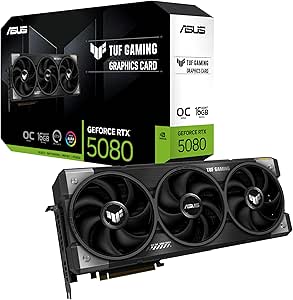 | Best for Heavy-Duty RTX 5080 Builds | GPU: NVIDIA GeForce RTX 5080 | Memory: 16GB GDDR7 | Boost clock: 2730 MHz OC mode; 2700 MHz default mode | VIEW LATEST PRICE | See Our Full Breakdown |
| ASUS Prime GeForce RTX 5080 16GB GDDR7 Graphics Card |  | Best Compact RTX 5080 | GPU: NVIDIA GeForce RTX 5080 | Memory: 16GB GDDR7 | Boost clock: 2617 MHz default; 2640 MHz OC mode | VIEW LATEST PRICE | See Our Full Breakdown |
| ASUS Dual GeForce RTX 5060 Ti 16GB GDDR7 OC Edition Gaming Graphics Card |  | Best 16GB Midrange Option | GPU: NVIDIA GeForce RTX 5060 Ti | Memory: 16GB GDDR7 | GPU clock: 2632 MHz OC mode; 2602 MHz default mode | VIEW LATEST PRICE | See Our Full Breakdown |
| GIGABYTE GeForce RTX 5060 Ti Eagle OC ICE 16G Graphics Card |  | Best for 16GB on a Midrange Card | GPU: NVIDIA GeForce RTX 5060 Ti | Memory: 16GB GDDR7 | Memory interface: 128-bit | VIEW LATEST PRICE | See Our Full Breakdown |
| ASUS Prime GeForce RTX 5060 OC Edition 8GB GDDR7 Graphics Card | 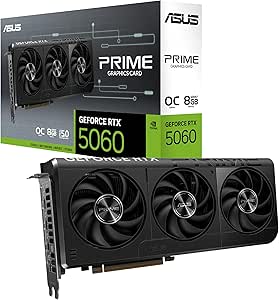 | Best for Quiet, Compact-Width Builds | Graphics processor: NVIDIA GeForce RTX 5060 | Memory: 8GB GDDR7 | GPU clock speed: 2565 MHz default; 2595 MHz OC mode | VIEW LATEST PRICE | See Our Full Breakdown |
| RTX 50-series graphics card | Memory | Cooling | GPU | Dimensions |
|---|---|---|---|---|
| PNY NVIDIA GeForce RTX 5060 Ti | 16GB GDDR7 | — | NVIDIA GeForce RTX 5060 Ti | 9.65 x 4.72 inches |
| PNY NVIDIA GeForce RTX 5070 Ti | 16GB GDDR7 | Triple fan | NVIDIA GeForce RTX 5070 Ti | — |
| MSI Gaming RTX 5060 Ti 8G Shad | 8GB GDDR7 | Two TORX Fan 5.0 fans | NVIDIA GeForce RTX 5060 Ti | 8.9 x 5 inches |
| PNY NVIDIA GeForce RTX 5080 OC | — | Three 100 mm axial fans, vapor chamber, dense heatsink, open aluminum backplate | NVIDIA GeForce RTX 5080 | — |
| MSI GeForce RTX 5070 Ti 16G Ve | 16GB GDDR7 | TORX Fan 5.0 | — | — |
| MSI Gaming RTX 5070 12G Ventus | 12GB GDDR7 | TORX Fan 5.0, dual fans, nickel-plated copper baseplate | NVIDIA GeForce RTX 5070 | 9.3 x 5 inches |
| GIGABYTE GeForce RTX 5060 Ti W | 8GB GDDR7 | WINDFORCE, 2 fans | NVIDIA GeForce RTX 5060 Ti | 8.19 x 4.72 inches |
| ASUS TUF Gaming GeForce RTX 50 | 16GB GDDR7 | Three Axial-tech fans, 3.6-slot design, phase-change GPU thermal pad | NVIDIA GeForce RTX 5080 | 13.7 x 5.7 inches |
| ASUS Prime GeForce RTX 5080 16 | 16GB GDDR7 | Three Axial-tech fans, vapor chamber, phase-change GPU thermal pad | NVIDIA GeForce RTX 5080 | 12 x 5 inches |
| ASUS Dual GeForce RTX 5060 Ti | 16GB GDDR7 | Two Axial-tech fans | NVIDIA GeForce RTX 5060 Ti | 9 x 4.7 inches |
| GIGABYTE GeForce RTX 5060 Ti E | 16GB GDDR7 | Dual-fan WINDFORCE | NVIDIA GeForce RTX 5060 Ti | 8.46 × 4.8 inches |
| ASUS Prime GeForce RTX 5060 OC | 8GB GDDR7 | Triple Axial-tech fans | — | — |
More Details on Our Top Picks
PNY NVIDIA GeForce RTX 5060 Ti 16GB OC Dual-Fan Graphics Card
I’d choose this PNY when a smaller build needs 16GB of GDDR7 without moving up to a larger, higher-tier card. Its compact dual-slot, SFF-ready design is easier to fit than the nearly three-slot PNY RTX 5070 Ti, while the 2692 MHz boost clock and dual fans provide a factory-overclocked starting point. The extra memory over the MSI RTX 5060 Ti Shadow 2X OC’s 8GB is useful for high-resolution textures and memory-heavy creative tasks, though it does not make the two GPUs equal in overall performance. The tradeoffs are its PCIe 5.0 x8 interface and 600W recommended system power. VelocityX adds tuning and fan-profile controls, but buyers who want more GPU headroom should look at the RTX 5070 Ti options instead.
Pros:- 16GB GDDR7 gives more memory headroom than the MSI RTX 5060 Ti Shadow 2X OC’s 8GB.
- Compact, dual-slot dimensions suit SFF-ready builds.
- Vented metal backplate supports passive cooling and helps resist card sag.
- VelocityX offers clock and fan tuning, monitoring, and up to five profiles.
Cons:- PCI Express 5.0 x8 interface is narrower than the x16 interface on the PNY RTX 5070 Ti.
- Requires a recommended 600W system power supply.
- Its RTX 5060 Ti GPU offers less performance headroom than the RTX 5070 Ti models in this roundup.
Best for: Small-form-factor PC builders who want an RTX 5060 Ti with 16GB of memory for gaming and memory-intensive creative workloads.
Not ideal for: Buyers seeking the strongest 4K performance or a card with a full x16 interface; consider a higher-tier model such as the PNY RTX 5070 Ti instead.
- GPU:NVIDIA GeForce RTX 5060 Ti
- Memory:16GB GDDR7
- Memory bandwidth:448 GB/s
- Boost clock:2692 MHz
- Memory interface:128-bit
- Interface:PCI Express 5.0 x8
- Cooling and form factor:Dual fan; compact dual-slot, SFF-ready
- Power:Single 8-pin connector; 600W recommended system power
- Dimensions:9.65 x 4.72 inches
Our verdict“Choose this PNY for a compact build that needs 16GB of VRAM, but step up to an RTX 5070 Ti if performance headroom matters more than size.”
PNY NVIDIA GeForce RTX 5070 Ti OC Triple Fan Graphics Card, 16GB GDDR7
For buyers who want a stronger step up from the RTX 5060 Ti cards, I’d put this PNY RTX 5070 Ti near the top of the shortlist. Its 16GB of GDDR7 on a 256-bit interface and PCIe 5.0 x16 connection give it a broader performance platform than the PNY RTX 5060 Ti 16GB, while DLSS 4 and Blackwell features support demanding games and creative applications. The triple-fan cooler is suited to sustained workloads, but the 2.98-slot thickness makes case clearance a real constraint: the compact PNY 5060 Ti is much easier to accommodate. Power also takes more planning because this card uses a 16-pin connection, with an adapter included. I’d favor this model when performance matters more than a slim build, but its size and power cabling make it a poor fit for compact or tightly routed systems.
Pros:- RTX 5070 Ti GPU offers a higher performance tier than the RTX 5060 Ti models in this roundup.
- 16GB GDDR7 and a 256-bit memory interface provide substantial memory capacity and bandwidth potential.
- PCIe 5.0 x16 interface.
- Triple-fan cooling and DLSS 4 support suit demanding gaming and creative workloads.
Cons:- Nearly three-slot thickness needs substantial expansion-slot and case clearance.
- Requires a 16-pin power connection or the included adapter cable.
- The listed maximum resolution is 3840 x 2160, lower than the 8K output specification listed for the PNY RTX 5060 Ti.
Best for: Enthusiast gamers and creators with a roomy desktop case who want an RTX 5070 Ti, 16GB of memory, and a full x16 connection.
Not ideal for: Small-case builders or anyone avoiding 16-pin power cabling; the compact PNY RTX 5060 Ti 16GB is easier to fit and power.
- GPU:NVIDIA GeForce RTX 5070 Ti
- Architecture:NVIDIA Blackwell
- Memory:16GB GDDR7
- Memory interface:256-bit
- Boost clock:2572 MHz
- Interface:PCI Express 5.0 x16
- Cooling:Triple fan
- Slot size:2.98 slots
- Power connection:16-pin; one 16-pin-to-three-8-pin adapter included
Our verdict“Pick this PNY RTX 5070 Ti for a roomy system where gaming and creative performance take priority over compact dimensions.”
MSI Gaming RTX 5060 Ti 8G Shadow 2X OC Graphics Card
The MSI Shadow 2X OC is the lineup’s compact, straightforward RTX 5060 Ti choice, but its 8GB of GDDR7 defines who should buy it. That capacity can suit gamers focused on current mainstream settings, while the PNY RTX 5060 Ti 16GB is the safer pick for high-resolution textures and memory-heavy creative work. MSI’s dual TORX Fan 5.0 cooling and nickel-plated copper baseplate are aimed at moving heat through a compact card, and its 8.9-inch length helps with smaller cases. It also has a useful mix of three DisplayPort 2.1a outputs and HDMI 2.1b. The main concern is not just the lower memory capacity: the supplied data leaves the boost clock and memory bus width unclear, so spec-focused buyers have less to verify than with the PNY 16GB model.
Pros:- Compact 8.9-inch length suits space-conscious builds.
- Dual TORX Fan 5.0 fans and a nickel-plated copper baseplate support heat transfer.
- Three DisplayPort 2.1a outputs and one HDMI 2.1b output.
- Blackwell architecture with DLSS 4 support.
Cons:- 8GB of VRAM provides less headroom than the PNY RTX 5060 Ti 16GB.
- The supplied product data does not clearly establish the boost clock or memory bus width.
- The RTX 5060 Ti tier offers less performance headroom than the RTX 5070 Ti cards in this roundup.
Best for: Builders with a compact case who want an RTX 5060 Ti for mainstream gaming and do not need more than 8GB of video memory.
Not ideal for: Players targeting high-resolution textures or creators with memory-heavy projects; the PNY RTX 5060 Ti 16GB offers twice the listed VRAM.
- GPU:NVIDIA GeForce RTX 5060 Ti
- Architecture:NVIDIA Blackwell
- Memory:8GB GDDR7
- Cooling:Two TORX Fan 5.0 fans
- Baseplate:Nickel-plated copper
- Display outputs:3x DisplayPort 2.1a; 1x HDMI 2.1b
- Maximum resolution:7680 x 4320
- Dimensions:8.9 x 5 inches
- Model number:G506T-8S2CP
Our verdict“Choose the MSI Shadow 2X OC for a compact mainstream build if 8GB of VRAM meets your workload; otherwise, favor the PNY 16GB version.”
PNY NVIDIA GeForce RTX 5080 OC Triple-Fan Graphics Card
I’d shortlist this PNY RTX 5080 for buyers who want a high-tier Blackwell card with cooling hardware suited to demanding, sustained use. Its combination of three 100 mm fans, a vapor chamber, and a dense heatsink is a more elaborate thermal setup than the triple-fan PNY RTX 5070 Ti’s listed cooler, while dual-ball bearings and counter-rotating fans add detail to the design. Fan stop at low temperatures can reduce fan noise when the card is lightly loaded. VelocityX lets users tune clocks and fan curves, monitor temperatures, and save profiles; that flexibility is useful, though it also means some controls depend on extra software. The provided specifications do not list memory capacity, dimensions, or power requirements, so I’d verify those against the system and workload before choosing it. Its large triple-fan format also rules out many compact cases.
Pros:- Triple 100 mm fans, vapor chamber, and dense heatsink target demanding workloads.
- Fan-stop operation can keep fans idle at low temperatures.
- Dual-ball fan bearings and counter-rotation are specified.
- VelocityX supports monitoring, tuning, and up to five saved profiles.
Cons:- Triple-fan cooling can require substantial case space.
- Clock and fan-curve controls depend on VelocityX software.
- The supplied product data does not specify memory capacity, dimensions, or power requirements.
Best for: High-end gamers and creators with a spacious desktop case who value a substantial cooling assembly and software-based tuning.
Not ideal for: Compact-case builders or buyers who need confirmed memory, card dimensions, and power specifications before choosing; the PNY RTX 5070 Ti listing provides more concrete fit details.
- GPU:NVIDIA GeForce RTX 5080
- Architecture:NVIDIA Blackwell
- Cooling:Three 100 mm axial fans, vapor chamber, dense heatsink, open aluminum backplate
- Fan bearings:Dual-ball
- Fan features:Counter-rotation; fan stop at low temperatures
- Ray tracing cores:4th generation
- Tensor cores:5th generation
- Software:PNY VelocityX
- Saved profiles:Up to five
Our verdict“Choose this RTX 5080 if you want its elaborate cooling and tuning features and can confirm that its size and power needs suit your system.”
MSI GeForce RTX 5070 Ti 16G Ventus 3X OC Black Graphics Card
This MSI Ventus 3X OC Black gives buyers seeking an RTX 5070 Ti a clear emphasis on heat transfer: TORX Fan 5.0 fans work with a nickel-plated copper baseplate and square Core Pipes designed to contact the GPU baseplate. Its 16GB GDDR7 and 256-bit interface match the key memory configuration of the PNY RTX 5070 Ti, so the choice is more about cooling design and the listed clock details than memory capacity. MSI lists an extreme performance clock of 2482 MHz, while PNY lists a 2572 MHz boost clock; those figures use different labels, so I would not treat them as a direct like-for-like ranking. The supplied information omits card dimensions, slot thickness, and power connection, making case-fit planning harder than with PNY’s specified 2.98-slot card. I’d verify those details before building around it.
Pros:- 16GB GDDR7 with a 256-bit memory interface.
- TORX Fan 5.0 fans are designed to stabilize high-pressure airflow.
- Nickel-plated copper baseplate and square Core Pipes target heat transfer from the GPU and memory.
- Three DisplayPort 2.1a outputs and one HDMI 2.1b output.
Cons:- The supplied specifications do not list dimensions or slot thickness, complicating case-fit checks.
- Power connector and recommended system power are not provided.
- Its listed 2482 MHz extreme performance clock is not directly comparable to the PNY model’s 2572 MHz boost-clock figure.
Best for: RTX 5070 Ti buyers who prioritize a detailed GPU-and-memory cooling design and want 16GB of GDDR7 for gaming or creative workloads.
Not ideal for: Builders who need confirmed card dimensions or power-connector details before purchase; the PNY RTX 5070 Ti listing gives clearer fit and connection information.
- Architecture:NVIDIA Blackwell
- Memory:16GB GDDR7
- Memory interface:256-bit
- Extreme performance clock:2482 MHz
- Cooling:TORX Fan 5.0
- Heat-transfer components:Nickel-plated copper baseplate; square Core Pipes
- Display outputs:3x DisplayPort 2.1a; 1x HDMI 2.1b
Our verdict“Choose MSI’s Ventus 3X OC Black if its cooling design is your priority, but confirm case clearance and power details before selecting it over the better-documented PNY RTX 5070 Ti.”
MSI Gaming RTX 5070 12G Ventus 2X OC Graphics Card
The RTX 5070 makes this Ventus a step up from the RTX 5060 Ti options here, while its 9.3-inch, dual-fan design is less imposing than the ASUS RTX 5080 cards. Blackwell and DLSS 4 support bring the current generation’s features to a card aimed at high-performance gaming, and 12GB of GDDR7 gives it more memory than the 8GB Gigabyte RTX 5060 Ti WINDFORCE. The nickel-plated copper baseplate and metal backplate add practical thermal and structural support. The tradeoff is that this is still a dual-fan card: under sustained heavy loads it may be louder than larger triple-fan designs such as the ASUS TUF RTX 5080. Its understated finish also favors function over showy lighting.
Pros:- RTX 5070 GPU with Blackwell architecture and DLSS 4 support
- 12GB of GDDR7 memory
- 9.3-inch length suits builds with limited GPU clearance
- Copper baseplate and metal backplate support cooling and card rigidity
Cons:- Dual-fan cooling may be louder under heavy loads than larger triple-fan cards
- 12GB is less memory capacity than the 16GB RTX 5080 models in this roundup
- Plain styling lacks RGB lighting
Best for: Gamers who want an RTX 5070 in a shorter card and do not need a premium RGB-heavy design.
Not ideal for: Buyers prioritizing quieter cooling during sustained heavy gaming, or those seeking the higher-tier performance and 16GB memory of an RTX 5080.
- GPU:NVIDIA GeForce RTX 5070
- Memory:12GB GDDR7
- Memory interface:192-bit
- GPU clock speed:2557 MHz
- Cooling:TORX Fan 5.0, dual fans, nickel-plated copper baseplate
- Video outputs:3x DisplayPort 2.1a, 1x HDMI 2.1b
- Dimensions:9.3 x 5 inches
- Maximum resolution:7680 x 4320
Our verdict“Choose this Ventus if you want RTX 5070 performance in a relatively short card and can accept dual-fan noise under demanding loads.”
GIGABYTE GeForce RTX 5060 Ti WINDFORCE OC 8G Graphics Card
This RTX 5060 Ti is the straightforward choice for buyers who want Blackwell and DLSS 4 without moving to the higher-tier RTX 5070 or RTX 5080 models. Its 8GB of GDDR7 is the main compromise: the ASUS Dual RTX 5060 Ti offers 16GB, giving it more headroom for memory-heavy games and creative work. Compared with that ASUS card, the Gigabyte’s appeal is a simpler, lightweight 8.19-inch dual-fan build, not extra memory capacity. PCIe 5.0 support and DisplayPort and HDMI connections suit a modern desktop setup, while the x8 connection is a specification buyers should match against their system needs. This makes most sense for modest builds and workloads, not anyone aiming for high-resolution settings with demanding memory use.
Pros:- Blackwell architecture and DLSS 4 support
- Compact 8.19-inch card with a two-fan cooling system
- GDDR7 memory and PCIe 5.0 support
- Supports DisplayPort, HDMI, and resolutions up to 7680 x 4320
Cons:- 8GB of VRAM offers less headroom than the ASUS Dual RTX 5060 Ti 16GB
- PCIe-Express x8 interface rather than x16
- RTX 5060 Ti tier sits below the RTX 5070 and RTX 5080 options for buyers seeking more GPU performance
Best for: First-time RTX 50-series buyers building a compact desktop for mainstream gaming and everyday creative tasks.
Not ideal for: Players using memory-intensive games or creative applications who want more than 8GB of VRAM, or buyers seeking a full x16 interface.
- GPU:NVIDIA GeForce RTX 5060 Ti
- Memory:8GB GDDR7
- Memory interface:128-bit
- GPU clock speed:2587 MHz
- Interface:PCIe 5.0, PCI-Express x8
- Cooling:WINDFORCE, 2 fans
- Dimensions:8.19 x 4.72 inches
- Warranty:3 years
Our verdict“Pick the WINDFORCE if a compact, entry-level RTX 50-series card suits your build and 8GB of VRAM fits your games and workloads.”
ASUS TUF Gaming GeForce RTX 5080 16GB GDDR7 OC Edition Graphics Card
Among these five, the ASUS TUF RTX 5080 is the imposing, high-performance option: it pairs the RTX 5080 with 16GB of GDDR7 and a factory overclock up to 2730 MHz in OC mode. Its 3.6-slot cooler, three Axial-tech fans, and phase-change thermal pad are built for heat management under demanding use. Compared with the ASUS Prime RTX 5080, the TUF has a more substantial cooling and protective design, but it is also longer and much thicker, making the Prime the easier fit for cases with tighter slot clearance. The TUF’s PCB coating and rugged components suit buyers who value a reinforced build. It demands planning, though: the 850W minimum PSU, 16-pin connector, 13.7-inch length, and 3.6-slot footprint rule it out of many smaller systems.
Pros:- RTX 5080 GPU with 16GB GDDR7 and factory overclock up to 2730 MHz
- Three Axial-tech fans and phase-change GPU thermal pad
- Protective PCB coating and rugged components
- Three DisplayPort 2.1a and two HDMI 2.1b outputs
Cons:- Large 3.6-slot design requires substantial case and slot clearance
- Requires an 850W minimum PSU and a 16-pin power connector
- Less suitable for compact builds than the 2.5-slot ASUS Prime RTX 5080
Best for: Enthusiast gamers and creators with a spacious case and suitable 850W-or-higher PSU who want a heavily cooled RTX 5080.
Not ideal for: Small-form-factor builders, owners of lower-capacity power supplies, or anyone without room for a 3.6-slot card.
- GPU:NVIDIA GeForce RTX 5080
- Memory:16GB GDDR7
- Boost clock:2730 MHz OC mode; 2700 MHz default mode
- Cooling:Three Axial-tech fans, 3.6-slot design, phase-change GPU thermal pad
- Video outputs:3x DisplayPort 2.1a, 2x HDMI 2.1b
- Dimensions:13.7 x 5.7 inches
- Power supply requirement:850W minimum with 16-pin 12V-2×6 (12VHPWR) connector
- Maximum resolution:7680 x 4320
Our verdict“Choose the TUF RTX 5080 for a spacious, high-power system where its substantial cooling and reinforced design matter more than compact dimensions.”
ASUS Prime GeForce RTX 5080 16GB GDDR7 Graphics Card
The ASUS Prime keeps the RTX 5080’s 16GB GDDR7 and three-fan cooling in a 2.5-slot design, making it the more case-conscious alternative to the 3.6-slot ASUS TUF RTX 5080. Its 12-inch length still needs checking, so “compact” here means slimmer, not suitable for every small-form-factor case. A vapor chamber and phase-change thermal pad help manage heat, while Quiet and Performance BIOS profiles let buyers choose between a calmer operating profile and higher performance. The default boost clock is lower than the TUF’s listed OC mode, and the Prime does not claim the same protective coating and rugged-component emphasis. In return, it takes up less slot space while retaining the RTX 5080 tier. Like the TUF, it still calls for an 850W PSU and a 16-pin connector.
Pros:- RTX 5080 GPU with 16GB GDDR7
- Slimmer 2.5-slot design than the ASUS TUF RTX 5080
- Vapor chamber, three Axial-tech fans, and phase-change thermal pad
- Dual BIOS offers Quiet and Performance profiles
Cons:- 12-inch length still requires a case-clearance check
- Requires an 850W minimum PSU and a 16-pin connector
- Lower listed OC-mode boost clock than the ASUS TUF RTX 5080
Best for: RTX 5080 buyers building in a case with limited slot thickness who still have room for a 12-inch card and an 850W PSU.
Not ideal for: Builders with short GPU clearance or power supplies below the specified 850W minimum.
- GPU:NVIDIA GeForce RTX 5080
- Memory:16GB GDDR7
- Boost clock:2617 MHz default; 2640 MHz OC mode
- Slot design:2.5 slots
- Cooling:Three Axial-tech fans, vapor chamber, phase-change GPU thermal pad
- Video outputs:3x DisplayPort 2.1a, 2x HDMI 2.1b
- Dimensions:12 x 5 inches
- Power requirement:850W minimum with 16-pin 12V-2×6 (12VHPWR) connector
Our verdict“Choose the Prime RTX 5080 if you want 16GB and a thinner card than the TUF, while your case and PSU can handle its length and power needs.”
ASUS Dual GeForce RTX 5060 Ti 16GB GDDR7 OC Edition Gaming Graphics Card
This ASUS pairs the RTX 5060 Ti with 16GB of GDDR7, doubling the memory of the Gigabyte RTX 5060 Ti WINDFORCE 8G and making it the more appealing fit for games and creative tasks that use more VRAM. It stays in the RTX 5060 Ti class rather than matching the RTX 5070 or RTX 5080 models for GPU tier, so the extra memory is about capacity, not a move into a higher GPU class. The 2.5-slot design and 9-inch length make it easier to fit than the large ASUS TUF RTX 5080. Axial-tech fans, 0dB operation during light use, and Quiet and Performance BIOS profiles add useful flexibility. Buyers should still check case clearance, and the product information does not specify a PSU requirement or warranty.
Pros:- 16GB of GDDR7, compared with 8GB on the Gigabyte RTX 5060 Ti WINDFORCE
- Compact 2.5-slot, 9-inch design
- Dual BIOS with Quiet and Performance profiles
- 0dB technology supports relative silence during light gaming
Cons:- RTX 5060 Ti GPU tier sits below the RTX 5070 and RTX 5080 options
- 2.5-slot thickness and 9-inch length still require case-clearance checks
- Provided product data does not state a PSU requirement or warranty
Best for: Gamers and creators who want an RTX 5060 Ti with 16GB of memory in a moderately compact desktop build.
Not ideal for: Buyers seeking RTX 5070- or RTX 5080-class GPU performance, or those who need a clearly stated PSU requirement and warranty before choosing.
- GPU:NVIDIA GeForce RTX 5060 Ti
- Memory:16GB GDDR7
- GPU clock:2632 MHz OC mode; 2602 MHz default mode
- Design:2.5 slots
- Cooling:Two Axial-tech fans
- Video outputs:3x DisplayPort 2.1b, 1x HDMI 2.1b
- Dimensions:9 x 4.7 inches
- Interface:PCI-Express x16
- Maximum resolution:7680 x 4320
Our verdict“Pick the ASUS Dual RTX 5060 Ti if 16GB of VRAM and a compact card matter more to you than stepping up to an RTX 5070 or RTX 5080.”
GIGABYTE GeForce RTX 5060 Ti Eagle OC ICE 16G Graphics Card
The RTX 5060 Ti Eagle OC ICE pairs NVIDIA Blackwell features, including DLSS 4 and hardware-accelerated ray tracing, with 16GB of GDDR7. That extra memory gives it a clearer advantage over the 8GB ASUS Prime RTX 5060 OC for games and workloads that benefit from a larger graphics-memory buffer. Its dual-fan WINDFORCE cooler and 2617 MHz listed boost clock keep the design simpler than triple-fan cards such as the ASUS Prime RTX 5060, while PCIe 5.0 provides a current-generation connection. The tradeoff is its 128-bit memory interface and RTX 5060 Ti tier: buyers seeking a substantial step up in GPU class should look toward the RTX 5070 Ti options in this roundup. At 8.46 inches long, it is compact by comparison, though case clearance still matters.
Pros:- 16GB of GDDR7 provides more memory capacity than the 8GB ASUS Prime RTX 5060 OC.
- Supports DLSS 4 and hardware-accelerated ray tracing.
- Dual-fan WINDFORCE cooling in an 8.46-inch card.
- PCIe 5.0 interface and a listed 2617 MHz GPU clock.
Cons:- The 128-bit memory interface is narrower than buyers may expect from a higher-tier card.
- RTX 5060 Ti performance is a step below the RTX 5070 Ti models in this roundup.
- Requires a compatible desktop PCIe slot and sufficient case clearance.
Best for: PC gamers who want an RTX 5060 Ti with 16GB of memory for higher-resolution textures or memory-heavy creative work, without moving to a larger GPU tier.
Not ideal for: Buyers targeting the stronger performance class of an RTX 5070 Ti, or those with a case too small for an 8.46-inch card.
- GPU:NVIDIA GeForce RTX 5060 Ti
- Memory:16GB GDDR7
- Memory interface:128-bit
- GPU clock speed:2617 MHz
- Memory clock speed:28000 MHz
- Interface:PCI Express 5.0
- Cooling:Dual-fan WINDFORCE
- Dimensions:8.46 × 4.8 inches
Our verdict“Choose this RTX 5060 Ti if 16GB of GDDR7 matters more to you than moving up to the faster RTX 5070 Ti class.”
ASUS Prime GeForce RTX 5060 OC Edition 8GB GDDR7 Graphics Card
The ASUS Prime RTX 5060 OC is a straightforward entry into the RTX 50 series for builders who value cooling controls and quiet operation. Its 0dB mode can stop the fans during light gaming, while the Quiet and Performance BIOS profiles let owners choose between a calmer setup and a more performance-focused fan curve. DLSS 4 and Blackwell features add current-generation support, but its 8GB of GDDR7 is the main compromise: the GIGABYTE RTX 5060 Ti Eagle OC ICE offers twice the memory and is a stronger fit for memory-heavy games or creative tasks. The triple Axial-tech fans and 2.5-slot design give the ASUS more cooling hardware than a simpler card, but the 10.6-inch length means it is not a small-case pick. I’d choose it for a quiet RTX 5060 build, not for maximum memory headroom.
Pros:- 0dB fan mode supports quiet operation during light gaming.
- Dual BIOS provides Quiet and Performance profiles.
- Triple Axial-tech fans and dual-ball bearings.
- Three DisplayPort 2.1b outputs plus HDMI 2.1b.
Cons:- 8GB of GDDR7 gives less memory headroom than the 16GB GIGABYTE RTX 5060 Ti Eagle OC ICE.
- The 10.6-inch length and 2.5-slot design require case clearance.
- RTX 5060 positioning makes it a lower GPU tier than the RTX 5060 Ti and RTX 5070 Ti cards in this roundup.
Best for: Desktop builders seeking an RTX 5060 with quiet idle behavior, selectable BIOS profiles, and three DisplayPort outputs.
Not ideal for: Players who use high-resolution texture packs or memory-intensive creative applications, or builders whose cases cannot fit a 10.6-inch, 2.5-slot card.
- Graphics processor:NVIDIA GeForce RTX 5060
- Memory:8GB GDDR7
- GPU clock speed:2565 MHz default; 2595 MHz OC mode
- AI performance:630 AI TOPS
- Interface:PCI Express 5.0
- Video outputs:3 × DisplayPort 2.1b; 1 × HDMI 2.1b
- Cooling:Triple Axial-tech fans
- Design and dimensions:2.5-slot; 10.6 × 4.7 inches
Our verdict“Pick the ASUS Prime RTX 5060 OC if quiet operation and BIOS choice matter more than the extra memory offered by the GIGABYTE RTX 5060 Ti.”
How We Picked
I ranked these cards by how well their GPU tier, memory capacity, cooler design, and likely build fit align with common gaming needs. I gave extra weight to the balance between performance headroom and practical ownership: a higher-tier GPU can be a better choice for demanding resolutions, while more VRAM can matter when games, creative applications, or future upgrades use larger assets. Model-specific traits such as dual- versus triple-fan cooling, board size, and design also influence who each card suits.
The order reflects the range of buyers each model can serve, not a claim that every card will perform identically in every PC. The RTX 5070 Ti 16GB cards rise to the top as balanced high-performance options; the RTX 5080 cards follow for buyers seeking a higher tier and accepting a larger, more demanding build fit. RTX 5060 and 5060 Ti models rank by their memory and practical role, with 16GB variants favored for flexibility and 8GB cards better matched to buyers with more modest requirements. I treat cooler and styling differences as useful tie-breakers, not substitutes for GPU tier or memory.
| RTX 50-series graphics card | GPU | Interface |
|---|---|---|
| PNY NVIDIA GeForce RTX 5060 Ti | NVIDIA GeForce RTX 5060 Ti | PCI Express 5.0 x8 |
| PNY NVIDIA GeForce RTX 5070 Ti | NVIDIA GeForce RTX 5070 Ti | PCI Express 5.0 x16 |
| MSI Gaming RTX 5060 Ti 8G Shad | NVIDIA GeForce RTX 5060 Ti | — |
| PNY NVIDIA GeForce RTX 5080 OC | NVIDIA GeForce RTX 5080 | — |
| MSI GeForce RTX 5070 Ti 16G Ve | — | — |
| MSI Gaming RTX 5070 12G Ventus | NVIDIA GeForce RTX 5070 | — |
| GIGABYTE GeForce RTX 5060 Ti W | NVIDIA GeForce RTX 5060 Ti | PCIe 5.0, PCI-Express x8 |
| ASUS TUF Gaming GeForce RTX 50 | NVIDIA GeForce RTX 5080 | — |
| ASUS Prime GeForce RTX 5080 16 | NVIDIA GeForce RTX 5080 | — |
| ASUS Dual GeForce RTX 5060 Ti | NVIDIA GeForce RTX 5060 Ti | PCI-Express x16 |
| GIGABYTE GeForce RTX 5060 Ti E | NVIDIA GeForce RTX 5060 Ti | PCI Express 5.0 |
| ASUS Prime GeForce RTX 5060 OC | — | PCI Express 5.0 |
Factors to Consider When Choosing Best RTX 50-series Graphics Cards
Before choosing a specific model, match the card to the games and applications you actually run, then check whether your case and power setup can support it. The broader decisions below can prevent common mismatches that a product list alone cannot resolve.
Match GPU Tier to Resolution and Frame-Rate Goals
Start with the resolution and refresh rate you plan to use, since they shape how much GPU headroom is useful. The RTX 5080 models are aimed at demanding workloads, while the RTX 5070 and 5070 Ti sit below them and the RTX 5060 family targets more modest performance needs. A higher-tier card may not improve the experience much if your monitor, game settings, or processor limits the system first. Conversely, buying too close to your current needs can leave less room for more demanding games or a future display upgrade. Think about the titles you play and the settings you value rather than relying on a single performance target. I’d favor a balanced system over spending on the GPU tier alone.
Choose VRAM for Your Workload, Not Just the GPU Name
Cards carrying the same GPU tier can differ in memory capacity, and that difference matters when games use large textures or applications work with sizable assets. In this lineup, several RTX 5060 Ti cards offer 16GB, while the MSI Shadow 2X and Gigabyte WINDFORCE versions have 8GB; the RTX 5070 Ti and RTX 5080 selections have 16GB. More VRAM does not automatically make a card faster, but it can give compatible workloads more room before memory limits become a concern. A common mistake is treating capacity as a replacement for GPU performance: an 8GB higher-tier card and a 16GB lower-tier card serve different priorities. Check the software and games you use most, and consider how long you expect to keep the card. Choose the capacity that fits those demands rather than treating the largest number as an automatic win.
Check Case Clearance Before Picking a Cooler
Graphics cards vary in length, thickness, and slot use, even when they share a GPU. Triple-fan models such as the PNY and MSI RTX 5070 Ti options can need more room than a dual-fan design, so verify your case’s GPU clearance and available expansion slots before ordering. Also check whether a front radiator, drive cage, or other component reduces the space listed in the case specifications. Compact cards can simplify a smaller build, but a small cooler may have less room to spread heat and may behave differently under sustained load. Leave room for power cables to bend without pressing against a side panel. These checks matter more than a card’s appearance in product photos.
Treat Cooling and Noise as Build-Level Choices
Fan count is a useful clue, but it cannot tell you the full thermal or noise behavior of a card. Cooler layout, heatsink design, fan tuning, case airflow, and room temperature all contribute to how a GPU runs during long sessions. A triple-fan card may suit a spacious system with sustained workloads, while a dual-fan model can make sense when available space is limited. The tradeoff is not simply quiet versus loud: a compact design can fit better, while a larger heatsink can occupy more of the case and affect airflow for nearby parts. Keep case fans and dust filters in the decision, since poor airflow can undermine a capable GPU cooler. If noise matters, compare independent testing of the exact model rather than guessing from fan count alone.
Confirm Power, Connectors, and System Balance
Before selecting an RTX 50-series card, check its manufacturer power guidance, required connectors, and the power supply already in your PC. A GPU upgrade can call for a different supply or cable arrangement, and a case with limited cable space can make installation awkward. Verify that the power supply is suitable for the whole system, not only the graphics card, especially if you also run a power-hungry processor. Consider CPU performance as well: a faster GPU cannot compensate for a processor that holds back the games or applications you use. This is a frequent upgrade trap when replacing only one component. A little system planning can prevent a card from being underused or difficult to install.
Pay More for Headroom Only When You Can Use It
The higher GPU tiers make the most sense when your monitor, games, and workload can benefit from their added capability. If you play at a more modest resolution or prioritize broad memory capacity, a 16GB RTX 5060 Ti may fit better than moving directly to an RTX 5080. Buyers seeking stronger gaming headroom can look to the RTX 5070 Ti, while the RTX 5080 is the premium choice in this group. Avoid choosing a more powerful card solely to future-proof without a specific upgrade plan; other components may become the limit first. Also compare model differences within a tier by case fit and cooling, not by exterior design alone. Spend on the GPU class that improves your actual use rather than on headroom you may not need.
Frequently Asked Questions
Should I choose an RTX 5060 Ti with 16GB or an RTX 5070 with 12GB?
These cards favor different strengths: the RTX 5070 is a higher GPU tier, while the RTX 5060 Ti 16GB models offer more memory capacity. If your priority is GPU capability for demanding games, the RTX 5070 may be the better fit; if your games or applications benefit from additional VRAM, the 16GB 5060 Ti deserves a close look. Neither capacity nor tier alone predicts how every title will run. Check performance comparisons for the specific games and resolution you use. For a long-term choice, weigh the workload you have today against the kind of software you expect to run next.
Is an 8GB RTX 5060 Ti a mistake if a 16GB version is available?
Not automatically, but it asks you to be more selective about memory-heavy games and applications. An 8GB model can make sense when its GPU tier and card design meet your needs and you do not rely on workloads that consume more video memory. The 16GB options in this roundup provide more capacity headroom, but that does not guarantee higher frame rates in every situation. Look for tests using your resolution, texture settings, and software rather than deciding from VRAM alone. If you plan to keep the card through several game or workflow changes, the 16GB models offer more flexibility.
Do I need a triple-fan card for an RTX 5070 Ti or RTX 5080?
No, fan count alone is not a reliable measure of whether a card will suit your build. Triple-fan models can offer a larger cooling layout, but they may also be longer or occupy more case space. A dual-fan design can be a better physical fit, particularly in a compact system, though its cooling and noise behavior depends on the full cooler design. Check the exact card dimensions and independent thermal and acoustic testing before choosing. Good case airflow and unobstructed GPU clearance matter whichever layout you select.
Which RTX 50-series card makes the most sense for a compact gaming PC?
Look first at the actual dimensions and slot thickness of the exact card, then compare them with your case clearance. The dual-fan MSI RTX 5070 Ventus 2X and several dual-fan RTX 5060 Ti models may be easier to fit than the triple-fan options, but product names do not replace a measurement check. A smaller case also needs a workable airflow path so the GPU does not recirculate warm air. Confirm power cable clearance and nearby radiator or drive-cage space before buying. If the card fits only with tight airflow or strained cables, a different model may be a better choice even within the same GPU tier.
When is it worth stepping up from an RTX 5070 Ti to an RTX 5080?
The RTX 5080 is a stronger fit when your games or applications can use the higher GPU tier and your system can support it. Buyers targeting demanding resolutions or sustained graphics workloads have more reason to consider the step up than those playing less demanding titles on a modest display. The 5070 Ti models in this roundup already pair their GPU with 16GB, so the choice is not simply a matter of gaining memory capacity. Check your processor, power supply, case dimensions, and monitor plans before committing to a higher tier. If those parts or your workload set a lower ceiling, the 5070 Ti may be the more balanced purchase.
Conclusion
For the best all-around choice, I’d start with the PNY RTX 5070 Ti OC Triple Fan, which combines a higher GPU tier with 16GB of memory. For a value-focused balance of memory capacity and a lower GPU tier, look at the PNY RTX 5060 Ti 16GB; the ASUS Dual RTX 5060 Ti 16GB is another option if its specific design suits your case. Buyers seeking the strongest tier in this group should compare the ASUS TUF RTX 5080, PNY RTX 5080, and ASUS Prime RTX 5080 against their case and cooling needs. For beginners, I’d favor a 16GB RTX 5060 Ti after checking system fit, since it avoids paying for the top tier while offering more memory than the 8GB alternatives. For compact builds, prioritize exact dimensions and consider dual-fan models; for a light-colored system, the Gigabyte RTX 5060 Ti Eagle OC ICE stands apart. Your best pick is the one whose GPU tier, memory, and physical fit match the way you play and the PC you already own.