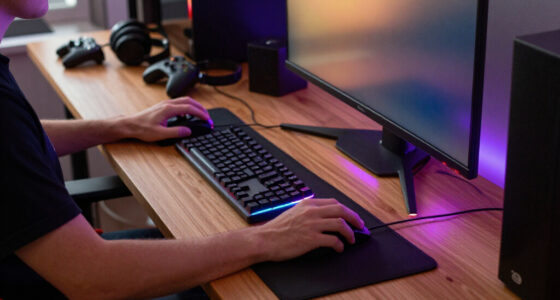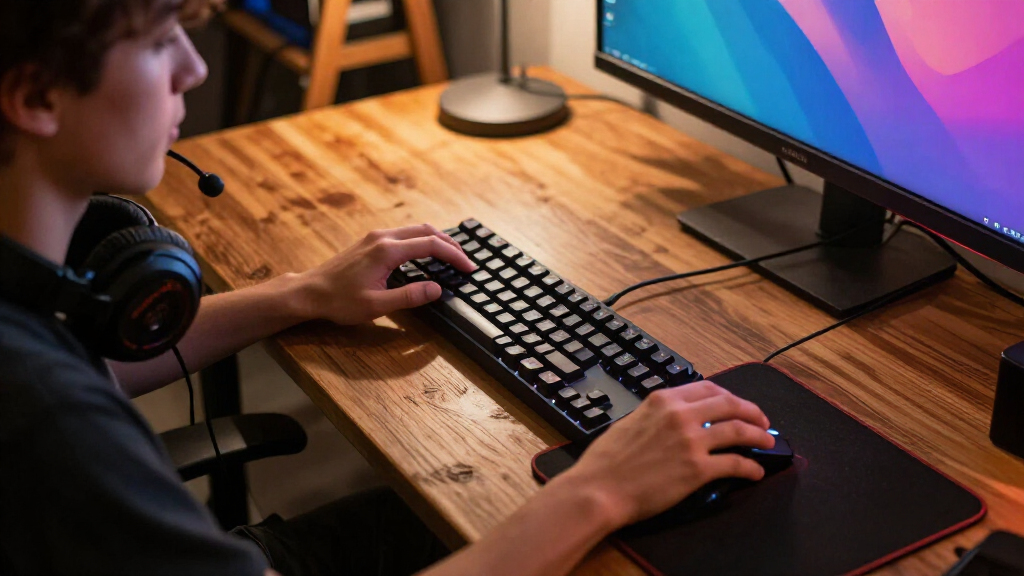

The best gaming accessories improve the parts of play you notice most, whether that means more precise mouse control, clearer headset audio, or a tidier desk. My best overall pick is the Razer Basilisk V3, which balances an ergonomic shape with customizable controls; the Logitech G305 is a strong alternative for players who want wireless freedom, while the Razer BlackShark V2 X focuses on a wired headset setup. The main tradeoffs are wired reliability versus wireless convenience, focused single-purpose gear versus multifunction add-ons, and desk coverage versus space. Continue reading for the full breakdown of all 14 options and guidance on choosing accessories that fit your setup.

Play games on Amazon Luna for your game nights, included with Prime
- A rotating selection of games, no download needed
- Play on TV, laptop or phone
- Fast, free delivery for your gear, too
Complete the kit


Key Takeaways
- The Basilisk V3 is my best overall pick because its ergonomic design and customizable controls make it a versatile mouse choice, while the G305 suits buyers who put wireless convenience first.
- Mouse shape and connection type matter more than headline DPI figures; the lineup includes wired and wireless mice with different handling and setup tradeoffs.
- Extended mouse pads vary more by extras and dimensions than by basic purpose: the BladeHawks and DR CATCH focus on broad desk coverage, while the Gimars adds Qi wireless charging.
- Dedicated keypads serve different needs: the Redragon K585 has a 42-key layout, while the Razer Tartarus V2 offers 32 programmable keys.
- Desk accessories solve distinct problems: KDD stands organize headsets and controllers, the Monkey Bomb holder adds a character-themed display, and the VELENTI stand keeps a phone or Kindle accessible.
| Razer BlackShark V2 X Wired Gaming Headset with 7.1 Surround Sound |  | Best for Lightweight, Cross-Platform Audio | Type: Wired gaming headset | Driver size: 50 mm | Connection: 3.5 mm audio jack | VIEW LATEST PRICE | See Our Full Breakdown |
| BladeHawks RGB Extended Gaming Mouse Pad, 31.5 x 12 Inches, Black | 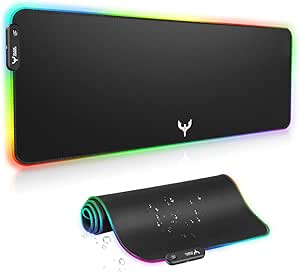 | Best for an RGB Desk Setup | Dimensions: 31.5 x 12 inches (800 x 300 mm) | Thickness: 4 mm | Surface: Micro-textured cloth | VIEW LATEST PRICE | See Our Full Breakdown |
| Razer Basilisk V3 Wired Ergonomic Gaming Mouse with Customizable RGB |  | Best for Customizable Controls | Connectivity: USB wired | Maximum sensitivity: 26,000 DPI | Programmable buttons: 11 | VIEW LATEST PRICE | See Our Full Breakdown |
| Gimars RGB Gaming Mouse Pad with 15W Qi Wireless Charging |  | Best for Qi Charging at the Desk | Dimensions: 800 x 300 x 4 mm (31.5 x 11.8 x 0.16 in) | Wireless charging: Up to 15W Qi | Lighting modes: 10 (7 static and 3 dynamic) | VIEW LATEST PRICE | See Our Full Breakdown |
| Redragon K585 Wired One-Handed RGB Gaming Keypad, 42-Key Layout |  | Best for Dedicated Gaming Macros | Keyboard type: One-handed mechanical gaming keypad | Number of keys: 42 | Macro controls: 7 keys; 28 slots across 4 profiles | VIEW LATEST PRICE | See Our Full Breakdown |
| Logitech G305 LIGHTSPEED Wireless Gaming Mouse, HERO 12K Sensor, Black |  | Best Lightweight Wireless Mouse | Connectivity: 2.4 GHz LIGHTSPEED wireless via USB receiver | Sensor: HERO optical | Sensitivity: 200–12,000 DPI | VIEW LATEST PRICE | See Our Full Breakdown |
| KDD Headset Stand with Charging Station, Detachable Controller Holder, and 9 Lighting Modes |  | Best Charging and Storage Hub | Model: KDD-766 | Charging ports: 2 USB-A and 1 USB-C | Storage capacity: 1 headset and 2 controllers, or up to 4 controllers | VIEW LATEST PRICE | See Our Full Breakdown |
| Exquisite Gaming Call of Duty Monkey Bomb Phone and Controller Holder |  | Best Gaming Collectible Stand | Product type: Phone and controller holder | Character and franchise: Monkey Bomb, Call of Duty | License: Officially licensed by Activision | VIEW LATEST PRICE | See Our Full Breakdown |
| Redragon M810 PRO Wireless RGB Gaming Mouse |  | Best for Extra Programmable Controls | Connectivity: 2.4 GHz wireless and USB-C | Sensor: Pixart PAW3325 optical | DPI settings: 500, 1,000, 2,000, 3,000, and 10,000; maximum listed sensitivity 12,000 DPI | VIEW LATEST PRICE | See Our Full Breakdown |
| KDD RGB Headset Stand with Detachable Controller Hook, Rotating Headphone Holder, and 9 Light Modes |  | Best for Rotating Headset Storage | Model: KDD-728B | Headphone holder: 360-degree rotating | Storage capacity: 1 headset and 2 controllers, or up to 4 controllers | VIEW LATEST PRICE | See Our Full Breakdown |
| Logitech G502 HERO Wired Gaming Mouse with 25,600 DPI Sensor |  | Best for Customizable Controls | Connectivity: USB wired | Sensor: Optical | Maximum sensitivity: 25,600 DPI | VIEW LATEST PRICE | See Our Full Breakdown |
| Razer Tartarus V2 Left-Handed Gaming Keypad with 32 Programmable Keys | 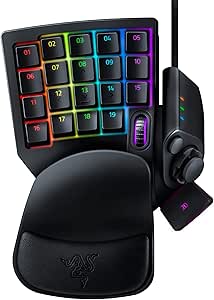 | Best for Macro-Heavy PC Games | Device type: Single-handed gaming keypad | Hand orientation: Left | Number of keys: 32 | VIEW LATEST PRICE | See Our Full Breakdown |
| VELENTI Gamer Chair Phone Stand for Smartphones and Kindles |  | Best Compact Desk Accessory | Product type: Tabletop phone stand | Design: Gamer chair | Compatible devices: Smartphones and Kindles | VIEW LATEST PRICE | See Our Full Breakdown |
| DR CATCH RGB Extended Gaming Mouse Pad, 31.5 x 11.8 Inches |  | Best for a Coordinated Desk Setup | Dimensions: 31.5 × 11.8 in | Thickness: 0.3 in | Weight: 0.69 kg | VIEW LATEST PRICE | See Our Full Breakdown |
| gaming accessorie | Dimensions |
|---|---|
| Razer BlackShark V2 X Wired Ga | — |
| BladeHawks RGB Extended Gaming | 31.5 x 12 inches (800 x 300 mm) |
| Razer Basilisk V3 Wired Ergono | — |
| Gimars RGB Gaming Mouse Pad wi | 800 x 300 x 4 mm (31.5 x 11.8 x 0.16 in) |
| Redragon K585 Wired One-Handed | 10.3 x 8.5 x 2 in |
| Logitech G305 LIGHTSPEED Wirel | — |
| KDD Headset Stand with Chargin | 11.42 x 7.4 x 2.94 inches |
| Exquisite Gaming Call of Duty | 5.43 x 5.71 x 9.25 inches |
| Redragon M810 PRO Wireless RGB | — |
| KDD RGB Headset Stand with Det | — |
| Logitech G502 HERO Wired Gamin | — |
| Razer Tartarus V2 Left-Handed | 6.02 × 2.36 × 0.8 in |
| VELENTI Gamer Chair Phone Stan | — |
| DR CATCH RGB Extended Gaming M | 31.5 × 11.8 in |
More Details on Our Top Picks
Razer BlackShark V2 X Wired Gaming Headset with 7.1 Surround Sound
The BlackShark V2 X is the headset pick for players who want a straightforward wired setup without adding much weight. At 240 g, with breathable foam cushions and closed-back earcups, it is better suited to long sessions than desk accessories that add lighting but do not improve comfort. Its 3.5 mm connection supports PC, Mac, PS4, Xbox One, and Switch, while the cardioid microphone is designed to focus on speech. That broad compatibility makes it a more direct plug-in choice than the USB-powered BladeHawks mouse pad, though the pad takes up more desk space rather than requiring a headset fit decision. The tradeoff is that 7.1 surround sound is limited to Windows 10 64-bit, and Xbox One may need a separately sold stereo adapter. Skip it if wireless freedom is a priority.
Pros:- Lightweight 240 g build and breathable foam cushions suit extended sessions.
- 3.5 mm connection supports several PC and console platforms.
- Closed-back earcups are designed to reduce outside noise.
- Cardioid microphone is designed to emphasize the player’s voice.
Cons:- Software-enabled 7.1 surround sound is limited to Windows 10 64-bit.
- Xbox One stereo adapter may be required and is sold separately.
Best for: PC and console players who want a lightweight wired headset with a voice-focused microphone and broad 3.5 mm compatibility.
Not ideal for: Players who need wireless movement, or console users expecting the software-enabled 7.1 feature to work on every platform.
- Type:Wired gaming headset
- Driver size:50 mm
- Connection:3.5 mm audio jack
- Microphone:Razer HyperClear cardioid
- Weight:240 g
- Earcup design:Closed-back, over-ear
- Compatibility:PC, Mac, PS4, Xbox One, Nintendo Switch
- Surround sound:Software-enabled 7.1 on Windows 10 64-bit
Our verdict“Choose the BlackShark V2 X for a lightweight, multi-platform wired headset, but not if you need wireless play or surround sound across platforms.”
BladeHawks RGB Extended Gaming Mouse Pad, 31.5 x 12 Inches, Black
The BladeHawks pad earns its place as the RGB desk-space pick: its 31.5-by-12-inch surface accommodates a keyboard and mouse together, so both can sit on a consistent cloth texture. The micro-textured surface is designed for smooth mouse movement, while a natural rubber base helps keep the pad from sliding. Its USB-powered lighting offers 14 modes and remembers the last selection, giving it more lighting choices than the Gimars pad’s 10 modes. Gimars, however, adds a raised Qi charging platform, making it the more functional choice for compatible devices. BladeHawks keeps the job simpler with a waterproof surface and no charging platform to position around. The main compromise is footprint: this extended pad needs substantial desk space, and its lighting occupies a USB connection.
Pros:- 31.5-by-12-inch surface fits a keyboard and mouse with room for peripherals.
- Micro-textured cloth is designed for smooth, precise mouse movement.
- Fourteen USB-powered lighting modes include power-off memory.
- Waterproof surface and non-slip natural rubber base support everyday use.
Cons:- Extended dimensions can occupy a substantial portion of a desk.
- RGB lighting requires a USB connection.
Best for: PC gamers who want a single illuminated surface beneath their keyboard and mouse and have enough desk space for an extended pad.
Not ideal for: Players with compact desks, or buyers who want a mouse pad to add Qi charging rather than RGB lighting.
- Dimensions:31.5 x 12 inches (800 x 300 mm)
- Thickness:4 mm
- Surface:Micro-textured cloth
- Base:Natural rubber
- Lighting modes:14 (7 static and 7 dynamic)
- Power:USB
- Water resistance:Waterproof surface
- Warranty:1 year
Our verdict“Pick the BladeHawks for a large, illuminated keyboard-and-mouse surface; choose the Gimars instead if built-in Qi charging matters more than extra lighting modes.”
Razer Basilisk V3 Wired Ergonomic Gaming Mouse with Customizable RGB
The Basilisk V3 is the most control-focused mouse in this group, built around a right-handed ergonomic shape, thumb rest, and 11 programmable buttons. That button count gives players more room for macros and secondary commands than a basic mouse, while the dual-mode tilt scroll wheel switches between tactile steps and free-spinning travel. Its 26,000 DPI optical sensor is adjustable, but the more practical distinction from the wireless Logitech G305 is the Basilisk’s wired connection: it avoids wireless setup and charging, at the cost of cable freedom. The Redragon K585 keypad offers a different route to extra commands with dedicated macro keys, but it takes up separate space and does not replace a mouse. The Basilisk is a poor fit for left-handed players or anyone who prefers a wireless desk.
Pros:- Right-handed ergonomic shape includes a thumb rest and accessible controls.
- Eleven programmable buttons support macros and secondary functions.
- Dual-mode tilt scroll wheel switches between tactile and free-spinning modes.
- Optical tracking offers sensitivity up to 26,000 DPI.
Cons:- Right-handed shape is not suited to left-handed use.
- Wired connection restricts movement compared with the wireless Logitech G305.
Best for: Right-handed PC players who want an ergonomic mouse with programmable buttons for macros, actions, and shortcuts.
Not ideal for: Left-handed users and players who prioritize a wireless setup or broad movement without a cable.
- Connectivity:USB wired
- Maximum sensitivity:26,000 DPI
- Programmable buttons:11
- Scroll wheel:Dual-mode HyperScroll tilt wheel
- Hand orientation:Right-handed
- Lighting:11 customizable RGB zones
- Switches:Razer Optical Mouse Switches Gen 2
- Operating system compatibility:Windows 10 and Windows 11
Our verdict“Choose the Basilisk V3 for a right-handed setup that benefits from extensive mouse controls, but opt for the G305 if wireless movement is the priority.”
Gimars RGB Gaming Mouse Pad with 15W Qi Wireless Charging
The Gimars pad combines an extended mouse surface with a feature the BladeHawks does not offer: a raised Qi charging platform for compatible devices. That makes it the better fit for players who want to keep a supported phone or other Qi device positioned on the desk while gaming. Its 31.5-by-11.8-inch fabric surface gives a keyboard and mouse shared space, and the water-resistant finish, non-slip rubber base, and reinforced edges address practical desk use. Compared with BladeHawks, Gimars trades four lighting modes for charging convenience; it has 10 modes rather than 14. The catch is the power setup: a USB-C cable is included, but a power adapter is not, and fast charging depends on a compatible adapter. It may also curl temporarily after transport.
Pros:- Raised Qi platform supports compatible devices at up to 15W.
- Large surface fits a keyboard and mouse together.
- Water-resistant fabric and non-slip rubber base support regular desk use.
- USB-C connection, reinforced edges, and lighting memory add practical convenience.
Cons:- Power adapter is not included, and fast charging requires a compatible adapter.
- The pad may curl temporarily after prolonged transportation.
- Its 10 lighting modes are fewer than the BladeHawks pad’s 14.
Best for: Gamers with Qi-compatible devices who want a large mouse pad and a dedicated charging position in the same desk accessory.
Not ideal for: Buyers without compatible Qi devices, or those who want a simple plug-in lighting pad without arranging a suitable power adapter.
- Dimensions:800 x 300 x 4 mm (31.5 x 11.8 x 0.16 in)
- Wireless charging:Up to 15W Qi
- Lighting modes:10 (7 static and 3 dynamic)
- Surface:Water-resistant, micro-textured fabric
- Base:Non-slip natural rubber
- Interface:USB-C
- Included accessory:USB-C cable
- Warranty:1 year
Our verdict“Choose Gimars if Qi charging is useful in your gaming setup; the BladeHawks is a simpler alternative if you want more lighting modes and no charging platform.”
Redragon K585 Wired One-Handed RGB Gaming Keypad, 42-Key Layout
The Redragon K585 is a gaming keypad, not a compact replacement for a full keyboard. Its 42-key layout puts core controls within reach of one hand, while seven programmable macro keys and 28 slots across four profiles let players set up different command sets. The hot-swappable sockets also allow supported 3-pin and 5-pin switches to be changed without soldering—a customization the Razer Tartarus V2 does not match through the listed switch-swap feature, though that alternative has 32 programmable keys rather than the K585’s 42 total keys. A magnetic wrist rest and USB pass-through add convenience, but the clicky blue switches can be disruptive in quiet rooms. Its wired connection and gaming-focused layout suit a dedicated setup, not typing-heavy work.
Pros:- Seven macro keys and 28 slots support four saved profiles.
- Hot-swappable sockets accept compatible 3-pin and 5-pin switches.
- Includes a USB pass-through port and detachable magnetic wrist rest.
- RGB lighting offers five modes and software customization.
Cons:- One-handed layout is a gaming keypad rather than a full keyboard.
- Clicky blue switches may be loud in quiet environments.
- Wired connection limits placement compared with wireless accessories.
Best for: PC gamers who want a dedicated one-handed control pad, programmable macros, and the option to change compatible switches.
Not ideal for: Players seeking a full keyboard, quiet key presses, or a compact accessory that needs no separate desk space.
- Keyboard type:One-handed mechanical gaming keypad
- Number of keys:42
- Macro controls:7 keys; 28 slots across 4 profiles
- Connectivity:Wired USB-C
- Switches:Clicky blue; hot-swappable 3-pin and 5-pin sockets
- Backlighting:RGB, 16.8 million colors, 5 modes
- Additional features:USB pass-through and detachable magnetic wrist rest
- Dimensions:10.3 x 8.5 x 2 in
- Compatible operating systems:Android, Linux, Windows
Our verdict“Pick the K585 for customizable one-handed controls and switch swapping, but choose a full keyboard if you need an everyday typing layout.”
Logitech G305 LIGHTSPEED Wireless Gaming Mouse, HERO 12K Sensor, Black
The Logitech G305 is the mouse I’d shortlist for players who want low-latency wireless without adding a rechargeable battery or elaborate lighting to their setup. Its 1 ms LIGHTSPEED report rate and HERO sensor support responsive play, while the compact, ambidextrous shape makes it a more flexible pick than the right-handed Redragon M810 PRO. Six programmable buttons cover common binds without the extra controls that can complicate a simple setup.
The tradeoff is power: a replaceable AA battery lasts up to 250 hours, but this mouse cannot be charged over USB-C like the M810 PRO. It also needs its USB receiver, so it is less convenient for devices without a suitable port. I’d choose it for straightforward, portable wireless gaming rather than users who want RGB customization or a rechargeable design.
Pros:- LIGHTSPEED wireless offers a 1 ms report rate for responsive input.
- HERO optical sensor supports up to 12,000 DPI and 400 IPS tracking.
- Ambidextrous compact design suits a range of hand orientations and desk setups.
- One AA battery provides up to 250 hours of use, with receiver storage built in.
Cons:- Requires the included USB receiver and does not offer Bluetooth connectivity.
- Uses a replaceable AA battery rather than a rechargeable battery.
- Six programmable buttons offer fewer control options than the Redragon M810 PRO’s eight.
Best for: PC and Mac players who want a compact, ambidextrous wireless mouse with long battery life and a USB receiver.
Not ideal for: Players who want a rechargeable mouse, extensive programmable controls, or receiver-free Bluetooth connectivity.
- Connectivity:2.4 GHz LIGHTSPEED wireless via USB receiver
- Sensor:HERO optical
- Sensitivity:200–12,000 DPI
- Report rate:1 ms
- Buttons:6 programmable
- Hand orientation:Ambidextrous
- Battery:1 included AA battery; up to 250 hours
- Weight:3.4 oz (99 g)
Our verdict“Choose the G305 if you want compact, responsive wireless gaming and prefer long AA-battery life over USB-C recharging.”
KDD Headset Stand with Charging Station, Detachable Controller Holder, and 9 Lighting Modes
The KDD-766 is the more useful choice for a desk where controllers, a headset, and smaller devices all need a home. It can hold a headset and two controllers, or up to four controllers, and adds two USB-A ports and one USB-C port for charging. That gives it a broader organizing role than the KDD-728B, which focuses on a rotating headphone holder, cable management, and RGB presentation rather than built-in charging ports.
Nine lighting modes with memory let the stand keep a chosen look, while its wide base, rubber feet, and protective padding help keep gear stable. The tradeoff is that charging still requires a separate power source, and the USB-C port is not compatible with iPhone charging. I’d pick this over a simple holder when charging access matters, but not for a desk that needs a stand-alone iPhone charging solution.
Pros:- Stores a headset and two controllers, or up to four controllers.
- Provides two USB-A ports and one USB-C port for compatible devices.
- Nine lighting modes include a memory function.
- Wide base, rubber feet, and protective padding support stable, scratch-conscious storage.
Cons:- Charging ports need a separate power source.
- The USB-C port is not compatible with iPhone charging.
- Plastic casing may not suit buyers seeking a metal stand.
Best for: Console players with several controllers and a headset who want tabletop storage plus USB charging ports for compatible devices.
Not ideal for: iPhone owners seeking USB-C charging from the stand or buyers who do not have a separate power source available.
- Model:KDD-766
- Charging ports:2 USB-A and 1 USB-C
- Storage capacity:1 headset and 2 controllers, or up to 4 controllers
- Lighting:9 modes with memory
- Dimensions:11.42 x 7.4 x 2.94 inches
- Material:Plastic casing
- Power control:Built-in circuit connect/disconnect button
- USB-C compatibility:Not compatible with iPhone charging
Our verdict“Choose the KDD-766 if you want controller and headset storage with extra charging ports, provided you have a separate power source.”
Exquisite Gaming Call of Duty Monkey Bomb Phone and Controller Holder
The Call of Duty Monkey Bomb holder brings character to a gaming desk while giving a controller or phone a designated resting place. Its weighted base and 8.5-inch figure make it a more display-focused accessory than either KDD stand: those models hold several pieces of gear and, in one case, provide charging ports, while this one puts the officially licensed Monkey Bomb design first. It can also hold remotes and eBook readers, so it is not limited to a single gaming device.
The compromise is function. This is a passive tabletop holder, not a charging dock, and it lacks the multi-controller capacity and cable organization of the KDD-728B. The weighted base is intended to help prevent tipping, but the character-shaped design takes up desk space and may not match every setup. I’d choose it when collectible styling matters as much as having a convenient place to set down a controller.
Pros:- Officially licensed Call of Duty Monkey Bomb design adds collectible appeal.
- Weighted base is designed to help prevent tipping.
- Compatible with most controllers, smartphones, remotes, and eBook readers.
Cons:- Does not provide charging or electronic connectivity.
- Holds devices individually rather than organizing multiple controllers and a headset.
- Character-shaped design may take up more desk space than a simple holder.
Best for: Call of Duty fans who want a licensed desk collectible that can hold a controller, phone, remote, or eBook reader.
Not ideal for: Players who need charging, cable management, or organized storage for multiple controllers and a headset.
- Product type:Phone and controller holder
- Character and franchise:Monkey Bomb, Call of Duty
- License:Officially licensed by Activision
- Material:PVC
- Height:8.5 inches
- Dimensions:5.43 x 5.71 x 9.25 inches
- Weight:1.3 lb
- Compatible devices:Most gaming controllers, smartphones, TV remotes, and eBook readers
Our verdict“Choose this holder if you want a Call of Duty display piece that also supports a device, not a charging or multi-controller station.”
Redragon M810 PRO Wireless RGB Gaming Mouse
The Redragon M810 PRO suits players who want more mouse controls and visible customization without a cable. Its eight programmable buttons give it an advantage over the Logitech G305’s six for extra binds or macros, while five onboard DPI levels make sensitivity changes available without relying on a single fixed setting. Rechargeable USB-C power also avoids the G305’s replaceable AA battery, and customizable RGB adds a visual feature the Logitech lacks.
That flexibility comes with compromises: Redragon specifies up to 45 hours in eco mode, well below the G305’s stated battery life, and the M810 PRO’s right-handed shape excludes left-handed users. Its listed 250 g weight is also substantially heavier than the compact Logitech. I’d favor it for right-handed players who value extra buttons, RGB, and recharging; for a lighter mouse with longer stated battery life, the G305 is the clearer fit.
Pros:- Eight programmable buttons support additional binds and macros.
- Rechargeable lithium-polymer battery charges via USB-C.
- Customizable RGB lighting allows visual personalization.
- Five onboard DPI levels provide several sensitivity settings.
Cons:- Right-handed design is not suited to left-handed users.
- Battery life is specified at up to 45 hours in eco mode and varies by mode.
- Listed weight of 250 g is substantially heavier than the Logitech G305.
Best for: Right-handed PC and laptop players who want eight programmable buttons, RGB lighting, and rechargeable wireless use.
Not ideal for: Left-handed players or buyers who prioritize a lighter mouse and longer stated battery life over extra controls and RGB.
- Connectivity:2.4 GHz wireless and USB-C
- Sensor:Pixart PAW3325 optical
- DPI settings:500, 1,000, 2,000, 3,000, and 10,000; maximum listed sensitivity 12,000 DPI
- Polling rate:1,000 Hz
- Programmable buttons:8
- Battery:Rechargeable lithium polymer; up to 45 hours in eco mode
- Hand orientation:Right-handed
- Weight:250 g
Our verdict“Choose the M810 PRO if you want a rechargeable, RGB wireless mouse with extra programmable controls and use it right-handed.”
KDD RGB Headset Stand with Detachable Controller Hook, Rotating Headphone Holder, and 9 Light Modes
The KDD-728B is aimed at players who want a tidy headset station with a little more flexibility than a fixed hook. Its 360-degree rotating headphone holder can be repositioned, and the cable organizers help keep headset wiring near the stand. The detachable controller hook and capacity for a headset plus two controllers, or up to four controllers, make it a stronger storage-focused option than the Monkey Bomb holder, which is built around a single device and collectible styling.
Nine RGB modes with memory add desk lighting, while four rubber pads help limit slipping and protect the surface. Unlike the KDD-766, this model has no listed charging ports, so its value is in organization rather than charging. The plastic construction and three-part assembly are also less appealing to buyers who want a sturdier, ready-to-use stand. I’d choose it when rotating headset placement and cable tidiness matter more than charging features.
Pros:- 360-degree rotating headphone holder can be repositioned.
- Cable organizers help manage headset wiring.
- Detachable controller hook and capacity for multiple controllers add storage flexibility.
- Nine RGB modes include a memory function, and rubber pads help protect the desk.
Cons:- Plastic construction may be less durable than metal alternatives.
- Requires assembly from three parts.
- Does not list charging ports, unlike the KDD-766.
Best for: Gamers who want a rotating headset holder, cable organization, and flexible controller storage on a shared desk.
Not ideal for: Buyers who need built-in charging ports or prefer a metal stand that requires no assembly.
- Model:KDD-728B
- Headphone holder:360-degree rotating
- Storage capacity:1 headset and 2 controllers, or up to 4 controllers
- Controller hook:Detachable
- Lighting:9 RGB modes with memory function
- Base:Pedestal with 4 rubber pads
- Assembly:3 parts
- Weight:0.53 kg
Our verdict“Choose the KDD-728B if rotating headset storage and cable organization matter more to you than built-in charging.”
Logitech G502 HERO Wired Gaming Mouse with 25,600 DPI Sensor
The Logitech G502 HERO suits players who want many commands close at hand without adding a separate keypad. Its 11 programmable buttons and dual-mode scroll wheel offer more control options than the simpler mouse setup of the Logitech G305 LIGHTSPEED, while the adjustable weights let you tune the balance rather than accept a fixed feel. The optical sensor reaches 25,600 DPI, though sensitivity alone is not a reason to choose it; the practical draw is being able to tailor controls and handling to different games. The tradeoff is its wired USB connection, which restricts movement compared with the wireless G305. RGB synchronization also requires Logitech Gaming Software, and its right-handed shape makes it a poor fit for left-handed players.
Pros:- 11 programmable buttons support shortcuts and game-specific commands
- Five removable 3.6 g weights allow balance adjustment
- Dual-mode scroll wheel offers both controlled and rapid scrolling
- Optical sensor supports sensitivity up to 25,600 DPI
Cons:- Wired USB connection limits movement compared with the Logitech G305 LIGHTSPEED
- RGB synchronization requires Logitech Gaming Software
- Right-handed design excludes left-handed users
Best for: Right-handed PC players who want programmable mouse controls and adjustable weight for different game styles
Not ideal for: Players who prioritize wireless freedom, left-handed ergonomics, or a simple plug-and-play mouse without software-dependent lighting
- Connectivity:USB wired
- Sensor:Optical
- Maximum sensitivity:25,600 DPI
- Programmable buttons:11
- Scroll wheel:Dual-mode hyper-fast
- Weight system:Five removable 3.6 g weights
- Hand orientation:Right-handed
- Cable length:1.0 m
Our verdict“Choose the G502 HERO if you want extensive onboard controls and adjustable weight more than wireless convenience.”
Razer Tartarus V2 Left-Handed Gaming Keypad with 32 Programmable Keys
The Razer Tartarus V2 is for players who want a dedicated bank of commands under one hand, not a replacement for a conventional keyboard. Its 32 remappable keys, macros, 8-way thumbpad, and three-way scroll wheel can keep frequent actions within reach in games with elaborate control schemes. Compared with the Redragon K585, this keypad offers a different control layout and more keys than the K585’s 42-key count suggests as a direct measure of fit; the better choice depends on which arrangement feels more useful for your game. Mecha-Membrane switches pair tactile feedback with a cushioned feel, and the two-position palm rest adds some adjustability. The cost of this specialized layout is clear: it is not suited to ordinary two-handed typing, and its USB-A cable keeps it tethered.
Pros:- 32 programmable keys support remapping and macros
- 8-way thumbpad and three-way scroll wheel add control options
- Mecha-Membrane keys combine tactile feedback with a cushioned feel
- Two-position adjustable palm rest supports a more tailored hand position
Cons:- Single-handed layout is not a substitute for a conventional keyboard
- USB-A wired connection limits placement and movement
- Specialized controls may go unused in games with simple key layouts
Best for: PC players who use many hotkeys or macros in MMO, strategy, or simulation games and want a dedicated one-handed control surface
Not ideal for: Players seeking a full keyboard replacement, wireless controls, or a conventional setup for typing and general computer work
- Device type:Single-handed gaming keypad
- Hand orientation:Left
- Number of keys:32
- Switch type:Mecha-Membrane
- Connectivity:USB-A wired
- Controls:8-way thumbpad and three-way scroll wheel
- Palm rest:Adjustable, two positions
- Dimensions:6.02 × 2.36 × 0.8 in
Our verdict“Pick the Tartarus V2 if your games benefit from a dedicated macro keypad and you are comfortable keeping a standard keyboard for typing.”
VELENTI Gamer Chair Phone Stand for Smartphones and Kindles
The VELENTI Gamer Chair Phone Stand adds a small, practical place for a phone or Kindle without taking over the desk. Its chair-shaped design brings more gaming-themed character than the plain utility of the DR CATCH Extended Gaming Mouse Pad, but it solves a different problem: keeping a secondary device upright and within reach rather than creating more mouse space. The stand fits smartphones and Kindles up to 19 cm tall and weighs 0.08 kg, making it easy to place beside a keyboard or move when clearing the surface. Its biodegradable material is a useful distinction in a category dominated by desk gear. The limitations are its tabletop-only placement and fixed size range; it does not charge or mount a device, and larger devices may not fit.
Pros:- Chair-inspired shape adds a gaming accent to a desk
- Holds compatible smartphones and Kindles upright and within reach
- Supports devices up to 19 cm tall
- Made from durable, biodegradable materials
Cons:- Only fits devices within its 19 cm height limit
- Tabletop design offers no clamp or alternate mounting option
- Does not provide charging or device-position adjustment
Best for: Gamers who keep a compatible phone or Kindle on the desk for messages, guides, or reference while playing
Not ideal for: Buyers who need a charging stand, an adjustable mount, or support for devices taller than 19 cm
- Product type:Tabletop phone stand
- Design:Gamer chair
- Compatible devices:Smartphones and Kindles
- Maximum device height:19 cm
- Material:Biodegradable materials
- Mounting type:Tabletop
- Item weight:0.08 kg
- Color:Black
Our verdict“Choose this stand if you want a compact, gaming-themed place for a compatible phone or Kindle, not a mount or charger.”
DR CATCH RGB Extended Gaming Mouse Pad, 31.5 x 11.8 Inches
The DR CATCH RGB Extended Gaming Mouse Pad makes the most sense for players who want one broad surface for both keyboard and mouse, with lighting built into the desk area. At 31.5 × 11.8 inches, it provides room to move a mouse without leaving the pad, while its waterproof microfiber surface is easier to clean than an uncoated fabric mat. The 14 lighting modes and mode memory offer more setup choices than a basic pad, though the BladeHawks RGB Extended Gaming Mouse Pad has a similar extended format, so desk fit and surface needs matter more than the RGB label alone. The rubber base helps resist slipping, but lighting requires a USB connection, and the wide footprint can crowd smaller desks. This is a surface upgrade, not a compact accessory.
Pros:- Extended surface fits a keyboard and mouse in one area
- Waterproof microfiber surface is smooth and easy to clean
- Rubber base helps keep the pad stable
- 14 lighting modes and last-mode memory allow quick setup
Cons:- 31.5-inch width needs substantial desk space
- RGB lighting requires a USB connection
- Large format is unnecessary for players who only need a compact mouse surface
Best for: PC gamers with a spacious desk who want keyboard-and-mouse coverage, easy-clean fabric, and configurable RGB lighting
Not ideal for: Players with limited desk space or anyone who wants a mouse pad without a USB-powered lighting connection
- Dimensions:31.5 × 11.8 in
- Thickness:0.3 in
- Weight:0.69 kg
- Materials:Microfiber and rubber
- Lighting modes:14
- Power:USB
- Surface features:Waterproof; lighting mode memory
- Shape:Rectangular
Our verdict“Choose the DR CATCH if your desk can accommodate an extended pad and you want easy-clean coverage with USB-powered RGB.”
How We Picked
I compared the 14 accessories by the job each one does, then weighed practical performance, usability, build and setup fit. For mice, I considered wired versus wireless operation, ergonomic intent, and control features; for headsets, the focus was on whether the product offers a straightforward gaming audio option. For pads, keypads, stands, and holders, I looked at usable surface area, added functions, desk footprint, and whether the accessory has a clear purpose beyond appearance.
The ranking favors accessories that can improve a common part of a gaming setup without requiring a narrow use case. That puts the Basilisk V3 ahead as a broadly useful mouse, while more specialized products rank higher for the buyers they serve: the G305 for wireless play, the Tartarus V2 for programmable left-hand input, and the Gimars pad for charging convenience. Similar-looking desk products are separated by function rather than styling alone, and every pick carries a tradeoff such as wiring, space needs, limited compatibility, or a more specialized role.
Factors to Consider When Choosing Best Gaming Accessories
Start with the part of your setup that causes the most friction, not the accessory with the longest feature list. These broader checks can help you avoid buying overlapping gear or choosing a device that does not fit your desk, games, or habits.
Match the accessory to the problem you actually have
Accessories are most useful when they address a specific annoyance: mouse control, headset comfort, limited desk space, or awkward access to common commands. Before buying, note what interrupts play or makes your setup less comfortable. A keypad may help if a game uses many commands, but it adds little if your keyboard already handles them comfortably. A headset stand tidies a desk but does not improve audio. Avoid choosing several accessories that solve the same problem while leaving your main pain point untouched.
Choose a mouse by shape and connection, not just sensor figures
Mouse fit depends on hand size, grip, weight preference, and how much movement your games require. A feature-rich wired mouse and a compact wireless model can both be sensible choices, but they suit different routines. Wireless removes cable drag, while wired play avoids charging and receiver management. Specifications such as maximum DPI do not tell you whether a mouse shape will feel natural or whether its controls match your games. If possible, prioritize a return policy and check the mouse dimensions before committing.
Check desk dimensions before choosing a large pad
An extended pad can give a mouse more room and create a consistent surface under both keyboard and mouse, but its footprint can crowd a small desk. Measure the clear area after accounting for monitor stands, speakers, and anything you need to reach during play. A wider pad is not automatically better if it forces your keyboard into an uncomfortable position. Also decide whether extras such as wireless charging are useful in your routine or simply add another feature to maintain. Keep a clear plan for cleaning and drying a large fabric surface.
Treat keypads as a learning and layout choice
A gaming keypad can free up space around the mouse and put programmable commands within reach, but it changes how you interact with games. The number of keys matters less than whether the layout and thumb controls suit your hand and the games you play. Check whether the software supports the assignments you need and whether you are comfortable configuring profiles. New users may get more value from a familiar keyboard before adding a separate input device. Left-handed placement and available desk space deserve attention before purchase.
Separate useful desk organization from decorative extras
Headset stands, controller hooks, themed holders, and phone stands can reduce clutter, but they do not all serve the same purpose. If you need charging, confirm what the stand actually powers and which devices or cables are required; a holder alone may only provide storage. Lighting is a visual feature, so check whether it can be turned off or controlled if you prefer a low-distraction desk. Measure the stand’s footprint and check that your controller, headset, phone, or e-reader fits securely. Choose decorative pieces for their display appeal only after the practical fit is clear.
Frequently Asked Questions
Should I choose a wired or wireless gaming mouse?
Choose based on how you prefer to manage your setup, rather than assuming one connection is always better. A wired mouse avoids charging and receiver upkeep, while a wireless model removes cable drag and can make a desk feel less restricted. The G305 is the wireless option in this lineup, while the Basilisk V3 and G502 HERO use wired connections. Compare shape and controls alongside connection type, since those have a direct effect on everyday handling. If charging interruptions would bother you, a wired model may be the simpler fit.
Is a gaming keypad worth adding if I already own a full keyboard?
A keypad is most useful when you regularly need extra programmable commands or want a compact input area beside your mouse. It is less compelling if your current keyboard already gives you comfortable access to the commands you use. The K585 and Tartarus V2 have different key counts and layouts, so compare their arrangement with your game habits and hand position. Plan for time spent configuring and learning the new controls. For occasional play or simple command sets, your existing keyboard may be enough.
Do I need an extended mouse pad, or will a standard pad work?
A standard pad is usually easier to place and move, while an extended pad can provide a larger, continuous surface for mouse and keyboard. The larger format makes most sense if you use broad mouse movements or want more consistent coverage across your desk. Measure before buying, since a pad that crowds your keyboard or other equipment can make the setup less comfortable. Extra functions, such as Qi charging on the Gimars model, only help if they fit your devices and charging routine. If desk space is tight, a smaller surface may be the more practical choice.
Can a headset stand with charging replace a separate charger?
Not automatically. A stand may organize a headset and controller while providing charging features, but you should check what charging method it uses, what cables or adapters are needed, and whether your devices are compatible. A holder without the right power connection will not replace a dedicated charger. Also decide whether combining storage and charging is helpful or whether a simpler stand would suit your desk better. Verify that the stand can hold your particular headset and controller securely.
Which type of gaming accessory should I buy first?
Start with the accessory that addresses your biggest everyday limitation. If mouse movement feels restricted, consider a mouse or a suitable pad; if audio is the issue, a headset is a more direct improvement than decorative desk gear. Players with crowded desks may get more practical benefit from a stand or holder, while command-heavy games may call for a keypad. Avoid buying multiple small extras before deciding what would change your play or comfort most. This approach also makes it easier to tell whether a new accessory earns its place in your setup.
Conclusion
For the broadest mix of control features and everyday usefulness, my best overall pick is the Razer Basilisk V3. The best value in function depends on your priority: choose the Logitech G305 for wireless convenience or the BladeHawks extended pad for straightforward desk coverage. My best premium-style specialist recommendation is the Razer Tartarus V2 for players who will use programmable left-hand controls; buyers who want a less specialized start should stick with a mouse or headset before adding a keypad. For beginners, the wired Razer BlackShark V2 X is a direct headset option without the added setup choices of a multi-device accessory. For specific needs, pick Gimars for a pad with Qi charging, a KDD stand for headset and controller organization, or the VELENTI holder for keeping a phone or Kindle nearby.