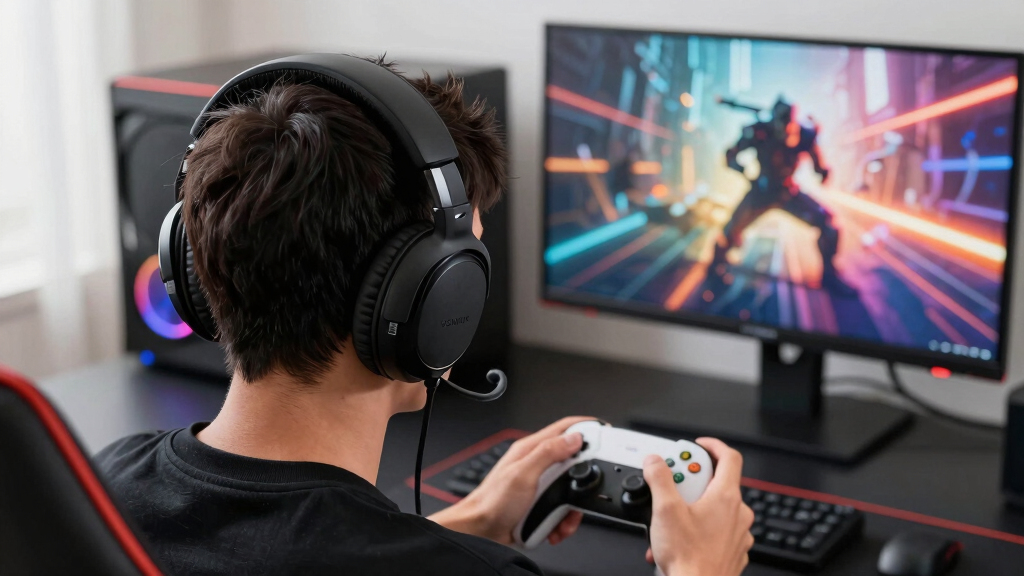

The Corsair HS80 RGB USB is my best overall pick among these gaming headsets with surround sound because it pairs Dolby Audio 7.1 with a focused USB setup that favors PC players who care about positional cues. The Logitech G Pro X stands out as the stronger premium wired choice thanks to its USB DAC, DTS support, and better mic control, while the HyperX Cloud II remains the safer value pick for players who want comfort, durability, and simple 7.1 audio without paying extra for wireless features. The main tradeoff is between software-powered surround accuracy, platform flexibility, mic quality, comfort, and price. Some headsets in this list are better for competitive footsteps, while others make more sense for casual console play or long Discord sessions. Keep reading for the full breakdown of which model fits each type of buyer.
Key Takeaways
- USB headsets ranked higher when surround sound was the priority, because models like the Corsair HS80 RGB USB and Logitech G Pro X give PC players more controlled virtual 7.1 processing than basic 3.5 mm options.
- HyperX models dominated comfort and durability, but they split by buyer type: the Cloud III is the more modern all-rounder, while the Cloud II is the simpler value pick.
- Budget headsets varied the most; the Logitech G432 offers clearer surround positioning than most low-cost picks, while models like the BENGOO G9000 and Senzer SG500 make more sense for casual use than serious spatial audio.
- Wireless adds freedom but raises the price; the Razer BlackShark V3 X HyperSpeed and Logitech G733 are better for cable-free setups, but wired models usually give stronger value for surround-focused gaming.
- Surround sound alone was not enough; the strongest picks balanced positional audio with mic clarity, clamp comfort, platform support, and easy controls.
| Corsair HS80 RGB USB Gaming Headset with Dolby Audio 7.1 Surround Sound |  | Best Overall | Audio Drivers: 50mm neodymium | Sound Technology: Dolby Audio 7.1 surround sound | Frequency Range: 20Hz-40,000Hz | VIEW LATEST PRICE | See Our Full Breakdown |
| Logitech G432 Wired Gaming Headset |  | Best Value Pick | Driver Size: 50 mm | Surround Sound: DTS Headphone:X 2.0 | Connectivity: USB and 3.5 mm jack | VIEW LATEST PRICE | See Our Full Breakdown |
| BENGOO G9000 Stereo Gaming Headset |  | Best Entry-Level Multi-Platform Pick | Compatibility: PS4, PS5, Xbox One, Xbox Series X|S, PC, Nintendo 3DS, laptop, PSP, tablet, iPad, mobile phone | Sound Technology: 7.1 surround sound | Driver Size: 40mm | VIEW LATEST PRICE | See Our Full Breakdown |
| Logitech G Pro X Wired Gaming Headset |  | Best for Team Chat | Microphone: Detachable pro-grade with Blue VO!CE technology | Sound Technology: DTS 7.1 surround sound | Drivers: 50 mm | VIEW LATEST PRICE | See Our Full Breakdown |
| Ozeino Gaming Headset |  | Best RGB Budget Pick | Sound Technology: 7.1 surround sound | Microphone: 360-degree omnidirectional noise-canceling microphone | Lighting: RGB LED lights | VIEW LATEST PRICE | See Our Full Breakdown |
| HyperX Cloud Alpha Gaming Headset, Red |  | Best Analog Sound Clarity | Frequency Response: 15Hz-25,000Hz | Microphone Frequency Response: 50Hz-18,000Hz | Fit Type: Over-ear | VIEW LATEST PRICE | See Our Full Breakdown |
| HyperX Cloud III Wired Gaming Headset, PC, PS5, Xbox Series X|S, Angled 53mm Drivers, Spatial Audio, Memory Foam, Durable Frame, Ultra-Clear 10mm Mic, USB-C, USB-A, 3.5mm – Black/Red |  | Best Wired Spatial Audio Upgrade | Driver Size: 53mm | Driver Design: Angled drivers | Spatial Audio: DTS Headphone:X | VIEW LATEST PRICE | See Our Full Breakdown |
| HyperX Cloud II Gaming Headset – 7.1 Surround Sound, Memory Foam Ear Pads, Durable Aluminum Frame, Multi-Platform Compatibility | 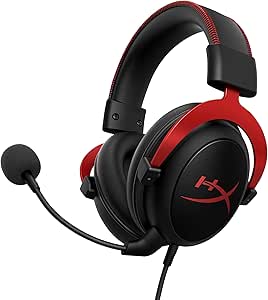 | Best Classic PC 7.1 Pick | Frequency Response: 15-25kHz | Drivers: 53mm | Surround Sound: 7.1 virtual surround | VIEW LATEST PRICE | See Our Full Breakdown |
| Razer Kraken V3 X Wired USB Gaming Headset |  | Best Lightweight PC RGB Pick | Weight: 285g | Drivers: Triforce 40mm | Microphone: HyperClear cardioid | VIEW LATEST PRICE | See Our Full Breakdown |
| Senzer SG500 Surround Sound Pro Gaming Headset with Noise Cancelling Microphone | 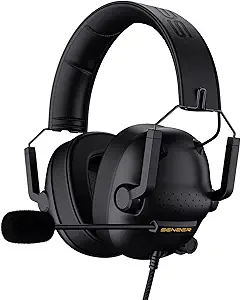 | Best Portable Budget Surround Pick | Model Number: SG500-BK | Weight: 0.66 lbs | Connectivity: Wired 3.5mm jack | VIEW LATEST PRICE | See Our Full Breakdown |
| Razer BlackShark V3 X HyperSpeed Wireless Gaming Headset for PC |  | Best Wireless Battery Pick | Drivers: 50mm TriForce Gen-2 | Surround Sound: 7.1 surround sound | Microphone: Detachable HyperClear cardioid, 9.9mm | VIEW LATEST PRICE | See Our Full Breakdown |
| Razer Kraken Gaming Headset for Console and PC |  | Best Comfort-Focused Wired Pick | Driver Size: 50 mm | Surround Sound: 7.1 on Windows 10 only | Microphone: Retractable noise-isolating cardioid | VIEW LATEST PRICE | See Our Full Breakdown |
| Logitech G733 Lightspeed Wireless Gaming Headset, Suspension Headband, Lightsync RGB, Blue VO!CE Mic, PRO-G Audio – Black |  | Best Wireless Pick for Streamers | Connectivity: Lightspeed 2.4 GHz wireless | Battery Life: Up to 29 hours | Wireless Range: 20 meters | VIEW LATEST PRICE | See Our Full Breakdown |
| Razer BlackShark V2 X Gaming Headset |  | Best Lightweight Wired Value | Sound Technology: 7.1 surround sound | Drivers: 50mm | Noise Cancellation: Passive noise cancellation | VIEW LATEST PRICE | See Our Full Breakdown |
More Details on Our Top Picks
Corsair HS80 RGB USB Gaming Headset with Dolby Audio 7.1 Surround Sound
I rank the Corsair HS80 RGB USB highest here because its Dolby Audio 7.1, wide frequency range, and 24bit/96kHz USB audio make surround cues feel more polished than the simpler BENGOO G9000 or Ozeino options. Compared with the Logitech G432, it feels more purpose-built for PC players who want a richer software-controlled setup, not just broad device support. The tradeoff is platform flexibility: the USB-only connection is less adaptable than the Logitech G Pro X or G432, both of which include 3.5mm options. I’d also flag the mic as more sensitive to positioning than some boom designs. Still, for a buyer focused on surround sound detail, comfort, and a sturdier frame, this is the most balanced pick in this batch.
Pros:- Dolby Audio 7.1 gives games a stronger sense of direction and space
- 24bit/96kHz USB audio is a clear step above basic analog headsets
- Memory foam and breathable microfiber help with longer sessions
- Aluminum-reinforced build feels more durable than many budget options
Cons:- USB-only design limits use with controllers and mobile devices
- iCUE software is needed to get the most from customization
- Omni-directional mic may need careful placement for clear chat
Best for: PC gamers who want refined Dolby surround, hi-res USB audio, and long-session comfort in one headset
Not ideal for: Console-first players or anyone who needs a 3.5mm jack for controllers, handhelds, or mobile devices
- Audio Drivers:50mm neodymium
- Sound Technology:Dolby Audio 7.1 surround sound
- Frequency Range:20Hz-40,000Hz
- Connection:USB wired
- High-Fidelity Sound:24bit/96kHz
- Microphone:Broadcast-grade omni-directional with flip-up mute
- Earpads:Memory foam with breathable microfiber
- Warranty:2 years
Bottom line: I’d choose this first for PC surround sound gaming when audio quality matters more than plug-anywhere flexibility.
Logitech G432 Wired Gaming Headset
The Logitech G432 makes the most sense as my value pick because it gives buyers DTS Headphone:X 2.0, 50 mm drivers, and both USB and 3.5mm connectivity without moving into the more involved Logitech G Pro X setup. Compared with the Corsair HS80 RGB USB, it is easier to use across consoles, Switch, mobile, and PC, though the Corsair has the cleaner PC-only audio path. The G432’s surround feature depends on Logitech G HUB, so PC players get the best version of it, while console users get a more basic wired headset experience. I’d also expect the lighter leatherette build to feel less premium than the Pro X. It wins on practical compatibility, not luxury.
Pros:- DTS Headphone:X 2.0 helps with positional awareness on PC
- USB and 3.5mm connections make it more flexible than USB-only models
- 50 mm drivers give it a stronger base than many entry headsets
- Flip-to-mute mic is simple and quick during multiplayer sessions
Cons:- DTS surround features require Logitech G HUB software
- Wired design can feel limiting at a desk or couch setup
- Materials are more practical than premium
Best for: Budget-conscious multi-platform players who want DTS surround on PC and simple 3.5mm support elsewhere
Not ideal for: Wireless-focused players or buyers who want the most premium materials in this lineup
- Driver Size:50 mm
- Surround Sound:DTS Headphone:X 2.0
- Connectivity:USB and 3.5 mm jack
- Microphone:Flip-to-mute boom mic
- Compatibility:PC, Mac, PlayStation 4/5, Nintendo Switch, mobile devices
- Material:Leatherette ear cups and headband
Bottom line: I’d pick the G432 for buyers who want credible PC surround sound without giving up console and mobile compatibility.
BENGOO G9000 Stereo Gaming Headset
I see the BENGOO G9000 as the starter pick for players who want 7.1 surround sound claims, broad platform support, and a low-friction control layout. It does not chase the more refined Dolby processing of the Corsair HS80 RGB USB or the DTS setup of the Logitech G432, so I’d treat it as an accessible headset rather than a precision surround tool. Its appeal is that it covers PS4, PS5, Xbox, PC, Nintendo handhelds, tablets, and phones with a familiar wired design. The 40 mm drivers are smaller than the 50 mm units in the Logitech models, which may matter for buyers who want fuller sound. The cable is also short for some couch setups, and older Xbox controllers may need an adapter.
Pros:- Broad compatibility covers consoles, PCs, handhelds, tablets, and phones
- 7.1 surround support adds more game-space awareness than basic stereo
- On-cable volume and mic mute controls are easy to reach
- Over-ear padding and adjustable headband suit shared household use
Cons:- 40 mm drivers are less powerful on paper than the 50 mm Logitech and Corsair options
- Older Xbox controllers require a separate Microsoft adapter
- 49-inch cable may be too short for some living-room setups
Best for: Casual players and families who need one affordable wired headset for several consoles and devices
Not ideal for: Competitive PC players who want higher-grade Dolby or DTS surround processing and larger drivers
- Compatibility:PS4, PS5, Xbox One, Xbox Series X|S, PC, Nintendo 3DS, laptop, PSP, tablet, iPad, mobile phone
- Sound Technology:7.1 surround sound
- Driver Size:40mm
- Microphone:Omni-directional, noise-isolating
- Cable Length:49 inches
- Controls:Rotary volume control and microphone mute
- Lighting:LED on earcups
- Warranty:2 years
Bottom line: I’d buy this for an affordable shared gaming headset, not for the most precise surround sound in the roundup.
Logitech G Pro X Wired Gaming Headset
The Logitech G Pro X earns its spot by pairing DTS 7.1 surround sound with a detachable mic using Blue VO!CE processing, which makes it the most communication-focused headset in this group. Compared with the Corsair HS80 RGB USB, the Pro X is less about a clean USB-only PC audio path and more about tuning: EQ profiles, a USB DAC, mic processing, and swappable ear pad styles. Against the Logitech G432, it feels more serious and better equipped for players who spend as much time coordinating as listening for footsteps. That added control brings setup friction, though. Casual players may find the sound card and software more than they want, and the wired design still limits movement.
Pros:- Blue VO!CE mic processing gives chat a more polished sound
- DTS 7.1 surround helps with directional awareness in competitive games
- USB DAC and G HUB profiles allow deeper audio tuning
- Includes both leatherette and velour-style memory foam ear pad options
Cons:- Software and USB sound card setup can feel excessive for casual use
- Wired connection limits movement compared with wireless gaming headsets
- Higher complexity makes it less beginner-friendly than the G432
Best for: Squad-based PC players, streamers, and ranked gamers who care about voice clarity as much as surround cues
Not ideal for: Casual console players who want a simple plug-in headset with minimal software setup
- Microphone:Detachable pro-grade with Blue VO!CE technology
- Sound Technology:DTS 7.1 surround sound
- Drivers:50 mm
- Connectivity:USB and 3.5mm aux
- Ear Pads:Memory foam with leatherette or velour options
- Impedance:35 Ohm
- Included Accessories:USB DAC, carrying bag, mobile cable with inline mic
- Warranty:2-year limited hardware
Bottom line: I’d choose the Pro X when clean team communication and tunable surround audio matter more than grab-and-go simplicity.
Ozeino Gaming Headset
The Ozeino Gaming Headset is the flashy budget choice: it combines 7.1 surround sound, a 360-degree noise-canceling mic, RGB lighting, and wide platform support in a package aimed at players who want more visual energy than the Logitech G432 or BENGOO G9000. I’d place it below the Corsair HS80 RGB USB for surround sound refinement and below the Logitech G Pro X for chat control, but it has a clearer style-first appeal. The breathable protein pads and adjustable headband help its case for longer sessions. The compromises are practical: PC mic use may need a splitter, older Xbox One controllers may need an adapter, and the lighting can be distracting for players who prefer a quieter desk setup.
Pros:- 7.1 surround support gives games more spatial presence than plain stereo
- RGB lighting adds a more expressive look than most budget rivals
- 360-degree noise-canceling mic is built for multiplayer chat
- Works with PC, PlayStation, Xbox Series X/S, Switch, laptops, and mobile devices
Cons:- PC microphone connection may require an extra splitter cable
- Older Xbox One controllers need an additional Microsoft adapter
- RGB lighting may distract buyers who prefer a cleaner setup
Best for: Younger gamers or style-focused players who want RGB lighting, broad device support, and surround features at a lower price point
Not ideal for: Minimalist setups, older Xbox One controller users, or PC buyers who do not want splitter-cable hassle
- Sound Technology:7.1 surround sound
- Microphone:360-degree omnidirectional noise-canceling microphone
- Lighting:RGB LED lights
- Compatibility:PC, PS4, PS5, Xbox Series X/S, Switch, laptop, mobile
- Material:Breathable protein over-ear pads
- Adjustability:Adjustable headband
Bottom line: I’d choose the Ozeino for a budget RGB setup where style and device coverage rank above premium surround processing.
HyperX Cloud Alpha Gaming Headset, Red
I’d place the HyperX Cloud Alpha here for buyers who care more about clean stereo imaging than software-driven surround effects. Its dual chamber drivers are meant to separate bass from mids and highs, which can make footsteps, reloads, and dialogue feel less crowded than on cheaper headsets like the Senzer SG500. Compared with the HyperX Cloud II, though, this is less of a surround-sound specialist because it does not center the package around 7.1 processing. That makes it a smart pick for console players who want reliable positional cues across platforms, but less appealing for PC players chasing virtual surround presets. The detachable cable and aluminum frame add durability, while the mic can be fussy if it is not seated or configured properly.
Pros:- Dual chamber drivers help reduce muddiness in busy game audio
- Comfortable memory foam padding suits long sessions
- Works across PC, PlayStation, Xbox, Switch, and mobile
- Aluminum frame feels more durable than many budget headsets
Cons:- No dedicated 7.1 surround processing in the listed feature set
- Microphone can have connection or static issues if not attached and configured carefully
- Wired analog design lacks the extra tuning options of USB headsets
Best for: Console and multi-platform players who want clear positional audio without relying on PC-only surround software.
Not ideal for: PC players who specifically want built-in 7.1 virtual surround controls, since the Cloud II and Cloud III lean harder into that experience.
- Frequency Response:15Hz-25,000Hz
- Microphone Frequency Response:50Hz-18,000Hz
- Fit Type:Over-ear
- Frame Material:Aluminum
- Ear Cushion Material:Leatherette with memory foam
- Cable:Detachable braided cable
- Compatibility:PC, PS4, PS5, Xbox One, Xbox Series X|S, Nintendo Switch, Mobile
Bottom line: Choose the Cloud Alpha if you want durable, clear wired audio across platforms and do not need PC-focused surround processing.
HyperX Cloud III Wired Gaming Headset, PC, PS5, Xbox Series X|S, Angled 53mm Drivers, Spatial Audio, Memory Foam, Durable Frame, Ultra-Clear 10mm Mic, USB-C, USB-A, 3.5mm – Black/Red
The HyperX Cloud III makes the most sense as the modern HyperX pick in this group because it pairs angled 53mm drivers with DTS Headphone:X spatial audio. Compared with the older HyperX Cloud II, it feels aimed at buyers who want broader connection options, especially USB-C, USB-A, and 3.5mm in one box. I’d rank it above the Cloud Alpha for surround-focused PC use, since its spatial audio support is more central to the design. The tradeoff is that it is still wired, and switching between platforms may take setup instead of feeling completely plug-and-play. Its 10mm mic is also a stronger voice-chat choice than the Senzer SG500’s budget mic, but the headset may feel bulky for players who prefer a lighter frame.
Pros:- DTS Headphone:X spatial audio is well suited to directional game sound
- USB-C, USB-A, and 3.5mm connections cover many devices
- Angled 53mm drivers help create a wider listening position
- 10mm noise-cancelling mic is built for clearer voice chat
Cons:- Wired design limits movement compared with wireless models in the wider roundup
- Bulkier shape may not suit smaller heads or travel bags
- Platform switching can require extra setup
Best for: PC and console players who want one durable wired headset with spatial audio support and flexible connection options.
Not ideal for: Players who want a light or wireless headset, since this model is wired and can feel bulky during travel or long sessions.
- Driver Size:53mm
- Driver Design:Angled drivers
- Spatial Audio:DTS Headphone:X
- Microphone:10mm noise-cancelling mic with built-in mesh filter
- Connectivity:USB-C, USB-A, 3.5mm
- Frame Material:Aluminum
- Compatibility:PC, PS5, Xbox Series X|S, Xbox One, Nintendo Switch, Mac, Mobile
- Color:Black/Red
Bottom line: Pick the Cloud III if you want the most complete wired HyperX option for spatial audio and chat quality.
HyperX Cloud II Gaming Headset – 7.1 Surround Sound, Memory Foam Ear Pads, Durable Aluminum Frame, Multi-Platform Compatibility
I’d choose the HyperX Cloud II for buyers who want a familiar, no-frills path into 7.1 virtual surround on PC or Mac. Compared with the Cloud Alpha, it gives surround processing a bigger role, which helps if the goal is more obvious directional separation in shooters and open-world games. Against the newer Cloud III, though, it feels less current because its USB sound card and 7.1 features are more platform-limited. The comfort formula is still strong: memory foam, a padded leatherette headband, and a sturdy aluminum frame. The main catch is compatibility. Console users can still use the headset, but some of the surround hardware benefits shrink outside PC, Mac, and PS4, so it is best treated as a PC-first value classic.
Pros:- 7.1 virtual surround gives PC and Mac players clearer directional cues
- 53mm drivers provide a fuller sound profile than smaller-driver budget sets
- Memory foam ear cushions and padded headband support long play sessions
- Detachable noise-cancelling mic keeps chat flexible
Cons:- 7.1 surround is limited to PC and Mac
- USB sound card support is limited to PC, Mac, and PS4
- Not supported with Xbox 360 or PS3
Best for: PC and Mac players who want a proven wired headset with simple 7.1 virtual surround and strong comfort.
Not ideal for: Xbox-focused buyers who expect every surround feature to work the same way on console as it does on PC.
- Frequency Response:15-25kHz
- Drivers:53mm
- Surround Sound:7.1 virtual surround
- Microphone:Detachable noise-cancelling microphone
- Fit Type:Over-ear
- Ear Cushions:Memory foam
- Headband:Padded leatherette
- Frame:Durable aluminum
- Compatibility:PC, Mac, PS4, Xbox One, Nintendo Switch, Mobile Devices
Bottom line: The Cloud II is the safest pick here for PC players who want classic wired comfort with simple virtual surround.
Razer Kraken V3 X Wired USB Gaming Headset
The Razer Kraken V3 X earns its spot by being the lightest-feeling PC-focused option in this batch, with a 285g build, 7.1 surround on Windows 10, and Chroma RGB. Compared with the HyperX Cloud III, it is less flexible because it relies on wired USB-A and does not cover consoles or mobile. For a Windows desk setup, though, that narrower focus can be useful: the Triforce 40mm drivers and HyperClear cardioid mic are tuned for games, chat, and visual desk flair rather than broad platform support. I’d pick the Cloud II for wider compatibility, but the Kraken V3 X is better for players who want a lighter headset with RGB at a PC station. The compromise is clear: outside Windows, its surround appeal drops fast.
Pros:- Light 285g design is easier to wear for long PC sessions
- 7.1 surround sound supports better directional awareness on Windows 10
- Chroma RGB adds customization for a matching desk setup
- HyperClear cardioid mic focuses voice pickup during team chat
Cons:- Not compatible with consoles or mobile devices
- 7.1 surround requires Windows 10
- USB-A wired connection is less flexible than 3.5mm or USB-C options
Best for: Windows PC gamers who want a lightweight USB headset with virtual surround and customizable RGB lighting.
Not ideal for: Console, Mac, and mobile players, because the USB-A connection and Windows 10 surround support make it a PC-first headset.
- Weight:285g
- Drivers:Triforce 40mm
- Microphone:HyperClear cardioid
- Sound:7.1 surround sound
- Lighting:Chroma RGB
- Connection:Wired USB-A
- Compatibility:Windows PCs
- Surround Requirement:Windows 10
Bottom line: Choose the Kraken V3 X if your setup is Windows-only and you want light comfort, RGB, and virtual surround over device flexibility.
Senzer SG500 Surround Sound Pro Gaming Headset with Noise Cancelling Microphone
The Senzer SG500 is the budget-minded choice I’d point to when portability matters as much as surround-style game audio. At 0.66 lbs with a foldable design, it is easier to pack than the bulkier HyperX Cloud III, and its 3.5mm jack works across consoles, PC, Switch, Mac, and mobile. That broad compatibility makes it more flexible than the Razer Kraken V3 X, which is locked to Windows PCs. The tradeoff is refinement: the Senzer cannot match the Cloud II’s 53mm-driver 7.1 package or the Cloud Alpha’s cleaner dual chamber approach. Its wired-only setup also means no couch-friendly wireless freedom. This pick is less about premium surround precision and more about getting an affordable, travel-friendly headset that still supports positional game sound.
Pros:- Foldable design is easier to store and carry
- Light 0.66 lb build reduces fatigue during longer sessions
- 3.5mm connection supports many consoles, PCs, Macs, and mobile devices
- Noise-cancelling microphone helps keep voice chat clearer
Cons:- Wired 3.5mm design may require adapters on some devices
- No wireless option for couch or handheld play
- Surround performance is less advanced than pricier HyperX models
Best for: Budget console and Switch players who want a light, foldable wired headset for home and travel.
Not ideal for: Competitive PC players who want more precise virtual 7.1 processing and higher-end driver design.
- Model Number:SG500-BK
- Weight:0.66 lbs
- Connectivity:Wired 3.5mm jack
- Sound:Surround sound
- Microphone:Noise-cancelling microphone
- Design:Foldable
- Battery Life:8 hours
- Color:Black
- Platform Compatibility:PC, PS4, PS5, Xbox One, Switch, Mac, Mobile
Bottom line: The SG500 is the practical low-cost pick for players who want portable surround-style audio across many devices.
Razer BlackShark V3 X HyperSpeed Wireless Gaming Headset for PC
I rank the Razer BlackShark V3 X HyperSpeed highest here for players who want surround cues without cable drag. Its 70-hour battery life gives it a clear endurance lead over the Logitech G733, which is more style-driven but shorter-lived at up to 29 hours. The 50mm TriForce Gen-2 drivers and 7.1 surround setup make this model better suited to shooters where footsteps, reloads, and distance cues matter. The tradeoff is flexibility: it has wireless, Bluetooth, and USB, but no classic 3.5mm fallback like the Razer BlackShark V2 X. I would also treat it as a gaming-first headset rather than an all-purpose audio pair, since its strengths are positional sound, chat, and low-lag play rather than music refinement.
Pros:- 70-hour battery life is much stronger than most wireless gaming headsets in this group
- 50mm TriForce Gen-2 drivers are built for clearer separation between game effects
- Detachable cardioid mic keeps voice pickup focused for team chat
- 270g weight makes it easier to wear through long multiplayer sessions
Cons:- No standard 3.5mm wired option for controllers or older devices
- PC-focused feature set limits its appeal as a universal console headset
- Battery life can drop depending on connection mode and volume
Best for: PC players who want long wireless sessions, low-lag gaming audio, and 7.1 positional sound without a heavy headset.
Not ideal for: Console players or anyone who wants a simple 3.5mm wired backup, since this model leans on wireless, Bluetooth, and USB connections.
- Drivers:50mm TriForce Gen-2
- Surround Sound:7.1 surround sound
- Microphone:Detachable HyperClear cardioid, 9.9mm
- Wireless:2.4 GHz wireless and Bluetooth
- USB Connection:USB supported
- Battery Life:Up to 70 hours
- Weight:270g
- Primary Platform:PC
Bottom line: This is the one I would pick for PC gamers who want wireless freedom and long battery life without giving up 7.1 surround positioning.
Razer Kraken Gaming Headset for Console and PC
The Razer Kraken makes the list because it puts comfort and platform reach ahead of wireless features. Compared with the Razer BlackShark V2 X, it feels like the more comfort-oriented pick thanks to its cooling gel-infused cushions and durable aluminum frame, while still offering 50mm drivers and 7.1 surround on Windows 10. That makes it a smart choice for players who split time between PC and consoles but still want richer PC positional audio when available. The catch is that its surround feature is not universal; on PS5, Xbox, Switch, and mobile, it functions more like a traditional stereo headset. I also rank it below the BlackShark V3 X HyperSpeed for players who care most about wireless freedom or battery life.
Pros:- Cooling gel-infused cushions help reduce heat during long play sessions
- Bauxite aluminum frame gives it a sturdier feel than many entry-level headsets
- Broad compatibility covers PC, PlayStation, Xbox, Switch, and mobile
- Retractable cardioid mic keeps the headset cleaner when chat is not needed
Cons:- 7.1 surround sound works only on Windows 10
- Microphone quality can be less consistent than more chat-focused models
- Wired design lacks the freedom of the BlackShark V3 X HyperSpeed or Logitech G733
Best for: Players who use several platforms and want a durable wired headset with stronger comfort for long sessions.
Not ideal for: Buyers who expect 7.1 surround on every device, since the surround feature is limited to Windows 10.
- Driver Size:50 mm
- Surround Sound:7.1 on Windows 10 only
- Microphone:Retractable noise-isolating cardioid
- Frame Material:Bauxite aluminum
- Compatibility:PC, PS4, PS5, Switch, Xbox One, Xbox Series X & S, Mobile
- Ear Cushions:Oval cooling gel-infused cushions
- Controls:In-line controls
- Color:Black/Blue
Bottom line: I would choose the Razer Kraken for multi-platform players who value comfort and durability more than wireless features.
Logitech G733 Lightspeed Wireless Gaming Headset, Suspension Headband, Lightsync RGB, Blue VO!CE Mic, PRO-G Audio – Black
I see the Logitech G733 Lightspeed as the best fit for players who want their headset to handle gaming, chat, and on-camera style at once. Compared with the Razer BlackShark V3 X HyperSpeed, it gives up a lot of battery life, but it answers with Lightsync RGB, Blue VO!CE mic filters, and a suspension headband that suits streaming setups and longer casual sessions. The 40mm PRO-G drivers are smaller than the 50mm drivers on the Razer models, so buyers chasing the strongest surround impact may prefer the BlackShark line. Its software dependence is another tradeoff: the best mic and lighting controls require setup. Still, for PC and console players who want low-latency wireless plus a more expressive design, this pick has a clearer identity than the plainer wired options.
Pros:- Lightspeed wireless gives low-lag play with a 20-meter range
- Blue VO!CE filters add more control over how voice chat sounds
- Dual-zone Lightsync RGB helps it stand out on camera
- Suspension headband and 278g weight support longer sessions
Cons:- Up to 29 hours of battery life trails the Razer BlackShark V3 X HyperSpeed
- Full lighting and mic customization depends on Logitech software
- Wireless-only setup is less flexible than headsets with USB and 3.5mm options
Best for: Streamers and social players who want wireless gaming audio, RGB styling, and software-based mic tuning.
Not ideal for: Minimalist players who do not want software setup or anyone who needs a wired 3.5mm connection.
- Connectivity:Lightspeed 2.4 GHz wireless
- Battery Life:Up to 29 hours
- Wireless Range:20 meters
- Audio Drivers:40 mm PRO-G
- Lighting:Dual-zone Lightsync RGB
- Microphone:Blue VO!CE filters
- Weight:278 g
- Compatibility:PC, PS5, PS4, Switch
- Color Options:Multiple color options
Bottom line: This is my pick for streamers and social gamers who want surround-ready wireless audio with stronger visual personality.
Razer BlackShark V2 X Gaming Headset
The Razer BlackShark V2 X earns its spot as the simplest way to get 7.1 surround on PC in a lightweight wired headset. At 240g, it is lighter than the Razer Kraken and the Logitech G733, which makes it especially appealing for players who dislike clampy or bulky headsets. Its 50mm drivers and passive noise isolation help sharpen in-game cues, while the 3.5mm jack gives it broader plug-and-play reach than wireless-only models. The limits are clear: surround sound is Windows 10 only, there is no wireless mode, and Xbox One users may need an adapter. I rank it below the BlackShark V3 X HyperSpeed for PC players who want freedom from cables, but above flashier options for buyers who want focused positional audio at a lighter weight.
Pros:- 240g design is the lightest option in this batch
- 50mm drivers support clearer directional cues in supported PC games
- 3.5mm connection works across many platforms without charging
- Passive noise cancellation helps reduce room distractions
Cons:- 7.1 surround sound is available only on Windows 10
- No wireless or Bluetooth mode
- Xbox One compatibility may require a stereo adapter
Best for: Budget-minded PC and console players who want a very light wired headset with strong positional audio on Windows.
Not ideal for: Wireless-first players or Xbox One owners who do not want to deal with possible adapter requirements.
- Sound Technology:7.1 surround sound
- Drivers:50mm
- Noise Cancellation:Passive noise cancellation
- Microphone:HyperClear cardioid mic
- Weight:240g
- Compatibility:PC, Mac, PS4, Xbox One, Switch
- Connectivity:3.5mm audio jack
- Ear Cushions:Breathable cushions
Bottom line: I would pick the BlackShark V2 X for players who want light, affordable wired surround performance without RGB or wireless extras.
How We Picked
I ranked these headsets around the way buyers actually choose gaming headsets with surround sound: how well the surround processing supports directional awareness, how easy the headset is to use on the intended platform, and whether the mic, comfort, and build match the asking price. PC-first USB models gained an advantage when they offered stronger virtual 7.1 or DTS/Dolby support, while 3.5 mm models were judged more on flexibility, comfort, and value.
The order also reflects tradeoffs inside this specific lineup. The Corsair HS80 RGB USB rises because it is focused and convincing for surround-first PC play, while the Logitech G Pro X earns a premium role for buyers who want stronger voice tools. The HyperX Cloud II and Logitech G432 rank well for value because they make surround sound accessible without bloated pricing, while cheaper or more casual models sit lower when their spatial audio, mic, or build quality is less competitive.
Factors to Consider When Choosing Gaming Headsets With Surround Sound
Choosing among gaming headsets with surround sound is less about chasing the biggest driver size and more about matching the headset to your platform, games, and tolerance for software. I focus on the areas that actually change the buying decision: surround implementation, connection type, comfort, mic quality, and long-term value.Surround Sound Type Matters More Than The Label
Many headsets advertise 7.1 surround sound, but the experience depends on the processing behind it. A USB headset such as the Corsair HS80 RGB USB or Logitech G Pro X can use PC software or a DAC to shape positional cues more precisely than a basic analog headset. DTS and Dolby processing can help separate footsteps, reloads, and environmental audio, but they also change the tonal balance, so explosions may feel less natural on some settings. Cheaper models may use the surround label while still sounding closer to enhanced stereo. For competitive shooters, I would prioritize directional clarity over heavy bass or loud virtual effects. For story games, a wider and more cinematic sound may matter more than pinpoint accuracy.
Match The Connection To Your Main Platform
The best headset on paper can become the wrong buy if its best surround features only work on a platform you rarely use. USB models often deliver their strongest virtual surround on PC, while 3.5 mm headsets such as the Razer BlackShark V2 X and HyperX Cloud Alpha are easier to move between consoles, controllers, laptops, and phones. Wireless picks like the Razer BlackShark V3 X HyperSpeed and Logitech G733 clean up the desk and help with movement, but they depend on battery life and dongle support. Console buyers should check whether surround processing comes from the headset, the console, or game settings. PC buyers can be more aggressive about USB and software because they usually get the full feature set. If one headset will serve every device in the house, platform flexibility may beat stronger PC-only surround.
Comfort Decides Whether Surround Features Get Used
Surround sound is only useful if the headset stays comfortable through long sessions. The HyperX Cloud II, Cloud Alpha, and Cloud III stand out in this list because their memory foam and sturdy frames suit buyers who play for hours at a time. Suspension designs like the Logitech G733 can reduce pressure on the top of the head, though they may feel less secure for some users. Lighter budget models may feel fine at first but can create pressure points when clamp force, shallow ear cups, or heat buildup catch up later. I would not pay extra for RGB or aggressive styling if the padding and adjustment range are only average. For glasses wearers, softer ear pads and moderate clamp force should rank higher than cosmetic extras.
Mic Quality Separates Gaming Headsets From Good Headphones
A headset with strong positional sound can still be frustrating if teammates hear thin, noisy, or muffled voice chat. The Logitech G Pro X has an advantage for voice-focused buyers because Blue VO!CE controls give more room to tune speech than simpler flip-to-mute mics. The HyperX Cloud III also makes sense for players who want clearer voice capture without turning the headset into a streaming rig. Budget headsets often advertise noise cancellation, but that usually means basic background reduction rather than clean broadcast-style audio. If you play ranked games, a clear mic can matter as much as hearing footsteps because callouts need to land fast. For solo play, mic quality can move lower on the priority list, making a cheaper or more comfort-focused model easier to justify.
Know When Paying More Actually Helps
Higher prices make sense when they buy better surround processing, stronger mic tools, better materials, or wireless convenience you will use every day. The Logitech G Pro X earns its premium role because it adds voice control and a DAC, not just flashier styling. The Razer BlackShark V3 X HyperSpeed makes more sense for buyers who specifically want low-latency wireless PC play, while a wired model may give better value for anyone who stays at a desk. Spending less works well with the Logitech G432 or HyperX Cloud II because both cover the basics without feeling like throwaway gear. I would be more cautious with ultra-budget surround claims when the headset lacks the software, drivers, or tuning to back them up. Pay more when the upgrade fixes a real problem in your setup, not just because the box lists more features.
Frequently Asked Questions
Is Virtual 7.1 Surround Sound Actually Better For Gaming?
Virtual 7.1 surround can help in games where directional cues matter, especially shooters with footsteps, reloads, and vertical audio. It works by processing stereo drivers to create a wider sense of space, so the quality depends heavily on the headset software and tuning. Models like the Corsair HS80 RGB USB and Logitech G Pro X are stronger choices when that processing is a main reason to buy. For music or some single-player games, stereo can sound more natural. I would treat surround as a useful gaming tool, not an automatic upgrade for every type of audio.
Should I Choose A USB Or 3.5 Mm Gaming Headset?
Choose USB if you mainly play on PC and want the headset’s surround software, DAC features, or mic processing. The Corsair HS80 RGB USB and Logitech G Pro X fit that buyer better than basic analog models. Choose 3.5 mm if you want one headset for controllers, laptops, handhelds, and mixed console use. The downside is that some surround features may come from the console or game rather than the headset itself. My practical rule is simple: PC-first buyers should lean USB, while multi-platform buyers should value 3.5 mm flexibility.
Which Pick Makes The Most Sense For Competitive Shooters?
For competitive shooters, I would start with the Corsair HS80 RGB USB if PC surround accuracy is the main goal. The Logitech G Pro X is the better fit if voice communication and mic tuning matter just as much as directional sound. The Razer BlackShark V2 X is a leaner, lighter option for buyers who want a competitive-style headset without paying for a full software suite. Heavy bass is not always helpful in this category because it can mask quieter cues. The best competitive pick is the one that keeps footsteps readable and voice chat clear.
Are Budget Surround Sound Headsets Worth Buying?
Budget models can be worth buying when expectations are realistic. The Logitech G432 is the strongest low-cost surround pick in this group because it includes DTS Headphone:X 2.0 support and works across USB and 3.5 mm. The BENGOO G9000, Ozeino Gaming Headset, and Senzer SG500 are better for casual buyers who want a gaming look, basic chat, and broad compatibility. They should not be expected to match the spatial precision or mic polish of the Corsair, Logitech Pro, or HyperX options. I would buy budget for casual play, not for serious ranked audio advantage.
Is Wireless Worth It For A Surround Sound Gaming Headset?
Wireless is worth it if cable freedom changes how you play, stream, or move around your setup. The Razer BlackShark V3 X HyperSpeed is the better wireless choice for PC players who want a lower-latency gaming focus, while the Logitech G733 leans more toward comfort, style, and everyday wireless use. Wired headsets usually cost less for similar audio performance and never need charging. Wireless also adds another compatibility check because dongles and surround features may not work the same across every platform. I would pick wireless for convenience, not because it automatically improves surround sound.
Conclusion
For most PC players shopping for gaming headsets with surround sound, my first recommendation is the Corsair HS80 RGB USB because it keeps the focus on Dolby Audio 7.1, comfort, and a clean USB setup. The HyperX Cloud II is my best value pick for buyers who want proven comfort and simple 7.1 support without stretching the budget, while the Logitech G Pro X is the premium wired choice for players who care about mic tuning as much as positional audio. Beginners should start with the Logitech G432 because it makes DTS surround approachable and affordable. For wireless buyers, I would choose the Razer BlackShark V3 X HyperSpeed for gaming-first freedom or the Logitech G733 for comfort and style. Console and multi-platform buyers should give extra weight to the HyperX Cloud Alpha or Razer BlackShark V2 X, since flexible 3.5 mm support may matter more than PC-only surround extras.