The best gaming handhelds balance the games you want to play with comfort, battery life, and an interface that suits portable use. My best overall pick is the Valve Steam Deck OLED 1TB for its dedicated gaming experience and vibrant OLED screen; the MSI Claw A8 stands out for buyers who want a large, high-refresh display and Windows flexibility, while the Retroid Pocket Flip 2 is a more focused choice for Android and retro play. The main tradeoff is between PC-game access and simplicity on one side, and compact size, longer sessions, or a narrower game library on the other. Hardware specs alone do not tell you how well a handheld fits your games, grip, or setup. Read on for the full comparison and advice on choosing the right type.

Play games on Amazon Luna for your game nights, included with Prime
- A rotating selection of games, no download needed
- Play on TV, laptop or phone
- Fast, free delivery for your gear, too
Complete the kit



Key Takeaways
- The Steam Deck OLED 1TB is the strongest all-around fit for buyers who want a dedicated gaming interface rather than a general-purpose Windows PC.
- The MSI Claw A8 and MSI Claw Gaming Handheld target big-screen PC play, but their different processors and memory configurations mean they are not interchangeable choices.
- Android handhelds and cloud-streaming devices serve different needs from PC handhelds: the Retroid Pocket Flip 2 is aimed at Android and retro play, while the abxylute One Pro depends on a strong network and access to another gaming source.
- Retro models are not a single category of equivalent devices. Screen size, controls, and device details matter more than a large built-in game count when choosing among the R36MAX, Boltz, RF40H, RG43H Pro, and RG52MINI.
- Two ASUS ROG Xbox Ally listings appear in this roundup with closely related specifications. Buyers should compare the exact product configuration and listing details rather than treating the two as distinct performance tiers.




| gaming handheld | Display | Storage | Processor | Battery |
|---|---|---|---|---|
| R36MAX 2 Retro Handheld Gaming | 4.5-inch IPS, 1024 × 768 | 128GB; TF card expansion up to 256GB | RK3326 quad-core Cortex-A35, up to 1.5GHz | 4000mAh; stated runtime varies between six and seven hours |
| MSI Claw Gaming Handheld | 8-inch FHD+, 120Hz | 1TB NVMe SSD | Intel Arc G3 Extreme | — |
| Boltz Retro Handheld Game Cons | 3.75-inch IPS, 720 × 720 | — | RK3326 quad-core Cortex-A35 | 3500mAh; up to five hours |
| RF40H 4-Inch Retro Handheld Ga | 4-inch IPS, 720 × 720 | 64GB | — | 4000mAh; stated runtime of six to eight hours |
| MANGMI AIR X Android Handheld | 5.5-inch FHD IPS touchscreen, 1920 × 1080, 400 nits | 64GB; expandable via microSD | Qualcomm Snapdragon 662 octa-core, up to 2.1GHz | 5000mAh; up to eight hours of gameplay |
| Lenovo Legion Go S Handheld Ga | 8-inch PureSight IPS, 1080p, 120Hz | 512GB | AMD Ryzen Z2 Go | 55.5Wh |
| Retroid Pocket Flip 2 Android | 5.5-inch AMOLED, 1080p, 60Hz | 128GB UFS 3.1 | Qualcomm Snapdragon 865 | 5,000mAh |
| Valve Steam Deck OLED 1TB Hand | 7.4-inch HDR OLED | 1TB NVMe SSD | — | 50Wh; estimated 3–12 hours depending on content |
| ASUS ROG Xbox Ally Gaming Hand | 7-inch 1080p touchscreen, 120Hz, FreeSync Premium | 512GB SSD | AMD Ryzen Z2 A | 60Wh |
| abxylute One Pro Cloud Gaming | 7-inch 1080p touchscreen | 64GB | MediaTek Genio 510 | — |
| MSI Claw A8 Gaming Handheld | 8-inch FHD+ (1920 × 1200), 120Hz | 1TB NVMe SSD | AMD Ryzen Z2 Extreme | — |
| RG43H Pro Retro Handheld Game | 4.3-inch IPS, 1024 × 768 | 64GB, expandable up to 512GB | Rockchip RK3562 quad-core | 4000 mAh |
| RG52MINI Retro Handheld Game C | 5.5-inch IPS, 720 × 1280 | 64GB; expandable to 1TB via TF card | Rockchip RK3562 quad-core Cortex-A53, 2.0GHz | 5000mAh; up to 8 hours of gameplay |
| WELLST·G P30S Handheld Game Co | — | 2GB | — | 860 mAh lithium-ion; up to 6 hours |
| ASUS ROG Xbox Ally Gaming Hand | 7-inch 1080p IPS touchscreen, 120Hz | 512GB SSD | AMD Ryzen Z2 A | 60Wh |
More Details on Our Top Picks
R36MAX 2 Retro Handheld Gaming Console, 4.5-Inch IPS Display, 128GB
The R36MAX 2 is aimed at players who want a broad collection of classic games ready to play, rather than a handheld PC for current releases. Its 20,000-plus preloaded games and support for more than 30 emulator formats give it a wider stated retro scope than the Boltz, while its 4.5-inch, 1024 × 768 IPS screen is larger and sharper on paper than the Boltz’s 3.75-inch display. The detachable grip and Hall-effect joysticks add control flexibility for longer sessions. In return, its Linux setup and RK3326 processor are a very different proposition from the Android app and cloud-streaming support on the MANGMI AIR X. I’d choose this for older systems, not modern PC gaming. Battery claims also conflict: the description says up to six hours, while product information says seven.
Pros:- Large stated library of more than 20,000 games across over 30 emulator formats
- 4.5-inch IPS display with 1024 × 768 resolution
- Detachable grip and Hall-effect joysticks
- TF card expansion supported up to 256GB
Cons:- Battery life is inconsistent across the supplied product information
- RK3326 hardware and Linux focus this device on retro gaming rather than modern PC titles
- Preloaded game titles are not identified in the supplied details
Best for: Retro-game fans who want a large preloaded library, several emulator formats, and a screen bigger than the Boltz’s.
Not ideal for: Players seeking modern PC games, Android apps, or a clearly documented battery runtime.
- Display:4.5-inch IPS, 1024 × 768
- Processor:RK3326 quad-core Cortex-A35, up to 1.5GHz
- GPU:Mali-G31MP2
- Operating system:Linux
- Storage:128GB; TF card expansion up to 256GB
- Game library:More than 20,000 games; over 30 emulator formats
- Controls:Hall-effect 3D joysticks; detachable grip
- Battery:4000mAh; stated runtime varies between six and seven hours
Our verdict“Choose the R36MAX 2 if retro-library breadth and a roomy display matter more than modern games or a consistent battery estimate.”
MSI Claw Gaming Handheld, Intel Arc G3 Extreme, 8-inch FHD+ 120Hz Display, 32GB RAM, 1TB SSD, Windows 11 Home, Void Purple
The MSI Claw is the PC-focused pick here, pairing Windows 11 Home with 32GB of memory and a 1TB NVMe SSD. That gives it a broader PC-game and software path than the Linux retro consoles, while the 8-inch, 120Hz FHD+ display offers more screen space and a higher refresh rate than the MANGMI AIR X’s 5.5-inch panel. Thunderbolt 4 and a microSD Express reader add useful connection and storage options. Those capabilities come with a tradeoff: at 1.7 pounds, it is substantially larger and heavier to hold than the compact retro picks, and the supplied details do not state battery capacity or runtime. I’d rank it for players who want a Windows handheld first, not for someone seeking a light device for quick classic-game sessions.
Pros:- 8-inch FHD+ display with a 120Hz refresh rate
- 32GB LPDDR5 memory and 1TB NVMe SSD
- Windows 11 Home supports a PC-oriented gaming and software setup
- Thunderbolt 4 and microSD Express reader
Cons:- At 1.7 pounds, it may feel heavy during extended handheld play
- Its 12.63-inch length makes it less compact than the retro and Android handhelds here
- The supplied product details do not specify battery capacity or runtime
Best for: PC gamers who want Windows compatibility, a large high-refresh screen, and ample built-in memory and storage.
Not ideal for: Commuters and extended handheld-session players who prioritize low weight, compact dimensions, or a stated battery runtime.
- Processor:Intel Arc G3 Extreme
- Display:8-inch FHD+, 120Hz
- Memory:32GB LPDDR5
- Storage:1TB NVMe SSD
- Operating system:Windows 11 Home
- Connectivity:Thunderbolt 4, Wi-Fi, Bluetooth
- Card reader:MicroSD Express
- Weight:1.7 pounds
Our verdict“Pick the MSI Claw if you want a large-screen Windows gaming handheld and can accept its weight and unspecified battery runtime.”
Boltz Retro Handheld Game Console with 20,503 Built-In Games and 3.75-Inch IPS Display
The Boltz keeps its appeal straightforward: a 3.75-inch IPS screen, dual analog sticks, and 20,503 built-in games in a Linux handheld. Its smaller display makes it a more compact-feeling choice than the R36MAX 2, whose 4.5-inch screen favors players who want more viewing area. The Boltz still includes a directional pad, shoulder triggers, action buttons, and a headphone jack, so its controls and audio options suit varied retro play. Its stated up-to-five-hour battery life is shorter than the RF40H’s six-to-eight-hour estimate, and the supplied details do not identify the included game titles. I’d pick it for a simple, portable retro setup, not for a long day away from charging or buyers who want clear information about exactly what is preloaded.
Pros:- 20,503 built-in games stated in the product details
- Dual analog joysticks plus a directional pad and shoulder triggers
- 720 × 720 IPS display
- Built-in speakers and 3.5 mm headphone jack
Cons:- Battery life is stated at up to five hours, less than the RF40H’s six-to-eight-hour estimate
- The included game titles are not identified
- Its 3.75-inch display is smaller than the R36MAX 2’s 4.5-inch panel
Best for: Retro players who prefer a compact console with dual sticks, built-in games, and a headphone jack.
Not ideal for: Buyers who want a larger display, longer stated battery life, or a named list of included games.
- Built-in games:20,503
- Processor:RK3326 quad-core Cortex-A35
- Operating system:Linux
- Display:3.75-inch IPS, 720 × 720
- Battery:3500mAh; up to five hours
- Charging:USB-C
- Controls:Dual analog joysticks, directional pad, shoulder triggers, and action buttons
- Audio:Built-in speakers and 3.5 mm headphone jack
Our verdict“Choose the Boltz for a compact, controls-ready retro handheld, but look elsewhere if screen size or longer stated playtime comes first.”
RF40H 4-Inch Retro Handheld Game Console with Wi-Fi
The RF40H is the practical retro bundle in this group: it pairs 20,000-plus preloaded games and more than 20 emulators with Wi-Fi, a headphone jack, and useful included accessories. The organizer bag and screen film make it more ready to carry than the Boltz, while the RF40H’s stated six-to-eight-hour battery range exceeds the Boltz’s up-to-five-hour claim. Its 4-inch, 720 × 720 IPS screen sits between the Boltz’s smaller panel and the R36MAX 2’s larger 4.5-inch display. The tradeoff is 64GB of storage, half the R36MAX 2’s listed capacity, and its preloaded titles are not named in the supplied information. I’d choose it for an out-of-box retro kit with Wi-Fi, not for Android streaming or a modern PC library.
Pros:- More than 20,000 preloaded games and over 20 emulators
- Wi-Fi, stereo speakers, and 3.5 mm headphone jack
- 4000mAh battery with a stated six-to-eight-hour runtime
- Includes TF card, organizer bag, screen film, USB-C cable, and manual
Cons:- 64GB storage is less than the R36MAX 2’s listed 128GB
- Battery estimate is a range rather than a single runtime
- Product details list a recommended age of 12 years and older
Best for: Retro players who want a ready-to-carry Linux console with included accessories, Wi-Fi, and a stated longer battery range.
Not ideal for: Buyers who need a large storage capacity, Android apps, or modern PC gaming; the product is also listed for ages 12 and older.
- Display:4-inch IPS, 720 × 720
- Operating system:Linux
- Preloaded games:More than 20,000
- Emulators:More than 20
- Storage:64GB
- Connectivity:Wi-Fi
- Battery:4000mAh; stated runtime of six to eight hours
- Included accessories:64GB TF card, USB-C charging cable, organizer bag, screen film, and user manual
Our verdict“Pick the RF40H for a more complete, carry-ready retro kit, but choose the R36MAX 2 if storage and a larger screen matter more.”
MANGMI AIR X Android Handheld Game Console, 5.5-inch FHD IPS, 4GB RAM, 64GB Storage, Black
Unlike the Linux retro consoles in this group, the MANGMI AIR X runs Android 14, so it is built for Android games, cloud streaming, and screen mirroring rather than a fixed preloaded retro library. Its 5.5-inch 1080p touchscreen is larger and sharper on paper than the Boltz’s 3.75-inch, 720 × 720 display, and its 5000mAh battery has a stated runtime of up to eight hours. Hall-effect controls and active cooling add gaming-focused features. The 4GB of RAM and 64GB of built-in storage are modest beside the MSI Claw’s 32GB memory and 1TB SSD, so this is not the better fit for a Windows PC-game library. I’d choose it for portable Android and streaming play, with the understanding that battery life varies by use.
Pros:- 5.5-inch 1920 × 1080 IPS touchscreen rated at 400 nits
- Android 14 supports Android games, cloud streaming, and screen mirroring
- Hall-effect joysticks and linear Hall triggers
- 5000mAh battery with up to eight hours of stated gameplay
Cons:- 4GB RAM and 64GB storage are modest beside the MSI Claw’s 32GB RAM and 1TB SSD
- Battery runtime depends on usage
- Android handheld gaming is a different fit from a Windows PC-game library
Best for: Players who want Android games and cloud streaming on a handheld with a sharp touchscreen and Hall-effect controls.
Not ideal for: PC gamers who need Windows software, a large internal game library, or the MSI Claw’s memory and SSD capacity.
- Processor:Qualcomm Snapdragon 662 octa-core, up to 2.1GHz
- Operating system:Android 14
- Display:5.5-inch FHD IPS touchscreen, 1920 × 1080, 400 nits
- Memory:4GB RAM
- Storage:64GB; expandable via microSD
- Controls:RGB Hall-effect joysticks and linear Hall triggers
- Battery:5000mAh; up to eight hours of gameplay
- Charging:15W USB Type-C
Our verdict“Choose the MANGMI AIR X for Android and cloud gaming on a sharp handheld screen, not for a Windows-style PC library.”
Lenovo Legion Go S Handheld Gaming Console, 8-Inch 120Hz Display, Ryzen Z2 Go, 16GB RAM, 512GB Storage, Glacier White
The Legion Go S makes the most sense for players who want a large, fluid screen without moving up to a bulkier desktop setup. Its 8-inch 1080p display is larger than the ROG Xbox Ally’s 7-inch panel, while the 120Hz refresh rate can make supported games and menus feel smoother. The Ryzen Z2 Go and 16GB of memory suit a Windows library, and the TrueStrike controllers are shaped for longer sessions. Compared with the Steam Deck OLED, this Lenovo trades SteamOS simplicity and a high-capacity SSD for Windows flexibility and a faster refresh rate. Its 512GB storage leaves less room for a large installed library, and the listed battery capacity alone does not tell buyers how long it will last in demanding games.
Pros:- Large 8-inch 1080p touchscreen gives games more screen space than the 7-inch ROG Xbox Ally.
- 120Hz refresh rate supports smoother motion in compatible games.
- TrueStrike controllers are designed for a comfortable grip during extended play.
- Windows platform and included PC Game Pass and EA Play access offer several ways to play.
Cons:- 512GB storage may fill quickly with large PC games.
- No specific gameplay runtime is provided for the 55.5Wh battery.
- Windows handhelds can require more setup than the Steam Deck OLED’s SteamOS experience.
Best for: Windows handheld players who value a roomy screen and ergonomic controls for longer play sessions.
Not ideal for: Players who want a clearly stated battery runtime or enough built-in storage for a large PC game library.
- Platform:Windows
- Processor:AMD Ryzen Z2 Go
- Graphics:AMD Radeon
- Display:8-inch PureSight IPS, 1080p, 120Hz
- Memory:16GB
- Storage:512GB
- Battery:55.5Wh
- Included subscription:3 months of PC Game Pass and EA Play
Our verdict“Choose the Legion Go S if a larger 120Hz screen and ergonomic Windows controls matter more to you than storage headroom or a stated battery runtime.”
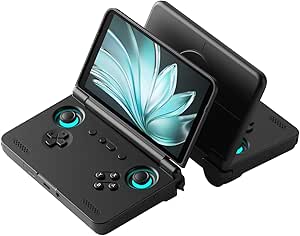
Retroid Pocket Flip 2 Android Handheld Game Console, 5.5-Inch AMOLED 1080p Display, Black
The Retroid Pocket Flip 2 is the compact pick for players who want Android games and a screen that folds away for travel. Its clamshell design protects the display when packed, a practical difference from the exposed screen on the abxylute One Pro. The 5.5-inch 1080p AMOLED panel gives games strong contrast, while Hall-effect sticks are designed to resist the drift that can affect conventional analog sticks. A Snapdragon 865, active cooling, and 8GB of RAM provide a more capable setup for Android gaming than a basic retro-focused handheld. The tradeoff is that its smaller 60Hz screen feels less suited to expansive PC-style play than the Legion Go S’s 8-inch 120Hz display. It also arrives without games, and update support is unspecified.
Pros:- Clamshell body helps protect the screen during transport.
- 5.5-inch 1080p AMOLED display offers vivid contrast in a compact format.
- Hall-effect analog sticks are designed to resist stick drift.
- Active cooling and 27W fast charging support longer play sessions and quicker top-ups.
Cons:- No games are preloaded, so buyers need to install their own apps and titles.
- Software update support is listed as unknown.
- The 60Hz, 5.5-inch screen is smaller and less fluid than the Legion Go S display.
Best for: Android gamers and emulation fans who want a pocketable clamshell with a protected screen and analog controls.
Not ideal for: Players seeking a large high-refresh-rate display, a preloaded game collection, or clearly documented software support.
- Operating system:Android 13
- Processor:Qualcomm Snapdragon 865
- GPU:Adreno 650
- Memory:8GB LPDDR4x
- Storage:128GB UFS 3.1
- Display:5.5-inch AMOLED, 1080p, 60Hz
- Battery:5,000mAh
- Connectivity:Wi-Fi 6, Bluetooth 5.1, USB-C DisplayPort, 3.5mm audio jack
- Weight:10.72 ounces
Our verdict“Pick the Flip 2 if a protected, portable Android handheld matters more to you than a large screen or included games.”
Valve Steam Deck OLED 1TB Handheld Gaming Console
For buyers whose games already live in Steam, the Steam Deck OLED is the most focused choice in this group. Its Steam Deck platform avoids the Windows launcher juggling of the Legion Go S and ROG Xbox Ally, while the 7.4-inch HDR OLED brings richer contrast than their listed LCD-style screens. The 1TB NVMe drive gives a substantial head start over the 512GB storage in those Windows competitors, and microSD expansion leaves room to grow. Anti-glare etched glass helps reduce reflections, a useful touch for play outside ideal lighting. The compromise is a 1280 × 800 resolution and a refresh rate up to 90Hz rather than the 1080p, 120Hz panels on the Legion Go S and ROG Xbox Ally. Battery life also varies widely by game, from a stated 3 to 12 hours.
Pros:- 7.4-inch HDR OLED display delivers high contrast and vivid color.
- 1TB NVMe storage offers more built-in room than the 512GB Legion Go S and ROG Xbox Ally.
- microSD support provides an option to expand the game library.
- Wi-Fi 6E and an included carrying case add useful connectivity and travel convenience.
Cons:- 1280 × 800 resolution is lower than the 1080p panels on the Legion Go S and ROG Xbox Ally.
- Refresh rate tops out at 90Hz, below those competitors’ 120Hz displays.
- Stated battery runtime ranges from 3 to 12 hours depending on content.
Best for: Steam users who want a handheld-first interface, a high-capacity internal drive, and an OLED screen.
Not ideal for: Players who need a 1080p 120Hz display or want one handheld interface for multiple PC storefronts.
- Platform:Steam Deck
- Storage:1TB NVMe SSD
- Display:7.4-inch HDR OLED
- Resolution:1280 × 800
- Refresh rate:Up to 90Hz
- Battery:50Wh; estimated 3–12 hours depending on content
- Connectivity:Wi-Fi 6E
- Expandable storage:microSD
- Included accessory:Carrying case with removable liner
Our verdict“Choose the Steam Deck OLED if your library is centered on Steam and you value its OLED screen and 1TB drive over higher resolution and refresh rate.”
ASUS ROG Xbox Ally Gaming Handheld, 7-inch 1080p 120Hz Touchscreen, AMD Ryzen Z2 A, 16GB RAM, 512GB SSD, White
The ROG Xbox Ally suits players who want one Windows handheld for games spread across Xbox, Steam, Epic, and other PC platforms. That breadth sets it apart from the Steam Deck OLED, whose strongest fit is a Steam-centered library. Its 7-inch 1080p touchscreen pairs a 120Hz refresh rate with FreeSync Premium, giving compatible games a smoother presentation than the Steam Deck’s 90Hz screen. A 60Wh battery and fast charging—listed as reaching 50% in 30 minutes—help when playtime is interrupted by travel or a short break. The cost of that flexibility is familiar Windows overhead, while 512GB is less built-in room than the Steam Deck OLED’s 1TB. At 1.47 pounds, it is also a substantial device to hold for long stretches.
Pros:- Supports games across Xbox, Steam, Epic, and other PC platforms.
- 1080p 120Hz touchscreen with FreeSync Premium.
- 60Wh battery and stated fast charging from 0% to 50% in 30 minutes.
- Three months of Xbox Game Pass Premium are included.
Cons:- 512GB SSD offers less built-in capacity than the Steam Deck OLED’s 1TB drive.
- Windows can involve more launcher and settings management than the Steam Deck platform.
- Listed weight of 1.47 pounds may feel heavy during extended handheld sessions.
Best for: Players with libraries across Xbox, Steam, and Epic who want a 1080p 120Hz Windows handheld.
Not ideal for: Steam-only players who would rather have a Steam Deck interface and more built-in storage, or buyers prioritizing a lighter device.
- Operating system:Windows 11
- Processor:AMD Ryzen Z2 A
- Display:7-inch 1080p touchscreen, 120Hz, FreeSync Premium
- Memory:16GB LPDDR5 6400MHz
- Storage:512GB SSD
- Battery:60Wh
- Fast charging:0% to 50% in 30 minutes
- Weight:1.47 pounds
- Ports:Dual USB Type-C
Our verdict“Choose the ROG Xbox Ally if access to several PC storefronts and a fast 1080p screen outweigh storage capacity and handheld weight.”
abxylute One Pro Cloud Gaming Handheld, 7-inch 1080p Touchscreen, 64GB
The abxylute One Pro is a better match for streaming games than for replacing a Windows gaming PC. Its cloud gaming and remote-play focus lets players access supported services or stream from another device, while Android games and emulation provide alternatives when streaming is not the plan. The 7-inch 1080p touchscreen is larger than the Retroid Pocket Flip 2’s 5.5-inch panel, and the listed 8+ hour battery life gives it a useful endurance claim. HDMI output up to 4K can also connect it to a larger display. The tradeoff is reliance on a solid Wi-Fi connection for cloud and remote play; unlike the Steam Deck OLED, its 64GB of storage is not aimed at holding a large native game library. Some services also need separate subscriptions.
Pros:- Supports cloud gaming and remote play across several services.
- Runs Android games and emulates systems including PS2 and GameCube.
- 7-inch 1080p touchscreen is larger than the Retroid Pocket Flip 2 display.
- Advertised battery life exceeds eight hours, with HDMI output up to 4K.
Cons:- Cloud and remote play depend on a broadband Wi-Fi connection.
- Some gaming services require separate subscriptions.
- 64GB storage is limited for local games compared with the Steam Deck OLED’s 1TB.
Best for: Players with reliable home Wi-Fi who want a dedicated device for cloud gaming, remote play, Android titles, and retro emulation.
Not ideal for: Travelers who often play offline or buyers who want a large library of locally installed PC games.
- Platform:Android
- Processor:MediaTek Genio 510
- Storage:64GB
- Display:7-inch 1080p touchscreen
- Battery life:Advertised 8+ hours
- Video output:Up to 4K
- Connectivity:Wi-Fi, HDMI, USB
- Weight:430g
Our verdict“Pick the abxylute One Pro if you have dependable Wi-Fi and want a streaming-first handheld with Android and emulation as backups.”
MSI Claw A8 Gaming Handheld, AMD Ryzen Z2 Extreme, 8-inch FHD+ 120Hz Display, 24GB LPDDR5x, 1TB NVMe SSD, White
The MSI Claw A8 is the strongest fit here for buyers who want a Windows handheld with a large, fast screen and room for a substantial game library. Its 8-inch 120Hz display gives fast-moving games more fluid presentation than the 7-inch screen on the ASUS ROG Xbox Ally, while the 1TB SSD means less early storage juggling. The AMD Ryzen Z2 Extreme and 24GB of memory also put it ahead on listed memory capacity, though specifications alone do not establish how every game will run.
That larger screen and 1.7-pound weight make it less pocketable than smaller retro options such as the RG43H Pro. Windows 11 offers access to PC game platforms, but it can involve more setup than a dedicated retro interface. I’d choose it for a feature-rich PC handheld, not for the lightest or simplest way to play.
Pros:- 8-inch 120Hz display offers a large viewing area and supports smoother motion.
- 1TB NVMe SSD provides more built-in space than the ASUS ROG Xbox Ally’s 512GB SSD.
- 24GB LPDDR5x memory is the highest stated memory capacity among these five products.
- Thunderbolt 4, Wi-Fi, Bluetooth, and an SD card reader give it varied connection and expansion options.
Cons:- At 1.7 pounds, it is heavier than the listed ASUS ROG Xbox Ally description weight.
- Windows 11 may call for more configuration and maintenance than the retro-focused RG43H Pro.
- The larger screen and handheld build are less suited to pocketable, lightweight play.
Best for: PC gamers who want a large 120Hz display, Windows game-platform access, and 1TB of built-in storage in one handheld.
Not ideal for: Buyers prioritizing low weight, a compact carry, or a simple retro-only interface; the 8-inch Windows device is larger and may require more software setup.
- Processor:AMD Ryzen Z2 Extreme
- Display:8-inch FHD+ (1920 × 1200), 120Hz
- Memory:24GB LPDDR5x
- Storage:1TB NVMe SSD
- Operating system:Windows 11 Home
- Connectivity:Bluetooth, Wi-Fi, Thunderbolt 4
- Weight:1.7 pounds
- Model number:CLAWA8BZ2070
Our verdict“Choose the MSI Claw A8 if a large 120Hz screen and roomy PC-game storage matter more than keeping your handheld light and compact.”
RG43H Pro Retro Handheld Game Console with RK3562 Chip
The RG43H Pro suits buyers who want a dedicated retro device that stays smaller than the 5.5-inch RG52MINI. Its 4.3-inch IPS screen, dual joysticks, shoulder buttons, and 1024 × 768 resolution make it more versatile than a basic button-only handheld, while HDMI output lets you take play to a TV. EmuELEC and RGBOX provide two system environments, and storage can expand from 64GB to 512GB.
Compared with the RG52MINI, the tradeoff is a smaller display and a stated battery capacity of 4000 mAh rather than 5000 mAh. The listing gives no playtime estimate, and its battery information is inconsistent, so I would not choose it based on expected endurance. Its scope is also different from the MSI Claw A8: this is a compact retro-focused console, not a Windows PC gaming handheld.
Pros:- Compact 4.3-inch format is smaller than the RG52MINI’s 5.5-inch display.
- Dual joysticks and shoulder buttons support more control styles than a simple button-only console.
- HDMI output allows play on a compatible television.
- Storage expands from 64GB up to 512GB.
Cons:- No playtime estimate is provided, and the listed battery requirement conflicts with the stated 4000 mAh capacity.
- The 4.3-inch screen is smaller than the RG52MINI’s display.
- Retro-focused systems do not offer the Windows PC game-platform access of the MSI Claw A8.
Best for: Retro-game fans who want dual joysticks, TV output, and expandable storage in a smaller device than the RG52MINI.
Not ideal for: Buyers who need a reliable battery-life estimate, a large screen, or access to current Windows PC games.
- Processor:Rockchip RK3562 quad-core
- Display:4.3-inch IPS, 1024 × 768
- Storage:64GB, expandable up to 512GB
- Battery:4000 mAh
- Controls:Dual 3D joysticks, shoulder buttons, action keys
- Connectivity:2.4 GHz Wi-Fi, HDMI output, USB Type-C with OTG, 3.5 mm headphone jack
- Dimensions:7.2 × 3.2 × 0.81 inches
- Color:Black
Our verdict“Pick the RG43H Pro if compact retro play and TV output matter more to you than a larger screen or clearly stated battery endurance.”
RG52MINI Retro Handheld Game Console, 5.5-Inch IPS Screen, 64GB
The RG52MINI is the more comfortable pick for retro gaming when screen size matters more than pocketability. Its 5.5-inch IPS display is larger than the RG43H Pro’s 4.3-inch panel, making menus and game details easier to see, while HDMI output and dual joysticks add flexibility beyond simple handheld play. The 64GB onboard storage can expand to 1TB with a TF card, giving it substantially more stated expansion headroom than the RG43H Pro.
Its RK3562 processor and EmuELEC/RGBOX systems keep the focus on supported retro formats rather than the broad PC game libraries available on the MSI Claw A8 or ASUS ROG Xbox Ally. The listing rates the 5000mAh battery for up to eight hours, but that is a stated maximum, not a guarantee for every session. I’d also treat the included-game count cautiously, since the product text gives varying figures.
Pros:- 5.5-inch IPS display is larger than the RG43H Pro’s 4.3-inch panel.
- Storage can expand from 64GB to 1TB using a TF card.
- HDMI output supports play on a compatible TV.
- Dual 3D joysticks, mechanical buttons, and Hall linear triggers offer several control inputs.
Cons:- The up-to-eight-hour battery claim may not reflect playtime in every situation.
- Product information gives inconsistent counts for the included games.
- Its retro-focused systems do not match the PC game-platform range of the MSI Claw A8.
Best for: Retro players who prefer a larger screen, want extensive TF-card expansion, and may connect the handheld to a TV.
Not ideal for: Buyers seeking a small pocketable console, dependable long-session battery expectations, or Windows PC game access.
- Display:5.5-inch IPS, 720 × 1280
- Processor:Rockchip RK3562 quad-core Cortex-A53, 2.0GHz
- Memory:2+4GB RAM
- Storage:64GB; expandable to 1TB via TF card
- Systems:EmuELEC and RGBOX
- Battery:5000mAh; up to 8 hours of gameplay
- Connectivity:2.4GHz Wi-Fi, HDMI output, USB Type-C, 3.5mm headphone jack
- Controls:Dual 3D joysticks, mechanical buttons, Hall linear triggers
Our verdict“Choose the RG52MINI over the smaller RG43H Pro if you want a roomier retro screen and greater storage expansion, and can accept uncertainty around the game count and battery runtime.”
WELLST·G P30S Handheld Game Console for Kids, 220 Retro Games, 3-Inch LCD, Rechargeable Battery, Blue
The WELLST·G P30S is the simplest option in this group for a child who wants a small, self-contained game device. Its 220 preloaded games and button controls avoid the extra systems and settings found on the RG43H Pro and RG52MINI. At 6.4 ounces, it is also much lighter than the Windows handhelds, and its compact size is easy to carry in a bag.
This simplicity comes with clear limits: the 3-inch LCD is far smaller than the RG52MINI’s 5.5-inch IPS screen, it is listed for one player, and its 2GB storage is not presented as expandable. The battery is rated for up to six hours, but the console lacks the richer controls, HDMI output, and Wi-Fi connectivity offered by the larger retro models. I’d treat it as a basic kid-focused game device, not a flexible handheld for older players.
Pros:- 220 preloaded games provide a ready-to-play selection without configuring separate game systems.
- At 6.4 ounces, it is lighter than the larger retro and Windows handhelds.
- Rechargeable battery is rated for up to six hours of play.
- Compact dimensions make it easy for children to carry.
Cons:- The 3-inch LCD is much smaller than the RG52MINI’s 5.5-inch IPS display.
- Listed for one player, with no stated HDMI output or Wi-Fi connectivity.
- The 2GB storage capacity offers much less room than the expandable storage on the RG43H Pro and RG52MINI.
Best for: Parents seeking a lightweight, single-player handheld with preloaded games and straightforward button controls for a young child.
Not ideal for: Older players who want a large screen, dual-stick controls, TV output, multiplayer connectivity, or expandable storage.
- Preloaded games:220
- Screen:3-inch LCD
- Battery:860 mAh lithium-ion; up to 6 hours
- Storage:2GB
- Controller type:Button control
- Number of players:1
- Dimensions:5.9 × 2.8 × 0.7 inches
- Weight:6.4 ounces
Our verdict“Choose the P30S for a young child who values simple, portable solo play, but pick the RG52MINI for a larger screen and more flexible controls.”
ASUS ROG Xbox Ally Gaming Handheld, 7-inch 120Hz Touchscreen, Ryzen Z2 A, 16GB RAM, 512GB SSD, Windows 11 Home, White
The ASUS ROG Xbox Ally makes the most sense for players who want one handheld for Xbox Game Pass and other PC platforms. Its Windows 11 Home support reaches beyond a single storefront, while the 7-inch 1080p touchscreen and 120Hz refresh rate offer a sharper, faster display than the small screens on the RG43H Pro and RG52MINI. Wi-Fi 6E, Bluetooth 5.4, and a 60Wh battery with fast charging round out a more connected setup than either retro console.
Compared with the MSI Claw A8, this model has a smaller display, 16GB rather than 24GB of listed memory, and a 512GB SSD instead of 1TB. That makes the MSI the more spacious, large-screen choice; the Ally’s case is the more specific fit for Xbox-focused access and stated fast charging. The weight listing conflicts between the description and item details, and the software update support date is unknown, so those details merit caution.
Pros:- Supports Xbox Game Pass, Steam, Epic Games, and other PC game platforms.
- 7-inch 1080p touchscreen runs at 120Hz and supports FreeSync Premium.
- 60Wh battery supports fast charging, with a stated 50% charge in 30 minutes.
- Wi-Fi 6E and Bluetooth 5.4 provide modern wireless connectivity.
Cons:- 512GB SSD is half the listed capacity of the MSI Claw A8’s 1TB drive.
- The 16GB memory capacity is lower than the MSI Claw A8’s 24GB.
- Listed weight differs between the description and item details, and the software update support date is unknown.
Best for: Xbox Game Pass players who also want access to Steam, Epic Games, and other PC platforms on a 7-inch Windows handheld.
Not ideal for: Buyers who prioritize maximum built-in storage, a larger 8-inch screen, or a clearly stated device weight.
- Display:7-inch 1080p IPS touchscreen, 120Hz
- Processor:AMD Ryzen Z2 A
- Memory:16GB LPDDR5X 6400MHz
- Storage:512GB SSD
- Graphics:AMD RDNA 2
- Operating system:Windows 11 Home
- Battery:60Wh
- Connectivity:Wi-Fi 6E, Bluetooth 5.4, USB
Our verdict“Pick the ROG Xbox Ally if Xbox Game Pass access and fast charging outweigh the MSI Claw A8’s larger screen, greater memory, and larger SSD.”

How We Picked
I compared these handhelds by the kind of gaming they support, how easy they appear to be to use on the move, and what their hardware choices mean for the buyer. For PC-focused models, I gave weight to the operating system, processor, memory, storage, screen, and whether the device offers a dedicated handheld interface or a more general Windows environment. For Android, cloud, and retro options, I focused on the games and services each device is suited to, screen and control practicality, and how much setup or network dependence a buyer should expect.
The ranking favors broad usefulness and a clear role, not a raw spec count. The Steam Deck OLED leads because it combines PC gaming with a handheld-first experience; the Windows models follow for buyers who value flexibility and a large display, with tradeoffs in interface complexity and device size. Android, cloud, and retro picks rank lower for overall versatility but can be better fits for a narrower use case. Where product details are limited or two listings overlap, I avoid assuming unlisted capabilities and recommend checking the exact configuration before purchase.
| gaming handheld | Operating system |
|---|---|
| R36MAX 2 Retro Handheld Gaming | Linux |
| MSI Claw Gaming Handheld | Windows 11 Home |
| Boltz Retro Handheld Game Cons | Linux |
| RF40H 4-Inch Retro Handheld Ga | Linux |
| MANGMI AIR X Android Handheld | Android 14 |
| Lenovo Legion Go S Handheld Ga | — |
| Retroid Pocket Flip 2 Android | Android 13 |
| Valve Steam Deck OLED 1TB Hand | — |
| ASUS ROG Xbox Ally Gaming Hand | Windows 11 |
| abxylute One Pro Cloud Gaming | — |
| MSI Claw A8 Gaming Handheld | Windows 11 Home |
| RG43H Pro Retro Handheld Game | — |
| RG52MINI Retro Handheld Game C | — |
| WELLST·G P30S Handheld Game Co | — |
| ASUS ROG Xbox Ally Gaming Hand | Windows 11 Home |
Factors to Consider When Choosing Best Gaming Handhelds
Choosing among these devices starts with the games and services you actually plan to use, not the biggest screen or highest memory figure. I would narrow the field by platform, how much setup you will tolerate, and whether you need games to run on the device itself.
Choose Your Game Library Before Comparing Hardware
Start with the storefronts, subscriptions, and game types you already use. A PC handheld offers access to a broad range of computer games, but individual titles may need control or settings adjustments. Android devices suit mobile games and supported emulation workflows, while a cloud handheld streams games rather than running demanding titles locally. Retro-focused consoles have a narrower purpose and should be judged by the systems and titles they can actually support, not by a headline game count. Check compatibility for the specific games you care about before treating a device as a replacement for another platform.
Decide Whether You Want a PC or a Handheld-First Interface
Windows handhelds can feel familiar if you already manage a PC library, but a desktop operating system can involve more navigation and setup on a small touchscreen. A dedicated gaming interface can make common tasks feel more direct, though it may not offer the same freedom across launchers and software. Think about whether you expect to install games, adjust settings, and troubleshoot, or whether you want to pick up the device and play. A common mistake is choosing Windows flexibility without accounting for the time spent managing it. If several people will share the handheld, a simpler interface may matter as much as processor capability.
Treat Screen Size, Shape, and Comfort as a Package
A larger screen can make text and detailed scenes easier to see, but it also makes a device less compact to carry. Resolution and refresh rate describe parts of the display experience; they do not tell you whether the grip feels comfortable during a long session or whether the screen suits your usual games. A clamshell design can protect its display when packed, while a conventional layout may be easier to use with accessories or a dock. If possible, compare the device dimensions and control layout against how you plan to hold it. Buyers often focus on display size and overlook weight distribution, button reach, and bag space.
Check Battery Expectations Against How You Play
Performance-focused PC games can make greater demands on a handheld than lighter retro or mobile titles. Battery life also changes with brightness, refresh rate, wireless use, and performance settings, so a capacity figure alone cannot predict a real session. Ask where you will play: a commute without reliable charging calls for a different compromise than couch gaming near an outlet. Lowering screen brightness or choosing less demanding games can extend a session, but it may not match a buyer’s preferred experience. If you expect long stretches away from power, prioritize portability and game demands together rather than assuming every handheld is equally suited to travel.
Understand Local Play, Streaming, and Network Dependence
A cloud-focused handheld can be light and comfortable because another device or service does the game processing, but that shifts the burden to your connection and subscription access. Streaming quality can change with network congestion, distance from the router, and whether you play away from home. Local PC, Android, and retro play avoid that particular dependency, though each has its own library and setup limits. Do not buy a streaming device as though it were a standalone gaming PC; check what source device or service it requires. For travel, test the network conditions you expect to face before making streaming the center of your setup.
Spend More for a Clear Need, Not a Bigger Spec Sheet
Higher memory, storage, or refresh rates matter only when they improve the games and habits you have. Extra storage can be useful if you keep a large library installed, while a higher-spec PC handheld may be excessive for older games or streaming. Conversely, a basic retro device is not a substitute for a PC handheld just because both have built-in screens and controls. Compare the full configuration, including operating system and storage, because similar product names can hide meaningful differences. Put the saved budget toward useful accessories only after checking what the handheld supports and what is included.
Frequently Asked Questions
Should I choose the Steam Deck OLED or a Windows handheld?
I would choose the Steam Deck OLED if a gaming-focused interface and a cohesive handheld experience matter more than running every Windows launcher or desktop app. A Windows model makes more sense if you specifically need Windows software, prefer its flexibility, or want to manage a broader PC setup directly on the device. That flexibility can bring extra configuration and navigation, so it is not automatically the easier choice. Before deciding, check compatibility for your most-played games and the launchers you rely on. The better fit is the one that supports your library without adding friction you do not want.
Can a cloud gaming handheld replace a gaming PC or console?
Not by itself in the way a local gaming PC can. A cloud handheld such as the abxylute One Pro is designed around streaming, so you need a supported game source or service and a dependable network connection. That can be convenient at home, but weak Wi-Fi, travel, or service access can limit play. Check the device’s service compatibility and any subscription requirements before buying. If you want games to run independently on the handheld, choose a local-play device instead.
Are retro handhelds a good choice for a first gaming handheld?
They can be a good starting point if your priority is a compact device for older games and you are comfortable with a narrower use case. They are not a general substitute for a PC handheld, and a long built-in game list does not tell you how well the controls, screen, or software suit you. Check which systems and games are supported, how the device handles game management, and whether its screen size feels right for your play. A simpler retro device may suit a child or casual player, while someone who wants current PC games should look elsewhere. Match the choice to the intended games rather than the category name.
Do I need 1TB of storage on a gaming handheld?
Not necessarily; storage needs depend on the size of your game library and how often you want to switch games without reinstalling them. A large PC library can fill storage faster than a collection of smaller retro or mobile titles. Consider whether the exact model supports storage expansion and whether managing an extra card fits your routine. Do not pay for capacity you will leave unused, but avoid choosing too little if you expect several large games installed at once. Check the included storage in the exact listing, especially when product names have multiple configurations.
Why are there two ASUS ROG Xbox Ally options in this roundup?
The supplied product list includes two ASUS ROG Xbox Ally listings with the same core processor, memory, storage, and screen details, while one listing explicitly names Windows 11 Home. That does not establish a meaningful performance difference between them. Compare the exact model identifier, software details, included accessories, and seller listing before choosing between the entries. If those details match, treat them as the same basic device rather than paying extra for a duplicate name. This is a useful reminder to verify configuration details instead of relying on a product title alone.
Conclusion
For the best overall balance of PC gaming and a handheld-focused experience, I would start with the Valve Steam Deck OLED 1TB. The MSI Claw A8 is my best premium-style fit for buyers who want a large, high-refresh Windows handheld, while the Retroid Pocket Flip 2 makes more sense for Android and retro play than for a broad PC library. For beginners, I would choose based on the games they already know: the WELLST·G P30S is a straightforward kids’ option, while the Steam Deck is the more capable entry point for someone interested in PC games. For best value, I would compare the retro and Android devices against the buyer’s actual game list rather than assume the least expensive category is the best fit. Choose the abxylute One Pro for a streaming-first setup, and favor the larger Windows options only if their flexibility and screen suit your routine.
Halloween Picks
halloween
As an affiliate, we earn on qualifying purchases.