
Choosing the right gaming mouse pad with RGB lighting requires balancing aesthetic appeal with functional performance. The Razer Firefly V2 stands out as the best overall choice due to its rigid hybrid surface that offers consistent speed and durability unmatched by cloth alternatives. For those prioritizing desk utility, the XXL RGB Gaming Mouse Pad with 15W Wireless Charging combines illumination with practical device charging, eliminating cable clutter. Conversely, budget-conscious players might prefer the BladeHawks RGB Gaming Mouse Pad, which delivers solid glide and vibrant lighting without the premium price tag. The primary tradeoff in this category lies between the soft, forgiving feel of cloth mats and the precise, fast tracking of hard surfaces, while also weighing the utility of integrated features like wireless charging against pure surface performance. Continue reading for a detailed breakdown of how these options compare in terms of glide, durability, and lighting customization.

Play games on Amazon Luna for your game nights, included with Prime
- A rotating selection of games, no download needed
- Play on TV, laptop or phone
- Fast, free delivery for your gear, too
Complete the kit



Key Takeaways
- Hard-surface pads like the Razer Firefly V2 offer superior consistency and ease of cleaning compared to traditional cloth mats.
- Integrated wireless charging features significantly increase pad thickness, which may affect wrist angle and comfort during long sessions.
- Cloth-based RGB pads generally provide better control and stopping power, making them preferable for tactical shooters over fast-paced arena games.
- Lighting uniformity varies widely; premium models offer seamless diffusion, while budget options often show visible LED points under the fabric.
- Desk size is a critical constraint; extended 31.5-inch mats require substantial desk real estate and may crowd keyboard placement.
| BladeHawks RGB Gaming Mouse Pad, 31.5 x 12 Inches, Black | 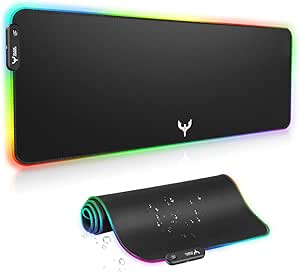 | Best Overall | Brand: BladeHawks | Model: BX04 | Dimensions: 31.5 x 12 inches (800 x 300 mm) | VIEW LATEST PRICE | See Our Full Breakdown |
| TIDALSOIL RGB Extended Gaming Mouse Pad, 31.5 × 11.8 in, Black |  | Best for Edge Durability | Brand: TIDALSOIL | Model: F3041-L | Dimensions: 31.5 × 11.8 in | VIEW LATEST PRICE | See Our Full Breakdown |
| KTRIO RGB Extended Gaming Mouse Pad, 31.5 × 11.8 in, Black |  | Best for Surface Protection | Dimensions: 31.5 × 11.8 in | Surface: Micro-weave cloth | Base: Rubber | VIEW LATEST PRICE | See Our Full Breakdown |
| Gimars RGB Gaming Mouse Pad with Wrist Rest, 12 x 10 in |  | Best for Wrist Support | Dimensions: 12 x 10 in | Lighting: 10 modes: 7 solid colors and 3 breathing marquee modes | Wrist rest: Slow-rebound memory foam | VIEW LATEST PRICE | See Our Full Breakdown |
| JMIYAV RGB Gaming Mouse Pad, 31.5 x 12 Inches, Topographic White |  | Best Light-Colored Design | Brand: JMIYAV | Dimensions: 31.5 x 12 inches | Thickness: 0.2 inches | VIEW LATEST PRICE | See Our Full Breakdown |
| XXL RGB Gaming Mouse Pad with 15W Wireless Charging |  | Best for Minimalist Desk Setups | Dimensions: 31.49 × 15.75 inches | Thickness: 4 mm | Surface Material: Nano-textured fabric | VIEW LATEST PRICE | See Our Full Breakdown |
| XXL RGB Gaming Mouse Pad with Magnetic Wireless Charger and Foldable Phone Stand |  | Best Multi-Device Charging Hub | Dimensions: 31.5 x 15.8 inches | Wireless Charging: 15W (Phone) + 5W (Earbuds) | Lighting Effects: 25 effects (Static, Gradient, Rainbow) | VIEW LATEST PRICE | See Our Full Breakdown |
| Moptmos RGB Gaming Mouse Pad, 31.5 × 11.8 Inches, Red Dragon |  | Best Themed Aesthetic | Dimensions: 31.5 × 11.8 inches | Thickness: 4 mm | Theme: Red Dragon | VIEW LATEST PRICE | See Our Full Breakdown |
| Razer Firefly V2 RGB Hard Gaming Mouse Mat |  | Best for Precision and Speed | Dimensions: 15.2 x 12 inches | Thickness: 0.14 inches | Surface Type: Micro-textured hard surface | VIEW LATEST PRICE | See Our Full Breakdown |
| HUADO RGB Gaming Mouse Pad, 31.5 x 11.8 Inches |  | Best Budget-Friendly Option | Dimensions: 31.5 x 11.8 inches | Thickness: 0.16 inches | Surface Material: Waterproof fabric | VIEW LATEST PRICE | See Our Full Breakdown |
| BladeHawks RGB Gaming Mouse Pad, Extended 31.5 × 12 Inches, Grey |  | Best for Desk Aesthetics | Dimensions: 800 × 300 mm (31.5 × 12 inches) | Color: Grey | Surface Material: Micro-textured waterproof cloth | VIEW LATEST PRICE | See Our Full Breakdown |
| DR CATCH RGB Extended Gaming Mouse Pad, 31.5 x 11.8 Inches |  | Best Value Standard | Dimensions: 31.5 x 11.8 inches | Thickness: 0.3 inches | Weight: 0.69 kg | VIEW LATEST PRICE | See Our Full Breakdown |
| Razer Goliathus Extended Chroma RGB Gaming Mouse Pad |  | Best for Ecosystem Integration | Brand: Razer | Surface Material: Micro-textured cloth | Base Material: Natural-foam rubber | VIEW LATEST PRICE | See Our Full Breakdown |
| RGB Desk Mat with 10W Wireless Charging |  | Best for Convenience Features | Dimensions: 31.49 x 11.81 inches | Wireless Charging: 10W Qi-compatible | Surface Material: Waterproof nano-textured cloth | VIEW LATEST PRICE | See Our Full Breakdown |
| Extended RGB Gaming Mouse Pad, 31.5 × 15.7 Inches | 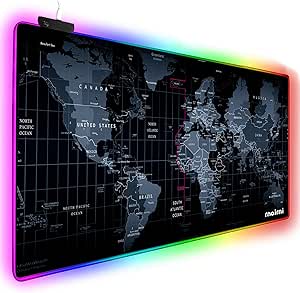 | Best for Maximum Coverage | Dimensions: 31.5 × 15.7 × 0.16 inches | Lighting Modes: 10 | Power Source: USB | VIEW LATEST PRICE | See Our Full Breakdown |
| gaming mouse pads with RGB lighting | Dimensions | Warranty | Surface Material |
|---|---|---|---|
| BladeHawks RGB Gaming Mouse Pa | 31.5 x 12 inches (800 x 300 mm) | 1 year | — |
| TIDALSOIL RGB Extended Gaming | 31.5 × 11.8 in | 1 year | — |
| KTRIO RGB Extended Gaming Mous | 31.5 × 11.8 in | 18 months | — |
| Gimars RGB Gaming Mouse Pad wi | 12 x 10 in | — | — |
| JMIYAV RGB Gaming Mouse Pad | 31.5 x 12 inches | — | — |
| XXL RGB Gaming Mouse Pad with | 31.49 × 15.75 inches | — | Nano-textured fabric |
| XXL RGB Gaming Mouse Pad with | 31.5 x 15.8 inches | 2 years | High-density micro-woven fabric |
| Moptmos RGB Gaming Mouse Pad | 31.5 × 11.8 inches | — | Smooth textile weave (Waterproof) |
| Razer Firefly V2 RGB Hard Gami | 15.2 x 12 inches | 1 year | — |
| HUADO RGB Gaming Mouse Pad | 31.5 x 11.8 inches | None | Waterproof fabric |
| BladeHawks RGB Gaming Mouse Pa | 800 × 300 mm (31.5 × 12 inches) | 12 months | Micro-textured waterproof cloth |
| DR CATCH RGB Extended Gaming M | 31.5 x 11.8 inches | — | Microfiber |
| Razer Goliathus Extended Chrom | — | 1 year | Micro-textured cloth |
| RGB Desk Mat with 10W Wireless | 31.49 x 11.81 inches | 1 year | Waterproof nano-textured cloth |
| Extended RGB Gaming Mouse Pad | 31.5 × 15.7 × 0.16 inches | 1 year | — |
More Details on Our Top Picks
BladeHawks RGB Gaming Mouse Pad, 31.5 x 12 Inches, Black
The BladeHawks pairs a full keyboard-and-mouse surface with 14 lighting modes, giving it a useful balance of desk coverage and RGB customization. Its micro-textured cloth is designed for smooth movement, while the water-repellent surface offers some protection from everyday splashes. Compared with the TIDALSOIL RGB Extended Gaming Mouse Pad, it has two more lighting modes and a stated 4 mm thickness, but TIDALSOIL specifies reinforced stitched edges, a durability detail BladeHawks does not list. The USB, driver-free setup keeps lighting simple, and power-off memory saves the last selected mode. The tradeoff is its broad 31.5-by-12-inch footprint: it suits a roomy desk, not a crowded setup, and the lights need a USB connection.
Pros:- Extended surface fits a keyboard, mouse, and small peripherals.
- 14 lighting modes include static and dynamic effects, with power-off memory.
- Micro-textured cloth surface and natural rubber base support smooth movement and desk grip.
- Water-repellent surface and driver-free USB operation suit everyday use.
Cons:- The 31.5-by-12-inch size takes substantial desk space.
- RGB lighting requires a USB power connection.
- Reinforced stitched edges are not listed, unlike on the TIDALSOIL model.
Best for: PC gamers who want a roomy keyboard-and-mouse mat, several lighting choices, and straightforward USB setup.
Not ideal for: Players with compact desks or anyone who wants RGB lighting without a cable connected to USB power.
- Brand:BladeHawks
- Model:BX04
- Dimensions:31.5 x 12 inches (800 x 300 mm)
- Thickness:4 mm
- Surface:Micro-textured cloth
- Base:Natural rubber
- Lighting:14 modes: 7 static and 7 dynamic
- Power:USB
- Warranty:1 year
Our verdict“Choose the BladeHawks if you want a spacious, easy-to-set-up RGB mat with more lighting modes than the TIDALSOIL, and have room for its wide footprint.”
TIDALSOIL RGB Extended Gaming Mouse Pad, 31.5 × 11.8 in, Black
The TIDALSOIL is a strong fit for buyers who value reinforced stitched edges on a full-width RGB mat. That construction is a practical distinction from the BladeHawks, which offers more lighting modes but does not specify stitched edging. TIDALSOIL provides 12 modes, a last-mode memory function, and a smooth surface for precise mouse movement; its 31.5-by-11.8-inch layout leaves room for a keyboard and mouse while taking up slightly less depth than the BladeHawks. The natural rubber base is designed to resist sliding, helping the mat stay put during play. There is no listed water-resistant coating or thickness specification, unlike the KTRIO’s coated surface and stated cable details. Its lighting also depends on a USB connection, so it is less suitable for cable-free desk setups.
Pros:- Reinforced stitched edges are designed to resist fraying.
- Extended dimensions accommodate a keyboard and mouse.
- 12 lighting modes and memory retain the last selected effect.
- Natural rubber anti-slip base supports a steady position on the desk.
Cons:- RGB lighting requires a USB connection.
- No water-resistant surface coating is specified.
- Thickness is not listed in the supplied product details.
Best for: Gamers who want an extended RGB mat with stitched edges and a remembered lighting setting for daily desk use.
Not ideal for: Buyers seeking a stated water-resistant coating, a detailed thickness specification, or lighting without USB power.
- Brand:TIDALSOIL
- Model:F3041-L
- Dimensions:31.5 × 11.8 in
- Lighting:12 modes: 4 dynamic and 8 static
- Connection:USB
- Base:Natural rubber, anti-slip
- Edge treatment:Reinforced anti-fray stitching
- Memory function:Remembers the last selected lighting mode
- Warranty:1 year
Our verdict“Pick TIDALSOIL over the BladeHawks if stitched-edge durability matters more to you than having the larger count of lighting modes.”
KTRIO RGB Extended Gaming Mouse Pad, 31.5 × 11.8 in, Black
KTRIO stands out among these extended mats for combining a water-resistant coating with a micro-weave surface intended to support both smooth gliding and controlled stopping. That makes it a more clearly specified choice for spill-prone desks than the TIDALSOIL, whose supplied details do not list a coating. Its 12 RGB modes are fewer than the BladeHawks’ 14, but the KTRIO adds stitched edges, a non-slip rubber base, and an 18-month warranty. A detachable braided cable is useful if the lighting lead needs to be removed for storage or repositioning; it still means RGB operation depends on a cable. The 31.5-by-11.8-inch size gives the keyboard and mouse room to share the surface, but it is a poor match for small desks.
Pros:- Water-resistant coating helps protect the cloth surface from spills.
- Micro-weave surface is designed for smooth glide and precise stopping.
- Stitched edges and a non-slip rubber base support everyday stability.
- Detachable braided cable and 18-month warranty are specified.
Cons:- The extended footprint may not fit smaller desks.
- RGB lighting requires the included cable.
- Its 12 modes are fewer than the BladeHawks’ 14.
Best for: Gamers with roomy desks who want an extended RGB mat with a coated surface, stitched edging, and a detachable lighting cable.
Not ideal for: Users with limited desk space or buyers who want the most lighting modes in this group.
- Dimensions:31.5 × 11.8 in
- Surface:Micro-weave cloth
- Base:Rubber
- Surface coating:Water-resistant
- Lighting:12 modes: 7 static and 5 dynamic
- Cable:Detachable braided cable
- Edge treatment:Stitched edges
- Warranty:18 months
Our verdict“Choose KTRIO over TIDALSOIL if a specified water-resistant coating and detachable braided cable matter more than extra lighting modes.”
Gimars RGB Gaming Mouse Pad with Wrist Rest, 12 x 10 in
The Gimars takes a different approach from the extended BladeHawks and KTRIO: it trades shared keyboard-and-mouse coverage for a slow-rebound memory foam wrist rest. That built-in support may appeal to people who spend long sessions at a desk and prefer a compact mouse area with an integrated cushion. Its smooth Lycra surface and textured rubber base are designed to keep tracking steady, while the RGB light bar offers 10 modes and remembers the last setting. The detachable 4.9-inch USB cable can be removed, but the lighting still needs USB power when in use. This is not a substitute for an extended desk mat: at 12 by 10 inches, it gives the keyboard no covered space and may feel restrictive for broad mouse movements compared with the full-width BladeHawks.
Pros:- Slow-rebound memory foam wrist rest provides integrated cushioning.
- Smooth Lycra surface supports mouse movement and tracking.
- Textured non-slip rubber base helps keep the pad steady.
- 10 lighting modes include memory for the last setting and a detachable cable.
Cons:- The 12-by-10-inch surface does not accommodate a keyboard.
- Its compact area may restrict broad or low-sensitivity mouse movements.
- RGB lighting requires USB power.
Best for: Desk workers and gamers who prefer an integrated memory-foam wrist rest on a dedicated mouse pad.
Not ideal for: Players who need a keyboard-and-mouse mat, make wide mouse sweeps, or want a larger RGB-lit desk surface.
- Dimensions:12 x 10 in
- Lighting:10 modes: 7 solid colors and 3 breathing marquee modes
- Wrist rest:Slow-rebound memory foam
- Surface:Lycra
- Base:Textured non-slip rubber
- Base thickness:4 mm
- USB cable:Detachable, 4.9 in
Our verdict“Choose Gimars over the BladeHawks if wrist support is your priority and you do not need an extended surface for your keyboard.”
JMIYAV RGB Gaming Mouse Pad, 31.5 x 12 Inches, Topographic White
The JMIYAV gives buyers a white topographic design instead of the black finish shared by the BladeHawks, TIDALSOIL, and KTRIO. Its 31.5-by-12-inch format still delivers the extended coverage expected from a keyboard-and-mouse RGB mat, while the superfine fiber surface and rubber base provide a familiar cloth-on-rubber setup. The 13 lighting modes sit between the BladeHawks’ 14 and the KTRIO’s 12, and mode memory recalls the last selection. A waterproof coating is listed, making it a useful alternative to the TIDALSOIL if spill protection is a priority. The costs of that look are practical rather than technical: the large mat needs desk space, and its light-colored surface may show marks more readily than black options. Lighting runs over USB.
Pros:- Topographic white finish offers a distinct alternative to the black mats in this group.
- Extended 31.5-by-12-inch surface provides room for keyboard and mouse.
- 13 RGB modes include memory for the last selected setting.
- Waterproof coating and non-slip rubber base suit everyday desk use.
Cons:- The extended size takes substantial desk space.
- USB power is required for RGB lighting.
- A light-colored surface may make visible marks more apparent than on black options.
Best for: Gamers building a light-colored or topographic-themed setup who want an extended RGB surface and a stated waterproof coating.
Not ideal for: Buyers who prefer a dark, low-visibility surface, have a compact desk, or want lighting without a USB lead.
- Brand:JMIYAV
- Dimensions:31.5 x 12 inches
- Thickness:0.2 inches
- Color:Topographic White
- Surface:Superfine fiber
- Base:Rubber
- Lighting:13 modes: 9 static and 4 dynamic
- Connection:USB
- Features:Non-slip, waterproof coating, lighting mode memory
Our verdict“Choose JMIYAV over the black TIDALSOIL if you want a light topographic look and a listed waterproof coating on an extended RGB mat.”
XXL RGB Gaming Mouse Pad with 15W Wireless Charging
This desk mat stands out for its 15W wireless charging capability, which allows you to keep a Qi-enabled phone topped up while you play. The XXL size (31.49 × 15.75 inches) provides ample room for a full keyboard and mouse, creating a unified aesthetic. Compared to the Moptmos RGB Gaming Mouse Pad, this option offers significantly more depth, accommodating wrist rests or additional peripherals comfortably. However, the 4 mm thickness may feel too high for those used to low-profile pads. A key tradeoff is the power requirement: achieving the full 15W speed demands a separate 9V/3A adapter, which is not included in the box. If you lack a compatible charger, you will default to slower speeds, negating some of the premium feature’s appeal.
Pros:- Integrated 15W wireless charging reduces cable clutter
- Extra-large depth accommodates keyboards and wrist rests
- Waterproof surface simplifies cleaning and maintenance
Cons:- Fast charging requires a separate, expensive power adapter
- 4 mm thickness may feel too high for competitive gamers
Best for: Users with Qi-enabled phones who want a large, clean desk surface without cable clutter.
Not ideal for: Buyers without a 9V/3A power adapter, as they cannot utilize the fast-charging feature.
- Dimensions:31.49 × 15.75 inches
- Thickness:4 mm
- Surface Material:Nano-textured fabric
- Base Material:Non-slip rubber
- Lighting Modes:11 RGB lighting modes
- Charging Power:Up to 15W (Qi)
- Power Source:USB
Our verdict“This is the ideal choice for minimalists who prioritize cable management and already own a high-wattage charger.”
XXL RGB Gaming Mouse Pad with Magnetic Wireless Charger and Foldable Phone Stand
This model redefines the desk mat by including a magnetic 360° phone stand alongside dual wireless charging for phones and earbuds. The 25 lighting effects offer more customization than the Miroddi XXL RGB Gaming Mouse Pad, allowing for nuanced aesthetic preferences. The inclusion of a 20W power adapter in the box is a major convenience, removing the guesswork of sourcing compatible chargers. However, the magnetic stand limits compatibility primarily to iPhone 12 and later or phones with magnetic cases. Users with non-MagSafe Android devices may find the stand useless, turning it into dead space. While the micro-woven surface offers smooth tracking, the added hardware makes this mat bulkier and less streamlined than simpler alternatives.
Pros:- Simultaneously charges phone and earbuds
- Includes a 20W power adapter and USB-C cable
- Magnetic stand offers hands-free viewing angles
Cons:- Magnetic stand compatibility is restricted to specific phone models
- Added hardware reduces available flat desk surface area
Best for: iPhone users or those with MagSafe-compatible devices who want an all-in-one charging station.
Not ideal for: Android users without magnetic cases, as the phone stand feature becomes irrelevant.
- Dimensions:31.5 x 15.8 inches
- Wireless Charging:15W (Phone) + 5W (Earbuds)
- Lighting Effects:25 effects (Static, Gradient, Rainbow)
- Surface Material:High-density micro-woven fabric
- Phone Stand:Magnetic, 360° rotation
- Included Accessories:20W Adapter, USB-C Cable
- Warranty:2 years
Our verdict“Choose this if you have a MagSafe-compatible phone and want a complete charging and viewing hub on your desk.”
Moptmos RGB Gaming Mouse Pad, 31.5 × 11.8 Inches, Red Dragon
The Red Dragon theme gives this pad a distinct visual identity that sets it apart from the plain black surfaces found on most competitors like the HUADO RGB Gaming Mouse Pad. It offers 15 lighting modes, including breathing and alternating effects, which blend well with the printed design. The waterproof textile surface is practical for spills, and the non-slip rubber base keeps it steady during intense sessions. However, the 4 mm thickness can create a noticeable step up from the desk, which might annoy users who prefer a flush profile. Additionally, the reliance on a USB connection for lighting means you need a spare port, unlike some battery-operated alternatives. It is a solid choice for style-conscious gamers who don’t mind a slightly thicker pad.
Pros:- Distinctive Red Dragon print enhances desk aesthetics
- Waterproof surface resists stains and spills
- One-button control simplifies lighting adjustments
Cons:- 4 mm thickness may interfere with low-profile wrist rests
- Requires a dedicated USB port for lighting power
Best for: Gamers who want a unique visual theme and basic RGB functionality without complex software.
Not ideal for: Users who prefer a low-profile, ultra-thin mouse pad for a seamless desk transition.
- Dimensions:31.5 × 11.8 inches
- Thickness:4 mm
- Theme:Red Dragon
- Lighting Modes:15
- Surface Material:Smooth textile weave (Waterproof)
- Base Material:Textured natural rubber
- Power Source:USB
Our verdict“This pad is perfect for those who prioritize a bold visual statement over a minimalist, low-profile design.”
Razer Firefly V2 RGB Hard Gaming Mouse Mat
This hard-surface mat is engineered for competitive accuracy, offering a micro-textured surface that reduces friction compared to the fabric tops of the Miroddi XXL RGB Gaming Mouse Pad. The Chroma RGB integration allows the lighting to sync with in-game actions, a feature most budget pads cannot match. Its ultra-thin 0.14-inch profile ensures a seamless transition from desk to pad, which is critical for flick shots. However, the hard surface can be noisy and may wear down mouse feet faster than fabric alternatives. It is also significantly smaller than the XXL mats in this list, offering less room for keyboard placement. This is a performance-first choice that sacrifices desk coverage and softness for speed and precision.
Pros:- Hard surface provides fast, consistent glide for FPS games
- Chroma RGB syncs with Razer devices and supported games
- Ultra-thin profile prevents wrist strain from height differences
Cons:- Hard surface increases noise and wear on mouse feet
- Smaller size limits space for large keyboards
Best for: Competitive FPS players who need a fast, low-friction surface for precise aiming.
Not ideal for: Users who prefer a soft, cushioned feel or need a large mat for keyboard storage.
- Dimensions:15.2 x 12 inches
- Thickness:0.14 inches
- Surface Type:Micro-textured hard surface
- Lighting:Customizable Chroma RGB (16.8M colors)
- Base Material:Non-slip natural-foam rubber
- Cable Management:Built-in cable manager
- Warranty:1 year
Our verdict“This is the definitive choice for competitive gamers who prioritize speed and precision over desk coverage.”
HUADO RGB Gaming Mouse Pad, 31.5 x 11.8 Inches
The HUADO RGB Gaming Mouse Pad delivers essential features at a lower cost, making it a sensible entry point for RGB enthusiasts. With 14 lighting modes and a waterproof fabric surface, it covers the basics well. The reinforced stitched edges help prevent fraying, a common issue with cheaper pads. Compared to the Moptmos Red Dragon, this model lacks a thematic print, offering a cleaner, more professional look. However, the lack of a warranty is a significant drawback, leaving buyers unprotected against early defects. The 0.16-inch thickness is thinner than the Miroddi or Moptmos pads, providing a lower profile that feels more integrated with the desk. It is a functional, no-frills option for those who want RGB lighting without the premium price tag.
Pros:- Affordable entry into RGB gaming peripherals
- Low-profile 0.16-inch thickness for a seamless desk feel
- Stitched edges enhance durability against fraying
Cons:- No warranty provided for defects or wear
- Lighting control is limited to basic hardware buttons
Best for: Budget-conscious gamers who want a large, functional RGB mat without paying for extra features.
Not ideal for: Users who require warranty protection or advanced lighting customization via software.
- Dimensions:31.5 x 11.8 inches
- Thickness:0.16 inches
- Surface Material:Waterproof fabric
- Base Material:Textured rubber
- Lighting Modes:14
- Warranty:None
- Weight:600 g
Our verdict“This is the go-to pick for buyers seeking a reliable, low-cost RGB pad without unnecessary extras.”
BladeHawks RGB Gaming Mouse Pad, Extended 31.5 × 12 Inches, Grey
This grey BladeHawks pad offers a distinct visual alternative to the standard black mats dominating this category. The micro-textured cloth surface balances speed and control, making it a solid choice for players who want precision without the drag of a soft pad. Compared to the DR CATCH model, which also uses a cloth surface, the BladeHawks stands out for its color option, which hides dust and wear better than darker alternatives. However, the lighting controls are basic, relying on a single button rather than software integration. The inconsistent documentation regarding mode counts is a minor annoyance, though the actual functionality remains stable. If you want RGB that doesn’t scream ‘gamer,’ this is a strong contender.
Pros:- Grey colorway blends well with modern, minimalist desk setups.
- Micro-textured surface provides a balanced glide for most game genres.
- Power-off memory ensures your preferred lighting setting is restored automatically.
Cons:- Ambiguous marketing materials list conflicting numbers of lighting modes.
- Basic one-button control lacks the customization depth of software-driven pads.
Best for: Users who prefer neutral or light-colored desk setups and want to hide dust accumulation.
Not ideal for: Competitive FPS players who need specific speed/control ratings found in specialized surfaces.
- Dimensions:800 × 300 mm (31.5 × 12 inches)
- Color:Grey
- Surface Material:Micro-textured waterproof cloth
- Base Material:Natural rubber
- Lighting Modes:14
- Power Source:USB
- Warranty:12 months
Our verdict“A stylish grey option that prioritizes desk aesthetics over advanced lighting customization.”
DR CATCH RGB Extended Gaming Mouse Pad, 31.5 x 11.8 Inches
The DR CATCH pad delivers the essential features of an RGB mousepad without unnecessary frills. Its smooth microfiber surface is optimized for speed, making it feel faster under the hand than the more textured BladeHawks option. While it shares the 14-mode lighting scheme with many competitors, the DR CATCH distinguishes itself with a slightly thinner profile at 0.3 inches, which may feel less intrusive on lower-profile desks. The tradeoff is a lack of software integration; you are limited to physical button cycling. For budget-conscious gamers who want reliable lighting and a consistent glide, this model offers a straightforward package that avoids the complexity of ecosystem-dependent pads like the Razer Goliathus.
Pros:- Smooth microfiber surface favors faster mouse movements.
- Lighting mode memory function saves your last chosen setting.
- Stable rubber base prevents shifting during intense gaming sessions.
Cons:- Fixed lighting patterns offer no color customization beyond presets.
- Large footprint requires significant desk real estate.
Best for: Budget-focused gamers who prioritize surface speed and simple plug-and-play lighting.
Not ideal for: Users who want to sync their mousepad lighting with game events or other peripherals.
- Dimensions:31.5 x 11.8 inches
- Thickness:0.3 inches
- Weight:0.69 kg
- Surface Material:Microfiber
- Base Material:Rubber
- Lighting Modes:14
- Power Source:USB
Our verdict“A no-nonsense, affordable extended pad that prioritizes glide speed over lighting flair.”
Razer Goliathus Extended Chroma RGB Gaming Mouse Pad
This Razer pad is defined by its software rather than its hardware. Chroma RGB synchronization allows the lighting to react to in-game actions, a feature completely absent in standalone options like the DR CATCH or BladeHawks. The micro-textured cloth surface is engineered for control, offering a higher-friction glide that benefits tactical shooters where precision aiming matters more than raw speed. Unlike the universal USB pads in this list, the Goliathus requires Razer Synapse to unlock its full potential. If you do not own other Razer products, you are paying a premium for lighting features you cannot fully utilize. It is a specialized tool for those already invested in the Razer ecosystem.
Pros:- Full Chroma RGB integration enables reactive lighting effects in supported games.
- Micro-textured surface provides high control for precision aiming.
- High-quality natural-foam rubber base offers exceptional stability.
Cons:- Advanced lighting features are locked behind Razer Synapse software.
- Higher price point compared to generic USB-powered alternatives.
Best for: Owners of Razer peripherals who want synchronized, reactive lighting across their entire setup.
Not ideal for: Mixed-brand setups where the pad will operate as a basic, limited-functionality mat.
- Brand:Razer
- Surface Material:Micro-textured cloth
- Base Material:Natural-foam rubber
- Lighting Technology:Chroma RGB
- Software Requirement:Razer Synapse
- Warranty:1 year
Our verdict“The definitive choice for Razer users seeking deep lighting integration and control-focused tracking.”
RGB Desk Mat with 10W Wireless Charging
The Miroddi desk mat attempts to solve desk clutter by integrating a 10W Qi wireless charger. This adds genuine utility for users who keep their phones on their desks, a feature entirely missing from standard competitors like the rnairni or DR CATCH pads. The nano-textured cloth surface is waterproof and easy to wipe down, offering a durability advantage over porous cloth surfaces. However, the lighting is basic, offering only 10 modes without software control. Compared to the Razer Goliathus, the lighting is a mere afterthought. The lack of a power adapter in the box is a minor inconvenience, but the ability to charge a device while gaming makes this a compelling multi-tool for organized workspaces.
Pros:- Integrated 10W Qi wireless charging pad adds practical utility.
- Waterproof nano-textured surface is easy to clean and maintain.
- Stitched nylon edges prevent fraying and extend the product’s lifespan.
Cons:- Power adapter is not included in the package.
- Lighting effects are limited to basic presets without customization options.
Best for: Users who want to reduce cable clutter by charging their phone directly on their desk.
Not ideal for: Gamers who prioritize high-end lighting effects or do not own Qi-compatible devices.
- Dimensions:31.49 x 11.81 inches
- Wireless Charging:10W Qi-compatible
- Surface Material:Waterproof nano-textured cloth
- Lighting Modes:10
- Edge Finish:Stitched nylon
- Power Adapter:Not included
- Warranty:1 year
Our verdict“A practical desk mat that trades advanced lighting for the convenience of built-in wireless charging.”
Extended RGB Gaming Mouse Pad, 31.5 × 15.7 Inches
At 15.7 inches deep, this rnairni pad dwarfs the standard 12-inch models like the BladeHawks and DR CATCH. The extra depth provides ample room for keyboard placement without crowding the mouse zone, which is ideal for users with large hands or those who prefer a wider stance. The surface is waterproof and the base is anti-slip, meeting the baseline expectations for durability. However, the lighting is purely functional, offering 10 static or breathing modes without any synchronization or advanced effects. It lacks the premium surface texture of the Razer or the utility of the Miroddi. This pad is for those who value physical space over aesthetic flair or software features.
Pros:- Extra-wide 15.7-inch depth offers superior workspace for large setups.
- Waterproof surface protects the desk from spills and sweat.
- Lighting can be completely turned off for a clean look.
Cons:- Basic lighting modes lack the variety found in competitors with 14+ modes.
- Surface material offers less distinct feedback than specialized micro-textured pads.
Best for: Users with large desks who need extra depth for comfortable keyboard and mouse positioning.
Not ideal for: Compact desk setups where the 15.7-inch depth would interfere with other equipment.
- Dimensions:31.5 × 15.7 × 0.16 inches
- Lighting Modes:10
- Power Source:USB
- Surface Type:Waterproof
- Base Type:Anti-slip
- Warranty:1 year
Our verdict“A spacious, utilitarian pad that prioritizes desk real estate over advanced lighting features.”

How We Picked
I evaluated these products based on three core pillars: surface performance, lighting integration, and build quality. Surface performance was judged by the material type (cloth vs. hard hybrid) and its impact on mouse sensor tracking and glide consistency. Lighting integration assessed how well the RGB elements were embedded into the design without creating uneven surfaces or hotspots that could distract gameplay. Build quality focused on edge stitching, base grip stability, and the durability of the lighting components under regular use.
The ranking logic prioritizes functional superiority over aesthetic novelty. Products with rigid or semi-rigid surfaces that maintain their shape over time rank higher than soft cloths that may warp or crease. Additionally, models offering tangible utility, such as wireless charging or wrist support, are positioned above basic illuminated mats, provided they do not compromise the primary function of smooth mouse movement. This hierarchy ensures that recommendations serve the player’s performance needs first, with lighting as an enhancing feature rather than a gimmick.
Factors to Consider When Choosing Gaming Mouse Pads With RGB Lighting
Selecting a gaming mouse pad with RGB lighting involves more than just picking a color scheme. The underlying technology and material composition dictate how your mouse behaves and how long the pad lasts.Surface Material: Cloth vs. Hard Hybrid
The choice between cloth and hard surfaces fundamentally alters your gaming experience. Cloth pads typically offer more friction, allowing for precise stopping power which is beneficial for tactical shooters like CS:GO or Valorant. In contrast, hard hybrid surfaces, such as those found on the Razer Firefly V2, provide a faster, more consistent glide that benefits fast-tracking games like Overwatch or Apex Legends. However, hard surfaces can wear down mouse feet faster and are less forgiving if you rest your wrist heavily. Consider your primary game genre and mouse foot material before deciding, as softer PTFE feet may degrade quickly on rigid textures.
Lighting Diffusion and Uniformity
Not all RGB implementations are created equal. High-end models use advanced diffusion layers to create a smooth, seamless glow, whereas budget options may reveal individual LED points, creating a spotted effect that can be distracting on a white or light-colored surface. Uniform lighting ensures that the aesthetic effect is pleasing rather than distracting. When evaluating pads, look for descriptions of ‘edge-lit’ or ‘diffused’ lighting. Poor diffusion can also create uneven surface textures if the LED strips are not properly embedded, leading to tiny bumps that disrupt mouse glide. Always check user feedback regarding surface smoothness near the light sources.
Integration of Wireless Charging
Some extended mouse pads now include wireless charging zones, adding significant utility to your desk setup. This feature eliminates the need for separate charging cables for your phone or earbuds, keeping your workspace tidy. However, this technology adds thickness to the pad, usually around 5-8mm, which can alter your wrist angle and potentially cause discomfort if your desk height is not adjusted accordingly. Furthermore, the charging area is often a distinct material zone that may feel different from the rest of the pad. Ensure your desk setup accommodates the added height before committing to a charging-enabled mat.
Durability and Edge Stitching
RGB pads are often more complex than standard mats, making durability a key concern. Look for stitched edges on cloth variants to prevent fraying over time, especially if you frequently rest your wrist on the border. For hard surfaces, check for scratch resistance ratings or coatings that prevent the surface from becoming dull or discolored after months of use. The lighting components themselves must be protected from moisture and spills; ensure the product specifies water resistance or spill-proof designs if you tend to keep drinks near your keyboard. A pad with poor edge quality will unravel quickly, ruining both the aesthetics and the performance.
Software Control and Customization
While many RGB pads offer standalone control via physical buttons, integration with software like Razer Chroma or proprietary apps allows for deeper customization. Software control enables you to sync lighting with in-game events, music, or system notifications, creating an immersive environment. However, this reliance on software can lead to compatibility issues after OS updates or bloatware concerns. If you prefer a ‘plug and play’ experience without installing extra programs, opt for pads with onboard memory or simple button controls. Assess whether the software ecosystem aligns with your existing peripherals to avoid managing multiple conflicting applications.
Frequently Asked Questions
Do RGB mouse pads affect mouse sensor accuracy?
In most cases, the RGB lighting itself does not interfere with optical or laser sensors, provided the light does not shine directly into the sensor from below. However, some cheaper pads have uneven surface textures caused by embedded LEDs, which can cause jittery tracking. High-quality pads embed the lighting in the edges or use diffusion layers that keep the surface flat. If you notice erratic cursor movement, try moving the mouse away from the brightest areas or switching to a pad with better surface uniformity.
Is a hard or cloth surface better for RGB pads?
Hard surfaces generally handle RGB lighting better because the material can be molded to diffuse light evenly without the texture issues common in cloth. Cloth pads can sometimes show LED hotspots or feel bumpy where the lights are located. However, cloth offers better control and comfort for many gamers. If you prioritize pure aesthetic uniformity and speed, go for hard hybrid. If you prefer tactile feedback and control, choose a high-quality cloth pad with edge-lit technology to minimize surface disruption.
How do I clean a gaming mouse pad with RGB lighting?
Cleaning methods depend on the surface material. For cloth pads, gently hand wash with mild soap and cool water, avoiding the electronic connectors and ensuring they are completely dry before plugging back in. For hard surfaces, a microfiber cloth with a small amount of isopropyl alcohol works well to remove oils and grime without damaging the lighting components. Never submerge the electronic base or connectors in water, as this will permanently damage the RGB functionality and potentially the pad’s structure.
Do wireless charging mouse pads slow down mouse performance?
No, the wireless charging zone typically does not affect mouse sensor performance as long as the sensor is not hovering directly over the coil while moving rapidly. However, the added thickness of the charging zone can change your hand position, which might indirectly affect your aim if you are not used to the height difference. Some users report that the magnetic field interferes with certain high-sensitivity wireless mouse dongles placed nearby, so keep receivers away from the charging area to avoid signal interference.
Are RGB mouse pads worth the extra cost compared to standard ones?
The value depends on your setup goals. If you are building a themed battlestation or enjoy immersive lighting effects, the aesthetic boost is worth the premium. However, if your primary concern is competitive performance, a standard high-quality cloth or hard pad often offers better surface consistency at a lower price. RGB pads are an enhancement, not a performance upgrade. Pay for the lighting only if you value the visual atmosphere and the specific features like charging or software sync that accompany it.
Conclusion
Choosing the right gaming mouse pad with RGB lighting depends on your specific priorities. For the best overall performance and durability, the Razer Firefly V2 remains the top choice due to its consistent hard surface and reliable lighting. If you want maximum desk utility and a cleaner setup, the XXL RGB Gaming Mouse Pad with 15W Wireless Charging is the ideal premium pick, despite its thickness. Beginners or budget-conscious gamers should start with the BladeHawks RGB Gaming Mouse Pad, which offers a solid entry point into RGB aesthetics without compromising basic glide. For those who prefer the traditional feel of cloth but want style, the TIDALSOIL RGB Extended Gaming Mouse Pad provides a soft, comfortable surface with vibrant edge lighting. Ultimately, match the surface texture to your game genre and the feature set to your desk habits for the best experience.
Black Friday Picks

Vitamix 5200 Blender with 64 oz Container, Black
As an affiliate, we earn on qualifying purchases.