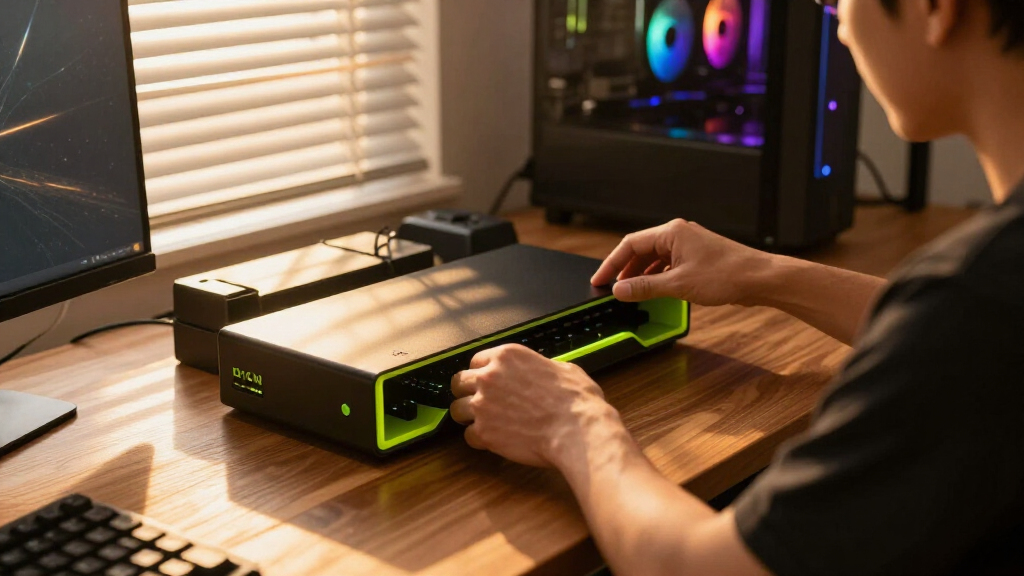

Gaming desk organizers solve three problems at once: they get your headset and controllers off the desk surface, they hide cables and small accessories, and they free up space for your mouse and keyboard. After comparing seven popular options, the KDD 7-in-1 Clamp-on Desk Pegboard earns the best overall spot because it mounts without drilling, organizes the most gear per square inch, and keeps everything within arm’s reach. If RGB aesthetics matter as much as function, the KDD 6-in-1 RGB Gaming Desk Organizer adds lighting to a genuinely useful freestanding design, while the OPNICE Dual Monitor Stand Riser doubles as a monitor lift if your real problem is desk depth, not accessory clutter. The main tradeoff in this category is between clamp-on systems (maximum storage, requires a desk edge) and freestanding stands (portable, but they consume desk space they’re meant to save). Keep reading for the full breakdown of each pick.

Play games on Amazon Luna for your game nights, included with Prime
- A rotating selection of games, no download needed
- Play on TV, laptop or phone
- Fast, free delivery for your gear, too
Complete the kit


Key Takeaways
- Clamp-on organizers like the KDD 7-in-1 Pegboard stored roughly twice the gear of freestanding stands while using zero desk surface, making them the clear choice for cramped setups.
- RGB lighting appeared on three of seven picks, but only the KDD 6-in-1 freestanding model combined lighting with genuinely useful storage — the pure RGB headset stands sacrificed drawer space for visuals.
- Monitor stand risers (OPNICE and Gianotter) are the best value per dollar if you also want ergonomic screen lifting, but they do nothing for headset and controller clutter.
- Three of seven picks came from KDD, and their quality was consistent — brand loyalty is defensible here, but their clamp-on pegboard clearly outperformed their simpler headphone stands.
- Every pick under $30 delivered acceptable build quality; paying more only made sense when the product bundled extras like USB-C charging ports or dual-monitor capacity.
| KDD Headphone Stand with Drawer for Desk | 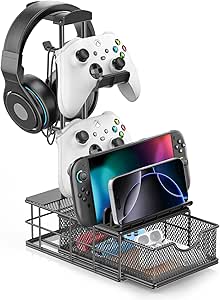 | Best Minimalist Pick | Material: Aluminum alloy | Storage: Built-in drawer for accessories | Compatibility: Headsets, controllers, smartphones, tablets | VIEW LATEST PRICE | See Our Full Breakdown |
| KDD 7-in-1 Clamp-on Desk Pegboard |  | Most Versatile Pick | Configuration: 7-in-1 modular organizer | Installation: Clamp-on, no drilling or tools | Material: Plastic | VIEW LATEST PRICE | See Our Full Breakdown |
| OPNICE Desk Organizer and Dual Monitor Stand Riser with Drawer and Pen Holders |  | Best for Ergonomics Plus Storage | Material: Metal | Color: Black | Monitor Support: Dual monitor stand riser | VIEW LATEST PRICE | See Our Full Breakdown |
| KDD 6-in-1 RGB Gaming Desk Organizer |  | Best All-in-One Gaming Station | Dimensions: 15.86 x 8.19 x 3.03 inches | Weight: 2.73 pounds | Lighting: 9 RGB modes (breathing, flashing, static) | VIEW LATEST PRICE | See Our Full Breakdown |
| Gianotter Dual Monitor Stand Riser with Drawer and Pen Holders |  | Best Value Ergonomic Riser | Material: High-strength metal | Monitor Support: Dual monitor stand riser | Adjustable Height: Yes | VIEW LATEST PRICE | See Our Full Breakdown |
| KDD Headphone Stand with USB A&C Charger Ports, RGB Lighting, Rotatable Headset Hanger, Device Slot, and Storage Drawer |  | Best Charging Station Pick | Lighting Modes: 9 modes including flashing, breathing, and single-color | Charging Ports: 2 USB-A, 1 USB-C | Device Storage: Slot for phones/tablets | VIEW LATEST PRICE | See Our Full Breakdown |
| KDD RGB Headset Stand with 9 Light Modes – Controller Holder for Desk – Rotatable Headphone Stand & Detachable Controller Hook |  | Best for Controller Storage | Light Modes: 9 | Color Options: Red, Green, Blue, Purple, Light Blue, Yellow, White | Rotation: 360° headphone holder | VIEW LATEST PRICE | See Our Full Breakdown |
| gaming desk organizer | Material | Assembly |
|---|---|---|
| KDD Headphone Stand with Drawe | Aluminum alloy | Easy, approximately 5 minutes |
| KDD 7-in-1 Clamp-on Desk Pegbo | Plastic | — |
| OPNICE Desk Organizer and Dual | Metal | None required |
| KDD 6-in-1 RGB Gaming Desk Org | Plastic and metal components | — |
| Gianotter Dual Monitor Stand R | High-strength metal | None required |
| KDD Headphone Stand with USB A | Durable plastic | — |
| KDD RGB Headset Stand with 9 L | Hardened plastic | 3 parts |
More Details on Our Top Picks
KDD Headphone Stand with Drawer for Desk
For gamers who want organization without visual noise, this aluminum headphone stand takes up barely any footprint while still earning its place on the desk. The built-in drawer is the standout here — it turns dead space under the headset into storage for dongles, USB drives, or spare thumbsticks. Compared with the KDD 7-in-1 Clamp-on Desk Pegboard, this option trades sheer storage volume for a cleaner silhouette and more premium materials, since the aluminum build feels closer to a hi-fi accessory than a plastic gaming add-on. The silicone pads prevent scratches on both the desk and your headset band. The tradeoff is capacity: if you own multiple controllers and a phone you want docked, the KDD 6-in-1 RGB Gaming Desk Organizer simply holds more stuff.
Pros:- Built-in drawer adds hidden storage without bulk
- Sturdy aluminum alloy construction with scratch-preventing silicone pads
- Clean cable management keeps wires off the desk surface
- Holds headsets, controllers, phones, and even tablets
- Assembles in about 5 minutes
Cons:- Limited total storage capacity compared with pegboard or tower-style organizers
- No published weight capacity, so very heavy headsets are a gamble
- Not portable — firmly a desk-bound solution
Best for: Gamers with one headset and a controller who want premium materials and hidden storage in a compact footprint
Not ideal for: Players with several controllers, a phone dock, and lots of small accessories — the single drawer fills up fast
- Material:Aluminum alloy
- Storage:Built-in drawer for accessories
- Compatibility:Headsets, controllers, smartphones, tablets
- Cable Management:Integrated cable organizer
- Protection:Silicone anti-scratch pads
- Assembly:Easy, approximately 5 minutes
- Placement:Desktop, freestanding
Our verdict“This is the pick for gamers who value a tidy, understated desk over maximum storage volume.”
KDD 7-in-1 Clamp-on Desk Pegboard
If your problem is that everything ends up scattered flat across the desk, this clamp-on pegboard solves it by moving storage up off the surface entirely. Seven functions — phone stand, pen holder, storage boxes, hooks, cable clips — cover nearly every accessory a gamer or streamer owns, and the detachable modules can be rearranged as your setup changes. That flexibility is its real advantage over the fixed-layout KDD Headphone Stand with Drawer, which locks you into one configuration. The no-drill clamp also means zero damage to the desk, a big deal for renters or anyone with a premium desk surface. Be aware of two limits: it only fits desks thinner than 2 inches, and the plastic construction won’t take abuse the way the metal OPNICE Dual Monitor Stand Riser does.
Pros:- Frees up desk surface by mounting storage at desk edge
- Fully modular layout you can rearrange as your gear changes
- Tool-free, no-drill installation
- Works equally well for office and gaming accessories
Cons:- Clamp only fits desks under 2 inches thick
- Plastic modules are less durable than metal alternatives
- Clamping can feel wobbly on uneven or beveled desk edges
Best for: Renters and gamers with crowded desks who need vertical, reconfigurable storage without drilling
Not ideal for: Owners of thick butcher-block or framed desks over 2 inches — the clamp physically won’t attach
- Configuration:7-in-1 modular organizer
- Installation:Clamp-on, no drilling or tools
- Material:Plastic
- Desk Compatibility:Desk thickness less than 2 inches
- Included Modules:Phone stand, pen holder, storage boxes, headset and controller hooks, cable clips
- Mounting Position:Desk edge / clamp-on
- Customization:Detachable, rearrangeable modules
Our verdict“The most adaptable option in this lineup for anyone who wants lots of storage types without surrendering desk space.”
OPNICE Desk Organizer and Dual Monitor Stand Riser with Drawer and Pen Holders
This one plays a different game than the rest of the lineup: instead of just holding accessories, it fixes your posture while organizing. The adjustable-height riser lifts dual monitors toward eye level, and the drawer plus two pen holders ride underneath, converting the riser’s footprint into usable storage. Compared with the KDD 6-in-1 RGB Gaming Desk Organizer, this model prioritizes ergonomics and desk real estate over gaming flair — there’s no lighting, but the metal build and monitor elevation deliver something no accessory tower can. It’s also ready out of the box with zero assembly, unlike the modular KDD options. The main frustration is the absence of published dimensions, so buyers with tight or unusual monitor pairings need to measure carefully before committing.
Pros:- Raises monitors for better posture and reduced neck strain
- Drawer and two pen holders add genuinely useful storage
- Sturdy metal construction supports dual monitors confidently
- No installation required — usable immediately
Cons:- No published dimensions, making fit verification difficult
- Limited color options
- No headset or controller-specific mounting like dedicated gaming organizers
Best for: Dual-monitor gamers and work-from-home users who want neck relief and storage in one purchase
Not ideal for: Ultrawide monitor owners — a dual riser layout may not accommodate a single very wide panel
- Material:Metal
- Color:Black
- Monitor Support:Dual monitor stand riser
- Height:Adjustable
- Storage:Drawer plus 2 pen holders
- Assembly:None required
- Dimensions:Not specified by manufacturer
Our verdict“The smart buy if monitor ergonomics matter as much to you as accessory organization.”
KDD 6-in-1 RGB Gaming Desk Organizer
This is the organizer for players whose desk is mission control: controllers, headset, phone, and miscellaneous accessories all get a designated slot. Unlike the KDD 7-in-1 Clamp-on Desk Pegboard, this tower is freestanding, so it works on any desk regardless of thickness or edge shape — a real advantage for glass-top or thick wood desks where clamps fail. The 9 RGB lighting modes are the differentiator: matched to your battlestation lighting, they make the organizer part of the setup’s aesthetic rather than a storage afterthought. Broad compatibility across PS5, Xbox, Switch, and Steam controllers means mixed-platform households are covered. Tradeoffs are real, though — at nearly 16 inches wide it claims serious desk space, and the RGB lighting will annoy anyone who wants a neutral workspace.
Pros:- Holds controllers, headset, phone, and accessories in a single station
- Nine RGB modes sync with existing gaming setup lighting
- Freestanding design works on any desk thickness — no clamping limits
- Compatible with PS5, PS4, Xbox Series X/S, Xbox One, Switch, and Steam controllers
Cons:- Nearly 16-inch footprint is too large for compact desks
- RGB lighting won’t suit neutral or work-focused spaces
- Not wall-mountable, limiting placement flexibility
Best for: Console and PC gamers who want every controller, headset, and phone docked in one RGB-lit station
Not ideal for: Small-desk owners or people who work at the same desk they game on — the footprint and lighting clash with a professional setup
- Dimensions:15.86 x 8.19 x 3.03 inches
- Weight:2.73 pounds
- Lighting:9 RGB modes (breathing, flashing, static)
- Material:Plastic and metal components
- Configuration:6-in-1 modular, freestanding
- Installation:No drilling — sits directly on desk
- Compatibility:PS5, PS4, Xbox Series X/S, Xbox One, Nintendo Switch, Steam Controller, gaming headsets
Our verdict“The most complete gaming-focused organizer here, provided your desk has the space and you actually want the lights.”
Gianotter Dual Monitor Stand Riser with Drawer and Pen Holders
Next to the OPNICE Dual Monitor Stand Riser, this Gianotter model covers the same core job — lifting monitors, hiding storage in a drawer — at a friendlier price, with one thoughtful extra: magnetic pen holders that can be repositioned or removed entirely rather than sitting in fixed spots. Like the OPNICE, it arrives fully assembled with zero setup, which puts both risers ahead of the modular KDD organizers for out-of-box convenience. The high-strength metal frame handles dual monitors without flex, and the adjustable height is what actually delivers the ergonomic payoff for long gaming sessions. The catch mirrors its rival: dimensions aren’t published, and the substantial footprint can overwhelm a small or shallow desk. Choose this over the OPNICE if budget matters more than brand polish; choose the OPNICE if you want the black finish guaranteed.
Pros:- Adjustable height relieves neck and eye strain during long sessions
- Magnetic pen holders offer flexible, repositionable storage
- High-strength metal build supports dual monitors firmly
- Zero assembly — ready straight from the box
Cons:- Color options not specified, so matching an existing setup is a gamble
- Large footprint is a poor fit for small desks
- No gaming-specific mounts for controllers or headsets
Best for: Budget-conscious dual-monitor users who want an ergonomic riser with storage and don’t need guaranteed color matching
Not ideal for: Anyone with a compact desk — a dual riser consumes a large, fixed amount of surface area
- Material:High-strength metal
- Monitor Support:Dual monitor stand riser
- Adjustable Height:Yes
- Drawer:Yes
- Pen Holders:2, magnetic
- Assembly:None required
- Dimensions:Not specified by manufacturer
Our verdict“The best-value way to combine monitor ergonomics with desk organization, as long as your desk can fit it.”
KDD Headphone Stand with USB A&C Charger Ports, RGB Lighting, Rotatable Headset Hanger, Device Slot, and Storage Drawer
This model stands out for turning a simple headset stand into a genuine desktop charging hub, with two USB-A ports and one Type-C port built right into the base. Compared with the KDD RGB Headset Stand with 9 Light Modes, which focuses purely on display and controller storage, this version replaces the controller hooks with a pull-out drawer and a device slot, making it far better at clearing loose cables, dongles, and small accessories off the desk. The 360° rotatable hook with rubber padding keeps headphones from getting scratched, and the six bottom pads keep everything planted during frantic gaming sessions. The tradeoffs are real: the Type-C port won’t charge iPhones, the plastic casing feels budget-grade next to KDD’s aluminum drawer stand, and cycling the nine RGB modes means manual button presses rather than app control.
Pros:- Three built-in charging ports keep phones and controllers powered without extra adapters
- Storage drawer and device slot genuinely reduce desk clutter, not just hold headphones
- 360° rotatable hook with rubber pads protects the headset headband
- Six rubber base pads keep the stand stable even on smooth desk surfaces
Cons:- Type-C port is not compatible with iPhone charging
- Lighting modes require manual cycling and can’t be set via app
- Plastic construction feels less premium than aluminum alternatives
Best for: Gamers who want one accessory that holds headphones, charges phones and controllers, and hides small clutter in a drawer
Not ideal for: iPhone owners relying on the Type-C port for charging, or buyers wanting a premium metal build
- Lighting Modes:9 modes including flashing, breathing, and single-color
- Charging Ports:2 USB-A, 1 USB-C
- Device Storage:Slot for phones/tablets
- Additional Storage:Drawer for small items
- Rotation:360° adjustable headphone hook
- Material:Durable plastic
- Base:6 rubber pads for stability
Our verdict“This pick makes the most sense for players who treat their headset stand as a charging and storage station rather than just a display piece.”
KDD RGB Headset Stand with 9 Light Modes – Controller Holder for Desk – Rotatable Headphone Stand & Detachable Controller Hook
Where the KDD Headphone Stand with USB Charger Ports and Drawer trades accessory hooks for charging and storage, this model doubles down on display and gear organization. The detachable controller hooks are the headline feature — a setup with two or three gamepads finally has a home, and the included cable organizers stop charging cords from tangling under the stand. The 9 lighting modes with a memory function mean the stand powers back up in your preferred color instead of defaulting to a rainbow cycle, and the three-part assembly takes minutes. The stable rubber-padded base holds up against the Gianotter monitor riser’s heft for a fraction of the footprint. That said, it’s a display piece first: no drawer, no charging ports, and the hardened plastic won’t fool anyone into thinking it’s premium. Bright lighting can also be distracting during late-night sessions in a shared room.
Pros:- Detachable controller hooks give gamepads a dedicated home instead of the desk surface
- 9 lighting modes with memory function restore your preferred color after power-off
- Three-part assembly and portable design make it easy to move or reposition
- Stable rubber-padded base prevents tipping even with heavy headphones attached
Cons:- No charging ports or storage drawer, limiting it to display duty
- RGB lighting can be distracting in shared rooms or dark environments
- Hardened plastic construction feels less premium than metal options
Best for: Console and PC gamers with multiple controllers who want an affordable, colorful way to display their gear
Not ideal for: Buyers needing charging ports or hidden storage, or anyone who finds RGB glow distracting in a dark room
- Light Modes:9
- Color Options:Red, Green, Blue, Purple, Light Blue, Yellow, White
- Rotation:360° headphone holder
- Material:Hardened plastic
- Compatibility:WinXP/7/8/10, Linux, Mac
- Assembly:3 parts
- Base:Stable with rubber pads
Our verdict“The right choice for gamers whose priority is showing off and organizing controllers, as long as charging and storage aren’t on the wishlist.”
How We Picked
I evaluated each organizer against five criteria that actually affect daily use: storage capacity (how many accessories it holds), mounting method (clamp-on versus freestanding), build stability (does it wobble when you grab the headset?), cable management, and value relative to features. Because gaming setups vary wildly in desk depth and gear load, I also weighed versatility — an organizer that adapts to different setups scored higher than a single-purpose stand, even a well-built one.
The ranking logic is straightforward: products that solved multiple clutter problems at once ranked highest, single-purpose accessory stands landed mid-pack, and monitor risers were slotted by how well they doubled as organizers rather than purely as monitor lifts. Price never outweighed function — a $25 pegboard that replaces four separate products beat a $40 RGB stand that holds one headset — but within similar capability tiers, cheaper and better-built options consistently ranked ahead.
Factors to Consider When Choosing Gaming Desk Organizers
Before picking a specific organizer, it helps to understand what actually separates a satisfying purchase from a gadget that ends up in a drawer. These are the factors that shaped my rankings and the ones most buyers get wrong.Clamp-On vs. Freestanding: Match the Mount to Your Desk
The single biggest decision is mounting style, and it depends entirely on your desk. Clamp-on organizers attach to the desk edge and consume zero surface area, which makes them ideal for shallow desks (under 24 inches deep) where every inch counts. The catch: you need a flat, accessible desk edge of roughly 2 inches, and clamp systems don’t work on desks with thick aprons, curved edges, or attached monitor arms. Freestanding organizers work on any surface and move easily between setups, but they paradoxically take up the desk space they’re meant to free — a real problem if your mousepad already eats 16 inches of width. A common mistake is buying a clamp-on for a desk that can’t accommodate one, then resorting to adhesive strips that fail under the weight of a gaming headset.
Count Your Gear Before You Count Features
Buyers routinely overbuy or underbuy because they shop features instead of inventorying their accessories. Write down what actually needs a home: one headset? Two controllers? A phone you want visible while gaming? Small items like USB drives and thumbsticks? An organizer with a headset hook, controller hooks, phone stand, and a drawer covers a four-accessory load in one footprint, while a basic headphone stand solves one problem and leaves the rest of your clutter untouched. The mistake I see most often is treating a headset stand as a complete solution when controllers and loose cables are the real desk chaos. Match the product’s slot count to your gear list, not to the marketing photos.
RGB Lighting: Aesthetic or Gimmick?
RGB is nearly unavoidable in this category, but it’s worth being honest about how much it adds. If your setup already has lit peripherals and a backlit monitor, a lighted organizer can tie the theme together for under $40 — a cheap way to complete an aesthetic. If your desk is in a shared room or you game in the dark and find stray light distracting, RGB becomes a liability, and some models don’t let you fully disable it. Also check whether the lighting is powered by USB or AC: USB-powered lighting means one more cable to hide, which partially defeats the purpose of an organizer. Lighting should be the tiebreaker between two equally functional products, never the reason you accept less storage.
Weight Capacity and Stability
Gaming headsets are heavier than most buyers expect — a wireless model with a boom mic can run 12 to 16 ounces, and adding a controller to an adjacent hook doubles the load. Cheap stands with narrow bases tip over when you remove the headset one-handed, which gets annoying fast. Look for a weighted base of at least one pound on freestanding models, or a metal clamp mechanism on edge-mounted ones — plastic clamps crack over time, especially on desks you adjust or move. If you own an audiophile-grade headset, prioritize solid aluminum construction over multifunction plastic units, even if that means giving up a phone slot or drawer.
When a Monitor Riser Is the Smarter Buy
Some buyers who search for organizers actually have an ergonomics problem disguised as a clutter problem. If your monitor sits too low and your desk feels cramped because your keyboard is jammed against the stand, a monitor riser with built-in storage lifts the screen to eye level and creates a shelf underneath for consoles, controllers, or accessories. This solves posture and storage in one purchase, often for less than $35. The tradeoff is real, though: risers do nothing for headset storage and cable routing, so if dangling headphones are your main complaint, a dedicated headset organizer is the better first purchase. Buyers with dual monitors should measure their combined stand width before ordering — many risers fit only slim or VESA-mounted panels.
Integrated Charging: Convenient or a Failure Point?
Some premium organizers add USB-A and USB-C charging ports, which sounds like a clean win — one fewer power strip on the floor. In practice, these built-in ports are only worth it if you actually charge devices at your desk daily; otherwise you’ve paid extra for a feature that adds internal wiring and a potential failure point. Check the wattage, too: many organizer ports deliver slow 5W charging that won’t keep a controller or phone topped up during a session. If fast charging matters, a separate charger at your power strip usually outperforms built-in ports. Treat integrated charging as a bonus on a product you’d buy anyway, not a reason to choose it.
Frequently Asked Questions
Do clamp-on desk organizers damage the desk?
Quality clamp-on organizers use padded jaws that distribute pressure evenly, so on a solid wood or thick MDF desk you’ll typically see no marking at all. Problems arise on cheap particleboard desks, where over-tightening the clamp can compress or dent the surface over months. The safe approach is tightening just until the organizer doesn’t wobble — not until it can’t move under force — and checking the pad placement every few weeks. If your desk has a soft veneer or an expensive finish, slide a thin piece of rubber or felt between the clamp pads and the desk edge as cheap insurance. Clamp-on is still the right call for most setups as long as you install it with reasonable care.
Are RGB desk organizers compatible with PC lighting software like Sync?
Almost universally, no. The RGB lighting on desk organizers in this price range runs on internal controllers with preset modes, toggled by a touch button or inline remote — they don’t connect to your PC as lighting devices. That means you can’t sync them with your keyboard, mouse, or case lighting, and the colors are set independently. Some buyers find this acceptable since a static color can still match a theme manually, but if perfect synchronization is the goal, you’ll need RGB ecosystem accessories instead of an organizer with built-in lighting. Treat organizer RGB as standalone decoration rather than an extension of your synced setup.
Can a headset stand organizer handle a heavy wireless gaming headset?
It can, but base design matters more than the marketing weight rating. A wireless headset with a boom mic commonly weighs 350 to 450 grams, and stands with small plastic bases or top-heavy hook designs can tip when the headset is removed quickly. Freestanding models with a wide, weighted base — ideally aluminum rather than hollow plastic — handle this load easily, and clamp-mounted hooks are even more stable since they’re anchored to the desk itself. Also check the hook width: some stands are shaped for slim headbands and put awkward pressure on padded ones. If your headset is on the heavy end, prioritize the aluminum clamp-on options or a stand with a broad metal base over multifunction plastic units.
Is a monitor riser with storage a good substitute for a dedicated gaming organizer?
It depends on what’s actually cluttering your desk. A riser with a drawer and pen holders excels at taming small items — cables, adapters, sticky notes, controllers stored flat — while simultaneously lifting your monitor to a healthier height. That combination is great value if small-item chaos and neck strain are your problems. What a riser can’t do is hold a headset off the desk or route dangling cables, so headphones end up on the riser surface or hanging off a hook you’ll need to buy separately. Many gamers end up pairing a riser with a simple headset stand, which together still cost less than many all-in-one premium organizers.
How much should I spend on a gaming desk organizer?
The sweet spot is $20 to $35, which covers well-built multifunction organizers with headset hooks, controller storage, and drawers. Below $15, you’re usually getting thin plastic that wobbles under a real gaming headset or clamps that strip out. Above $40, the extra spend is only justified by meaningful additions like integrated fast charging, genuinely solid aluminum construction, or a dual-monitor-capable riser — paying more for RGB alone is rarely worth it. Since these products are simple mechanically, mid-range models from established brands perform close to premium ones. My advice is to budget for the storage capacity you need, then stop — this category rewards restraint more than upselling.
Conclusion
For most gamers, the KDD 7-in-1 Clamp-on Desk Pegboard is the best overall pick — it stores a headset, controllers, phone, and small accessories using zero desk surface, which no freestanding model can match. If budget is the priority, the Gianotter Dual Monitor Stand Riser delivers monitor lifting plus drawer storage for the lowest price in the lineup, making it the best value for cluttered small desks. The KDD Headphone Stand with USB A&C Charger Ports takes the premium slot for buyers who want charging built into a rotating, lit stand and don’t mind paying for convenience. Beginners should start with the KDD RGB Headset Stand with 9 Light Modes — it’s affordable, simple, and solves the single most common problem (a headset with nowhere to live) before you invest in a bigger system. For specific needs: dual-monitor owners get the most from the OPNICE riser, RGB enthusiasts should choose the KDD 6-in-1 freestanding organizer, and anyone wanting hidden storage with their headset hook will appreciate the drawer-equipped KDD Headphone Stand with Drawer. Whatever you pick, match the organizer to your actual gear list first — the best product on this list is the one whose slots line up with your clutter.
Fall Picks
fall essentials
As an affiliate, we earn on qualifying purchases.