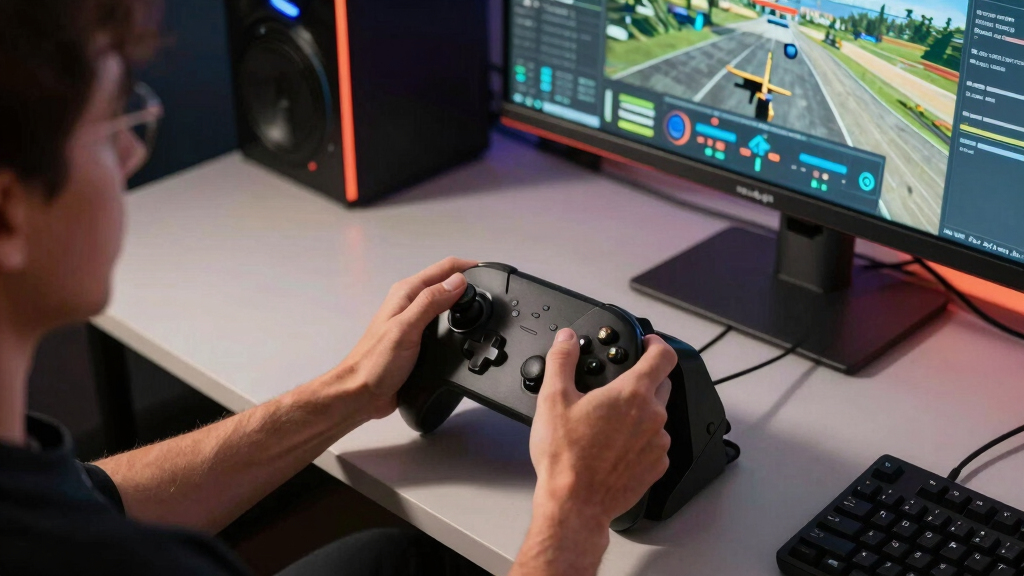

The best flight sticks for Steam flight sims need to balance precision, button access, desk space, and Steam-friendly PC setup, not just raw realism. I rank the Thrustmaster T16000M FCS as the best overall pick because it gives most PC players the cleanest mix of accurate control, fair pricing, and room to grow. The Thrustmaster T-Flight Hotas One is the value standout for buyers who want a separate throttle on a tighter budget, while the Logitech G X56 H.O.T.A.S. makes more sense for space sims and players who want many mapped controls. The main tradeoff is simple: cheaper sticks are easier to start with, premium sticks feel more convincing, and full HOTAS systems demand more desk space and setup time. Keep reading for the full breakdown of which model fits your Steam library, budget, and control style.

Play games on Amazon Luna for your game nights, included with Prime
- A rotating selection of games, no download needed
- Play on TV, laptop or phone
- Fast, free delivery for your gear, too
Complete the kit



Key Takeaways
- The Thrustmaster T16000M FCS wins overall because it balances precision, price, and PC usefulness better than the flashier premium models.
- The T-Flight Hotas One is the value pick for buyers who want a real throttle, while the T-Flight Stick X is the cheaper bare-bones starter.
- The Logitech G X56 and HOTAS Warthog both target serious players, but the X56 favors control density while the Warthog favors replica feel.
- The TCA Sidestick Airbus Edition is the civil aviation specialist, while the Sol-R 1 Flightstick is better treated as a PC-only alternative rather than a universal HOTAS replacement.
- The Turtle Beach VelocityOne Flightstick is the compact middle ground, but its built-in throttle cannot fully replace the flow of a separate throttle unit.
| Thrustmaster T-Flight Hotas One Flight Stick & Throttle |  | Best Overall for Steam and Xbox Players | Compatibility: Xbox Series X|S, Windows PC | Control Type: Flight stick and throttle | Throttle Design: Detachable throttle | VIEW LATEST PRICE | See Our Full Breakdown |
| Thrustmaster Sol-R 1 Flightstick | 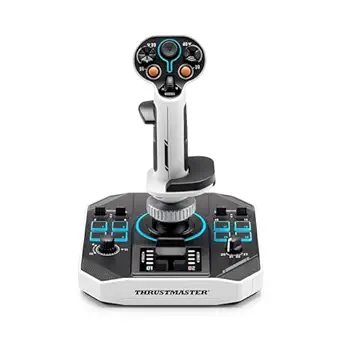 | Best Button-Heavy Stick | Compatibility: PC | Control Type: Flightstick | Number of Buttons: 44 action buttons | VIEW LATEST PRICE | See Our Full Breakdown |
| Thrustmaster TCA Sidestick Airbus Edition Flight Sim Joystick |  | Best for Airbus and Civil Aviation Sims | Compatibility: PC | Scale: 1:1 Airbus A320-style replica | Sensor Technology: Magnetic Hall sensor | VIEW LATEST PRICE | See Our Full Breakdown |
| Thrustmaster T16000M FCS Precision Combat Flight Sim Joystick |  | Best Value Precision Stick | Compatibility: PC | Sensor Technology: H.E.A.R.T magnetic sensors | Buttons: 16 programmable buttons | VIEW LATEST PRICE | See Our Full Breakdown |
| Logitech G X56 H.O.T.A.S Throttle and Joystick Flight Simulator Game Controller |  | Best Premium HOTAS for Complex Sims | Compatibility: Windows 7, 8.1, 10, 11 | Control Type: HOTAS throttle and joystick | Programmable Controls: 189 | VIEW LATEST PRICE | See Our Full Breakdown |
| Turtle Beach VelocityOne Flightstick Universal Sim Controller, Xbox, PC |  | Best Xbox-Friendly Steam Pick | Compatibility: Xbox Series X|S, Xbox One, Windows 10 and 11 PCs | Programmable Buttons: 27 | Axes: 8 | VIEW LATEST PRICE | See Our Full Breakdown |
| Thrustmaster HOTAS Warthog A-10C Replica Metal Flight Stick for PC |  | Best Premium Combat Stick | Compatibility: PC | Construction: All-metal detachable handle | Weight: 6+ lbs | VIEW LATEST PRICE | See Our Full Breakdown |
| Thrustmaster T-Flight Stick X USB Ergonomic Flight Sim Joystick – PC | 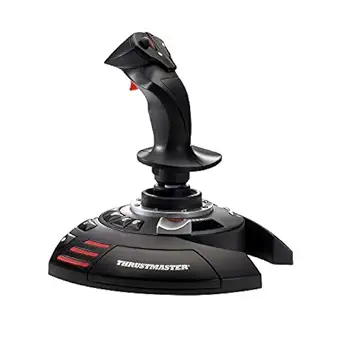 | Best Budget PC Starter Stick | Connectivity: USB | Compatibility: PC | Programmable Buttons: 12 | VIEW LATEST PRICE | See Our Full Breakdown |
| flight sticks for Steam flight sim | Compatibility |
|---|---|
| Thrustmaster T-Flight Hotas On | Xbox Series X|S, Windows PC |
| Thrustmaster Sol-R 1 Flightsti | PC |
| Thrustmaster TCA Sidestick Air | PC |
| Thrustmaster T16000M FCS Preci | PC |
| Logitech G X56 H.O.T.A.S Throt | Windows 7, 8.1, 10, 11 |
| Turtle Beach VelocityOne Fligh | Xbox Series X|S, Xbox One, Windows 10 and 11 PCs |
| Thrustmaster HOTAS Warthog A-1 | PC |
| Thrustmaster T-Flight Stick X | PC |
More Details on Our Top Picks
Thrustmaster T-Flight Hotas One Flight Stick & Throttle
I rank the Thrustmaster T-Flight Hotas One highest for Steam flight sim players who want a full stick-and-throttle setup without jumping straight to the Logitech G X56. Its detachable throttle makes it feel more complete than the Thrustmaster T16000M FCS by itself, while the 14 programmable buttons cover the core commands most civilian and combat sims need. Compared with the TCA Sidestick Airbus Edition, this pick is less aircraft-specific, which makes it easier to use across Microsoft Flight Simulator, Star Wars: Squadrons, and other Steam titles. The tradeoff is refinement: rudder pedals cost extra, compatibility can vary by sim, and beginners still face a learning curve. For mixed PC and Xbox use, though, its broad platform support gives it the cleanest middle ground.
Pros:- Detachable throttle gives a more complete flight setup than a basic joystick
- Works with both Windows PC and Xbox Series X|S
- Adjustable resistance helps match the feel to different aircraft types
- Compatible with Thrustmaster TFRP pedals for later expansion
Cons:- Rudder pedals are not included
- Some Steam flight sims may need manual setup or may have limited support
- More controls than a beginner may want on day one
Best for: Steam flight sim players who also use Xbox and want a stick-and-throttle setup without paying premium HOTAS prices.
Not ideal for: Sim pilots who want pedal control included, since rudder pedals require a separate purchase.
- Compatibility:Xbox Series X|S, Windows PC
- Control Type:Flight stick and throttle
- Throttle Design:Detachable throttle
- Buttons:14 programmable buttons
- Resistance:Adjustable stick resistance
- Hat Switch:Included
- Trigger:Responsive trigger
- Expansion:Compatible with Thrustmaster TFRP rudder pedals
Our verdict“This is the most balanced pick if I want one affordable HOTAS for both Steam flight sims and Xbox play.”
Thrustmaster Sol-R 1 Flightstick
The Thrustmaster Sol-R 1 Flightstick earns its place for Steam players who map lots of cockpit commands and hate reaching for the keyboard. Its 44 action buttons give it far more direct control than the T16000M FCS, and the ambidextrous design makes it more flexible than aircraft-themed options such as the TCA Sidestick Airbus Edition. That makes sense for space sims, combat sims, and complex layouts where quick inputs matter. The catch is that the provided product data leaves gaps: there is no detailed sensor, throttle, software, or expansion information here. Compared with the Logitech G X56, it is less clearly a full HOTAS system. I would treat the Sol-R 1 as a control-dense stick first, not a complete cockpit replacement.
Pros:- 44 action buttons support complex Steam sim bindings
- Ambidextrous layout works for left- or right-handed setups
- Backlighting helps in low-light gaming spaces
- Less aircraft-specific than the Airbus-style TCA Sidestick
Cons:- Provided specs do not confirm sensor technology
- No detailed throttle or pedal expansion information is listed
- Less clearly complete than a full HOTAS like the Logitech G X56
Best for: Steam players who want many mappable commands on the stick itself, especially for space and combat sims.
Not ideal for: Buyers who need confirmed throttle hardware, sensor details, or expansion support before choosing a controller.
- Compatibility:PC
- Control Type:Flightstick
- Number of Buttons:44 action buttons
- Backlit:Yes
- Lighting:Backlit joystick with unique colors
- Design:Ambidextrous
Our verdict“This is the pick I would choose for maximum stick-mounted inputs, provided I do not need a clearly documented full HOTAS package.”
Thrustmaster TCA Sidestick Airbus Edition Flight Sim Joystick
The Thrustmaster TCA Sidestick Airbus Edition is the most focused pick here, and that is both its strength and its limit. For Microsoft Flight Simulator on Steam, its 1:1 Airbus A320-inspired layout, integrated throttle, and thrust reverser make airline procedures feel more natural than on the broader T-Flight Hotas One. Its Hall sensor precision also puts it closer to the T16000M FCS than to cheaper entry sticks when fine inputs matter on approach. The tradeoff is versatility: the Airbus styling is less universal for combat or space sims, and console players should skip it because this is a PC model. I like it most for buyers who care more about airliner realism than having the broadest control scheme.
Pros:- Airbus A320-inspired design suits civil aviation sim flying
- Magnetic Hall sensor supports precise, drift-resistant control
- Built-in throttle and thrust reverser reduce the need for extra hardware
- Rotating handle can provide rudder control with lock or unlock options
Cons:- PC-only compatibility limits platform flexibility
- Airbus-specific layout is less adaptable for combat and space sims
- Beginners may need time to learn the extra aircraft-style controls
Best for: PC players focused on Microsoft Flight Simulator airliners, especially Airbus-style cockpit layouts.
Not ideal for: Xbox players or combat sim fans who want a less aircraft-specific stick with a separate throttle.
- Compatibility:PC
- Scale:1:1 Airbus A320-style replica
- Sensor Technology:Magnetic Hall sensor
- Action Buttons:17
- Remappable Buttons:12
- Joystick Head Modules:4
- Throttle:Built-in throttle
- Rudder Control:Rotating handle with lock/unlock
- Setup:Plug and play
Our verdict“This is the right stick when I want Steam airliner flying to feel Airbus-oriented without buying a larger cockpit setup.”
Thrustmaster T16000M FCS Precision Combat Flight Sim Joystick
The Thrustmaster T16000M FCS makes the strongest case when precision matters more than buying a full HOTAS bundle. Its H.E.A.R.T magnetic sensors give it the same kind of drift-resistant control logic that makes the TCA Sidestick Airbus Edition appealing, but this model is more neutral: it works for combat, space, and civilian Steam sims rather than leaning into one cockpit style. Compared with the T-Flight Hotas One, the missing separate throttle is the biggest compromise, so it feels less immersive out of the box. The upside is control quality and flexibility, helped by an ambidextrous body, 16 buttons, and an 8-way hat switch. I would pick it over cheaper sticks when smooth aiming and fine corrections matter more than having every control surface included.
Pros:- H.E.A.R.T magnetic sensors support precise, drift-resistant input
- Ambidextrous design can be adjusted for either hand
- 16 programmable buttons and four axes cover many Steam sim commands
- T.A.R.G.E.T software allows custom profiles for different games
Cons:- No separate throttle hardware is included
- Software setup may be needed to get the best layout per sim
- Programmable controls can feel complex for new flight sim players
Best for: PC sim players who want accurate stick control for combat, space, and civilian Steam sims without buying a premium HOTAS.
Not ideal for: Players who want a separate throttle included, since this is a joystick-focused setup.
- Compatibility:PC
- Sensor Technology:H.E.A.R.T magnetic sensors
- Buttons:16 programmable buttons
- Hat Switch:8-way hat switch
- Axes:4 axes including twist rudder
- Design:Ambidextrous with customizable components
- Software:T.A.R.G.E.T programming software
Our verdict“This is my value pick for Steam players who want accurate control first and can add throttle hardware later.”
Logitech G X56 H.O.T.A.S Throttle and Joystick Flight Simulator Game Controller
The Logitech G X56 H.O.T.A.S sits above the Thrustmaster T-Flight Hotas One because it is built for players who want far more command mapping, especially in VR and complex Steam sims. Its 189 programmable controls, twin throttles, friction adjustment, and throttle lock make it better suited to multi-engine aircraft and space sims than a simpler single-throttle setup. Compared with the T16000M FCS, it is a fuller system from the start, with both stick and throttle included. That extra control comes with real costs: it needs two USB ports, takes more setup time, and can be overkill for casual Microsoft Flight Simulator flights. I would choose it only if the added hardware and adjustable spring system match the way I plan to fly.
Pros:- 189 programmable controls support advanced bindings and VR use
- Twin throttles suit multi-engine aircraft and space sim control schemes
- Hall-effect sensors and four spring options allow fine control tuning
- RGB backlighting helps match a PC gaming setup
Cons:- Requires two USB ports
- Setup complexity is much higher than simpler Thrustmaster options
- Premium price is hard to justify for casual flight sim use
Best for: PC sim players who fly complex aircraft or space sims and want a full HOTAS with deep command mapping.
Not ideal for: Beginners or casual flyers who want a simple plug-and-play stick for occasional Steam flights.
- Compatibility:Windows 7, 8.1, 10, 11
- Control Type:HOTAS throttle and joystick
- Programmable Controls:189
- Throttle:Twin throttles with friction adjuster and throttle lock
- Sensors:Hall-effect sensors for axes
- Stick Force:4 spring options
- Lighting:RGB backlighting
- Connectivity:2x USB
- Cable Length:2 meters
Our verdict“This is the premium choice when I want a full command center for demanding Steam flight and space sims.”
Turtle Beach VelocityOne Flightstick Universal Sim Controller, Xbox, PC
I rank the Turtle Beach VelocityOne Flightstick as the best crossover choice for Steam players who also want Xbox support. Compared with the Thrustmaster T-Flight Stick X, it gives buyers a much denser control layout, with 27 programmable buttons, 8 axes, trim control, flap and throttle levers, and an OLED display for profile changes. That matters in Steam flight sims where bindings can pile up fast, especially in space sims or aircraft with layered controls. Against the Thrustmaster HOTAS Warthog, it is less authentic and less physically premium, but it is also more flexible for mixed-platform setups. The tradeoff is complexity: beginners may spend more time mapping controls, and casual players may not get full value from the price.
Pros:- 27 programmable controls give plenty of room for Steam sim bindings
- Xbox and Windows support makes it more flexible than PC-only sticks
- OLED display helps with profile and setting changes
- Ambidextrous design works for more desk layouts
Cons:- Setup can feel busy for first-time flight stick buyers
- Costs more than basic plug-and-play PC sticks
- No Xbox Cloud streaming support
Best for: Steam flight sim players who want one stick for PC and Xbox, with enough buttons for aircraft, space sims, and custom profiles.
Not ideal for: Casual players who only fly simple PC sims, since the setup depth and price may feel excessive.
- Compatibility:Xbox Series X|S, Xbox One, Windows 10 and 11 PCs
- Programmable Buttons:27
- Axes:8
- Connectivity:USB-C to USB-A cable
- Display:OLED Flight Management Display
- Lighting:RGB LED zones
- Design:Ambidextrous with reversible wrist rest
- Extra Controls:Nano trim wheel, POV hat, rapid-fire trigger
Our verdict“Buy this if Steam is your main platform but Xbox compatibility and deep control mapping still matter.”
Thrustmaster HOTAS Warthog A-10C Replica Metal Flight Stick for PC
The Thrustmaster HOTAS Warthog earns the premium combat slot because it prioritizes realism, mass, and precision over broad convenience. Compared with the Turtle Beach VelocityOne Flightstick, it is more specialized: the all-metal A-10C replica grip and weighted base are built for sim pilots who care about aircraft-style ergonomics and deliberate inputs. Its Hall-Effect 16-bit sensors make sense for Steam combat sims where small stick movements affect aiming, formation flying, and landing control. It is less friendly than the VelocityOne for console users and less simple than the Thrustmaster T-Flight Stick X for beginners. The price, weight, and PC-only design narrow its audience, but for serious desktop combat sim setups, this is the most purpose-built stick in this batch.
Pros:- All-metal A-10C replica handle gives a more aircraft-like feel
- Hall-Effect 16-bit sensors support precise, drift-resistant input
- 19 buttons and multiple hat switches suit complex combat sim bindings
- Weighted base helps keep the stick planted during firm inputs
Cons:- PC-only compatibility limits platform flexibility
- Heavy base needs a sturdy desk or mounting plan
- T.A.R.G.E.T. software can be intimidating for newer users
Best for: PC Steam combat sim players building a fixed desk setup for DCS-style aircraft control and replica feel.
Not ideal for: Xbox players, casual flyers, or anyone using a lightweight desk that may not handle a heavy metal base well.
- Compatibility:PC
- Construction:All-metal detachable handle
- Weight:6+ lbs
- Sensors:Hall-Effect 16-bit
- Buttons:19
- Hat Switches:3 eight-way, 1 four-way with push button
- Triggers:Dual trigger
- Software:Thrustmaster T.A.R.G.E.T.
Our verdict“Choose this when realism and combat-sim precision matter more than price, portability, or console support.”
Thrustmaster T-Flight Stick X USB Ergonomic Flight Sim Joystick – PC
I place the Thrustmaster T-Flight Stick X as the budget-friendly starter pick for Steam flight sims because it covers the basics without asking buyers to build a full cockpit. Compared with the Turtle Beach VelocityOne Flightstick, it has fewer controls and no display, but its plug-and-play USB setup is easier for new PC sim players who want to start flying quickly. Against the Thrustmaster HOTAS Warthog, it feels much less serious, yet its built-in throttle, twist rudder, adjustable resistance, and 12 programmable buttons are enough for casual Microsoft Flight Simulator routes, arcade combat games, and lighter space sims. The limits show up as your bindings grow: no console support, fewer advanced controls, and less long-term headroom for demanding sim pilots.
Pros:- Plug-and-play USB setup keeps first-time PC setup simple
- Built-in throttle and twist rudder cover core flight controls
- 12 programmable buttons allow basic sim customization
- Weighted base adds stability without needing a mount
Cons:- PC-only support leaves out Xbox players
- Fewer controls than VelocityOne or Warthog
- Limited upgrade ceiling for complex aircraft and combat sims
Best for: New Steam flight sim players who want an affordable PC joystick with throttle and rudder controls in one compact unit.
Not ideal for: Advanced sim pilots who need many hats, separate throttle hardware, or a more premium sensor and build package.
- Connectivity:USB
- Compatibility:PC
- Programmable Buttons:12
- Adjustable Resistance:Yes
- Built-in Throttle:Yes
- Rudder Control:Twist handle
- Base:Weighted
Our verdict“Pick this as an inexpensive first Steam flight stick when simplicity matters more than advanced controls.”
How We Picked
I ranked these sticks by how well they fit Steam flight sim play: precision for small inputs, enough buttons for keyboard-heavy games, PC compatibility, desk footprint, and price against real control gains. Full HOTAS sets earned points when the separate throttle clearly improved aircraft or spacecraft control, but I did not let size or metal parts outweigh usability for most players. That is why the Thrustmaster T16000M FCS leads the list, while the Logitech G X56 and HOTAS Warthog sit behind it as better fits for narrower, more expensive setups.
I also weighed upgrade paths, learning curve, and where each stick becomes annoying. A budget model can rank well if it helps a new Steam simmer stop using a gamepad without forcing a full desk build, but it loses ground when limited buttons or looser feel create extra keyboard dependency. Specialized sticks, such as the TCA Sidestick Airbus Edition, score higher for civil aviation than for combat or space sims. The final order favors balanced control first, then value, then premium realism or niche strengths.
| flight sticks for Steam flight sim | Compatibility |
|---|---|
| Thrustmaster T-Flight Hotas On | Xbox Series X|S, Windows PC |
| Thrustmaster Sol-R 1 Flightsti | PC |
| Thrustmaster TCA Sidestick Air | PC |
| Thrustmaster T16000M FCS Preci | PC |
| Logitech G X56 H.O.T.A.S Throt | Windows 7, 8.1, 10, 11 |
| Turtle Beach VelocityOne Fligh | Xbox Series X|S, Xbox One, Windows 10 and 11 PCs |
| Thrustmaster HOTAS Warthog A-1 | PC |
| Thrustmaster T-Flight Stick X | PC |
Factors to Consider When Choosing Best Flight Sticks For Steam Flight Sims
I would start by matching the stick to the way you actually fly on Steam: relaxed Microsoft Flight Simulator sessions, twitchy combat, space trading, or a rotating mix. The right pick is rarely the most expensive one; it is the one that cuts the fewest corners in the games you play most.
Match the Stick to Your Steam Library
I would not buy the same stick for Microsoft Flight Simulator, DCS, Elite Dangerous, and War Thunder. Civil aviation rewards smooth pitch and roll, easy trim access, and a layout that feels natural during long climbs, which makes the TCA Sidestick Airbus Edition more appealing than it looks for airliner fans. Combat and space sims need faster access to weapons, sensors, views, and power management, so the Logitech G X56 or T-Flight Hotas One can feel less cramped than a simple stick. If your Steam library changes month to month, I would favor the T16000M FCS because it is less tied to one cockpit style. The mistake is buying for the one sim you want to try once, then living with awkward controls in the games you actually keep playing.
Choose Between Separate and Integrated Throttle Control
A separate throttle changes how a sim feels because power becomes a hand movement instead of a small slider or keyboard tap. That is why the T-Flight Hotas One earns a value role: it gives beginners the core HOTAS rhythm without the cost of the X56. The downside is that entry-level throttle units usually feel lighter and offer fewer fine controls, so they can outgrow your mapping needs in complex aircraft. Integrated throttles, like the one on the VelocityOne Flightstick, save space and keep setup simple, but they do not give the same left-hand control flow. I would choose a separate throttle for space sims, combat jets, or helicopters, and choose an integrated solution when desk space and quick storage matter more.
Prioritize Precision Before Premium Materials
Metal construction sounds like the obvious upgrade, but precision and sensor design matter more in Steam sims where tiny inputs decide landings, refueling, and aiming. The HOTAS Warthog wins on heft and replica feel, yet its premium build does not automatically make it the best match for every player. The T16000M FCS ranks higher overall because its control accuracy and price make more sense for a broader Steam audience. Heavy sticks can also need sturdier desks or mounts, which adds cost that buyers often forget. I would pay extra for metal when you want a specific cockpit feel, but I would not treat it as the main path to better flying.
Plan for Buttons, Hats, and Keyboard Dependence
Steam flight sims often hide the real cost of a cheap stick in the keyboard. A model with fewer hats and buttons may fly fine, then force you back to keys for camera views, target cycling, landing gear, flaps, comms, or autopilot commands. The Logitech G X56 solves much of that with a dense control layout, while the T-Flight Stick X stays attractive only if you want a lighter, simpler setup. More buttons can also slow beginners down when every switch needs mapping before the first comfortable flight. I would rather have enough well-placed controls than a panel full of inputs that you will never remember under pressure.
Check Desk Space Before Chasing a Bigger Setup
The best stick on paper can be the wrong stick if it takes over your desk. Full HOTAS sets, especially the X56, ask for room on both sides of the keyboard, while the VelocityOne Flightstick keeps more controls in one footprint. Weight helps with stability, but a heavy unit like the HOTAS Warthog can feel awkward if your desk height puts your wrist at the wrong angle. If you share a workspace, quick storage matters as much as buttons, because a controller that stays boxed away will not improve your flights. I would pick a compact stick for casual sessions and a larger HOTAS only when you can leave it set up or mount it cleanly.
Frequently Asked Questions
Do I Need a HOTAS for Steam Flight Sims, or Is a Single Stick Enough?
I would treat a HOTAS as a control-flow upgrade, not a requirement. A single stick is enough for casual flying, training missions, and airliners if it has a usable throttle slider and enough buttons for your core commands. A separate throttle starts to matter in space sims, combat jets, helicopters, and aircraft where power changes happen constantly. The T-Flight Hotas One is the affordable way into that style, while the X56 makes sense only if you will use its extra controls. If you are unsure, a precise single stick like the T16000M FCS is the safer starting point.
Which Flight Stick Makes the Most Sense If I Play Several Steam Sims?
For a mixed Steam library, I would avoid the most specialized option unless one sim clearly dominates your play time. The Thrustmaster T16000M FCS is the strongest all-around pick here because it does not lock you into an Airbus layout, a replica combat grip, or a large desk setup. The VelocityOne Flightstick is also appealing for mixed play if compact storage matters. The X56 gives more controls, but it asks for more money, mapping time, and desk space. A broad-use stick should make switching games easier, not turn every new sim into a control-binding project.
Is the HOTAS Warthog Worth It If I Am Not Mainly Flying DCS?
I would only move the HOTAS Warthog high on the list if replica feel, metal construction, and A-10-style control are part of the appeal. For general Steam flying, its cost and weight are hard to justify against more flexible picks like the T16000M FCS or Logitech G X56. The lack of twist rudder also means many buyers will want pedals, which pushes the total setup cost higher. It can be a great premium stick for the right cockpit goal, but it is not the automatic upgrade path for every simmer. If you mostly fly casual civil routes or arcade-leaning combat, I would spend less and put the savings toward a throttle, pedals, or mounts.
Are Xbox-Compatible Flight Sticks Better for Steam on PC?
Xbox compatibility is useful if you split time between console and PC, but it does not automatically make a stick better for Steam. On PC, I care more about button mapping, driver behavior, throttle control, and how well the layout fits keyboard-heavy sims. The T-Flight Hotas One and VelocityOne Flightstick both gain versatility from Xbox support, yet PC-only options can still be cleaner choices for dedicated Steam players. If you never plan to use a console, do not pay extra just for the platform badge. Buy around the control layout and the games you actually launch.
What Should I Upgrade First After Buying a Basic Flight Stick?
I would upgrade the part that removes the most repeated keyboard use from your flights. For many Steam players, that means adding a separate throttle before chasing a heavier stick, especially in space sims and combat aircraft. If takeoffs, taxiing, helicopters, or crosswind landings feel clumsy, rudder pedals may bring a bigger gain than a premium grip. Mounts can also matter because a stable stick position makes small inputs easier and long sessions less tiring. The right upgrade depends on the control problem you feel most often, not on the most expensive item in the category.
Conclusion
My final recommendation is the Thrustmaster T16000M FCS for most Steam flight sim players because it gives the strongest mix of precision, price, and flexibility. I would choose the Thrustmaster T-Flight Hotas One as the best value HOTAS, and the T-Flight Stick X as the cheapest beginner pick if you only need the basics. The HOTAS Warthog is my premium pick for buyers who want replica feel and already accept the cost, weight, and lack of twist rudder. For specific needs, I would point airliner fans to the TCA Sidestick Airbus Edition, space sim players to the Logitech G X56, compact-desk players to the Turtle Beach VelocityOne Flightstick, and buyers who want a newer PC-only Thrustmaster alternative to the Sol-R 1 Flightstick. The cleanest choice is not always the most dramatic hardware; it is the stick that matches your Steam library without pushing you into extra gear too early.
Halloween Picks
halloween
As an affiliate, we earn on qualifying purchases.