For the best HOTAS controllers for PC gaming in 2026, I rank the Logitech G X56 H.O.T.A.S. as the best overall pick because it balances a true split throttle, a deep control layout, and broad appeal across space sims, combat sims, and Microsoft Flight Simulator. The Thrustmaster T16000M FCS HOTAS is the value sweet spot, giving PC players Hall-effect stick precision and a real throttle without the Warthog price. For buyers who want metal build and A-10-style realism, the Thrustmaster HOTAS Warthog is the premium choice, though its price, size, and lack of twist rudder make it less friendly for casual setups. The main tradeoffs are simple: more controls and heavier hardware cost more, while budget sets are easier to start with but leave less room for complex bindings. Keep reading for the full ranking logic, buyer-type recommendations, and the details that separate a flight stick from a true PC HOTAS setup.

Play games on Amazon Luna for your game nights, included with Prime
- A rotating selection of games, no download needed
- Play on TV, laptop or phone
- Fast, free delivery for your gear, too
Complete the kit



Key Takeaways
- I rank the Logitech G X56 first because it covers the broadest PC gaming spread: dual throttles, many programmable controls, and strong space-sim usefulness without Warthog pricing.
- I place the Thrustmaster T16000M FCS HOTAS above cheaper sets because magnetic stick precision and a real throttle give it a longer useful life than the T.Flight models.
- I still treat the Thrustmaster HOTAS Warthog as the premium combat pick, but its price, desk footprint, and lack of twist rudder keep it from being the easiest all-round recommendation.
- I rank standalone specialists lower for this HOTAS-focused list: the Sol-R 1, TCA Sidestick, and Logitech Flight Yoke each fit a narrower PC flight style.
- I see the T.Flight Hotas One and T.Flight Hotas X as starter hardware: simple, affordable, and approachable, but short on bindings for serious DCS or space-sim profiles.
| Logitech G X56 H.O.T.A.S Throttle and Joystick Flight Simulator Game Controller |  | Best Overall | Control Surface Options: All control surfaces required for flight simulation | Programmable Controls: 189 | Lighting: RGB backlighting | VIEW LATEST PRICE | See Our Full Breakdown |
| Thrustmaster T-Flight Hotas X USB Flight Sim Stick & Throttle – PC |  | Best Value Pick | Connectivity: USB | Number of Buttons: 12 | Number of Axes: 5 | VIEW LATEST PRICE | See Our Full Breakdown |
| Thrustmaster TCA Sidestick Airbus Edition Flight Sim Joystick – PC |  | Best Airbus-Style Sidestick | Sensor Technology: Magnetic contactless sensor | Number of Action Buttons: 17 | Remappable Buttons: 12 | VIEW LATEST PRICE | See Our Full Breakdown |
| Logitech G PRO Flight Yoke System, Professional Simulation Yoke and Throttle Quadrant, 75 Programmable Controls, USB, PC |  | Best Yoke Alternative | Modes: 3 | Programmable Controls: 75 | Control Buttons: 14 | VIEW LATEST PRICE | See Our Full Breakdown |
| Thrustmaster T-Flight Hotas One Flight Stick & Throttle – Xbox & PC |  | Best Cross-Platform HOTAS | Compatibility: Xbox & PC | Design: Detachable throttle, modular | Buttons: 14 programmable | VIEW LATEST PRICE | See Our Full Breakdown |
| Logitech G Saitek X52 Pro Flight Control System Controller and Joystick |  | Best Feature-Rich Midrange HOTAS | Display: LCD multi-function display | Buttons: Illuminated buttons | Throttle: Progressive throttle with resistance adjustment and detents | VIEW LATEST PRICE | See Our Full Breakdown |
| Thrustmaster Sol-R1 Hall-Effect Space Combat Flight Sim Joystick | 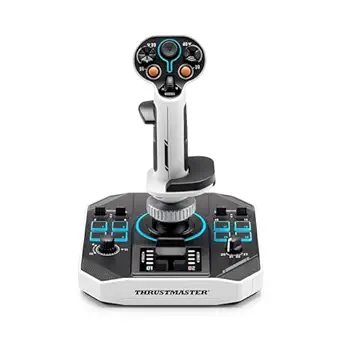 | Best for Space Combat | Programmable Actions: 44 | Action Buttons on Stick: 21 | Triggers: 2 | VIEW LATEST PRICE | See Our Full Breakdown |
| Thrustmaster HOTAS Warthog A-10 Replica Flight Stick & Throttle Set |  | Best Premium Replica HOTAS | Type: Flight stick and throttle set | Platform: PC | Material: All-metal | VIEW LATEST PRICE | See Our Full Breakdown |
| Thrustmaster T16000M FCS HOTAS |  | Best Value Precision HOTAS | Compatibility: PC via USB, Windows 32-bit and 64-bit | Action Buttons: 16 | Additional Buttons: 14 | VIEW LATEST PRICE | See Our Full Breakdown |
| HOTAS controllers for PC gaming | Compatibility | Connectivity |
|---|---|---|
| Logitech G X56 H.O.T.A.S Throt | Windows 7, 8.1, 10, 11 | 2x USB |
| Thrustmaster T-Flight Hotas X | PC | USB |
| Thrustmaster TCA Sidestick Air | — | Plug and play |
| Logitech G PRO Flight Yoke Sys | Windows 11/10/8.1/7, Microsoft Flight Simulator, FSX, X-Plane 10, Prepar3D | USB |
| Thrustmaster T-Flight Hotas On | Xbox & PC | — |
| Logitech G Saitek X52 Pro Flig | — | 2x USB 2.0 ports |
| Thrustmaster Sol-R1 Hall-Effec | PC | — |
| Thrustmaster HOTAS Warthog A-1 | — | — |
| Thrustmaster T16000M FCS HOTAS | PC via USB, Windows 32-bit and 64-bit | — |
More Details on Our Top Picks
Logitech G X56 H.O.T.A.S Throttle and Joystick Flight Simulator Game Controller
I rank the Logitech G X56 highest here because it gives PC sim players the widest control ceiling: 189 programmable controls, twin throttles, Hall-effect axes, and adjustable stick force. Compared with the Thrustmaster T-Flight Hotas X, it is far more expandable for complex aircraft, space sims, and multi-engine setups. The dual throttle matters because it turns engine management from a keyboard chore into a physical control choice. The tradeoff is friction: it needs two USB ports, desk space, and patience during setup. I would not point a first-time casual pilot here before the Hotas One, but for players who want one PC-focused HOTAS that can grow into demanding sims, this is the most complete pick in this batch.
Pros:- 189 programmable controls support complex sim bindings
- Twin throttles improve multi-engine and space-sim control
- Hall-effect sensors and spring options allow more precise stick feel
- RGB lighting helps separate controls visually in darker setups
Cons:- Requires two USB connections
- Setup can feel heavy for beginners
- Costs more than entry-level HOTAS systems
Best for: PC sim players who want a full stick-and-dual-throttle setup for complex flight sims, space sims, and multi-engine control.
Not ideal for: New players with limited desk space or only one free USB port, because setup and cable demands are heavier than simpler HOTAS options.
- Control Surface Options:All control surfaces required for flight simulation
- Programmable Controls:189
- Lighting:RGB backlighting
- Connectivity:2x USB
- Compatibility:Windows 7, 8.1, 10, 11
- Cable Length:2 meters
- Sensors:Hall-effect sensors for axes
- Spring Options:4 spring options with adjustable stick force
- Throttle:Twin throttles with friction adjuster and throttle lock
Our verdict“Choose this if you want the richest PC HOTAS control layout here and do not mind a steeper setup curve.”
Thrustmaster T-Flight Hotas X USB Flight Sim Stick & Throttle – PC
The Thrustmaster T-Flight Hotas X earns my value slot because it keeps the core HOTAS idea intact: a separate-feeling stick, a detachable throttle, rudder control, and programmable inputs without the heavier price or setup load of the Logitech G X56. Its 12 buttons and 5 axes are not enough for every advanced cockpit command, but they cover the basics better than a single joystick such as the TCA Sidestick Airbus Edition. The adjustable resistance is useful because it lets players avoid the loose, toy-like feel common in cheaper flight sticks. The catch is headroom. Once bindings get dense in DCS, Elite Dangerous, or Microsoft Flight Simulator, the X56 gives much more room to grow. I see this as the sensible starter HOTAS for PC players who still want real throttle separation.
Pros:- Strong price-to-function balance for a PC HOTAS
- Detachable throttle supports wider desk layouts
- Adjustable resistance improves stick feel
- Plug-and-play setup lowers the barrier for new players
Cons:- Limited button count compared with higher-end HOTAS systems
- Advanced profiles may need extra setup
- PC-only compatibility limits cross-platform use
Best for: Budget-focused PC players who want a real HOTAS layout for flight sims without jumping straight into premium hardware.
Not ideal for: Advanced sim pilots who rely on many cockpit bindings, because 12 buttons can run out quickly in complex aircraft.
- Connectivity:USB
- Number of Buttons:12
- Number of Axes:5
- Rudder Control:Dual rudder handle
- Detachable Throttle:Yes
- Programmable:Yes
- Preset Memory:Yes
- Resistance Adjustment:Yes
- Compatibility:PC
Our verdict“Pick this if you want the most affordable path into a proper PC HOTAS setup and can live with fewer controls.”
Thrustmaster TCA Sidestick Airbus Edition Flight Sim Joystick – PC
I would choose the Thrustmaster TCA Sidestick Airbus Edition for PC players who mainly fly airliners and want a sidestick feel rather than a full combat-style HOTAS. Compared with the Thrustmaster T-Flight Hotas One, it gives up a separate throttle module, but its Airbus A320-inspired layout, magnetic sensor, thrust reverser, and swappable joystick head modules make it more cockpit-specific. That focus is the reason it ranks as a specialist pick instead of the best all-around choice. The built-in throttle is handy for compact desks, though it cannot match the physical engine control of the Logitech G X56 dual throttles. I like it most for Microsoft Flight Simulator pilots who care more about airliner handling than weapon binds, space-sim inputs, or a sprawling control surface.
Pros:- Airbus A320-style sidestick design suits civil aviation sims
- Magnetic contactless sensor helps resist drift
- 17 action buttons provide more control than many compact sticks
- Built-in throttle and thrust reverser save desk space
Cons:- Not a full HOTAS with a separate throttle unit
- Airbus-focused layout is less natural for combat aircraft
- Beginners may need time to learn the remappable modules
Best for: PC airliner sim players who want an Airbus-style sidestick with compact throttle and rudder controls built in.
Not ideal for: Players who want a full separate throttle for combat sims or space sims, because the integrated throttle is less flexible.
- Sensor Technology:Magnetic contactless sensor
- Number of Action Buttons:17
- Remappable Buttons:12
- Joystick Head Modules:4
- Built-in Throttle:Yes
- Thrust Reverser:Yes
- Rudder Control:Rotating handle with lockable twist
- Connectivity:Plug and play
Our verdict“Buy this for Airbus-style PC flying in a compact setup, not as a do-everything HOTAS replacement.”
Logitech G PRO Flight Yoke System, Professional Simulation Yoke and Throttle Quadrant, 75 Programmable Controls, USB, PC
The Logitech G PRO Flight Yoke System is the pick I would separate from the classic HOTAS crowd. It is better for civil aviation than the Logitech G X56 if the goal is flying Cessnas, airliners, and training-style routes rather than jets or space combat. The yoke and throttle quadrant make pitch, roll, and engine control feel closer to many real aircraft, while 75 programmable controls still leave enough room for sim commands. The tradeoff is genre fit. A yoke is less useful for fast stick-based aircraft, and it asks for more desk commitment than the TCA Sidestick Airbus Edition. It may also need optional software to reach its full mapping potential. I would rank it highly for Microsoft Flight Simulator, but not as the default HOTAS pick for every PC gamer.
Pros:- Yoke and throttle quadrant suit civil aviation better than a combat-style stick
- 75 programmable controls support detailed sim setups
- Steel shaft adds durability to the yoke mechanism
- Desk clamps help create a more stable cockpit-style layout
Cons:- Less versatile for fighter jets and space sims
- Needs more desk space than compact sticks
- Optional software may be needed for full functionality
Best for: PC players focused on Microsoft Flight Simulator, X-Plane, FSX, or Prepar3D with general aviation and airliner flying.
Not ideal for: Combat and space-sim players who need fast stick movement and a classic throttle-and-stick HOTAS layout.
- Modes:3
- Programmable Controls:75
- Control Buttons:14
- Mounting:2 desk clamps
- Connectivity:USB
- Compatibility:Windows 11/10/8.1/7, Microsoft Flight Simulator, FSX, X-Plane 10, Prepar3D
- USB Cable Length:5.9 ft (1.8m)
- Throttle Cable Length:4.92 ft (1.5m)
Our verdict“Choose this over a HOTAS if your PC flying is mainly civil aviation and cockpit realism matters more than compactness.”
Thrustmaster T-Flight Hotas One Flight Stick & Throttle – Xbox & PC
The Thrustmaster T-Flight Hotas One makes the most sense when PC gaming is only part of the plan. Compared with the Thrustmaster T-Flight Hotas X, it adds Xbox and PC compatibility while keeping the same friendly idea: detachable throttle, adjustable resistance, and enough programmable controls for mainstream flight games. That flexibility is the real reason to buy it. If the setup will live beside an Xbox as well as a PC, the Hotas One is easier to justify than the PC-only Hotas X. Against the Logitech G X56, though, it is clearly the lighter-duty choice. The 14 programmable buttons are fine for approachable sims, but demanding PC pilots may want more switches, axes, and throttle detail. Rudder pedals are also separate, so a full cockpit setup costs more.
Pros:- Works with both Xbox and PC
- Detachable throttle supports different desk positions
- 14 programmable buttons cover mainstream flight controls
- Compatible with Thrustmaster TFRP rudder pedals for expansion
Cons:- Far fewer controls than premium PC HOTAS systems
- Rudder pedals cost extra
- Button layout can take time for new users
Best for: Players who split flight games between Xbox and PC and want one affordable HOTAS-style controller for both platforms.
Not ideal for: PC-only sim hobbyists building a dense cockpit setup, because the Logitech G X56 offers far more programmable control.
- Compatibility:Xbox & PC
- Design:Detachable throttle, modular
- Buttons:14 programmable
- Adjustable Resistance:Yes
- Trigger:Responsive
- Additional Compatibility:Thrustmaster TFRP rudder pedals sold separately
Our verdict“Get this if cross-platform play matters more than having the most advanced PC-only HOTAS layout.”
Logitech G Saitek X52 Pro Flight Control System Controller and Joystick
I rank the Logitech G Saitek X52 Pro as the Best Feature-Rich Midrange HOTAS because it gives PC players more cockpit-style feedback than the Thrustmaster T16000M FCS HOTAS without reaching the size, weight, or cost level of the Thrustmaster HOTAS Warthog. The LCD multi-function display and illuminated buttons make mapped commands easier to read during longer sim sessions, while the adjustable throttle resistance helps it feel less toy-like than simpler starter sets. The tradeoff is setup friction: it needs two USB ports, Windows software, and time spent programming controls. Compared with the Sol-R1, this is more traditional aircraft-focused than space-combat focused, so I would pick it for flight sim immersion rather than twitchy six-degree movement.
Pros:- LCD display and illuminated buttons make complex bindings easier to manage
- Adjustable throttle resistance gives better control over speed changes
- Five-position handle adjustment helps different hand sizes find a workable grip
- No-contact X and Y axes reduce wear on core stick movement
Cons:- Needs two USB ports, which can be awkward on compact PC setups
- Software setup and programming may slow down new sim players
- Less rugged and less authentic than the Thrustmaster HOTAS Warthog
Best for: PC flight sim players who want a cockpit-style stick-and-throttle setup with visible controls and deeper customization than entry-level HOTAS kits.
Not ideal for: First-time HOTAS buyers with limited USB ports or little patience for software setup.
- Display:LCD multi-function display
- Buttons:Illuminated buttons
- Throttle:Progressive throttle with resistance adjustment and detents
- Axes:No-contact technology on X and Y axes
- Handle Adjustment:5 positions with soft-touch grip
- Connectivity:2x USB 2.0 ports
- System Requirements:Windows 10, 8.1, or 7 with internet for software download
Our verdict“I would choose this if I wanted a customizable PC HOTAS with cockpit feedback, but not the bulk of a full replica system.”
Thrustmaster Sol-R1 Hall-Effect Space Combat Flight Sim Joystick
The Thrustmaster Sol-R1 earns my Best for Space Combat slot because it is built around dense, fast access to commands rather than classic aircraft replica feel. Compared with the Logitech G Saitek X52 Pro, it puts more actions directly on the stick, with 44 programmable actions, a mini stick, thumbwheel, triggers, and hat switches that suit space sims where strafing, targeting, and power management all compete for attention. Its ambidextrous design also makes it more flexible than the Thrustmaster HOTAS Warthog, which is aimed at A-10-style realism. The catch is that this is still just a joystick, not a full throttle-and-stick package like the T16000M FCS HOTAS. I would not call it the easiest first buy unless the buyer already knows they want space-sim control density.
Pros:- 44 programmable actions support dense space sim control layouts
- Hall-effect sensing helps keep stick input smooth and drift-resistant
- Ambidextrous shape works for left- or right-handed setups
- Mini stick, thumbwheel, triggers, and hat switches suit multi-axis space control
Cons:- Does not include a separate throttle like the T16000M FCS HOTAS
- Feature depth can feel busy for casual flying
- Price may be hard to justify for players outside space combat sims
Best for: Space sim and space combat players who want lots of programmable inputs on the stick and prefer ambidextrous ergonomics.
Not ideal for: Players who want a complete throttle-and-stick HOTAS set in one box.
- Programmable Actions:44
- Action Buttons on Stick:21
- Triggers:2
- Hat Switches:2
- Mini Stick:Yes
- Thumbwheel:Yes
- Sensor Technology:Hall-effect
- Design:Ambidextrous, backlit
- Compatibility:PC
Our verdict“I would pick this for space combat first, especially when programmable stick controls matter more than a bundled throttle.”
Thrustmaster HOTAS Warthog A-10 Replica Flight Stick & Throttle Set
I place the Thrustmaster HOTAS Warthog as the Best Premium Replica HOTAS because it serves a different buyer than the Logitech G Saitek X52 Pro or Thrustmaster T16000M FCS HOTAS. This is for sim pilots who value all-metal construction, A-10C-inspired controls, dual throttles, toggles, and a heavy physical feel over convenience. The Hall Effect sensor system supports fine control, but the bigger draw is how many aircraft functions can live on hardware instead of a keyboard. That realism has costs: it takes up far more desk space, asks for more setup effort, and can be excessive for lighter PC flying. Compared with the Sol-R1, it is less suited to ambidextrous space combat and much better suited to serious military flight simulation.
Pros:- All-metal build gives it a heavier, more realistic control feel
- A-10C-style stick and throttle layout suits serious military flight sims
- 55 programmable controls reduce keyboard dependence
- Hall Effect sensors support precise, smooth input
Cons:- Large and heavy enough to demand dedicated desk space
- High price is hard to defend for occasional PC flying
- Complex controls and setup can overwhelm beginners
Best for: Dedicated PC flight sim pilots who want a heavy, realistic A-10-style stick-and-throttle setup for advanced sims.
Not ideal for: Casual players, small desks, or buyers who want a simple first HOTAS with quick setup.
- Type:Flight stick and throttle set
- Platform:PC
- Material:All-metal
- Programmable Buttons:55
- Hat Switch:8-way
- Sensors:Hall Effect H.E.A.R.T
- Throttle:Dual throttle
- Control Features:Multiple switches and toggles
Our verdict“I would reserve this for serious sim pilots who want replica-style realism and have the space and budget for it.”
Thrustmaster T16000M FCS HOTAS
The Thrustmaster T16000M FCS HOTAS is my Best Value Precision HOTAS because it gives PC players Hall effect accuracy in a full stick-and-throttle package without the replica pricing of the Thrustmaster HOTAS Warthog. Compared with the Logitech G Saitek X52 Pro, it skips the LCD display and extra cockpit flash, but the Hall effect magnetic sensors make a stronger case for players who care more about clean stick input than visual extras. It also feels more complete for aircraft flying than the Sol-R1 because the separate throttle is part of the package. The limits are plain: PC-only compatibility, a setup process that may take some tuning, and fewer high-end materials than the Warthog. I see it as the practical middle choice for serious value hunters.
Pros:- Hall effect magnetic sensors deliver precise stick input for the price
- Includes both joystick and throttle for a true HOTAS layout
- Twist rudder axis helps players avoid buying pedals right away
- Broad button and switch count supports custom PC bindings
Cons:- PC-only compatibility leaves console players out
- Lacks the LCD and illuminated control feedback of the Logitech X52 Pro
- Build and controls feel less premium than the HOTAS Warthog
Best for: PC players who want a precise stick-and-throttle HOTAS for flight sims without paying for a metal replica system.
Not ideal for: Console players or buyers who want premium materials, onboard displays, or replica-style switches.
- Compatibility:PC via USB, Windows 32-bit and 64-bit
- Action Buttons:16
- Additional Buttons:14
- POV Hat:8-way
- Switches:Two 4-way switches
- Axes:4 including twist rudder
- Sensors:Hall effect magnetic sensors
Our verdict“I would buy this as the sensible precision pick when a full PC HOTAS matters more than replica materials or display extras.”
How We Picked
I ranked these nine options by how well they answer a PC gaming HOTAS brief, not by raw feature count alone. A higher spot went to controllers that combine separate throttle control, enough programmable inputs, predictable stick precision, strong PC compatibility, and layouts that fit modern sims such as Microsoft Flight Simulator, DCS, Elite Dangerous, Star Citizen, and War Thunder. I cross-checked official manufacturer specs for the Logitech G X56, Logitech Flight Yoke System, Thrustmaster T16000M FCS HOTAS, HOTAS Warthog, T.Flight Hotas X, T.Flight Hotas One, TCA Sidestick Airbus Edition, and Sol-R 1 Flightstick, with legacy X52 background for the older Saitek-era design.
The order rewards all-round PC usefulness first. That is why the Logitech G X56 sits above the Thrustmaster HOTAS Warthog: the Warthog has a more convincing metal replica build, but the X56 is easier to recommend to mixed-genre PC gamers who want lots of bindings, dual throttles, and space-sim controls at a lower price. The T16000M FCS HOTAS ranks high because it gives more precision per dollar than the entry sets, while the T.Flight models serve buyers who need a simple first HOTAS. Standalone sticks and yokes, including the Sol-R 1, TCA Sidestick, and Logitech Flight Yoke, are kept in the list for specific PC flight needs, but they rank lower because they do not cover the broad HOTAS use case as cleanly.
| HOTAS controllers for PC gaming | Compatibility |
|---|---|
| Logitech G X56 H.O.T.A.S Throt | Windows 7, 8.1, 10, 11 |
| Thrustmaster T-Flight Hotas X | PC |
| Thrustmaster TCA Sidestick Air | — |
| Logitech G PRO Flight Yoke Sys | Windows 11/10/8.1/7, Microsoft Flight Simulator, FSX, X-Plane 10, Prepar3D |
| Thrustmaster T-Flight Hotas On | Xbox & PC |
| Logitech G Saitek X52 Pro Flig | — |
| Thrustmaster Sol-R1 Hall-Effec | PC |
| Thrustmaster HOTAS Warthog A-1 | — |
| Thrustmaster T16000M FCS HOTAS | PC via USB, Windows 32-bit and 64-bit |
Factors to Consider When Choosing Best HOTAS Controllers For PC Gaming
I would start with the games, desk space, and upgrade plans before picking a controller by price alone. A great HOTAS for one PC player can be the wrong buy for another if the control layout does not match the aircraft, spacecraft, or sim style they spend the most time with.
Match the Controller to Your Sim Type
I would choose by primary game before choosing by spec sheet. Space combat rewards extra axes, ministicks, and enough inputs for thrusters, target management, power systems, and camera controls, which makes the X56, T16000M, and Sol-R 1 more natural fits. Military combat sims reward a firm stick, split throttle, hats, and switches that feel deliberate, which is where the Warthog earns its premium role. Civil aviation changes the priority toward trim, throttle quadrants, reversers, and yoke or sidestick realism, so the TCA Sidestick and Logitech Yoke make more sense than they would for Star Citizen. A common mistake is buying the most dramatic-looking setup and then realizing half the controls do not map neatly to the game played most. I would rather match the control layout to the cockpit style first, then decide how much polish and programmability are worth paying for.
True HOTAS vs Flight Stick vs Yoke
A true HOTAS setup gives the right hand flight control and the left hand throttle control, which matters because speed changes, targeting, countermeasures, views, and weapons can stay under your fingers. A standalone flight stick can still be a smart buy, especially for Microsoft Flight Simulator or a compact desk, but it usually asks more from the keyboard. A yoke system feels more believable for general aviation and airliners, yet it is weaker for combat and space games where pitch, roll, yaw, and rapid throttle changes happen together. This is why the Logitech Flight Yoke ranks as a useful specialist rather than a top HOTAS pick. If you play across several genres, I would favor a split stick-and-throttle unit before a yoke or single sidestick.
Button Count, Hats, and Modes
Button count only helps when the controls are easy to find without looking down. Hats, toggles, rotaries, mode switches, and ministicks each solve different binding problems, so a 30-button HOTAS can feel more useful than a higher-number layout if the controls are grouped well. For VR players, tactile separation matters even more because keyboard fallback is clumsy once the headset is on. Entry HOTAS models like the T.Flight Hotas X and Hotas One keep the learning curve gentle, but they run out of bindings faster in DCS or Elite Dangerous. Advanced sets like the X56 and Warthog reward careful profiles, though they also demand more setup time before the layout feels natural. I would pay for more inputs only if the games on my shortlist actually use them.
Sensor Precision and Throttle Feel
Sensor quality affects small corrections, aiming, refueling, formation flying, and smooth landings more than it affects casual sightseeing. Hall-effect or magnetic sensing reduces wear-prone contact points on key axes, which is why the T16000M, Warthog, TCA Sidestick, and Sol-R 1 stand out on precision value. Throttle feel is a separate issue: a long, smooth throw helps with airliners and space docking, while detents help afterburner, idle, and reverse thrust feel more distinct. Twist rudder is worth having if you do not own pedals, and its absence on a premium set can add cost because pedals become the natural next purchase. A buyer can overspend on sensors and still dislike the setup if the throttle range, spring force, or grip shape fights their hand. I would treat precision as one part of control comfort, not the whole reason to buy.
Desk Space, Mounting, and Upgrade Path
HOTAS controllers take more room than their product photos suggest, and desk stability changes the feel of every input. Separated throttle-and-stick units are more flexible than a fixed base, but they also need cable routing and enough width for shoulders to stay relaxed. Heavy hardware such as the Warthog feels planted, while lighter gear may benefit from clamps, desk mats, or a cockpit mount. Upgrade path matters because rudder pedals, extra throttles, clamps, and MFD panels can turn a modest setup into a more serious sim station. I would avoid spending the whole budget on the main controller if pedals or mounting hardware will solve the bigger comfort problem. The smartest setup is the one that fits the desk and gets used often, not the one with the most dramatic spec list.
Frequently Asked Questions
Is a HOTAS Better Than a Regular Joystick for PC Gaming?
For most PC players choosing between the two, I would pick a true HOTAS if the main games are DCS, Elite Dangerous, Star Citizen, War Thunder, or any sim with frequent throttle and weapon management. A regular joystick can fly the aircraft, but the keyboard will handle more secondary controls. That gap becomes annoying in VR or during combat, where reaching for keys breaks the flow. A compact stick still makes sense for civil aviation, casual flying, or a small desk. The tradeoff is price and space: a HOTAS gives more control, while a joystick is cheaper and easier to store.
Should I Buy the Logitech G X56 or the Thrustmaster HOTAS Warthog?
I would choose the Logitech G X56 for mixed PC gaming and the Thrustmaster HOTAS Warthog for dedicated military-sim realism. The X56 has broader space-sim appeal thanks to its dual throttles, thumb controls, and large programmable layout. The Warthog feels more like a serious cockpit component, with metal construction and A-10C replica controls, but it costs more and does not include twist rudder. If pedals are already in the plan, the Warthog becomes easier to justify. If the setup needs to handle several games without becoming a cockpit project, the X56 is the easier recommendation.
Are Budget HOTAS Controllers Good Enough for Microsoft Flight Simulator?
Yes, a budget HOTAS can be good enough for Microsoft Flight Simulator if the goal is learning basic throttle, pitch, roll, and rudder control without building a full cockpit. The Thrustmaster T-Flight Hotas X and Hotas One give a more natural two-hand layout than a gamepad or keyboard. The limit is depth: fewer buttons mean more keyboard use for autopilot, radios, camera controls, flaps, and trim. For airliners, a sidestick plus throttle quadrant or a yoke can feel more appropriate than an entry HOTAS. I would start cheap only if the buyer is still learning what they like, then upgrade once the favorite aircraft and games are clear.
Do I Need Rudder Pedals With a HOTAS?
You do not need rudder pedals on day one if the controller has twist rudder or a paddle-style rudder input. Twist control is fine for casual flying, space games, and early training, especially on the X56, T16000M, T.Flight models, and TCA Sidestick. Pedals become more valuable when taxiing, crosswind landings, helicopters, warbirds, and coordinated turns start to matter. The Warthog is the main case where I would budget for pedals sooner because the stick itself does not cover twist rudder. I would buy pedals after the main HOTAS only when yaw control feels like the limiting factor.
Is the Thrustmaster TCA Sidestick Airbus Edition a HOTAS?
The TCA Sidestick Airbus Edition is best understood as a sidestick, not a full HOTAS bundle. It has a small built-in throttle and a useful Airbus-inspired layout, but it does not give the same left-hand throttle workload as the X56, T16000M FCS HOTAS, or Warthog. That makes it strong for Microsoft Flight Simulator airliner flying, especially if an Airbus-style quadrant is added later. It is less convincing for space combat or DCS because those games reward more throttle-side hats, switches, and axes. I would buy it for civil aviation identity, not as the broadest PC gaming HOTAS.
Conclusion
My final call is to start with the Logitech G X56 H.O.T.A.S. as the best overall pick if the buyer wants one PC setup that can move between space sims, combat sims, and general flight without jumping to the most expensive hardware. I would pick the Thrustmaster T16000M FCS HOTAS for best value, since it brings magnetic stick precision and a proper throttle at a friendlier price than the premium sets. For a dedicated combat-sim cockpit, the Thrustmaster HOTAS Warthog is the best premium choice, while the Thrustmaster T-Flight Hotas One is my best for beginners pick and the T-Flight Hotas X is the low-cost PC-only route. For specific needs, I would steer civil aviation players to the TCA Sidestick Airbus Edition or Logitech Flight Yoke System, space-combat players with limited room to the Sol-R 1 Flightstick, and classic HOTAS fans to the Logitech G X52 Pro.
Evergreen bestsellers Picks
bestsellers
As an affiliate, we earn on qualifying purchases.