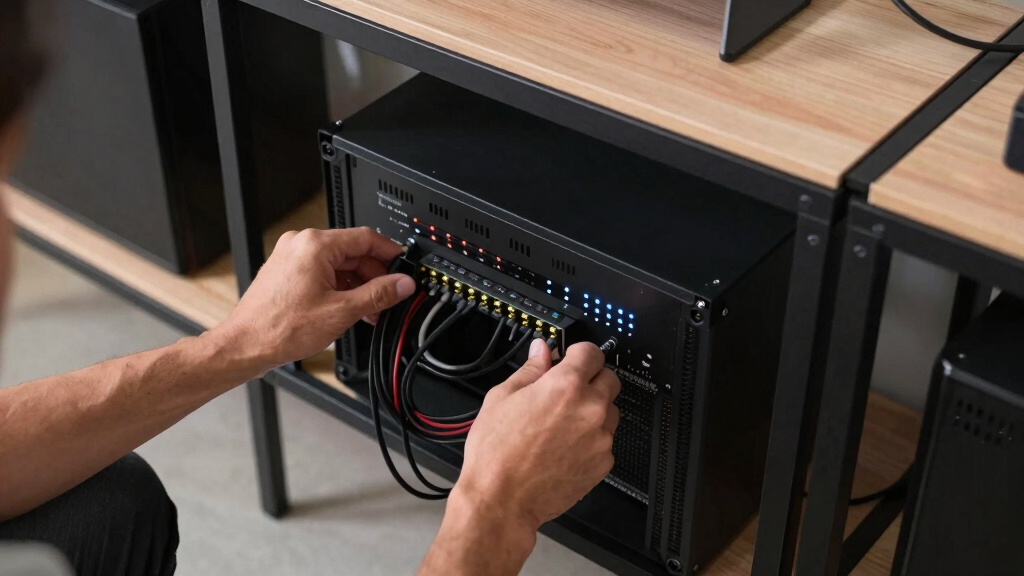

The best network racks for gaming homes share three traits: they fit standard 19-inch gear, they tame cable clutter, and they don’t turn your living space into a server closet. After comparing the leading wall-mount and floor-standing options, my best overall pick is the Tecmojo 6U Wall Mount Server Cabinet — it swallows a modem, router, switch, and NAS behind a lockable glass door, keeping dust, pets, and curious hands away from your hardware. If you want the most rack for the money, the AxcessAbles 12U Network Rack with Wheels rolls between rooms and ships with the screws and tools most racks make you buy separately. And for dedicated game rooms growing into full homelabs, the StarTech 42U 4-Post Server Rack is the premium option you won’t outgrow. The main tradeoffs come down to wall-mounted versus floor-standing, open airflow versus enclosed noise and dust control, and how much space your gear actually takes up. Keep reading for the full breakdown of all eight picks and who each one is really for.

Play games on Amazon Luna for your game nights, included with Prime
- A rotating selection of games, no download needed
- Play on TV, laptop or phone
- Fast, free delivery for your gear, too
Complete the kit



Key Takeaways
- Wall-mounted cabinets took the top spots because most gaming setups only need 4U-12U of space — anything larger is homelab territory, not gaming networking.
- The Tecmojo 6U earned Best Overall by hiding a full modem-to-NAS lineup behind a lockable glass door at a size that fits above a desk or in a hallway closet.
- Open-frame racks like the RIVECO 15U and AxcessAbles 12U win on airflow and price but lose on noise containment — a real problem when your switch and NAS share a room with your TV.
- Four of the eight racks are Tecmojo models, and that range (4U to 12U, open and enclosed) lets you scale up without mixing rail standards or shelf sizes.
- The StarTech 42U is the only rack here rated past 1,300 lbs — overkill for a router and switch, but the right call when a gaming home is turning into a full homelab.
| RIVECO 15U Server Rack Floor Standing Open Frame with Wheels | 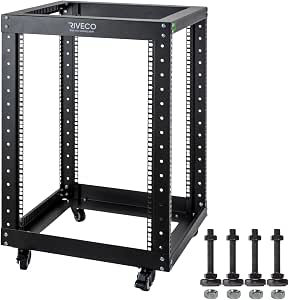 | Best Overall | Rack Units: 15U (also available 6U–25U) | Weight Capacity: 600 lbs on leveling feet, 500 lbs on casters | Dimensions: 19.7″ W x 21.7″ D x 33.2″ H (with casters) | VIEW LATEST PRICE | See Our Full Breakdown |
| ECHOGEAR 10U Wall Mount Network Rack with Vented Shelves and Hardware |  | Best for Beginners | Capacity: 10U | Weight Capacity: 150 lbs | Depth: 20.4 inches | VIEW LATEST PRICE | See Our Full Breakdown |
| Tecmojo 12U Wall Mount Server Cabinet with Lockable Glass Door and Cooling Fan |  | Best for Secure Spaces | Rack Units: 12U | Weight Capacity: 110 lbs | Dimensions: 24.25″ H x 21.65″ W x 17.72″ D | VIEW LATEST PRICE | See Our Full Breakdown |
| Tecmojo 6U Wall Mount Server Cabinet with Lockable Glass Door, 450mm Depth |  | Best Compact Pick | Rack Units: 6U | Weight Capacity: 110 lbs | Dimensions: 13.78″ H x 21.65″ W x 17.72″ D | VIEW LATEST PRICE | See Our Full Breakdown |
| StarTech 42U 4-Post Server Rack, 19in Open Frame with Adjustable Depth |  | Best for Serious Home Labs | Rack Units: 42U | Weight Capacity: 1323 lbs (600 kg) | Depth Range: Adjustable, 22–40 inches | VIEW LATEST PRICE | See Our Full Breakdown |
| AxcessAbles 12U Network Rack with Wheels |  | Best Mobile Open Frame | Rack Size: 12U | Weight Capacity: 500 lbs | Depth: 18 inches | VIEW LATEST PRICE | See Our Full Breakdown |
| Tecmojo 4U Wall Mount Rack |  | Best Compact Wall Mount | Rack Size: 4U | Weight Capacity: 110 lbs (50 kg) | Depth: 14 inches | VIEW LATEST PRICE | See Our Full Breakdown |
| Tecmojo 12U Open Frame Network Rack |  | Best Wall-or-Floor Hybrid | Rack Size: 12U | Floor Capacity: 260 lbs | Wall Capacity: 130 lbs | VIEW LATEST PRICE | See Our Full Breakdown |
| network racks for gaming home | Weight Capacity | Material | Rack Units |
|---|---|---|---|
| RIVECO 15U Server Rack Floor S | 600 lbs on leveling feet, 500 lbs on casters | SPCC cold-rolled steel | 15U (also available 6U–25U) |
| ECHOGEAR 10U Wall Mount Networ | 150 lbs | — | — |
| Tecmojo 12U Wall Mount Server | 110 lbs | Cold-rolled steel | 12U |
| Tecmojo 6U Wall Mount Server C | 110 lbs | Cold-rolled steel | 6U |
| StarTech 42U 4-Post Server Rac | 1323 lbs (600 kg) | Cold-rolled steel | 42U |
| AxcessAbles 12U Network Rack w | 500 lbs | Steel | — |
| Tecmojo 4U Wall Mount Rack | 110 lbs (50 kg) | Cold rolled steel | — |
| Tecmojo 12U Open Frame Network | — | Cold rolled steel | — |
More Details on Our Top Picks
RIVECO 15U Server Rack Floor Standing Open Frame with Wheels
The RIVECO 15U Open Frame Rack earns the top spot because it solves the most common gaming-home problem: gear that outgrows a shelf but doesn’t justify a server room. Fifteen rack units swallow a modem, router, patch panel, switch, NAS, and a console or two, and the 600 lb capacity with leveling feet means weight is basically never the limiting factor. Casters let me roll the whole setup out to rewire instead of crawling behind furniture — a practical win the wall-mounted Tecmojo 6U can’t match. Open-frame airflow keeps fan-less switches cool, though it also means dust and noise are on full display, something the enclosed Tecmojo 12U cabinet handles better. Assembly takes an hour of honest work, and the black-only finish won’t suit every room. For most setups, this is the rack to beat.
Pros:- 15U of space plus a 600 lb capacity leaves years of headroom for new gear
- Casters and leveling feet both included, so it can roll or sit permanently
- Open frame keeps fan-less switches and consoles cool without added fans
- Same product line runs from 6U to 25U if your needs change later
Cons:- Open design offers no security, dust protection, or noise containment
- Assembly is required and the frame is awkward to move before casters go on
- Black is the only finish, which limits placement in finished living spaces
Best for: Gamers building a growing setup — router, NAS, switch, consoles — who want floor-standing capacity and mobility without committing to a full cabinet.
Not ideal for: Homes with toddlers or pets where exposed cables and gear would get disturbed — the enclosed Tecmojo 12U cabinet is the safer call there.
- Rack Units:15U (also available 6U–25U)
- Weight Capacity:600 lbs on leveling feet, 500 lbs on casters
- Dimensions:19.7″ W x 21.7″ D x 33.2″ H (with casters)
- Material:SPCC cold-rolled steel
- Finish:Black RAL9005 powder coat
- Mounting Width:19-inch, 4-post open frame
- Included:M6 screws, cage nuts, casters, leveling feet
Our verdict“The default choice for most gaming homes: big enough to grow into, mobile enough to live with.”
ECHOGEAR 10U Wall Mount Network Rack with Vented Shelves and Hardware
If the phrase ‘cage nuts’ means nothing to you, the ECHOGEAR 10U Wall Mount Rack is where I’d start. Everything needed to hang it arrives in the box, including two vented 1U shelves — so a router and console can sit on flat surfaces instead of demanding rack-native mounting, which the RIVECO 15U expects of everything. The open frame keeps air moving around gear and makes cabling forgiving while you learn. Ten units and a 150 lb ceiling cover a typical gaming network with room left over, but this is a wall-only design, so stud placement decides where your network lives, and it won’t migrate to the floor later the way the Tecmojo 12U open frame can. Skip it if lockable security matters — the Tecmojo 12U cabinet is the better answer there.
Pros:- Ships with all mounting hardware, making it the easiest install in this lineup
- Two vented 1U shelves hold non-rack gear like routers and consoles
- 150 lb capacity beats most wall cabinets, including the Tecmojo models
- Open frame gives generous airflow and painless cable access
Cons:- Wall-mount only — no floor-standing option if your layout changes
- No doors or panels, so gear is exposed to dust, noise, and curious hands
- 10U ceiling means heavy expanders will outgrow it
Best for: First-time rack buyers who want a modem, router, and a console or two neatly wall-mounted without buying rack-native gear.
Not ideal for: Renters who can’t anchor into studs, and anyone who needs lockable security — the open design protects nothing.
- Capacity:10U
- Weight Capacity:150 lbs
- Depth:20.4 inches
- Design:Open frame, wall-mount only
- Included:2x 1U vented shelves, mounting hardware
- Equipment Fit:Gear up to 19 inches deep
- Cooling:Passive airflow via open frame and vented shelves
Our verdict“The friendliest entry point into rack mounting, as long as your walls and your ambitions stay modest.”
Tecmojo 12U Wall Mount Server Cabinet with Lockable Glass Door and Cooling Fan
Some gaming homes share space with toddlers, cats, or roommates, and that’s where the Tecmojo 12U Wall Mount Cabinet pulls ahead of the open-frame RIVECO 15U. Lockable glass doors and side panels keep cables from being tugged and settings from being bumped, while the built-in cooling fan pushes air across gear that an open rack relies on room airflow to cool. Doubling the Tecmojo 6U’s capacity, it leaves real room for a patch panel, switch, and a couple of consoles. The tradeoffs are honest ones: the 110 lb weight limit and 14.2-inch mounting depth exclude deep servers and heavy UPS units, and assembly plus wall anchoring is a weekend project, not an evening one. I’d pick it over the StarTech 42U only when floor space is genuinely scarce.
Pros:- Lockable glass door and side panels keep gear safe from tampering
- Built-in cooling fan actively moves air in an enclosed space
- Glass front lets you check status lights without opening the cabinet
- 12U capacity doubles the Tecmojo 6U while staying off the floor
Cons:- 110 lb weight limit is the lowest among the larger picks here
- 14.2-inch mounting depth rules out full-depth servers and big UPS units
- Assembly and solid wall anchoring take real time and effort
Best for: Households with kids, pets, or shared walls who need mid-size capacity with physical security and active cooling built in.
Not ideal for: Buyers planning to add a deep server or heavy UPS later — the 14.2-inch depth and 110 lb ceiling will box them in.
- Rack Units:12U
- Weight Capacity:110 lbs
- Dimensions:24.25″ H x 21.65″ W x 17.72″ D
- Max Mounting Depth:14.2 inches
- Material:Cold-rolled steel
- Security:Lockable glass door and lockable side panels
- Cooling:Built-in cooling fan
Our verdict“The right pick when security and tidiness matter more than depth or heavyweight expansion.”
Tecmojo 6U Wall Mount Server Cabinet with Lockable Glass Door, 450mm Depth
For a gaming home where the network gear lives in a hallway closet or a corner of the living room, the Tecmojo 6U Wall Mount Cabinet is the tidy answer. It gets a modem, router, and a small switch off the floor and behind a lockable glass door, which keeps curious kids and pets away from blinking lights and reset buttons. Compared with the open-frame ECHOGEAR 10U, it trades easy access and airflow for protection and a cleaner look — you can see gear status through the glass without opening anything. The 14.2-inch mounting depth fits shallow network gear but rules out full-size servers or deep UPS units, so I’d treat this as a networking hub rather than a growth platform. Against its bigger sibling, the Tecmojo 12U cabinet, it gives up half the capacity to fit spaces the 12U simply can’t.
Pros:- Compact 6U footprint fits closets and tight walls where larger racks can’t
- Lockable glass door and side panels secure gear from kids and pets
- Adjustable mounting rails adapt to varied 19-inch equipment
- Glass front allows status checks without opening the cabinet
Cons:- 6U capacity leaves almost no room to expand beyond core network gear
- 14.2-inch max mounting depth excludes servers and most UPS units
- Assembly plus wall anchoring is more work than the size suggests
Best for: Apartment and small-home gamers who want a modem, router, and switch secured behind glass without giving up any floor space.
Not ideal for: Anyone running deep servers or a full-size UPS — the 14.2-inch mounting depth physically won’t accept them.
- Rack Units:6U
- Weight Capacity:110 lbs
- Dimensions:13.78″ H x 21.65″ W x 17.72″ D
- Max Mounting Depth:14.2 inches
- Material:Cold-rolled steel
- Security:Lockable glass door and side panels
- Rails:Adjustable mounting rails
Our verdict“The smallest secure option here — ideal for a lean network hub, wrong for anything that needs to grow.”
StarTech 42U 4-Post Server Rack, 19in Open Frame with Adjustable Depth
The StarTech 42U 4-Post Rack is the option for gaming homes that stopped being casual years ago. Its adjustable 22-to-40-inch depth accepts full-length servers that none of the wall cabinets here — Tecmojo’s 14.2-inch limit included — can physically hold, and the 1323 lb capacity laughs at stacked UPS batteries. Compared with the RIVECO 15U, it offers nearly triple the mounting height and proper four-post stability for sliding rails. The costs are real: at over six feet tall it dominates a room, assembly demands comfort with cage nuts and a level, and open sides mean fan noise from any server becomes room noise. For a router-and-console household it’s overkill; for a home lab running game servers beside the gaming PCs, it’s the only pick here with headroom to spare.
Pros:- 42U and a 1323 lb capacity handle anything a home lab can throw at it
- Adjustable 22–40 inch depth fits full-length enterprise servers
- Four-post design supports sliding rails for heavy rack-mount gear
- Ships with casters, leveling feet, and base-plate mounting options
Cons:- Over six feet tall and bulky — it needs a dedicated room or garage corner
- Assembly requires real technical comfort and ideally a second person
- Open frame contains neither noise nor dust and offers zero security
Best for: Home-lab enthusiasts running full-depth servers, self-hosted game servers, or multi-PC rigs who need maximum capacity and depth flexibility.
Not ideal for: Typical gaming households with a router and a console or two — the size, effort, and footprint buy capacity they’ll never use.
- Rack Units:42U
- Weight Capacity:1323 lbs (600 kg)
- Depth Range:Adjustable, 22–40 inches
- Height:80.3″ with casters, 78″ without
- Posts:4-post open frame
- Mounting Width:19 inches
- Material:Cold-rolled steel
- Base Options:Casters, leveling feet, or base plate
Our verdict“Massive, capable overkill — buy it only if your gaming home already runs like a small data center.”
AxcessAbles 12U Network Rack with Wheels
The AxcessAbles 12U earns its spot as the mobile workhorse of this roundup. Its 500 lb capacity is double what the Tecmojo 12U handles on the floor (260 lbs), which matters if your gaming room doubles as storage for a heavy UPS, amplifiers, or stacked consoles. The lockable caster wheels let you roll the whole setup out to rewire behind it, something the wall-mounted Tecmojo 4U can never offer. The tradeoff is footprint: at 18 inches deep it claims real floor space, and the open frame leaves gear exposed to dust and curious pets, unlike the enclosed Tecmojo 12U cabinet with its lockable glass door. It also tops out at 12U, so anyone planning a StarTech 42U-style expansion should look up the lineup. For a gaming home that values access and mobility over protection, this is the sensible pick.
Pros:- 500 lb capacity handles a heavy UPS, amps, and stacked gear
- Lockable casters make rewiring and cleaning behind the rack easy
- Ships with 34 rack screws, a spacer, and an assembly tool
- Steel frame stays rigid once fully loaded
Cons:- Open frame exposes equipment to dust and pets
- 12U ceiling limits future expansion
- Heavy when loaded — moving it across carpet takes help
Best for: Gamers who want to roll a heavy AV-and-server stack away from the wall for easy cable swaps and cleaning
Not ideal for: Renters short on floor space, or anyone who needs lockable, dust-protected storage rather than open access
- Rack Size:12U
- Weight Capacity:500 lbs
- Depth:18 inches
- Width:19 inches
- Material:Steel
- Mobility:Lockable caster wheels
- Included Hardware:34 rack screws, spacer, assembly tool
Our verdict“Buy this if your gaming home needs a heavy-duty rack you can roll out and rewire without unloading a thing.”
Tecmojo 4U Wall Mount Rack
Not every gaming home needs a full rack, and the Tecmojo 4U is the pick for setups that amount to a modem, router, switch, and maybe a patch panel. It mounts flat on the wall and lifts your network core off the desk, which frees space and cleans up cable runs. Compared with the much larger AxcessAbles 12U, it holds a fraction of the gear, but it also disappears into a closet or corner in a way a floor rack never can. The catch is the 14-inch depth limit: full-size servers and deep UPS units simply will not fit, and the open frame gives no dust or tamper protection like the Tecmojo 6U cabinet’s lockable glass door. Think of it as a tidy wall shelf for network basics, not a rack you grow into over time.
Pros:- Gets modem, router, and switch off the desk and onto the wall
- No assembly required; mounts flat or on the wall
- 110 lb capacity comfortably covers standard networking gear
- Powder-coated cold rolled steel resists scratches
Cons:- 14-inch depth excludes full-size servers and deep UPS units
- Open design offers no dust or tamper protection
- 4U leaves no room to expand later
Best for: Apartment gamers with a modem-router-switch stack who want it off the desk and out of sight
Not ideal for: Anyone running a home lab or deep server gear — the 14-inch depth rules that out fast
- Rack Size:4U
- Weight Capacity:110 lbs (50 kg)
- Depth:14 inches
- Width:19 inches
- Material:Cold rolled steel
- Finish:Electrostatic powder coat
- Mounting:Wall-mount or flat placement
- Assembly:None required
Our verdict“Buy this if your network gear fits in a shoebox and you’d rather hang it on a wall than dedicate floor space to it.”
Tecmojo 12U Open Frame Network Rack
The Tecmojo 12U open frame is the flexible middle ground of this lineup. It hangs on a wall holding up to 130 lbs or stands on the floor carrying 260 lbs, so it adapts if you rearrange the room later. The two ventilated shelves are a real bonus — consoles, cable boxes, and non-rackmount gear sit alongside patch panels without extra purchases, something the AxcessAbles 12U does not include out of the box. Versus the AxcessAbles, though, you give up caster wheels and half the weight capacity, and wall-mounting at 130 lbs means heavy UPS units stay off this rack. The open frame also lacks the lockable protection of the Tecmojo 12U cabinet. For a growing setup that might shift between wall and floor, it makes more sense than committing to either extreme.
Pros:- Works wall-mounted or floor-standing as your room layout changes
- Two ventilated shelves hold consoles and other non-rackmount gear
- Drilling template and setup video simplify installation
- 260 lb floor capacity handles a mid-size stack
Cons:- Wall capacity drops to 130 lbs, ruling out heavy UPS units
- No wheels — repositioning means unloading and lifting
- Open frame leaves gear exposed to dust
Best for: Gamers mid-upgrade who aren’t sure whether their rack will end up on a wall or on the floor
Not ideal for: Owners of heavy UPS units or deep servers who need one rack to carry everything at full weight
- Rack Size:12U
- Floor Capacity:260 lbs
- Wall Capacity:130 lbs
- Material:Cold rolled steel
- Mounting:Wall-mounted or floor-standing
- Included:2 ventilated shelves, mounting hardware
- Setup Support:Assembly manual, drilling template, online video
Our verdict“Buy this if you want one rack that can start on the wall and move to the floor as your gaming setup grows.”
How We Picked
I ranked these racks the way a gaming household actually buys one: by how much 19-inch gear a typical setup holds (modem, router, patch panel, switch, NAS, maybe a small UPS), by noise and dust control, by mounting flexibility, by build quality at the price, and by how forgiving each rack is to install. Racks in the 4U-12U range that mount on a wall scored highest, because gaming homes rarely need — or have floor space for — a data-center footprint.
The order reflects those priorities. The Tecmojo 6U leads because it covers the most common case — a handful of devices that need to disappear behind a door — at a mid-range price. The value and beginner picks (AxcessAbles, ECHOGEAR) rank next because they remove specific friction: mobility and simple mounting. The larger floor racks (RIVECO, StarTech) sit lower not because they’re worse products, but because they serve a smaller slice of gaming homes; the StarTech would be number one for a rack-mounted homelab, and its review says exactly that. Where two racks were close, I favored the one with the clearer buyer outcome — lockable doors over open frames in shared rooms, casters over fixed feet in rentals.
| network racks for gaming home | Material |
|---|---|
| RIVECO 15U Server Rack Floor S | SPCC cold-rolled steel |
| ECHOGEAR 10U Wall Mount Networ | — |
| Tecmojo 12U Wall Mount Server | Cold-rolled steel |
| Tecmojo 6U Wall Mount Server C | Cold-rolled steel |
| StarTech 42U 4-Post Server Rac | Cold-rolled steel |
| AxcessAbles 12U Network Rack w | Steel |
| Tecmojo 4U Wall Mount Rack | Cold rolled steel |
| Tecmojo 12U Open Frame Network | Cold rolled steel |
Factors to Consider When Choosing Best Network Racks For Gaming Homes
The reviews tell you which racks are good; this guide tells you which rack is good for you. The picks above were ranked for gaming homes specifically, but the right answer shifts with device count, wall structure, noise tolerance, and how fast your setup is growing. Use the sections below to pressure-test your choice before you drill into a wall or wheel 15U of steel into a spare bedroom.
How Many Rack Units (U) Do You Actually Need?
The most common mistake buyers make is shopping by ambition instead of by device count. One rack unit is 1.75 inches of vertical space, and a typical gaming home uses less than it thinks: a modem (1U), router or firewall (1U), patch panel (1U), a 16- or 24-port switch (1U), and a NAS (1U-2U) lands you at 5U-6U before any server hardware enters the picture. A 6U-12U rack covers that with room for cable slack and one upgrade, which is why every wall-mounted pick in this roundup sits in that band. The opposite trap stings too — a 4U rack filled to the last inch leaves no space for a brush panel or a future switch, and re-racking later is a miserable afternoon. My rule: count your devices, add 2U, then stop. Step up to 15U or 42U only if you already own a rack-mount server or a battery backup that eats 2U-3U on its own. Anything beyond that is homelab planning, not gaming networking, and it changes the kind of rack you should buy.
Wall-Mounted or Floor-Standing?
Wall-mounting is the default for gaming homes because it keeps gear off the floor, away from vacuum cleaners, spills, and pets, and it frees up the corner where a floor rack would sit. The catch is structural: a loaded 12U cabinet can push 100 lbs, so it must anchor into studs — drywall anchors are a slow-motion disaster. Open-frame wall racks like the Tecmojo 4U and 12U double as small floor units, which is handy in rentals where you can’t open walls. Floor-standing racks with casters solve the rental problem differently: you get full capacity and can roll the whole setup out to re-cable, but you give up floor space and the rack becomes a visible piece of furniture. If your networking gear lives near the TV or desk, wall-mount it. If it lives in a garage, basement, or spare room, a rolling floor rack is the more forgiving choice.
Open Frame vs. Enclosed Cabinet
This choice decides what your rack does to the room it lives in. Open frames breathe better and cost less, and they make cable changes a two-minute job because every side is reachable. They also expose everything: fan noise from a switch or NAS, blinking status lights during a late-night session, and dust settling into vents. Enclosed cabinets with glass doors flip that equation — they cut perceived noise, keep dust and curious fingers out, and look like furniture instead of infrastructure — but they trap heat, which is why the enclosed picks here lean on vented panels or a built-in fan. In a shared living room or bedroom gaming setup, I lean enclosed every time. In a basement or dedicated game room, open frames deliver the same capacity for less money and better thermals. Don’t buy enclosed without a fan if you plan to rack anything that runs warm, like a PoE switch feeding access points.
Depth and Weight Ratings Are Where Cheap Racks Cut Corners
Rack depth is the spec buyers skim and regret. A shallow 12-inch rack holds patch panels and small switches, but a 450mm-deep cabinet like the top pick swallows full-size managed switches and compact UPS units without connectors kinking against the door. Measure your deepest device, add 3-4 inches for cabling and airflow, and buy that depth or more — advertised depths sometimes exclude the door and rear clearance. Weight rating matters just as much on wall mounts: a 12U enclosure loaded with a UPS, NAS, and switch can exceed 80 lbs, and the rating should cover the rack itself plus margin. Floor racks are more forgiving, but the gap between a 500 lb rating (AxcessAbles) and a 1,323 lb rating (StarTech) tells you whether the rack expects AV gear or dense rack-mount servers. If a listing doesn’t state a load rating at all, treat that as a red flag rather than an oversight.
Cooling, Cable Management, and Power Planning
Heat and cables are what make a rack feel dialed-in or chaotic, and both are cheaper to plan than to fix. For cooling, passive venting handles most gaming setups — a modem, router, and switch rarely need active fans — but the moment you add a NAS with spinning drives or a PoE switch, a cabinet fan stops being optional; that’s what separates the Tecmojo 12U cabinet from its fanless 6U sibling. For cables, budget 1U-2U for a brush or lacing panel and leave slack loops long enough to slide devices forward without unplugging everything. On power, a rack-mount PDU or even a well-secured power strip beats a pile of wall warts, and if you’re adding a UPS, remember it’s usually your heaviest and deepest device — reserve the bottom U for it. Leave one vented shelf unused between warm devices rather than stacking everything back to back; that air gap costs one U and buys real thermal headroom. None of this is expensive, but skipping it is why so many first racks get rebuilt within a year.
Frequently Asked Questions
Is a network rack worth it for a gaming setup, or is it overkill?
It’s overkill if your whole setup is a modem and a Wi-Fi router — those two boxes can hide behind a TV stand. A rack starts paying for itself at four or more rack-mountable devices: modem, router, patch panel, switch, and a NAS is the classic gaming-home lineup, and at that point loose stacking on a shelf means worse thermals, messier cables, and harder troubleshooting. The rack’s real value is organization and airflow, not the metal itself — everything gets a labeled place, and hot air stops recirculating between stacked boxes. If you’re also running ethernet drops to a desk or console, the cable management alone justifies a 6U wall cabinet. If you never plan to add a switch or NAS, save the money and skip this category entirely.
What size network rack should a gaming home buy?
Count your current devices in rack units, add 2U of breathing room, and buy the closest size up. For most gaming households that math lands on 6U to 12U: a modem, router, patch panel, switch, and NAS occupies about 5U-6U, leaving space for a shelf or a future upgrade. Go 4U only if your setup is literally a patch panel and one switch — the Tecmojo 4U fills that niche and nothing more. Jump to 15U or 42U only when you already own rack-mount servers, a full-size UPS, or you’re planning a homelab that will grow past networking gear. Buying big ‘just in case’ sounds sensible, but oversized racks cost more, weigh more, and lead to half-empty installs where gear rattles and cables sag.
Can I wall-mount a network rack in an apartment or rental?
Yes, but the rack type decides how painful it gets. A loaded wall cabinet must hit at least two studs — a 12U enclosure full of gear can top 100 lbs, and drywall anchors will eventually pull out — so expect to patch a few holes when you move. If your landlord won’t allow that, open-frame racks with casters like the AxcessAbles 12U are the clean workaround: nothing touches the wall, and the whole rack rolls out of the way for cleaning or re-cabling. The dual-mount Tecmojo 12U open frame is the middle path — it stands on the floor now and wall-mounts later when you own the walls. Whichever route you take, photograph the wall before mounting so any deposit dispute has evidence.
Open frame or enclosed cabinet — which is better for a living room?
For a living room, enclosed wins almost every time. A glass-door cabinet like the Tecmojo 6U hides blinking status LEDs and cable spaghetti, muffles fan and drive noise, and keeps dust and pet hair out of vents — three things that matter a lot in a room you actually sit in. Open frames make sense in basements, garages, and dedicated game rooms where airflow and easy access beat appearances. The one exception: if your gear runs hot — a PoE switch or a NAS with spinning drives — an enclosed cabinet needs a fan, like the one built into the Tecmojo 12U, or you’ll cook your router to save your eyes. Match the rack to the room, not the other way around.
How much should I spend on a network rack for a gaming home?
Expect three rough tiers. Under about $100 gets you small open wall frames like the Tecmojo 4U — decent steel, but no door, no fan, and limited depth. The $100-$250 band is the sweet spot for gaming homes: lockable enclosed cabinets like the Tecmojo 6U and 12U, or rolling open frames like the AxcessAbles 12U with all mounting hardware included. Past $250, you’re paying for capacity and future-proofing — the RIVECO 15U and especially the StarTech 42U with its 1,323 lb rating — which only makes sense if your setup is growing toward a real homelab. Where extra money genuinely helps: a built-in fan, deeper cabinets (450mm or 17.7 inches), and included casters or screws. Where it doesn’t: paying for U you won’t fill within two years.
Conclusion
After weighing all eight racks against how gaming homes actually use them, the decision comes down to your room and your roadmap. For most readers, the Tecmojo 6U Wall Mount Cabinet is the best overall pick — right-sized for a modem-to-NAS lineup, lockable, and clean enough for a shared room. If money is the main constraint, the AxcessAbles 12U is the best value: wheels, tools, and hardware in the box, with open airflow as a bonus. New to racking? The ECHOGEAR 10U is the best for beginners, thanks to vented shelves and a friendlier install. Renters and tinkerers who rewire often should grab the RIVECO 15U or the dual-mount Tecmojo 12U open frame. Tight spaces belong to the Tecmojo 4U, heat-sensitive enclosed setups to the fan-equipped Tecmojo 12U cabinet, and if your gaming home is quietly becoming a homelab, the StarTech 42U is the best premium buy you’ll never have to replace. Pick the rack that fits the gear you own today plus two units of growth — that’s the whole game.
Fall Picks
fall essentials
As an affiliate, we earn on qualifying purchases.