The best retro gaming consoles make classic play easy, but game counts alone do not tell you which one fits your needs. My best overall pick is the Atari Flashback 12 Gold for its clearly defined library of built-in Atari games, while the Atari Game Station Pro stands out for a broader Atari collection and the GameNext Mini for its simple, self-contained setup. The main tradeoff is between a focused, named game library and generic game sticks advertising thousands of titles across multiple emulators. Before choosing, check how games are selected, what controllers are included, and whether the console suits your TV and preferred systems. Read on for my full comparison and practical advice on choosing among all 15 options.

Play games on Amazon Luna for your game nights, included with Prime
- A rotating selection of games, no download needed
- Play on TV, laptop or phone
- Fast, free delivery for your gear, too
Complete the kit



Key Takeaways
- The Atari models offer clearer platform identity: the Flashback 12 Gold lists 130 built-in games, while the My Arcade Atari Game Station Pro lists 200+ Atari games.
- Large advertised libraries are not the same as a stronger collection: several game sticks list 20,000 or more titles, but their product details provide less clarity about the individual games.
- GameNext takes a simpler approach: its 620 built-in games and two controllers may appeal to buyers who want a straightforward console without relying on a game-stick-style library claim.
- Many multi-emulator sticks share similar headline features: 4K HDMI, wireless controllers, and 20,000-plus games appear across several models, so the specific product details and support matter.
- Storage and emulator counts need context: a 64GB card or 23 emulators does not by itself confirm game quality, smooth performance, or easy navigation.




| retro gaming console | Controllers | Emulators | Video output |
|---|---|---|---|
| Retro Gaming Console with 64GB | Two 2.4GHz wireless controllers | 25 | HDMI; listing mentions 4K compatibility and 1080p |
| HRYYDS Retro Gaming Console Pr | Two 2.4GHz wireless controllers | 23 | 1080p and 4K listed |
| Hsoigc Retro Gaming Console St | Two 2.4GHz wireless controllers | 23 | 4K HDMI output claimed; 1080p HD quality also stated |
| Retro Game Console with 64GB C | Two 2.4GHz wireless controllers | — | — |
| Atari Flashback 12 Gold Retro | Wired joystick and paddle controllers | — | HDMI, 720p |
| LIUWEI Retro Gaming Console Ga | Two wireless controllers | — | 4K output stated |
| Cesanto Retro Gaming Console w | Two wireless 2.4GHz controllers | 23 | — |
| Nikodocr Retro Gaming Console | Two wireless controllers | 23 pre-installed | — |
| Boltz Retro Stick Gaming Conso | Two 2.4GHz wireless controllers | 9 preloaded | 4K HDMI |
| GameNext Retro Mini Game Conso | Two joystick controllers | — | AV |
| Retro Plug-and-Play Gaming Con | 2 wireless 2.4 GHz controllers | 23 | — |
| MUSBOY Retro Game Console with | 2 wireless 2.4 GHz controllers | 9 | — |
| My Arcade Atari Game Station P | 2 wireless 2.4 GHz joysticks with paddles | — | — |
| Kulivloa Retro Gaming Console | — | 23 | 1080p HDMI |
| Retro Gaming Console with 20,0 | 2 x 2.4 GHz wireless controllers with 360° joysticks | — | — |
More Details on Our Top Picks
Retro Gaming Console with 64GB Storage, 25 Emulators, Dual Wireless Controllers, HDMI Output, and Save/Load
I’d choose this stick for its 25 emulators, the largest stated emulator count among these five picks. That breadth may suit players who want to jump between different retro systems, while the two wireless controllers make local multiplayer easier than with a single-controller setup. Save and load states also help when a game is hard to finish in one sitting. Compared with the Atari Flashback 12 Gold, this is the broader, less platform-specific option; the Atari is a better match for a curated 2600-style experience.
The main drawback is uncertainty in the listing: it names both 64GB and 128GB storage, and pairs a 4K claim with 1080p video details. I’d pick it for its emulator range, not on the assumption of a particular capacity or resolution.
Pros:- Lists 25 emulators, more than the other products in this batch
- Includes two 2.4GHz wireless controllers
- Supports save and load states
- HDMI connection works with a TV or monitor
Cons:- Storage is inconsistently listed as both 64GB and 128GB
- Video details conflict between 4K compatibility and 1080p
- Pre-installed game selection and compatibility are not specified
Best for: Players who want a wide range of emulated systems and two wireless controllers for couch play.
Not ideal for: Buyers who need dependable storage and resolution specifications before choosing a console.
- Storage:64GB listed; listing also mentions 128GB
- Emulators:25
- Controllers:Two 2.4GHz wireless controllers
- Controller range:Up to 10 meters
- Video output:HDMI; listing mentions 4K compatibility and 1080p
- Features:Plug and play; save and load states
- Players:2
- Dimensions:6.3 x 4.5 x 4.1 inches
Our verdict“Choose this for its unusually broad stated emulator lineup, but skip it if conflicting capacity and video claims are deal-breakers.”
HRYYDS Retro Gaming Console Pro, 4K HDMI Game Stick with 40,000+ Games
The HRYYDS makes its case with a stated 40,000+ pre-installed games and 64GB of storage, making it the strongest fit here for buyers who want a large menu ready without downloads. Its two wireless controllers and save/load support add useful flexibility for shared play and longer sessions. Compared with the Hsoigc Retro Gaming Console Stick, which lists over 20,000 games, HRYYDS advertises a much larger library; the Hsoigc, by contrast, gives a clear two-year warranty in its supplied details.
The big count does not tell buyers how the games are distributed across systems or how well they run, and the software update support date is unknown. I’d treat 4K as an output claim rather than proof of native 4K gameplay, especially since 1080p is also listed. This is a library-first choice, not the safest pick for buyers who prioritize ongoing support or clear game-by-game information.
Pros:- Lists more than 40,000 pre-installed games
- Includes 64GB of storage and 23 emulators
- Comes with two 2.4GHz wireless controllers
- Supports saving and loading game progress
Cons:- Software update support date is listed as unknown
- Game count does not specify the library’s system-by-system mix or compatibility
- 1080p and 4K output claims do not clarify native game resolution
Best for: Players seeking a very large preloaded selection and two wireless controllers for immediate shared play.
Not ideal for: Buyers who want a documented update-support schedule or clear details about game compatibility.
- Model:SDGSG-M15
- Storage:64GB
- Pre-installed games:40,000+
- Emulators:23
- Video output:1080p and 4K listed
- Connectivity:HDMI
- Controllers:Two 2.4GHz wireless controllers
- Controller range:Up to 40 feet
- Save features:Save and load game progress
Our verdict“Pick HRYYDS if advertised library size is your main priority, but look elsewhere for clearer support and compatibility details.”
Hsoigc Retro Gaming Console Stick with 4K HDMI, 23 Emulators, 20,000+ Games, and Dual Wireless Controllers
The Hsoigc stands apart from the other multi-emulator sticks here by listing a two-year warranty, a useful point of distinction when product support matters as much as a large game bundle. It includes a 64GB TF card, over 20,000 games, and two wireless controllers, so it has the basics for immediate two-player use without internet or downloads. Compared with the Retro Game Console with 64GB Card and Wireless Controllers, Hsoigc gives a specific emulator count of 23 and a stated warranty, while both advertise more than 20,000 games.
Its video wording is less clear: the listing says 4K HDMI output but also describes 1080p HD quality. The controllers require four AAA batteries, which are not included, so setup needs an extra purchase. I’d favor this over the HRYYDS when warranty information matters more than the biggest advertised game count, but not for buyers seeking crisp resolution claims or battery-ready controllers.
Pros:- Lists a two-year warranty
- Includes a 64GB TF card and over 20,000 games
- Provides two 2.4GHz wireless controllers
- Plug-and-play use does not require internet or downloads
Cons:- Four AAA controller batteries are required and not included
- The 4K output claim is paired with a 1080p quality description
- Game compatibility details are not provided
Best for: Buyers who want a large preloaded library and value a stated warranty alongside wireless multiplayer.
Not ideal for: Players who want included controller batteries or a precise, consistent account of supported resolution.
- Storage:64GB TF card
- Emulators:23
- Included games:Over 20,000
- Video output:4K HDMI output claimed; 1080p HD quality also stated
- Controllers:Two 2.4GHz wireless controllers
- Controller range:Up to 12 meters
- Controller batteries:Four AAA batteries required; not included
- Warranty:2 years
Our verdict“Choose Hsoigc for its stated warranty and ready-to-play library, provided you’re comfortable supplying batteries and accepting unclear resolution claims.”
Retro Game Console with 64GB Card and Wireless Controllers
This game stick is a straightforward option for buyers who want a 64GB card with over 20,000 preloaded games, two wireless controllers, and save support without needing downloads. Its appeal is practical rather than especially distinctive: setup is simple, and a stated controller range of up to 40 feet suits a living-room TV. Compared with the Hsoigc Retro Gaming Console Stick, it offers a similarly sized advertised library and the same number of controllers, but Hsoigc specifies 23 emulators and a two-year warranty—details this listing does not provide.
The video description says up to 1080p with 4K HDMI upscaling, which should not be mistaken for a clear promise of native 4K gaming. Controller batteries are also not included, and unspecified game compatibility makes the headline library count hard to evaluate. I’d pick this for uncomplicated shared play, not for buyers who need detailed system coverage or resolution information.
Pros:- Includes a 64GB TF card with over 20,000 games
- Comes with two 2.4GHz wireless controllers
- Supports saving game progress
- Requires no internet or downloads for plug-and-play setup
Cons:- Controller batteries are not included
- Game count and compatibility details are unspecified
- Video details describe 1080p visuals with 4K upscaling rather than clear native 4K output
Best for: Households seeking a simple HDMI game stick with two wireless controllers and a large preloaded collection.
Not ideal for: Buyers who want a specified emulator list, detailed game compatibility, or batteries included with the controllers.
- Storage:64GB TF card
- Preloaded games:Over 20,000
- Video:Up to 1080p with 4K HDMI upscaling
- Connectivity:HDMI
- Controllers:Two 2.4GHz wireless controllers
- Controller range:Up to 40 feet
- Controller batteries:Four AAA batteries required; not included
- Save feature:Supports saving game progress
Our verdict“Pick this for easy two-player setup and a large advertised library, but choose Hsoigc if stated emulator coverage and warranty matter more.”
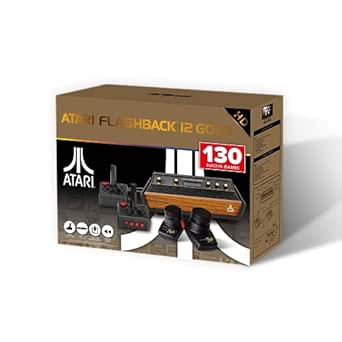
Atari Flashback 12 Gold Retro Game Console with 130 Built-In Games
The Atari Flashback 12 Gold is the most focused choice in this group: its 130 built-in Atari 2600 games offer a curated alternative to the huge, less-specific libraries advertised by sticks such as the HRYYDS Retro Gaming Console Pro. The included joystick and paddle controllers suit the original Atari style, while HDMI and an included cable simplify connecting it to an HD TV. Save, load, and rewind features make older games easier to revisit without relying only on their original pacing.
That focus is also the tradeoff. Unlike the wireless, multi-emulator options, this console is tied to an Atari 2600 collection, outputs 720p, and uses wired controllers. The listing also warns that picture and sound may not match modern technology. I’d choose it for a more specific Atari experience, not as a general-purpose retro library or a high-resolution option.
Pros:- Includes 130 built-in Atari 2600 games
- Includes joystick and paddle controllers suited to the platform
- Supports saving, loading, and rewinding games
- HDMI cable and Micro USB power adapter are included
Cons:- Limited to a specified Atari 2600 platform rather than a broad multi-system library
- Wired controllers restrict seating and placement
- 720p output and older-style picture and sound may disappoint buyers seeking modern presentation
Best for: Atari fans who want a compact, console-specific collection with joystick and paddle controls.
Not ideal for: Buyers seeking multiple emulated systems, wireless controllers, or higher-resolution output.
- Platform:Atari 2600
- Built-in games:130
- Video output:HDMI, 720p
- Controllers:Wired joystick and paddle controllers
- Power:Micro USB
- Included accessories:HDMI cable and Micro USB power adapter
- Save features:Save, load, and rewind
- Model number:AR3080B
- Item weight:485 g
Our verdict“Choose the Atari Flashback 12 Gold for a focused 2600-style collection, not for broad system coverage or wireless play.”
LIUWEI Retro Gaming Console Game Stick Pro with 64GB Storage
The LIUWEI combines a 64GB game stick with two wireless controllers, making it a practical pick for shared play across a TV, PC, or projector. Its HDMI connection and stated 4K output suit modern displays better than the AV-only GameNext Mini, while the plug-and-play setup avoids downloads and internet requirements. The main caveat is the library claim: the title lists 20,000-plus games, but the description says over 40,000, so I would not choose it based on a precise count. Compared with the Boltz Retro Stick, LIUWEI has less stated storage and no listed wireless range, but its multi-display compatibility gives it a useful setup advantage. Buyers should also treat the included library size as unclear.
Pros:- 64GB storage is specified
- Two 2.4GHz wireless controllers support multiplayer
- HDMI connection and stated 4K output suit modern displays
- Works without downloads or an internet connection
Cons:- Game count conflicts between the title and description
- No wireless-controller range or battery requirements are specified
Best for: Households that want a simple HDMI game stick with two controllers for play on a TV, PC, or projector
Not ideal for: Buyers who need a verified game count or want clearly stated storage and controller-range details
- Brand:LIUWEI
- Storage:64GB
- Wireless communication:2.4GHz
- Video output:4K output stated
- Connection:HDMI
- Controllers:Two wireless controllers
- Model name:1Y-O51T-FLZ1
- Color:Black
Our verdict“Choose the LIUWEI if flexible HDMI display support matters more than a clearly verified library count.”
Cesanto Retro Gaming Console with 20,000 Games and 23 Emulators
The Cesanto keeps its pitch straightforward: 20,000 listed games, 23 emulators, two wireless controllers, and an HDMI connection. That specific emulator count gives buyers a clearer description of its intended range than the GameNext Mini, which lists a smaller library but relies on legacy AV. It also asks less of the buyer than the Boltz Retro Stick’s much larger stated library and storage, although Cesanto does not list storage capacity or video resolution. The supplied HDMI cable and user guide round out a simple TV setup, and two-player support makes it suitable for casual shared sessions. I would skip it if you need a known resolution, storage figure, or detailed compatibility information; those points are absent from the supplied product data.
Pros:- Lists 20,000 games and 23 emulators
- Includes two 2.4GHz wireless controllers
- HDMI cable is included for TV connection
- User guide is included with the plug-and-play setup
Cons:- Storage capacity and output resolution are not specified
- The product information does not clarify game compatibility or library organization
Best for: First-time retro game stick buyers who want an HDMI setup, two controllers, and a stated emulator count
Not ideal for: Players who need documented storage capacity, 4K output, or more detail about game and display compatibility
- Brand:Cesanto
- Built-in games:20,000
- Emulators:23
- Controllers:Two wireless 2.4GHz controllers
- Player support:Two players
- Connection:HDMI
- Dimensions:4.7 × 3.9 × 5.5 inches
- Included accessories:HDMI cable and user guide
Our verdict“Pick the Cesanto for a plainly described HDMI starter setup, but choose the Boltz if stated storage and 4K output matter more.”
Nikodocr Retro Gaming Console Stick with 23 Emulators and Dual Wireless Controllers
Nikodocr is a sensible middle ground for buyers who want a listed 64GB TF card and a stated library of more than 20,000 games without moving to the Boltz’s 128GB capacity. Its 23 pre-installed emulators and two-player wireless setup resemble the Cesanto’s broad format, but Nikodocr adds a named storage card and an HDMI cable among its listed accessories. The product description does call the output 4K, though its specs only confirm HDMI, so I would not treat that resolution claim as a fully detailed display specification. There are practical setup wrinkles: the controllers need four AAA batteries, which are not included, and the supplied information conflicts over whether an HDMI cable comes in the box. Those details make it less ready straight out of the package than its plug-and-play pitch suggests.
Pros:- Includes a specified 64GB TF card
- Lists over 20,000 games and 23 pre-installed emulators
- Two wireless controllers support two-player play
- Includes a USB power cable and user guide
Cons:- Four AAA controller batteries are not included
- Product details conflict about whether an HDMI cable is included
- 4K is described, but the listed video-output specification only says HDMI
Best for: Buyers seeking a 64GB-card game stick with two-player support who already have AAA batteries available
Not ideal for: Players who want every connection detail confirmed or expect the controllers to be ready without buying batteries
- Built-in games:20,000+
- Emulators:23 pre-installed
- Storage:64GB TF card
- Video connection:HDMI; 4K described
- Controllers:Two wireless controllers
- Controller power:Four AAA batteries required; not included
- Material and color:Plastic; white
- Listed accessories:TF card, HDMI cable, USB power cable, and user guide
Our verdict“Choose Nikodocr for a stated 64GB card and two-player setup if you are comfortable checking the cable contents and supplying batteries.”
Boltz Retro Stick Gaming Console – 40,000 Classic Games
The Boltz makes the strongest capacity case in this group, pairing a 128GB storage capacity with a stated library of over 40,000 games. That gives it more listed storage than the 64GB LIUWEI and Nikodocr sticks, while its compact HDMI form is easier to move between displays than the AV-connected GameNext Mini. Two 2.4GHz controllers and a stated range of up to 30 feet help when players sit farther from the screen, and offline play suits setups without reliable internet. The tradeoff is that Boltz lists just nine preloaded emulators, fewer than the 23 named for Cesanto and Nikodocr; a larger game count does not tell buyers which systems are covered. The controllers also need AA batteries that are not included, so the kit is not fully ready for multiplayer out of the box.
Pros:- 128GB storage is the largest stated capacity among these five products
- Lists over 40,000 games for offline play
- Two wireless controllers have a stated range of up to 30 feet
- Compact stick connects to 4K HDMI-compatible displays
Cons:- Lists nine emulators, fewer than the 23 specified for Cesanto and Nikodocr
- AA batteries for both controllers are not included
Best for: Retro fans who want substantial stated storage, a compact HDMI stick, and wireless multiplayer without internet
Not ideal for: Buyers who prioritize a wider stated emulator list or want controllers that include their batteries
- Built-in games:40,000+
- Emulators:9 preloaded
- Storage capacity:128GB
- Video output:4K HDMI
- Controllers:Two 2.4GHz wireless controllers
- Wireless range:Up to 30 feet
- Controller power:AA batteries; not included
- Form factor:Compact gaming stick
Our verdict“Choose the Boltz if storage capacity and a compact offline HDMI setup outweigh the need for a longer stated emulator list.”
GameNext Retro Mini Game Console with 620 Built-In Games and Two Controllers
The GameNext is the outlier here: rather than competing with HDMI sticks such as the Cesanto, it uses AV output and a compact console body. That makes it a better match for an older television with compatible AV inputs, but a poor fit for many newer monitors and TVs without them. Its 620 built-in games are far fewer than the thousands listed by the other four products, which may appeal to buyers who prefer a smaller, simpler selection over a sprawling game library. Two joystick controllers allow local multiplayer, but they are wired, and the console needs a corded power connection. Changing games also requires pressing the reset button, an awkward step compared with the plug-and-play HDMI sticks. I would choose it for legacy AV compatibility, not for display flexibility or convenience.
Pros:- AV output can suit older televisions with compatible inputs
- Includes 620 built-in games
- Two joystick controllers support one- or two-player play
- Direct setup is available with a compatible AV input
Cons:- No HDMI or wireless connectivity
- Some 4K monitors may not support its AV connection
- Switching games requires pressing the console reset button
Best for: Owners of older AV-equipped televisions who want a simple wired console for occasional two-player play
Not ideal for: People using HDMI-only TVs or monitors, or anyone who wants wireless controllers and easy game switching
- Brand:GameNext
- Built-in games:620
- Players:1–2
- Controllers:Two joystick controllers
- Video output:AV
- HDMI and wireless:Not supported
- Power:Corded electric
- Dimensions:11 × 5 × 1.5 inches
- Model:G1001
Our verdict“Choose the GameNext only if your display has AV input and you prefer a wired, smaller-library alternative to HDMI sticks such as the Cesanto.”
Retro Plug-and-Play Gaming Console with 20,001 Games, 4K HDMI, and Wireless Controllers
I’d choose the Cesanto for buyers who want a large preloaded library and a wide range of emulator support without sorting through extra setup. Its 20,001 built-in games, 23 emulators, and two wireless controllers make it a straightforward fit for shared TV play. Compared with the MUSBOY Retro Game Console, Cesanto offers more listed emulators, while MUSBOY claims a larger game count; neither product’s supplied details identify the individual games, so the headline totals don’t tell me which library better matches a particular player. The HDMI connection keeps setup simple, but the product information gives no resolution specification despite the 4K wording in its title. I’d skip it if I wanted a clearly documented game list or dependable details about picture output.
Pros:- Includes 20,001 built-in games across 23 emulators
- Comes with two 2.4 GHz wireless controllers for two-player play
- HDMI connection supports simple TV setup
Cons:- The supplied details do not identify the games or emulator formats
- The resolution is not specified in the product specs, despite 4K in the title
- No information is provided about library updates or adding games
Best for: Households seeking an easy-to-connect, two-player game stick with a large preloaded library and broad emulator coverage.
Not ideal for: Buyers who need a verified game list, clearly stated output resolution, or information about adding and updating games.
- Built-in games:20,001
- Emulators:23
- Controllers:2 wireless 2.4 GHz controllers
- Players:2
- Connection:HDMI
- Display platform:TV
- Color:White
- Brand:Cesanto
Our verdict“Choose Cesanto for its 23-emulator mix and included multiplayer controllers, but look elsewhere if documented game selection or output specs matter most.”
MUSBOY Retro Game Console with 9 Emulators, 25,200+ Games, 4K HDMI Output, and Dual Wireless Controllers
The MUSBOY makes its case with a stated library of 25,200+ games, the largest count among these five products. I’d favor it over the Cesanto if the advertised quantity is the main draw; Cesanto lists 23 emulators, compared with MUSBOY’s nine, so the count alone doesn’t mean broader system coverage. Two wireless controllers and 4K HDMI output suit casual couch play on a TV or monitor, and its compact stick is easy to place behind a screen. There’s a catch: the product details don’t name the games or emulator formats, and they describe no way to download games or update the library. That makes this a simple preloaded option, not a flexible platform for players who want to curate or expand their collection.
Pros:- Advertises more than 25,200 built-in games
- Includes two wireless 2.4 GHz controllers for two-player sessions
- Supports 4K HDMI output to a TV or monitor
- Small, lightweight stick is easy to position near a display
Cons:- Only nine emulators are listed, fewer than the Cesanto’s 23
- The product details do not identify included games or emulator formats
- No game downloads or library updates are described
Best for: Players who want a compact, TV-connected system with a very large advertised preloaded library and two controllers.
Not ideal for: Retro fans who want to verify specific titles, broaden emulator coverage, or add and update games after setup.
- Built-in games:25,200+
- Emulators:9
- Output:4K HDMI
- Controllers:2 wireless 2.4 GHz controllers
- Number of players:2
- Compatibility:TV
- Dimensions:3.97 x 1.65 x 0.39 inches
- Weight:9.6 ounces
- Included components:TF card
Our verdict“Pick MUSBOY if the largest advertised library count is your priority, but choose a better-documented option if system coverage or specific games matter.”
My Arcade Atari Game Station Pro Retro Console with 200+ Games
Unlike the game-stick options in this roundup, the My Arcade Atari Game Station Pro has a defined focus: licensed Atari games spanning Atari 2600, 5200, 7800, and arcade titles. That makes its library easier to understand than the unspecified collections on the MUSBOY and Kulivloa, even though its 200-plus game count is far smaller. Two wireless joysticks with paddles suit games designed around that control style, while save options let players pause a session and return later. I’d pick it for Atari nostalgia, not for the broadest menu of retro systems. The omissions matter: Pac-Man and Galaga aren’t included, the joysticks need four AA batteries that aren’t supplied, and the console requires a 5 V, 2 A USB-A power source.
Pros:- Includes over 200 built-in Atari and bonus games
- Covers Atari 2600, 5200, 7800, and arcade titles
- Two wireless joysticks include paddles for compatible games
- HDMI connection and save options support convenient TV sessions
Cons:- Pac-Man and Galaga are not included
- Joysticks require four AA batteries, which are not supplied
- Requires a 5 V, 2 A USB-A power source
Best for: Atari fans who want a licensed, clearly identified collection and wireless paddle-style controls for TV play.
Not ideal for: Buyers seeking thousands of games across many systems, or anyone who expects Pac-Man and Galaga in the included library.
- Games:200+ built-in Atari and bonus games
- Included game systems:Atari 2600, 5200, 7800, and arcade titles
- Controllers:2 wireless 2.4 GHz joysticks with paddles
- Video connection:HDMI
- Power source:USB; requires 5 V, 2 A USB-A port
- Controller batteries:4 AA batteries required; not included
- Dimensions:7 x 4.19 x 1.19 inches
- Warranty:120-day warranty against manufacturer defects
Our verdict“Choose this console for its licensed Atari focus and paddle joysticks, not for a large multi-system library.”
Kulivloa Retro Gaming Console with 20,000+ Games and 23 Emulators
The Kulivloa stands apart from the Fanyooge by giving a specific controller range: up to 40 feet. That may help when the TV is across a larger room, though both products list more than 20,000 games and 23 emulators, and neither supplies a named game list. Kulivloa outputs at 1080p HDMI, a more clearly stated resolution than the Cesanto’s listed connection details, but it doesn’t match the Fanyooge’s 4K claim. The package includes an HD extension cable and TF card, which can simplify connecting the stick to a crowded TV setup. My main reservation is what buyers must supply themselves: four AAA batteries for the controllers and a power adapter. It’s a practical plug-and-play pick only if those omissions won’t slow setup.
Pros:- Advertises more than 20,000 games across 23 emulators
- Two 2.4 GHz wireless controllers have a stated range of up to 40 feet
- 1080p HDMI output and an included HD extension cable support TV setup
- Includes a TF card and USB cable
Cons:- Four AAA controller batteries are required but not included
- Power adapter is not included
- The product details do not identify the included games
Best for: TV gamers who need wireless controllers with a stated range of up to 40 feet and are comfortable supplying batteries and a power adapter.
Not ideal for: Buyers who want the power adapter and controller batteries included, or who prioritize a stated 4K output.
- Game library:20,000+ games
- Emulators:23
- Video output:1080p HDMI
- Wireless connectivity:2.4 GHz
- Controller range:Up to 40 feet
- Compatible memory:microSD
- Included components:Game stick, HD extension cable, TF card, USB cable, 2 wireless controllers
- Controller batteries:4 AAA batteries required; not included
- Power adapter:Not included
Our verdict“Choose Kulivloa for its stated 40-foot controller range and 1080p output, provided you already have suitable power and batteries.”
Retro Gaming Console with 20,000+ Classic Games and 23 Emulators (64 GB)
The Fanyooge is the only option here that specifies both 64 GB of storage and wireless controllers with 360° joysticks, giving buyers clearer hardware details than the Cesanto’s listing. Its 20,000-plus preloaded games and 23 emulators are in the same broad-library category as the Kulivloa, while the Fanyooge claims 4K HDMI output rather than Kulivloa’s stated 1080p. Those specifications may appeal to players who prefer analog-style movement, but the product information doesn’t say the library can be expanded: its cons explicitly rule out adding games or emulators beyond the built-in selection. I’d treat the 64 GB as included storage for the existing setup, not a promise of customization. The supplied details also don’t name the games, which makes the large headline count hard to evaluate.
Pros:- Includes more than 20,000 preloaded games across 23 emulators
- Two wireless controllers feature 360° joysticks
- Lists 64 GB of storage and 4K HDMI output
- Plug-and-play setup does not require internet according to the product description
Cons:- Cannot add games or emulators beyond the built-in selection
- The supplied details do not identify the included titles
- The product warranty is mentioned, but its terms are not specified
Best for: Players who want two wireless controllers with 360° joysticks, a stated 64 GB of storage, and a preloaded library for HDMI TV play.
Not ideal for: Collectors who want to add games or emulators, or buyers who need a named and verifiable game list before choosing.
- Storage:64 GB
- Games included:20,000+ classic games
- Emulators supported:23
- Controllers:2 x 2.4 GHz wireless controllers with 360° joysticks
- HDMI output:4K
- Color:White
- Platform compatibility:Nintendo 3DS (emulated)
- Warranty:Product warranty; details via manufacturer
Our verdict“Pick Fanyooge for its specified 360° joystick controls and 64 GB storage, but skip it if you expect to expand or curate the game library.”
How We Picked
I compared these consoles by how clearly their product details help a buyer predict the experience: whether the library is built in or storage-based, which systems or emulators are named, what controllers and connections are included, and how much setup the format implies. I also separated products with a defined brand or game collection from sticks that lead with very large game totals. That distinction matters because a long advertised list is less useful when buyers cannot readily identify what they will play.
The ranking gives more weight to clarity, ease of choosing games, and a well-defined use case than to the biggest headline number. Atari Flashback 12 Gold and the My Arcade Atari Game Station Pro earn distinction for their explicit Atari focus; GameNext has a defined built-in collection for casual play. Multi-emulator sticks remain relevant for buyers seeking breadth, but similar specifications and limited detail about library organization make it harder to distinguish them confidently. Product names and listed specifications alone do not establish game licensing, compatibility, or performance, so I treat those as questions buyers should verify rather than assume.
Factors to Consider When Choosing Best Retro Gaming Consoles
Before choosing a console, decide what kind of retro gaming session you want: a known set of games, a broad collection spanning systems, or an uncomplicated option to connect and play. The product descriptions in this roundup use different measures—built-in game counts, storage capacity, emulator counts, and video output—that are not directly interchangeable. These checks can help you compare the experience behind the numbers.
Start With the Games and Systems You Actually Want
Make a short list of the games, series, or original platforms you care about before comparing console totals. A console with a defined Atari collection may be a better match for an Atari fan than a stick advertising thousands of assorted titles. Multi-emulator claims suggest broader system coverage, but they do not tell you whether the specific games you want are present. Check product details for named systems, sample titles, and a way to browse the library. If those details are missing, treat compatibility as unconfirmed rather than assuming that an emulator count guarantees access. This step can prevent buying a broad-looking device that does not suit your actual play habits.
Treat Game Counts as a Starting Point, Not a Quality Measure
Large counts can refer to repeated, regional, or unfamiliar titles, and the listed total alone does not reveal how well a collection is organized. A smaller built-in library can be easier to browse when its contents are clearly identified. Look for menus, search or sorting details, and information about how games are selected. If a listing emphasizes a card or storage capacity, that describes space rather than the quality or legality of the software on it. Avoid choosing solely by the largest number; compare the evidence available about the actual collection. When a listing does not provide a title list, decide whether that uncertainty is acceptable for your use.
Match the Console Format to Your Comfort With Setup
A game stick connects directly to a TV’s HDMI port, while a conventional console may occupy more space and use a separate cable path. Either can be convenient, but the TV location, available HDMI ports, and access to power can affect how tidy the setup feels. Check whether the product includes the cables or power accessories you need rather than inferring that from an HDMI claim. Also consider whether the stick could be blocked by the TV or require an extension cable. A simpler connection does not guarantee simple menus, so look for clear setup and navigation information. Buyers who want a ready-to-play experience should prioritize setup instructions and an included controller over a headline resolution figure.
Check Controller Details Before Buying for Two Players
Listings that say “dual wireless controllers” signal two-player intent, but the phrase does not describe controller shape, button layout, latency, battery type, or charging method. Those details can change how comfortable longer sessions feel. Check whether two controllers are included and whether the games you plan to play support simultaneous local play. For children or casual family sessions, simple pairing and easy-to-replace batteries may matter more than extra buttons. If you expect frequent multiplayer use, look for clear information about pairing and controller power rather than relying on the word wireless. A focused console with fewer game options may serve a shared household better if its controls and play modes are easier to understand.
Read Resolution Claims in the Context of Retro Games
A 4K HDMI label describes an output connection or display claim; it does not mean the original games were created in 4K or that every title will look sharper. Retro visuals were designed around older display formats, and scaling can affect how they appear on a modern television. Check whether a listing explains resolution support, aspect ratio, or display settings instead of relying on the number alone. Buyers seeking an authentic look may care more about image options and compatibility than maximum output resolution. Also confirm that your TV has a suitable HDMI input and that the console can display correctly at your preferred settings. Treat unclear video claims as a reason to seek more product information.
Know What You Can Verify About the Collection
Built-in games, removable storage, and emulator support raise different questions about updates, backups, and the source of the software. A storage card can make a library portable, but it can also add a point of failure or make replacement procedures relevant. Check whether the seller explains how files are managed and what support is available if a card or controller stops working. Do not assume that a high game count confirms licensing or future access. Buyers who want fewer unknowns may prefer a branded, clearly described game collection over a device whose contents are not itemized. If long-term support matters, look for warranty and manufacturer details before deciding.
Frequently Asked Questions
Should I choose a console with thousands of listed games or one with a smaller named collection?
Choose based on whether variety or certainty matters more to you. A multi-emulator stick may offer a wider range of games and systems, but a very large advertised count does not identify which titles are included or how easy they are to find. A smaller named collection, such as the Atari-focused options here, gives you a clearer idea of its intended audience. Look for an itemized game list if specific titles matter. If the listing does not provide one, treat the library as uncertain rather than buying for the headline number alone.
Does a 4K HDMI label mean retro games will look better on my television?
Not necessarily. The label indicates a video-output claim, not that the original games were made in 4K or that the console uses high-quality scaling. Image appearance can depend on the device’s output settings and your television. Check whether the listing explains resolution modes or aspect-ratio options, particularly if you care about preserving the original look. If those details are absent, do not make 4K the deciding factor. Game selection and reliable TV compatibility may matter more.
Are wireless controllers a good choice for two-player retro games?
They can reduce cable clutter, but the listing should confirm that two controllers are included and how they are powered and paired. “Dual wireless” does not explain comfort, responsiveness, battery life, or whether every game supports two players. Check for controller details and local multiplayer information before buying for a family or regular co-op use. For occasional play, included wireless controllers may be convenient. If multiplayer is your main reason for buying, missing controller specifications are a meaningful uncertainty.
Is a 64GB storage card better than a console with built-in games?
Neither format is automatically better; they describe different ways a product presents its library. A storage card gives the console space for its files, but the capacity alone does not confirm which games are included, how they are organized, or whether the card is easy to replace. A built-in collection can feel more straightforward when its titles are clearly listed. Before choosing, check whether the card is included, how the menu works, and what happens if it fails. If you prefer a simple setup, prioritize clear game and support information over capacity.
Which type of retro console is a better first choice for a beginner?
For a beginner, a clear and bounded collection can be easier to understand than a device with a huge, unspecified library. The Atari Flashback 12 Gold and GameNext Mini both describe built-in game collections, though they serve different audiences and should be compared by their listed titles and controls. A multi-emulator stick may be a better fit if you are comfortable sorting through a broader library and checking system support. Review the setup steps, included accessories, and menu details before buying. The easiest choice is the one whose games and connection method are clear to the person who will use it.
Conclusion
For a best overall choice among these listings, I would start with the Atari Flashback 12 Gold if a focused, built-in Atari collection suits your taste; its defined scope is easier to judge than a large, unspecified game count. For Atari fans seeking a broader listed collection, compare the My Arcade Atari Game Station Pro and its 200+ games. The GameNext Mini is my pick for beginners who value a straightforward built-in collection and two included controllers. For broad multi-system variety, one of the 20,000-plus-game sticks may fit, but I would choose only after checking its game list, menus, and support rather than relying on the count. There is no clear premium pick from the supplied specifications alone: buyers seeking a more polished or supported experience should verify build details, warranty, and software information before paying more.
Halloween Picks
halloween
As an affiliate, we earn on qualifying purchases.