
TL;DR

Get games and gaming gear delivered free — and shop member deals
- Fast, free delivery on millions of items
- Access to Prime Big Deal Days deals on October 6–7
- Prime Video, Amazon Music and more included
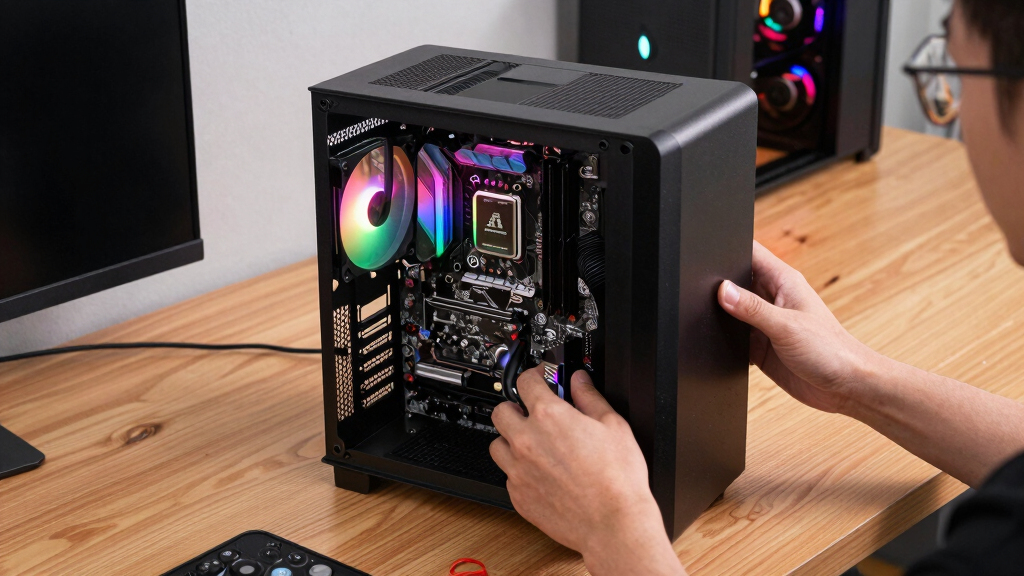
Mini ITX builds are compact gaming PCs built around a 6.7 x 6.7 inch motherboard, usually paired with an SFX power supply, careful cooling, and a short GPU. They make strong Steam Machine alternatives when you want Steam on the TV, better upgrade options than a console, and more power than many handheld setups, but you pay for that small size with tighter part choices, more heat planning, and a fussier build.
A good Mini ITX gaming PC can disappear under your TV like a game console, then load your Steam library like a full desktop with a tiny engine growling inside.
You get the neat living room shape people wanted from Steam Machines, but with parts you choose, storage you can expand, and performance you can tune. That matters if your Steam Deck feels a little soft on a 4K TV, or your console shelf has one empty black rectangle waiting for something smarter.
This guide gives you Mini ITX builds explained for Steam Machine alternatives in plain English: what they are, what they cost, where they shine, and where the small case starts to bite.
Mini ITX Builds Explained for Steam Machine Alternatives
TL;DR: Mini ITX builds are compact gaming PCs built around a 6.7 x 6.7 inch motherboard, usually paired with an SFX power supply, careful cooling, and a short GPU. They can disappear under your TV like a console, then load your Steam library like a full desktop.
Console comfort, PC flexibility, and a footprint small enough for a living room shelf.
What You Actually Build
A Mini ITX Steam PC is a small desktop that behaves like a console when you want it to: boot into Steam Big Picture Mode, use a controller from the couch, and keep desktop freedom for updates, launchers, mods, and storage.
Mini ITX motherboard
The 170 x 170 mm board holds the CPU socket, RAM, storage, Wi-Fi, and graphics slot in a compact square that makes console-like cases possible.
Steam on the TV
Use Big Picture Mode, controller-first navigation, and a quiet case so the machine feels natural beside a soundbar, dock, and console shelf.
Small size costs planning
You gain a neat footprint and upgradeable parts, but pay with tighter GPU clearance, hotter airflow paths, and less forgiving cable routing.
Pick the screen
1080p, 1440p, and 4K targets need very different GPUs.
Choose the case
The case sets GPU length, cooler height, PSU type, and fan space.
Match the GPU
Measure length, thickness, and power connector clearance first.
Balance the CPU
A cooler midrange chip often beats a hotter flagship in a cramped case.
Budget the boring bits
Good fans, short cables, and an efficient SFX PSU make the build feel polished.
Why Not an Old Steam Machine?
The original Steam Machine idea was compelling, but a current Mini ITX build uses modern desktop parts instead of locking you into an aging box. You keep the couch-first dream while choosing the hardware, storage, OS, and upgrade path.
| Option | Best For | Upgrade Path | TV Performance | Main Tradeoff |
|---|---|---|---|---|
| Steam Deck on TV | Portable play and lighter games | ~ Storage and dock accessories | ~ Soft in demanding 4K setups | Lower output in heavy games |
| Old Steam Machine | Collectors and basic Steam access | ✗ Limited by old platform | ✗ Often behind modern titles | Aging hardware and limited support |
| Mini ITX Steam PC | Living room power and upgrades | ✓ CPU, GPU, RAM, storage | ✓ Strong 1080p or 1440p potential | More planning and small-part cost |
| Full tower PC | Maximum airflow and easy upgrades | ✓ Most flexible | ✓ Highest ceiling | Large, desk-first design |
Best for 1080p TV play, older libraries, lighter esports games, and practical living room streaming.
The sweet spot for a compact Steam box with a modern midrange GPU, NVMe storage, and quiet cooling.
For compact cases, premium SFX power supplies, stronger GPUs, and careful thermal tuning around 4K ambitions.
Cooling Is the Part You Feel
Specs decide frame rates, but cooling decides whether the living room stays pleasant. Cabinet airflow, fan curves, GPU exhaust, and PSU efficiency matter as much as raw silicon when the PC sits beside your TV.
Small cases amplify mistakes
A beautiful case can still feel bad if it traps GPU heat after twenty minutes. Check intake paths, exhaust paths, side-panel clearance, and whether your TV cabinet has room to breathe.
Verified is context, not a promise
Steam Deck Verified status describes Valve’s tested Steam Deck experience. A custom Mini ITX PC may run faster, but launchers, anti-cheat, operating systems, and controller prompts can still vary by game.
The Six-Part Compatibility Check
Mini ITX builds punish guesswork. A GPU that is 12 mm too long can turn a clean build night into a pile of screws and sighs, so match these parts before pressing buy.
The rulebook
Check GPU length, GPU thickness, CPU cooler height, radiator support, front USB, and whether the layout uses riser cables.
Mini ITX, not Micro ATX
Expect one PCIe slot, two RAM slots, fewer headers, and a denser build process than larger desktop boards.
Balanced beats blazing
A modern Ryzen 5 or Core i5 class chip is enough for most couch play and usually easier to cool than a flagship.
Measure three times
Length, slot thickness, and power-cable bend clearance decide whether the side panel closes cleanly.
SFX or SFX-L
Many mainstream Mini ITX gaming builds fit well around 450W to 650W, while high-end GPUs need more careful planning.
NVMe keeps it clean
An NVMe SSD reduces cable clutter, speeds game loads, and leaves the small case easier to assemble and service.
Best buying order: choose the TV target, pick the case, record every clearance limit, then choose the GPU, CPU cooler, and power supply that fit the box rather than fighting it.
Trace the Couch-PC Chain
The magic is not one part. It is a chain of decisions that turns a small desktop into a Steam-focused living room machine.
Key Takeaways
- Mini ITX motherboards measure 170 x 170 mm, which lets a Steam-focused PC fit into a console-like living room footprint.
- Start with your TV target and case dimensions before buying a GPU, because small cases set hard limits on length, thickness, cooling, and power cables.
- A 450W to 650W SFX power supply fits many mainstream Mini ITX gaming builds, but high-end GPUs may need more careful planning.
- Steam Deck Verified status is helpful context, but it applies to Steam Deck’s tested experience, not every custom Mini ITX PC.
- Cooling, fan curves, and cabinet airflow matter as much as raw specs when the PC sits beside your TV.
As an affiliate, we earn on qualifying purchases.
What You Actually Get From a Tiny Steam PC
Mini ITX builds explained for Steam Machine alternatives starts with one simple idea: you are building a small desktop PC that behaves like a console when you want it to. You can boot straight into Steam Big Picture Mode, use a controller from the couch, and still drop into Windows or Linux when you need desktop freedom.
The Mini ITX board is the heart of the build. According to the Mini-ITX form factor specification, the board measures 170 x 170 mm, or 6.7 x 6.7 inches [1]. That square is about the size of a thick sandwich napkin, yet it can hold a modern CPU socket, RAM slots, storage, Wi-Fi, and the slot for a graphics card.
Imagine a setup where your TV stand has a soundbar, a controller dock, and one matte black box no bigger than a shoebox. You tap the controller, Steam opens, and your library appears without the tower-under-the-desk feeling. That is the appeal.
The promise is simple: console comfort, PC flexibility, and a footprint small enough for a living room shelf.
SFX power supply for mini ITX build
As an affiliate, we earn on qualifying purchases.
As an affiliate, we earn on qualifying purchases.
Why Mini ITX Makes More Sense Than Old Steam Machines
Mini ITX builds make better Steam Machine alternatives because they use current PC parts instead of locking you into one vendor’s aging box. The original Steam Machine idea was exciting, but today you can build a quieter, faster, more repairable version using a small case, Steam Big Picture Mode, and the operating system you prefer.
Valve removed Steam Machines from the main Steam hardware menu in 2018, while Steam Deck and SteamOS kept the living room PC dream alive in a different shape [2]. A Mini ITX build picks up that loose thread. You get the same couch-first Steam feeling, but with desktop-class hardware.
Here is the practical difference. An old Steam Machine might struggle with a new AAA release at 1080p, fan whining like a hair dryer in a drawer. A fresh Mini ITX PC with a modern midrange GPU can target smooth 1080p or 1440p play, depending on the parts, settings, and game.
| Option | Best For | Main Tradeoff |
|---|---|---|
| Steam Deck on TV | Portable play and lighter games | Lower TV performance in demanding games |
| Old Steam Machine | Collectors and basic Steam access | Aging hardware and limited support |
| Mini ITX Steam PC | Living room power and upgrades | More planning, higher small-case part cost |
| Full tower PC | Maximum airflow and easy upgrades | Large, desk-first design |
short GPU for small form factor PC
As an affiliate, we earn on qualifying purchases.
As an affiliate, we earn on qualifying purchases.
The Parts That Matter Most Before You Buy Anything
Mini ITX builds explained for Steam Machine alternatives depends on matching six parts before you press buy: case, motherboard, CPU, cooler, graphics card, and power supply. Small PCs punish guesswork. A GPU that is 12 mm too long can turn your clean build night into a pile of screws and sighs.
Start with the case because it sets every limit. Many compact gaming cases sit around 5 to 10 liters, while roomier small-form-factor cases can stretch beyond that for easier cooling. Under your TV, those few liters decide whether the machine looks like a console or a tiny workstation.
- Case: Check GPU length, CPU cooler height, radiator support, and front USB ports.
- Motherboard: Pick Mini ITX, not Micro ATX. You usually get two RAM slots and fewer expansion options.
- CPU: A modern Ryzen 5 or Core i5 class chip is enough for most Steam couch play.
- GPU: Measure card length, thickness, and power connectors before buying.
- Power supply: Most tight cases use SFX or SFX-L units, often around 450W to 650W for mainstream gaming builds.
- Storage: An NVMe SSD keeps cables out of the way and makes game loads feel snappy.
A real-world example: if you want to play Elden Ring or Cyberpunk 2077 from the couch, you should care more about GPU clearance and airflow than RGB lighting. The prettiest case in the room will still feel bad if it cooks itself after 20 minutes.
As an affiliate, we earn on qualifying purchases.
How to Plan a Mini ITX Build Without Wasting Money
- Choose your target screen first. Decide whether you want 1080p, 1440p, or 4K TV play.
- Pick the case second. Write down its GPU length, cooler height, and PSU support.
- Match the GPU to your TV goal. Do not buy a giant card for a case that only accepts compact models.
- Choose a CPU that will not overheat the box. A balanced midrange chip often beats a hotter flagship in a cramped case.
- Budget for the boring parts. Good fans, short cables, and an efficient PSU make the build feel polished.
The cleanest Mini ITX plan starts with your screen, not with the fanciest part on sale. A 1080p TV in a bedroom needs a very different box than a 4K OLED in the living room. You can save hundreds by aiming at the screen you actually use.
For a Steam Machine-style setup, a balanced build often beats a wild one. Think $600 to $900 for an entry or used-parts machine, $1,000 to $1,500 for a strong modern living room build, and $2,000+ if you chase high-end GPUs in boutique small cases. Tiny does not always mean cheap.
Here is the trap: people buy the graphics card first because it feels exciting. Then they discover the card blocks the side panel, the power cable bends like a stressed garden hose, and the case fans have nowhere to breathe. Start with dimensions and the build gets calmer.
Where Performance Feels Console-Like, and Where It Does Not
A Mini ITX Steam PC can feel console-like when it boots straight to Steam, uses a controller cleanly, and runs games at stable settings. It stops feeling console-like when Windows updates pop up, driver panels ask questions, or a game needs keyboard input before it reaches the title screen.
Performance depends on the platform and version you choose. If you run Windows, you may get broad game compatibility and easy launcher support. If you run a SteamOS-like Linux setup, you may get a cleaner couch interface, but anti-cheat support and launchers can vary by game and version.
According to Valve, Steam Deck Verified status is tested for the Steam Deck’s hardware and software experience, not for every living room PC [3]. That means a game marked Verified on Steam Deck gives you a helpful clue, not a promise that your custom Mini ITX box will behave the same way.
Example: a game may run beautifully on your Mini ITX PC at 1440p with a controller, then open a third-party launcher with tiny text on the TV. The GPU did its job. The couch experience still took a scratch.
Cooling Is the Part You Feel in the Room
Cooling makes or breaks a Mini ITX living room build because heat and noise have nowhere to hide. In a small case, warm air can swirl around the GPU like steam in a closed kitchen, and a bad fan curve can turn a quiet movie room into a buzzing desk corner.
You do not need exotic cooling for every build. A well-ventilated case, a sensible CPU power limit, and two good fans can beat a flashy cramped layout. The goal is steady comfort: no throttling, no sudden fan screams, no hot plastic smell after a long session.
- Use mesh or ventilated panels when the case sits inside a TV cabinet.
- Leave breathing room behind the case so hot air can escape.
- Set a gentle fan curve so fans ramp smoothly instead of jumping in loud bursts.
- Avoid oversized CPUs if you mainly play GPU-heavy games from the couch.
- Clean dust filters every few months, especially if the case sits near carpet.
A practical scenario: you play Baldur’s Gate 3 for three hours on a warm Friday night. A good Mini ITX build hums softly and keeps frame times steady. A poorly cooled one gets louder every act, then drops clocks right when the fight fills the screen with fire.
The Living Room Setup That Makes It Feel Finished
The best Mini ITX Steam setup feels finished when you can sit down, grab one controller, and start a game without reaching for a keyboard. Hardware power is only half the job. The other half is making the box behave politely on a couch, ten feet from the screen.
Use Steam Big Picture Mode as your main front door. Pair a controller that wakes the system reliably, set your TV input label to PC or Game Mode, and check that text looks sharp at your chosen resolution. A tiny detail like HDMI black level can make dark scenes look either rich and inky or gray and washed out.
Keep a small wireless keyboard nearby anyway. Not on display, not in your hands all night, just tucked into the media cabinet for launcher logins, mod tools, and the occasional stubborn settings menu. Think of it as the spare key under the mat.
A Steam Machine alternative succeeds when the PC work disappears until you actually need PC control.
What You Gain, What You Give Up, and Who Should Build One
A Mini ITX Steam PC gives you strong performance, flexible storage, upgradeable parts, and a clean living room footprint. You give up some easy building space, some upgrade freedom, and often some money, because compact motherboards, SFX power supplies, and premium small cases can cost more than larger parts.
You should build one if you love Steam, want better TV performance than a handheld dock, and enjoy choosing parts carefully. You should pause if you want a zero-maintenance console experience, because a Mini ITX PC is still a PC. It asks for drivers, settings, and the occasional Saturday afternoon tune-up.
Age ratings still matter here. A Mini ITX box can launch your full PC library on the family TV, including games rated ESRB M, PEGI 18, or unrated indie releases. Set Steam Family View, OS accounts, or launcher controls before the machine lands in a shared living room.
Here is the honest test: if measuring GPU clearance sounds annoying but acceptable, you may enjoy the build. If it sounds like punishment, buy a prebuilt small PC or use a console. Your free time counts too.
A Smart Starter Spec for Most Steam Players
A smart starter Mini ITX Steam build uses a midrange CPU, a compact modern GPU, 16GB to 32GB of RAM, a 1TB or 2TB NVMe SSD, and a quality 550W to 650W SFX power supply. That mix gives you enough muscle for couch gaming without filling the case with heat you cannot move.
For the CPU, aim for efficient midrange chips rather than the hottest flagship. For the GPU, pick the fastest card that fits your case, your power supply, and your noise comfort. The best small build is the one that plays your games well and stays civil while doing it.
Storage deserves more love than it gets. A 2TB NVMe SSD can hold a healthy Steam library without adding cables, which makes the inside of the case cleaner and airflow less messy. When you are installing a 120GB game at midnight, the extra space feels like a gift.
One simple rule helps: leave headroom. If your case says a 330 mm GPU fits, do not assume every 330 mm card will be fun to install. Power plugs, cable bend, and side panels all want their own little slice of space.
Frequently Asked Questions
Can a Mini ITX build replace a Steam Machine?
Yes. A Mini ITX build can replace the old Steam Machine idea by running Steam on current PC hardware in a small living room case. You get more control over parts, storage, operating system, and future upgrades.
Is a Mini ITX gaming PC better than docking a Steam Deck?
It depends on what you want. A docked Steam Deck is simpler and portable, while a Mini ITX PC can deliver stronger TV performance with the right CPU and GPU. For demanding games on a large 1440p or 4K screen, the Mini ITX route usually has more room to grow.
Are Mini ITX builds hard for beginners?
They are harder than standard desktop builds because space is tight. You need to check GPU length, cooler height, PSU type, and cable routing before buying parts. A beginner can do it, but patience and careful measuring matter.
How much should you spend on a Mini ITX Steam PC?
Expect roughly $600 to $900 for an entry build, $1,000 to $1,500 for a strong mainstream setup, and more than $2,000 for high-end small-form-factor hardware. Smaller parts often carry a price premium.
Can Mini ITX builds handle modern AAA games?
Yes, with the right graphics card, CPU, and cooling. A modern Mini ITX build can run current AAA games at 1080p or 1440p very well, while 4K depends heavily on the GPU, game settings, and upscaling support.
Conclusion
Build a Mini ITX Steam PC when you want the living room calm of a console with the flexible muscle of a desktop. Measure first, buy second, and treat cooling as part of the design rather than an afterthought.
Done well, the box fades into the shelf, the controller wakes the screen, and your Steam library lights up the room like a wall of tiny doors.
Halloween Picks
halloween
As an affiliate, we earn on qualifying purchases.