
Choosing a gaming headset with surround sound is less about picking a magic audio format and more about deciding how you want to connect. Wired and wireless models can both use virtual surround processing to make compatible game audio feel more directional, but the connection changes the cost, setup, and everyday experience. Wired headsets suit players who want dependable audio without charging; wireless headsets suit those who value a clear desk and freedom to move. The best fit also depends on platform support: surround features may rely on a USB transmitter, console settings, or companion software, so a headset’s feature list alone does not guarantee the same result everywhere.

Play games on Amazon Luna for your game nights, included with Prime
- A rotating selection of games, no download needed
- Play on TV, laptop or phone
- Fast, free delivery for your gear, too

HyperX Cloud III Wired Gaming Headset, Black/Red
- ✔ Connectivity: Wired; USB-C, USB-A, and 3.5 mm
- ✔ Compatibility: PC, PS5, Xbox Series X|S, Xbox One, Nintendo Switch, Mac, and mobile
- ✔ Driver size: 53 mm angled drivers
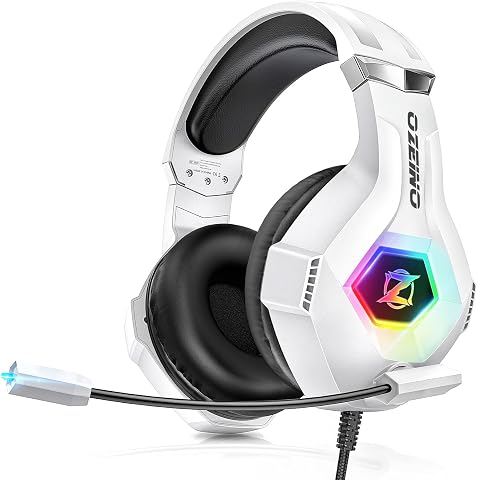
Ozeino ZW1 Gaming Headset with 7.1 Surround Sound and Noise-Cancelling Microphone
- ✔ Audio: 7.1 surround sound
- ✔ Connectivity: 3.5 mm audio jack; USB connector for RGB lighting
- ✔ Microphone: Rotatable, noise-cancelling

BENGOO G9000 Stereo Gaming Headset with Microphone
- ✔ Connectivity: Wired; USB cable
- ✔ Driver size: 40 mm neodymium drivers
- ✔ Sound: 7.1 surround sound
At a Glance
| Criteria | Wired gaming headsets with virtual surround sound | Wireless gaming headsets with virtual surround sound | Winner |
|---|---|---|---|
| Upfront value | Usually lower cost for similar core audio; no wireless hardware to pay for. | Typically costs more for comparable features; premium models may add stronger software, noise controls, or multi-device support. | A |
| Connection reliability and latency | Direct cable connection avoids radio interference and battery-related dropouts; latency is generally negligible. | Good dedicated wireless systems can be responsive, though interference, range, or transmitter issues can affect connection. | A |
| Freedom of movement | Cable tethers the player to the device and may snag or limit seating. | No headset cable across the desk; useful when standing, moving, or switching seating positions. | B |
| Charging and upkeep | No charging; cable wear and connector condition are the main upkeep concerns. | Needs periodic charging, and battery capacity can decline with age; some models support use while charging. | A |
| Surround sound support | Virtual surround may be delivered through software, USB audio, or platform processing; features vary by model. | Virtual surround can be processed by headset software or the connected platform; exact support depends on model and device. | Depends |
| Platform compatibility | Analog models work broadly with headphone jacks, while USB software features can be platform-specific. | USB transmitters and companion apps can limit features on consoles, mobile devices, or computers without supported software. | Depends |
| Microphone and controls | Often straightforward inline controls; cable placement can put controls within easy reach. | Controls are on the headset or transmitter, with no cable to manage; placement and layout differ by model. | Depends |
HyperX Cloud III Wired Gaming Headset, Black/Red
The HyperX Cloud III earns our top spot by covering the practical parts of a gaming headset particularly well: a memory foam headband and ear cushions for extended wear, an aluminum frame, and a detachable noise-cancelling microphone with an LED mute indicator. Its USB-C, USB-A, and 3.5 mm connections also make it easier to move between a PC, console, and handheld device than a headset tied to one connection format.There is an important distinction for this roundup: the supplied Cloud III description does not explicitly claim 7.1 surround sound. Its angled 53 mm drivers are described as tuned for gaming audio, which may appeal to players seeking clear game cues, but buyers specifically shopping for a stated 7.1 mode should look first at the Ozeino or BENGOO. Cloud III wins on overall fit, build, and connection flexibility rather than on the strongest surround-sound label.Compared with the Ozeino ZW1, the Cloud III offers more connection choices and a detachable mic, while Ozeino explicitly calls out 7.1 surround sound and breathable ear pads. Against the BENGOO G9000, HyperX lists a larger driver size, an aluminum frame, and more substantial comfort materials; BENGOO counters with in-line volume and mute controls. The main compromise is the wired design, which limits movement, and the product details do not say whether its gaming audio includes a dedicated virtual surround mode.
Pros:
- Memory foam ear cushions and headband are designed for comfort during long sessions.
- USB-C, USB-A, and 3.5 mm connections support a broad range of listed platforms.
- Detachable noise-cancelling microphone includes an LED mute indicator.
- Aluminum frame is designed for durability.
Cons:
- The wired connection limits freedom to move away from the gaming device.
- The supplied description does not specify 7.1 surround sound.
Best for: Players who want a comfortable, durable wired headset that can connect to several types of gaming devices and value a detachable microphone.
Not ideal for: Buyers who require an explicitly stated 7.1 surround-sound feature or want a wireless headset for unrestricted movement.
Bottom line: We recommend the Cloud III as the most adaptable everyday pick, provided its stated gaming-tuned audio meets your needs without an explicit 7.1 claim.
“We recommend the Cloud III as the most adaptable everyday pick, provided its stated gaming-tuned audio meets your needs without an explicit 7.1 claim.”
Ozeino ZW1 Gaming Headset with 7.1 Surround Sound and Noise-Cancelling Microphone
If 7.1 surround sound is the feature that brought us to this comparison, the Ozeino ZW1 puts that promise in its name. It pairs the stated surround feature with a rotatable noise-cancelling microphone, over-ear breathable pads, and an adjustable headband. That combination makes it a focused choice for players who want directional audio called out directly and need a headset suited to voice chat.The connection details deserve attention before choosing it. Audio runs through a 3.5 mm jack; the USB connector powers RGB lighting only. PC users need the included audio splitter cable for separate microphone and headphone ports. This means the headset’s extra lighting connector should not be mistaken for USB audio, and its setup is more involved than the Cloud III’s listed USB-C and USB-A options.Compared with Cloud III, Ozeino is clearer about its 7.1 surround feature but provides fewer connection formats and does not list a detachable microphone or aluminum frame. The BENGOO G9000 also advertises 7.1 and includes simple in-line controls, whereas Ozeino specifies breathable pads, an adjustable headband, and a three-year warranty. Older Xbox One controller owners may need a separate Microsoft adapter, another compatibility detail to check before buying. The surround label is appealing, but the supplied specifications do not explain platform-by-platform surround processing, so we would confirm that it works with the intended device and games.
Pros:
- Explicitly advertises 7.1 surround sound and directional audio cues.
- Rotatable noise-cancelling microphone supports voice chat.
- Breathable over-ear pads and an adjustable headband.
- Includes an audio splitter cable and extension cord.
Cons:
- USB connector powers RGB lighting only; game audio uses the 3.5 mm jack.
- PC use requires the included audio splitter cable.
- Older Xbox One controllers may require an additional Microsoft adapter.
Best for: Players who want a headset explicitly marketed with 7.1 surround sound, breathable over-ear pads, and a rotatable noise-cancelling microphone.
Not ideal for: Buyers who want USB audio, the simplest PC connection, or an explicitly documented surround setup for their exact platform.
Bottom line: We favor the ZW1 when an explicit 7.1 surround claim matters most, as long as its 3.5 mm connection and platform setup suit your gaming station.
“We favor the ZW1 when an explicit 7.1 surround claim matters most, as long as its 3.5 mm connection and platform setup suit your gaming station.”
BENGOO G9000 Stereo Gaming Headset with Microphone
The BENGOO G9000 is the simpler controls-first choice among the two headsets here that explicitly list 7.1 surround sound. Its flexible, noise-isolating microphone, padded over-ear cups, and in-line volume wheel and mute button keep common adjustments within reach, so we do not have to hunt through game menus to lower the volume or silence chat.Its stated compatibility spans PlayStation, Xbox, PC, Nintendo 3DS, laptops, tablets, and phones. That breadth is useful for players who want one wired headset for several devices, though the supplied details do not explain which connection or adapter is needed for each platform. The 49-inch cable is a particularly relevant limit: it may work well at a compact desk or console setup but gives less reach than a longer lead would.Compared with Ozeino, BENGOO also claims 7.1 surround sound and offers more explicit on-cable volume and mute controls, while Ozeino specifies breathable pads, an adjustable headband, and includes a splitter and extension cord. Cloud III looks better suited to long sessions for buyers prioritizing memory foam and an aluminum frame, and it lists USB-C, USB-A, and 3.5 mm connections. BENGOO is a practical alternative when the controls and device range fit, but older Xbox One controllers may need a separate Microsoft adapter, and the product details offer less information about build and fit than HyperX.
Pros:
- Advertises 7.1 surround sound.
- In-line rotary volume control and microphone mute button.
- Flexible noise-isolating microphone.
- Compatibility list includes consoles, computers, and mobile devices.
Cons:
- Listed cable length is 49 inches, which may limit reach at some setups.
- Wired design restricts movement.
- Older Xbox One controllers may need a separate Microsoft adapter.
Best for: Players who want an explicitly stated 7.1 headset with on-cable volume and mute controls for a compact, multi-device gaming setup.
Not ideal for: Buyers who need a long cable, wireless freedom, detailed platform-specific connection guidance, or the more fully described comfort and frame materials of Cloud III.
Bottom line: We choose the G9000 for accessible on-cable controls and stated 7.1 audio, while recognizing that its short listed cable and less detailed fit information narrow its appeal.
“We choose the G9000 for accessible on-cable controls and stated 7.1 audio, while recognizing that its short listed cable and less detailed fit information narrow its appeal.”
As an Amazon Associate we earn from qualifying purchases.
Key Differences
The strongest practical distinction is the connection. A wired headset is ready whenever it is plugged in, and its direct connection avoids wireless interference and charging interruptions. That makes it a sensible choice for long sessions at a fixed desk, especially when a similar wireless model costs noticeably more. Wireless earns its premium through movement and a cleaner setup: standing up between matches or sitting farther from the console is easier when no cable follows you.
Surround sound does not settle the choice by itself. Many gaming headsets use virtual processing to make directional cues more apparent, and the result depends on the headset, game mix, platform audio settings, and available software. A USB headset may offer a surround mode on a PC but fewer controls on a console. Check the exact model’s platform support and connection method before paying for a feature that may not work in your setup.
For most players at a desk, wired is the better value because it avoids both a battery and a wireless premium. Choose wireless when the freedom from a cable is a benefit you will use regularly. Paying more for wireless makes sense when comfort and movement matter enough to outweigh charging and the possibility of connection issues; it does not automatically buy better positional audio.
Detailed Comparison
Upfront value (Wired gaming headsets with virtual surround sound wins — moderate)
Wired generally wins on price for comparable core audio, with a moderate gap when a wireless counterpart adds a transmitter and battery. That saving matters if your priority is clear game audio and chat at a fixed setup. Wireless costs more, but the premium buys convenience rather than a guaranteed improvement in surround sound.
Connection reliability and latency (Wired gaming headsets with virtual surround sound wins — moderate)
Wired wins by a minor to moderate margin for predictable connection: it does not depend on radio conditions, and latency is usually negligible. Wireless headsets designed for gaming can also feel responsive, but their performance depends on the specific system, range, and interference nearby. For competitive play where consistency matters most, wired is the safer default.
Freedom of movement (Wireless gaming headsets with virtual surround sound wins — major)
Wireless wins by a major margin if you move around while playing. Without a cable, standing up or shifting far from the desk is easier, and the setup looks less cluttered. Wired remains comfortable for many seated players, but its tether can catch on furniture or limit how far you move.
Charging and upkeep (Wired gaming headsets with virtual surround sound wins — major)
Wired wins by a major margin in day-to-day readiness: plug it in and play, with no battery to charge or manage. Wireless requires periodic charging, and its battery will age over time. Some models work while charging, but a cable then returns to the setup during those sessions.
Surround sound support (moderate difference)
There is no universal winner. Either connection type can support virtual surround, but implementation varies by headset and platform. The difference is minor when both candidates offer a mode that works with the same games and device. Check whether processing comes from the headset, a USB transmitter, PC software, or the console before comparing feature names.
Platform compatibility (major difference)
This depends on the exact connection and features. A basic wired headset with a standard audio plug can work across many devices, while USB surround options may need supported software. Wireless models can work smoothly on their intended platform, but a transmitter or companion app may restrict features elsewhere. The difference can be major if you switch between PC and console, so verify compatibility for each device.
Microphone and controls (minor difference)
Neither connection type wins across the category. Wired inline controls can be easy to reach, while wireless controls avoid a cable but may sit somewhere less convenient on the ear cup. Microphone quality varies by model rather than connection. Compare voice samples or specifications for the actual candidates, and check that mute and volume controls are accessible during play.
Wired gaming headsets with virtual surround sound: Pros and Cons
Pros:
- Usually costs less for comparable core gaming audio.
- No battery to charge or replace.
- Direct connection avoids wireless interference and keeps latency predictable.
- A standard audio plug can offer broad device compatibility.
Cons:
- Cable can snag, clutter a desk, or limit movement.
- USB surround features may depend on platform software.
- Cable and connector can wear with heavy use.
Wireless gaming headsets with virtual surround sound: Pros and Cons
Pros:
- Freedom to stand, shift position, or sit farther from the device.
- No headset cable across the desk.
- Dedicated gaming wireless systems can provide responsive audio without a tether.
Cons:
- Often costs more than a comparable wired model.
- Requires charging and battery care.
- Wireless range, interference, and feature support vary by model and platform.
Who Should Choose What
Choose Wired gaming headsets with virtual surround sound if:
- You play mainly at a desk and stay close to your PC or console.
- You want surround options without paying extra for wireless convenience.
- You prefer a headset that is ready to use without charging.
- You want a simple connection and predictable performance for long sessions.
Choose Wireless gaming headsets with virtual surround sound if:
- You regularly stand up, shift seats, or play away from your desk.
- A cable gets in your way or makes your setup feel cluttered.
- You are willing to pay more and charge the headset for a cleaner, more flexible setup.
- The model’s wireless transmitter and surround features are confirmed to work with your platform.
Skip both if: Skip both if your main need is accurate positional audio but the only available options have surround features unsupported by your platform; compare stereo headsets and your device’s spatial-audio options instead.
Value for Money
For a fixed desk, wired is usually the better value: its direct connection and lack of charging make it practical without adding a wireless premium. Paying more for wireless is worthwhile if you will regularly use the freedom to move, or if removing the cable materially improves your setup. It is poor value to pay extra for a surround label alone. Confirm that the processing works on your platform and that the headset fits your budget after comparing comfort, microphone, and return terms.
Final Verdict
Choose a wired gaming headset with virtual surround sound if you play seated, want dependable audio, and would rather spend less or avoid battery upkeep. Choose wireless if you move around enough that a cable is a daily annoyance, and the added cost and charging fit your habits. The deciding factor is how often you use the freedom to move: for most stationary players, wired is the stronger value; for mobile players, wireless is worth paying more for. In either case, check platform-specific surround support before buying.
Frequently Asked Questions
Does wireless surround sound work as well as wired surround sound?
It can, but the connection alone does not determine positional quality. Headset processing, game audio, platform settings, and software support all matter. Compare the specific models and confirm that their surround modes work on your device.
Is virtual surround sound better than stereo for gaming?
Not for every player or game. Virtual surround can help some players perceive direction, while stereo can sound clear and natural. Try the modes your platform supports and choose the one that makes cues easiest for you to place.
Should I pay more for a wireless gaming headset?
Pay more when freedom from a cable will improve regular play, such as when you stand up often or sit away from your console. If you stay at a desk, a wired headset usually delivers better value unless a wireless model offers other features you specifically need.
Can I use a surround sound gaming headset on a console and a PC?
Often, but support varies. A headset may provide basic audio on both while reserving its surround mode or companion controls for one platform. Check the exact model’s supported devices and connection requirements before buying.
Fall Picks
fall essentials
As an affiliate, we earn on qualifying purchases.