
The best gaming controller upgrades depend on whether you want finer aim, a more comfortable grip, extra controls, or a complete controller replacement. My best overall pick is the Xbox Elite Wireless Controller Series 2 for its broad hardware customization, while the GameSir G7 Pro stands out for cross-device flexibility and the KontrolFreek FPS Freek Galaxy offers a simpler thumbstick-focused change. The main tradeoff is between inexpensive add-ons that alter one part of your setup and full controllers that cost you time learning a new layout and feature set. Platform fit and compatibility matter just as much as the upgrade itself. Read on for the full breakdown of what each option changes, what it asks you to give up, and who should choose it.

Get games and gaming gear delivered free — and shop member deals
- Fast, free delivery on millions of items
- Access to Prime Big Deal Days deals on October 6–7
- Prime Video, Amazon Music and more included
Complete the kit



Key Takeaways
- Full controllers offer the widest changes: the Xbox Elite Series 2 and GameSir G7 Pro affect more than grip or stick height, but require a bigger commitment than clip-on or replacement parts.
- Thumbstick accessories solve different problems: KontrolFreek FPS Freek Galaxy adds height for stick control, while Precision Rings add resistance; neither changes the controller’s underlying layout.
- Platform compatibility narrows the field: several picks are specific to Xbox or PlayStation, while the 16-in-1 grip caps are listed for multiple systems; confirm the exact controller model before buying.
- Customization adds upkeep: interchangeable sticks, caps, and buttons give more ways to tune feel, but small parts can be easier to misplace and may require installation.
- The strongest upgrade may be a small one: players who like their current controller can change a single touchpoint instead of replacing a device they already find comfortable.
| KontrolFreek Precision Rings for Gaming Controllers, 6-Pack |  | Best for Fine-Tuning Aim | Brand: KontrolFreek | Quantity: 6 rings | Resistance levels: Soft, medium, and hard | VIEW LATEST PRICE | See Our Full Breakdown |
| Collective Minds Strike Pack Wired Dominator for Xbox Series X|S and Xbox One |  | Best for Adding Back Controls to Xbox | Compatible consoles: Xbox Series X|S and Xbox One | Compatible controller models: Xbox Series 1914; Xbox One 1537, 1697, and 1708 | Connectivity: Wired USB | VIEW LATEST PRICE | See Our Full Breakdown |
| KontrolFreek FPS Freek Galaxy Black Performance Thumbsticks for PS4 & PS5 – Limited Edition |  | Best for Mixed-Height Stick Control | Compatibility: PlayStation 4 and PlayStation 5 | High-rise height increase: 10.0 mm | Mid-rise height increase: 6.5 mm | VIEW LATEST PRICE | See Our Full Breakdown |
| GameSir G7 Pro Controller for Xbox, PC, and Android – Black |  | Best Premium Multi-Platform Upgrade | Connectivity: Wired for Xbox; wired or 2.4 GHz wireless for PC; Bluetooth for Android | Sticks: Mag-Res TMR | Triggers: Hall Effect analog triggers with switchable micro-switch stops | VIEW LATEST PRICE | See Our Full Breakdown |
| KontrolFreek Aim Boost Kit for Xbox One and Xbox Series X Controllers, Black Galaxy |  | Best All-in-One Xbox Aim Kit | Brand: KontrolFreek | Compatible devices: Xbox One and Xbox Series X controllers | Included items: Performance thumbsticks and precision rings | VIEW LATEST PRICE | See Our Full Breakdown |
| 14-in-1 Metal Thumbsticks for Xbox Elite Controller Series 2, Black |  | Best Elite Series 2 Accessory Kit | Brand: niffgaff | Compatibility: Xbox Elite Wireless Controller Series 2 | Material: Stainless steel | VIEW LATEST PRICE | See Our Full Breakdown |
| 16-in-1 Performance Thumb Grips Joystick Caps for PS5/4/Xbox/Switch Pro |  | Best Multi-Platform Thumbstick Upgrade | Brand: faysazoy | Unit count: 16 | Packs: 8 | VIEW LATEST PRICE | See Our Full Breakdown |
| eXtremeRate Ergonomic Split D-pad Buttons for PS5, PS5 Edge, and PS4 Controllers, Black |  | Best Fighting-Game D-pad Mod | Brand: eXtremeRate | Color: Black | Material: ABS | VIEW LATEST PRICE | See Our Full Breakdown |
| 8Bitdo Ultimate 2 Wireless Controller – Black |  | Best Cross-Platform Performance Upgrade | Connectivity: 2.4 GHz wireless and USB-C wired | Wireless range: 10 m | Polling rate: 1000 Hz | VIEW LATEST PRICE | See Our Full Breakdown |
| Xbox Elite Wireless Controller Series 2, Black | 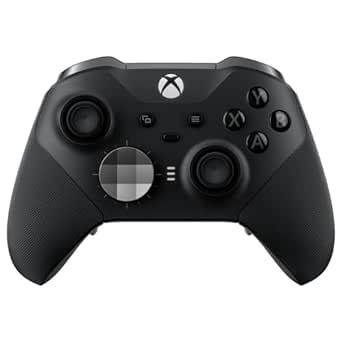 | Best Premium Xbox Upgrade | Color: Black | Battery life: Up to 40 hours | Connectivity: Xbox Wireless, Bluetooth, and USB-C | VIEW LATEST PRICE | See Our Full Breakdown |
| AceGamer Aurora II Wireless Gaming Controller | 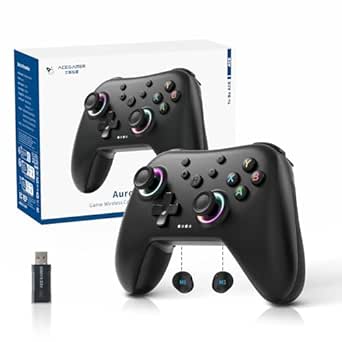 | Best Wireless Controller Upgrade for Multi-Platform Play | Connectivity: 2.4 GHz wireless, Bluetooth | Compatible devices: PC, Nintendo Switch, Nintendo Switch 2, Steam Deck, iOS, Android | Joysticks: Hall Effect sensors | VIEW LATEST PRICE | See Our Full Breakdown |
| eXtremeRate Blue Replacement Thumbsticks for PS5 and PS4 Controllers |  | Best Cosmetic Stick Swap for PlayStation Controllers | Compatible devices: PlayStation 5, PlayStation 4, PS4 Slim, PS4 Pro controllers | Number of items: 2 | Material: PC and TPE plastic | VIEW LATEST PRICE | See Our Full Breakdown |
More Details on Our Top Picks
KontrolFreek Precision Rings for Gaming Controllers, 6-Pack
I’d choose these rings when the main upgrade needed is more thumbstick resistance, not a taller stick or extra controller buttons. Three firmness levels let you adjust how much resistance you want, and the six-ring set gives you spares or room to equip more than one controller. The moisture-wicking rubber is designed to return to shape after use, making this a reusable alternative to replacing a controller. Compared with the KontrolFreek Aim Boost Kit, this set focuses on resistance rather than combining rings with performance thumbsticks. That narrower approach can suit players who already like their stick height, but added resistance can feel restrictive and may call for sensitivity adjustments. Compatibility can also depend on the controller’s stick design, so check the fit before buying.
Pros:- Three resistance strengths make it easier to find a preferred feel.
- Six rings provide spares or allow use across compatible controllers.
- Flexible, moisture-wicking rubber is designed for repeated use.
- Adds resistance without requiring a replacement controller.
Cons:- Added resistance may feel restrictive, especially for players used to loose sticks.
- Fit can vary with thumbstick design and controller compatibility.
- May require sensitivity changes to suit the new feel.
Best for: Controller players who like their current thumbstick height but want adjustable resistance to help steady aim and limit overshooting.
Not ideal for: Players who prefer light, unrestricted stick movement, or anyone whose controller thumbsticks do not securely fit these rings.
- Brand:KontrolFreek
- Quantity:6 rings
- Resistance levels:Soft, medium, and hard
- Material:Rubber
- Compatible devices:PlayStation 4, PS5, Xbox One, Xbox Series X|S, Switch Pro, and Scuf controllers
- Color:Black, purple, and green
- Model number:4005-MIX
Our verdict“Choose this set if you want to tune stick resistance without changing thumbstick height or replacing your controller.”
Collective Minds Strike Pack Wired Dominator for Xbox Series X|S and Xbox One
The Strike Pack is for Xbox players who want programmable rear controls without replacing their existing controller. Its wired USB connection and companion app offer remapping and macro options, plus game modes such as rapid fire and quickscope. That makes it a more feature-driven upgrade than the KontrolFreek Precision Rings, which change thumbstick resistance but do not add buttons. The tradeoff is setup: you need a compatible Xbox controller, the required firmware, and time to configure the features. Product details also conflict on whether the attachment has two paddles or four back buttons, so I would verify the control layout before buying. It is an attachment, not a complete controller, and the wired connection may be less appealing to players who want a wireless setup.
Pros:- Adds programmable rear controls to supported Xbox controllers.
- Provides remapping and customizable macros through a companion app.
- Wired USB connection supports Xbox and PC use.
- Includes additional game modes such as rapid fire and quickscope.
Cons:- Requires a compatible controller and firmware version 3.1.43 or later.
- Product information conflicts on whether it has two paddles or four back buttons.
- Wired attachment setup is less convenient than a wireless controller upgrade.
Best for: Xbox One and Series X|S players with a supported controller who want remappable rear controls and app-managed macros.
Not ideal for: Buyers seeking a standalone or wireless controller, or players who do not want to check controller compatibility and firmware before setup.
- Compatible consoles:Xbox Series X|S and Xbox One
- Compatible controller models:Xbox Series 1914; Xbox One 1537, 1697, and 1708
- Connectivity:Wired USB
- Programmable back controls:Product details state both two paddles and four ergonomic buttons
- Features:Remappable controls, macros, recoil assist, rapid fire, Dynamic Fire, Tap Burst, and Quickscope
- Companion app:iOS and Android
- Firmware requirement:Version 3.1.43 or later
- Controller included:No
Our verdict“Pick the Strike Pack if you already own a supported Xbox controller and want programmable rear controls more than a wireless, all-in-one upgrade.”
KontrolFreek FPS Freek Galaxy Black Performance Thumbsticks for PS4 & PS5 – Limited Edition
This PS4 and PS5 upgrade suits players who want a taller aiming stick without changing their whole controller. Its mixed-height pair adds 10 mm on the high-rise stick and 6.5 mm on the mid-rise, giving the right stick more travel for small aiming adjustments while keeping the other stick closer to a familiar height. Compared with the KontrolFreek Precision Rings, which add resistance around existing sticks, the Galaxy changes grip and stick height instead. The non-slip rubber can help maintain contact during long sessions and protects stock sticks from wear. The tradeoff is a more pronounced change in feel: players used to standard-height sticks may find the added height uncomfortable at first. It also does not offer the adjustable resistance levels included with the rings.
Pros:- Mixed heights provide a distinct aiming and movement setup.
- High-rise stick adds 10 mm and mid-rise stick adds 6.5 mm.
- Non-slip rubber compound supports grip during play.
- Covers stock thumbsticks against wear.
Cons:- The extra height can feel uncomfortable to players accustomed to standard sticks.
- Does not provide adjustable resistance like the KontrolFreek Precision Rings.
- Limited-edition availability may make replacement harder to find.
Best for: PS4 and PS5 players who want a higher right stick for finer aiming while keeping a moderate-height stick for movement.
Not ideal for: Players who prefer standard-height thumbsticks or want adjustable stick resistance rather than a height and grip change.
- Compatibility:PlayStation 4 and PlayStation 5
- High-rise height increase:10.0 mm
- Mid-rise height increase:6.5 mm
- Stick profile:High-rise and mid-rise concave thumbsticks
- Material:Proprietary non-slip rubber compound
- Edition:Limited edition
Our verdict“Choose the Galaxy pair if you want a noticeable mixed-height aiming upgrade for a PS4 or PS5 controller and are comfortable adapting to taller sticks.”
GameSir G7 Pro Controller for Xbox, PC, and Android – Black
The G7 Pro is the broadest hardware upgrade in this group: instead of modifying a stock controller, it brings TMR sticks, Hall Effect triggers, and four customizable buttons in one gamepad. Its connection options also vary by platform—wired for Xbox, wired or 2.4 GHz wireless for PC, and Bluetooth for Android—so it offers more flexibility than the Xbox-only Strike Pack Wired Dominator. On PC, the 1000 Hz polling rate and gyro aiming target players who want extra control options; the gyro feature is limited to PC. A charging station and built-in battery add convenience, but the Xbox connection remains wired, which narrows its appeal for couch setups that depend on wireless play. This is a full controller replacement, so it makes less sense if you only need a small thumbstick adjustment.
Pros:- Supports Xbox, PC, and Android with platform-specific connection options.
- TMR sticks and Hall Effect analog triggers provide a hardware-focused upgrade.
- PC polling rate reaches 1000 Hz and gyro aiming is available on PC.
- Includes four customizable buttons and a charging station.
Cons:- Xbox connection is wired.
- Gyro aiming is limited to PC.
- A full controller purchase is more than needed for players seeking only a stick accessory.
Best for: Players who game across Xbox, PC, and Android and want one feature-rich controller with customizable buttons and a charging station.
Not ideal for: Xbox players who require a wireless connection, or buyers who only want a low-commitment stick grip or resistance add-on.
- Connectivity:Wired for Xbox; wired or 2.4 GHz wireless for PC; Bluetooth for Android
- Sticks:Mag-Res TMR
- Triggers:Hall Effect analog triggers with switchable micro-switch stops
- PC polling rate:1000 Hz
- Gyroscope:PC-only
- Customizable buttons:4
- Battery capacity:1200 mAh
- Charging:Smart auto start-stop charging station
- Audio jack:3.5 mm
Our verdict“Choose the G7 Pro if you want a feature-rich controller across several platforms and can accept wired play on Xbox.”
KontrolFreek Aim Boost Kit for Xbox One and Xbox Series X Controllers, Black Galaxy
The Aim Boost Kit combines two kinds of thumbstick change: mixed-height performance sticks for grip and reach, plus three strengths of precision rings for adjustable resistance. That makes it a more complete aiming accessory than the standalone KontrolFreek Precision Rings, which leave stock stick height unchanged. The combination gives Xbox One and Xbox Series X players room to tune both feel and control, and the rings are intended to cushion movement and help limit overshooting. The tradeoff is that changing stick height and resistance at once can take adjustment; you may need to revise in-game sensitivity before the setup feels right. Unlike the GameSir G7 Pro, this kit keeps your current controller rather than replacing it, but it does not add back buttons or broader platform features.
Pros:- Combines performance thumbsticks with precision rings.
- Mixed-height sticks support a tailored aiming and control setup.
- Three ring strengths give players options for resistance.
- Designed for Xbox One and Xbox Series X controllers.
Cons:- The combined height and resistance changes may take time to adapt to.
- May require in-game sensitivity adjustments.
- Does not add programmable back buttons or replace the controller.
Best for: Xbox One and Xbox Series X players who want to adjust both thumbstick height and resistance without replacing their controller.
Not ideal for: Players who already like stock stick height, want a complete controller upgrade, or prefer not to adjust in-game sensitivity.
- Brand:KontrolFreek
- Compatible devices:Xbox One and Xbox Series X controllers
- Included items:Performance thumbsticks and precision rings
- Precision ring strengths:3
- Thumbstick design:Mixed-height performance thumbsticks
- Enclosure material:Rubber
- Color:Black
- Model number:6204-XBX
Our verdict“Choose the Aim Boost Kit if you want a combined height-and-resistance aiming upgrade for an Xbox controller you already own.”
14-in-1 Metal Thumbsticks for Xbox Elite Controller Series 2, Black
This kit makes the most sense for Xbox Elite Series 2 owners who want to change the controller’s feel without replacing the whole pad. Six stainless-steel thumbsticks, four paddles, and two D-pads give you more ways to match controls to different games than the Faysazoy snap-on caps, which only modify stick tops. Tool-free swaps keep customization straightforward, and the storage case helps prevent the spare parts from getting lost. The tradeoff is strict compatibility: unlike the 8Bitdo Ultimate 2, this is not a complete controller and offers no wireless or connectivity upgrade. Its metal components may also feel heavier or firmer than the stock parts, so it is a targeted replacement and customization kit rather than a universal upgrade.
Pros:- Six thumbsticks, four paddles, and two D-pads support varied control setups
- Stainless-steel construction offers a solid, grippy feel
- Components install without tools
- Storage case keeps spare parts together
Cons:- Compatible only with the Xbox Elite Wireless Controller Series 2
- Adds replacement parts but does not upgrade connectivity, battery, or core controller electronics
Best for: Xbox Elite Series 2 owners who want spare sticks, paddles, and D-pads for different games or to replace worn components
Not ideal for: Players with standard Xbox, PlayStation, or Switch controllers, since this kit is designed specifically for the Elite Series 2
- Brand:niffgaff
- Compatibility:Xbox Elite Wireless Controller Series 2
- Material:Stainless steel
- Thumbsticks:6
- Paddles:4
- D-pads:2
- Included tools and storage:Adjustment tool and storage case
Our verdict“Choose this kit if you already own an Elite Series 2 and want a broad set of swappable controls without buying another controller.”
16-in-1 Performance Thumb Grips Joystick Caps for PS5/4/Xbox/Switch Pro
For a low-commitment change to stick grip and height, this Faysazoy set works across several major controller families rather than locking you into one ecosystem. Its three pairs of low-, mid-, and high-profile caps let you tune reach and leverage for different playstyles; the taller options may suit players seeking finer aim adjustments, while lower caps keep the feel closer to stock. Snap-on installation makes swapping easy, and the extra colorful caps add a style choice the eXtremeRate split D-pad does not address. These caps protect the original sticks, but they cannot replace worn controller parts or add back buttons like the Elite Series 2. They may also feel bulky to players who prefer an unobstructed, low-profile stick.
Pros:- Three pairs of caps offer low, medium, and high stick profiles
- Five colorful anti-slip caps provide grip and visual customization
- Snap-on fitting requires no tools
- Helps protect original thumbsticks from wear
Cons:- Raised caps can feel bulky to players who prefer low-profile sticks
- Does not replace damaged sticks or add new controller inputs
Best for: Players who switch between PS5, PS4, Xbox, or Switch Pro controllers and want to experiment with stick height and grip
Not ideal for: Players who prefer the original stick shape, need to replace damaged thumbsticks, or want added paddles and buttons
- Brand:faysazoy
- Unit count:16
- Packs:8
- Items:16
- Weight:0.86 g
- Warranty:30 days
- Included profiles:Low, medium, and high thumbstick caps
Our verdict“Pick this set if you want a quick, reversible way to adjust stick height and grip across compatible mainstream controllers.”
eXtremeRate Ergonomic Split D-pad Buttons for PS5, PS5 Edge, and PS4 Controllers, Black
These replacement buttons target a specific control preference: separate direction inputs instead of a single connected D-pad. That layout may appeal to fighting-game players who want to press directions independently, making this a more focused modification than the Faysazoy stick caps or the all-in-one Xbox Elite Series 2. The black ABS buttons can also coordinate with compatible eXtremeRate button kits and shells, so they suit a broader controller-customization project. The significant tradeoff is installation: the controller must be opened, which calls for tools and repair experience rather than a quick snap-on change. Compatibility is also limited to specified PS4 and PS5 controller models, and the controller itself is not included.
Pros:- Split directional buttons offer an alternative to a connected D-pad
- Compatible with select eXtremeRate button kits and replacement shells
- ABS construction keeps the replacement parts lightweight
- Supports controller customization without replacing the full controller
Cons:- Controller disassembly is required for installation
- Controller is not included
- Compatibility is limited to specified PS4 and PS5 models
Best for: PS4 or PS5 fighting-game players who prefer independent directional buttons and are comfortable opening a controller
Not ideal for: Players seeking a plug-and-play upgrade, anyone unwilling to disassemble a controller, or owners of unsupported controller models
- Brand:eXtremeRate
- Color:Black
- Material:ABS
- Compatible devices:PS5, PS5 Edge, and PS4 controllers
- Model compatibility:BDM-010/020/030/040
- Installation:Controller disassembly required
- Dimensions:1.57 x 1.18 x 0.2 inches
- Package contents:Replacement D-pad buttons; controller not included
Our verdict“Choose this mod if independent D-pad inputs are your priority and you have the skills to install internal controller parts.”
8Bitdo Ultimate 2 Wireless Controller – Black
The 8Bitdo Ultimate 2 is the strongest fit here for someone who wants to upgrade the whole controller experience across PC, Steam, Apple devices, and Android. Its 2.4 GHz connection and 1000 Hz polling rate are aimed at responsive play, while two back paddles and extra bumpers offer more input options than a basic pad. Switchable Hall Effect or tactile trigger modes let players choose between a smoother pull and a more defined click—useful flexibility that the Elite Series 2 does not describe as a switchable trigger system. The included charging dock and USB-C adapter make the setup feel more complete. The tradeoffs are that battery life is not specified here, and this controller does not list Xbox console compatibility, unlike the Elite Series 2.
Pros:- 2.4 GHz wireless connection with a listed 1000 Hz polling rate
- Switchable Hall Effect linear or tactile trigger modes
- Two back paddles and extra bumpers expand control options
- Charging dock and USB-C adapter are included
Cons:- Battery life specification is not provided
- Xbox console compatibility is not listed
- Only the black color is specified
Best for: PC, Steam, Apple-device, and Android players who want a feature-rich wireless controller with alternate trigger feels and rear paddles
Not ideal for: Xbox console players who need a listed Xbox-compatible controller, or buyers who require published battery-life details
- Connectivity:2.4 GHz wireless and USB-C wired
- Wireless range:10 m
- Polling rate:1000 Hz
- Trigger modes:Switchable linear Hall Effect or tactile
- Motion control:Customizable 6-axis
- Additional controls:2 back paddles and extra R4/L4 bumpers
- Charging:Multifunctional charging dock with USB-C adapter
- Compatibility:PC, Apple, Steam, and Android
Our verdict“Pick the Ultimate 2 for a flexible wireless upgrade across PC and mobile platforms, but choose the Elite Series 2 if Xbox console support is your priority.”
Xbox Elite Wireless Controller Series 2, Black
For Xbox and Windows players seeking a substantial step up from a standard controller, the Elite Series 2 combines adjustable-tension thumbsticks, hair trigger locks, interchangeable parts, and saved profiles in one device. Those adjustments let you shape stick resistance and trigger travel around your preferred games, rather than adding just one narrow modification like the eXtremeRate split D-pad. Its up to 40 hours of battery life and included charging dock also make it better suited to regular play without frequent charging. The 8Bitdo Ultimate 2 is a stronger cross-platform alternative for PC and mobile users who want selectable trigger feels, but the Elite Series 2 lists Xbox console support and Xbox Wireless. The main drawbacks are its platform-centered app features and battery life that varies with use and accessories.
Pros:- Adjustable-tension thumbsticks and hair trigger locks support tailored control
- Interchangeable sticks, paddles, and D-pads provide multiple configurations
- Stores up to three custom profiles
- Up to 40 hours of rechargeable battery life with a charging dock included
Cons:- Some app features are limited to Xbox consoles and Windows PCs
- Actual battery life varies with usage and accessories
- A complete controller upgrade is more than necessary for buyers seeking only a grip or D-pad change
Best for: Xbox Series X|S, Xbox One, and Windows PC players who want adjustable controls, interchangeable components, and saved game profiles
Not ideal for: Players who prioritize broad compatibility with Apple and Android devices, or who only want an inexpensive single-part accessory
- Color:Black
- Battery life:Up to 40 hours
- Connectivity:Xbox Wireless, Bluetooth, and USB-C
- Compatibility:Xbox Series X|S, Xbox One, Windows PC, and supported cloud gaming devices
- Audio jack:3.5 mm
- Custom profiles:Up to 3
- Included components:6 thumbsticks, 4 paddles, 2 D-pads, carrying case, charging dock, adjustment tool, and USB-C cable
Our verdict“Choose the Elite Series 2 if you want a configurable premium controller for Xbox and Windows, rather than a targeted add-on or a mobile-focused pad.”
AceGamer Aurora II Wireless Gaming Controller
The AceGamer Aurora II is a controller replacement rather than a small add-on: it combines Hall Effect joysticks, two programmable rear buttons, and both 2.4 GHz and Bluetooth wireless options. That makes it a broader upgrade than the KontrolFreek Precision Rings, which modify stick feel without adding wireless connectivity or remappable controls. Its compatibility with PC, Switch, Steam Deck, iOS, and Android suits players who move between platforms, but Xbox is excluded, so it is a poor fit for an Xbox-first setup. The 1000 mAh battery adds cordless convenience, though battery life details are not provided. One setup wrinkle: 2.4 GHz pairing requires a specific button sequence, making Bluetooth the simpler route for buyers who dislike configuration steps.
Pros:- Hall Effect joysticks are designed to provide precise input and reduce stick-drift risk.
- Two programmable back buttons add control options without moving fingers from the main controls.
- 2.4 GHz and Bluetooth connectivity support different wireless setups.
- Compatible with PC, Switch, Steam Deck, iOS, and Android.
Cons:- Not compatible with Xbox.
- 2.4 GHz pairing requires a specific button sequence.
- Battery capacity is listed, but runtime information is not provided.
Best for: PC and Nintendo Switch players who want one wireless controller with Hall Effect sticks and programmable rear buttons for use across several supported devices.
Not ideal for: Xbox players, or anyone who wants a plug-and-play 2.4 GHz setup without learning a button sequence.
- Connectivity:2.4 GHz wireless, Bluetooth
- Compatible devices:PC, Nintendo Switch, Nintendo Switch 2, Steam Deck, iOS, Android
- Joysticks:Hall Effect sensors
- Back buttons:2 programmable buttons with switches
- Button quantity:12
- Battery capacity:1000 mAh
- Sleep mode:After 5 minutes of inactivity
- Xbox compatibility:Not compatible
Our verdict“Choose the Aurora II if you want a multi-platform wireless controller with Hall Effect sticks and rear buttons, but skip it for Xbox use.”
eXtremeRate Blue Replacement Thumbsticks for PS5 and PS4 Controllers
These eXtremeRate blue replacement thumbsticks are a focused upgrade for players who want a fresh look or need replacement sticks for a compatible PlayStation controller. Unlike the KontrolFreek FPS Freek Galaxy thumbsticks, which attach over existing sticks, this set replaces the original parts, giving the controller a more integrated custom appearance. The included screwdriver tool supports installation, but the job requires opening the controller shell; that makes it a more involved project than fitting add-on grips or rings. The PC and TPE plastic construction is described as durable, though the listing does not specify changes to stick height, sensitivity, or performance. Blue is the only stated color, so buyers seeking a subtle or alternative finish have fewer choices.
Pros:- Fits PlayStation 5, PlayStation 4, PS4 Slim, and PS4 Pro controllers.
- PC and TPE plastic construction is intended for durability.
- Includes a screwdriver tool for installation.
- Replaces the original sticks for an integrated color customization.
Cons:- Installation requires opening the controller shell and may be challenging for beginners.
- Only blue is listed as a color option.
- No change to stick height, sensitivity, or gaming performance is specified.
Best for: PS5 and PS4 owners comfortable opening a controller who want replacement thumbsticks with a custom blue finish.
Not ideal for: Beginners who want a no-tools upgrade, players unwilling to open their controller, or anyone seeking a choice of colors or stated performance changes.
- Compatible devices:PlayStation 5, PlayStation 4, PS4 Slim, PS4 Pro controllers
- Number of items:2
- Material:PC and TPE plastic
- Color:Blue
- Item weight:30 g
- Model number:JPF603-EXR
- Manufacturer part number:JPF603
- Installation tool:Screwdriver included
Our verdict“Pick this set for a built-in blue thumbstick refresh on a compatible PlayStation controller if you are comfortable opening the shell.”
How We Picked
I compared these 12 products by the kind of improvement they offer, how much of the existing controller they change, and how clearly their listed compatibility matches common platforms. I gave more weight to practical fit—such as whether an upgrade changes aim feel, grip, button layout, or overall controller capability—than to feature counts alone. I also weighed setup effort, the need to open or modify a controller, and whether the accessory works with a narrow set of models or several controller families.
The ranking favors options that offer a meaningful upgrade for a clearly defined buyer without demanding unnecessary changes. That puts complete, customizable controllers near the top for players seeking a broader improvement, while focused add-ons rank well when they address a specific comfort or control issue. Platform-specific replacement parts and specialized accessories sit lower because they can be effective but require closer compatibility checks and may solve only one problem. I treat the listed product names and compatibility claims as the basis for comparison; buyers should check the manufacturer’s current fit details before purchase.
Factors to Consider When Choosing Best Gaming Controller Upgrades
Start with the part of your current setup that actually limits play. An accessory that changes stick height will not fix an awkward button layout, and a premium controller may be wasted if all you need is a little more grip. These buying factors can help separate a useful upgrade from extra hardware you will not use.
Choose the problem before choosing the product
Write down what feels wrong during play: slippery grips, imprecise stick movement, an uncomfortable directional pad, or too few control options. Match the upgrade to that specific issue rather than buying a bundle because it contains many pieces. Stick caps and performance thumbsticks affect contact and reach, while rings add resistance; neither changes the controller’s core button arrangement. A replacement controller makes more sense when several parts of the existing device feel limiting. A common mistake is expecting one small accessory to improve every aspect of control. If you cannot name the problem it addresses, hold off until you can.
Check exact platform and model compatibility
Compatibility labels can refer to a console family without covering every controller revision in it. Check the exact model name, generation, and whether the upgrade is for a standard or premium version before ordering. This matters especially for replacement thumbsticks and D-pad parts, which may depend on the controller’s shape or internal design. Multi-platform grip caps can be more flexible, but their listed fit still needs to match the controller you own. Do not assume that a PlayStation accessory fits every PlayStation controller, or that an Xbox One part fits an Elite model. When a listing is unclear, verify fit with the manufacturer rather than relying on a broad platform label.
Weigh a reversible add-on against a full replacement
Clip-on accessories and removable caps let you alter one part of a familiar controller with little commitment. Replacement buttons and sticks can offer a more integrated feel, but installation may take more care and may be difficult to reverse. A complete controller can bring several changes at once, which helps when your current device has multiple shortcomings. It also means adapting to a different shape, control arrangement, or customization system. Avoid replacing a controller just to gain a feature that a small accessory can provide. Pay more for a full device when the broader changes matter to your regular play, not just because it has more options.
Think about adaptation time, not only features
Changes to stick height, resistance, grip, and button shape can affect familiar hand movements. A setup that feels controlled in one game may take adjustment in another, particularly if the change alters how far or how quickly a stick moves under your thumb. Install or attach one change at a time so you can tell what helps. Keep the original parts when possible, especially if you play different genres or share the controller. More adjustability is useful only if you are willing to tune and learn it. For a first upgrade, a single-purpose accessory can be an easier way to judge whether that type of change suits you.
Plan for maintenance and small-part storage
Interchangeable sticks, caps, and buttons give you more ways to personalize a controller, but they also create extra pieces to track. Store unused parts together and check that removable components sit securely before a session. Replacement parts may require disassembly, so read the installation instructions and decide whether you are comfortable working on the controller. Add-on caps are usually less involved, though they can still loosen or get lost when removed. A large accessory set is not automatically better if you will use only one piece. Favor the simplest option that addresses your issue and is manageable to maintain.
Compare the whole setup, not the accessory count
Bundles can look appealing because they offer several ways to change a controller, but the useful comparison is how many of those options match your needs. A focused thumbstick upgrade may provide more value to an aim-focused player than a collection of unrelated grips. Conversely, a player who wants to change several parts may benefit from a configurable controller rather than buying separate accessories over time. Include setup effort, compatibility limits, and the possibility of replacing a part you already like in your decision. Do not treat a larger feature list as proof of a better fit. Choose the upgrade that improves your most frequent use without adding controls or maintenance you do not want.
Frequently Asked Questions
Should I upgrade my current controller or buy a complete replacement?
Keep your current controller if its shape and button layout already suit you and one specific issue is getting in the way. A thumbstick or grip accessory can make a focused change without requiring you to relearn the whole device. Choose a replacement when several parts feel limiting or you want a broader set of adjustments in one controller. Also check whether the new controller works with your platform and the games you play. If you are unsure, a reversible accessory is a lower-commitment way to learn which changes help.
Will taller performance thumbsticks improve my aim?
Taller sticks change thumb reach and can give some players a different sense of control, but they do not automatically make aim more accurate. The result depends on your grip, the game’s settings, and how quickly you adapt to the altered movement. A taller stick may feel awkward if you prefer short travel or switch frequently between controllers. It also will not correct a problem caused by sensitivity settings or an uncomfortable hand position. Treat it as a feel adjustment and test one change at a time.
Are controller replacement parts a good choice for beginners?
They can be, if you are comfortable checking compatibility and following installation instructions. Replacement thumbsticks or D-pad buttons may demand more care than removable caps, and some parts require opening the controller. Beginners who want a low-effort change can start with a grip or stick accessory that does not require disassembly. Keep the original parts and avoid making several modifications at once. If the fit or installation steps are unclear, choose a simpler upgrade or ask the manufacturer for guidance.
Can I use one upgrade across Xbox, PlayStation, and Switch controllers?
Some grip accessories are listed for several controller families, but many thumbstick parts and buttons are made for specific models. A shared platform label does not guarantee that every revision or premium controller version fits. Check the exact controller name and generation in the compatibility information before buying. Full controllers have their own platform and device limitations, so confirm support for the system you plan to use. When you use more than one platform, favor a clearly documented fit over assumptions based on appearance.
Is it better to buy a multi-piece upgrade kit or one focused accessory?
A kit makes sense when you already know you want to change several touchpoints and its parts match your controller. A single accessory is a better starting point when you are testing whether added stick height, grip, or resistance suits you. Unused pieces can add clutter without improving play, and parts in a bundle may not all fit the same controller. Compare the function of each included item with a specific need rather than counting components. Starting with one change also makes it easier to tell whether the upgrade helped.
Conclusion
For a broad hardware upgrade, I recommend the Xbox Elite Wireless Controller Series 2 as the best overall choice, while the GameSir G7 Pro is a strong alternative for buyers who value use across Xbox, PC, and Android. The best value depends on the issue: choose the KontrolFreek FPS Freek Galaxy for a focused stick-height change or the 16-in-1 Performance Thumb Grips if you want a variety of listed grip options. For beginners, start with a simple add-on such as the KontrolFreek Aim Boost Kit or Precision Rings rather than modifying a controller internally. The best premium pick is the Elite Series 2 for players who want extensive customization, while the best for specific needs varies by platform: consider the eXtremeRate D-pad or replacement sticks for compatible PlayStation controllers, and the Metal Thumbsticks for the Xbox Elite Series 2. If your current controller already feels right, choose the smallest upgrade that addresses a real annoyance; if several parts need changing, a complete controller is the more coherent choice.
Halloween Picks
halloween
As an affiliate, we earn on qualifying purchases.