
Prime deals on gaming mice are some of the best value opportunities of the year, but the discounts also attract a flood of mediocre hardware that isn’t worth even a reduced price. After comparing the field, the Logitech G502 Hero stands out as the best overall pick thanks to its 25,600 DPI Hero sensor, 11 programmable buttons, and a track record of hitting steep discounts. For pure value, the Logitech G305 Lightspeed delivers genuine wireless performance at a budget-wired price, while the SteelSeries Prime Edition is the lightweight esports option if you care about competitive speed over RGB flair. The main tradeoff you’ll face during these sales is between cheap RGB-loaded mice that look impressive but cut corners on sensors and switches, versus proven flagships that rarely dip below mid-range pricing. Read on for the full breakdown of all 14 mice and which deals are actually worth your cart.

Play games on Amazon Luna for your game nights, included with Prime
- A rotating selection of games, no download needed
- Play on TV, laptop or phone
- Fast, free delivery for your gear, too
Complete the kit


Key Takeaways
- The Logitech G502 Hero and Razer Basilisk V3 separated themselves from the pack through sensor quality and button durability — an area where every sub-$20 option in this lineup compromises.
- Logitech‘s G305 was the only wireless mouse under $50 that matched wired performance, making it the clear value winner over the Redragon M810 Pro, which trades battery life for RGB lighting.
- Redragon dominates the budget tier with five entries, but the M908 MMO mouse is the only one I’d recommend for a specific audience — players who need 12+ side buttons for macro-heavy games.
- The SteelSeries Prime Edition’s 69g weight and optical switches make it the only true esports-grade pick here; everything else prioritizes comfort or features over pure speed.
- Sub-$15 mice like the BENGOO and MELOGAGA use interchangeable internals despite different branding — at that price, the only real differentiator is button count and shape.
- Discount percentage matters less than base sensor quality: a 50% off deal on a generic 4,000 DPI mouse is still worse value than a 20% discount on the Razer DeathAdder Essential.
| SteelSeries Esports FPS Gaming Mouse – Prime Edition |  | Best Overall for Competitive FPS | Weight: 69g | Sensor: TrueMove Pro optical | Max CPI: 18,000 | VIEW LATEST PRICE | See Our Full Breakdown |
| Logitech G305 Lightspeed Wireless Gaming Mouse |  | Best Wireless Value | Sensor: HERO optical | DPI Range: 200–12,000 | Wireless: Lightspeed, 1 ms response | VIEW LATEST PRICE | See Our Full Breakdown |
| Redragon M602 Gaming Mouse |  | Best Budget Feature-Packed Pick | Max DPI: 7,200 | Buttons: 9 programmable | Connection: Wired USB | VIEW LATEST PRICE | See Our Full Breakdown |
| BENGOO Gaming Mouse Wired with RGB Backlit |  | Best Ultra-Cheap Starter Pick | DPI Range: 1,200–3,600 | Buttons: 6 | Lighting: RGB multi-color | VIEW LATEST PRICE | See Our Full Breakdown |
| MELOGAGA Wired Gaming Mouse RGB USB with 4 DPI and 6 Buttons |  | Best Ultra-Cheap Prime Deal | DPI Settings: 1200/1600/2400/3200 | Buttons: 6 | Lighting: RGB | VIEW LATEST PRICE | See Our Full Breakdown |
| Redragon M730 Wired RGB Gaming Mouse 10K DPI Lightweight Remapping Keys |  | Best Value for Customization | Max DPI: 10,000 (via software) | Default DPI Levels: 5 (400/800/1600/2400/3200) | Buttons: 6 programmable | VIEW LATEST PRICE | See Our Full Breakdown |
| Redragon M810 PRO Wireless RGB Gaming Mouse 10,000 DPI with Remapping Keys |  | Best Budget Wireless Option | Max DPI: 10,000 | Programmable Buttons: 8 | Polling Rate: 1000Hz | VIEW LATEST PRICE | See Our Full Breakdown |
| Razer Basilisk V3 Customizable RGB Wired Ergonomic Gaming Mouse, Black |  | Best Premium Pick | Sensor: Focus Plus 26K DPI Optical | Programmable Buttons: 11 | Switch Type: Optical Mouse Switches Gen 2 (70M clicks) | VIEW LATEST PRICE | See Our Full Breakdown |
| Redragon M908 Wired MMO RGB Gaming Mouse 12400 DPI Remapping Keys |  | Best for MMO Players | Sensor: Pixart PAW3327 | Max DPI: 12,400 (5 levels) | Buttons: 18 programmable | VIEW LATEST PRICE | See Our Full Breakdown |
| Wired PC Gaming Mouse with RGB Backlit and Programmable Buttons | 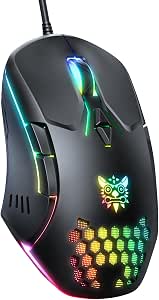 | Cheapest Way Into a Pro-Grade Sensor | Sensor: PMW3389 e-sports level optical | DPI: 1200 / 2400 / 3600 | Buttons: 7 programmable | VIEW LATEST PRICE | See Our Full Breakdown |
| Acer Wired Gaming Mouse, 12,800 DPI RGB Ergonomic Computer Mouse for PC |  | Best for Medium Hands and Laptop Setups | DPI: Up to 12,800 | Buttons: 8 programmable | Connection: USB wired, paracord cable | VIEW LATEST PRICE | See Our Full Breakdown |
| Redragon M612 Wired RGB Optical Gaming Mouse 8000 DPI Remapping Keys |  | Best Button Count for the Money | DPI: Up to 8000 | Buttons: 11 programmable | Connection: USB wired | VIEW LATEST PRICE | See Our Full Breakdown |
| Logitech G502 Hero Wired Gaming Mouse – Black |  | Best Premium All-Rounder | Sensor: HERO gaming sensor | DPI: Up to 25,600 | Buttons: 11 programmable | VIEW LATEST PRICE | See Our Full Breakdown |
| gaming mouse for Prime deal | Buttons | Lighting | Compatibility | Sensor |
|---|---|---|---|---|
| SteelSeries Esports FPS Gaming | 5 programmable | RGB | PC/Mac | TrueMove Pro optical |
| Logitech G305 Lightspeed Wirel | 6 programmable | — | — | HERO optical |
| Redragon M602 Gaming Mouse | 9 programmable | Customizable RGB | Windows, Mac, Linux | — |
| BENGOO Gaming Mouse Wired with | 6 | RGB multi-color | Windows XP/Vista/7/8, Macbook, PC, Notebook | — |
| MELOGAGA Wired Gaming Mouse RG | 6 | RGB | Windows XP/Vista/7/8/10, macOS | — |
| Redragon M730 Wired RGB Gaming | 6 programmable | — | — | — |
| Redragon M810 PRO Wireless RGB | — | RGB with DIY options | — | — |
| Razer Basilisk V3 Customizable | — | Razer Chroma RGB, 16.8M colors | — | Focus Plus 26K DPI Optical |
| Redragon M908 Wired MMO RGB Ga | 18 programmable | — | Windows, Mac | Pixart PAW3327 |
| Wired PC Gaming Mouse with RGB | 7 programmable | RGB backlit, customizable effects | Windows, Mac, Linux, Chrome | PMW3389 e-sports level optical |
| Acer Wired Gaming Mouse | 8 programmable | — | Windows, macOS, Linux, Chrome OS | — |
| Redragon M612 Wired RGB Optica | 11 programmable | RGB backlight | Windows 10+, macOS 10.15+ | Optical |
| Logitech G502 Hero Wired Gamin | 11 programmable | RGB LIGHTSYNC | — | HERO gaming sensor |
More Details on Our Top Picks
SteelSeries Esports FPS Gaming Mouse – Prime Edition
This option stands out as the most competition-focused pick in the lineup, and it earns the top spot because it pairs an 18K CPI TrueMove Pro sensor with magnetic optical switches rated for 100 million clicks — specs that outclass everything else here. Compared with the Razer DeathAdder Essential, the 69g frame makes flick shots and rapid repositioning noticeably less tiring, though players who prefer a heavier, planted feel may find it almost skittish. The design came from collaboration with over 100 pro players, which shows in the clean, distraction-free button layout. The tradeoff is simplicity: five buttons and no wireless option mean this is a specialist tool, not an all-rounder.
Pros:- Featherlight 69g build improves agility in fast shooters
- 18,000 CPI TrueMove Pro sensor for tournament-grade tracking
- Magnetic optical switches rated for 100 million clicks
- Shape refined with input from 100+ professional gamers
Cons:- Too light for players who prefer a heavier, more stable mouse
- Right-handed shape only, and limited to five buttons
Best for: Competitive FPS players who prioritize sensor precision, switch durability, and a lightweight frame over extras
Not ideal for: MMO or MOBA players who need many macro buttons — the Redragon M908 or M602 offer far more programmable inputs
- Weight:69g
- Sensor:TrueMove Pro optical
- Max CPI:18,000
- Switches:Magnetic optical, 100M clicks
- Buttons:5 programmable
- Lighting:RGB
- Compatibility:PC/Mac
Our verdict“If you take shooters seriously and want pro-grade internals at a deal price, this is the one to grab.”
Logitech G305 Lightspeed Wireless Gaming Mouse
Among all the Prime deals here, this model makes the most sense for anyone who wants to cut the cord without spending a fortune. The 1 ms Lightspeed connection means wireless lag is a non-issue in real gameplay, and the HERO sensor’s efficiency translates into up to 250 hours on a single AA battery — no charging cable, no dock, no dead-battery anxiety mid-match. Compared with the wired SteelSeries Prime, the sensor tops out lower at 12,000 DPI, but almost nobody plays above that range anyway. The rounded, compact shape and built-in receiver storage also make it the most travel-friendly pick here. The catch: it’s small for large hands, and there’s no RGB or wired fallback if the battery dies.
Pros:- 1 ms wireless response indistinguishable from wired in play
- Up to 250 hours of battery life on one AA battery
- Compact, portable design with internal nano receiver storage
- HERO sensor with adjustable 200–12,000 DPI
Cons:- Requires AA batteries with no rechargeable option
- Compact shape may cramp larger hands during long sessions
Best for: Students, laptop gamers, and frequent travelers who want reliable wireless performance at a budget price
Not ideal for: Players with large hands or those who want lots of buttons — the compact shell and six buttons limit MMO-style play
- Sensor:HERO optical
- DPI Range:200–12,000
- Wireless:Lightspeed, 1 ms response
- Battery Life:Up to 250 hours (AA)
- Weight:3.4 oz (99 g)
- Buttons:6 programmable
Our verdict“The smartest buy if wireless freedom and battery longevity matter more to you than raw button count.”
Redragon M602 Gaming Mouse
This option stands out for squeezing nine programmable buttons, macro editing, and 7,200 DPI into a price tier where the BENGOO RGB mouse offers only basic DPI switching. For MOBA and MMO dabblers, the two extra thumb buttons genuinely change how you play, mapping items, spells, or push-to-talk without reaching for the keyboard. The software download required for macro setup is a real annoyance compared with plug-and-play rivals, and the shell is right-handed only — lefties are out of luck. Build quality is solid for the price, but it won’t match the SteelSeries Prime’s switch durability over years of heavy clicking. As a deal-driven bundle of features per dollar, though, it’s hard to beat.
Pros:- Nine programmable buttons with full macro editing support
- Adjustable DPI up to 7,200 for flexible sensitivity
- Customizable RGB lighting to match a setup
- Ergonomic shape comfortable for long sessions
Cons:- Requires a software download to unlock macros and remapping
- Right-handed design only, and heavier than esports-focused mice
Best for: Budget-conscious MOBA/MMO players who want macro buttons and customization without a big spend
Not ideal for: Competitive FPS players — the weight and software dependency lag behind lighter, simpler options like the Prime
- Max DPI:7,200
- Buttons:9 programmable
- Connection:Wired USB
- Lighting:Customizable RGB
- Hand Orientation:Right-handed
- Weight:0.27 kg (270 g listed)
- Compatibility:Windows, Mac, Linux
Our verdict“The most functionality you can get per dollar on this list, as long as you’re willing to install the software.”
BENGOO Gaming Mouse Wired with RGB Backlit
As the lowest rung on the ladder, this pick makes sense for one buyer: someone who wants a gaming look and feel for pocket change. The RGB backlighting and ergonomic shell deliver the aesthetic, and plug-and-play setup with no drivers means it works the moment you plug it in — genuinely simpler than the Redragon M602, which demands software for its extras. Realistically, the 1,200–3,600 DPI range trails every other mouse here, including the DeathAdder Essential’s 6,400, and the six buttons aren’t truly programmable. It’s a visual upgrade from an office mouse rather than a performance one, and that framing matters when comparing deals.
Pros:- Rock-bottom price point for a gaming-styled mouse
- Multi-color RGB lighting for desk aesthetics
- True plug-and-play with no drivers required
- Ergonomic shape for comfortable everyday use
Cons:- DPI maxes out at 3,600, far below similarly priced rivals
- Buttons are fixed with no programmable options
Best for: Casual or younger gamers who want RGB style and basic gaming comfort at the lowest possible price
Not ideal for: Anyone chasing precision — the 3,600 DPI ceiling and non-programmable buttons fall short of every other pick here
- DPI Range:1,200–3,600
- Buttons:6
- Lighting:RGB multi-color
- Connection:Wired USB
- Setup:Plug and play, no driver
- Compatibility:Windows XP/Vista/7/8, Macbook, PC, Notebook
Our verdict“Buy it for the look and the price, not the performance — it’s a stepping stone, not a destination.”
MELOGAGA Wired Gaming Mouse RGB USB with 4 DPI and 6 Buttons
At the bottom of the price ladder, this MELOGAGA mouse makes the list as the cheapest way to add RGB flair to a desk setup. The four DPI stages (up to 3200) cover the basics for casual shooters and MOBAs, and the plug-and-play setup means no software to fight with — a real advantage over the Redragon M730, which demands software installation for meaningful customization. Compared with the similarly budget BENGOO mouse, this one trades programmable buttons for simplicity, and that’s the tradeoff to understand: the six buttons here are fixed in function. This pick makes the most sense as a stocking stuffer, a backup mouse, or a first gaming mouse for a kid — not as a tool for anyone who takes competitive play seriously.
Pros:- Extremely low price for a full RGB gaming mouse
- Plug-and-play with no software required
- Four adjustable DPI stages for everyday flexibility
- Ergonomic shape comfortable for long casual sessions
Cons:- No programmable buttons at all
- DPI range too limited for high-sensitivity competitive gaming
Best for: Casual players, kids, or anyone building a budget battlestation who wants RGB looks for pocket change
Not ideal for: Competitive or MMO players — the non-programmable buttons and 3200 DPI ceiling cap its potential
- DPI Settings:1200/1600/2400/3200
- Buttons:6
- Lighting:RGB
- Connectivity:Wired USB
- Compatibility:Windows XP/Vista/7/8/10, macOS
- Setup:Plug-and-play, no software
Our verdict“Grab it only if price is the deciding factor and you don’t need programmability.”
Redragon M730 Wired RGB Gaming Mouse 10K DPI Lightweight Remapping Keys
This is where price-to-feature ratio starts getting interesting. The M730 gives you 10,000 DPI and fully programmable buttons for roughly what the basic MELOGAGA costs two of — making it the standout value pick for buyers who want real customization without paying Razer money. At 82 grams, it sits comfortably between the ultralight SteelSeries Esports mouse (69g) and the chunky 175g Redragon M908, so it works for both palm and claw grippers. The catch: out of the box you only get five default DPI stages, and unlocking the full 10K plus macro remapping requires Redragon’s software, which is clunkier than Razer Synapse. Compared with the wireless Redragon M810 PRO, you lose cord-free convenience but gain a lighter, cheaper, lag-free experience.
Pros:- 10,000 DPI sensor rare at this price point
- All six buttons remappable via software
- Lightweight 82g build suits fast-paced gaming
- Eight RGB backlight modes for visual customization
Cons:- Full customization locked behind unintuitive software
- Default DPI stages limited until you configure them manually
Best for: Budget-conscious FPS and MOBA players who want programmable macros and high DPI under a tight Prime deal budget
Not ideal for: Wireless-first desk setups — the cable is non-negotiable here
- Max DPI:10,000 (via software)
- Default DPI Levels:5 (400/800/1600/2400/3200)
- Buttons:6 programmable
- Weight:82 grams
- Backlit Modes:8 RGB modes
- Design:Ergonomic, claw-grip
- Connectivity:Wired
Our verdict“The smartest spend in this batch if you want maximum tweakability per dollar.”
Redragon M810 PRO Wireless RGB Gaming Mouse 10,000 DPI with Remapping Keys
If cutting the cord matters more than having the absolute best sensor, this is the most affordable wireless route in the roundup. The M810 PRO pairs a 10,000 DPI sensor with eight programmable buttons and 45 hours of battery — specs that undercut the pricier Logitech G305 Lightspeed on button count and RGB lighting, though Logitech’s sensor and wireless reputation remain a step above. A 1000Hz polling rate keeps latency respectable for a 2.4GHz connection, so this holds up in ranked matches, not just productivity. The real tradeoff is weight: the rechargeable battery makes it heavier than the wired M730, so flick-shot players may notice the difference. Eight macro buttons also make it a sleeper pick for MMO players who can’t stretch to the 18-button M908.
Pros:- 45-hour battery life outlasts most budget wireless rivals
- Eight programmable buttons including macros
- 1000Hz polling rate for low-latency 2.4GHz wireless
- Customizable RGB with DIY color options
Cons:- Heavier than comparable wired mice due to battery
- Wireless-only design means downtime when charging
Best for: Buyers who want wireless freedom, RGB lighting, and macro buttons without paying Logitech or Razer prices
Not ideal for: Featherweight-mouse enthusiasts — the battery adds heft that competitive low-sensitivity players won’t love
- Max DPI:10,000
- Programmable Buttons:8
- Polling Rate:1000Hz
- Battery Life:Up to 45 hours
- Wireless Technology:2.4GHz
- Lighting:RGB with DIY options
Our verdict“The best-value cordless pick here, provided battery weight doesn’t bother you.”
Razer Basilisk V3 Customizable RGB Wired Ergonomic Gaming Mouse, Black
This is the only true premium flagship in this batch, and the gap is measurable. A 26K DPI Focus Plus sensor, Gen 2 optical switches rated for 70 million clicks, and the Hyperscroll tilt wheel put it in a different league from the Redragon M908 — which counters with more raw buttons but a far less refined feel. The Basilisk V3 stands out for people who treat a mouse as a decade-long investment rather than a Prime Day impulse buy. That said, the price is the obvious hurdle, and the wired cable is a genuine limitation when the cheaper Redragon M810 PRO offers wireless freedom. Razer Synapse is also overkill for casual users — the software depth that enthusiasts love will feel like homework to anyone coming from the plug-and-play MELOGAGA.
Pros:- 26K DPI Focus Plus optical sensor for elite tracking precision
- Optical switches rated for 70 million clicks
- Hyperscroll tilt wheel adds productivity and gaming utility
- 11 programmable buttons with full Chroma RGB integration
Cons:- Premium price far above every other mouse in this roundup
- Wired-only connectivity limits desk flexibility
- Deep Synapse customization can overwhelm casual users
Best for: Enthusiasts and daily grinders who want flagship sensor quality, switch durability, and deep customization
Not ideal for: Budget shoppers and casual players — you’d be paying premium money for features you’ll never touch
- Sensor:Focus Plus 26K DPI Optical
- Programmable Buttons:11
- Switch Type:Optical Mouse Switches Gen 2 (70M clicks)
- Lighting:Razer Chroma RGB, 16.8M colors
- Connectivity:USB wired
- Additional Features:Hyperscroll tilt wheel, ergonomic design
Our verdict“Worth the splurge only if you’ll actually exploit its sensor and switch superiority.”
Redragon M908 Wired MMO RGB Gaming Mouse 12400 DPI Remapping Keys
Nothing else in this lineup competes on sheer button count — 18 programmable inputs make the M908 the clear MMO and productivity champion, dwarfing even the Razer Basilisk V3’s eleven. World of Warcraft or Final Fantasy XIV players who map entire action bars to their thumb will find the twelve side buttons genuinely game-changing, and the included weight tuning set (eight 2.4g pieces) lets you dial in feel — a feature nobody else in this batch offers. The Pixart PAW3327 sensor at 12,400 DPI is legit hardware, not marketing fluff. But be honest about the drawbacks: at 175g stock, it’s more than double the weight of the SteelSeries Esports mouse, it’s right-handed only, and mastering the software is a project in itself. This is a specialist tool, not an all-rounder.
Pros:- 18 programmable buttons, the most in this roundup
- Genuine Pixart PAW3327 sensor with 12,400 DPI
- Weight tuning set for personalized balance
- Braided 6ft cable with gold-plated connector
Cons:- 175g weight is far heavier than esports-oriented mice
- Right-handed design excludes left-handed players
- Steep learning curve for full macro setup
Best for: MMO and MOBA players who need a full action bar at their thumb, plus productivity users who love macro shortcuts
Not ideal for: FPS players chasing lightweight flick shots — 175g is heavy, and left-handed users are out of luck entirely
- Sensor:Pixart PAW3327
- Max DPI:12,400 (5 levels)
- Buttons:18 programmable
- Polling Rate:1000 Hz
- Acceleration:30G
- Weight:175 g (plus 8x 2.4g tuning weights)
- Cable:6 ft braided fiber, gold-plated USB
- Compatibility:Windows, Mac
Our verdict“Buy it for the buttons, not the speed — MMO players get unmatched control at a mid-range price.”
Wired PC Gaming Mouse with RGB Backlit and Programmable Buttons
This mouse’s biggest talking point is the PMW3389 sensor, a genuinely competitive e-sports chip that most budget rods — including the Redragon M602 and the MELOGAGA six-button model — simply don’t carry. That means tracking accuracy here punches well above its price, which matters if you play shooters where a sensor that stutters at high speed costs you fights. The 7-button layout with macro support is modest compared to the Redragon M612’s 11 buttons, but it keeps things simple for players who don’t want a full MMO command deck. The tradeoff is raw polish: lighting effects can be fiddly to configure, and the absence of any weight data suggests a no-frills chassis. Compared to the Logitech G502 Hero, it lacks adjustable weights and a premium scroll wheel, yet it delivers the core precision most buyers actually notice.
Pros:- PMW3389 sensor delivers e-sports level tracking at a budget price
- Adjustable DPI up to 3600 covers most competitive play styles
- RGB lighting with customizable effects for setup aesthetics
- Plug-and-play across Windows, Mac, Linux, and Chrome
Cons:- No weight specification, so feel and heft are a gamble before buying
- Lighting effect configuration is less intuitive than Redragon or Logitech software
Best for: Budget-conscious FPS players who want a true e-sports sensor without paying Logitech or Razer prices
Not ideal for: MMO or MOBA players who need 9+ programmable buttons — 7 buttons fills up fast
- Sensor:PMW3389 e-sports level optical
- DPI:1200 / 2400 / 3600
- Buttons:7 programmable
- Lighting:RGB backlit, customizable effects
- Connection:Wired
- Click Life:20 million clicks
- Compatibility:Windows, Mac, Linux, Chrome
Our verdict“Buy it for the sensor, not the frills — this is the most tracking accuracy per dollar in the budget tier.”
Acer Wired Gaming Mouse, 12,800 DPI RGB Ergonomic Computer Mouse for PC
Acer’s entry carves out a niche the bigger rods ignore: a medium-hand ergonomic shape that suits laptop users and players with smaller grips. At 190g it is heavier than the lightweight SteelSeries Prime, which makes it steadier for deliberate aiming but sluggish for flick-heavy FPS play. The 12,800 DPI ceiling matches the Redragon M908’s MMO-tuned sensor, while the drag-free paracord cable gives it a near-wireless feel that the standard rubber cables on the Redragon M612 can’t match. Rapid Fire and macro support round out a surprisingly complete feature set for the price. The compromises: it’s wired only in a market where the Logitech G305 Lightspeed offers wireless freedom, and the USB-A plug may demand an adapter on modern thin laptops. Some buyers will also find the 2.9-inch width bulky.
Pros:- 12,800 DPI sensor with 4 personalized DPI presets
- 8 programmable buttons with Rapid Fire and macro support
- Paracord cable feels nearly unrestricted compared to standard rubber cables
- Medium-hand ergonomic shape fills a gap between compact and oversized mice
Cons:- USB-A connection may require adapters on newer laptops
- At 190g and 2.9 inches wide, it feels bulky next to lightweight esports mice
Best for: Laptop gamers and medium-handed players who want a high-DPI ergonomic mouse with a flexible paracord cable
Not ideal for: Owners of port-limited ultrabooks without USB-A, and anyone wanting wireless — adapters and dongles eat into the value
- DPI:Up to 12,800
- Buttons:8 programmable
- Connection:USB wired, paracord cable
- Hand Orientation:Right-handed
- Weight:190 g
- Dimensions:4.7″ L x 2.9″ W
- Compatibility:Windows, macOS, Linux, Chrome OS
Our verdict“A smart pick for medium hands and desk-bound laptop setups, as long as you have a USB-A port to spare.”
Redragon M612 Wired RGB Optical Gaming Mouse 8000 DPI Remapping Keys
The M612’s pitch is simple: 11 programmable buttons at a price where rivals offer 6 or 7. That’s Logitech G502 Hero territory for a fraction of the cost, and it makes this the sensible choice for MOBA and MMO players who map abilities, items, and push-to-talk to the mouse. The 8000 DPI sensor sits comfortably between the PMW3389 budget rod’s 3600 and the Acer’s 12,800 — plenty for most players, though competitive FPS snipers may want more headroom. The matte textured grip is more confident in sweaty sessions than the glossy finishes on cheaper Redragon models like the M602. The catch is that full remapping requires software, and the wired-only design plus single black colorway limit flexibility compared to the wireless Redragon M810 PRO, which costs a bit more but cuts the cable.
Pros:- 11 programmable buttons rival mice at double the price
- 8000 DPI with a dedicated Rapid Fire key
- Matte finish and textured grip stay comfortable in long sessions
- Works across Windows and macOS
Cons:- Full remapping and macro features depend on installed software
- Wired only, with no wireless alternative in this model line at this price
Best for: MOBA and MMO players on tight budgets who need macro-heavy button layouts without paying G502 prices
Not ideal for: Players who hate software setup — out of the box, the extra buttons don’t do much until you configure them
- DPI:Up to 8000
- Buttons:11 programmable
- Connection:USB wired
- Hand Orientation:Right-handed
- Sensor:Optical
- Lighting:RGB backlight
- Compatibility:Windows 10+, macOS 10.15+
- Finish:Matte ABS with textured grip
Our verdict“The most programmable buttons per dollar in this roundup — grab it if you map more than you aim.”
Logitech G502 Hero Wired Gaming Mouse – Black
The G502 Hero remains the benchmark because it solves a problem nobody else in this lineup addresses: adjustable weight tuning. With five 3.6g weights, you can dial in the exact heft your aim prefers — something the fixed-weight Redragon M612 and Acer simply can’t offer. The 25,600 DPI HERO sensor tops every wired mouse here by a wide margin, and the dual-mode hyper-fast scroll wheel is a genuine productivity tool that no budget rod matches. Its 11 buttons match the M612’s count, but Logitech’s G HUB software is more polished — and more demanding to learn. The real tradeoffs are price and cable: at its usual cost it sits well above the Redragon options, and if you want wireless you’d step up to the Logitech G305 Lightspeed, sacrificing the weight system and button count to get it.
Pros:- HERO sensor with up to 25,600 DPI, the highest sensitivity in this lineup
- Five adjustable 3.6g weights for custom balance and feel
- 11 programmable buttons plus a dual-mode hyper-fast scroll wheel
- Mechanical button tensioning gives crisp, consistent click response
Cons:- Wired only at this price point while cheaper rivals offer wireless options
- G HUB software has a learning curve and is required for full customization
Best for: Enthusiasts who want one mouse to fine-tune for both competitive gaming and all-day work
Not ideal for: Tinker-averse buyers — without investing time in G HUB, you’re paying a premium for features you’ll never configure
- Sensor:HERO gaming sensor
- DPI:Up to 25,600
- Buttons:11 programmable
- Lighting:RGB LIGHTSYNC
- Weights:Up to 5 x 3.6g adjustable
- Scroll Wheel:Dual-mode hyper-fast
- Connection:Wired USB
Our verdict“If the Prime discount brings it near the budget rods’ territory, the G502 is the easiest upgrade decision in this roundup.”

How We Picked
Since Prime deals reward acting fast, I ranked these mice on the criteria that actually determine long-term satisfaction once the discount hype fades. Sensor quality and consistency came first — a mouse can have all the RGB in the world, but an inconsistent sensor makes it useless for anything beyond casual browsing. Switch durability ranked second, because cheap Omron clones found in sub-$20 mice are the number one failure point, often double-clicking within a year. Weight, ergonomics, and button layout determined suitability for different hand sizes and grip styles, while software support separated brands with real driver ecosystems (Razer, Logitech, SteelSeries) from those offering sketchy third-party configuration tools.
The ranking also reflects realistic deal pricing — I evaluated each mouse at the price it typically hits during Prime events, not its inflated list price. A mouse like the G502 Hero, which routinely drops to budget territory during sales, ranks higher than its MSRP would suggest. Mice were also penalized for misleading spec inflation, such as advertising maximum DPI figures that no sensor can track accurately. Finally, I weighed versatility: mice that serve multiple use cases (FPS, MMO, productivity) ranked above hyper-specialized options unless that specialization was genuinely best-in-class.
Factors to Consider When Choosing Gaming Mouse For Prime Deals
A Prime deal changes the usual buying calculus. Prices compress, which means the gap between a mediocre mouse and an excellent one can shrink to just $10-15 during the event. This guide covers the factors that matter most when you’re deciding quickly.Sensor Quality Beats DPI Numbers Every Time
The single biggest mistake deal shoppers make is equating a high DPI figure with a good mouse. A 12,400 DPI sensor in a $20 mouse will rarely track accurately above 3,000 DPI, and almost nobody plays above that range anyway — professional FPS players typically use 400-1,600 DPI. What actually matters is tracking consistency, polling rate, and IPS rating, which cheap manufacturers rarely advertise because the numbers are unimpressive. Established sensors like Logitech’s Hero, Razer’s Focus-grade sensors, and SteelSeries’s TrueMove Pro hold their accuracy across the full DPI range and don’t spin out during fast flicks. During Prime events, a discounted name-brand mouse with a modest 10,000 DPI sensor will always outperform a generic 20,000 DPI mouse. My rule: if the brand doesn’t name the sensor, assume it’s mediocre.
Wired vs. Wireless at Deal Prices
Wireless used to be a premium feature, but Prime deals have changed that — the Logitech G305 routinely drops under $30, making wireless latency essentially a solved problem at budget prices. That said, not all wireless is equal: the G305 uses a reliable 2.4GHz dongle with months of battery life, while cheaper wireless mice like some generic offerings suffer from interference and dead zones. If a wireless mouse in this lineup doesn’t specify its battery life in months, be skeptical. Wired mice still win on weight consistency and never needing charging, which is why esports-focused picks like the SteelSeries Prime remain wired by design. The practical decision: choose wireless if you value a clean desk and play couch-friendly setups; choose wired if you compete or simply hate charging things. At Prime deal prices, you no longer need to pay a premium for reliable wireless.
Weight and Grip Style Compatibility
Weight is the most overlooked spec in deal shopping, yet it shapes every session. The SteelSeries Prime at 69g sits at the light end for effortless flick shots, while the Logitech G502 at 121g (before adding its tuning weights) feels planted and controlled — neither is better, but they suit opposite playstyles. Your grip style matters just as much: palm grippers with larger hands will find the Basilisk V3 and G502 comfortable, while claw and fingertip grippers may prefer the smaller G305 or the Redragon M730’s slimmer profile. A common mistake is buying a heavy MMO mouse like the Redragon M908 for FPS gaming, then wondering why aim feels sluggish. If possible, check the mouse’s dimensions against one you already own rather than guessing from photos. During flash sales there’s no time to deliberate, so know your grip style before the event starts.
Software Ecosystems and Programmable Buttons
Programmable buttons are only as good as the software behind them. Logitech G HUB, Razer Synapse, and SteelSeries GG are mature platforms with cloud profiles, per-game configurations, and regular updates — a button remapped through them will work reliably for years. Generic mice like the Acer or the unbranded RGB options often rely on lightweight utilities that may not survive a Windows update or may not be digitally signed, which triggers security warnings. This becomes a real issue if you plan to use macros in MMOs or MOBAs, where unreliable software means losing keybindings mid-session. If you don’t actually use macros, don’t pay extra for 12 side buttons — they add weight and accidental-click risk. The sweet spot for most players is 5-8 programmable buttons, which covers DPI shifting, push-to-talk, and a few in-game actions without clutter.
Spotting Fake Discounts and Deal Timing
Not every Prime deal is a deal. A recurring pattern is price inflation in the weeks before the event, followed by a ‘discount’ back to the normal street price. Before buying, check a price-history tracker to confirm the deal price is genuinely below the rolling average — this matters most for Redragon and generic-brand mice, whose list prices are often fiction. The genuinely steep discounts tend to land on previous-generation name-brand mice, like the G305 or DeathAdder Essential, because retailers clear inventory for newer models. Prime-exclusive Lightning Deals on mice can be real bargains, but they sell out in minutes, so know your shortlist beforehand. Another timing tip: day two of a Prime event often sees deeper cuts on remaining stock than day one. Never impulse-buy a mouse you haven’t researched just because the timer is red.
When to Spend More During a Sale
Prime deals distort the usual price-performance curve, and smart shoppers use that to buy up rather than down. If your budget was $20, a deal that puts the Razer DeathAdder Essential at $25 makes spending the extra $5 the correct move — the jump in sensor and switch quality at that threshold is the largest in the entire category. The next meaningful jump happens around $40-50, where flagship-tier mice like the Basilisk V3 sometimes appear. Above that, diminishing returns kick in unless you have specific needs like MMO button grids or esports-grade weight. The mistake to avoid is spending $15 on a generic mouse that fails within a year when $25 would have bought something lasting three times as long. Deal events reward buyers who set a use-case budget, not a dollar budget. Figure out what you need the mouse to do, then buy the cheapest name-brand option that does it at deal pricing.
Frequently Asked Questions
Are Redragon mice actually good, or just cheap?
Redragon occupies a legitimate niche: genuinely usable hardware at prices name brands can’t match. The M908 MMO mouse is arguably the best button-per-dollar value in the entire budget category, and the M730 and M612 hold up fine for casual and mid-level gaming. The compromises are real, though — the sensors track acceptably but lack the precision of a Hero or TrueMove Pro sensor, the software is functional but clunky, and switch longevity typically runs 1-2 years rather than 3-5. If you’re buying during a Prime deal, the calculus shifts: when a discounted Logitech or Razer option closes the price gap to within $10, I’d take the name brand every time. Redragon makes the most sense when your budget is firmly under $25 even after discounts.
Is the Logitech G502 Hero still worth buying in 2026?
Yes, and a Prime deal makes the case even stronger. The Hero sensor at 25,600 DPI remains more accurate than most mice released since, the 11 programmable buttons cover everything from MMO builds to productivity macros, and the adjustable weight system lets you tune the feel. Its age shows in a few ways: 121g is heavy by current esports standards, the cable is stiffer than modern paracord-style cables, and there’s no wireless option at this deal price. But for palm-grip players who want a do-everything mouse, nothing in this 14-mouse field matches its versatility. When Prime pricing drops it near $35-40, it’s one of the safest purchases in gaming peripherals.
Should I buy a cheap RGB gaming mouse or wait for a name-brand deal?
This depends on how the deal prices land, and Prime events usually favor the name brand. A $12 generic RGB mouse like the BENGOO or MELOGAGA is fine as an emergency replacement or a kid’s first mouse, but you’re getting an unnamed sensor, basic switches, and software that may barely work. The pattern I found across this lineup is that Prime discounts on entry-level name-brand mice typically bring them within $8-15 of the generic options. At that gap, the Razer DeathAdder Essential or Logitech G305 is simply a better long-term purchase — better warranty support, better resale, and hardware that won’t develop double-click issues in year one. Wait for the event unless you need a mouse today.
Do I need more than 5 buttons on a gaming mouse?
For most players, no — and extra buttons can actively hurt if you don’t use them. Five buttons (left, right, scroll click, and two side buttons) covers DPI shifting, melee attacks, push-to-talk, and weapon switching, which handles FPS, battle royale, and MOBA gaming entirely. The players who benefit from more are MMO and MMO-lite players (Final Fantasy XIV, WoW, Warframe) who map rotation abilities to a 12-button grid like the Redragon M908’s, and productivity power users who bind copy-paste or app-switching macros. Extra buttons add weight, increase the chance of accidental presses, and complicate your muscle memory for weeks. Buy the button count that matches your games, not the biggest number on the spec sheet.
How much should I expect to save on a gaming mouse during Prime Day?
Realistic savings vary sharply by tier. Entry-level name-brand mice like the G305 and DeathAdder Essential typically see 30-40% off, which is genuine value. Mid-range mice like the Basilisk V3 usually land in the 20-30% range, while current-generation flagships rarely exceed 15% because demand supports full price. Budget brands like Redragon advertise big percentages off, but their baseline prices are already low, so the absolute savings are often just $5-8. The best absolute deals tend to appear on previous-generation models being cleared for refreshes, which is exactly why older-but-excellent mice dominate the top of this ranking. Set price alerts before the event on two or three specific models rather than browsing the deals feed hoping to stumble into something.
Conclusion
Prime deals reward decisiveness, so here’s the short version by buyer type. For the best overall pick, the Logitech G502 Hero is the mouse I’d put in most carts — its sensor, button count, and typical deal pricing make it the most complete package in this lineup. The best value goes to the Logitech G305 Lightspeed, which turns Prime pricing into a wireless mouse that undercuts wired competitors. Best for beginners is the Razer DeathAdder Essential: simple, comfortable, reliable, and usually discounted enough to be an easy first gaming mouse. For premium buyers, the Razer Basilisk V3 offers the most refined experience here with its scroll-wheel customization and 11 buttons. Esports-focused players should grab the SteelSeries Prime Edition for its 69g weight and optical switches, while MMO players on a budget get the most from the Redragon M908 and its 12-button grid. If your deal budget is under $15, the Redragon M602 or BENGOO will get the job done — just set expectations accordingly. Whatever you choose, verify the deal price against recent history before you click buy, because the best Prime deal is the one on hardware you’d want at full price.
Fall Picks
fall essentials
As an affiliate, we earn on qualifying purchases.