Gaming streaming microphones range from $25 RGB budget kits to $150 dual-mode XLR setups, and the gap between them shows up in one place above all: how your voice holds up against keyboard clatter, fan noise, and an untreated room. My top pick, the FIFINE AmpliGame AM8, wins because its dynamic capsule and USB/XLR flexibility deliver clean, room-tolerant audio at a mid-range price. If budget is the priority, the TONOR Gaming Microphone Set bundles a boom arm and full controls for under $40, while the FIFINE AM8PROT kit is the strongest choice if you plan to grow into an audio interface later. The main tradeoff you’ll face is dynamic versus condenser — dynamics ignore your messy room, condensers capture more detail but every background sound too. Read on for the full breakdown of all 15 mics and which one matches your setup.
Get ready for Prime Big Deal Days — try Prime free
Exclusive member deals on October 6–7, plus fast free delivery. Cancel anytime.
Start your free trialAs an affiliate, we earn on qualifying purchases.
Complete the kit



Key Takeaways
- Dynamic capsules (FIFINE AM8, AM8PROT, K688CT, both TONOR dynamics) dominated this comparison for typical untreated gaming rooms, while condenser models like the Blue Yeti and A6V demanded quiet spaces to sound their best.
- Dual USB/XLR connectivity appeared on five of the fifteen mics, and every one of my top five picks has it — the small price premium protects your investment when you eventually add an audio interface.
- FIFINE‘s dominance in this lineup (six of fifteen products) came down to consistent on-mic gain control, tap-to-mute, and headphone monitoring at nearly every price point, features rivals like the generic RGB condenser mics skip.
- The Blue Yeti remains the most recognizable name, but its weight, desk-stand footprint, and room sensitivity make it a worse fit for cramped battlestations than the boom-arm bundles from TONOR and FIFINE.
- Sub-$40 picks (TONOR set, MRSDY) are genuinely usable for casual streaming, but their fixed cardioid capsules and weaker noise rejection show why spending $60–90 buys the biggest audible jump in this category.
| FIFINE AmpliGame AM8 USB/XLR Dynamic Microphone for Gaming and Streaming |  | Best Overall | Frequency Response: 50Hz-16KHz | Connection Types: USB, XLR | RGB Lighting: Yes (USB only) | VIEW LATEST PRICE | See Our Full Breakdown |
| FIFINE AmpliGame A6V USB Gaming Microphone with RGB Lighting |  | Best Value Pick | Sampling Rate: 192kHz | Polar Pattern: Cardioid | SNR: 70dB | VIEW LATEST PRICE | See Our Full Breakdown |
| FIFINE AmpliGame AM8W XLR/USB Gaming Microphone for Streaming and Podcasting |  | Best for Dual-Use Creators | Connectivity: USB and XLR | Lighting: RGB (USB only) | Controls: Mute button, gain knob, headphone jack, volume control | VIEW LATEST PRICE | See Our Full Breakdown |
| TONOR Gaming Microphone Set with Boom Arm, USB Condenser Microphone for Content Creators, RGB Lighting, Tap Mute, Gain Control, Streaming Equipment |  | Best All-in-One Starter Kit | Connectivity: USB-A | Type: USB condenser microphone | Polar Pattern: Unidirectional | VIEW LATEST PRICE | See Our Full Breakdown |
| FIFINE AmpliGame AM8PROT Gaming Microphone Kit, XLR/USB Dynamic PC Mic |  | Best Premium Kit | Connectivity: USB, XLR | Frequency Response: 20Hz-20kHz | Polar Pattern: Unidirectional | VIEW LATEST PRICE | See Our Full Breakdown |
| Logitech Blue Yeti USB Microphone – Midnight Blue |  | Best Versatile All-Rounder | Pickup Patterns: Cardioid, Omni, Bidirectional, Stereo | Connectivity: USB | Software: Blue VO!CE via Logitech G HUB | VIEW LATEST PRICE | See Our Full Breakdown |
| FIFINE AmpliTank K688CT Podcast Microphone Kit | 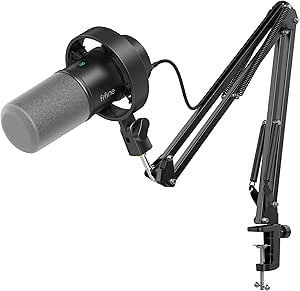 | Best Podcast-Ready Kit | Microphone Type: Dynamic | Connectivity: USB and XLR | Polar Pattern: Cardioid | VIEW LATEST PRICE | See Our Full Breakdown |
| FIFINE AmpliGame AM8T XLR/USB Gaming Microphone Set |  | Best Dual-Mode Streamer Mic | Connectivity: USB, XLR | Polar Pattern: Unidirectional | Frequency Range: 50Hz–16kHz | VIEW LATEST PRICE | See Our Full Breakdown |
| ZealSound Podcast Microphone for PC (K66) |  | Best for Mobile Creators | Connectivity: USB-C with included Lightning adapters | Device Compatibility: Windows, Mac, iPhone, iPad, Android, PS4, PS5 | Frequency Response: 40Hz–18kHz | VIEW LATEST PRICE | See Our Full Breakdown |
| MRSDY USB Gaming Microphone with Noise Reduction and RGB Lighting |  | Best Budget RGB Pick | Connectivity: USB Type-A | Compatible Devices: PC, Laptop, PS4, PS5, Mac | Polar Pattern: Unidirectional | VIEW LATEST PRICE | See Our Full Breakdown |
| Logitech Blue Yeti USB Microphone – Blackout |  | Best Overall | Pickup Patterns: Cardioid, Omni, Bidirectional, Stereo | Connectivity: USB | Software: Blue VO!CE effects | VIEW LATEST PRICE | See Our Full Breakdown |
| FIFINE AmpliGame A6T USB Gaming Microphone Kit |  | Best Complete Starter Kit | Polar Pattern: Cardioid | Compatibility: Windows, Mac OS, PS4, PS5 | Interface: USB-C to USB-A/C | VIEW LATEST PRICE | See Our Full Breakdown |
| MAONO DGM20S Gaming Microphone for PC |  | Best for Noisy Environments | Connectivity: USB | Compatible Devices: PC, Mac, PS5/PS4 | Key Features: Noise reduction, RGB lighting, mute button, gain control, zero-latency monitoring | VIEW LATEST PRICE | See Our Full Breakdown |
| Tonor Dynamic Gaming Microphone XLR/USB with AI Noise Cancellation |  | Best Upgrade Path | Connectivity: USB, XLR | Special Feature: AI DeNoise noise cancellation | Compatible Devices: Laptop, PC, PS4, PS5 | VIEW LATEST PRICE | See Our Full Breakdown |
| Gaming Microphone for PC, PS4/5, and Laptop – USB Condenser Mic with RGB Lights |  | Best Budget Pick | Polar Pattern: Cardioid | Diaphragm Size: 25mm | Sampling Rate: 192kHz | VIEW LATEST PRICE | See Our Full Breakdown |
| gaming streaming microphone | Connectivity | Polar Pattern |
|---|---|---|
| FIFINE AmpliGame AM8 USB/XLR D | — | — |
| FIFINE AmpliGame A6V USB Gamin | — | Cardioid |
| FIFINE AmpliGame AM8W XLR/USB | USB and XLR | — |
| TONOR Gaming Microphone Set wi | USB-A | Unidirectional |
| FIFINE AmpliGame AM8PROT Gamin | USB, XLR | Unidirectional |
| Logitech Blue Yeti USB Microph | USB | — |
| FIFINE AmpliTank K688CT Podcas | USB and XLR | Cardioid |
| FIFINE AmpliGame AM8T XLR/USB | USB, XLR | Unidirectional |
| ZealSound Podcast Microphone f | USB-C with included Lightning adapters | — |
| MRSDY USB Gaming Microphone wi | USB Type-A | Unidirectional |
| Logitech Blue Yeti USB Microph | USB | — |
| FIFINE AmpliGame A6T USB Gamin | — | Cardioid |
| MAONO DGM20S Gaming Microphone | USB | — |
| Tonor Dynamic Gaming Microphon | USB, XLR | — |
| Gaming Microphone for PC | USB | Cardioid |
More Details on Our Top Picks
FIFINE AmpliGame AM8 USB/XLR Dynamic Microphone for Gaming and Streaming
The AM8 earns the top spot because it solves the problem most gaming mics ignore: growth. A dynamic capsule means it rejects keyboard clatter and room echo far better than condenser models like the Blue Yeti, which happily picks up every mechanical switch in the room. The dual USB and XLR outputs mean you can plug in via USB today and graduate to an audio interface later without buying a new mic — something the AmpliGame A6V simply can’t offer. Onboard mute, gain control, and a headphone jack for zero-latency monitoring round out a genuinely complete control layout.
The tradeoff: RGB lighting and the function keys only work over USB, so XLR users lose the frills. And if you go the XLR route, an interface is a separate purchase.
Pros:- Dynamic capsule rejects keyboard and background noise better than condenser rivals
- Dual USB/XLR connectivity protects your investment as your setup grows
- Onboard mute with LED indicator and headphone jack for direct monitoring
- Works across PC, Mac, and PS5 without driver hassle
Cons:- RGB lighting and function keys are inactive when using XLR
- XLR use requires a separate audio interface, adding cost
- Some manual setup and tweaking is needed for best sound
Best for: Streamers who want clean, noise-rejecting audio today and a path to professional XLR gear later
Not ideal for: Buyers who want every feature active at all times — RGB and controls are USB-only, and XLR requires an extra interface purchase
- Frequency Response:50Hz-16KHz
- Connection Types:USB, XLR
- RGB Lighting:Yes (USB only)
- Mute Control:Yes, with LED indicator
- Built-in Headphone Jack:Yes
- Compatibility:PC, Mac, PS5
Our verdict“If you want one microphone that handles noisy rooms now and professional workflows later, this is the pick that ages best.”
FIFINE AmpliGame A6V USB Gaming Microphone with RGB Lighting
For the price of a AAA game, the A6V delivers a plug-and-play package that looks and sounds the part. Its 192kHz sampling rate headlines the spec sheet, and the bundle includes a shock mount and pop filter — accessories that cheaper generic USB mics make you buy separately. Compared with the TONOR TC310+ kit, the A6V is the simpler, cheaper entry: no boom arm to wrangle, just set it on its desk stand and go. The 7-color gradient RGB gives a desk genuine streamer energy on a budget.
But the value equation has limits. It’s USB-only with no XLR path, so unlike the AM8, there’s no upgrade route. The RGB also cycles automatically — you can’t lock a color — and the condenser-style sensitivity means it will capture background noise in untreated rooms.
Pros:- 192kHz sampling delivers noticeably clean audio at a budget price
- Shock mount and pop filter included in the box
- Plug-and-play with Windows, Mac, PS4, and PS5
- Eye-catching gradient RGB lighting
Cons:- No XLR connectivity, so no upgrade path later
- RGB cannot be locked to a single color or mode
- Sensitive pickup means it captures keyboard and room noise easily
Best for: First-time streamers on a tight budget who want an all-included USB kit with streamer aesthetics
Not ideal for: Anyone with a noisy room or long-term XLR ambitions — it’s condenser-sensitive and locked to USB forever
- Sampling Rate:192kHz
- Polar Pattern:Cardioid
- SNR:70dB
- RGB Lighting:Gradient RGB with 7 colors
- Cable Length:6.6 ft
- Compatibility:Windows, Mac OS, PS4, PS5, desktop, laptop
Our verdict“The cheapest credible way to start streaming today — just accept that you’ll outgrow it if the hobby sticks.”
FIFINE AmpliGame AM8W XLR/USB Gaming Microphone for Streaming and Podcasting
The AM8W sits in a smart middle ground: it shares the AM8’s dual USB/XLR DNA but leans into a compact, desk-friendly design for people who stream and podcast in equal measure. Where the AM8PROT kit arrives with a boom arm and takes over your desk real estate, the AM8W keeps things tidy — a consideration if you also record voiceovers or take calls from the same workspace. Controls are where it earns its keep: mute, gain, headphone volume, and a monitoring jack are all within finger’s reach, which matters when you’re flipping between a Discord session and a podcast recording.
Be aware that the recommended 2-to-6-inch recording range demands close, consistent positioning — lazy mic discipline will sound thin. And like its sibling, RGB only lives on the USB connection.
Pros:- Dual USB/XLR connectivity in a compact desktop footprint
- Full physical control set: mute, gain, headphone jack, and volume knob
- Small enough to share a desk with a second monitor or mixer setup
- Versatile across streaming, podcasting, and voiceover work
Cons:- RGB lighting only functions over USB
- Requires close, consistent mic positioning for good XLR sound
- Bundle contents are less clearly specified than rival kits
Best for: Creators splitting time between live streams and recorded podcasts who need quick, physical control without a bulky kit
Not ideal for: Chatty streamers who sit back from the mic — sound quality drops fast outside the 2-6 inch sweet spot
- Connectivity:USB and XLR
- Lighting:RGB (USB only)
- Controls:Mute button, gain knob, headphone jack, volume control
- Design:Compact desktop microphone
- Recommended Recording Range:2 to 6 inches
Our verdict“A space-conscious dual-purpose mic for creators whose setup needs to do more than one job at once.”
TONOR Gaming Microphone Set with Boom Arm, USB Condenser Microphone for Content Creators, RGB Lighting, Tap Mute, Gain Control, Streaming Equipment
What separates the TONOR TC310+ is that the boom arm is the star, not an add-on. A clamped, adjustable arm frees the mic from your desk surface, which means less thump transferred through the desk and a cleaner on-camera framing — something neither the FIFINE A6V with its desk stand nor the bare AM8 provides out of the box. The 78dB signal-to-noise ratio is respectable for this class, and tap-to-mute plus a gain knob make mid-stream adjustments painless. Multiple RGB modes with brightness control give it a leg up on the A6V’s fixed color cycling.
The catch is friction: cable management along the arm takes patience, first-time streamers may find the assembly fiddly compared with a true plug-and-play stick mic, and it’s largely a PC-and-console affair with USB-A only.
Pros:- Complete kit includes a sturdy boom arm and desk clamp
- Multiple RGB modes with adjustable brightness, not just auto-cycling
- Tap-to-mute and gain control are easy to use mid-stream
- 78dB SNR delivers crisp audio for the price
Cons:- Setup and cable management along the boom arm is fiddly for beginners
- USB-A only, with no XLR upgrade path
- Compatibility skews toward PC and select consoles
Best for: New content creators who want the full boom-arm streaming setup in one purchase instead of piecing it together
Not ideal for: Impatient beginners or laptop users wanting a zero-setup mic — assembly and cable routing take real effort
- Connectivity:USB-A
- Type:USB condenser microphone
- Polar Pattern:Unidirectional
- Signal-to-Noise Ratio:78dB
- Included Hardware:Adjustable boom arm with desk clamp
- Hardware Platform:PC
- Enclosure Material:ABS, alloy steel
Our verdict“Buy this if you want your first streaming setup to look and function like a pro rig from day one.”
FIFINE AmpliGame AM8PROT Gaming Microphone Kit, XLR/USB Dynamic PC Mic
This is the top of the FIFINE gaming line, and the specs show it: a full 20Hz-20kHz frequency response versus the standard AM8’s narrower 50Hz-16KHz, giving voice deeper body and more natural low-end presence. The kit arrives complete with a durable metal boom arm, long cable, customizable RGB, and real-time monitoring with mix control — meaning you can blend your mic and game audio in your headphones without software. Compared with the TONOR TC310+, the AM8PROT wins on fidelity and its XLR path; compared with the Blue Yeti, its dynamic capsule is simply friendlier to untreated rooms.
Those advantages come with friction: the control surface takes time to learn, configuration isn’t beginner-friendly, and the boom-arm kit eats desk space that compact setups can’t spare.
Pros:- Full 20Hz-20kHz frequency response for richer, more natural voice
- Complete kit with durable metal boom arm and long cable
- Real-time monitoring and mix control without extra software
- XLR and USB connectivity for maximum flexibility
Cons:- Feature-dense controls overwhelm first-time users
- Requires setup and tuning to perform at its best
- Bulky boom-arm kit consumes considerable desk space
Best for: Dedicated streamers and podcasters ready to invest in a full rig with pro-grade frequency response and XLR headroom
Not ideal for: Casual or occasional gamers — the price, learning curve, and desk footprint are wasted on light use
- Connectivity:USB, XLR
- Frequency Response:20Hz-20kHz
- Polar Pattern:Unidirectional
- Signal-to-Noise Ratio:75 dB
- Special Features:Controllable RGB, monitoring, mix control, mute, volume control
- Included Hardware:Boom arm stand
- Compatibility:PC, laptop, PS4/PS5
Our verdict“The most complete and best-sounding kit in this lineup — worth it only if streaming is more than a hobby.”
Logitech Blue Yeti USB Microphone – Midnight Blue
The Blue Yeti remains the benchmark for creators who want one microphone that can do almost everything, and its four pickup patterns are why. Cardioid for solo streaming, omnidirectional for roundtable podcasts, bidirectional for interviews, stereo for music — no other mic in this lineup matches that flexibility. Compared with the FIFINE AmpliTank K688CT, which locks you into cardioid, the Yeti is the safer bet if your content might evolve beyond gaming. Blue VO!CE software adds broadcast-style effects and noise cleanup that elevate raw USB audio. The tradeoff: it’s a condenser mic, so it eagerly picks up keyboard clacks and room echo, which dynamic mics like the K688CT handle better. The bundled desktop stand also eats desk space and transmits thumps, so most buyers will want a boom arm eventually.
Pros:- Four pickup patterns cover streaming, interviews, podcasts, and music recording
- Blue VO!CE software adds professional effects and noise processing
- Full onboard controls for gain, mute, monitoring, and pattern switching
- True plug-and-play on PC and Mac with no drivers needed
Cons:- Condenser capsule captures keyboard and room noise that dynamic mics reject
- Full feature set depends on Logitech G HUB software
- Included desktop stand is wobbly and takes up considerable desk space
Best for: Multi-format creators who stream, podcast, record music, and want one mic for all of it
Not ideal for: Streamers in untreated, noisy rooms — the condenser capsule will capture every keyboard click and background hum
- Pickup Patterns:Cardioid, Omni, Bidirectional, Stereo
- Connectivity:USB
- Software:Blue VO!CE via Logitech G HUB
- Controls:Headphone volume, pattern selection, mute, mic gain
- Included Accessories:Desktop stand
- Color:Midnight Blue
Our verdict“Buy the Yeti if you produce varied content and want maximum pattern flexibility; skip it if your streaming room is loud or untreated.”
FIFINE AmpliTank K688CT Podcast Microphone Kit
This option stands out for being the most complete out-of-the-box package in this batch: microphone, boom arm, shock mount, and windscreen all included, where competitors like the FIFINE AmpliGame AM8T leave you buying an XLR cable separately. The dynamic capsule is the real story — it naturally rejects room noise and keyboard clatter, which makes it better suited than the condenser-based Blue Yeti for streamers broadcasting from untreated bedrooms. Dual USB and XLR outputs mean you can start simple today and graduate to a mixer-based setup later without replacing the mic. The catches are real, though: the onboard function keys only work over USB, so XLR users lose direct control, and the desk clamp requires a tabletop under two inches thick. Angle adjustments also demand a gentle hand.
Pros:- Dynamic capsule naturally suppresses background and keyboard noise
- Complete kit includes boom arm, shock mount, and windscreen
- Dual USB/XLR connectivity supports both beginner and pro audio chains
- Handles loud sources up to 130dB without distortion
Cons:- Onboard function keys only work in USB mode
- XLR mode requires an external mixer or audio interface for control
- Boom arm positioning needs careful adjustment to avoid forcing the joints
Best for: Podcasters and streamers in noisy spaces who want a full kit with a clear upgrade path to XLR
Not ideal for: Owners of thick or non-standard desks — the clamp won’t fit tabletops over 2 inches, and XLR users lose the onboard controls
- Microphone Type:Dynamic
- Connectivity:USB and XLR
- Polar Pattern:Cardioid
- Max Sound Pressure Level:130dB
- Included Accessories:Boom arm, windscreen, shock mount
- Desk Clamp Compatibility:Desks under 2 inches thick
Our verdict“The K688CT makes the most sense for noise-conscious creators who want everything in one box and room to grow into an XLR setup.”
FIFINE AmpliGame AM8T XLR/USB Gaming Microphone Set
The AmpliGame AM8T splits the difference between the podcast-focused AmpliTank K688CT and pure-budget RGB mics: it brings the same USB/XLR dual connectivity plus onboard mute, gain, and headphone monitoring, but wraps it in gamer styling with controllable RGB lighting. For streamers whose setup is also their backdrop, that lighting matters more than it sounds on paper. Compared with the ZealSound K66, its dynamic unidirectional capsule does more of the noise rejection work in hardware rather than relying on processing, which usually sounds more natural on stream. But the kit cuts corners the K688CT doesn’t: no XLR cable in the box, no shock mount or windscreen, and a frequency range capped at 16kHz that leaves voices slightly less airy. Beginners may also find the routing options fiddly at first.
Pros:- USB and XLR connectivity future-proofs your audio chain
- Onboard mute, gain, and zero-latency headphone monitoring
- Customizable RGB lighting fits a coordinated battlestation
- Sturdy adjustable boom arm included
Cons:- XLR cable not included, adding an extra purchase
- Frequency response tops out at 16kHz, dulling vocal detail
- Desk clamp limited to tabletops under 2 inches thick
Best for: Intermediate streamers who want RGB aesthetics today and an XLR upgrade path tomorrow
Not ideal for: Complete beginners on a strict budget — the missing XLR cable and multi-mode controls add cost and complexity
- Connectivity:USB, XLR
- Polar Pattern:Unidirectional
- Frequency Range:50Hz–16kHz
- Special Features:Controllable RGB, headphone jack with volume, mute function
- Signal-to-Noise Ratio:80dB
- Weight:1 kg
- Enclosure Material:ABS plastic, metal
Our verdict“A smart middle pick for gamers who care about looks and want hardware controls, as long as they’re willing to buy the XLR cable separately.”
ZealSound Podcast Microphone for PC (K66)
What sets the ZealSound K66 apart from everything else here is device reach: with included Lightning adapters and USB-C, it plugs into iPhones, iPads, and Android phones alongside PCs and consoles. If your content lives on TikTok or you record away from your desk, no other mic in this roundup travels as easily. Unlike the FIFINE AmpliGame AM8T, it offers physical gain, echo, and mute controls plus real-time monitoring without touching software — handy when your ‘studio’ is a phone on a tripod. The compromises follow from the price: it’s USB only, so there’s no mixer upgrade path like the AM8T or AmpliTank K688CT offer, the control cluster can overwhelm first-timers, and the 40Hz–18kHz response is respectable but not exceptional. It also lacks the RGB flair gamers may want.
Pros:- Works with iPhone, iPad, Android, PC, Mac, PS4, and PS5 out of the box
- Hardware controls for gain, echo, mute, and monitoring volume
- Built-in noise reduction cleans up casual recording environments
- Plug-and-play with no drivers or software
Cons:- USB-only, with no XLR upgrade path
- Dense control layout can overwhelm beginners
- No boom arm or shock mount included
Best for: Mobile-first creators filming TikToks, YouTube Shorts, or phone-based recordings who need one mic for every device
Not ideal for: Streamers planning a professional XLR audio chain — USB-only connectivity is a dead end
- Connectivity:USB-C with included Lightning adapters
- Device Compatibility:Windows, Mac, iPhone, iPad, Android, PS4, PS5
- Frequency Response:40Hz–18kHz
- Sampling Rate:46kHz
- Sensitivity:-45dB ±3dB
- Controls:Gain, volume, mute, echo, real-time monitoring
Our verdict“The right pick if your recordings happen on a phone as often as a PC; the wrong one if you’re building a permanent XLR streaming rig.”
MRSDY USB Gaming Microphone with Noise Reduction and RGB Lighting
At the value end, the MRSDY delivers the two things budget gamers actually notice on stream — RGB lighting and noise reduction — with zero software installation. Its plug-and-play simplicity is a genuine contrast with the Blue Yeti, which leans on G HUB for its best features; here, everything works the moment you plug in, and latency-free headphone monitoring is included at a price the Yeti and even the FIFINE AmpliGame AM8T can’t touch. The savings show, though. The build leans heavily on plastic where the AM8T uses metal, there’s no shock mount or pop filter in the box (expect plosives and desk thumps in your audio), and the single unidirectional pattern means no podcast or interview versatility. Sound quality is serviceable for game chat and casual streaming rather than polished voice work.
Pros:- Effective noise reduction without any software setup
- Latency-free headphone monitoring at a budget price
- Customizable RGB lighting modes for desk aesthetics
- Works with PC, Mac, PS4, and PS5 via plug-and-play
Cons:- No shock mount or pop filter included
- Plastic-heavy construction raises durability concerns
- Single unidirectional pattern limits recording versatility
Best for: Budget-conscious gamers who want RGB style, monitoring, and simple setup for chat and casual streaming
Not ideal for: Anyone pursuing polished vocal quality — the plastic build, missing accessories, and single pattern cap its ceiling
- Connectivity:USB Type-A
- Compatible Devices:PC, Laptop, PS4, PS5, Mac
- Polar Pattern:Unidirectional
- Special Features:RGB lights, noise reduction, headphone monitoring, mute, volume control
- Signal-to-Noise Ratio:78dB
- Weight:8.8 ounces
Our verdict“A fair trade for casual streamers who prioritize looks and simplicity over audio refinement — just add your own pop filter.”
Logitech Blue Yeti USB Microphone – Blackout
The Blue Yeti earns the top spot because it solves a problem most budget rivals create: inflexibility. With four pickup patterns (cardioid, omni, bidirectional, stereo), it handles solo streaming, two-person podcasts, and room recording without new hardware. The onboard controls for gain, mute, and headphone volume also put it ahead of the FIFINE AmpliGame A6T, which buries more of its adjustments in the mic body but offers less recording flexibility. Blue VO!CE software adds broadcast-style effects that make a raw stream sound polished. The tradeoff is physical: this is the heaviest, bulkiest mic in this lineup, and the desktop stand eats desk space that a boom-arm kit like the MAONO DGM20S avoids. It’s also more expensive than everything else here, so casual players should look downstream.
Pros:- Four pickup patterns cover solo, interview, and room recording
- Onboard gain, mute, and volume controls allow live adjustment
- Blue VO!CE software adds professional voice effects
- Plug-and-play USB setup with no drivers required
Cons:- Bulky desktop design consumes significant desk space
- Noticeably more expensive than comparable budget kits
Best for: Streamers and podcasters who want one microphone that covers every recording scenario for years
Not ideal for: Players with cramped desks or tight budgets — it’s large, heavy, and pricier than budget rivals
- Pickup Patterns:Cardioid, Omni, Bidirectional, Stereo
- Connectivity:USB
- Software:Blue VO!CE effects
- Controls:Headphone volume, pattern selection, mute, mic gain
- Design:Adjustable desktop stand, pivotable microphone
- Color:Blackout
Our verdict“Buy this if you want a do-everything microphone that outlasts your first streaming setup; skip it if desk space or budget is tight.”
FIFINE AmpliGame A6T USB Gaming Microphone Kit
Where the Blue Yeti gives you a microphone and a stand, the FIFINE AmpliGame A6T hands you an entire streaming station: boom arm, shock mount, pop filter, and C-clamp in one box. That completeness is why it ranks as the best starting point — a newcomer doesn’t need to research accessories or worry about compatibility mismatches. It works across Windows, Mac, PS4, and PS5, and the touch-mute button is genuinely faster than fumbling for software controls mid-match. Compared with the generic RGB mic at the bottom of this list, the A6T’s boom arm frees your desk surface entirely rather than adding to the clutter. The catch is focus: cardioid-only recording means no podcast-style multi-person capture, and the manual has confused some buyers during assembly. The RGB ring is decorative, not functional.
Pros:- Full accessory bundle includes boom arm, shock mount, and pop filter
- Cross-platform support for Windows, Mac, PS4, and PS5
- Touch-mute button enables instant silencing during live sessions
- Long 8.2ft cable allows flexible desk placement
Cons:- Cardioid-only pattern limits recording versatility
- Setup instructions can be unclear for first-time boom arm users
Best for: First-time streamers who want every accessory included so nothing needs to be bought separately
Not ideal for: Podcasters needing multi-person or omni recording — the single cardioid pattern can’t capture a room
- Polar Pattern:Cardioid
- Compatibility:Windows, Mac OS, PS4, PS5
- Interface:USB-C to USB-A/C
- Cable Length:8.2ft (2.5m)
- Lighting:RGB gradient
- Included Accessories:Shock mount, pop filter, boom arm stand, C-clamp, user manual
Our verdict“The most sensible first microphone purchase because everything arrives in one box — just don’t expect it to grow into a podcast rig.”
MAONO DGM20S Gaming Microphone for PC
The MAONO DGM20S carves out its niche through active noise reduction, a feature neither the Blue Yeti nor the FIFINE A6T offers. If you stream from a shared apartment with keyboard clatter, fan hum, or street noise, this is the pick that actively cleans your voice rather than relying on positioning alone. The kit matches the A6T accessory-for-accessory — boom arm, shock mount, pop filter — but adds zero-latency monitoring so you hear yourself without echo, which matters during long sessions. Its weaknesses are boundaries: Xbox players are locked out entirely, and fine-tuning the noise reduction requires Windows software, leaving Mac users with default settings. Compared with the Tonor dual-output mic later in this list, the MAONO stays USB-only, so there’s no upgrade path to an audio interface down the road.
Pros:- Active noise reduction cleans up keyboard and background noise
- Zero-latency monitoring prevents distracting self-echo
- Complete boom arm and shock mount bundle included
- Driver-free plug-and-play operation on PC and PlayStation
Cons:- No Xbox compatibility at all
- Noise reduction adjustments require Windows-only software
Best for: Streamers in loud households who need software noise reduction to keep their voice clean
Not ideal for: Xbox gamers and Mac users — console compatibility excludes Xbox and noise controls require Windows
- Connectivity:USB
- Compatible Devices:PC, Mac, PS5/PS4
- Key Features:Noise reduction, RGB lighting, mute button, gain control, zero-latency monitoring
- Included Accessories:Boom arm, shock mount, pop filter, cables, desktop clamp
- Setup:Plug-and-play, no drivers
Our verdict“The right choice when your recording space fights against you; if your room is already quiet, a cheaper or more flexible mic serves you better.”
Tonor Dynamic Gaming Microphone XLR/USB with AI Noise Cancellation
Every other mic in this batch is USB-only, which means when you outgrow it, you replace it. The Tonor’s dual USB and XLR outputs change that equation: start on USB today, then plug into an audio interface later without buying a new microphone. That makes it the natural stepping stone toward a professional setup, sitting between fixed USB models like the MAONO DGM20S and full podcast rigs like the FIFINE AmpliTank K688CT. Its AI noise cancellation targets mechanical keyboard noise specifically, and the dynamic capsule rejects room sound better than condenser alternatives here. The friction is cost and completeness — no XLR cable ships in the box, and XLR mode needs a separate sound card, so the real price of the upgrade path is higher than the sticker. Xbox users are again left out.
Pros:- Dual USB and XLR outputs protect your investment long-term
- AI noise cancellation handles keyboard and ambient noise well
- Real-time monitoring with volume control built in
- Dynamic capsule rejects room noise better than condenser designs
Cons:- XLR cable not included, adding hidden cost
- XLR mode requires a separate sound card or interface
- No Xbox compatibility
Best for: Growing creators who want to start on USB and move to an XLR interface without rebuying a microphone
Not ideal for: Buyers on a strict budget — the XLR path requires buying a cable and sound card separately
- Connectivity:USB, XLR
- Special Feature:AI DeNoise noise cancellation
- Compatible Devices:Laptop, PC, PS4, PS5
- Monitoring:Real-time with volume control
- Weight:850 g
- Color:Black
Our verdict“Buy this only if you seriously plan to upgrade to an interface — otherwise a cheaper USB-only mic delivers the same streaming result.”
Gaming Microphone for PC, PS4/5, and Laptop – USB Condenser Mic with RGB Lights
Sometimes you just need a working microphone that costs less than a new game, and this unbranded condenser covers the basics without drama. The one-touch mute with visual indicator is a genuinely useful touch at this price — many cheap mics make you unplug to silence yourself — and the cardioid pattern plus pop filter deliver acceptable voice clarity for Discord and casual streaming. Against the FIFINE A6T, it loses on accessories and platform polish but wins on price by a wide margin; against the MAONO DGM20S, it lacks noise reduction entirely, so a quiet room is close to mandatory. The RGB Symphony Lights are the main personality feature, though buyers who find glow distracting during dark scenes have no dimming option. Durability is a relative unknown compared with Logitech’s track record, which is the real gamble here.
Pros:- One-touch mute with visual indicator is rare at this price
- 192kHz sampling delivers respectable voice clarity
- Pop filter, shock mount, and anti-splash screen included
- Works across PC, PS4, PS5, and laptops
Cons:- No noise reduction, so background sound passes straight through
- Unbranded build with uncertain long-term durability
- RGB lighting cannot be dimmed or disabled
Best for: Casual players and Discord users who want clear voice on a minimal budget without accessory bundles
Not ideal for: Serious streamers or anyone in a noisy room — no noise reduction and no brand support network
- Polar Pattern:Cardioid
- Diaphragm Size:25mm
- Sampling Rate:192kHz
- Connectivity:USB
- Cable Length:180cm
- Lighting:RGB Symphony Lights
- Base Material:Carbon steel
Our verdict“A fine cheap entry point for voice chat and light streaming — just don’t expect it to compete with named-brand audio quality.”
How We Picked
I judged every microphone against the realities of a gaming setup, not a treated studio. That meant prioritizing noise rejection (how well the mic ignores mechanical keyboards, PC fans, and echo), on-device controls (gain knobs, mute buttons, headphone monitoring — things you’ll adjust mid-stream), and connectivity flexibility, since USB-only mics hit a ceiling the moment you want an interface or mixer. Build quality and mount stability mattered too: a mic that wobbles on a cheap stand or picks up desk bumps will frustrate you every session. I also weighed what’s included, because boom arms, shock mounts, and pop filters can add $30–50 of hidden cost to bare-mic purchases.
Price-to-performance anchored the final ranking. A $35 mic that sounds like a $60 mic ranks above a famous $100 mic that sounds like a $70 mic in a noisy room. The top slots go to microphones that pair a dynamic capsule with dual USB/XLR output, because that combination future-proofs your setup while solving the biggest problem streamers face: background noise. Budget picks earned their places by bundling accessories and delivering acceptable voice clarity, while premium picks had to justify their cost with genuinely better rejection, monitoring, or software.
| gaming streaming microphone | Polar Pattern | Connectivity |
|---|---|---|
| FIFINE AmpliGame AM8 USB/XLR D | — | — |
| FIFINE AmpliGame A6V USB Gamin | Cardioid | — |
| FIFINE AmpliGame AM8W XLR/USB | — | USB and XLR |
| TONOR Gaming Microphone Set wi | Unidirectional | USB-A |
| FIFINE AmpliGame AM8PROT Gamin | Unidirectional | USB, XLR |
| Logitech Blue Yeti USB Microph | — | USB |
| FIFINE AmpliTank K688CT Podcas | Cardioid | USB and XLR |
| FIFINE AmpliGame AM8T XLR/USB | Unidirectional | USB, XLR |
| ZealSound Podcast Microphone f | — | USB-C with included Lightning adapters |
| MRSDY USB Gaming Microphone wi | Unidirectional | USB Type-A |
| Logitech Blue Yeti USB Microph | — | USB |
| FIFINE AmpliGame A6T USB Gamin | Cardioid | — |
| MAONO DGM20S Gaming Microphone | — | USB |
| Tonor Dynamic Gaming Microphon | — | USB, XLR |
| Gaming Microphone for PC | Cardioid | USB |
Factors to Consider When Choosing Gaming Streaming Microphones
Before you pick a specific microphone, it helps to understand what actually moves the needle on stream audio. These are the factors that separated the winners from the losers in this comparison — and the mistakes that send buyers back to the store.
Dynamic vs. Condenser: The Decision That Matters Most
This single choice shapes everything else. Condenser mics (Blue Yeti, FIFINE A6V, most budget RGB mics) are more sensitive and capture richer detail, but that sensitivity works against you in a typical bedroom or dorm — they’ll pick up your keyboard, your PC fans, and the dishwasher down the hall. Dynamic mics demand you speak close to the capsule, but in exchange they ignore almost everything else in the room, which is why they dominated my top rankings. A common mistake is assuming condenser automatically means better; for streaming, the opposite is often true. If your recording space is quiet and treated with foam or curtains, a condenser rewards you. If you stream from an untreated room with a mechanical keyboard, buy dynamic and don’t look back.
USB-Only vs. USB/XLR: Buying for the Streamer You’ll Become
A USB-only mic works today and is genuinely plug-and-play, but it locks you out of the upgrade path. Dual USB/XLR microphones cost roughly $20–40 more and let you later add an audio interface like a Focusrite Scarlett or GoXLR without replacing the mic itself. The mistake I see most often is a buyer purchasing a $100 USB-only mic, then outgrowing it within a year and eating the full cost twice. My advice: if streaming is a serious hobby or income source, treat the XLR port as insurance. If it’s strictly casual, USB-only saves money you can spend on a boom arm or acoustic treatment instead. Note that using XLR mode requires buying an interface — the port alone doesn’t power the mic.
On-Mic Controls and Monitoring
Mid-stream, you will need to mute fast and adjust gain without alt-tabbing. Mics with a physical mute button and a gain knob on the body beat models that force you into software for every tweak — this is a real differentiator between the FIFINE lineup and cheaper generic RGB mics. Zero-latency headphone monitoring (a 3.5mm jack on the mic itself) is the sleeper feature: without it, you hear yourself on a delay through your PC, which is disorienting and causes people to talk louder, degrading the recording. If you’ve never heard yourself stream before, monitoring also catches problems — a bumping desk, a crackling cable — before your chat does. Treat these three features as the functional baseline for a serious streaming mic.
Compare bundle contents before comparing prices. A $50 mic with a boom arm, shock mount, and pop filter included is often cheaper overall than a $45 mic that requires $35 of accessories. Desk stands — the default for the Blue Yeti and several budget picks — transfer every keyboard vibration and mouse click straight into the recording, and they eat desk space next to dual monitors. A boom arm decouples the mic from the desk and positions it close to your mouth, which matters even more for dynamic mics since they need proximity to sound full. If your chosen mic ships bare, budget for an arm and a shock mount before checkout, not after.
Noise Cancellation: Hardware, Software, or AI?
Several mics in this roundup advertise AI or DSP noise cancellation (the TONOR dynamic, MRSDY, MAONO DGM20S), and it’s worth understanding what that actually does. Software cancellation can strip fan hum and static effectively, but aggressive processing can also make your voice sound thin, robotic, or artificially smeared during fast speech. Hardware noise rejection — meaning a dynamic capsule that simply doesn’t hear the noise — preserves natural voice quality and works in every app with zero configuration. The best approach is layered: a decent dynamic capsule first, then NVIDIA Broadcast or RTX Voice as a free second line of defense. Don’t buy a mic on AI cancellation alone; buy it for the capsule, and treat the software as a bonus.
RGB and Aesthetics: Worth Paying For?
RGB lighting appears on roughly half this lineup because streamers are on camera and the mic sits in frame. It costs little to include, so it shouldn’t drive your decision — but software control matters. Fixed or breathing-only lighting can clash with the rest of your setup, while mics with sync software let you match colors and effects to your keyboard and monitor bezels. One genuine caution: some budget RGB mics put the lighting budget ahead of the audio budget, and it shows in thin, harsh voice reproduction. If two mics cost the same and one has RGB while the other has a better capsule and monitoring jack, take the second — your viewers hear your mic far more often than they study it.
Frequently Asked Questions
Do I need XLR, or is USB enough for Twitch streaming?
For most streamers, USB is genuinely enough — platforms compress audio anyway, and a good USB dynamic mic like the FIFINE AM8 will sound excellent to your viewers without any extra hardware. XLR becomes worthwhile when you want an audio interface’s cleaner preamps, hardware mixing, multiple inputs (a second mic for a co-host, for example), or better control over processing. The smart middle path is a dual USB/XLR mic: start in USB mode today, and if you outgrow it, the same mic plugs into an interface tomorrow. What you should not do is buy an XLR mic without budgeting for the interface, because an XLR mic produces almost no sound plugged straight into a computer’s line-in. USB-only is a real limitation, but it’s one most casual and semi-serious streamers never actually hit.
Will a better microphone fix my echoey room?
Partially, and the microphone type determines how much. A condenser mic will faithfully broadcast every reflection off your bare walls, and no amount of money spent on the mic fixes that — a $130 Blue Yeti in an empty bedroom sounds worse than a $60 dynamic in the same room. A dynamic mic helps enormously because its reduced sensitivity means it mostly stops hearing the room, which is exactly why dynamics fill my top slots. Pair a dynamic with close, on-axis positioning (2–6 inches from your mouth) and you eliminate most echo without any acoustic treatment. If you still hear hollow reflections, a rug, curtains, and a foam panel or two behind you cost less than a mic upgrade and often improve things more.
Is the Blue Yeti still worth buying in 2026?
It depends entirely on your room. The Yeti is a condenser with four pickup patterns, excellent detail capture, and a long track record — in a quiet, softly furnished space, it still sounds very good and its multi-pattern flexibility suits podcasters with guests at the table. But for the typical gamer with a mechanical keyboard and a PC on the desk, its sensitivity becomes a liability, and its heavy footprint plus short desk stand make placement awkward compared with modern boom-arm bundles. Mics like the FIFINE AM8 match or beat its streaming voice quality at a lower price while rejecting room noise far better. Buy the Yeti if you record vocals or multi-person podcasts in a treated space; skip it if your priority is game streaming from an ordinary room.
How much do I actually need to spend for good stream audio?
The meaningful floor is around $35–40, where bundles like the TONOR set deliver clear voice, a mute button, and a boom arm — perfectly respectable for casual streaming. The biggest audible jump in this category happens between $50 and $90, where you gain dynamic capsules, onboard gain, monitoring jacks, and USB/XLR flexibility; that’s the sweet spot for anyone streaming regularly. Past roughly $130, returns diminish fast for game streaming specifically, because platform compression and viewer playback devices erase the fine differences you paid for. My practical advice: spend $60–90 on the mic, then put any remaining budget toward a boom arm or room treatment rather than a more expensive microphone. A mid-range mic in a decent position beats a premium mic on a wobbly desk stand every time.
Do I need a pop filter and shock mount?
A pop filter matters most with condenser mics and close speaking, where plosives — those puffy ‘p’ and ‘b’ blasts — hit the sensitive capsule hard; many dynamic mics have built-in foam or internal screening that handles most of it, but an external filter still cleans things up if you talk close. A shock mount is arguably more useful for gamers: it physically decouples the mic from the boom arm and desk, so keyboard thumps and desk bumps don’t thunder through your stream every time you type or click. If your mic is arm-mounted on the same desk as your keyboard, prioritize the shock mount. If your mic sits on a stand, address the stand first — the shock mount can’t fix a rigid desk stand transmitting vibrations. Happily, several bundles in this lineup include both accessories, which is part of why they rank above bare-mic alternatives at similar prices.
Conclusion
After comparing all fifteen, the right choice comes down to your room and your ambitions. For best overall, the FIFINE AmpliGame AM8 pairs a noise-rejecting dynamic capsule with USB/XLR flexibility and full onboard controls at a price that leaves room for accessories — it’s the pick that fits almost any streamer. For best value, the TONOR Gaming Microphone Set bundles the boom arm, filter, and controls for under $40 and is the smartest entry point that won’t embarrass you on stream. The best premium option is the FIFINE AM8PROT kit, whose complete accessory package and dual-mode output justify the spend for streamers building toward an interface-based setup, with the AmpliTank K688CT as the alternative if podcast-style vocal depth is the goal. Beginners who want plug-and-play simplicity with zero setup friction should grab the FIFINE A6T or the ZealSound if phone and tablet streaming is part of the plan. For specific needs: quiet, treated rooms and multi-person recording favor the Blue Yeti; cluttered desks and tight budgets favor the compact RGB condensers like the MRSDY or MAONO DGM20S. Whatever you choose, position the mic close, monitor your own audio, and remember — a mid-range mic used well beats an expensive mic used badly every single time.
Fall Picks
fall essentials
As an affiliate, we earn on qualifying purchases.