
The best Radeon graphics card overall in this roundup is the ASUS Prime Radeon RX 9070 XT OC Edition, a strong fit for high-end gaming with 16GB of memory. For a more balanced step down, the ASUS Prime Radeon RX 9070 OC Edition pairs a current-generation GPU with the same memory capacity, while the ASUS Dual RX 9060 XT 16GB stands out for buyers prioritizing a midrange card with generous VRAM. The lineup also includes older and entry-level models, which can suit modest workloads but involve sharper performance compromises. Your main choices are how much graphics performance you need, how much memory gives you useful headroom, and whether your case and power supply can support the card. Read on for my full comparison and guidance on matching a Radeon GPU to your system.

Play games on Amazon Luna for your game nights, included with Prime
- A rotating selection of games, no download needed
- Play on TV, laptop or phone
- Fast, free delivery for your gear, too
Complete the kit



Key Takeaways
- The RX 9070 XT and RX 9070 are the strongest current-generation options here: both have 16GB of GDDR6, while the XT model is the performance-first pick and the non-XT model is the more measured alternative.
- Sixteen gigabytes appears across several distinct tiers: RX 9060 XT options offer it in a midrange class, so memory capacity alone does not indicate gaming performance.
- Board design changes the fit, not the GPU tier: compact dual-fan cards such as the ASUS Dual RX 9060 XT may suit different builds than triple-fan models such as the ASRock RX 9060 XT Challenger Pro.
- The RX 7900 XT and RX 6950 XT are older high-performance choices: their larger memory capacities can appeal to demanding workloads, but buyers should compare platform age and system requirements against newer Radeon options.
- The RX 550 and RX 580 serve a different purpose from modern gaming picks: they are best treated as basic-display or older-PC options, not alternatives to the RX 7600-and-up cards for current demanding games.
| ASUS Prime Radeon RX 9070 XT OC Edition 16GB GDDR6 Graphics Card |  | Best Overall | GPU: AMD Radeon RX 9070 XT | Memory: 16GB GDDR6 | Interface: PCIe 5.0, PCI-Express x16 | VIEW LATEST PRICE | See Our Full Breakdown |
| AMD Radeon RX 6950 XT 16GB GDDR6 Graphics Card |  | Best for 4K Display Support | GPU: AMD Radeon RX 6950 XT | Memory: 16GB GDDR6 | Memory bus and speed: 256-bit; up to 18 Gbps | VIEW LATEST PRICE | See Our Full Breakdown |
| XFX Speedster SWFT210 Radeon RX 7600 Graphics Card with 8GB GDDR6, HDMI & 3xDP (AMD RDNA 3) |  | Best for Mainstream Builds | GPU: AMD Radeon RX 7600, RDNA 3 | Memory: 8GB GDDR6 | Boost clock: Up to 2655 MHz | VIEW LATEST PRICE | See Our Full Breakdown |
| ASUS Prime Radeon RX 9070 GRE EVO OC Edition Graphics Card |  | Best for 1440p Gaming | GPU: AMD Radeon RX 9070 GRE | Memory: 12GB GDDR6 | Boost clock: 2880 MHz | VIEW LATEST PRICE | See Our Full Breakdown |
| ASRock Radeon RX 9070 Challenger OC 16GB Graphics Card |  | Best for 16GB RDNA 4 Builds | GPU and architecture: AMD Radeon RX 9070, RDNA 4 | Compute units and processors: 56 compute units; 3584 stream processors | Memory: 16GB GDDR6, 256-bit bus, 20 Gbps | VIEW LATEST PRICE | See Our Full Breakdown |
| ASRock Radeon RX 7600 Challenger 8GB OC |  | Best for 1080p Gaming | GPU: AMD Radeon RX 7600 | Memory: 8GB GDDR6 | Boost clock: Up to 2695MHz | VIEW LATEST PRICE | See Our Full Breakdown |
| ASUS Dual Radeon RX 9060 XT 16GB GDDR6 Graphics Card |  | Best Compact 16GB Upgrade | GPU: AMD Radeon RX 9060 XT | Memory: 16GB GDDR6 | Boost clock: Up to 3250MHz in OC mode; up to 3230MHz in Default mode | VIEW LATEST PRICE | See Our Full Breakdown |
| XFX Swift AMD Radeon RX 9060 XT OC White Gaming Graphics Card, 16GB GDDR6 | 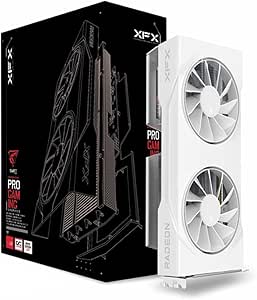 | Best White Triple-Fan Pick | GPU: AMD Radeon RX 9060 XT | Memory: 16GB GDDR6 | Base clock: Up to 1900MHz | VIEW LATEST PRICE | See Our Full Breakdown |
| MAXSUN AMD Radeon RX 550 4GB GDDR5 ITX Gaming Graphics Card |  | Best for Small, Low-Demand Builds | GPU: AMD Radeon RX 550 | Memory: 4GB GDDR5 | GPU clock: Up to 1183MHz | VIEW LATEST PRICE | See Our Full Breakdown |
| Sapphire AMD Radeon RX 7900 XT Gaming Graphics Card, 20GB GDDR6 |  | Best for High-End Gaming and Connectivity | GPU: AMD Radeon RX 7900 XT | Memory: 20GB GDDR6 | Memory interface: 320-bit | VIEW LATEST PRICE | See Our Full Breakdown |
| ASRock Radeon RX 7700 XT Challenger 12GB OC Graphics Card |  | Best for 1440p Gaming | GPU: AMD Radeon RX 7700 XT | Architecture: AMD RDNA 3 | Memory: 12GB GDDR6 | VIEW LATEST PRICE | See Our Full Breakdown |
| MOUGOL AMD Radeon RX 580 8GB GDDR5 Graphics Card |  | Best for Legacy PC Upgrades | GPU: AMD Radeon RX 580 2048SP | Memory: 8GB GDDR5 | Memory bus: 256-bit | VIEW LATEST PRICE | See Our Full Breakdown |
| ASRock Radeon RX 7600 Challenger Pro OC 8GB Graphics Card |  | Best for Multi-Monitor 1080p Builds | GPU: AMD Radeon RX 7600 | Architecture: AMD RDNA 3 | Memory: 8GB GDDR6 | VIEW LATEST PRICE | See Our Full Breakdown |
| ASRock Radeon RX 9060 XT Challenger Pro 16GB OC Graphics Card |  | Best for 16GB RDNA 4 Gaming | GPU: AMD Radeon RX 9060 XT | Architecture: AMD RDNA 4 | Memory: 16GB GDDR6 | VIEW LATEST PRICE | See Our Full Breakdown |
| ASUS Prime Radeon RX 9070 OC Edition 16GB GDDR6 EVO Gaming Graphics Card |  | Best for Premium Radeon Performance | GPU: AMD Radeon RX 9070 | Memory: 16GB GDDR6 | Game clock: Up to 2140 MHz | VIEW LATEST PRICE | See Our Full Breakdown |
| Radeon graphics card | Memory | GPU | Interface | Boost clock |
|---|---|---|---|---|
| ASUS Prime Radeon RX 9070 XT O | 16GB GDDR6 | AMD Radeon RX 9070 XT | PCIe 5.0, PCI-Express x16 | Up to 3030 MHz in OC mode |
| AMD Radeon RX 6950 XT 16GB GDD | 16GB GDDR6 | AMD Radeon RX 6950 XT | PCI Express x16 | Up to 2310 MHz |
| XFX Speedster SWFT210 Radeon R | 8GB GDDR6 | AMD Radeon RX 7600, RDNA 3 | PCI Express x16 | Up to 2655 MHz |
| ASUS Prime Radeon RX 9070 GRE | 12GB GDDR6 | AMD Radeon RX 9070 GRE | PCIe 5.0 x16 | 2880 MHz |
| ASRock Radeon RX 9070 Challeng | 16GB GDDR6, 256-bit bus, 20 Gbps | — | PCIe 5.0 | — |
| ASRock Radeon RX 7600 Challeng | 8GB GDDR6 | AMD Radeon RX 7600 | PCIe 4.0 x8 | Up to 2695MHz |
| ASUS Dual Radeon RX 9060 XT 16 | 16GB GDDR6 | AMD Radeon RX 9060 XT | PCIe 5.0, PCI Express x16 | Up to 3250MHz in OC mode; up to 3230MHz in Default mode |
| XFX Swift AMD Radeon RX 9060 X | 16GB GDDR6 | AMD Radeon RX 9060 XT | — | Up to 3320MHz |
| MAXSUN AMD Radeon RX 550 4GB G | 4GB GDDR5 | AMD Radeon RX 550 | PCI Express x16 | — |
| Sapphire AMD Radeon RX 7900 XT | 20GB GDDR6 | AMD Radeon RX 7900 XT | PCI Express 4.0 | — |
| ASRock Radeon RX 7700 XT Chall | 12GB GDDR6 | AMD Radeon RX 7700 XT | — | Up to 2584 MHz |
| MOUGOL AMD Radeon RX 580 8GB G | 8GB GDDR5 | AMD Radeon RX 580 2048SP | PCIe 3.0 x16 | — |
| ASRock Radeon RX 7600 Challeng | 8GB GDDR6 | AMD Radeon RX 7600 | — | Up to 2695 MHz |
| ASRock Radeon RX 9060 XT Chall | 16GB GDDR6 | AMD Radeon RX 9060 XT | PCIe 5.0 x16 | Up to 3290 MHz |
| ASUS Prime Radeon RX 9070 OC E | 16GB GDDR6 | AMD Radeon RX 9070 | PCIe x8, as listed in product information | Up to 2610 MHz in OC mode |
More Details on Our Top Picks
ASUS Prime Radeon RX 9070 XT OC Edition 16GB GDDR6 Graphics Card
The ASUS Prime RX 9070 XT is my strongest all-round pick here for buyers seeking a high-tier Radeon card with ample memory and current display connections. Its 16GB of GDDR6 and three DisplayPort 2.1a outputs give it more headroom for demanding games and multi-display setups than the RX 7600, while the dual BIOS lets you choose a Quiet or Performance profile. The 2.5-slot cooler combines axial-tech fans, dual-ball bearings, and a phase-change thermal pad; 0dB operation can keep fan noise down during lighter use. Compared with the RX 9070 GRE EVO, this XT edition is the more performance-oriented choice, but it also occupies a substantial amount of case space. I’d check clearance before buying, especially for a compact build.
Pros:- 16GB GDDR6 provides memory capacity for demanding games and workloads.
- Three DisplayPort 2.1a outputs and HDMI 2.1b support modern display setups.
- Dual BIOS offers Quiet and Performance profiles, with 0dB operation during light use.
- Triple-fan cooling, dual-ball bearings, and a phase-change thermal pad support heat management.
Cons:- The 12.3-inch, 2.5-slot design needs careful case-clearance checks.
- Its premium positioning may be more card than buyers need for modest gaming builds.
Best for: PC builders who want a premium Radeon gaming card, 16GB of memory, and flexible quiet or performance profiles.
Not ideal for: Small-case builders or anyone without room for a 2.5-slot card measuring 12.3 inches long.
- GPU:AMD Radeon RX 9070 XT
- Memory:16GB GDDR6
- Interface:PCIe 5.0, PCI-Express x16
- Video outputs:3 x DisplayPort 2.1a, 1 x HDMI 2.1b
- Boost clock:Up to 3030 MHz in OC mode
- Cooling and size:3 fans, 2.5-slot; 12.3 x 5.1 in
- Maximum resolution:7680 x 4320
- Warranty:3 years
Our verdict“Choose this ASUS if you want a feature-rich 16GB Radeon card and have room for its large cooler.”
AMD Radeon RX 6950 XT 16GB GDDR6 Graphics Card
The Radeon RX 6950 XT is a distinct option for buyers who want a 16GB card with stated support for 3840 × 2160 displays and broad video-format support. Its 256-bit memory bus and memory speed of up to 18 Gbps are useful specifications for a high-resolution gaming and media system. Compared with the newer RX 9070 XT and RX 9070, this listing gives less detail about display connections and cooling, so I would verify the exact card configuration before purchase. The listed single fan and recommended 850W power supply are meaningful compromises: the card may suit an existing high-capacity system better than a quiet, low-power build. HDMI is the only listed output, which also limits flexibility versus the ASUS Prime cards with multiple DisplayPort connections.
Pros:- 16GB of GDDR6 memory with a 256-bit bus.
- Listed maximum resolution of 3840 × 2160.
- Supports AMD FreeSync and Smart Access Memory.
- Includes AV1 decoding and H.264 and H.265/HEVC encoding and decoding.
Cons:- The recommended power supply is 850W.
- Only one fan is listed, unlike the three-fan ASUS and ASRock cards in this roundup.
- HDMI is the only listed video output, limiting connection choices.
Best for: Owners of an existing high-wattage desktop who want 16GB of Radeon memory and stated 4K display support.
Not ideal for: Builders prioritizing multiple DisplayPort connections, a quiet multi-fan cooler, or lower power requirements.
- GPU:AMD Radeon RX 6950 XT
- Memory:16GB GDDR6
- Memory bus and speed:256-bit; up to 18 Gbps
- Boost clock:Up to 2310 MHz
- Interface:PCI Express x16
- Video output:HDMI
- Recommended PSU:850W
- Maximum resolution:3840 × 2160
Our verdict“Pick the RX 6950 XT if its 16GB capacity and 4K display support suit your existing system, and its power and output limits fit your setup.”
XFX Speedster SWFT210 Radeon RX 7600 Graphics Card with 8GB GDDR6, HDMI & 3xDP (AMD RDNA 3)
The XFX Speedster SWFT210 RX 7600 is the straightforward choice in this group for a mainstream gaming PC that does not need the 16GB capacity of the RX 9070 models. It pairs 8GB GDDR6 with a boost clock up to 2655 MHz and a dual-fan cooler, while its HDMI and three DisplayPort outputs make it useful for multi-monitor setups. Compared with the ASRock RX 9070 Challenger, this card has half the listed memory and a less ambitious product tier, but that can make it a better fit for a build aimed at less demanding workloads. Its stated maximum resolution is 3840 x 2160, though that figure alone does not promise a particular gaming experience at that resolution. Buyers should also confirm case and power compatibility; the listing does not specify a PSU recommendation.
Pros:- Dual-fan cooling provides an active cooling solution for gaming loads.
- HDMI and three DisplayPort outputs support multiple display connections.
- 8GB GDDR6 and a boost clock up to 2655 MHz suit a mainstream build.
- Three-year manufacturer warranty.
Cons:- 8GB of memory is less capacity than the 12GB and 16GB cards elsewhere in this roundup.
- The listing does not provide a recommended PSU wattage.
- No RGB lighting or additional aesthetic customization is listed.
Best for: Mainstream PC builders seeking an 8GB Radeon card with dual-fan cooling and three DisplayPort connections.
Not ideal for: Players who want 16GB of memory for demanding games or a card with a listed PSU recommendation.
- GPU:AMD Radeon RX 7600, RDNA 3
- Memory:8GB GDDR6
- Boost clock:Up to 2655 MHz
- Memory clock speed:18 GHz
- Interface:PCI Express x16
- Video outputs:HDMI, 3 x DisplayPort
- Cooling:2 fans
- Warranty:3 years manufacturer
Our verdict“Choose the XFX RX 7600 for a mainstream setup that values multiple display outputs over the larger memory capacity of the RX 9070 cards.”
ASUS Prime Radeon RX 9070 GRE EVO OC Edition Graphics Card
The ASUS Prime RX 9070 GRE EVO OC is aimed at buyers who want a newer Radeon platform and a stated focus on 1440p gaming, without choosing the RX 9070 XT at the top of this batch. Its 12GB of GDDR6 sits between the XFX RX 7600’s 8GB and the 16GB options from ASUS and ASRock, giving it a clear middle position in memory capacity. The triple axial-tech fans, dual-ball bearings, and phase-change thermal pad bring cooling hardware similar to the ASUS XT, and the 2.5-slot design is compact by comparison with that model’s listed 12.3-inch length. Still, compact is relative: this card needs room and good case airflow. Buyers who prefer more memory headroom should compare it with the ASRock RX 9070 Challenger.
Pros:- 12GB GDDR6 offers more capacity than the RX 7600’s 8GB.
- Triple axial-tech fans and a phase-change thermal pad support cooling.
- PCIe 5.0, HDMI 2.1, and DisplayPort 2.1 provide current connectivity.
- 2.5-slot design is shorter than the ASUS Prime RX 9070 XT’s listed 12.3-inch length.
Cons:- 12GB of memory is less than the 16GB on the ASUS RX 9070 XT and ASRock RX 9070 Challenger.
- The 2.5-slot card still needs case clearance and adequate airflow.
- No customizable RGB lighting is listed.
Best for: 1440p-focused gamers who want a 12GB Radeon card with PCIe 5.0 and modern display outputs.
Not ideal for: Buyers who prioritize 16GB of memory or need a genuinely small, low-profile graphics card.
- GPU:AMD Radeon RX 9070 GRE
- Memory:12GB GDDR6
- Boost clock:2880 MHz
- Game clock:2300 MHz
- Interface:PCIe 5.0 x16
- Video outputs:1 x HDMI 2.1, 3 x DisplayPort 2.1
- Cooling and size:3 axial-tech fans, 2.5-slot; 10 x 6.9 in
- Warranty:3 years
Our verdict“Choose the RX 9070 GRE EVO if 1440p is your target and 12GB is a better fit than the larger-memory options.”
ASRock Radeon RX 9070 Challenger OC 16GB Graphics Card
The ASRock RX 9070 Challenger OC makes sense for buyers who want the listed RDNA 4 architecture and 16GB of GDDR6 without stepping up to the ASUS RX 9070 XT. Its 56 compute units, 256-bit memory bus, and 20 Gbps memory speed give the spec sheet a different emphasis from the RX 9070 GRE EVO, which has 12GB. Three fans with 0dB silent operation add a quiet-running option, while two 8-pin power connectors and a recommended 700W PSU make power planning part of the purchase. The 2.5-slot, 290mm card also needs a clearance check. Compared with the ASUS RX 9070 XT, the ASRock lists a lower boost clock and a shorter two-year warranty, but may suit a buyer who wants 16GB and RDNA 4 without choosing that XT model.
Pros:- 16GB GDDR6 on a 256-bit bus with 20 Gbps memory speed.
- RDNA 4 architecture and a factory-overclocked boost clock up to 2520 MHz.
- Three fans with 0dB silent operation.
- Maximum display resolution listed at 8192 × 4320.
Cons:- Requires two 8-pin power connectors and a recommended 700W PSU.
- The 290mm, 2.5-slot design needs case-clearance checks.
- Two-year warranty is shorter than the three-year warranties listed for the ASUS cards.
Best for: Builders seeking an RDNA 4 Radeon card with 16GB memory, triple-fan cooling, and a 700W recommended PSU.
Not ideal for: Compact-PC builders, users without two available 8-pin power connectors, or buyers seeking a longer listed warranty.
- GPU and architecture:AMD Radeon RX 9070, RDNA 4
- Compute units and processors:56 compute units; 3584 stream processors
- Memory:16GB GDDR6, 256-bit bus, 20 Gbps
- Boost and game clocks:Up to 2520 MHz boost; 2070 MHz game clock
- Interface:PCIe 5.0
- Power:2 x 8-pin connectors; 700W recommended PSU
- Cooling and dimensions:3 fans; 290 × 123 × 51 mm; 2.5 slots
- Warranty:2 years
Our verdict“Choose the ASRock RX 9070 Challenger if you want a 16GB RDNA 4 card and can accommodate its power and case requirements.”
ASRock Radeon RX 7600 Challenger 8GB OC
Built for 1080p play, the ASRock RX 7600 Challenger pairs an 8GB memory buffer with a factory overclock, making it a more suitable choice for current games than the entry-level RX 550. Its dual-fan cooler can stop spinning at light loads, so everyday desktop use can stay quiet, while the metal backplate adds support to the card.
Compared with the newer ASUS Dual RX 9060 XT 16GB, this is a more modest option: its 8GB of memory gives demanding games less room, and it is aimed at lower resolutions rather than a broad 4K upgrade. The 269mm length also needs a case check, and the PCIe 4.0 x8 connection and 550W PSU recommendation may complicate older builds. I’d choose it for a modern 1080p system, not a high-end upgrade target.
Pros:- Factory-overclocked boost clock up to 2695MHz
- Dual-fan 0dB cooling can stay quiet at light loads
- Metal backplate adds rigidity
- HDMI 2.1 and three DisplayPort outputs support multiple displays
Cons:- 8GB of VRAM is limiting for some demanding games and higher resolutions
- 269.2mm length may not fit smaller cases
- 550W recommended PSU and PCIe 4.0 x8 interface may be a poor fit for older systems
Best for: 1080p gamers building a modern desktop who want a quiet dual-fan card and have a suitable 550W power supply.
Not ideal for: Players targeting demanding 1440p or 4K gaming, or owners of compact cases and older low-wattage systems.
- GPU:AMD Radeon RX 7600
- Memory:8GB GDDR6
- Boost clock:Up to 2695MHz
- Memory speed:18Gbps
- Interface:PCIe 4.0 x8
- Power connector:1 x 8-pin
- Recommended PSU:550W
- Dimensions:269.2 x 131.8 x 40.3mm
- Outputs:3 x DisplayPort 1.4a, 1 x HDMI 2.1 VRR
Our verdict“Choose the RX 7600 Challenger for quiet, straightforward 1080p gaming, but step up to a 16GB RX 9060 XT for more memory headroom.”
ASUS Dual Radeon RX 9060 XT 16GB GDDR6 Graphics Card
The ASUS Dual RX 9060 XT stands out for combining 16GB of GDDR6 with a relatively compact 2.5-slot design. That memory capacity gives it more room for large textures and newer games than the ASRock RX 7600 Challenger, while the two Axial-tech fans and 0dB mode suit a desktop that spends time on quieter everyday tasks. Its Quiet and Performance BIOS profiles also let buyers favor lower noise or higher fan behavior without changing cards.
The tradeoff is physical rather than subtle: 2.5 slots still occupy more space than a slim card, and the listing requires a PCI Express x16 interface. The triple-fan XFX Swift RX 9060 XT may appeal to buyers prioritizing a larger cooling setup or a white build, but the ASUS is the more space-conscious pick. I’d favor it for a compact gaming PC that can accommodate its thickness.
Pros:- 16GB GDDR6 memory for more texture and game-data headroom than 8GB cards
- 2.5-slot form factor is more compact than many triple-fan designs
- 0dB mode supports quiet operation during light use
- Dual BIOS provides Quiet and Performance profiles
Cons:- Still occupies 2.5 slots, which can crowd compact builds
- Two-fan cooling may not suit buyers seeking a larger triple-fan cooler
- Requires a PCI Express x16 interface
Best for: Builders seeking a 16GB Radeon upgrade for a space-conscious gaming PC, with quiet and performance BIOS profiles.
Not ideal for: Small-form-factor builders limited to a single- or dual-slot card, or anyone whose system lacks a PCI Express x16 slot.
- GPU:AMD Radeon RX 9060 XT
- Memory:16GB GDDR6
- Boost clock:Up to 3250MHz in OC mode; up to 3230MHz in Default mode
- Game clock:Up to 2640MHz in OC mode; up to 2620MHz in Default mode
- Interface:PCIe 5.0, PCI Express x16
- Cooling:2 Axial-tech fans with 0dB technology
- Form factor:2.5-slot
- Dimensions:8 x 4.7 inches
- Outputs:2 x DisplayPort 2.1a, 1 x HDMI 2.1b
Our verdict“Pick the ASUS Dual RX 9060 XT if you want 16GB of memory in a comparatively compact card and can spare 2.5 slots.”
XFX Swift AMD Radeon RX 9060 XT OC White Gaming Graphics Card, 16GB GDDR6
The XFX Swift pairs an RX 9060 XT and 16GB of GDDR6 with a white finish and three-fan cooler, making it a distinctive choice for a coordinated light-colored build. The listed boost clock reaches 3320MHz, and its HDMI plus two DisplayPort outputs cover common multi-monitor setups. Against the ASUS Dual RX 9060 XT, the XFX gives up compactness in favor of a triple-fan layout and a more conspicuous aesthetic; that may suit buyers who want the card visible through a windowed case.
Its 10.63-inch length and 4.88-inch width make case clearance a real constraint, and the supplied maximum-resolution figure is 3840 × 2160 rather than the 8K figure listed for the ASUS. The listing gives no specific cooler noise or BIOS profile details, so buyers seeking those controls may prefer the ASUS. I’d choose this version primarily for its white styling and three-fan design, after checking the case dimensions.
Pros:- 16GB GDDR6 memory
- Three-fan cooling design
- White finish suits coordinated light-colored builds
- HDMI and two DisplayPort outputs
Cons:- 10.63-inch length and 4.88-inch width can limit case compatibility
- No 0dB mode or BIOS profiles are specified in the product data
- Maximum listed resolution is 3840 × 2160
Best for: PC builders creating a white-themed gaming system who want an RX 9060 XT, 16GB of memory, and a triple-fan cooler.
Not ideal for: Compact-case owners or buyers who want a clearly documented quiet mode, dual BIOS, or higher listed display resolution.
- GPU:AMD Radeon RX 9060 XT
- Memory:16GB GDDR6
- Base clock:Up to 1900MHz
- Game clock:Up to 2780MHz
- Boost clock:Up to 3320MHz
- Memory clock speed:20GHz
- Cooling:3 fans
- Dimensions:10.63 x 4.88 inches
- Outputs:1 x HDMI, 2 x DisplayPort
Our verdict“Choose the XFX Swift for a white build and triple-fan RX 9060 XT design, provided your case has room for its long card.”
MAXSUN AMD Radeon RX 550 4GB GDDR5 ITX Gaming Graphics Card
The MAXSUN RX 550 fills a different role from the faster cards here: its compact ITX footprint and mix of HDMI, VGA, DVI-D, and DisplayPort outputs can serve a small desktop or a system with older monitors. It has 4GB of GDDR5 and a single low-noise fan, while support for 4K video decode makes it useful for media playback. Compared with the ASRock RX 7600 Challenger, however, this is a much lower-performance choice; the RX 550 is better suited to light gaming and everyday display tasks than demanding modern games.
The small size and broad output selection are practical strengths, but its 4GB memory and single-fan cooler leave little room for intensive workloads. The product description mentions 1080p gaming and light editing, not high-resolution gaming performance. I’d consider it for a compact secondary PC or an upgrade to add modern display connections, not as the centerpiece of a gaming build.
Pros:- Compact 7.28-inch card suits small builds
- HDMI, VGA, DVI-D, and DisplayPort support a range of monitors
- 4K video decode supports media playback
- Single 9cm fan is specified as low-noise
Cons:- 4GB GDDR5 and RX 550 hardware limit demanding game performance
- Single-fan cooling is less suited to sustained heavy workloads
- A poor fit for buyers seeking a high-resolution gaming upgrade
Best for: Small-form-factor PC owners who need basic graphics, older-monitor connections, media playback, or light gaming.
Not ideal for: Gamers seeking strong performance in demanding modern titles or buyers targeting sustained high-resolution workloads.
- GPU:AMD Radeon RX 550
- Memory:4GB GDDR5
- GPU clock:Up to 1183MHz
- Memory clock speed:6000MHz
- Interface:PCI Express x16
- Cooling:1 x 9cm fan
- Dimensions:7.28 x 4.44 inches
- Video outputs:HDMI, VGA, DVI-D Dual Link, DisplayPort
- Warranty:3 years
Our verdict“Choose the RX 550 for compact systems and basic display or media duties, not for a modern high-performance gaming PC.”
Sapphire AMD Radeon RX 7900 XT Gaming Graphics Card, 20GB GDDR6
The Sapphire RX 7900 XT is the clear high-end choice in this group, with 20GB of GDDR6 and a 320-bit memory interface setting it apart from the 16GB RX 9060 XT cards and the 8GB RX 7600. That larger memory capacity gives demanding games and high-resolution workloads more room, while the three-fan layout and HDMI, DisplayPort, and USB-C outputs serve a full-featured desktop setup. Its listed maximum resolution reaches 7680 x 4320.
This scale comes with a substantial physical cost: the card is a three-slot ATX design measuring 14.5 x 7.75 inches and weighing 1850g. It is far less suitable for compact builds than the ASUS Dual RX 9060 XT or the small MAXSUN RX 550, and the product data does not specify a power-supply recommendation. I’d reserve it for a roomy case and a buyer who can use its high-end GPU and broad outputs.
Pros:- 20GB GDDR6 memory and a 320-bit interface
- Three-fan cooling design
- HDMI, two DisplayPort, and USB-C outputs
- Listed support for resolutions up to 7680 x 4320
Cons:- Three-slot design and 14.5-inch length require substantial case space
- At 1850g, it is a heavy card that needs adequate physical support
- Product data does not specify a recommended power supply
Best for: High-end gamers and workstation users who need 20GB of VRAM, a three-fan card, and HDMI, DisplayPort, and USB-C connectivity.
Not ideal for: Small-case builders or buyers whose gaming needs are modest enough for the RX 7600 or RX 9060 XT class.
- GPU:AMD Radeon RX 7900 XT
- Memory:20GB GDDR6
- Memory interface:320-bit
- Form factor:3-slot ATX
- Interface:PCI Express 4.0
- Cooling:3 fans
- Dimensions:14.5 x 7.75 inches
- Weight:1850g
- Outputs:1 x HDMI, 2 x DisplayPort, 1 x USB-C
Our verdict“Pick the Sapphire RX 7900 XT for a roomy high-end system that benefits from 20GB of memory and USB-C output.”
ASRock Radeon RX 7700 XT Challenger 12GB OC Graphics Card
I’d pick the RX 7700 XT Challenger for a gaming build that needs more memory headroom than the 8GB RX 7600 models without moving to a higher-tier card. Its 12GB of GDDR6 and 54 compute units make it the more capable middle ground in this group for demanding games and creative workloads. Compared with the ASRock RX 7600 Challenger Pro, it offers more memory and a wider 192-bit bus, while the newer RX 9060 XT Challenger Pro brings 16GB and RDNA 4 features for buyers who want a newer generation.
The tradeoffs are practical: this card needs two 8-pin power connectors, and its 10.5-inch length may rule it out for some compact or prebuilt systems. The dual-fan cooler has a quiet stop mode, but it is less elaborate than the triple-fan designs elsewhere in the roundup. I see it as a sensible 1440p-oriented choice when fit and power are confirmed.
Pros:- 12GB GDDR6 and a 192-bit memory bus provide more capacity than the RX 7600 options listed.
- 54 compute units make it a stronger step-up choice for demanding gaming workloads.
- Dual-fan cooling stops at low temperatures to reduce idle noise.
- Three DisplayPort outputs and HDMI 2.1 support varied display setups.
Cons:- Requires two 8-pin auxiliary power connectors.
- Its 266 mm length and 51 mm thickness may not suit some prebuilt or compact cases.
- The dual-fan cooler is less substantial than the triple-fan designs in this roundup.
Best for: PC gamers seeking a 12GB Radeon card for a 1440p-focused build and who have a case with room for a 266 mm card and two 8-pin power leads.
Not ideal for: Owners of compact prebuilts or power supplies without two 8-pin connectors; the RX 7600 is a simpler fit, while the RX 9060 XT offers 16GB for buyers prioritizing newer features.
- GPU:AMD Radeon RX 7700 XT
- Architecture:AMD RDNA 3
- Memory:12GB GDDR6
- Memory bus:192-bit
- Boost clock:Up to 2584 MHz
- Cooling:Dual fans with 0dB silent cooling
- Video outputs:3 x DisplayPort, 1 x HDMI 2.1
- Power connectors:2 x 8-pin
- Dimensions:266 x 130 x 51 mm
Our verdict“Choose this card for a 12GB, 1440p-oriented Radeon build if your case and power supply can accommodate its size and two power connectors.”
MOUGOL AMD Radeon RX 580 8GB GDDR5 Graphics Card
The MOUGOL RX 580 fills a different role from the newer RDNA cards here: it is a basic option for refreshing an older desktop, especially one that benefits from its HDMI, DisplayPort, and DVI mix. That connector selection can be useful when keeping an older monitor in service. Its 8GB of memory and 256-bit bus are ample on paper for modest workloads, but the GDDR5 memory and RX 580 2048SP GPU place it well behind the RX 7600 and RX 7700 XT in this Radeon lineup.
I’d only choose it when compatibility with an older setup or display connections matters more than current-generation performance. The PCIe 3.0 interface and 240 mm card length also call for a fit check, and its one-year warranty is a limited reassurance compared with buying a newer-generation GPU. This is not the pick for someone building around demanding modern games; it is the legacy-system alternative to the faster ASRock RX 7600 Challenger Pro.
Pros:- HDMI, DisplayPort, and DVI cover a broad range of monitor connections.
- 8GB GDDR5 memory with a 256-bit bus suits basic gaming and desktop workloads.
- Dual fans and heat pipes provide active cooling.
- PCIe 3.0 x16 can match older desktop platforms.
Cons:- The RX 580 2048SP is an older-generation GPU, behind the RDNA 3 alternatives in this roundup.
- Its 240 mm length may be awkward for compact or prebuilt cases.
- GDDR5 memory and PCIe 3.0 make it a poor fit for buyers seeking newer platform features.
Best for: Owners of older desktop PCs who want a Radeon upgrade with DVI, HDMI, and DisplayPort connections for mixed-generation monitors and modest gaming needs.
Not ideal for: Builders targeting demanding modern games, high-refresh 1440p play, or a compact case; the RX 7600 and RX 7700 XT are newer and more capable options.
- GPU:AMD Radeon RX 580 2048SP
- Memory:8GB GDDR5
- Memory bus:256-bit
- Core clock:1206 MHz
- Memory clock:8 GHz
- Interface:PCIe 3.0 x16
- Cooling:Dual fans with heat pipes
- Video outputs:HDMI, DisplayPort, DVI
- Dimensions:240 x 135 x 45 mm
Our verdict“Buy this only for an older desktop where its legacy display connections and modest workload fit matter more than newer Radeon performance.”
ASRock Radeon RX 7600 Challenger Pro OC 8GB Graphics Card
The RX 7600 Challenger Pro OC suits a buyer who wants a current RDNA 3 card for a straightforward gaming or multi-display desktop, rather than the added memory capacity of the RX 7700 XT. Its three DisplayPort outputs and HDMI 2.1 support up to four displays, while the triple-fan cooler includes a 0dB mode for quieter low-load operation. Compared with the RX 580, it brings newer RDNA 3 architecture, GDDR6, and PCIe 4.0; compared with the RX 7700 XT, it uses less memory and a narrower bus.
That makes the 8GB capacity the main limitation for buyers planning to run newer games with heavier texture demands. The card is also unusually long at 303 mm and occupies 2.5 slots, so checking case clearance is part of the decision. I’d favor it over the smaller RX 7600 Challenger when multi-display connectivity and a triple-fan cooler matter, but skip it if your case is tight or you want more than 8GB.
Pros:- Three DisplayPort outputs plus HDMI 2.1 support up to four displays.
- Triple-fan cooling includes a 0dB mode for low-load silence.
- RDNA 3, ray tracing support, and AMD FSR support in compatible software.
- Metal backplate adds structural support.
Cons:- 8GB of GDDR6 on a 128-bit interface gives less memory headroom than the RX 7700 XT or RX 9060 XT.
- At 303 mm long and 2.5 slots wide, it needs generous case clearance.
- Calls for a 550W recommended power supply and one 8-pin power connector.
Best for: 1080p gamers and desktop users running several monitors who have a full-size case and want RDNA 3 features with a triple-fan cooler.
Not ideal for: Small-case builders or gamers who want more memory headroom; the 303 mm length and 8GB capacity are limiting, while the RX 7700 XT offers 12GB.
- GPU:AMD Radeon RX 7600
- Architecture:AMD RDNA 3
- Memory:8GB GDDR6
- Memory interface:128-bit
- Boost clock:Up to 2695 MHz
- Cooling:Triple fans with 0dB silent mode
- Ports:3 x DisplayPort 1.4a, 1 x HDMI 2.1
- Power:1 x 8-pin; 550W recommended PSU
- Dimensions:303 x 131 x 45 mm; 2.5-slot width
Our verdict“Choose this RX 7600 variant for a multi-monitor RDNA 3 desktop if your case fits its long triple-fan cooler and 8GB suits your games.”
ASRock Radeon RX 9060 XT Challenger Pro 16GB OC Graphics Card
I’d shortlist the RX 9060 XT Challenger Pro 16GB OC for a 1440p-focused build where memory capacity and newer Radeon features matter more than a compact footprint. Its 16GB of GDDR6 gives it more room for large textures and creative projects than the 8GB RX 7600 models, while RDNA 4 adds third-generation ray tracing and second-generation AI accelerators. Compared with the RX 7700 XT Challenger, it has more memory and a PCIe 5.0 interface; the ASUS RX 9070 is a higher-tier alternative for buyers seeking a different performance class.
The 128-bit memory bus is narrower than the RX 7700 XT’s 192-bit bus, so memory capacity alone does not tell the whole performance story. This card’s triple-fan cooler and 0dB mode are appealing, but its 290 mm length and 2.5-slot width need a case check. One 8-pin connector and a recommended 550W supply keep its power requirements straightforward relative to cards needing two leads.
Pros:- 16GB GDDR6 offers more capacity than the 8GB RX 7600 cards in this roundup.
- RDNA 4 includes third-generation ray tracing and second-generation AI accelerators.
- Triple-fan cooling with 0dB mode can stop fans under low loads.
- Single 8-pin connector and 550W recommended PSU simplify power planning.
Cons:- The 128-bit memory bus is narrower than the RX 7700 XT Challenger’s 192-bit bus.
- Its 290 mm length and 2.5-slot width require a case clearance check.
- Only three displays are supported, fewer than the RX 7600 Challenger Pro’s listed maximum of four.
Best for: 1440p gamers and creators who want 16GB of VRAM, RDNA 4 features, and a single 8-pin power connection in a case that fits a 290 mm triple-fan card.
Not ideal for: Small-case builders or buyers who prioritize a wider memory bus over capacity; the RX 7700 XT has a 192-bit bus, while this card uses a 128-bit interface.
- GPU:AMD Radeon RX 9060 XT
- Architecture:AMD RDNA 4
- Memory:16GB GDDR6
- Memory bus:128-bit
- Memory speed:20 Gbps
- Game clock:2700 MHz
- Boost clock:Up to 3290 MHz
- Interface:PCIe 5.0 x16
- Ports:2 x DisplayPort 2.1a, 1 x HDMI 2.1b
Our verdict“Pick this card for a 16GB RDNA 4 build aimed at 1440p gaming, provided its triple-fan size fits your case.”
ASUS Prime Radeon RX 9070 OC Edition 16GB GDDR6 EVO Gaming Graphics Card
The ASUS Prime RX 9070 OC is the premium pick in this five-card batch, aimed at buyers who want a higher-tier GPU and 16GB of memory rather than the more modest RX 7600 or RX 7700 XT options. It pairs 16GB GDDR6 with a factory overclock and ASUS cooling features, including Axial-tech fans, dual ball bearings, and a phase-change GPU thermal pad. Compared with the RX 9060 XT Challenger Pro, it sits in a higher Radeon tier, while retaining a 2.5-slot design that may be easier to place than some larger triple-fan cards.
The product data gives a 2140 MHz game clock and up to 2610 MHz boost in OC mode, but does not state a power recommendation, card dimensions, or a full port count beyond one HDMI 2.1b and three DisplayPort 2.1a connections in the title. I would verify those fit details and the PCIe x8 interface listing before buying. This is a stronger-class choice than the RX 9060 XT, but its incomplete published specs make compatibility checks especially important.
Pros:- 16GB GDDR6 provides substantial memory capacity for gaming and content workloads.
- Factory OC mode lists boost speeds up to 2610 MHz.
- Axial-tech fans, dual ball bearings, and a phase-change GPU thermal pad are specified cooling features.
- Three DisplayPort 2.1a outputs and one HDMI 2.1b output support modern display connections.
Cons:- The listing does not provide card dimensions or a recommended power supply, complicating fit and power checks.
- The product information lists a PCIe x8 interface, which buyers should verify against the intended system.
- Its higher-tier positioning may be excessive for basic 1080p builds where the RX 7600 is a more fitting class.
Best for: Enthusiasts planning a higher-tier Radeon build with 16GB of memory, modern DisplayPort 2.1a outputs, and enough case clearance for a 2.5-slot card.
Not ideal for: Buyers seeking a clearly documented compact upgrade or a modest gaming card; the RX 7600 is simpler for basic builds, and this listing omits dimensions and power requirements.
- GPU:AMD Radeon RX 9070
- Memory:16GB GDDR6
- Game clock:Up to 2140 MHz
- Boost clock:Up to 2610 MHz in OC mode
- Interface:PCIe x8, as listed in product information
- Video outputs:1 x HDMI 2.1b, 3 x DisplayPort 2.1a
- Cooling:Axial-tech fans with dual ball bearings
- Thermal feature:Phase-change GPU thermal pad
- Slot design:2.5-slot
Our verdict“Choose the RX 9070 OC for a higher-tier Radeon build with 16GB of memory, but confirm its dimensions, power needs, and interface details before ordering.”

How We Picked
I compared the 15 cards by their likely place in a buyer’s build: GPU generation and performance tier, memory capacity, and suitability for the intended resolution and workload. I also considered practical differences that can affect installation and day-to-day use, including cooler layout, card size, display connections where specified, and the likelihood that a system needs a stronger power supply or more case clearance. A card’s memory figure was not treated as a substitute for its GPU class; 16GB on an RX 9060 XT does not make it equivalent to a higher-tier Radeon.
The ranking favors current, broadly useful gaming options first, then cards that make sense for a narrower performance, form-factor, or budget need. Within close tiers, I give weight to useful VRAM and recognizable board designs, while older models fall behind when their generation limits their role for modern games. The RX 550 and RX 580 remain in the roundup because they may suit basic or legacy systems, but they rank below the gaming-focused picks. Exact performance depends on the game, settings, resolution, cooling, and system configuration.
Factors to Consider When Choosing Best Radeon Graphics Cards
Before choosing from this list, I’d match the card to the whole PC rather than choosing by model name or memory capacity alone. These factors help prevent a common mismatch: buying a GPU that is either more powerful than your display and workload need or too demanding for your case and power supply.
Match the GPU Tier to Your Resolution and Games
Start with the resolution and refresh rate you actually use, then think about the most demanding games you play. Higher resolutions and detailed settings place more pressure on the GPU, while lighter games may not benefit from stepping up to a flagship-class card. The RX 9070 XT and RX 9070 sit above the RX 9060 XT and RX 7600 options in this lineup, so choose between them based on the performance headroom you need rather than a general rule that newer or bigger is always better. A powerful card can be underused with a modest monitor, while a lower-tier card may force settings compromises in demanding games. Check independent benchmarks for your specific titles and resolution before buying, since performance varies by game and settings.
Read VRAM Alongside the GPU Model
Memory capacity can help with high-resolution textures, large assets, and workloads that hold substantial data on the card, but it does not tell the whole performance story. The RX 9060 XT models in this list have 16GB, while the RX 7600 models have 8GB; that difference may affect headroom, but it does not erase the gap between GPU tiers. Likewise, the RX 7900 XT’s 20GB is useful context for its intended high-performance role, not a guarantee that it suits every gaming PC. Check the games and software you use, the resolution you target, and whether your workload has a known memory requirement. Avoid paying for capacity you cannot use, but do not assume a lower-memory card will age well for your particular settings.
Check Case Clearance and Cooling Layout
Graphics cards in the same GPU family can use different cooler designs and take up different amounts of space. A dual-fan card may be easier to fit in some cases, while a triple-fan model can require more room; fan count alone does not establish temperatures or noise. Measure available card length, thickness, and clearance around nearby components before ordering, and check whether the case has enough airflow for the card’s expected heat output. Also consider whether the card will block expansion slots or make access to other connectors awkward. A cooler that physically fits but sits against a solid panel or has restricted airflow may not behave as intended.
Confirm Power Supply and Connectors
Moving from an entry-level card to a high-performance model can change what the rest of the PC must support. Check the manufacturer’s recommended power supply guidance for the exact card, then verify your PSU’s wattage, available PCIe power connectors, age, and general condition. Do not rely on a listing’s GPU name alone: board partners can use different power limits and connector arrangements. Leave room for the rest of the system’s load rather than sizing a supply to the graphics card in isolation. If the PSU needs replacing, include that added hardware and installation work in your decision.
Weigh Newer Features Against an Older Card’s Role
The lineup spans several Radeon generations, so older cards such as the RX 6950 XT, RX 580, and RX 550 should be judged by the job they can still do, not by their former position in the market. A previous-generation high-end GPU may remain relevant for a particular workload, while a low-end older card may be adequate for display output or a legacy system. Before choosing an older model, check driver support, the games or applications you need, display connections, and the condition and warranty of the specific unit. Newer cards may offer a better fit for fresh builds, but they can also bring higher system requirements. Buy older hardware only when its role and limitations are clear.
Treat Board-Partner Details as Fit and Usability Choices
ASUS, ASRock, Sapphire, XFX, and other board partners can package a Radeon GPU with different cooling, dimensions, fan behavior, lighting, and display outputs. These details matter when a build has limited room, a specific monitor connection, or a preference for quieter operation, but they do not turn one GPU tier into another. Compare the exact model’s dimensions, connectors, cooling design, warranty terms, and manufacturer specifications rather than assuming every card with the same GPU is interchangeable. A factory overclock is a secondary detail; case fit and power compatibility are more consequential for many buyers. When two models use the same GPU, choose the one whose board design best suits your PC and support needs.
Frequently Asked Questions
Should I choose the RX 9070 XT or the RX 9070?
I’d choose the RX 9070 XT if your priority is the highest gaming performance among the current-generation 16GB cards in this roundup. The RX 9070 makes more sense if you want a high-tier current-generation GPU but do not need the XT model’s additional performance headroom. Both still require a suitable case and power supply, so compare the exact board dimensions and power guidance before deciding. Your monitor resolution and the games you play should settle the choice more than the shared 16GB capacity. Check game-specific benchmarks if you are deciding between them for a particular workload.
Is an RX 9060 XT with 16GB a better choice than an RX 7600 with 8GB?
They serve different performance tiers, so I would not decide from VRAM alone. The RX 9060 XT 16GB cards are the more suitable starting point when you want a newer midrange option and extra memory headroom, while the RX 7600 models are lower-tier choices for less demanding gaming needs. The RX 7600’s 8GB may be enough for a modest resolution and settings, but demanding games can make memory limits more relevant. Check performance for your own games and intended settings, then compare the exact card’s size and power needs. If you keep a GPU for several years or use memory-heavy software, the 16GB options merit closer attention.
Can an older RX 6950 XT or RX 7900 XT still make sense for a new PC?
They can make sense when their performance, memory capacity, and the price and condition of the exact card suit your build, but neither should be selected by reputation alone. The RX 7900 XT has 20GB of GDDR6 and occupies a high-performance role, while the RX 6950 XT is an older-generation option with 16GB. Compare current benchmarks against the RX 9070-series cards for your games and applications, and check driver support and warranty coverage. Both also call for careful checks of case clearance, power supply capacity, and connectors. For a new build, an older model is most compelling when its specific strengths outweigh its age and system demands.
Are the RX 550 and RX 580 suitable for modern gaming?
They are not comparable to the newer RX 7600, RX 9060 XT, or RX 9070-series cards for demanding current games. The RX 580 may still suit older games or a system with modest expectations, while the RX 550 is better understood as a basic graphics option for light tasks or legacy hardware. Before buying either, check the particular games, required settings, display connections, and driver support you need. Older units may also have a different warranty or condition than a new current-generation card. I would choose one only when its limited role fits the PC and the workload.
What should I check before buying a Radeon card for a compact PC?
Check the exact card’s length, thickness, and slot occupancy against your case measurements; the GPU family name does not tell you whether a board will fit. Then verify clearance for its power connectors, airflow around the cooler, and any nearby drive cages or expansion cards. A dual-fan design may be easier to place than a triple-fan design, but the listed dimensions matter more than fan count. Confirm the power supply has the required connectors and adequate capacity for the specific model. Also make sure the card provides the display connections your monitor uses, especially if your setup depends on a particular port.
Conclusion
For most buyers seeking a current, high-performance Radeon, I’d start with the ASUS Prime RX 9070 XT OC as my best overall pick; choose the ASUS Prime RX 9070 if you want a closely related option without targeting the XT tier. The RX 9060 XT 16GB models are my best value-oriented candidates for buyers who want a current midrange card with more memory headroom, while the ASUS Dual RX 9060 XT is a sensible place to start for a build where a two-fan design is attractive—after checking its dimensions. For a premium, high-performance alternative with 20GB, consider the Sapphire RX 7900 XT, but compare its age, power needs, and benchmarks against newer cards first. Beginners should focus on an RX 7600 or RX 9060 XT only after matching it to their monitor, case, and power supply; the RX 550 and RX 580 are best reserved for basic or older-system needs. That leaves a clear decision: choose by the performance tier your games require, then confirm the exact board fits the rest of your PC.