
The Valve Steam Deck OLED 1TB is my best overall digital-only gaming console because it pairs a mature download-based library with a vivid OLED screen, ample storage, and console-like SteamOS controls. The Lenovo Legion Go S 8APU1 is the premium alternative for buyers who want stronger listed hardware, while the Logitech G Cloud is the simpler choice for streaming through Xbox Cloud Gaming or GeForce NOW. The main choice is whether games should run locally, stream from a cloud service, or arrive through remote play from hardware already in the home. Storage, battery life, subscriptions, network quality, and access to existing game libraries can matter more than raw specifications. Continue reading for the full breakdown of where each option fits and which compromises come with it.

Play games on Amazon Luna for your game nights, included with Prime
- A rotating selection of games, no download needed
- Play on TV, laptop or phone
- Fast, free delivery for your gear, too
Complete the kit



Key Takeaways
- Steam Deck OLED 1TB leads the lineup because it balances local gaming, storage, display quality, and platform maturity without depending on a second console.
- Lenovo occupies three different positions: the SteamOS Z1 Extreme model is the premium performance pick, the 1TB Z2 Go version favors Windows flexibility, and the 512GB version is the value-oriented Legion choice.
- Logitech G Cloud and PlayStation Portal are service-dependent; the Logitech supports several streaming routes, while the Portal makes sense mainly for someone who already owns a PS5.
- One terabyte is the practical sweet spot for buyers installing large PC games, while 512GB can work for a smaller rotation and streaming devices need far less local space.
- Advertised game counts did not drive the retro rankings. Platform transparency, controller quality, licensing uncertainty, update support, and dependable emulation matter more than claims of 20,000 or 40,000 games.
| Lenovo Legion Go S Handheld Gaming Console |  | Best for High-Performance Portable Gaming | Display: 8-inch 120Hz IPS LCD touchscreen | Processor: AMD Ryzen Z2 Go | Graphics: Integrated AMD RDNA graphics | VIEW LATEST PRICE | See Our Full Breakdown |
| Logitech G Cloud Gaming Handheld |  | Best for Cloud Gaming | Display: 7-inch 1080p touchscreen | Refresh Rate: 60Hz | Battery Life: More than 12 hours | VIEW LATEST PRICE | See Our Full Breakdown |
| Valve Steam Deck OLED 1TB Handheld Gaming Console |  | Best Overall | Display: 7.4-inch HDR OLED with anti-glare glass | Resolution: 1280 x 800 | Refresh Rate: Up to 90Hz | VIEW LATEST PRICE | See Our Full Breakdown |
| RG56PRO Retro Video Game Console |  | Best for Retro Gaming | Display: 5.5-inch IPS Full HD screen | Resolution: 1280 x 720 | Processor: 2.0GHz RK3562 | VIEW LATEST PRICE | See Our Full Breakdown |
| PlayStation Portal Remote Player | 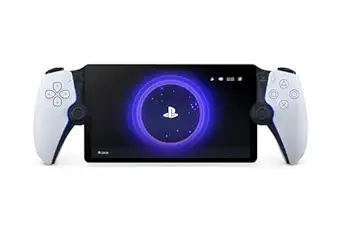 | Best for PS5 Owners | Display: 8-inch LCD | Resolution: Full HD 1080p | Frame Rate: Up to 60fps | VIEW LATEST PRICE | See Our Full Breakdown |
| 2026 New Retro Gaming Console Stick Pro |  | Best Plug-and-Play Retro Pick | Storage: 64GB | Emulators: 23 | Game Library: 20,000+ preinstalled games | VIEW LATEST PRICE | See Our Full Breakdown |
| HRYYDS 2026 Retro Gaming Console Pro |  | Best Preloaded Retro Library | Storage: 64GB | Game Library: 40,000+ preinstalled games | Emulators Supported: 23 | VIEW LATEST PRICE | See Our Full Breakdown |
| Lenovo Legion Go S with AMD Ryzen Z2 Go |  | Best Midrange Gaming Handheld | Display: 8-inch PureSight IPS | Refresh Rate: 120Hz | Processor: AMD Ryzen Z2 Go | VIEW LATEST PRICE | See Our Full Breakdown |
| Lenovo Legion Go S 8APU1 with SteamOS | 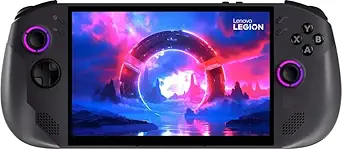 | Best Premium SteamOS Handheld | Display: 8-inch touchscreen | Resolution and Refresh Rate: 1920 × 1200 at 120Hz | Processor: AMD Ryzen Z1 Extreme | VIEW LATEST PRICE | See Our Full Breakdown |
| digital-only gaming console | Display | Storage |
|---|---|---|
| Lenovo Legion Go S Handheld Ga | 8-inch 120Hz IPS LCD touchscreen | 1TB SSD |
| Logitech G Cloud Gaming Handhe | 7-inch 1080p touchscreen | — |
| Valve Steam Deck OLED 1TB Hand | 7.4-inch HDR OLED with anti-glare glass | 1TB NVMe SSD |
| RG56PRO Retro Video Game Conso | 5.5-inch IPS Full HD screen | 128GB TF card included |
| PlayStation Portal Remote Play | 8-inch LCD | — |
| 2026 New Retro Gaming Console | — | 64GB |
| HRYYDS 2026 Retro Gaming Conso | — | 64GB |
| Lenovo Legion Go S with AMD Ry | 8-inch PureSight IPS | 512GB |
| Lenovo Legion Go S 8APU1 with | 8-inch touchscreen | 1TB SSD |
More Details on Our Top Picks
Lenovo Legion Go S Handheld Gaming Console
I rank the Lenovo Legion Go S highly for buyers who want their digital PC library in a portable format without sacrificing screen size or storage. Its 8-inch 120Hz touchscreen makes fast games appear smoother than on the 90Hz Steam Deck OLED, while the 1TB SSD leaves more room for large downloads than the 512GB Legion Go S variant elsewhere in the lineup. It also offers broader connectivity than the Logitech G Cloud, including dual USB-C 4.0 ports and external-display support. The tradeoff is efficiency: this is a heavier-duty handheld, and battery duration is not clearly stated. Its Ryzen Z2 Go chip also sits below premium handheld-PC hardware such as the Ryzen Z1 Extreme. I would choose it for flexible Windows-style gaming, but the opened upgrade seal creates a warranty concern.
Pros:- Large 8-inch 120Hz touchscreen makes fast gameplay smoother and menus easier to read
- 1TB SSD provides practical space for modern digital PC game libraries
- Dual USB-C 4.0 ports support flexible charging, accessories, and display connections
- Customizable controls and profiles suit multiple game genres
Cons:- The original seal was opened for the memory and storage upgrade, which may complicate warranty coverage
- Battery runtime is not specified, making travel endurance difficult to judge
- Ryzen Z2 Go performance is less suited to demanding settings than higher-tier Z1 Extreme handhelds
Best for: PC players who want a large 120Hz handheld screen, 1TB of local game storage, and external-display flexibility
Not ideal for: Warranty-conscious buyers or frequent travelers who need clearly documented all-day battery life
- Display:8-inch 120Hz IPS LCD touchscreen
- Processor:AMD Ryzen Z2 Go
- Graphics:Integrated AMD RDNA graphics
- Memory:16GB RAM
- Storage:1TB SSD
- Ports:Dual USB-C 4.0
- Display Output:DisplayPort 1.4
- Power:Adjustable power modes
Our verdict“Choose this Legion Go S for a large, fast portable PC-gaming display and ample storage, provided the upgrade-related warranty risk is acceptable.”
Logitech G Cloud Gaming Handheld
The Logitech G Cloud takes a different route from the Lenovo Legion Go S and Steam Deck OLED: it streams demanding games instead of running them locally. That makes its 463-gram body and 12-plus-hour battery appealing for long sessions around the house, where heavier handheld PCs can become tiring and drain faster. Its 7-inch 1080p panel is sharper than the Steam Deck OLED by pixel count, though it lacks that model’s richer OLED contrast and 90Hz refresh rate. Support for Xbox Cloud Gaming, GeForce NOW, remote play, and Google Play gives it broad digital access, but subscriptions can raise the long-term cost. I would only rank it this highly for buyers with reliable 5GHz Wi-Fi: weak or unavailable internet can introduce lag or leave its main gaming functions unusable.
Pros:- More than 12 hours of stated battery life supports extended streaming sessions
- Lightweight 463-gram design is easier to hold than full handheld gaming PCs
- Supports Xbox Cloud Gaming, NVIDIA GeForce NOW, remote play, and Google Play
- 1080p touchscreen delivers a sharp image at a practical seven-inch size
Cons:- Cloud gaming quality depends heavily on fast, stable Wi-Fi
- Service subscriptions can add recurring costs
- It cannot match the local-game flexibility or offline capability of the Steam Deck OLED
Best for: Home cloud-gaming subscribers with strong 5GHz Wi-Fi who prioritize low weight and long battery life
Not ideal for: Travelers without dependable internet or buyers who want to install demanding PC games directly on the handheld
- Display:7-inch 1080p touchscreen
- Refresh Rate:60Hz
- Battery Life:More than 12 hours
- Weight:463 g
- Connectivity:5GHz Wi-Fi, up to 800 Mbps
- Controls:Haptics, gyroscope, and remappable inputs
- Supported Services:Xbox Cloud Gaming, NVIDIA GeForce NOW, and Google Play Store
- Materials:PC/ABS, TPE, and TPU
Our verdict“The G Cloud is the sensible lightweight choice for committed streaming subscribers, but it loses much of its value away from reliable Wi-Fi.”
Valve Steam Deck OLED 1TB Handheld Gaming Console
The Steam Deck OLED 1TB earns my top position because it balances local digital gaming, display quality, storage, and battery flexibility better than the narrower alternatives. Unlike the Logitech G Cloud, it runs compatible PC games without depending on an active stream, and its HDR OLED panel provides deeper blacks and stronger contrast than the Lenovo Legion Go S IPS screen. The Legion counters with a larger 8-inch panel and faster 120Hz refresh rate, but Valve’s 90Hz display, anti-glare glass, Wi-Fi 6E, and console-like Steam interface form a more cohesive package. The drawbacks are price and compatibility: some Steam titles, anti-cheat systems, or third-party launchers require extra work or may not run. Battery life also spans a wide three-to-12-hour range, so demanding games can shorten unplugged sessions sharply.
Pros:- HDR OLED screen offers richer contrast and color than the IPS models in the lineup
- 1TB NVMe SSD accommodates a substantial locally installed Steam library
- Local game support makes it more versatile away from Wi-Fi than cloud-focused handhelds
- Wi-Fi 6E and an included carrying case add practical everyday value
Cons:- Premium pricing places it above simpler cloud and retro handhelds
- Game and anti-cheat compatibility is not universal
- Battery life can fall to about three hours with demanding software
Best for: Steam users seeking a polished digital handheld with local play, premium display quality, and enough storage for a varied PC library
Not ideal for: Budget shoppers or players whose favorite multiplayer titles rely on unsupported anti-cheat software
- Display:7.4-inch HDR OLED with anti-glare glass
- Resolution:1280 x 800
- Refresh Rate:Up to 90Hz
- Storage:1TB NVMe SSD
- Battery:50Whr
- Battery Life:3–12 hours
- Connectivity:Wi-Fi 6E
- Included Accessory:Carrying case with removable liner
Our verdict“The Steam Deck OLED 1TB is my strongest all-around recommendation for buyers who want a premium screen and genuine offline access to digital PC games.”
RG56PRO Retro Video Game Console
The RG56PRO is the specialist pick for buyers who value older games over current PC or console releases. Its claimed library of more than 31,000 titles and 128GB included card provide immediate variety without the streaming subscriptions required by the Logitech G Cloud. The 5.5-inch 720p IPS panel is smaller and less detailed than Logitech’s 7-inch 1080p screen, yet that lower resolution suits many classic systems and keeps the device portable. An open Linux platform also offers more customization than the closed PlayStation Portal experience. That freedom brings friction: file management, emulator settings, and library cleanup may demand technical patience. The bundled catalog may contain duplicates or obscure entries, and buyers should verify the sourcing rights for included game files. I see its eight-hour stated runtime as useful, though demanding 3D emulation may reduce it.
Pros:- Large claimed library spans classic titles and fifth-generation 3D games
- Open-source Linux system permits deeper customization than closed streaming devices
- 5.5-inch 720p IPS display is well matched to portable retro play
- 5000mAh battery provides up to eight hours of stated gameplay
Cons:- Advanced setup and customization can require familiarity with Linux and emulators
- The huge preloaded library may include duplicates and poorly curated titles
- Game-file licensing and provenance may be unclear
Best for: Retro enthusiasts comfortable managing emulators, Linux settings, and a very large preloaded game catalog
Not ideal for: Buyers seeking current AAA releases, polished console simplicity, or clearly documented licensing for every included game
- Display:5.5-inch IPS Full HD screen
- Resolution:1280 x 720
- Processor:2.0GHz RK3562
- System:Open-source Linux
- Storage:128GB TF card included
- Game Library:More than 31,000 claimed games
- Battery:5000mAh, up to 8 hours
- Charging:USB Type-C fast charging
- Controls:Dual 3D joysticks with customizable LED lighting
Our verdict“Pick the RG56PRO for a customizable all-in-one retro library, but expect more setup and catalog housekeeping than mainstream handhelds require.”
PlayStation Portal Remote Player
The PlayStation Portal Remote Player makes the most sense as a companion for an established PlayStation household, letting someone play compatible downloaded PS5 and PS4 games while the television is occupied. Its 8-inch 1080p screen is larger and sharper than the Steam Deck OLED panel, while the controller layout preserves familiar PlayStation inputs rather than adopting a generic handheld shape. Compared with the Logitech G Cloud, however, Portal serves a narrower ecosystem and offers fewer streaming platforms. Remote play depends on a PS5, and supported cloud streaming requires a PlayStation Plus Premium membership and a strong connection. Network conditions can affect image quality and response time, while VR titles and games needing extra peripherals are excluded. I would choose it for focused access to a digital PlayStation library, not as an independent replacement for a console.
Pros:- Eight-inch 1080p display offers a large, sharp view of streamed PlayStation games
- Up to 60fps playback suits most PS5 remote-play sessions
- Familiar PlayStation-style controls provide a more console-like layout than generic cloud handhelds
- Supports both PS5 remote play and eligible PlayStation Plus Premium cloud streaming
Cons:- Remote play requires a PS5, while cloud catalog access requires a Premium subscription
- Performance and latency depend on network quality
- It lacks the broad service support and local game installation offered by competing handhelds
Best for: PS5 households that share a television and want another screen for compatible downloaded games or Premium cloud titles
Not ideal for: Buyers without a PS5 or PlayStation Plus Premium, or anyone wanting broad access to Xbox, Steam, and Android libraries
- Display:8-inch LCD
- Resolution:Full HD 1080p
- Frame Rate:Up to 60fps
- Audio:Tempest 3D AudioTech
- Connectivity:Wi-Fi and PlayStation Link
- Audio Port:3.5mm audio jack
- Compatibility:Compatible streamed PS5 and PS4 games
- Internet Requirement:5Mbps minimum; 15Mbps recommended
Our verdict“The PlayStation Portal is a strong second-screen purchase for committed PS5 owners, but its ecosystem limits make it a poor general-purpose handheld.”
2026 New Retro Gaming Console Stick Pro
I rank the Retro Gaming Console Stick Pro as the easiest route into digital retro gaming because its 20,000-plus preloaded games require neither downloads nor an internet connection. Compared with the HRYYDS 2026 Retro Gaming Console Pro, it offers roughly half the advertised library and lacks stated save-and-load support, but its three-step setup is better suited to beginners who value simplicity over sheer volume. Dual 2.4G controllers make local multiplayer accessible, while the claimed 0.1-second response time should help older action games feel immediate. The 4K HDMI output improves TV compatibility and presentation, though it cannot add modern detail to low-resolution originals. Buyers are also locked into the included catalog, and the controllers need separately purchased batteries. I see this as a convenient nostalgia system, not an expandable gaming platform.
Pros:- More than 20,000 games are available without downloads or an internet connection
- Dual 2.4G wireless controllers support local multiplayer out of the box
- 4K HDMI output provides a straightforward connection to modern displays
- Simple three-step installation suits buyers unfamiliar with emulation hardware
Cons:- The game library cannot be expanded with new titles
- Its advertised catalog is much smaller than the HRYYDS model’s 40,000-plus selection
- Controller batteries must be purchased separately
Best for: Beginners, families, and casual retro fans who want a large offline game library with minimal setup
Not ideal for: Collectors who want to add specific games or players who expect online multiplayer and a customizable library
- Storage:64GB
- Emulators:23
- Game Library:20,000+ preinstalled games
- Maximum Video Output:4K
- Video Connection:HDMI
- Controllers:Two 2.4G wireless controllers
- Claimed Response Time:0.1 seconds
Our verdict“This is my pick for buyers who want uncomplicated, offline retro play and can accept a fixed game catalog.”
HRYYDS 2026 Retro Gaming Console Pro
The HRYYDS 2026 Retro Gaming Console Pro earns its place through scale: its 40,000-plus preinstalled games double the advertised selection of the Retro Gaming Console Stick Pro while using the same 64GB capacity and 23-emulator framework. Save-and-load support gives it another practical advantage, letting players return to longer adventures instead of treating every session as disposable. I also favor its controllers for larger rooms because their stated 40-foot range offers more placement freedom. This remains a closed digital system, however, so the huge catalog cannot be supplemented when a favorite title is absent. Some modern TVs may present compatibility problems, and there is no stated online multiplayer support. The 1080p and 4K output options improve display flexibility, but they do not remake vintage graphics. I rank it above the smaller stick for variety, not refinement.
Pros:- Advertised library of more than 40,000 games is the largest among these four picks
- Save-and-load support makes longer retro games easier to revisit
- Two wireless controllers offer a stated range of up to 40 feet
- Supports both 1080p and 4K HDMI output
Cons:- Users cannot add titles beyond the preinstalled library
- Compatibility issues may occur with some modern televisions
- No online multiplayer capability is specified
Best for: Retro enthusiasts and families who prioritize the largest ready-made offline library and want save support
Not ideal for: Players who want curated modern releases, online competition, or the freedom to install additional games
- Storage:64GB
- Game Library:40,000+ preinstalled games
- Emulators Supported:23
- Output Resolutions:1080p and 4K
- Video Connection:HDMI
- Included Controllers:Two wireless controllers
- Controller Range:Up to 40 feet
- Game Progress:Save and load supported
Our verdict“Choose this model when the widest preloaded retro selection matters more than expandability or online features.”
Lenovo Legion Go S with AMD Ryzen Z2 Go
I place the Lenovo Legion Go S with Ryzen Z2 Go in the midrange slot because it combines a spacious 8-inch 120Hz IPS display, 16GB of memory, and 512GB of storage without chasing the maximum specification. Compared with the Legion Go S 8APU1, it has half the RAM and half the SSD capacity, so demanding games and a growing digital collection leave less headroom. It still offers a more self-contained gaming experience than the Logitech G Cloud, which centers on cloud services, while Legion ColdFront cooling and textured controls are aimed at sustained portable sessions. The 55.5Whr battery is fairly substantial on paper, but no runtime is supplied, and a high-refresh display can increase power demand. With no stated expandable-storage support, buyers may eventually need to manage installations closely. This model favors balance over premium performance.
Pros:- Eight-inch 120Hz IPS panel offers more screen space and smoother motion than many compact handhelds
- Ryzen Z2 Go processor and Radeon graphics support local portable gaming
- Legion ColdFront cooling is designed for extended play sessions
- Anti-slip ergonomic controls improve grip during handheld use
Cons:- The 512GB drive provides limited room for a large modern game library
- No expandable-storage option is specified
- Real-world battery runtime is not provided
Best for: Portable PC-game buyers who want a large, fluid display and capable hardware without paying for 32GB of RAM and a 1TB SSD
Not ideal for: Players with very large digital libraries or buyers seeking the strongest Legion Go S configuration
- Display:8-inch PureSight IPS
- Refresh Rate:120Hz
- Processor:AMD Ryzen Z2 Go
- Graphics:AMD Radeon
- Memory:16GB
- Storage:512GB
- Battery:55.5Whr
- Cooling:Legion ColdFront technology
- Included Support:One year of Legion Ultimate Support
Our verdict“This Legion Go S makes sense for buyers seeking a balanced local-gaming handheld who do not need the premium model’s extra memory and storage.”
Lenovo Legion Go S 8APU1 with SteamOS
The Lenovo Legion Go S 8APU1 is my premium pick for buyers building a substantial Steam-based digital library. Its Ryzen Z1 Extreme and Radeon 780M graphics are paired with 32GB of memory, giving it more multitasking headroom than the Ryzen Z2 Go Legion Go S listed here. A 1TB SSD also doubles that model’s storage, reducing the need to remove large games, while microSD support adds another path for expansion. SteamOS supplies a console-like interface, but buyers tied to non-Steam stores may encounter more friction than on a broader PC setup. The integrated controls cannot be detached, and the 730-gram body is less inviting for long sessions than the lighter Logitech G Cloud. Battery specifications are absent, making portable endurance hard to judge. I rank it highest for capability, though not for flexibility or low weight.
Pros:- Ryzen Z1 Extreme and Radeon 780M hardware provide the strongest specified performance in this batch
- 32GB of LPDDR5x memory offers ample headroom for demanding games and multitasking
- One-terabyte SSD accommodates a much larger installed library than the 512GB Legion Go S
- Dual USB4 ports and microSD support provide useful connectivity and expansion
Cons:- SteamOS can add friction for games and services outside the Steam ecosystem
- Integrated controllers cannot be detached or rearranged
- No battery-life figure is provided despite the system’s portable focus
Best for: Steam-focused enthusiasts who want premium handheld performance, generous memory, and room for a sizable downloaded game library
Not ideal for: Buyers dependent on non-Steam storefronts, detachable controls, or a lightweight handheld with clearly stated battery endurance
- Display:8-inch touchscreen
- Resolution and Refresh Rate:1920 × 1200 at 120Hz
- Processor:AMD Ryzen Z1 Extreme
- Graphics:Radeon 780M with RDNA 3
- Memory:32GB LPDDR5x
- Storage:1TB SSD
- Ports:Dual USB-C with USB4, DisplayPort and power delivery; microSD; 3.5mm audio
- Wireless Connectivity:Wi-Fi 6E and Bluetooth
- Weight:1.61 lb / 730 g
Our verdict“Pick this model for a high-capacity Steam handheld, provided its weight, fixed controls, and software boundaries fit your habits.”
How We Picked
I compared these consoles across game-delivery method, performance potential, display quality, controls, portability, storage, software usability, and platform support. I gave extra weight to how independently each device works, since a handheld that runs downloaded games has a different value proposition from one that requires cloud access or a host PS5. Battery demands, library compatibility, repair and update prospects, and likely ownership costs also shaped the order. The aim was to identify clear buyer roles, not rank products by one specification.
The highest positions went to devices with mature ecosystems and broad libraries, followed by models that trade some simplicity for added power or flexibility. Cloud and remote-play hardware ranked lower for general use because connection quality and subscriptions can limit where they work, though they remain strong choices for the right household. Retro products were judged more cautiously when their brand support, licensing status, or enormous preloaded-game claims were unclear. That ranking method puts dependable everyday value ahead of headline numbers.
Factors to Consider When Choosing Best Digital-only Gaming Consoles
The best choice depends less on the word console and more on where the game is processed. I recommend deciding between local downloads, cloud streaming, remote play, and emulation before comparing screens or processor names. That first decision quickly removes devices that cannot support the way or places in which someone plans to play.
Choose the Right Game-Delivery Model
Local-download handhelds such as the Steam Deck and Legion Go S run compatible games on the device, making them the strongest choices for travel and unreliable internet. Cloud handhelds exchange local processing power for lighter hardware and access to remote servers, but image quality and responsiveness rise or fall with the network. A remote player such as PlayStation Portal sits in a third category because it depends on games and hardware from an existing ecosystem. Retro handhelds and HDMI sticks use emulation, which brings a different set of compatibility, setup, and licensing questions. A common mistake is treating all four categories as interchangeable because none uses physical discs. I would choose the delivery model before the hardware tier, since no display or processor upgrade can remove the wrong dependency.
Match the Console to Your Existing Library
An existing library can make one platform far less expensive than another. Steam ownership favors SteamOS handhelds, while Xbox Cloud Gaming and GeForce NOW accounts make the Logitech option more useful from day one. PlayStation Portal has a narrow but clear purpose for a PS5 household, yet it offers little value to someone without that console. Windows handhelds can reach several storefronts and launchers, though that freedom often brings more updates, menus, and troubleshooting. Buyers starting from zero should compare the games they actually want rather than the advertised size of each storefront. I place library access ahead of theoretical versatility because unused compatibility does not improve the purchase.
Balance Performance, Screen Quality, and Battery Demand
Higher frame rates and sharper visuals require more processing power, which can shorten unplugged sessions and increase heat or fan noise. A 120Hz screen is most useful when the hardware can produce high frame rates in the games being played; it offers less value in demanding titles capped near 30 or 60 frames per second. OLED improves contrast and dark-scene clarity without promising faster performance, making it a visible upgrade across a wider range of games. Streaming devices can deliver attractive graphics with modest local hardware, but network delay may matter more than the display specification in quick competitive games. Large eight-inch panels improve readability while making a handheld less pocketable and potentially more tiring to hold. I would pay for performance that matches the intended game library, not the highest number on the box.
Plan Storage Around Real Installation Sizes
One terabyte provides useful breathing room for modern PC games, several of which can consume a large share of a 512GB drive after updates and downloadable content. A 512GB model can still be sensible when its price is lower and the owner keeps only a few games installed. Cloud and remote-play devices need less local capacity because the main game files live elsewhere. Expansion slots can reduce storage pressure, although card speed, game compatibility, and the cost of a quality card affect the final value. Retro listings with thousands of included titles may contain duplicates, regional variants, or poorly organized files, so a huge count does not prove a better library. My rule is to compare usable storage and upgrade cost rather than the headline capacity alone.
Count Subscriptions, Accessories, and Support
The purchase price may be only the first expense. Cloud services can add recurring fees, and some games must still be purchased or linked through a supported storefront. Remote play may require a host console, while handheld PCs often benefit from a dock, case, charger, or extra storage. Controller replacements and battery service also matter more on portable hardware than they do on a simple TV stick. Lesser-known retro products may offer low entry prices but limited documentation, firmware updates, warranty help, or replacement parts. I favor clear long-term support over oversized bundle claims, particularly when a device will hold account credentials or connect to a home network.
Frequently Asked Questions
Is a digital-only console the same as a cloud gaming console?
No. A digital-only console lacks a physical-media drive, but it may still download and run games locally, as the Steam Deck and Legion Go S do. A cloud console streams video from remote hardware and sends control inputs back over the internet. Local play offers better independence from network quality, while cloud play can provide demanding graphics on lighter hardware. I recommend checking where the game actually runs before comparing prices.
Should I choose Steam Deck OLED or Lenovo Legion Go S?
The Steam Deck OLED is my choice for a more polished Steam-focused experience, strong display contrast, and an established community. A Legion Go S is better suited to buyers who prioritize an eight-inch screen, a higher listed refresh rate, Windows storefront flexibility, or the premium Z1 Extreme configuration. Windows models may require more desktop-style setup, while SteamOS keeps daily operation closer to a traditional console. The 32GB Legion model also carries hardware that power-focused buyers may value more than simplicity. I would pick Steam Deck for balance and Legion for a specific performance or software need.
Can PlayStation Portal work without owning a PS5?
PlayStation Portal is not a conventional standalone handheld for locally installed PS5 games. Its core purpose is to extend access to the PlayStation ecosystem through remote or supported streaming features, which makes account, service, region, and network requirements central to the purchase. A PS5 owner who wants to play away from the main television is the clearest match. Someone seeking an independent travel console will get more freedom from a Steam Deck or Legion Go S. I would verify the current PlayStation service requirements in the buyer’s region before ordering.
How good does my internet need to be for cloud or remote play?
Connection stability matters more than a high advertised download speed. Low latency, consistent throughput, and strong Wi-Fi coverage determine whether controls feel responsive and the picture stays clear. A busy household, distant router, congested wireless channel, or hotel network can create problems even when a speed test looks fast. Ethernet to the host console and modern Wi-Fi near the handheld can improve remote play at home. Buyers who often play away from reliable networks should favor local-download hardware.
Are retro consoles with thousands of built-in games a safe purchase?
I would approach enormous preloaded libraries cautiously. Game-count claims may include duplicates, alternate versions, poorly emulated titles, or software whose licensing status is unclear. Unknown brands can also provide limited security updates, warranty support, controller replacements, and setup documentation. A smaller device with an open platform and a clear way to manage legally owned game files may deliver a better long-term experience. For this group, I value transparent software and support more than the largest advertised number.
Conclusion
For most buyers, my best overall choice is the Valve Steam Deck OLED 1TB because it combines local play, a mature ecosystem, generous storage, and a high-contrast display. The Lenovo Legion Go S 8APU1 is the premium pick for buyers drawn to 32GB of RAM, a Ryzen Z1 Extreme processor, and SteamOS, while the 512GB Legion Go S is my value-oriented choice when it costs meaningfully less than the 1TB models. Beginners with dependable Wi-Fi and active streaming services should start with the Logitech G Cloud, since its lighter cloud-first approach avoids much of the setup associated with a handheld PC. The 1TB Z2 Go Legion makes more sense for Windows flexibility, and PlayStation Portal is the focused choice for a PS5 household that wants another screen. For retro play, the RG56PRO is the more portable option, while the HDMI sticks suit television play but carry greater uncertainty around software quality, support, and included-game claims. My final split is Steam Deck for balance, Legion for power, Logitech for cloud play, and Portal for PS5 remote access.
Halloween Picks
halloween
As an affiliate, we earn on qualifying purchases.