

TL;DR
Listen free for 30 days with Audible
Thousands of audiobooks and originals — cancel anytime.
Start your free trialAs an affiliate, we earn on qualifying purchases.
As of July 15, 2026, ProtonDB rates Palworld and MECCHA CHAMELEON Platinum, while Assassin’s Creed Black Flag Resynced holds Gold for Linux and Proton play [2]. Those ratings make all three promising Steam Deck choices, but ProtonDB tiers are community reports rather than Valve’s Verified labels, and updates can change compatibility overnight.
Two of today’s three highlighted Steam games sit at ProtonDB’s highest compatibility tier. That is good news if you want to hear Palworld’s grassy fields rustle through your Deck speakers or squeeze in a bright, frantic MECCHA CHAMELEON session before your train reaches the next stop.
This Skeldrift briefing explains Steam Deck compatibility on July 15, 2026 for Palworld, Assassin’s Creed Black Flag Resynced, and MECCHA CHAMELEON. You will see what their Platinum and Gold ProtonDB ratings mean, why those ratings differ from Valve’s Verified system, and what you should check before spending money or filling precious storage space [1][2].
The date matters because compatibility moves like wet paint. A game patch, a new Proton release, a launcher update, or an anti-cheat change can turn a smooth evening into a black screen and spinning fan. Treat this article as a dated compatibility briefing, then pair it with recent community reports when you install.
Palworld and MECCHA CHAMELEON hold Platinum ProtonDB ratings in the July 15, 2026 snapshot, making them the lowest-friction choices in this three-game group.
Assassin’s Creed Black Flag Resynced is Gold, which signals strong Proton play after common tweaks rather than poor compatibility.
ProtonDB tiers and Valve’s Deck Verified labels answer different questions, so check both before buying.
Test first launch, busy gameplay, controls, offline behavior, and suspend-resume before taking your Deck away from reliable Wi-Fi.
Match every performance or compatibility claim to a recent game build, Proton version, SteamOS release, and device type.
- Palworld — Platinum
- Assassin’s Creed Black Flag Resynced — Gold
- MECCHA CHAMELEON — Platinum
ProtonDB community tiers for current Steam top sellers, as of 2026-07-15.
See Which Top Games Give You the Smoothest Deck Start
Steam Deck compatibility of today’s top games looks encouraging: Palworld and MECCHA CHAMELEON are Platinum on ProtonDB, while Assassin’s Creed Black Flag Resynced is Gold as of July 15, 2026 [2]. In plain English, every highlighted game belongs to one of ProtonDB’s two strongest community tiers.
| Game | ProtonDB tier | What you should expect | Best next check |
|---|---|---|---|
| Palworld | Platinum | Windows build works through Proton without special changes in qualifying reports | Read reports for the newest game build |
| Assassin’s Creed Black Flag Resynced | Gold | Strong results after common tweaks or configuration changes | Check launcher and control notes |
| MECCHA CHAMELEON | Platinum | Qualifying reports describe an out-of-the-box Proton experience | Confirm reports from Deck hardware |
Suppose you have 45 minutes before boarding a flight and room for only one fresh install. The two Platinum games offer the simpler starting bet because Platinum signals that reporters did not need custom fixes. The Gold game can still play beautifully, but you should leave time for a Proton version change, launcher login, or another small adjustment.
These tiers describe Linux play through Proton, not a guaranteed frame rate, battery figure, or perfect result on every Steam Deck. This briefing also does not assign age suitability: ratings and content labels vary by region, so check the current Steam store listing and your local age-rating board before buying for a younger player [1].

512GB Retro Game Card for Steam Deck – 50600+ Plug and Play Video Games, Included Emulator Console, Batocera 39 Game System Compatible
- Designed for Steam Deck: Compatible only with Steam Deck devices
- Supports All Steam Deck Versions: Works with OLED and Standard models
- Extensive Game Library: 62+ emulators and 50,600+ games
As an affiliate, we earn on qualifying purchases.
As an affiliate, we earn on qualifying purchases.
Know What Every ProtonDB Tier Predicts Before You Install
Steam Deck compatibility tiers tell you how much friction ProtonDB users encountered while running a Windows game on Linux. Platinum means no reported special setup, Gold usually means strong play after tweaks, and Silver, Bronze, or Borked signal progressively larger barriers [2]. The badge works like a weather forecast, not a signed promise.
- Platinum: The game works through Proton without special changes in qualifying community reports.
- Gold: The game works well after common tweaks, settings changes, or another manageable adjustment.
- Silver: The game runs, but issues may affect controls, video playback, stability, or other parts of the experience.
- Bronze: The game launches, yet frequent or serious problems can spoil normal play.
- Borked: The game does not provide a usable experience under the reported setup.
Think of the scale as five doors into the same arcade. Platinum is an open door with the lights already on; Gold asks you to turn a key. Silver may stick, Bronze needs a hard shoulder, and Borked feels like pushing against brick.
A concrete example makes the distinction clearer. If a Gold report says the game works after selecting a newer Proton build, you may spend two minutes changing that setting and then play for hours. If a Silver report mentions broken cutscenes, the game could still run at a stable pace while leaving you staring at a silent black rectangle whenever the story moves forward.
A high ProtonDB tier predicts low setup friction. It does not certify frame rate, battery life, text size, online services, or sleep-and-resume behavior on your exact Deck.

JSAUX PC0104 ModCase Compatible with Steam Deck, Steam Deck Case Comprehensive Protection Include Detachable Front Shell, Body Protective Shell, Metal Bracket and Strap – Basic Set
- Perfect Fit for OLED & LCD: Engineered for OLED and LCD models
- Detachable Front Cover: Removable hard front shield for protection
- Secure Snap-On Design: Ensures easy and secure attachment
As an affiliate, we earn on qualifying purchases.
As an affiliate, we earn on qualifying purchases.
Why Palworld’s Platinum Badge Makes It the Safest Big Install
Steam Deck compatibility for Palworld earns a Platinum ProtonDB rating in the July 15, 2026 snapshot, making it the strongest starting signal available from that community system [2]. You should expect the Windows version to work through Proton without a special workaround under the qualifying reported setups.
That matters for a game where you may wander from a quiet green hillside into a crowded base filled with moving creatures, flickering workstations, and overlapping sound effects. Compatibility only gets you through the front door, though. Dense scenes can challenge handheld hardware even when Proton itself behaves perfectly, so a Platinum badge should never become an invented promise of locked frame rates.
Imagine loading your save during a lunch break. The game opens, your controls register, and your save appears without an evening spent copying launch commands from a forum. That is the practical value of low-friction Proton support: you spend your short break playing instead of troubleshooting.
Before a long trip, launch Palworld on the same SteamOS and Proton version you plan to use away from home. Visit your busiest base, enter combat, suspend the Deck for five minutes, and resume. That ten-minute rehearsal catches problems a menu-screen test will miss, including heavy-scene slowdowns, connection trouble, or a resume glitch.
The Steam store page confirms the product and its current requirements [1], while ProtonDB provides the community tier [2]. Check both again after a major patch because Palworld’s Platinum status can change as the game, SteamOS, and Proton receive updates.
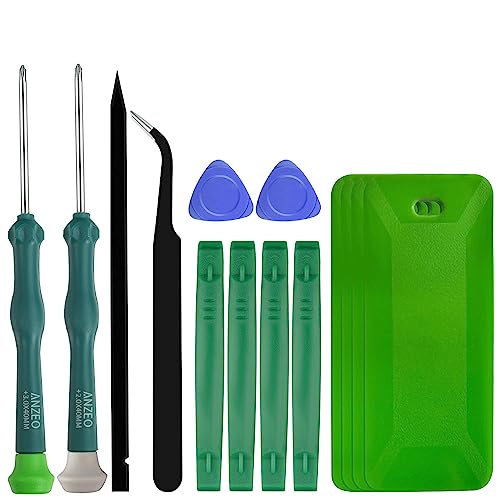
JAOYSTII Tool Kit for Steam Deck, Philips Screwdriver for Steam Deck Battery Replacement with Tweezers, Opening Pry Bar & Plastic Cards
- Complete Steam Deck Tool Kit: Includes all necessary tools for Steam Deck repair
- Durable Phillips Screwdrivers: Made of industrial-grade steel for precision and durability
- Safe and Precise: Ensures accurate screw fitting and removal without stripping
As an affiliate, we earn on qualifying purchases.
As an affiliate, we earn on qualifying purchases.
Get Black Flag Resynced Running Without Letting Gold Scare You
Steam Deck compatibility for Assassin’s Creed Black Flag Resynced is rated Gold on ProtonDB in this July 15, 2026 briefing [2]. Gold remains a positive result: the game should work well through Proton after one or more common adjustments, though you should expect slightly more setup than with a Platinum title.
A Gold badge can sound like a runner-up medal, but that comparison misses the point. It is closer to a hotel room that is ready once you collect the key at reception. You may need to select a Proton version, complete a launcher step, or change one setting; after that, the actual stay can feel smooth.
For example, you might install the game on Friday night and plan to sail across a blue-black sea from the sofa. If a launcher presents tiny text or needs an online login, handle that while your Deck sits beside a stable Wi-Fi connection. Complete first-run setup at home, then restart the game and test whether it reaches gameplay without another prompt.
Read the newest ProtonDB entries for reports that match Steam Deck hardware, SteamOS, and the current game build. Desktop Linux success still gives useful evidence, but it may not reveal handheld concerns such as the on-screen keyboard, controller glyphs, readable menus, or suspend and resume.
No supplied evidence supports a specific frame-rate target, battery duration, or Valve Verified label for this version, so this briefing does not invent one. Any rumors or leaks about future patches, removed launcher steps, or new Deck support remain unconfirmed until the developer, Valve, or live build confirms them.

JSAUX 2-Pack Ultra HD Screen Protector for Steam Deck OLED/LCD
- Compatibility: Fits Steam Deck LCD and OLED
- Full Coverage: Edge-to-edge 7-inch tempered glass
- Easy Installation: Guiding frame for simple setup
As an affiliate, we earn on qualifying purchases.
As an affiliate, we earn on qualifying purchases.
Why MECCHA CHAMELEON Is the Easy Wildcard to Try
Steam Deck compatibility for MECCHA CHAMELEON reaches Platinum on ProtonDB in the July 15, 2026 snapshot [2]. That rating places it beside Palworld and above the Gold-rated Black Flag Resynced for setup simplicity, even though popularity and technical compatibility measure two very different things.
The title may be the lesser-known name in this three-game lineup, yet that can make its result more useful. Big franchises attract piles of guides within hours; a smaller release benefits more from an out-of-the-box compatibility signal. When fewer troubleshooting posts exist, Platinum acts like a bright trail marker in a dark forest.
Say you spot the game before a weekend away and want something new on your Deck. A Platinum tier tells you the reported Proton path should be clean, but you should still open the game, reach an active scene, test every control, and read the smallest menu text. Launching is not the same as living with a game for six hours.
You should also check whether recent reports came from the LCD Deck, OLED Deck, or desktop Linux. Proton compatibility can carry across those machines, while battery drain, display behavior, and perceived smoothness can differ. Keep performance claims tied to the hardware and software version used by the reporter.
Finally, check the current Steam listing for system requirements, content descriptors, and any regional age rating [1]. The Platinum badge answers a technical question about Proton; it does not tell you whether the game’s themes suit a child or whether its text feels comfortable on a seven-inch display.
Check Any Deck Game in Five Minutes Before a Trip
A five-minute Steam Deck compatibility check can save your evening because it tests the exact game build, Proton release, and SteamOS version sitting in your hands. Follow these steps while you still have reliable Wi-Fi, then repeat the test after any large patch that touches a launcher, anti-cheat system, graphics code, or input support.
- Compare both rating systems. Read Valve’s current Deck label on Steam, then check ProtonDB’s tier and newest Deck-specific reports.
- Match the date and version. Favor reports written after the latest game patch and note the Proton version they used.
- Finish the first launch. Complete logins, shader processing, agreements, and on-screen keyboard prompts before leaving home.
- Test real gameplay. Visit a busy area, start combat, open menus, and check every control for at least five minutes.
- Suspend and resume. Put the Deck to sleep during gameplay, wait briefly, and confirm that sound, controls, and online features return.
Imagine your train entering a tunnel just as a launcher requests a fresh sign-in. The game may have perfect rendering and controller support, yet that single network gate leaves you watching your own reflection in a black screen. First-launch testing catches that trap while you can still fix it.
For demanding games, test the noisiest scene you can reach rather than walking around an empty room. A fan that rises from a soft whisper to a hair-dryer rush tells you more than a polished title screen. Record your chosen graphics preset, frame cap, and Proton version so you can restore a working setup after experimenting.
Do not copy an old launch command blindly. A workaround that helped six months ago can hurt a newer Proton release, much like wearing a winter coat in July. Start clean, change one setting at a time, and keep the last known working configuration close.
Avoid the Compatibility Labels That Lead Buyers Astray
The biggest Steam Deck compatibility mistake is treating ProtonDB Platinum as identical to Valve Deck Verified. ProtonDB records community experience with Linux and Proton, while Valve’s program checks Deck-focused requirements such as input, display, seamless interaction, and system support. The two labels can agree, but they answer different questions.
Consider a Windows game that runs flawlessly through Proton but opens a launcher with tiny buttons. ProtonDB users could report excellent technical operation, while Valve might classify the Deck experience differently because you need the touchscreen or on-screen keyboard. One label measures whether the engine runs; the other examines more of the handheld journey.
The second trap is reading an old report as permanent truth. A July 1 post may describe a clean launch, then a July 14 update may add new video files, DRM, or anti-cheat behavior. Recency beats report volume when a game has just changed.
The awkward phrase knowledge cutoff in October 2023 sometimes appears in generic compatibility summaries that do not have access to specific articles published after that date. Such material cannot verify a July 15, 2026 rating by itself. This briefing uses the supplied dated ProtonDB snapshot for its three tiers, while still treating live status as changeable [2].
Finally, separate compatibility from quality. A Platinum game can have demanding graphics, small text, short battery life, or online design that feels clumsy on the road. A Gold game can become your favorite Deck experience after one two-minute fix. Use the badge as a map legend rather than a review score.
Turn These Ratings Into a Smarter Buying Decision
You should buy or install based on your tolerance for setup, not the color of one badge alone. Choose a recent Platinum report when you want the shortest path to play, accept Gold when a simple tweak feels reasonable, and pause at Silver or below until you understand the exact problem.
If you are packing for a twelve-hour flight tomorrow, Palworld or MECCHA CHAMELEON offers the cleaner compatibility bet in this group because each carries Platinum [2]. If you have a quiet evening at home and do not mind checking a launcher or Proton setting, Black Flag Resynced remains a strong Gold candidate.
- Limited troubleshooting time: Start with a Platinum game and test it before departure.
- Comfortable changing settings: A Gold title can offer an excellent result after a small adjustment.
- Need offline play: Test sign-in, cloud saves, and launch behavior with Wi-Fi disabled.
- Buying for a child: Check regional age ratings and content descriptors separately from Deck support.
- Low storage space: Verify the current download size and leave room for updates and shader data.
Compatibility also changes the value of your time. Saving 20 minutes of troubleshooting matters more during a short commute than during a relaxed Sunday afternoon. The best choice is the game that fits both your taste and the amount of tinkering you will tolerate.
Skeldrift’s practical ranking is simple: the two Platinum games lead for low-friction setup, while the Gold game remains attractive for players willing to make a small adjustment. Check live reports at purchase time because Steam’s top games can receive patches faster than any dated article can follow.
Frequently Asked Questions
Does ProtonDB Platinum mean a game is Steam Deck Verified?
No, Platinum and Deck Verified are separate labels. ProtonDB Platinum reflects strong community reports for running a game on Linux through Proton, while Valve’s Deck program checks a wider set of handheld requirements. Always read both current labels before buying.
Will Palworld run at a fixed frame rate on Steam Deck?
The Platinum tier does not promise a specific frame rate. It describes Proton compatibility, while performance depends on the current game build, your graphics settings, scene complexity, SteamOS, and Deck model. Test a crowded base rather than relying on the quiet opening menu.
Is a Gold ProtonDB game worth installing?
Yes, Gold is a strong compatibility result. It usually means the game works well after a common tweak, such as selecting a Proton version or handling a launcher step. Assassin’s Creed Black Flag Resynced is the Gold example in this dated briefing [2].
Why can Steam Deck compatibility change after an update?
Game patches can alter launchers, video playback, DRM, anti-cheat, graphics code, or controls. Proton and SteamOS updates can also fix old problems or create temporary new ones. Read reports posted after the latest patch and keep your last working settings recorded.
Should I use Proton Experimental for these games?
Start with Steam’s default selection unless a recent, matching report recommends another Proton version. Experimental can fix a new problem, but it can also behave differently after an update. Change one setting at a time so you can identify what helped.
Can I rely on desktop Linux reports for Steam Deck compatibility?
Desktop Linux reports offer useful Proton evidence, but Deck-specific reports provide better clues about controls, tiny text, the on-screen keyboard, suspend-resume behavior, and handheld performance. Favor reports that name the Deck model, SteamOS release, and Proton version.
Do these compatibility ratings cover age suitability?
No, compatibility tiers do not function as age ratings. They describe technical operation, not violence, language, online interaction, or other content. Check the current Steam listing and your regional rating board before buying a game for a younger player [1].
Conclusion
Use the rating as your starting signal, then test the exact build in your hands. Palworld and MECCHA CHAMELEON offer the cleanest ProtonDB outlook here, while Black Flag Resynced asks for a little more preparation. Ten minutes of testing at home can protect hours of play on the road.
Before you close the case and head out, launch the game, enter its busiest scene, put the Deck to sleep, and wake it again. When the controls return and the screen lights up without a hitch, that small green glow feels better than any badge.
Back to school Picks
back to school
As an affiliate, we earn on qualifying purchases.



![A Walkable ASCII Cyberpunk City In One HTML File [Video]](https://skeldrift.com/wp-content/uploads/2026/09/a-walkable-ascii-cyberpunk-city-in-one-html-file-video-featured-260x140.jpg)