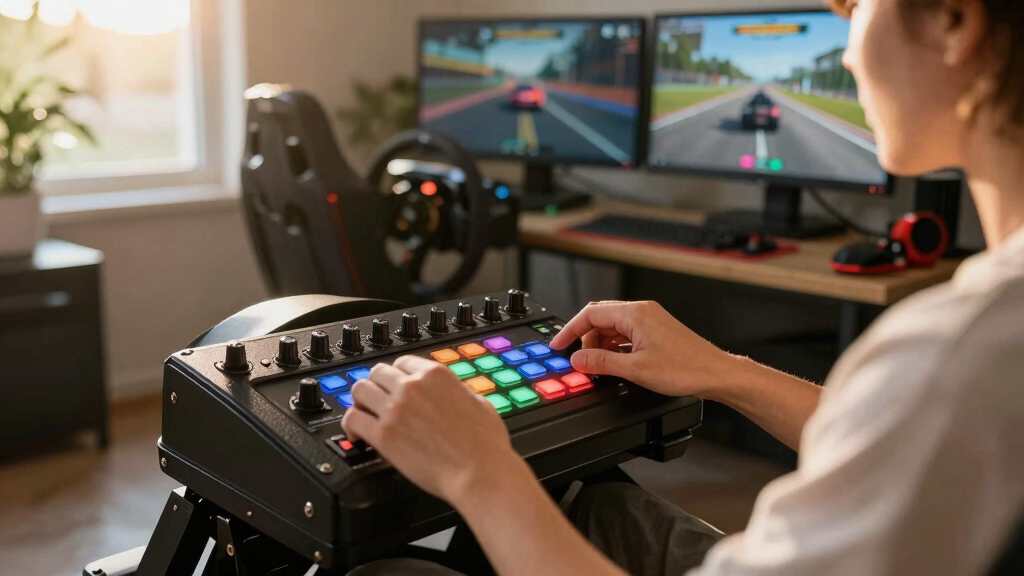
The PXN Multi-functional CB1 is my best overall choice because its 30 programmable inputs, adjustable lighting, and flexible mounting cover the needs of most PC racers without pushing into specialist hardware. The MiYee Button Box takes the premium spot with a carbon-fiber panel, metal housing, six press-enabled encoders, and tactile toggles. For drivers with limited cockpit space, the SIM-PANEL Gen 2 offers the cleanest horizontal layout and places frequently used controls within an easy lateral reach.

Play games on Amazon Luna for your game nights, included with Prime
- A rotating selection of games, no download needed
- Play on TV, laptop or phone
- Fast, free delivery for your gear, too
The main decision is not simply how many commands a box can store. I would choose according to control type, mounting position, configuration effort, and the amount of desk or rig space available. Rotary encoders suit brake bias and traction-control adjustments, covered toggles feel appropriate for persistent functions, and ordinary buttons work well for menus or radio commands. Every model here is aimed at PC users, so console racers should skip this lineup unless their game and hardware maker explicitly document support.
Three of the entries are PXN CB1 listings with closely related specifications. I rank them separately because the supplied descriptions emphasize different packages, mounting details, and setup characteristics, but buyers should compare the photographs, included bracket, seller, and return policy before ordering. My ranking gives preference to useful physical controls and clear installation details rather than treating RGB lighting or a large function count as proof of a better button box.
Complete the kit



Key Takeaways
- The PXN Multi-functional CB1 earns my Best Overall ranking by balancing 30 programmable commands, adjustable RGB lighting, broad PC-game support, and flexible installation.
- The MiYee is the strongest choice for frequent in-race adjustments because its six press-enabled rotary encoders provide finer control than the button-led PXN models.
- The SIM-PANEL Gen 2 is the most space-conscious option, but its sparse published specifications make it a less certain purchase than the better-documented alternatives.
- The three PXN CB1 listings appear closely related, so buyers should compare included mounting hardware, seller support, and current pricing instead of assuming each ASIN represents a different control panel.
- All five products target Windows PC setups; none is a dependable recommendation for PlayStation, Xbox, or Mac users.


| button boxes for sim racing | Platform | Lighting |
|---|---|---|
| PXN Multi-functional Sim Racin | Windows PC | Adjustable RGB |
| MiYee Sim Racing Button Box Pr | PC | — |
| SIM-PANEL PC Sim Racing Gen 2 | PC only | — |
| PXN CB1 Racing Button Box for | PC | 7 customizable RGB effects |
| PXN CB1 Sim Racing Button Box | Windows PC | RGB with adjustable color and brightness |
More Details on Our Top Picks
PXN Multi-functional Sim Racing Button Box for Windows PC with 30 Programmable Buttons and RGB Lighting
I rank the PXN Multi-functional CB1 first because it offers the most balanced package for a typical PC sim rig. Its 30 programmable inputs can move indicators, ignition, pit controls, camera changes, radio commands, and vehicle adjustments away from the keyboard. Adjustable RGB lighting can make the panel easier to locate in a dim room, although I see that as a secondary benefit rather than the reason to buy it.
Compared with the MiYee, this PXN is better suited to someone who wants plenty of general-purpose commands without paying mainly for metal construction and six encoders. The tradeoff is less tactile specialization: a high command count does not replace the precise adjustment offered by multiple rotary controls. The companion app also adds setup work, and a first-time buyer could find 30 assignments harder to remember than expected.
This listing rises above the other CB1 entries through its broad description of game, wheel, and mounting compatibility. Still, the three PXN listings may represent very similar hardware. I would compare the included mounts and seller terms before paying more for this ASIN. It is my most adaptable recommendation, but racers focused on tactile realism should favor the MiYee, while drivers with a narrow cockpit may prefer the horizontal SIM-PANEL.
Pros:- Thirty programmable inputs accommodate a wide control map
- Adjustable RGB lighting improves visibility in darker setups
- Works with multiple popular PC racing games and steering-wheel setups
- Flexible installation suits desks and dedicated rigs
Cons:- No stated console compatibility
- Full customization requires an app download
- The large command map can overwhelm new sim racers
Best for: PC sim racers who want one versatile panel for a broad mix of driving, vehicle, pit, and menu commands
Not ideal for: Console racers, minimalists, or drivers who prefer several dedicated rotary encoders
- Platform:Windows PC
- Controller type:PC racing simulator center control box
- Programmable buttons:30
- Connection:USB
- Lighting:Adjustable RGB
- Power source:USB
- Weight:1.18 pounds
- Dimensions:5.67 x 3.09 x 7.24 inches
Our verdict“My first choice for most PC racers, the PXN Multi-functional CB1 combines ample programming capacity with approachable mounting and useful illumination.”
MiYee Sim Racing Button Box Programmable Button Control with Rotary Encoders and Carbon Fiber Panel
The MiYee Button Box has the richest physical interface in this group. Its six press-enabled rotary encoders are a natural match for brake bias, traction control, ABS, fuel maps, and menu movement, while three covered locking toggles suit functions that should remain visibly on or off. A genuine carbon-fiber faceplate and metal enclosure also give it a more substantial construction brief than the ABS-bodied PXN CB1.
I place it second because its hardware is more specialized, not because it is a weaker control panel. Compared with my top-ranked PXN, the MiYee provides better adjustment tools and clearer tactile variety, but fewer conventional buttons. Its 32-key customizable profile expands the possible command map, yet configuring encoders, button presses, and toggles may be more involved for a beginner than assigning a bank of simple PXN controls.
This pick makes the most sense for an established cockpit where drivers make frequent changes while moving. The secure adjustable bracket supports that role, and the metal controls should appeal to buyers who value a mechanical feel. I would skip it for a casual desk setup that only needs ignition, headlights, and pit commands; the cheaper, simpler PXN variants can cover those jobs with less learning. Like every model here, PC-only compatibility also narrows its audience.
Pros:- Six press-enabled encoders suit precise in-race adjustments
- Carbon-fiber panel and metal housing provide premium construction
- Covered toggles and CNC-machined buttons are easy to distinguish by touch
- Adjustable bracket supports secure cockpit installation
Cons:- More complicated to map and memorize than a basic button panel
- PC compatibility only
- Its specialist controls may be excessive for casual use
Best for: Enthusiasts who regularly adjust car settings mid-race and value metal controls and varied tactile feedback
Not ideal for: Beginners, console users, or casual drivers who only need a small set of straightforward commands
- Faceplate:Carbon fiber
- Housing:Metal
- Main buttons:10 backlit CNC-machined metal buttons
- Toggle switches:3 covered self-locking metal toggles
- Rotary encoders:6 programmable press-enabled encoders
- Key profile:32-key customizable profile
- Start control:Dedicated one-touch start button
- Platform:PC
- Installation:Secure adjustable bracket
Our verdict“I recommend the MiYee to committed PC racers who value tactile adjustment controls more than maximum conventional-button capacity.”
SIM-PANEL PC Sim Racing Gen 2 Button Box (Horizontal Layout)
The defining advantage of the SIM-PANEL Gen 2 is its horizontal orientation. A wide, low panel can fit beneath a monitor or alongside a wheel base where a tall box would obstruct sightlines or compete with a shifter. That arrangement can also make controls easier to scan from left to right during a race. For tight rigs, shape and reach can matter more than the largest possible input count.
Against the PXN CB1 models, the SIM-PANEL presents a cleaner ergonomic proposition but far fewer published details. The description confirms fully programmable buttons and broad PC-rig integration, yet it does not state the button count, connection method, materials, or dimensions. That missing information is why I rank it below the two better-documented leaders. A promising layout is not enough to verify whether it will fit a particular opening or provide every required control.
I would choose this model when a horizontal panel solves a known placement problem and the retailer can answer any remaining specification questions. It is less compelling for buyers seeking rotary encoders, RGB customization, or a clearly documented mounting system. Compared with the MiYee, it favors spatial simplicity over tactile variety; compared with the PXN boxes, it offers a distinct shape rather than a stronger stated feature set.
Pros:- Horizontal shape suits low-clearance mounting positions
- Programmable controls support personalized command maps
- Ergonomic layout is intended for quick access
- Designed to integrate with varied PC sim rigs
Cons:- Published specifications omit button count and dimensions
- No console support
- Control types and mounting hardware are not clearly documented
Best for: PC racers who need a low horizontal control panel beneath a monitor or within a narrow cockpit opening
Not ideal for: Buyers who require published dimensions, a confirmed control count, or documented rotary encoders
- Platform:PC only
- Layout:Horizontal
- Programming:Fully programmable buttons
- Design focus:Quick-access ergonomics
- Rig integration:Compatible with various PC sim racing setups
- Generation:Gen 2
Our verdict“The SIM-PANEL Gen 2 is my space-saving pick, provided its seller can confirm the missing fit and control details before purchase.”
PXN CB1 Racing Button Box for PC – 30 Programmable Buttons with RGB Lighting
This PXN CB1 listing stands out for unusually clear installation details. Its clamp accepts surfaces up to 7 cm thick, and the panel can be positioned on a table or monitor area. That flexibility helps renters, desk racers, and anyone who does not want to drill into a cockpit. The 30 programmable commands and seven RGB effects largely match the broad appeal of my first-place PXN.
Why does it rank fourth? Its stated compatibility is narrower, highlighting PC use and the PXN V9 Gen2 wheel, while the top PXN listing describes broader support across games and wheel setups. The ABS resin body also lacks the premium material appeal of the MiYee. Its metal-contact dial switch is a welcome tactile element, but this remains a general-purpose panel rather than an encoder-heavy control station.
I would favor this ASIN over the other CB1 options when the 70 mm clamping capacity directly solves an installation problem or when its current package clearly includes the required bracket. Otherwise, the nearly overlapping PXN descriptions make price, seller reliability, and included hardware better tie-breakers than lighting modes. Beginners should also plan a restrained first control map instead of assigning all 30 commands immediately.
Pros:- Mounts to surfaces up to 7 cm thick
- Thirty programmable commands cover racing and menu functions
- Seven RGB effects offer adjustable visual styling
- Metal-contact dial adds a distinct physical control
Cons:- Compatibility description emphasizes PC and the PXN V9 Gen2
- ABS construction feels less specialized than the MiYee hardware
- Setup and a large command map may challenge beginners
Best for: Desk-based PC racers who need a clamp that accommodates a thick surface or multiple mounting positions
Not ideal for: Console players, buyers seeking a metal enclosure, or anyone who does not need its specific clamp capacity
- Platform:PC
- Highlighted wheel support:PXN V9 Gen2
- Programmable commands:30
- Lighting:7 customizable RGB effects
- Housing material:ABS resin
- Maximum surface thickness:7 cm
- Mounting positions:Monitor area or table
- Dial:Metal-contact dial switch with button-up and stop functions
Our verdict“I would buy this CB1 variant for its documented clamp flexibility, especially when a thick desk rules out less adaptable mounts.”
PXN CB1 Sim Racing Button Box for PC, 19 Controls, 30 Programmable Functions, RGB Backlit Simulator Control Panel
The fifth pick gives the clearest explanation of how the PXN CB1 reaches its advertised capacity: 19 physical controls across nine input types can trigger as many as 30 functions. That distinction matters because programmable functions are not the same as 30 separate physical buttons. Its layout is suited to racers who want varied inputs without stepping up to the MiYee’s more elaborate encoder-and-toggle arrangement.
This version also has the broadest simulation brief, covering racing, trucking, flight, and farming games. USB connection is described as driver-free, while VESA 100 x 100 mm support and a clamp for surfaces up to 70 mm thick provide credible installation options. Compared with the SIM-PANEL, its fit information is much stronger; compared with my leading PXN listing, its physical-control count is more transparent.
I rank it fifth for this racing-specific roundup because much of its appeal comes from versatility outside racing, and the description does not promise advanced customization software. A buyer focused solely on car setup adjustments will gain more from the MiYee’s six encoders. Someone switching among several simulator genres, however, may find this the most adaptable selection. The dense assortment of controls can still feel busy for a casual driver, and Windows-only support remains a firm limitation.
Pros:- Nineteen physical controls span nine input types
- Supports up to 30 programmed functions
- VESA and thick-surface clamp options suit varied installations
- Driver-free USB connection simplifies initial recognition
Cons:- Limited to Windows PC
- No advanced customization application is specified
- Multi-sim layout may be busier than a racing-only buyer needs
Best for: Windows users who switch among racing, trucking, flight, and farming simulators on one desk or cockpit
Not ideal for: Console or Mac users, casual racers, and drivers wanting an encoder-focused panel
- Platform:Windows PC
- Physical controls:19
- Input types:9
- Programmable functions:Up to 30
- Lighting:RGB with adjustable color and brightness
- Connection:Driver-free USB
- VESA support:100 x 100 mm
- Clamp capacity:Surfaces up to 70 mm thick
- Simulation genres:Racing, trucking, flight, and farming
Our verdict“I recommend this CB1 listing to multi-sim players who value mounting versatility and varied controls more than racing-specific specialization.”
How We Picked
I ranked these products by asking how well each one supports fast, repeatable control during a race. A useful button box should reduce keyboard hunting and give each command a physical shape or location that can be learned. I gave extra weight to rotary encoders, guarded toggles, deliberate spacing, and mounting positions that keep controls reachable without blocking a wheel, monitor, or shifter.
I also compared programmability, platform support, installation flexibility, and the effort needed to create a practical control map. A claim of 30 functions has limited value if the panel is confusing or awkwardly positioned. Conversely, a simpler layout can rank well when it gives a particular buyer better access. Construction quality affected the order too: the MiYee model’s carbon-fiber faceplate and metal housing place it above plastic rivals for material quality, though its complexity and likely premium positioning keep it from first place.
My judgments are based on the supplied product specifications and descriptions, not hands-on testing. I treated undocumented details cautiously and did not assume console support, advanced software features, or accessories beyond those listed. Because several PXN entries share the CB1 name and similar control counts, I separated them by documented package strengths while flagging their apparent overlap for shoppers.
| button boxes for sim racing | Platform |
|---|---|
| PXN Multi-functional Sim Racin | Windows PC |
| MiYee Sim Racing Button Box Pr | PC |
| SIM-PANEL PC Sim Racing Gen 2 | PC only |
| PXN CB1 Racing Button Box for | PC |
| PXN CB1 Sim Racing Button Box | Windows PC |
Factors to Consider When Choosing Best Button Boxes For Sim Racing
I would start with the commands used while the car is moving, then select a panel whose physical controls match those actions. Button quantity matters less than reach, tactile identification, and a layout that can be learned without looking away from the track.Match the Control Type to the Command
I prefer rotary encoders for repeated adjustments such as brake bias, ABS, traction control, and fuel mapping. A turn produces a predictable increase or decrease, while a press can open a related menu. Latching toggles work better for persistent states such as headlights or ignition, and guarded switches reduce accidental activation. Ordinary buttons remain the practical choice for pit requests, radio messages, camera changes, and menu shortcuts.
Plan the Mount Before Choosing the Panel
I would measure the intended location, surface thickness, wheel clearance, and distance from the seated position. The PXN listings with 70 mm clamps and VESA support provide the clearest installation guidance. The SIM-PANEL’s horizontal layout may fit beneath a display, but its unstated dimensions warrant confirmation. A box with more controls is a poor choice if reaching it requires leaning away from the wheel.
Build a Control Map You Can Remember
I would begin with six to ten frequently used commands and group related actions together. Consistency beats maximum assignment count: lighting controls can occupy one area, pit functions another, and car adjustments a third. Color illumination can help locate a panel, but position and control shape do more for operation without visual attention. Printable labels or a saved profile also make future changes easier to track.
Check Platform and Game Recognition
Every product in this ranking is intended for Windows PC. I would verify that the target game accepts generic USB button inputs and check whether the chosen model needs configuration software. Console versions of the same racing game do not automatically accept PC accessories. Buyers using several simulators should also confirm that profiles can be recreated or switched without remapping every command before each session.
Frequently Asked Questions
How many controls does a sim racing button box need?
I find that 10 to 20 well-placed physical controls cover most common racing needs, including ignition, pit requests, lights, wipers, radio, camera, brake bias, and traction control. A 30-function panel leaves room for menus and secondary commands, but that capacity only helps when the layout remains memorable. I would favor distinct control types and sensible grouping over the largest advertised number.
Are button boxes compatible with PlayStation or Xbox?
The models in this roundup are PC-focused and should not be treated as console-compatible. Consoles accept a narrower range of peripherals, and support can depend on the wheel base, game, and accessory ecosystem. I would only purchase a button box for PlayStation or Xbox when both the manufacturer and the intended game explicitly list that exact model as supported.
Are rotary encoders better than regular buttons?
Rotary encoders are better for values that move up and down through several steps, while buttons suit single actions. That makes the MiYee especially attractive for car-setting adjustments. I would not replace every button with an encoder, though: pit confirmation, headlights, radio messages, and reset commands are faster and clearer on dedicated push buttons or toggles.
Does RGB lighting improve racing performance?
RGB lighting mainly improves visibility and organization, not driving pace. It can help locate a panel in a dark room or separate groups of controls when color customization is available. I would still prioritize mounting position, tactile differences, and reliable input recognition. Those qualities determine whether the box reduces distraction; lighting mostly adds convenience and visual cohesion.
Why are three PXN CB1 models included?
The supplied products use separate ASINs and emphasize different details, even though their names and core specifications overlap. I kept each listing so buyers can compare mounting information, physical-control descriptions, compatibility claims, and package focus. I would inspect listing photographs and included accessories carefully, since a lower price on one ASIN may be more meaningful than small wording differences between them.
Conclusion
For most PC racers, I would choose the PXN Multi-functional CB1 because it balances command capacity, lighting, mounting flexibility, and broad stated compatibility. Drivers who frequently change brake bias, traction control, or fuel settings should spend more on the MiYee, whose encoders and metal controls provide the strongest tactile interface here.
The SIM-PANEL Gen 2 is my pick for a low, horizontal mounting position, though I would confirm its dimensions and control count before ordering. Desk racers dealing with a thick surface should examine the clamp-focused PXN CB1, while players moving among racing, trucking, flight, and farming sims will get more value from the 19-control multi-sim CB1. Console and Mac users should skip all five unless exact compatibility is documented for their system.
Columbus Day / Indigenous Peoples' Day Picks
long weekend sales
As an affiliate, we earn on qualifying purchases.