The Creative SB16 Sound Blaster 16 is my best overall ISA sound card because it offers the strongest balance of DOS game support, 16-bit playback, and recognizable Sound Blaster compatibility. The IBM ESS ES1868F card is a friendlier choice for beginners, while the Creative AWE64 CT4520 is better suited to buyers who value MIDI playback over period-authentic FM synthesis. The main tradeoffs involve DOS compatibility, FM character, MIDI features, background noise, and collector pricing. Exact board revisions and physical condition matter as much as the family name, especially across the varied SB16 and AWE64 ranges. Continue reading for the full breakdown and the reasons each option occupies a different place in my ranking.
Complete the kit



Key Takeaways
- The Creative SB16 ranks first because it covers more typical DOS gaming needs than the MIDI-focused AWE64 cards without tying the buyer to an OEM-specific system.
- The IBM ESS ES1868F is my beginner pick, while the lower-cost Creative CT4170 offers better value for buyers comfortable working with Creative drivers and CQM-based FM audio.
- The AWE64 CT4520 outranks the unspecified AWE64 listing because its model number makes its capabilities easier to verify; a generic AWE64 title can conceal major revision differences.
- The Yamaha card has the clearest specialist role: it is the preferred option for buyers prioritizing genuine Yamaha FM character, provided the chip and board revision match the seller’s description.
- The Compaq Vibra 16 card is mainly an OEM restoration choice, and the Creative AE-7 ranks last because it uses PCIe rather than ISA and cannot serve as a drop-in card for an ISA-only retro PC.
| Compaq Soundblaster Vibra 16-bit ISA Sound Card – Refurbished | 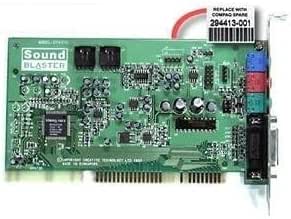 | Best Refurbished Pick | Brand: Compaq | Product Family: Soundblaster Vibra | Interface: ISA | VIEW LATEST PRICE | See Our Full Breakdown |
| Creative SB16 Sound Blaster 16 Channel 2 16-Bit ISA Sound Card |  | Best Overall | Interface: ISA | Audio Bit Depth: 16-bit | Listed Channel Configuration: 16 | VIEW LATEST PRICE | See Our Full Breakdown |
| Creative Sound Blaster AE-7 Hi-Res Internal PCIe Sound Card |  | Best Modern Alternative | Interface: PCIe | Processor: Dedicated quad-core | DAC: ESS SABRE-class 9018 | VIEW LATEST PRICE | See Our Full Breakdown |
| Creative Labs Sound Blaster Awe64 CT4520 ISA Sound Card |  | Best for Authentic AWE64 Builds | Brand: Creative Labs | Product Family: Sound Blaster AWE64 | Model: CT4520 | VIEW LATEST PRICE | See Our Full Breakdown |
| Creative Labs Sound Blaster AWE64 ISA Sound Card |  | Best Listed Audio Specifications | Model: Sound Blaster AWE64 CT4520 | Interface: ISA | Audio Bit Depth: 16-bit | VIEW LATEST PRICE | See Our Full Breakdown |
| IBM 16-Bit ISA Audio/Sound Card with ESS ES1868F Chip |  | Best for Straightforward Legacy Builds | Brand: IBM | Interface: ISA | Bus Width: 16-bit | VIEW LATEST PRICE | See Our Full Breakdown |
| Yamaha ISA Sound Audio Card |  | Best for Multi-Channel Retro Audio | Brand: Yamaha | Interface: ISA | Compatible Device: Personal computer | VIEW LATEST PRICE | See Our Full Breakdown |
| Creative Sound Blaster CT4170 ISA Sound Card | 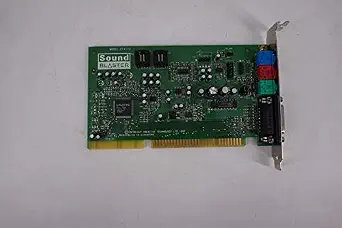 | Best for Legacy Test Benches | Brand: Creative | Product Family: Sound Blaster | Model: CT4170 | VIEW LATEST PRICE | See Our Full Breakdown |
| ISA sound card | Interface | Brand |
|---|---|---|
| Compaq Soundblaster Vibra 16-b | ISA | Compaq |
| Creative SB16 Sound Blaster 16 | ISA | — |
| Creative Sound Blaster AE-7 Hi | PCIe | — |
| Creative Labs Sound Blaster Aw | ISA | Creative Labs |
| Creative Labs Sound Blaster AW | ISA | — |
| IBM 16-Bit ISA Audio/Sound Car | ISA | IBM |
| Yamaha ISA Sound Audio Card | ISA | Yamaha |
| Creative Sound Blaster CT4170 | ISA | Creative |
More Details on Our Top Picks
Compaq Soundblaster Vibra 16-bit ISA Sound Card – Refurbished
I rank the Compaq Soundblaster Vibra 16-bit as the practical refurbished choice for a period Compaq or another confirmed-compatible ISA system. Its 16-bit audio processing provides the level of game and multimedia playback expected from later DOS-era hardware, while refurbishment offers more reassurance than an unverified pull. Compared with the Creative Labs Sound Blaster AWE64 CT4520, this Vibra card is the simpler option; it lacks the AWE64 model’s stronger focus on legacy music playback. The main concern is sparse technical documentation, which makes resource settings, drivers, and exact board compatibility harder to verify before purchase. I would choose it for a straightforward restoration, but buyers chasing the most configurable or collectible ISA card should favor the AWE64 CT4520.
Pros:- Refurbished condition may reduce the risk associated with an unverified vintage pull
- 16-bit processing suits later DOS games and period multimedia
- Sound Blaster Vibra lineage supports an era-appropriate restoration
- Simpler positioning than feature-heavy AWE-series cards
Cons:- No detailed chipset, connector, or resource-setting information is supplied
- Requires a compatible ISA expansion slot
- Compatibility may depend on finding the correct legacy drivers
Best for: Owners restoring a compatible Compaq or DOS-era desktop who want a refurbished 16-bit ISA audio card
Not ideal for: Buyers who need documented jumper settings, bundled drivers, or compatibility with a motherboard lacking ISA slots
- Brand:Compaq
- Product Family:Soundblaster Vibra
- Interface:ISA
- Audio Processing:16-bit
- Card Type:Internal sound card
- Condition:Refurbished
Our verdict“This is my refurbished pick for a compatible Compaq restoration, provided the buyer can verify the exact board revision and drivers.”
Creative SB16 Sound Blaster 16 Channel 2 16-Bit ISA Sound Card
The Creative SB16 Sound Blaster takes my overall spot because its supplied data gives buyers a clearer picture than most vintage listings: 16-bit audio, a 48 kHz ceiling, and a listed 90 dB signal-to-noise ratio. That makes it easier to match with a legacy PC than the poorly documented Compaq Soundblaster Vibra. It also fits period gaming more naturally than the PCIe-only Sound Blaster AE-7. The advertised 16-channel surround description may rely on software or listing terminology rather than the discrete speaker layouts associated with modern cards, so I would verify the exact board revision. Its ISA-only connection and lack of current ports keep it firmly tied to older systems. For a buyer prioritizing recognizable Sound Blaster heritage and comparatively useful specifications, however, this is the most balanced ISA choice here.
Pros:- Published 48 kHz sample-rate ceiling suits period games and multimedia
- Listed 90 dB signal-to-noise ratio provides a useful basis for comparison
- 16-bit Sound Blaster design is appropriate for legacy PC builds
- More detailed listing data than the Compaq Vibra and CT4520 entries
Cons:- ISA interface excludes current motherboards
- Advertised channel and surround claims may need board-specific verification
- No USB, optical, or other modern connectivity
Best for: DOS and early Windows PC builders who want a recognizable 16-bit Sound Blaster card with more published audio data than most vintage listings
Not ideal for: Audiophiles or modern-PC owners who need PCIe connectivity, high-resolution playback, or clearly documented discrete surround outputs
- Interface:ISA
- Audio Bit Depth:16-bit
- Listed Channel Configuration:16
- Audio Output Mode:Surround
- Maximum Sample Rate:48 kHz
- Signal-to-Noise Ratio:90 dB
- Compatible Devices:Personal computer, laptop
- Hardware Platform:Personal computer
Our verdict“I would choose this as the all-around ISA card for a period PC when documented specifications matter as much as Sound Blaster identity.”
Creative Sound Blaster AE-7 Hi-Res Internal PCIe Sound Card
The Creative Sound Blaster AE-7 is the outlier: it is a PCIe card, not an ISA card, so I include it only as the modern alternative for buyers whose real goal is better PC audio. Its ESS SABRE-class 9018 DAC, 127 dB DNR, and 32-bit/384 kHz support far exceed the Creative SB16’s listed 16-bit/48 kHz capability. The Xamp bi-amplifier also drives headphones rated up to 600 ohms, a job the vintage choices are not positioned to handle. That performance comes with a higher price, more involved software setup, and no fit for an authentic ISA restoration. Its virtual 5.1/7.1 processing also serves current entertainment rather than DOS compatibility. I rank it outside the true ISA leaders because platform fit matters more than raw fidelity in this roundup.
Pros:- 127 dB DNR and ESS SABRE-class DAC target clean modern playback
- Supports audio playback up to 32-bit/384 kHz
- Xamp bi-amplifier supports headphones rated up to 600 ohms
- Dedicated quad-core processor handles audio effects and surround processing
Cons:- Not an ISA card and unsuitable for period ISA motherboards
- Premium features carry a higher cost than legacy cards
- Internal installation and software configuration may challenge newcomers
Best for: Modern desktop owners who discovered they need high-resolution PCIe audio and powerful headphone amplification rather than ISA compatibility
Not ideal for: Vintage PC restorers because the PCIe interface cannot replace an ISA sound card in a period-correct system
- Interface:PCIe
- Processor:Dedicated quad-core
- DAC:ESS SABRE-class 9018
- Dynamic Range:127 dB DNR
- Playback Support:Up to 32-bit/384 kHz
- Headphone Impedance:Up to 600 ohms
- Surround Sound:5.1 discrete, 7.1 virtual
- Audio Connections:1/4-inch and 1/8-inch microphone and headphone I/O
- Color:Black
Our verdict“Buy the AE-7 only if modern fidelity and headphone power matter more to you than ISA hardware compatibility.”
Creative Labs Sound Blaster Awe64 CT4520 ISA Sound Card
I place the Creative Labs Sound Blaster AWE64 CT4520 ahead of generic legacy choices for builders seeking a named board revision and a period-focused Creative card. The CT4520 identity is more useful when researching drivers and compatibility than the limited description attached to the Compaq Soundblaster Vibra. Its appeal lies in vintage-system fit and AWE64-era audio, not the inflated resolution figures sometimes attached to old-card listings. Compared with the Creative SB16, though, this listing supplies far fewer measurable details, leaving connectors, memory configuration, accessories, and operating condition uncertain. It also offers none of the modern playback or headphone features of the Sound Blaster AE-7. I see it as a restoration-specific purchase: rewarding for an AWE64 build, but weaker for shoppers who need documented performance or an easy installation path.
Pros:- CT4520 model number helps buyers research board-specific legacy support
- AWE64 identity suits period-focused DOS and Windows restorations
- Creative branding makes it a more recognizable collector option than generic ISA cards
- Designed for compatibility with legacy PC hardware
Cons:- Listing omits measurable audio specifications and memory details
- ISA-only design has no place in modern motherboards
- Operating condition, accessories, and driver availability are not stated
Best for: Collectors and retro-PC builders seeking a CT4520-branded AWE64 card for a period-focused Creative ISA build
Not ideal for: Buyers who need verified memory details, connector information, included drivers, or support for a non-ISA computer
- Brand:Creative Labs
- Product Family:Sound Blaster AWE64
- Model:CT4520
- Interface:ISA
- Card Type:Internal sound card
- Target Hardware:Vintage computer systems
Our verdict“This is my pick for a buyer who specifically wants a CT4520 AWE64 restoration card and is prepared to verify the missing details.”
Creative Labs Sound Blaster AWE64 ISA Sound Card
The Creative Labs Sound Blaster AWE64 ISA earns this role because its listing claims 16-bit output, 192 kHz sampling, 120 dB signal-to-noise performance, and 5.1 surround. On paper, those figures beat the Creative SB16’s listed 48 kHz and 90 dB. They are also unusually ambitious for an ISA-era AWE64, so I would treat them as seller-provided data and confirm the exact CT4520 board before buying. That uncertainty prevents this card from taking the overall position. Compared with the other CT4520 listing, it gives shoppers more numbers but not necessarily more confidence, since the historical hardware description and modern-style specifications sit awkwardly together. The card still requires an ISA-equipped computer and lacks current connections. I would choose it only when return protection and model verification make the specification risk manageable.
Pros:- Seller-listed 192 kHz maximum sample rate is the highest among the ISA products shown
- Listed 120 dB signal-to-noise ratio suggests low-noise output if accurate
- AWE64 and CT4520 identification supports targeted legacy research
- Advertised headphone compatibility adds flexibility for private listening
Cons:- 192 kHz, 120 dB, and 5.1 claims require verification for this ISA-era model
- ISA interface restricts use to compatible legacy systems
- Lacks the modern ports and processing offered by the PCIe AE-7
Best for: Experienced retro-PC buyers who can verify a CT4520 board and want the most detailed seller-listed audio claims in this ISA lineup
Not ideal for: Risk-averse collectors who need historically verified specifications, or anyone whose computer has no ISA slot
- Model:Sound Blaster AWE64 CT4520
- Interface:ISA
- Audio Bit Depth:16-bit
- Listed Output Mode:Surround
- Listed Channel Configuration:5.1
- Listed Maximum Sample Rate:192 kHz
- Listed Signal-to-Noise Ratio:120 dB
- Compatible Devices:Personal computer, laptop, headphone
- Hardware Platform:Personal computer
Our verdict“I would buy this AWE64 only after verifying the CT4520 hardware and seller-listed specifications against the actual card.”
IBM 16-Bit ISA Audio/Sound Card with ESS ES1868F Chip
I rank the IBM 16-Bit ISA Sound Card as the practical choice for buyers restoring a basic legacy PC rather than building a feature-heavy audio system. Its ESS ES1868F chipset and 16-bit ISA design provide a clear hardware identity, which makes it easier to match with an appropriate motherboard than the poorly documented Creative CT4170. It also favors simplicity over the Yamaha ISA card’s game port and claimed 5.1-channel output. That narrower focus suits period-correct Windows or DOS machines needing basic, dependable audio without extra functions. The drawback is limited ambition: there is no modern connection path, and its feature set trails the Creative AWE64 models in the wider lineup. I place it here because compatibility and simplicity matter more than expansion for a straightforward restoration.
Pros:- ESS ES1868F chipset provides a clearly identified foundation for legacy system matching
- 16-bit ISA interface fits period-correct PC restoration projects
- Focused feature set supports uncomplicated vintage builds
- IBM branding may appeal to collectors assembling an era-appropriate system
Cons:- Works only with systems that have a compatible ISA slot
- Basic audio capabilities fall behind feature-rich AWE64 alternatives
- No modern digital or external connectivity options
Best for: Retro-PC restorers who need a clearly identified 16-bit ISA card for basic audio in an older IBM-compatible system
Not ideal for: Buyers seeking surround output, modern connectors, or the richer synthesis features associated with Creative AWE64 cards
- Brand:IBM
- Interface:ISA
- Bus Width:16-bit
- Chipset:ESS ES1868F
- Product Type:Internal sound card
- Target Systems:Legacy PCs with ISA slots
- Audio Capability:Basic legacy PC audio
Our verdict“Choose this IBM card for a simple ISA restoration where a known ESS chipset matters more than surround sound or advanced synthesis.”
Yamaha ISA Sound Audio Card
The Yamaha ISA Sound Audio Card takes the most ambitious multimedia role among these three picks. Its listed 5.1-channel surround output gives it a broader speaker focus than the basic IBM ES1868F card, while the included game port adds a useful connection for compatible legacy controllers. I would choose it for a retro entertainment build where gaming and multi-speaker playback carry more weight than strict period branding. Yet the listing leaves major questions unanswered: no chipset is identified, driver availability is unclear, and 5.1 operation may depend heavily on the host system and software. That uncertainty makes the IBM card easier to evaluate for a simple restoration. The Yamaha earns its place through greater connection versatility, but buyers should verify compatibility before treating its surround capability as guaranteed across older operating systems.
Pros:- Listed 5.1-channel surround support offers more speaker flexibility than basic ISA cards
- Integrated game port can connect compatible legacy gaming controllers
- Designed for installation in personal computers with ISA support
- Broader multimedia focus than the IBM ES1868F model
Cons:- Unspecified chipset makes driver and compatibility research harder
- No stated modern driver support
- Surround performance may depend on compatible software and system configuration
Best for: Retro gaming and multimedia builders who have an ISA-equipped PC, compatible drivers, and a multi-speaker setup
Not ideal for: Collectors who need a documented chipset or buyers unwilling to research operating-system and driver compatibility
- Brand:Yamaha
- Interface:ISA
- Compatible Device:Personal computer
- Hardware Platform:PC
- Audio Output Mode:Surround
- Channel Configuration:5.1 channels
- Additional Connection:Game port
- Return Policy:Amazon 30-day return guarantee
Our verdict“Pick the Yamaha for an ISA multimedia build with multi-channel ambitions, provided you can confirm the required drivers and platform support.”
Creative Sound Blaster CT4170 ISA Sound Card
I reserve the Creative Sound Blaster CT4170 for a narrower buyer: someone sourcing an ISA card for a legacy test bench or measurement setup. Its listing specifically connects the card with test and measurement use, giving it a more defined application than a generic replacement board. Creative’s Sound Blaster identity may also fit systems built around familiar legacy audio hardware. Compared with the IBM ES1868F card, though, the CT4170 is harder to purchase confidently because the supplied data omits its chipset, bit depth, channel configuration, and connector details. The Yamaha ISA card is likewise a better candidate for gaming because it explicitly lists a game port and 5.1 output. I rank this model lower for general use, but its specialized system role and stated enhanced audio quality keep it relevant for compatible technical equipment.
Pros:- Explicitly positioned for compatible test and measurement systems
- ISA interface suits legacy technical PCs
- Creative Sound Blaster model identity aids exact-board searches
- Advertised to improve audio quality in compatible hardware
Cons:- Missing chipset, bit-depth, channel, and connector specifications
- Compatibility is limited to legacy systems with ISA support
- Less suitable for gaming than the Yamaha card based on the available feature data
Best for: Technicians maintaining an ISA-based test bench or measurement PC that specifically calls for a Creative CT4170
Not ideal for: General retro-gaming buyers who need documented audio specifications, a game port, or confirmed driver compatibility
- Brand:Creative
- Product Family:Sound Blaster
- Model:CT4170
- Interface:ISA
- Product Type:Internal sound card
- Target Systems:Compatible legacy PCs
- Stated Application:Test and measurement
- Stated Audio Benefit:Enhanced audio quality
Our verdict“Buy the CT4170 when a legacy technical system specifically needs this model, but choose a better-documented card for a general retro PC.”
How We Picked
I ranked these cards around real DOS compatibility, including Sound Blaster support, common base-address and IRQ configurations, driver availability, and behavior in systems without modern operating systems. I also weighed FM synthesis quality, MIDI capability, mixer noise, connector selection, and how much effort each card may demand during setup. Since these products are decades old, board condition and revision clarity carry more weight in my ranking than decorative packaging or vague refurbished claims.
My order favors cards that can cover a broad library before specialist models. That places the Creative SB16 first, followed by the approachable IBM ESS ES1868F and value-focused Creative CT4170. The AWE64 CT4520 and Yamaha entry rank higher for specific MIDI or FM priorities, while the unspecified AWE64 and Compaq Vibra listings lose ground because buyers receive less certainty about revision or system fit. I treat the PCIe Creative AE-7 as a compatibility warning rather than a true ISA recommendation, despite its strong modern audio specifications.
| ISA sound card | Brand | Interface |
|---|---|---|
| Compaq Soundblaster Vibra 16-b | Compaq | ISA |
| Creative SB16 Sound Blaster 16 | — | ISA |
| Creative Sound Blaster AE-7 Hi | — | PCIe |
| Creative Labs Sound Blaster Aw | Creative Labs | ISA |
| Creative Labs Sound Blaster AW | — | ISA |
| IBM 16-Bit ISA Audio/Sound Car | IBM | ISA |
| Yamaha ISA Sound Audio Card | Yamaha | ISA |
| Creative Sound Blaster CT4170 | Creative | ISA |
Factors to Consider When Choosing Best ISA Sound Cards
Choosing among the best ISA sound cards starts with the computer and game library rather than the largest feature list. I would match the card to the motherboard slot, DOS software support, preferred music style, and willingness to configure resources manually. Exact model identification and component condition often matter more than branding, while premium MIDI hardware only pays off when the software can use it.
Confirm the Slot Before Comparing Audio Features
I start by checking whether the motherboard has a working 16-bit ISA slot, since an internal card cannot overcome a physical bus mismatch. A PCI or PCIe connector may appear similar in a poor listing photo, but the keying and electrical interface are different. The Creative AE-7 requires PCIe, so it will not fit an ISA-only 386, 486, or early Pentium motherboard. I would also inspect the BIOS for resource controls and confirm that no other expansion card already occupies the intended IRQ or DMA channel. Mechanical fit matters in compact OEM cases where brackets, risers, or card length can restrict otherwise compatible hardware. This basic screening prevents an expensive card from becoming an unusable display piece.
Match DOS Support to the Game Library
Sound Blaster compatibility is more valuable than a high playback specification when older games only expose a short list of supported devices. I favor cards with drivers or initialization utilities that can set familiar values such as address 220h, IRQ 5 or 7, and DMA 1. Jumper-configured cards can be predictable after setup, but changing resources may require opening the case. Plug-and-Play ISA models are more flexible, yet they may need a DOS utility every time the machine starts. The ESS ES1868F can simplify common DOS configurations, while Creative models may be the safer match for software that explicitly expects Sound Blaster hardware behavior. Before purchasing, I would list the games that matter most and check their setup menus rather than assuming every ISA card supports every mode.
Choose Between FM Authenticity and Sample-Based MIDI
FM synthesis and wavetable MIDI produce very different results even when both cards play the same game soundtrack. A verified Yamaha OPL-family chip suits buyers who want the timbre associated with many late-1980s and early-1990s DOS releases. Later Creative cards may use CQM synthesis, which is compatible at a functional level but can sound different in instruments, percussion, and sustained notes. The AWE64 shifts the emphasis toward its EMU8000 sample-based synthesis, making it more appealing for General MIDI arrangements than for strict OPL reproduction. SB16 revisions vary, so I would never infer the FM chip from the Sound Blaster 16 name alone. Buyers planning an external MIDI module should also verify MPU-401 behavior and the gameport interface instead of paying only for onboard synthesis.
Treat Condition as Part of the Specification
Every card here is old enough for capacitor aging, corrosion, damaged jacks, and noisy controls to affect daily use. The word refurbished has no fixed marketplace meaning; it may describe a cleaned card, a repaired board, or merely a card that produced sound once. I would seek clear photographs of both sides, close views around capacitors, and confirmation that digital audio, FM, MIDI, and both output channels were checked. A working card can still have a noisy mixer or weak channel, problems that a basic boot test may miss. A documented repair can justify a higher price when the seller identifies replaced parts and supplies functional results. For the Compaq model, I would also verify the bracket, connector layout, and host-system part number because OEM variations may complicate installation in a standard case.
Buy the Board Number, Not the Family Name
Marketplace titles often group several cards under broad labels such as SB16 or AWE64, even though their hardware can differ. The CT4520 identifier provides a better starting point than a generic AWE64 title because it narrows the board revision and likely feature set. An unspecified AWE64 listing may represent a Value, standard, or other revision with different memory and output arrangements. The CT4170 identifies a lower-cost Vibra design, which helps explain why it competes on price rather than Yamaha FM authenticity or advanced MIDI expansion. OEM part numbers deserve the same scrutiny because a Compaq-branded card may have altered connectors or bundled-software assumptions. If a seller will not provide a readable model number and actual board photos, I would price the card as an uncertain revision.
Pay More Only for Features the Build Will Use
A higher collector price does not automatically produce a better DOS gaming system. I would pay extra for an AWE64 when MIDI playback is a priority, but that premium makes less sense for a build centered on AdLib-era FM music. A verified Yamaha design can command more interest from FM-focused buyers, while offering little advantage in games played mainly through digital effects. For a broad, practical library, compatibility and clean output usually return more value than rare packaging or an unusual revision. Beginners may save time by choosing a well-documented ESS card even when a cheaper unidentified board is available. I would reserve the largest budget for a card whose exact synthesis, resource, or restoration benefits match a defined goal.
Frequently Asked Questions
Is the Creative Sound Blaster AE-7 an ISA sound card?
No. The Creative Sound Blaster AE-7 is a PCIe card designed for much newer computers, and its connector is electrically and physically incompatible with ISA. It may provide better modern playback specifications, but those figures do not help an ISA-based DOS machine. I would only choose the AE-7 for a PC with a free PCI Express slot and a supported modern operating system. For a period DOS build, it should be removed from the shortlist.
Should I choose an SB16 or an AWE64 for DOS gaming?
I would choose the SB16 for the broadest general-purpose DOS build, especially when digital effects and familiar game setup options matter most. The AWE64 is better suited to buyers who place more weight on sample-based MIDI music and are comfortable with later Creative synthesis. Neither family name guarantees a particular FM implementation because revisions differ. An AWE64 may also cost more without improving games that use only basic Sound Blaster effects. The final choice should follow the game library and preferred soundtrack style.
Is an ESS ES1868F card compatible enough for a first DOS PC?
For many builds, the ESS ES1868F is a strong beginner choice because it offers useful Sound Blaster-compatible modes and relatively manageable configuration. It can be easier to live with than an obscure clone whose drivers and resource tools are difficult to locate. Compatibility is not perfect across every game, so I would still check software that depends on unusual mixer behavior or a specific Creative feature. The IBM-branded card may also use OEM connectors or settings that deserve verification. With documentation and a tested board, it offers a sensible balance of price, compatibility, and setup effort.
Do I need a Yamaha ISA card for authentic DOS music?
A Yamaha card is the strongest candidate when OPL-style FM authenticity is the main goal, but it is not mandatory for every DOS system. Many games support digital Sound Blaster effects, General MIDI, or several music devices, making other cards equally practical. I would verify the exact Yamaha chip because a vague brand-only listing does not prove which synthesis hardware is present. Buyers focused on later General MIDI soundtracks may prefer the AWE64 or an external MIDI module. The Yamaha premium makes the most sense for a library where FM music is heard often enough to justify it.
What proof should I request before buying a refurbished ISA sound card?
I would request photos of the actual board and readable model numbers, plus confirmation that both audio channels, FM synthesis, digital playback, and the gameport were checked. A screenshot showing device detection is useful but does not reveal hiss, distortion, or a failing output channel. The seller should describe any replaced capacitors, repaired traces, cleaned sockets, or altered brackets. I would also ask which operating system, driver, IRQ, DMA channel, and base address were used during the test. A listing with documented functional checks deserves more confidence than one relying on the word refurbished alone.
Conclusion
For most DOS retro PCs, my best overall recommendation is the Creative SB16 because it offers the most balanced route into digital effects, familiar game support, and flexible use. The Creative CT4170 is my best-value pick for buyers willing to accept its lower-cost Vibra design and CQM FM character. For premium MIDI-focused builds, I would choose the AWE64 CT4520, while the IBM ESS ES1868F is my preferred beginner option because its compatibility and setup demands are easier to manage. A generic AWE64 only makes sense after the seller confirms its exact board revision. For specific needs, the Yamaha card is the FM-focused choice, while the Compaq Vibra suits a matching OEM restoration. I would skip the AE-7 for any ISA machine because PCIe compatibility cannot be added through drivers or configuration.