
The Razer Basilisk V3 is my best overall choice among the best Razer gaming products because its ergonomic shape, customizable controls, and wired reliability suit the widest range of PC games. I would choose the Razer Viper V4 Pro for competitive play, where its 49-gram design matters more than extra buttons, while the Razer Naga V2 HyperSpeed is the clear specialist for MMO players. This roundup focuses entirely on Razer gaming mice, with choices spanning inexpensive wired models, long-lasting wireless designs, and feature-heavy premium options. The main tradeoffs are weight versus versatility, wired simplicity versus wireless freedom, and broad usability versus genre-specific controls. Continue reading for the full breakdown of which model fits each buyer and where paying more actually makes sense.
Complete the kit



Key Takeaways
- I rank the Razer Basilisk V3 first because it offers the strongest balance of comfort, control flexibility, and price without asking buyers to manage a battery.
- The comparison reveals a clear split between lightweight esports mice such as the Viper V4 Pro and button-rich specialist mice such as the Naga V2 HyperSpeed.
- I see the DeathAdder Essential as the easiest beginner purchase, while the Basilisk V3 X HyperSpeed is the stronger value choice for buyers who specifically want wireless freedom.
- Higher prices buy different advantages rather than universally better performance: the Viper V4 Pro prioritizes low weight, while the Basilisk V3 Pro 35K prioritizes features and versatility.
- Four Basilisk variants make the exact model name matter. I would check the sensor generation, connection type, and price before buying an older Basilisk V3 Pro over a newer 35K version.
| Razer Basilisk V3 |  | Best Overall | Sensor: Optical sensor | Maximum sensitivity: 26,000 DPI | Programmable buttons: 11 | VIEW LATEST PRICE | See Our Full Breakdown |
| Razer DeathAdder Essential | 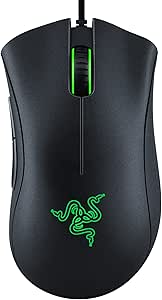 | Best Budget Pick | Connectivity: Wired | Sensor: Optical | Maximum sensitivity: 6,400 DPI | VIEW LATEST PRICE | See Our Full Breakdown |
| Razer Viper V4 Pro |  | Best for Competitive Esports | Weight: 49 g | Sensor: Focus Pro 50K Optical Sensor Gen 3 | Maximum sensitivity: 50,000 DPI | VIEW LATEST PRICE | See Our Full Breakdown |
| Razer Basilisk V3 Pro 35K |  | Best Premium Wireless | Sensor: Gen 2 35K DPI optical sensor | Maximum sensitivity: 35,000 DPI | Battery life: Up to 140 hours | VIEW LATEST PRICE | See Our Full Breakdown |
| Razer Cobra Pro |  | Best for Multi-Device Setups | Connectivity: 2.4 GHz, Bluetooth, and USB Type-C | Sensor: Focus Pro 30K Optical Sensor | Maximum sensitivity: 30,000 DPI | VIEW LATEST PRICE | See Our Full Breakdown |
| Razer Naga V2 HyperSpeed Wireless MMO Gaming Mouse |  | Best for MMO Players | Programmable Buttons: 19 | Sensor: Focus Pro 30K Optical Sensor | Wireless Connectivity: Razer HyperSpeed Wireless 2.4 GHz and Bluetooth | VIEW LATEST PRICE | See Our Full Breakdown |
| Razer Basilisk V3 X HyperSpeed Wireless Gaming Mouse |  | Best Value Wireless Pick | Sensor: 5G 18K Optical Sensor | Programmable Controls: 9 | HyperSpeed Battery Life: Up to 285 hours | VIEW LATEST PRICE | See Our Full Breakdown |
| Razer Basilisk V3 35K Wired Ergonomic Gaming Mouse |  | Best Wired Performance | Sensor: 35K DPI Optical Sensor Gen 2 | Customizable Controls: 13 | Lighting: 11-zone Chroma RGB with full underglow | VIEW LATEST PRICE | See Our Full Breakdown |
| Razer Viper V3 HyperSpeed Wireless PC Gaming Mouse |  | Best Competitive Value | Weight: 82g | Sensor: 30K DPI optical sensor | Battery Life: Up to 280 hours | VIEW LATEST PRICE | See Our Full Breakdown |
| Razer Basilisk V3 Pro Customizable RGB Wireless Gaming Mouse | 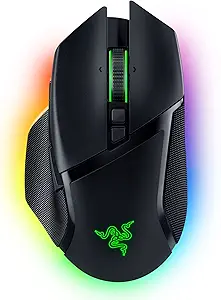 | Best Premium RGB Pick | Sensor: Focus Pro 30K Optical Sensor | Programmable Buttons: 11 | Lighting: 13-zone Chroma RGB with full underglow | VIEW LATEST PRICE | See Our Full Breakdown |
| Razer gaming product | Sensor | Switches | Lighting | Maximum sensitivity |
|---|---|---|---|---|
| Razer Basilisk V3 | Optical sensor | Optical Mouse Switches Gen 2 | Razer Chroma RGB, 16.8 million colors | 26,000 DPI |
| Razer DeathAdder Essential | Optical | — | — | 6,400 DPI |
| Razer Viper V4 Pro | Focus Pro 50K Optical Sensor Gen 3 | Gen 4 Optical Switches | — | 50,000 DPI |
| Razer Basilisk V3 Pro 35K | Gen 2 35K DPI optical sensor | — | 12-zone Razer Chroma RGB | 35,000 DPI |
| Razer Cobra Pro | Focus Pro 30K Optical Sensor | Gen 3 optical switches, rated for 90 million clicks | 11-zone Razer Chroma RGB | 30,000 DPI |
| Razer Naga V2 HyperSpeed Wirel | Focus Pro 30K Optical Sensor | Mechanical Mouse Switches Gen-2 | — | — |
| Razer Basilisk V3 X HyperSpeed | 5G 18K Optical Sensor | Razer Mechanical Switches Gen-2 | Razer Chroma RGB with 16.8 million colors | — |
| Razer Basilisk V3 35K Wired Er | 35K DPI Optical Sensor Gen 2 | Optical Switches Gen 3 | 11-zone Chroma RGB with full underglow | — |
| Razer Viper V3 HyperSpeed Wire | 30K DPI optical sensor | Mechanical Switches Gen-2 | — | — |
| Razer Basilisk V3 Pro Customiz | Focus Pro 30K Optical Sensor | Optical Switches Gen-3 | 13-zone Chroma RGB with full underglow | — |
More Details on Our Top Picks
Razer Basilisk V3
I rank the Razer Basilisk V3 first because it offers the broadest mix of comfort, control, and speed without charging extra for wireless hardware. Its 11 programmable buttons support shooters, strategy games, and everyday shortcuts, while the thumb rest favors long palm-grip sessions. Compared with the DeathAdder Essential, its 26,000 DPI sensor and HyperScroll tilt wheel provide greater precision and much deeper customization. The Basilisk V3 Pro removes the cable and adds more controls, but it costs more and reserves 8,000 Hz polling for separate accessories. The tradeoff here is a permanent wired connection, plus reliance on Synapse for detailed remapping and lighting. I see this as the strongest all-purpose choice for buyers who value ergonomic versatility over minimal weight or wireless freedom.
Pros:- Eleven programmable buttons support complex game commands and productivity shortcuts
- Thumb rest and sculpted right-handed shape suit extended palm-grip sessions
- 26,000 DPI optical sensor provides precise, responsive tracking
- HyperScroll tilt wheel handles rapid page movement and horizontal inputs
Cons:- Wired design restricts movement compared with Razer’s wireless alternatives
- Full button and lighting customization depends on Razer Synapse
- Heavier ergonomic design is less suited to rapid fingertip aiming
Best for: Right-handed PC gamers who play several genres and want abundant controls, a supportive thumb rest, and no battery management
Not ideal for: Competitive claw-grip players who favor ultralight wireless movement, since the ergonomic body and cable feel less agile than the Viper V4 Pro
- Sensor:Optical sensor
- Maximum sensitivity:26,000 DPI
- Programmable buttons:11
- Switches:Optical Mouse Switches Gen 2
- Scroll wheel:HyperScroll tilt wheel
- Lighting:Razer Chroma RGB, 16.8 million colors
Our verdict“I recommend the Basilisk V3 as the best all-round Razer mouse for right-handed buyers who want comfort and extensive controls at a lower cost than the flagship wireless models.”
Razer DeathAdder Essential
I place the Razer DeathAdder Essential here as the sensible entry point for buyers who want Razer’s familiar ergonomic shape without paying for advanced wireless hardware or elaborate lighting. Its 6,400 DPI optical sensor is ample for mainstream gaming, and five programmable buttons cover core shooter and action-game commands without presenting a crowded layout. Compared with the Basilisk V3, it sacrifices the tilt wheel, six extra buttons, optical switches, and far higher sensitivity. That makes it easier to approach but much less flexible for strategy games or shortcut-heavy workloads. Its wired-only design also limits desk freedom, while the mechanical switches carry a shorter rated lifespan than the Cobra Pro’s optical switches. I recommend it on price and comfort, not because it competes with Razer’s performance leaders.
Pros:- Affordable route into Razer’s established right-handed ergonomic shape
- 6,400 DPI optical sensor is capable enough for mainstream play
- Five programmable buttons keep the control layout approachable
- Mechanical switches are rated for up to 10 million clicks
Cons:- Wired connection offers less freedom than the Cobra Pro or Viper V4 Pro
- Only five buttons limit its usefulness for MMO and strategy commands
- Sensor and switch technology trail Razer’s newer models
Best for: Budget-conscious right-handed players who want a comfortable wired mouse for shooters, action games, and everyday PC use
Not ideal for: MMO players, wireless setups, and buyers who need many remappable commands or flagship-level sensor performance
- Connectivity:Wired
- Sensor:Optical
- Maximum sensitivity:6,400 DPI
- Programmable buttons:5
- Hand orientation:Right-handed
- Switch durability:Up to 10 million clicks
- Weight:0.13 kg
- Warranty:2 years
Our verdict“I recommend the DeathAdder Essential for buyers who prioritize low cost and palm-grip comfort over wireless convenience and extensive customization.”
Razer Viper V4 Pro
The Razer Viper V4 Pro earns my esports role through a focused combination of 49-gram weight, 8,000 Hz polling, and a 50,000 DPI sensor. Those figures translate into easier rapid corrections and more frequent cursor updates for players using high-refresh displays. The Basilisk V3 Pro offers more buttons, a thumb rest, and richer RGB, yet its feature-heavy ergonomic design is less focused on swift aim. Likewise, the Cobra Pro lasts longer under its quoted maximum but cannot match the Viper’s ultralight competitive design. There are firm compromises: 8,000 Hz mode cuts rated battery life from 180 to 45 hours, the premium price is hard to justify outside serious competition, and the shape chiefly favors claw or fingertip control. I rank it as the performance specialist, not the most adaptable mouse here.
Pros:- 49-gram body supports fast flicks and repeated aim corrections
- Focus Pro 50K sensor delivers extremely high tracking resolution
- Polling rate reaches 8,000 Hz for highly responsive cursor updates
- Up to 180 hours of battery life at 1,000 Hz reduces charging interruptions
Cons:- Battery life falls to 45 hours when running at 8,000 Hz
- Premium pricing offers limited value outside competitive play
- Low-profile shape is less supportive for palm grip
Best for: Competitive FPS players using claw or fingertip grip, especially those pairing a large mousepad with a high-refresh gaming monitor
Not ideal for: Palm-grip users and casual players who would benefit more from extra controls, stronger hand support, or a lower price
- Weight:49 g
- Sensor:Focus Pro 50K Optical Sensor Gen 3
- Maximum sensitivity:50,000 DPI
- Polling rate:Up to 8,000 Hz
- Battery life:Up to 180 hours at 1,000 Hz; 45 hours at 8,000 Hz
- Switches:Gen 4 Optical Switches
- Connectivity:HyperSpeed Wireless Gen 2 and USB-C wired
- Compatibility:PC and Mac
Our verdict“I recommend the Viper V4 Pro to serious FPS competitors who will trade extra buttons, palm support, and battery endurance for minimal weight and maximum responsiveness.”
Razer Basilisk V3 Pro 35K
I choose the Razer Basilisk V3 Pro 35K for buyers who want Razer’s fullest ergonomic wireless package rather than the lean efficiency of an esports mouse. Its 13 customizable controls and configurable tilt wheel suit games with layered commands, while up to 140 hours of battery life keeps the cable out of routine play. Compared with the wired Basilisk V3, it raises sensor resolution, expands the control count, and removes cable drag. The Viper V4 Pro remains the better competitive FPS pick because its 49-gram design favors fast aiming over hand support and command density. This model’s weaknesses are cost and accessory dependence: reaching 8,000 Hz polling requires separately sold hardware, and its extensive feature set will be excessive for buyers who only need basic inputs. The Phantom Green finish also offers less visual flexibility than black.
Pros:- Thirteen customizable controls handle layered commands and shortcuts
- Up to 140 hours of battery life supports long wireless sessions
- 35,000 DPI sensor tracks accurately across varied surfaces
- Configurable HyperScroll tilt wheel supports several scrolling styles
Cons:- Flagship pricing makes it a poor fit for buyers using only basic controls
- Reaching 8,000 Hz polling requires an additional accessory
- Feature-heavy ergonomic body is less agility-focused than the Viper V4 Pro
Best for: Right-handed enthusiasts who want a feature-rich wireless mouse for mixed genres, long sessions, and command-heavy games
Not ideal for: Value shoppers and weight-sensitive FPS players who do not need 13 controls, elaborate RGB, or an advanced scroll wheel
- Sensor:Gen 2 35K DPI optical sensor
- Maximum sensitivity:35,000 DPI
- Battery life:Up to 140 hours
- Customizable controls:13
- Lighting:12-zone Razer Chroma RGB
- Polling rate:Up to 8,000 Hz with compatible accessories
- Scroll wheel:Configurable HyperScroll tilt wheel
- Color:Phantom Green
Our verdict“I recommend the Basilisk V3 Pro 35K to buyers willing to pay for Razer’s richest blend of wireless freedom, ergonomic support, and programmable control.”
Razer Cobra Pro
I give the Razer Cobra Pro the multi-device role because its 2.4 GHz, Bluetooth, and USB-C connections let one mouse move between a gaming PC, laptop, and wired charging setup. Five onboard profiles make its 10 controls useful away from the primary computer, while the 170-hour maximum battery life beats the Basilisk V3 Pro’s quoted 140 hours. Compared with the Viper V4 Pro, the Cobra favors RGB, connection flexibility, and extra commands rather than a stripped-back 49-gram esports build. Its 30,000 DPI sensor can track on glass, giving mobile desk setups more freedom. The drawbacks come from complexity and unclear portability: Razer does not specify weight in the supplied data, and 11-zone lighting can consume power without improving play. Buyers seeking palm support may also prefer the sculpted Basilisk family.
Pros:- Three connection methods support gaming PCs, laptops, and wired use
- Ten customizable controls and five onboard profiles travel between systems
- Battery life reaches up to 170 hours
- 30,000 DPI sensor can track on difficult surfaces, including glass
Cons:- Unspecified weight makes direct agility comparisons difficult
- Numerous settings may overwhelm buyers seeking simple plug-and-play control
- Eleven-zone RGB can reduce practical battery endurance
Best for: Gamers who switch between multiple computers and want wireless flexibility, onboard profiles, extensive RGB, and more controls than an esports mouse
Not ideal for: Palm-grip buyers seeking a pronounced thumb rest or competitive players who need a verified ultralight weight
- Connectivity:2.4 GHz, Bluetooth, and USB Type-C
- Sensor:Focus Pro 30K Optical Sensor
- Maximum sensitivity:30,000 DPI
- Battery life:Up to 170 hours
- Customizable controls:10
- Onboard profiles:5
- Lighting:11-zone Razer Chroma RGB
- Switches:Gen 3 optical switches, rated for 90 million clicks
Our verdict“I recommend the Cobra Pro for multi-device gamers who value connection choice, portable profiles, and customization more than ultralight simplicity or deep palm support.”
Razer Naga V2 HyperSpeed Wireless MMO Gaming Mouse
I rank the Razer Naga V2 HyperSpeed as the specialist choice for MMO players because its 19 programmable buttons place far more commands under one hand than the Basilisk V3 Pro or Viper V3 HyperSpeed. That can reduce keyboard reaching during raids, rotations, and inventory-heavy games. Its dual wireless modes also favor long sessions: Bluetooth stretches battery life to 400 hours, while HyperSpeed supplies the lower latency better suited to active play. The 30K optical sensor adds precise tracking, though button access—not extreme DPI—is the main reason to buy it. I would skip it for fast shooters, where the lighter Viper V3 HyperSpeed is easier to flick. The crowded layout takes time to configure and memorize, while the feature-heavy body carries more weight than simpler Razer mice.
Pros:- Nineteen programmable buttons accommodate complex MMO command sets
- Up to 400 hours of Bluetooth battery life supports long play cycles
- HyperSpeed wireless provides a low-latency option for active gaming
- Focus Pro 30K sensor tracks precisely across varied surfaces, including glass
Cons:- Feature-heavy design is relatively cumbersome for rapid flick movements
- Programming and memorizing numerous macros creates a steep setup curve
- Premium positioning is hard to justify outside button-intensive games
Best for: MMO and action-RPG players who want numerous abilities, macros, and menu commands accessible from the mouse
Not ideal for: Competitive FPS players or newcomers who prefer a light mouse with a simple button layout
- Programmable Buttons:19
- Sensor:Focus Pro 30K Optical Sensor
- Wireless Connectivity:Razer HyperSpeed Wireless 2.4 GHz and Bluetooth
- Bluetooth Battery Life:Up to 400 hours
- HyperSpeed Battery Life:Up to 250 hours
- Switches:Mechanical Mouse Switches Gen-2
- Switch Lifespan:Up to 60 million clicks
- Color:Black
Our verdict“Choose this for MMO command density; choose a Viper or Basilisk model if speed or simplicity matters more.”
Razer Basilisk V3 X HyperSpeed Wireless Gaming Mouse
The Razer Basilisk V3 X HyperSpeed earns my value-wireless slot by balancing useful customization, an ergonomic shape, and exceptionally long battery claims without chasing the Basilisk V3 Pro’s premium extras. Its nine programmable controls cover weapon swaps, shortcuts, and productivity commands with less setup friction than the Naga V2 HyperSpeed’s 19-button array. Up to 285 hours over HyperSpeed—or 535 hours over Bluetooth—also makes it the strongest battery-focused choice here. The compromise is performance headroom: its 18K optical sensor is capable, but less advanced than the 30K and 35K sensors fitted to pricier models. It also lacks the wired Basilisk V3 35K’s 13-control layout and elaborate underglow. I favor this model for right-handed buyers who value endurance, though its substantial ergonomic shell may feel unwieldy in smaller hands.
Pros:- Excellent battery claims in both HyperSpeed and Bluetooth modes
- Nine programmable controls provide broad customization without an MMO-style button grid
- Ergonomic shape supports palm and relaxed claw grips
- Chroma RGB adds adjustable lighting at a lower tier than the Pro model
Cons:- Large ergonomic shell can be awkward for smaller hands
- 18K sensor trails the higher-resolution sensors in the Naga, Viper, and premium Basilisk models
- Fewer controls and scroll features than the wired Basilisk V3 35K
Best for: Right-handed players seeking an affordable, long-lasting wireless mouse with enough controls for mixed game genres
Not ideal for: Small-handed players and spec-focused competitors who want the lightest body or Razer’s highest-resolution sensor
- Sensor:5G 18K Optical Sensor
- Programmable Controls:9
- HyperSpeed Battery Life:Up to 285 hours
- Bluetooth Battery Life:Up to 535 hours
- Wireless Connectivity:Razer HyperSpeed Wireless and Bluetooth
- Switches:Razer Mechanical Switches Gen-2
- Lighting:Razer Chroma RGB with 16.8 million colors
Our verdict“This is my pick for buyers who want dependable wireless endurance and practical customization without paying for Pro-tier features.”
Razer Basilisk V3 35K Wired Ergonomic Gaming Mouse
I place the Razer Basilisk V3 35K first among wired choices because it delivers the lineup’s highest stated sensor resolution alongside 13 customizable controls and a versatile HyperScroll tilt wheel. Compared with the Basilisk V3 X HyperSpeed, it trades cordless freedom for more commands, richer 11-zone underglow, and optical switches rated for 90 million clicks. The flexible Speedflex cable reduces drag, but it cannot match the clean movement or portable convenience of the Viper V3 HyperSpeed. Its scroll modes and extra inputs make particular sense for players who alternate between shooters, strategy games, and desktop work. I would not steer casual buyers here if they dislike software configuration: the dense control set can feel excessive, and extracting value from it takes setup time. Still, wired consistency and extensive control make this the stronger desk-bound performance pick.
Pros:- 35K Gen-2 optical sensor provides very high tracking resolution
- Thirteen customizable controls suit games and shortcut-heavy desktop work
- Configurable HyperScroll tilt wheel supports rapid and precise scrolling
- Optical Gen-3 switches carry a 90-million-click rating
Cons:- Cable restricts movement and creates more desk clutter than wireless alternatives
- Numerous controls and scroll settings can overwhelm casual players
- Ergonomic, feature-rich body is less suited to ultralight competitive play
Best for: Desk-based players who want maximum control density, a versatile scroll wheel, and wired consistency across several game genres
Not ideal for: Minimalist or travel-focused players who dislike cable management and extensive control configuration
- Sensor:35K DPI Optical Sensor Gen 2
- Customizable Controls:13
- Lighting:11-zone Chroma RGB with full underglow
- Switches:Optical Switches Gen 3
- Switch Lifespan:Up to 90 million clicks
- Cable:Speedflex cable
- Scroll Wheel:Configurable HyperScroll tilt wheel
- Connectivity:Wired
Our verdict“Pick this when wired reliability and abundant controls outweigh the freedom and cleaner setup of a wireless mouse.”
Razer Viper V3 HyperSpeed Wireless PC Gaming Mouse
The Razer Viper V3 HyperSpeed is my competitive-value pick for players who want a shooter-focused wireless design without moving up to the far lighter Viper V4 Pro. At 82 grams, it is easier to reposition quickly than the control-heavy Naga V2 HyperSpeed and Basilisk V3 Pro, while the 30K sensor and HyperSpeed connection serve accurate, low-latency aiming. Six programmable buttons keep the layout uncluttered, which benefits FPS play but restricts its appeal for MMOs and shortcut-heavy games. Its single AA battery can run for up to 280 hours and is easy to replace, yet that arrangement adds weight and creates recurring battery waste or expense. I also see the lack of a stated wired mode as a limitation when the battery runs flat. The five onboard DPI stages provide useful sensitivity changes without complicating the design.
Pros:- 82-gram body is more agile than feature-heavy Naga and Basilisk models
- 30K optical sensor supports precise competitive aiming
- Up to 280 hours of battery life limits interruptions
- Simple six-button layout reduces accidental inputs during shooters
Cons:- AA battery adds weight and requires replacement or separate rechargeable cells
- Six programmable buttons are restrictive for MMOs and complex action games
- No wired operating option is specified for battery emergencies
Best for: Budget-conscious FPS players who want accurate wireless tracking, a clean six-button layout, and long AA-powered runtime
Not ideal for: Ultralight esports purists, MMO players needing many commands, or buyers who want rechargeable and wired operation
- Weight:82g
- Sensor:30K DPI optical sensor
- Battery Life:Up to 280 hours
- Battery:1 AA battery included
- Connectivity:Razer HyperSpeed wireless
- Switches:Mechanical Switches Gen-2
- Programmable Buttons:6
- DPI Stages:5
Our verdict“Choose it for straightforward competitive wireless play, but move to the Viper V4 Pro for a much lighter esports build.”
Razer Basilisk V3 Pro Customizable RGB Wireless Gaming Mouse
I reserve the premium RGB role for the Razer Basilisk V3 Pro, whose 13-zone full underglow, 11 programmable buttons, and HyperScroll tilt wheel create a more elaborate all-purpose package than the Basilisk V3 X HyperSpeed. Its Focus Pro 30K sensor tracks on varied surfaces, including glass, while Gen-3 optical switches bring a 90-million-click rating. That combination suits a polished desktop setup and games requiring more commands than the Viper V3 HyperSpeed can offer. Premium features bring clear costs: battery life drops to 110 hours over HyperSpeed, far below the Basilisk V3 X’s 285-hour claim, and full customization depends on Razer Synapse. The substantial ergonomic body will also deter ultralight-mouse fans. I rank it behind newer 35K alternatives for raw sensor specifications, but its wireless customization and extensive lighting remain its clearest reasons to buy.
Pros:- Thirteen-zone Chroma RGB underglow offers extensive lighting control
- Eleven programmable buttons suit mixed genres and desktop shortcuts
- Focus Pro 30K sensor tracks accurately on varied surfaces, including glass
- Gen-3 optical switches have a 90-million-click rating
Cons:- Premium price is difficult to justify for buyers who do not value RGB or extra controls
- HyperSpeed battery life trails the cheaper Basilisk V3 X by a wide margin
- Full customization relies on Razer Synapse, and the substantial body is not suited to ultralight preferences
Best for: Enthusiasts building an RGB-focused desktop who want wireless freedom, numerous controls, and a feature-rich ergonomic shape
Not ideal for: Price-sensitive shoppers, ultralight FPS players, and anyone unwilling to use Synapse for full customization
- Sensor:Focus Pro 30K Optical Sensor
- Programmable Buttons:11
- Lighting:13-zone Chroma RGB with full underglow
- Wireless Technology:Razer HyperSpeed Wireless
- Bluetooth Battery Life:Up to 150 hours
- HyperSpeed Battery Life:Up to 110 hours
- Switches:Optical Switches Gen-3
- Switch Lifespan:Up to 90 million clicks
- Scroll Wheel:HyperScroll tilt wheel
Our verdict“Buy it for a premium wireless RGB setup with abundant controls, not for maximum battery life or minimum weight.”

How We Picked
I evaluated these products by how well they convert specifications into useful buyer outcomes. My main criteria were shape and everyday usability, gaming performance, control layout, connection reliability, battery demands, build quality, and value within Razer’s own range. I gave extra weight to versatility for the top positions because the best overall recommendation should work across more than one genre. Specialized designs still ranked well when they offered a clear advantage for a defined buyer, such as very low weight for esports or numerous commands for MMOs.
The order reflects broad appeal first and specialization after that. The Basilisk V3 leads as the all-rounder, the DeathAdder Essential earns the beginner role, and the Viper V4 Pro is my competitive pick. I assigned the Basilisk V3 Pro 35K to premium buyers, the Cobra Pro to compact RGB-focused setups, and the Naga V2 HyperSpeed to MMO players. The Basilisk V3 X HyperSpeed fills the value-wireless role, the Basilisk V3 35K serves buyers wanting an updated wired control platform, and the Viper V3 HyperSpeed offers a less costly route into wireless FPS play. I place the older Basilisk V3 Pro lower because its value depends heavily on a discount beside the newer 35K model.
Factors to Consider When Choosing Best Razer Gaming Products
I would start by matching the mouse to hand comfort and game type, then decide how much wireless convenience is worth. Razer’s overlapping names can make a newer sensor or different connection seem like a minor suffix, even when it changes the buying case. The sections below explain the broader tradeoffs that separate these models.
Choose Shape and Controls Before Maximum DPI
I treat shape as the first filter because a technically advanced mouse is a poor purchase if its body fights the user’s grip. Basilisk models favor an ergonomic, control-rich approach, while the Viper family places more emphasis on a lighter, faster-feeling design. The Cobra Pro makes more sense when I want a compact body without giving up wireless features, and the DeathAdder Essential offers a simpler ergonomic route. Hand size, grip style, and preferred button placement matter more during long sessions than an extremely high sensor ceiling. I would also avoid assuming that more buttons are always better, since unused controls can add complexity and weight. Buyers who switch between work, strategy games, and shooters may gain more from accessible controls and comfort than from the lightest possible chassis.
Decide Whether Wireless Convenience Justifies the Cost
Wireless models remove cable drag and create a cleaner desk, but I would factor in battery management and price rather than judging the connection alone. Long advertised battery life is useful for buyers who dislike frequent charging, though lighting, connection mode, and usage patterns can change real runtime. A wired mouse remains the simpler choice for a fixed desktop because it never needs charging and usually costs less for a similar control layout. Wireless earns its premium when the PC setup moves often, the cable catches on the desk, or freedom of movement affects play. I would not pay extra merely to remove a cable that already sits comfortably in a bungee or behind a large desk. The smarter comparison is total convenience versus total cost, including batteries, charging habits, and any optional accessories.
Match Button Count to the Games You Actually Play
I would choose button count around repeated commands rather than the largest number printed on the box. The Naga V2 HyperSpeed’s 19 programmable buttons can reduce keyboard movement in MMOs, productivity apps, and ability-heavy games, but that layout may feel excessive in a basic shooter. Basilisk models occupy the middle ground, making them more adaptable for mixed libraries without becoming dedicated MMO hardware. Viper models suit players who keep most commands on the keyboard and want the mouse focused on aiming. A common mistake is buying for a game someone plans to play rather than the games they already open every week. My rule is to pay for extra controls only when at least several of them will have clear, repeatable assignments.
Understand What Weight and Sensor Numbers Change
The Viper V4 Pro’s 49-gram weight has a direct purpose: it reduces the effort needed for rapid direction changes during competitive play. That advantage matters less to buyers who prefer a planted feel, rely on extra thumb controls, or spend more time in slower genres. High DPI figures also provide ample sensitivity headroom, but most players operate far below the maximum setting. I view sensor upgrades as most valuable when they arrive with better tracking consistency, suitable software control, and a shape the buyer already likes. Chasing the highest number can lead to paying for capacity that never affects play. I would prioritize usable weight, stable tracking, and comfortable control over specification-sheet bragging rights.
Check the Exact Basilisk Version Before Paying
Razer’s Basilisk naming creates the greatest chance of an accidental purchase in this lineup. I would read the complete model name and verify whether it is wired, HyperSpeed wireless, Pro, or Pro 35K. Similar shells do not mean identical sensors, battery systems, lighting features, or accessory support. The newest version is not automatically the best buy when an older model receives a large discount, but a small price gap usually favors newer hardware. Buyers should also compare the features they will actually use, since premium charging or lighting options add little value when they remain disabled. My preferred approach is to set a budget, identify the required connection, and then compare generation-specific features and current pricing.
Frequently Asked Questions
Should I Buy the Wired Basilisk V3 or the Wireless Basilisk V3 X HyperSpeed?
I would choose the wired Basilisk V3 for a permanent desktop setup where lower cost, uninterrupted power, and RGB customization matter most. The Basilisk V3 X HyperSpeed makes more sense when cable-free movement is a real benefit rather than a cosmetic preference. Its wireless design adds freedom but also introduces battery planning and may sacrifice some features found on higher-tier Basilisk versions. Buyers who rarely move their mouse beyond one desk can usually put the price difference toward another upgrade. For laptops, shared workspaces, or cleaner setups, I think the wireless model earns its place.
Is the Viper V4 Pro Worth Paying More Than the Viper V3 HyperSpeed?
The Viper V4 Pro is worth the premium for competitive players who can benefit from its 49-gram body and who place aiming speed above extra controls. I see the Viper V3 HyperSpeed as the more sensible purchase for casual FPS play, especially when its higher weight is not a concern. The less expensive model leaves more budget for a keyboard, headset, or larger mouse pad, which may improve the complete setup more than shaving grams from the mouse. Players moving from a heavy productivity mouse are likely to find either option responsive enough. I would pay for the V4 Pro only when low weight is a specific requirement, not merely because it sits higher in the range.
Can the Naga V2 HyperSpeed Work Well Outside MMOs?
Yes, the Naga V2 HyperSpeed can support strategy games, simulations, creative software, and any workflow with many shortcuts. Its value comes from replacing keyboard reaches with repeatable thumb commands, not from the MMO label alone. I would skip it for buyers who mainly play aim-heavy shooters because the dense control layout adds little when only a few buttons are needed. It can also demand more setup time than a simpler mouse, since an unassigned button grid provides no real benefit. For mixed use, I would choose it only when command density matters more than minimal weight and simplicity.
Should I Buy the Basilisk V3 Pro 35K or the Older Basilisk V3 Pro?
I would favor the Basilisk V3 Pro 35K when the price gap is modest because it represents the newer premium option in this lineup. The older Basilisk V3 Pro becomes appealing when a meaningful sale undercuts the 35K version and its feature set already covers the buyer’s needs. A higher sensor ceiling alone should not force an upgrade if the older model provides the preferred shape, controls, and connection. Buyers should compare exact retailer listings because similar names and product images can hide generation differences. My buying rule is simple: choose the newer model near full price and the older model only when the discount clearly changes the value equation.
Which Razer Mouse Is Best for a First-Time Gaming Setup?
I recommend the DeathAdder Essential for a first-time setup when price and simplicity lead the decision. Its ergonomic wired design, 6,400 DPI sensor, and five programmable buttons cover the basics without asking a new buyer to manage batteries or a dense control scheme. The Basilisk V3 is the better step-up choice for someone who already knows extra customization will be useful across several game genres. I would avoid beginning with the Naga unless MMOs are the main focus, and the Viper V4 Pro is difficult to justify before competitive needs are clear. Starting with a straightforward mouse also helps the buyer learn preferred grip, weight, and button placement before paying for premium hardware.
Conclusion
For the widest mix of games and buyers, my best overall recommendation is the Razer Basilisk V3. The DeathAdder Essential is my beginner and budget pick, while the Basilisk V3 X HyperSpeed offers the strongest value for buyers committed to wireless. I would choose the Basilisk V3 Pro 35K as the premium all-rounder and the Viper V4 Pro for competitive players who prioritize minimal weight. Specific needs produce clearer choices: the Naga V2 HyperSpeed fits MMO and shortcut-heavy play, the Cobra Pro suits compact RGB-focused setups, the Basilisk V3 35K serves feature-minded wired buyers, and the Viper V3 HyperSpeed offers a more affordable wireless FPS route. The older Basilisk V3 Pro is my sale-dependent alternative, making sense only when its price sits comfortably below the newer 35K model.