TL;DR

Play games on Amazon Luna for your game nights, included with Prime
- A rotating selection of games, no download needed
- Play on TV, laptop or phone
- Fast, free delivery for your gear, too
Open-back headphones usually give you a wider, airier presentation and cooler earcups, making them appealing for competitive and immersive gaming in a quiet room. Closed-back headphones block more outside noise, leak less sound, and often deliver harder bass impact, which suits shared spaces, streaming, travel, and cinematic games; accurate imaging and sensible tuning matter more than back design alone.
A wider soundstage can make you worse at finding footsteps. That sounds backward, especially when open-back headphones are often praised as the competitive gamer’s obvious choice. Yet a huge virtual space means little when an opponent’s movement lands somewhere in a hazy patch between front-left and directly left.
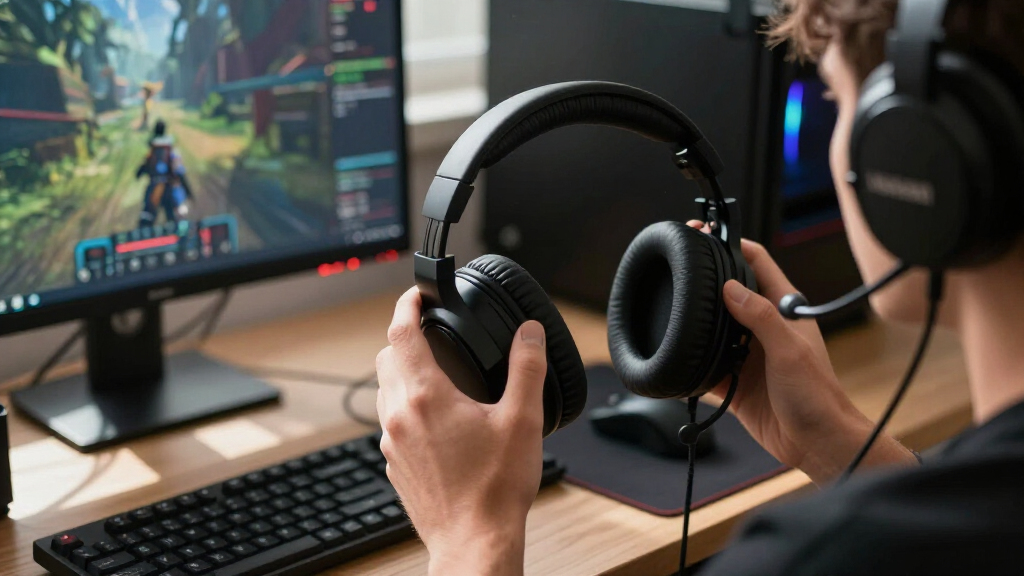
The real choice is less like picking a winner and more like choosing the right window for a room. Open-back headphones use vented earcups that allow sound and air to pass, giving music and game effects a more open character. Closed-back headphones seal the rear of each driver, trapping more sound inside while pushing keyboards, televisions, and conversations farther into the background.[1]
You will learn how both designs handle footsteps, explosions, voice chat, heat, wireless connections, and spatial audio. More useful still, you will see how to match those traits to your actual desk: perhaps a silent home office at midnight, a shared living room beside a television, or a streaming setup with a sensitive condenser microphone. The goal is not to crown one design, but to help you choose the one that removes the biggest problem from your gaming setup.
Choose open-back headphones when you play in a quiet private room and value cooler earcups, natural voice monitoring, and a spacious presentation.
Choose closed-back headphones when outside noise, privacy, microphone bleed, travel, or stronger bass creates the bigger practical need.
Judge competitive performance by imaging accuracy and controlled bass, because soundstage width alone cannot tell you where a footstep will land.
Compare stereo and spatial processing in the same repeatable game scene; keep the mode that produces stable positions and believable distances.
Test headphones with your own glasses, microphone, source device, and longest normal session before deciding whether the complete setup works.
Open-Back vs Closed-Back Headphones Explained for Gaming
The best design is the one that removes your setup’s biggest problem. Open-back headphones usually feel wider, airier, and cooler. Closed-back headphones isolate better, leak less, and often hit harder. For competitive play, however, precise imaging and controlled bass matter more than cup design alone.
Quiet private room
Open-back is often the natural fit.
Shared or noisy room
Closed-back usually solves more problems.
Competitive priority
Judge imaging before soundstage width.
Airier presentation and less confined environmental sound.
Better passive isolation from televisions, fans, and voices.
Stable placement matters more than a huge virtual stage.
Room noise, glasses, microphone, source, and session length.
Airflow changes the entire experience
Open cups let sound and air pass through the housing. Closed cups seal the rear of each driver. That single construction choice influences isolation, leakage, heat, bass impact, and perceived space.
Open-Back
A window into a quiet room: spacious, breathable, and naturally connected to your surroundings.
- + Wider, airier presentation
- + Lower heat buildup in long sessions
- + More natural self-monitoring in voice chat
- − Room noise can mask subtle game cues
- − Audible leakage may reach people or microphones
Closed-Back
A controlled gaming space: private, focused, and less vulnerable to real-world interruptions.
- + Moderate to strong passive isolation
- + Lower leakage in shared spaces
- + Often stronger perceived bass impact
- − More heat and pressure may develop
- − The presentation can feel more intimate
| Gaming factor | Open-back | Closed-back |
|---|---|---|
| Soundstage | ✓Usually wider and more spacious | ~Usually closer and more intimate |
| Positional cues | ✓Often excellent with good tuning | ✓Can be highly precise with good tuning |
| Noise isolation | ✗Very little | ✓Moderate to strong |
| Sound leakage | ✗High | ✓Usually low |
| Bass character | ~Often lighter and more natural | ✓Often weightier and more forceful |
| Heat buildup | ✓Generally lower | ~Generally higher |
| Best environment | ✓Quiet, private room | ✓Shared, noisy, or mobile setup |
✓ Strong fit ~ Context-dependent ✗ Practical limitation
A wider stage can still miss the target
Soundstage describes the apparent size of the virtual world. Imaging describes how precisely a sound can be located inside it. A giant stage is not useful when positions blur between front-left and directly left.
Soundstage = size
How broad, deep, and open the game world appears. Open-back headphones often lead here, making forests, arenas, and distant effects feel less confined.
Imaging = precision
How clearly you can point to a footstep, reload, or moving opponent. Accurate imaging can outperform sheer width in competitive matches.
Typical design tendencies
Key insight
Wide soundstage does not equal accurate positioning. A well-tuned closed-back model can place footsteps more reliably than an open-back model with vague imaging.
Choose around the game and the room
Neither construction owns a genre. Tuning, imaging, comfort, and background noise can shift the result. Start with the practical problem you encounter most often.
Ranked shooters
Best in a quiet room when accurate imaging, clean upper-frequency cues, restrained bass, and long-session comfort come first.
Shared spaces
Isolation pushes televisions, conversations, fans, and keyboards behind the game while reducing disturbance for people nearby.
Exploration worlds
An airy presentation can make forests, caves, ruined cities, and distant environmental effects feel larger than the room.
Action and horror
Stronger impact and isolation add physical weight to engines and explosions while making close whispers more immediate.
Test the complete setup
Use the same scene, volume, source, and listening position. Compare stereo with spatial processing separately. Keep the mode that produces stable movement, believable distance, and the fewest practical distractions.
Identify fans, voices, television, traffic, and nearby listeners.
Replay a fixed training range or rotating sound source.
Check left-to-right, front-to-back, vertical, and distance cues.
Compare stereo and spatial modes at matched volume.
Test heat, clamp, glasses, microphone bleed, and fatigue.
Choose the weakness you can live with.
Select open-back when the room is quiet and you value ventilation, natural voice monitoring, and spacious presentation. Select closed-back when noise, privacy, microphone bleed, travel, or stronger bass creates the larger need.
See the Differences That Will Affect Every Gaming Session
Open-back vs closed-back headphones for gaming differ mainly in airflow, isolation, and leakage. Open cups let air and sound move through the housing, while closed cups contain more of the driver’s output. That physical choice shapes space, bass impact, heat, privacy, and how much of your room reaches your ears.
| What you notice | Open-back headphones | Closed-back headphones |
|---|---|---|
| Soundstage | Usually wider and airier | Usually closer and more intimate |
| Positional cues | Often spacious, with strong separation | Can be highly precise with good tuning |
| Outside noise | Very little isolation | Moderate to strong passive isolation |
| Sound leakage | High enough for nearby people to hear | Usually low |
| Bass character | Often lighter and more natural | Often weightier and more forceful |
| Heat | Generally lower | Generally higher |
| Best setting | Quiet, private room | Noisy or shared space |
Imagine playing a rainy match while a desk fan rattles beside you. With open cups, that dry mechanical buzz may sit beside the rain and cover the soft scrape of an approaching player. A closed pair can push the fan backward, giving you more usable detail even if its soundstage feels smaller.
Now move to a silent bedroom after midnight. The open design can spread wind, distant gunfire, and rustling trees beyond the earcups, almost like the walls have moved outward. The tradeoff is obvious when someone beside you can hear recognizable dialogue and menu music, while a closed design keeps far more of that sound private.[1]
Choose the weakness you can live with: open-back leakage and poor isolation, or closed-back heat and a potentially tighter presentation.
As an affiliate, we earn on qualifying purchases.
Find Footsteps by Separating Soundstage From Imaging
Open-back vs closed-back headphones for gaming is not the same contest as wide versus narrow sound. Soundstage describes the apparent size and depth of the game world, while imaging describes how precisely you can point toward a sound inside it. Competitive success depends more heavily on the second trait.[2]
Think of soundstage as the size of a dartboard and imaging as your ability to see each numbered segment. A giant board does not help when its markings look smeared. In the same way, an open headphone can throw gunfire far beyond your head yet leave you guessing whether a reload came from ten o’clock or nine o’clock.
A carefully tuned closed-back pair can produce a smaller stage while drawing positions with crisp edges. During a corridor fight, you may hear one opponent at the doorway, another behind a crate, and a third climbing metal stairs. That separation and placement gives you useful information, even when the whole scene feels close.
Front-to-back and vertical cues also rely on the game’s audio engine, its headphone mix, the recording, and the shape of your ears. One player may hear an overhead target instantly through a spatial mode, while another hears the same target as strangely distant. Your hearing and head shape act like a personal filter, so another player’s favorite setup is not a guaranteed match.
Test imaging with a repeatable scene instead of wandering through a noisy match. Stand near a rotating sound source, ask a friend to move around your character, or replay a training range with fixed targets. Listen for stable positions, clean distance changes, and an unbroken movement path; those traits tell you more than sheer width.
As an affiliate, we earn on qualifying purchases.
Choose the Sound That Fits Competitive or Story-Driven Games
Open-back vs closed-back headphones for gaming changes meaning when you switch genres. Competitive games reward precise imaging, controlled bass, and clear upper-frequency cues, while story-driven games often benefit from deep bass, strong dynamics, and freedom from outside distractions. Either cup design can serve either style when the tuning fits.
In a tactical shooter, oversized bass can behave like thick fog. A grenade’s low roar lingers while a quiet reload or cloth-covered footstep disappears behind it. An open pair with restrained bass often keeps those details separated, but a balanced closed pair can do the same while blocking the clatter of your mechanical keyboard.
- For ranked shooters: favor stable left-to-right placement, clear front-to-back movement, moderate bass, and comfort that survives several matches.
- For racing and action games: stronger low-frequency impact can add weight to engines, crashes, and heavy machinery.
- For exploration games: a spacious presentation can make caves, forests, and ruined cities feel larger than the room around you.
- For horror games: isolation can make a whisper behind you feel uncomfortably close, especially when the real room falls silent.
Suppose you spend Tuesday night playing a competitive shooter and Saturday afternoon roaming a vast role-playing world. You do not necessarily need two headphones. A model with reliable imaging and moderate bass can handle both, while a gentle parametric EQ cut can tame a booming low end during ranked play.
Open-back headphones for competitive play work best when your room stays quiet. Closed-back headphones for cinematic play often make explosions strike with more physical punch, yet aggressive bass can muddy speech. Treat these as common tendencies rather than fixed laws; driver design, ear pads, tuning, and fit can outweigh the label printed on the box.
gaming headphones with accurate imaging
As an affiliate, we earn on qualifying purchases.
As an affiliate, we earn on qualifying purchases.
Keep Room Noise, Heat, and Microphone Bleed Under Control
Your room and microphone can decide this purchase before sound quality enters the discussion. Open cups suit a quiet private space, while closed cups make more sense near conversations, traffic, televisions, or humming appliances. Streamers also gain an easier path to clean microphone audio when less game sound escapes.
Imagine streaming at night with an open headphone turned up beside a sensitive desktop microphone. Menu music leaks from the cups, reaches the microphone half a meter away, and returns to viewers as a thin metallic echo. Moving a cardioid dynamic microphone close to your mouth, lowering its gain, and reducing playback volume can cut that bleed.
Closed cups usually simplify recording, but they create their own odd behavior: your voice sounds muffled inside your head, so you begin speaking louder without noticing. Microphone sidetone feeds a little of your voice back into the headphones and helps you settle into a natural speaking level. It is a small feature with a large effect during a three-hour team session.
Heat depends on more than the openings behind the drivers. A light closed model with breathable fabric pads may feel cooler than a heavy open model with dense velour, fierce clamp, and shallow cups. Check weight, clamp force, pad material, cup depth, glasses pressure, and replacement-part availability, because a sore jaw will end a session faster than imperfect bass.
Privacy matters around younger players too. Headphone design does not change a game’s ESRB, PEGI, or other regional age rating, and open cups may let nearby people hear mature dialogue while allowing outside speech into the player’s ears. Parents and guardians should still check the specific game’s current rating, online-interaction notices, chat controls, and platform safety settings.
As an affiliate, we earn on qualifying purchases.
Get Spatial Audio and Wireless Features Without Buying the Hype
Stereo headphones already reproduce directional game audio when the game encodes those cues well. Virtual surround and object-based spatial systems process the signal with head-related filters to imitate sound beside, behind, or above you. Both open and closed headphones can use that processing; open cups do not create true surround by themselves.
A spatial mode can help you track an aircraft sweeping overhead, yet it may also make dialogue sound hollow or stretch footsteps into the wrong distance. Compare the game’s headphone mode, plain stereo, and one spatial option in the same training area. Keep the setting that gives you faster, repeatable placement, not the one with the largest echo.
Connectivity adds another choice. Traditional open-back headphones use cables more often because designers build many of them for stationary listening, while closed gaming headsets offer a much larger wireless selection. Modern 2.4 GHz wireless connections can work well for games, but ordinary Bluetooth may add noticeable delay unless every device in the chain supports a suitable low-latency method.
You can spot that delay in a rhythm game: the drum lands on screen, then the hit reaches your ears a fraction later, like a badly dubbed film. Wired headphones remove battery anxiety and usually connect to more devices, though a demanding high-impedance or low-sensitivity model may need more power than a controller or laptop jack supplies. A DAC or amplifier only helps when your source lacks clean volume; it does not automatically sharpen positional accuracy.
Platform labels need context. Steam Deck Verified status can change after game or software updates, and that badge evaluates a game’s Deck experience rather than the positional quality of a headphone. Console spatial features, USB support, chat mixing, and wireless compatibility can also vary by platform and system version, so check current official requirements before buying hardware for one specific device.
Make the Right Choice With a Five-Step Reality Check
The fastest buying method is to start with your noisiest real session, then judge imaging, comfort, microphone behavior, and connection needs in that setting. Specifications rarely reveal how accurately a headphone places footsteps or how hard its headband presses after an hour. Your desk provides better clues than a feature sheet.
- Listen to your room. Sit in silence, then notice fans, traffic, keyboards, televisions, and conversations. If those sounds regularly cover quiet game details, begin with closed-back options.
- Check who shares the space. If another person studies, sleeps, or watches television nearby, open-back leakage may become the deciding problem.
- Match the tuning to your games. Favor controlled bass and precise imaging for competitive play; choose more low-end weight if engines, explosions, and musical impact matter more.
- Test the full-session fit. Wear the headphones with your glasses for at least an hour when a return policy or demonstration allows it. Watch for hot pads, jaw pressure, headband pain, and ears touching the driver cover.
- Test your actual signal chain. Use your PC, console controller, microphone, chat software, and preferred spatial setting. Check volume, latency, leakage, sidetone, and whether teammates hear your game audio.
For example, a player in a silent office who competes in shooters and uses a close dynamic microphone has a strong case for open cups. The same player beside a loud gaming laptop, a television, and a sleeping partner may perform better with closed cups because isolation preserves subtle cues that openness would expose to the room.
Do not let the gaming label make the decision for you. A traditional headphone may offer excellent sound and replaceable cables, while a gaming headset may add a useful boom microphone, chat balance, low-latency wireless, and console controls. Compare the complete setup rather than one specification, including pad cost, cable availability, battery replacement, and software support.
Semi-open models sit between the two categories, but they are not a perfect halfway point. Their vents may widen the presentation while still leaking recognizable sound, and their isolation often remains limited. Think of semi-open construction like a door left partly ajar: less exposed than a wide-open doorway, but far from sealed.
Source notes: [1] skeldrift.com PC Gaming Hardware comparison data on airflow, isolation, leakage, bass, and comfort. [2] skeldrift.com gaming-audio guidance distinguishing soundstage from imaging and describing the role of game engines, headphone tuning, and individual hearing.
Frequently Asked Questions
Are open-back headphones always better for FPS games?
No, open-back headphones are not automatically better for FPS games. Their spacious presentation can separate sounds well, but reliable imaging, controlled bass, and a quiet room matter more. A precise closed pair can beat a vague open pair when you need to place footsteps and reloads quickly.
Can people nearby hear open-back headphones?
Yes, people in the same room can often hear recognizable audio from open-back headphones, especially at higher volume. Dialogue and music may sound like a tiny radio playing across the desk. Leakage varies by model, fit, and level, but open cups are a poor choice when privacy or quiet sharing matters.
Do closed-back headphones completely block outside noise?
Most closed-back headphones reduce noise rather than eliminate it. Their passive seal handles voices and higher-frequency clatter better than deep engine rumble or building vibration. You need a model with effective active noise cancellation if low-frequency noise remains a major problem.
Will open-back headphones leak game audio into my microphone?
Open-back headphones can leak into a microphone when playback is loud, microphone gain is high, or the microphone sits far from your mouth. A close cardioid dynamic microphone, lower gain, sensible listening volume, and noise suppression reduce the risk. Record a quiet test clip and listen for menu music or teammate voices behind your speech.
Is virtual 7.1 surround necessary for gaming?
Virtual 7.1 is not required for accurate game audio. Many games provide strong directional cues through stereo or a dedicated headphone mix, while virtual processing can change tone and distance. Test both modes in one familiar scene and choose the setting with clearer, more stable placement.
Do open-back headphones have weak bass?
Open-back headphones often have less bass weight, but they do not automatically lack deep or accurate low frequencies. Closed cups commonly make explosions and engines feel more forceful because they retain pressure around the ear. Model tuning matters more than the category, and a clean low end can preserve footsteps, dialogue, and musical detail.
Conclusion
Match the headphone to the room before matching it to the game. A wide open-back presentation cannot rescue a footstep buried under traffic and television noise, while strong closed-back isolation offers little benefit if heat and clamp make you pull the headset off after forty minutes. Start with your environment, then compare imaging, tuning, comfort, microphone leakage, and connection support.
If your room stays quiet and private, let open cups give the game space to breathe. If life keeps rumbling around your desk, close the cups and keep that noise outside. The right choice is the one that lets a distant footstep, a whispered line, or the growl of an engine arrive cleanly and exactly when it should.
Halloween Picks
halloween
As an affiliate, we earn on qualifying purchases.