Complete the kit




Play games on Amazon Luna for your game nights, included with Prime
- A rotating selection of games, no download needed
- Play on TV, laptop or phone
- Fast, free delivery for your gear, too
Key Takeaways
- Dedicated peripherals like the Logitech G502 outperform bundled kits in precision and durability, making them better for competitive players.
- RGB accessories are no longer just for show; products like the Govee Light Bars enhance immersion through real-time audio and game sync.
- Desk organization is a critical but often overlooked factor; stands and holders like the UPERGO Walnut Stand reduce clutter and improve cable management.
- Macro pads such as the Razer Tartarus V2 offer a tangible advantage in MMOs and strategy games by reducing finger strain and key binding complexity.
- Wireless charging integration in accessories like the Gimars Mouse Pad adds convenience but may introduce latency or heat issues for competitive gamers.
| Orzly Hornet RX-250 Wired Gaming Bundle |  | Best Budget Starter Kit | Bundle Contents: Keyboard, Mouse, Headset, Mouse Pad | Keyboard Type: Full-size Membrane | Mouse DPI Levels: 1200, 1600, 2400, 3200 | VIEW LATEST PRICE | See Our Full Breakdown |
| Cable Guys Call of Duty Monkeybomb Holder |  | Best Collector’s Desk Accessory | License: Call of Duty (Activision) | Material: Heavy-duty PVC | Height: 8.5 inches | VIEW LATEST PRICE | See Our Full Breakdown |
| VELENTI Gamer Chair Phone Stand |  | Best Eco-Friendly Desk Organizer | Material: Biodegradable Materials | Max Device Height: 19 cm | Style: Gamer Chair | VIEW LATEST PRICE | See Our Full Breakdown |
| VSD M18 Macro Pad Programmable Keypad |  | Best Productivity Enhancement | Key Count: 18 (15 LCD + 3 Physical) | Connectivity: USB-C Wired | Display Support: JPG, PNG, GIF, Animations | VIEW LATEST PRICE | See Our Full Breakdown |
| DR CATCH RGB LED Gaming Mouse Pad |  | Best Large Surface with Lighting | Dimensions: 31.5 x 12 x 0.3 inches | Lighting Modes: 14 Customizable RGB Modes | Power Source: USB | VIEW LATEST PRICE | See Our Full Breakdown |
| Govee RGBIC Gaming Light Bars H6047 with Smart Controller |  | Best for Immersive Setup Integration | Model: H6047 | Light Source: LED | Power Source: Corded Electric | VIEW LATEST PRICE | See Our Full Breakdown |
| Razer Tartarus V2 Left-Handed Gaming Keypad |  | Best for Left-Handed MMO Players | Brand: Razer | Model: Tartarus V2 | Switch Type: Mecha-Membrane | VIEW LATEST PRICE | See Our Full Breakdown |
| KDD RGB Headset Stand with Rotating Headphone Holder and Detachable Controller Hook |  | Best Budget Desk Organizer | Brand: KDD | Model: KDD-728B | Material: Plastic | VIEW LATEST PRICE | See Our Full Breakdown |
| Gimars RGB Gaming Mouse Pad with 15W Qi Wireless Charging |  | Best for Wireless Charging Integration | Brand: Gimars | Model: G-RGB-W03 | Dimensions: 800 × 300 × 4 mm | VIEW LATEST PRICE | See Our Full Breakdown |
| IC+RGBW USB-Powered LED Light Bars with App and Remote Control, 2-Pack |  | Best Versatile Ambient Lighting | Quantity: 2 light bars | Lighting: IC+RGB and white LED | Power source: 5 V DC via USB | VIEW LATEST PRICE | See Our Full Breakdown |
| Logitech G502 HERO Wired Gaming Mouse |  | Best Precision Mouse for FPS Players | Sensor: HERO 25K Optical | Max DPI: 25,600 | Buttons: 11 Programmable | VIEW LATEST PRICE | See Our Full Breakdown |
| BladeHawks RGB Extended Gaming Mouse Pad | 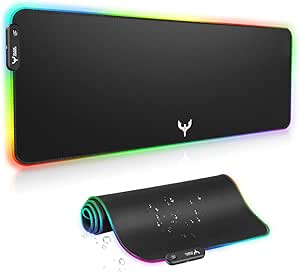 | Best Large Surface for Multi-Peripheral Setups | Dimensions: 31.5 x 12 inches | Thickness: 4 mm | Material: Micro-textured cloth; rubber base | VIEW LATEST PRICE | See Our Full Breakdown |
| KontrolFreek Precision Rings for Gaming Controllers |  | Best Affordable Aiming Upgrade | Quantity: 6 rings | Resistance Levels: Soft, medium, hard | Material: Flexible rubber | VIEW LATEST PRICE | See Our Full Breakdown |
| UPERGO Walnut Headphone Stand with Controller Holder |  | Best Premium Desk Organization Solution | Material: Solid walnut wood | Dimensions: 4.72 x 8.27 x 6.3 inches | Compatibility: Headphones, PS5, Xbox, Switch controllers | VIEW LATEST PRICE | See Our Full Breakdown |
| gaming accessorie | Material |
|---|---|
| Orzly Hornet RX-250 Wired Gami | — |
| Cable Guys Call of Duty Monkey | Heavy-duty PVC |
| VELENTI Gamer Chair Phone Stan | Biodegradable Materials |
| VSD M18 Macro Pad Programmable | — |
| DR CATCH RGB LED Gaming Mouse | — |
| Govee RGBIC Gaming Light Bars | Plastic |
| Razer Tartarus V2 Left-Handed | — |
| KDD RGB Headset Stand with Rot | Plastic |
| Gimars RGB Gaming Mouse Pad wi | — |
| IC+RGBW USB-Powered LED Light | — |
| Logitech G502 HERO Wired Gamin | — |
| BladeHawks RGB Extended Gaming | Micro-textured cloth; rubber base |
| KontrolFreek Precision Rings f | Flexible rubber |
| UPERGO Walnut Headphone Stand | Solid walnut wood |
More Details on Our Top Picks
Orzly Hornet RX-250 Wired Gaming Bundle
This bundle stands out as the most practical entry point for gamers who want to replace a full setup without breaking the bank. Unlike the VSD M18 Macro Pad, which adds niche productivity features, the Orzly kit provides the essential trifecta: keyboard, mouse, and headset. The membrane keyboard offers a quieter typing experience than mechanical alternatives, though it lacks the tactile feedback enthusiasts crave. The ambidextrous mouse is a rare find in budget bundles, catering equally to left and right-handed users. However, the reliance on a wired connection limits cable management flexibility compared to wireless options. This setup is ideal for those who prioritize immediate functionality over long-term durability or premium aesthetics.
Pros:- Includes four essential peripherals in one package
- Ambidextrous mouse design suits both left and right-handed users
- Spill-resistant keyboard design protects against minor accidents
- Broad compatibility with consoles and PC platforms
Cons:- Membrane switches lack the tactile response of mechanical keys
- All components are wired, limiting desk organization flexibility
- Headset audio quality is basic compared to dedicated gaming headsets
Best for: Students or first-time PC builders who need a complete, affordable peripheral set for immediate use.
Not ideal for: Competitive FPS players who require high polling rates and mechanical switches for precise input.
- Bundle Contents:Keyboard, Mouse, Headset, Mouse Pad
- Keyboard Type:Full-size Membrane
- Mouse DPI Levels:1200, 1600, 2400, 3200
- Headset Type:Stereo with Foldable Mic
- Connectivity:Wired
- Compatibility:PC, PS5, Xbox, Switch
Our verdict“This kit is the logical choice for beginners who need a functional, all-in-one solution without investing in individual high-end components.”
Cable Guys Call of Duty Monkeybomb Holder
This item redefines desk organization by merging utility with fandom. While the DR CATCH RGB Mouse Pad focuses on performance tracking, the Monkeybomb holder addresses the clutter problem of loose controllers and phones. The weighted PVC base ensures it stays put during intense gaming sessions, a significant advantage over lighter, flimsy stands. It serves as a conversation piece for streamers, adding visual interest to a background. However, the fixed geometry means it cannot adjust to devices significantly larger than standard controllers. This is not a performance upgrade, but a quality-of-life improvement for those who value their desk’s aesthetic as much as its function.
Pros:- Officially licensed design adds authenticity to a gaming setup
- Weighted base prevents tipping during active use
- Holds multiple device types including phones and controllers
- Compact footprint saves valuable desk real estate
Cons:- Plastic construction feels less premium than metal alternatives
- Fixed design lacks adjustability for different device sizes
- Specific branding may clash with non-gaming environments
Best for: Call of Duty fans and streamers who want to display collectibles while keeping controllers off the desk.
Not ideal for: Gamers who use oversized accessories or prefer minimalist, license-free desk setups.
- License:Call of Duty (Activision)
- Material:Heavy-duty PVC
- Height:8.5 inches
- Weight:1.3 pounds
- Mounting Type:Tabletop with Weighted Base
- Compatible Devices:PS5, Xbox, Smartphones
Our verdict“This holder is best for fans who want to keep their gear organized while showcasing their loyalty to the Call of Duty franchise.”
VELENTI Gamer Chair Phone Stand
This stand offers a whimsical alternative to standard tech accessories. Compared to the functional but plain Cable Guys Monkeybomb, the VELENTI stand focuses on sustainability and playful design. It holds smartphones upright, allowing users to reference guides or chat while gaming. The biodegradable materials appeal to environmentally conscious buyers, a niche rarely served in gaming hardware. However, the clip mechanism imposes a strict height limit of 19 cm, excluding larger tablets or phones with thick cases. It is a lightweight, portable solution for those who need a simple prop to hold a second screen, rather than a robust mounting system.
Pros:- Made from biodegradable materials for sustainable consumption
- Unique gaming chair design adds personality to a workspace
- Lightweight and portable for easy transport
- Keeps devices upright and within eye level
Cons:- Strict 19 cm height limit restricts device compatibility
- Clip fastening may struggle with bulky phone cases
- Lightweight build may slide on smooth surfaces
Best for: Eco-conscious gamers who use their phone as a secondary display and prefer playful, sustainable desk items.
Not ideal for: Users with large smartphones or tablets, or those needing a heavy-duty stand for frequent adjustments.
- Material:Biodegradable Materials
- Max Device Height:19 cm
- Style:Gamer Chair
- Fastening Type:Clip
- Item Weight:0.08 kg
- Mounting Type:Tabletop
Our verdict“This stand is a charming, sustainable choice for users who want to keep their phone accessible without contributing to plastic waste.”
VSD M18 Macro Pad Programmable Keypad
The VSD M18 bridges the gap between gaming and content creation. Unlike the Orzly Hornet Bundle, which simplifies inputs, the M18 expands them with 15 LCD keys that display dynamic icons. This visual feedback is critical for streamers managing complex OBS scenes or editors using Adobe shortcuts. The USB-C connectivity ensures fast data transfer, though it lacks the wireless freedom of some modern peripherals. The built-in utility plugins (clock, weather) add desktop value beyond gaming. While it requires software configuration to unlock its potential, the ability to create multi-step macros makes it a powerful tool for efficiency-minded users who find standard keyboards insufficient for their workflow.
Pros:- 15 LCD keys provide clear visual identification of functions
- Supports complex multi-step macros for automated tasks
- Broad software integration with OBS, Adobe, and Office
- Ambidextrous design suits left and right-handed setups
Cons:- Requires software installation for full customization
- No native Linux support limits cross-platform flexibility
- Wired-only connection restricts placement options
Best for: Streamers, video editors, and power users who need customizable shortcuts and visual feedback for complex workflows.
Not ideal for: Casual gamers who prefer plug-and-play simplicity and do not use productivity software.
- Key Count:18 (15 LCD + 3 Physical)
- Connectivity:USB-C Wired
- Display Support:JPG, PNG, GIF, Animations
- Lighting:RGB Surround Ring
- Compatibility:Windows 11+, macOS 11.0+
- Hand Orientation:Ambidextrous
Our verdict“This keypad is an essential upgrade for creators who need to streamline repetitive tasks and visualize their hotkeys.”
DR CATCH RGB LED Gaming Mouse Pad
This extended mat dominates the desk with its 31.5 x 12-inch surface, offering ample room for low-DPI mouse movements. Compared to the Govee RGBIC Light Bars, which illuminate the wall behind the monitor, the DR CATCH pad integrates lighting directly into the play area. The microfiber surface balances speed and control, suitable for most game genres. A key advantage is the power-off memory function, which saves your preferred lighting mode, avoiding the need to reconfigure settings daily. However, the USB connection consumes a port, and the bright lights may distract in dark rooms. It is a solid choice for those who want their aesthetic to extend to the immediate workspace.
Pros:- Extended size accommodates both keyboard and wide mouse arcs
- 14 RGB modes with brightness control and memory function
- Waterproof microfiber surface resists spills and is easy to clean
- Non-slip rubber base ensures stability during fast movements
Cons:- Requires a dedicated USB port for power
- Lighting can be overly bright in dark environments
- Thick rubber base may feel bulky under the wrist
Best for: Gamers who use low mouse sensitivity and want integrated desk lighting without separate light bars.
Not ideal for: Users with limited USB ports or those who prefer a dark, distraction-free gaming environment.
- Dimensions:31.5 x 12 x 0.3 inches
- Lighting Modes:14 Customizable RGB Modes
- Power Source:USB
- Surface Material:Microfiber
- Base Material:Non-slip Rubber
- Special Features:Waterproof, Power-off Memory
Our verdict“This pad is ideal for players who want to combine mouse tracking performance with ambient desk lighting in one accessory.”
Govee RGBIC Gaming Light Bars H6047 with Smart Controller
This option stands out for its seamless Razer Synapse integration, allowing lighting to sync directly with in-game actions. Unlike the IC+RGBW LED Light Bars, which operate independently, these bars react to audio and game states, creating a cohesive visual environment. The RGBIC technology enables dynamic multi-color effects rather than static single-color washes, adding depth to your desk. However, the reliance on specific software means setup is more complex than plug-and-play alternatives. While the physical dial offers quick manual control, the need for both the Govee Home App and Razer Synapse can feel redundant for users who prefer minimal software bloat. It is a powerful tool for immersion, but less ideal for those wanting simple, standalone ambiance.
Pros:- Syncs lighting effects with Razer Synapse 3 for game-aware ambiance
- Audio visualization reacts to sound from speakers or headphones
- Physical smart dial provides quick access to modes without opening an app
Cons:- Requires both Govee Home and Razer Synapse software for full functionality
- Lacks screen color picking for ambient light matching
- Not water-resistant, restricting placement to dry indoor areas
Best for: Razer ecosystem users who want lighting to react to gameplay and audio in real-time
Not ideal for: Minimalists who dislike installing multiple companion apps for hardware control
- Model:H6047
- Light Source:LED
- Power Source:Corded Electric
- Wattage:3 watts
- Connectivity:Wi-Fi, Bluetooth
- Control Methods:App, Touch, Voice, Remote
- Compatibility:Razer Synapse 3, Alexa, Google Assistant
- Material:Plastic
Our verdict“Choose this if you are already in the Razer ecosystem and want lighting that reacts to your gameplay.”
Razer Tartarus V2 Left-Handed Gaming Keypad
Designed exclusively for the left hand, this keypad frees up the right hand for precision mouse work, a distinct advantage over standard keyboards. The 32 programmable Mecha-Membrane keys offer a tactile feel that balances mechanical crispness with membrane comfort. Compared to the VSD M18 Macro Pad, the Tartarus V2 includes an 8-way directional thumbpad, making it superior for movement-intensive genres like MMOs or MOBAs. The adjustable palm rest supports long sessions, reducing wrist strain. However, its left-handed-only design makes it unusable for the majority of gamers. The wired USB-A connection also limits desk flexibility, requiring careful cable management compared to wireless peripherals.
Pros:- 32 fully programmable keys allow for complex macro assignments
- 8-way directional thumbpad replaces keyboard WASD for natural movement
- Adjustable palm rest provides ergonomic support during extended use
Cons:- Designed solely for left-handed users, excluding right-handed players
- Wired USB-A connection restricts placement options
- Requires Razer Synapse software for complete configuration
Best for: Left-handed gamers playing MMOs or MOBAs who need dedicated movement and ability controls
Not ideal for: Right-handed players or those with limited desk space who cannot accommodate a separate left-side device
- Brand:Razer
- Model:Tartarus V2
- Switch Type:Mecha-Membrane
- Number of Keys:32
- Connectivity:USB-A
- Backlighting:Razer Chroma RGB (16.8 million colors)
- Hand Orientation:Left
- Software:Razer Synapse 3 (PC) / Razer Synapse 2 (Mac)
Our verdict“This keypad is the definitive choice for left-handed players seeking ergonomic movement controls.”
KDD RGB Headset Stand with Rotating Headphone Holder and Detachable Controller Hook
This stand offers a practical solution for cluttered desks by combining headset and controller storage in one unit. Unlike the UPERGO Walnut Headphone Stand, which focuses on aesthetic wood grain, the KDD prioritizes utility with a detachable controller hook and cable organizers. The 360-degree rotating holder allows easy access without moving the base. Assembly is simple, requiring no drivers, which appeals to users who want functional tech without software complications. The plastic construction feels less premium than wooden or aluminum alternatives, but the rubber base pads ensure stability. It is a straightforward, no-frills organizer that keeps peripherals off the desk surface efficiently.
Pros:- Holds both a headset and up to two controllers simultaneously
- Detachable hook allows flexible controller storage options
- Rubber base pads prevent slipping and protect desk surfaces
Cons:- Plastic construction lacks the premium feel of wood or metal stands
- RGB lighting requires a continuous power source
Best for: Console and PC gamers who need to store multiple controllers and headsets in a small footprint
Not ideal for: Users seeking high-end materials like wood or metal for their desk aesthetic
- Brand:KDD
- Model:KDD-728B
- Material:Plastic
- Weight:0.53 kg
- Lighting Modes:9 RGB modes
- Headphone Holder:360-degree rotation
- Capacity:1 headset and 2 controllers, or up to 4 controllers
- Compatibility:Windows XP/7/8/10, Linux, Mac
Our verdict“A functional, affordable organizer for gamers who prioritize desk tidiness over material luxury.”
Gimars RGB Gaming Mouse Pad with 15W Qi Wireless Charging
This extended desk mat differentiates itself by integrating a 15W Qi wireless charging platform, reducing cable clutter for compatible devices. While the DR CATCH RGB LED Gaming Mouse Pad offers similar size and lighting, the Gimars adds functional utility with its charging zone. The micro-textured, water-resistant surface ensures smooth mouse tracking and easy cleanup from spills. The non-slip natural rubber base keeps the mat firmly in place during intense gaming sessions. However, the 4 mm profile may feel bulky under the wrist compared to thinner mats. Additionally, the fast charging feature requires a separate compatible power adapter, which is not included, adding to the total cost of ownership.
Pros:- Built-in 15W Qi wireless charging pad for compatible devices
- Large 800x300mm surface accommodates keyboard and mouse
- Water-resistant fabric surface is easy to clean and durable
Cons:- Fast wireless charging requires a separate power adapter (not included)
- 4 mm thickness may feel too high for some users’ wrists
Best for: Gamers who use wireless charging phones or accessories and want to reduce desk cables
Not ideal for: Users who prefer ultra-thin mouse pads for a low-profile wrist feel
- Brand:Gimars
- Model:G-RGB-W03
- Dimensions:800 × 300 × 4 mm
- Wireless charging:15W Qi
- Lighting modes:10 (7 static, 3 dynamic)
- Surface:Micro-textured, water-resistant fabric
- Base:Natural rubber, non-slip
- Interface:USB-C
Our verdict“Ideal for tech-savvy gamers who value integrated wireless charging over a minimalist desk profile.”
IC+RGBW USB-Powered LED Light Bars with App and Remote Control, 2-Pack
Unlike the Govee RGBIC Gaming Light Bars, which focus on game sync, this two-pack prioritizes versatile illumination with both RGB and white lighting modes. The inclusion of white LEDs makes these bars useful for general room lighting, not just gaming effects. Control is flexible, offering app, remote, and inline button options, which simplifies operation for non-tech-savvy users. The music syncing feature adds dynamic visuals for media consumption. However, the lack of advanced gaming software integration means it cannot react to in-game events. The USB power requirement is convenient for connecting to TVs or PCs, but the plastic build feels less durable than premium metal fixtures.
Pros:- Combines RGB effects with white light for functional illumination
- Includes a remote control for easy operation without a phone
- USB power allows connection to TVs, PCs, or power banks
Cons:- Lacks advanced gaming software integration for game-synced effects
- Plastic housing feels less premium than metal alternatives
Best for: Users who want a single lighting solution for both gaming ambiance and general room illumination
Not ideal for: Competitive gamers who need lighting that reacts specifically to game actions or audio
- Quantity:2 light bars
- Lighting:IC+RGB and white LED
- Power source:5 V DC via USB
- Cord length:60 inches
- Controls:App, remote control, and inline button
- Connectivity:Bluetooth
- Lighting modes:64+ patterns
- Colors:16 million
Our verdict“A flexible lighting option for those who need both colorful gaming effects and practical white light.”
Logitech G502 HERO Wired Gaming Mouse
The Logitech G502 HERO remains a benchmark for competitive shooters due to its HERO 25K sensor, which delivers flawless tracking without acceleration or smoothing. While wireless options like the Orzly Hornet RX-250 offer freedom of movement, this wired model provides a consistent, lag-free connection ideal for high-stakes gaming. The adjustable weight system allows players to fine-tune balance, a feature rarely found in budget peripherals. However, the right-handed design limits accessibility, and the 1-meter cable can feel restrictive on smaller desks compared to wireless alternatives. This mouse is not about flashy gimmicks; it is about raw input accuracy and reliability. If you prioritize sensor performance over cable management, this stands out as a serious tool for improvement.
Pros:- HERO 25K sensor offers industry-leading precision with no smoothing
- Adjustable weight system allows for personalized feel and balance
- 11 programmable buttons provide extensive macro control
- Dual-mode scroll wheel switches between free-spin and tactile modes
Cons:- Wired connection restricts movement compared to wireless rivals
- Ergonomics are strictly right-handed, excluding left-handed users
- Full RGB customization requires installing additional Logitech software
Best for: Competitive FPS players who need pixel-perfect tracking and customizable weight balance.
Not ideal for: Left-handed gamers or those who prefer the freedom of wireless peripherals.
- Sensor:HERO 25K Optical
- Max DPI:25,600
- Buttons:11 Programmable
- Connectivity:Wired
- Weight System:5 x 3.6g adjustable weights
- Lighting:RGB (LIGHTSYNC)
- Hand Orientation:Right-handed
Our verdict“This mouse is the definitive choice for players who value sensor accuracy and customization over wireless convenience.”
BladeHawks RGB Extended Gaming Mouse Pad
At 31.5 x 12 inches, the BladeHawks RGB Extended Mouse Pad transforms a desk into a unified gaming surface, accommodating both keyboard and mouse seamlessly. Unlike the DR CATCH RGB Mouse Pad, which focuses solely on lighting, this model prioritizes utility with its waterproof micro-textured surface and natural rubber base. The 14 lighting modes are controlled via a simple USB button, avoiding complex software setups. However, the sheer size demands significant desk real estate, making it unsuitable for compact setups. While it lacks the wireless charging integration of the Gimars RGB Mouse Pad, its stability and spill resistance offer practical durability for daily use. This is a functional foundation for players who want their peripherals grounded and illuminated.
Pros:- Massive 31.5 x 12-inch surface supports full keyboard and mouse movement
- Waterproof surface protects against spills and stains
- Non-slip rubber base keeps the pad stationary during intense play
- USB-powered lighting requires no drivers or software installation
Cons:- Large footprint may overwhelm smaller desks
- Requires a dedicated USB port for lighting functionality
Best for: Players with large desks who need a single, stable surface for keyboard and mouse.
Not ideal for: Users with limited desk space or those who dislike managing USB cables for lighting.
- Dimensions:31.5 x 12 inches
- Thickness:4 mm
- Material:Micro-textured cloth; rubber base
- Lighting Modes:14 (7 static, 7 dynamic)
- Power Source:USB
- Features:Waterproof, non-slip, memory
- Warranty:1 year
Our verdict“This pad is an excellent value for gamers who need a durable, spacious, and illuminated foundation for their setup.”
KontrolFreek Precision Rings for Gaming Controllers
The KontrolFreek Precision Rings offer a low-cost method to enhance controller aiming by adding resistance to thumbsticks. Unlike the Logitech G502, which relies on digital precision, these rings provide tactile feedback that helps stabilize fine movements. The set includes three resistance levels, allowing users to experiment with soft, medium, or hard tension to find their preference. The moisture-wicking material ensures a secure grip even during sweaty sessions, outperforming standard rubber grips. However, some players may find the added resistance alters muscle memory negatively. Compared to buying a new pro controller, this is a minimal investment with potentially high returns in accuracy. It is a niche accessory that transforms the feel of existing hardware without replacing it.
Pros:- Three distinct resistance levels allow for customized aiming feel
- Moisture-wicking material prevents slippage from sweat and oils
- Flexible rubber construction returns to shape after compression
- Compatible with major console controllers including PS5 and Xbox
Cons:- Added resistance may feel unnatural to players used to standard sticks
- Fit depends on specific controller thumbstick geometry
Best for: Console players seeking improved aim stability without purchasing a new controller.
Not ideal for: Players who prefer free-flowing thumbstick movement or have non-standard stick shapes.
- Quantity:6 rings
- Resistance Levels:Soft, medium, hard
- Material:Flexible rubber
- Compatibility:PS4/5, Xbox One/Series, Switch
- Function:Adds resistance to thumbsticks
- Feature:Moisture-wicking
- Model Number:4005-MIX
Our verdict“These rings are a smart, budget-friendly addition for any controller owner wanting to refine their aim.”
UPERGO Walnut Headphone Stand with Controller Holder
The UPERGO Walnut Stand distinguishes itself through material quality, offering a solid walnut construction that elevates desk aesthetics beyond typical plastic accessories. Unlike the KDD RGB Headset Stand, which focuses on lighting effects, this stand prioritizes minimalist elegance and functional storage. The weighted base and silicone pads ensure stability, while the hollow center provides a discreet spot for cables or dongles. It holds both headphones and a controller, consolidating two clutter-prone items into one tidy unit. However, the compact dimensions mean it cannot support oversized gaming headsets. This is an organizational tool for players who view their desk as part of their home interior, preferring natural wood grain over plastic and RGB lights.
Pros:- Solid walnut construction adds a premium, natural look to the desk
- Integrated holder supports both headphones and game controllers
- Weighted base with silicone pads prevents slipping and scratching
- Tool-free assembly via a simple snap-together design
Cons:- Small footprint may not fit bulky over-ear headphones
- Lacks electronic features like charging or lighting
Best for: Gamers who prioritize desk aesthetics and need to organize headphones and controllers neatly.
Not ideal for: Users with very large headsets or those who prefer tech-heavy, RGB-lit accessories.
- Material:Solid walnut wood
- Dimensions:4.72 x 8.27 x 6.3 inches
- Compatibility:Headphones, PS5, Xbox, Switch controllers
- Assembly:Tool-free snap-together
- Base Features:Weighted, anti-slip silicone pads
- Storage:Hollow base tray
- Mounting Type:Tabletop
Our verdict“This stand is the ideal choice for players seeking a stylish, functional way to declutter their gaming space.”
How We Picked
My selection process prioritized functional utility over mere aesthetic appeal. I evaluated each product based on build quality, compatibility with major platforms (PC, console, mobile), and the specific problem it solves for the gamer. For input devices, precision and latency were the primary metrics; for environmental accessories like light bars and pads, I focused on customization options and ease of installation. I also considered long-term value, looking at warranty information and material durability to ensure these picks hold up under daily use. The ranking reflects a hierarchy where performance-critical items like mice and keypads are weighed more heavily than cosmetic enhancements, unless the cosmetic item significantly impacts immersion or organization.| gaming accessorie | Material |
|---|---|
| Orzly Hornet RX-250 Wired Gami | — |
| Cable Guys Call of Duty Monkey | Heavy-duty PVC |
| VELENTI Gamer Chair Phone Stan | Biodegradable Materials |
| VSD M18 Macro Pad Programmable | — |
| DR CATCH RGB LED Gaming Mouse | — |
| Govee RGBIC Gaming Light Bars | Plastic |
| Razer Tartarus V2 Left-Handed | — |
| KDD RGB Headset Stand with Rot | Plastic |
| Gimars RGB Gaming Mouse Pad wi | — |
| IC+RGBW USB-Powered LED Light | — |
| Logitech G502 HERO Wired Gamin | — |
| BladeHawks RGB Extended Gaming | Micro-textured cloth; rubber base |
| KontrolFreek Precision Rings f | Flexible rubber |
| UPERGO Walnut Headphone Stand | Solid walnut wood |