
TL;DR

Get games and gaming gear delivered free — and shop member deals
- Fast, free delivery on millions of items
- Access to Prime Big Deal Days deals on October 6–7
- Prime Video, Amazon Music and more included
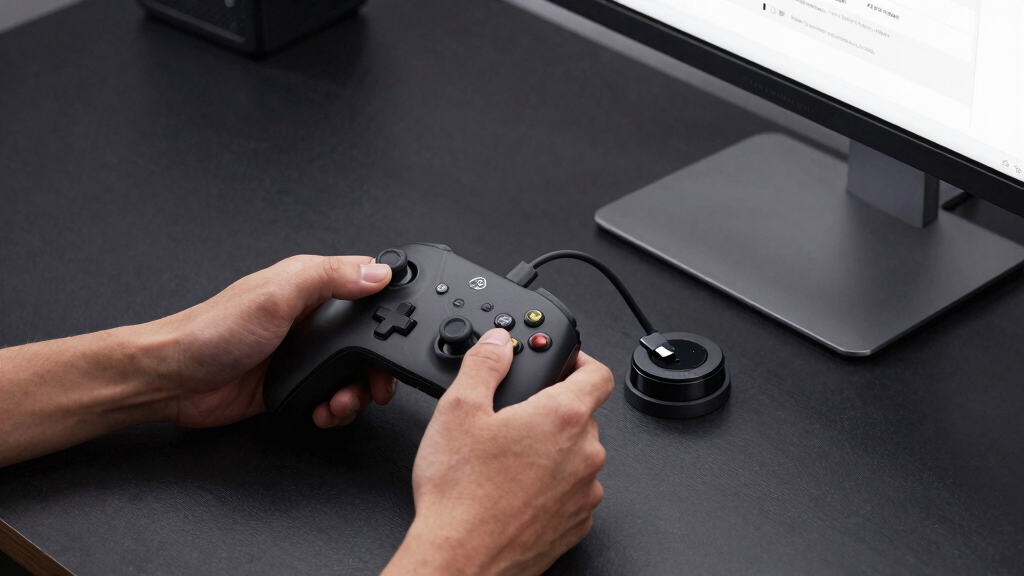
A new open-source web application allows a Steam Controller to automatically navigate and dock to its magnetic charging puck using optical flow computer vision. The system leverages WebHID and a webcam for autonomous charging, marking a significant innovation in controller management.
A new open-source project enables a Steam Controller to automatically navigate to and dock with its magnetic charging puck using computer vision and WebHID telemetry. This system, developed by an independent creator, combines optical flow tracking and haptic feedback to facilitate autonomous charging, representing a novel application of accessible web technologies in gaming hardware management.
The project employs OpenCV.js to track the controller and puck via an overhead webcam, using Lucas-Kanade optical flow algorithms. You can learn more about Steam Controller Auto-Charge for related innovations. It connects to the Steam Controller through WebHID, streaming input and telemetry data, including battery status and voltage. The system guides the controller toward the puck by firing asymmetric haptic pulses through the controller’s internal Linear Resonant Actuators (LRAs), adjusting pulse frequency as the controller approaches within 150 pixels for a gentle magnetic dock. Setup requires mounting a webcam overhead, installing dependencies via the Nix package manager, and running a simple command to build the application. For detailed setup instructions, see the project documentation. Once activated, the controller can autonomously navigate to the puck, with manual control still available if desired. To explore related hardware management solutions, visit the project page.
Implications for Controller Automation and DIY Hardware
This development demonstrates how accessible web technologies can be combined with computer vision to automate hardware interactions, potentially reducing manual effort in device management. For gamers and hobbyists, it offers a glimpse into customizable, autonomous hardware solutions that could extend beyond charging, including device positioning or calibration tasks. The project also showcases open-source innovation in gaming peripherals, encouraging further experimentation and community-driven enhancements.
Steam Controller magnetic charging puck
As an affiliate, we earn on qualifying purchases.
As an affiliate, we earn on qualifying purchases.
Background of Autonomous Controller Docking Projects
While wireless charging and automated docking are common in consumer electronics, applying computer vision and web APIs to enable a controller to find and dock itself is unprecedented. Previous efforts in gaming peripherals focused on manual or semi-automated setups. This project builds on open-source computer vision tools like OpenCV.js and WebHID APIs, which have gained traction in hobbyist communities for DIY automation. The concept aligns with broader trends towards accessible, programmable hardware, but this is among the first to demonstrate fully autonomous docking for a gaming controller using web-based tech.
“This project shows how web-based computer vision can enable real-time hardware automation, opening new possibilities for DIY gaming setups.”
— an anonymous researcher
webcam overhead mount for gaming setup
As an affiliate, we earn on qualifying purchases.
As an affiliate, we earn on qualifying purchases.
Unconfirmed Aspects of System Reliability and Compatibility
It is not yet clear how reliably the system performs across different lighting conditions, desk setups, or with various controller models. The project remains experimental, and user reports on long-term stability or potential hardware conflicts are still pending. Additionally, compatibility with official Steam Controller firmware updates or future hardware revisions has not been confirmed.
As an affiliate, we earn on qualifying purchases.
Expected Developments and Community Feedback
Developers plan to refine the system, improve object detection accuracy, and expand compatibility. Community feedback from early testers will likely influence further features, such as enhanced obstacle avoidance or integration with other peripherals. The project’s open-source nature means users can contribute code, report issues, and customize the setup for their specific desk environments. Future updates may include automated calibration routines or support for additional controllers.
As an affiliate, we earn on qualifying purchases.
Key Questions
Can this system work with all Steam Controllers?
The system is designed for the standard Steam Controller, but compatibility with different models or future firmware updates has not been fully confirmed. Users should test their specific hardware.
What are the setup requirements?
Setup involves mounting an overhead webcam, installing dependencies via the Nix package manager, and running the provided web application. The process is designed to be straightforward for users familiar with basic hardware and software configuration.
Is this system safe for my controller’s battery?
Since the system uses haptic pulses and visual tracking, it does not interfere with the controller’s hardware directly. Battery status is monitored via telemetry, but long-term safety has not been formally tested.
Will this work on Windows, Mac, and Linux?
Yes, the project is compatible across these operating systems, provided the user supports the required dependencies and hardware setup.
Is this project officially supported by Valve or Steam?
No, this is an independent, open-source project developed by hobbyists and has no official affiliation with Valve or Steam.
Source: Hacker News
Halloween Picks
halloween
As an affiliate, we earn on qualifying purchases.