
TL;DR

Play games on Amazon Luna for your game nights, included with Prime
- A rotating selection of games, no download needed
- Play on TV, laptop or phone
- Fast, free delivery for your gear, too
Ethernet backhaul connects mesh Wi‑Fi nodes through network cables instead of Wi‑Fi, reducing jitter, packet loss, and competition for wireless airtime. It rarely transforms your baseline server ping, but it can stop the sharp lag spikes that appear when walls, interference, downloads, and other users strain a wireless mesh.
Your internet speed can look perfect while a game still stutters at the worst possible moment. A speed test may flash 500 Mb/s, yet your character snaps backward when someone starts uploading photos downstairs. The missing detail is often not bandwidth but latency consistency: how smoothly packets cross your home before they even reach the internet.
In a mesh network, a nearby satellite must send your gaming traffic back to the primary router. If that trip happens over Wi‑Fi, every wall, neighboring network, and busy household device gets a chance to interrupt it. Ethernet backhaul replaces that inter-node wireless journey with a cable, giving packets a quiet, predictable lane through the house.
You will learn what wired backhaul changes, what it cannot repair, and how to build a layout that works for a console, gaming PC, handheld, or cloud-gaming screen. You will also see why Gigabit Ethernet is usually enough, when multi-gig hardware earns its keep, and how bufferbloat or double NAT can spoil an otherwise tidy setup. The goal is simple: fewer red connection icons and more evenings when the network fades into the background.
Use Ethernet backhaul to remove the variable wireless hop between a mesh satellite and the primary router; expect steadier latency more than a dramatic drop in…
Wire a stationary console or PC as well as the mesh node when possible, because that removes both the client Wi‑Fi hop and the inter-node wireless hop.
Keep existing Cat 5e for gigabit gaming if every link negotiates reliably at 1 Gb/s; choose Cat 6 for sensible new home cable runs.
Test latency while uploads and downloads saturate the connection; large spikes across wired devices point toward bufferbloat and queue management rather than b…
Place wired satellites near the clients they serve, but keep them open, elevated, and far enough apart to avoid heavy coverage overlap.
Ethernet Backhaul Explained for Gaming Mesh Networks
Ethernet backhaul gives mesh traffic a quiet, predictable lane. It rarely transforms baseline server ping, but it can suppress the jitter, packet loss and sharp lag spikes created by walls, interference and a busy household.
Fewer timing swings as packets cross the local mesh.
More than enough for nearly all online gaming.
A cable cannot move the game server closer.
Build a wired mesh that keeps packets moving
The primary mesh router stays between the internet connection and every satellite. A LAN-side switch can distribute Ethernet to nodes, consoles, PCs and other wired devices.
Internet
The external route begins beyond your home.
Modem or ONT
Terminates the provider connection.
Primary router
Handles routing, NAT and traffic control.
LAN switch
Creates stable wired branches through the home.
Mesh node
Serves nearby Wi-Fi clients without wireless backhaul.
A console can still benefit while using Wi-Fi: only the short console-to-node hop remains wireless, while the longer node-to-router journey travels over Ethernet.
Where wired backhaul wins
Wireless backhaul is easier to install. Ethernet is less sensitive to distance, walls, neighboring networks and competing household traffic.
Ethernet backhaul
Preserves radio airtime for the devices that genuinely need Wi-Fi and stabilizes performance at remote nodes.
Wireless backhaul
A practical choice when cabling is impossible, but link quality still changes with obstacles, congestion and distance.
| Gaming factor | Ethernet backhaul | Wireless backhaul |
|---|---|---|
| Latency consistency | ✓ STEADY across the local mesh path | ~ VARIABLE as interference changes |
| Packet reliability | ✓ STRONG on sound cables and ports | ✗ EXPOSED on weak or obstructed links |
| Wireless capacity | ✓ PRESERVED for client devices | ~ SHARED on dual-band systems |
| Installation | ~ WORK cable runs or wall jacks | ✓ EASY power and placement only |
| Node placement | ✓ CLIENT-FIRST near the devices served | ~ LINK-FIRST must also reach the router |
Your ping number tells only half the story
A 500 Mb/s speed test can look excellent while a match stutters. Games care about the timing and reliability of small packets—not merely the maximum volume your connection can move.
Illustrative local-path variability
Relative risk rises when traffic, interference and difficult radio paths overlap.
Read this as a stability model, not a benchmark. Actual results depend on signal quality, node design, congestion and traffic management.
Server distance
Geography and remote processing remain part of baseline ping.
ISP routing
Congestion or inefficient paths outside the home still add delay.
Bufferbloat
Large spikes on wired devices under load point toward queue management.
Client Wi-Fi
A weak console-to-node link can remain the unstable first hop.
Do not expect a dramatic collapse in baseline ping. Expect fewer moments when 40 ms suddenly becomes 120 ms.
Gigabit is usually enough
Online games rarely need more than a few megabits per second. Choose faster backhaul for aggregate household traffic, local transfers and future capacity—not because the game itself demands it.
1 Gb/s Ethernet
A strong fit for nearly all gaming setups and many home internet connections.
- Keep reliable Cat 5e already negotiating at 1 Gb/s
- Choose Cat 6 for practical new home cable runs
- Wire the console or PC as well when possible
2.5 Gb/s and faster
Useful when several high-throughput workloads converge at a node or switch.
- Internet service exceeds 1 Gb/s
- NAS or local game-streaming traffic is heavy
- Wi-Fi 6E or Wi-Fi 7 clients exceed gigabit in aggregate
Keep Cat 5e when every link negotiates reliably at 1 Gb/s and remains error-free.
Run Cat 6 for a sensible balance of capability, cost and future flexibility.
Follow the improvement chain
Ethernet backhaul does not create gaming performance from nothing. It removes a specific source of local variability, producing a sequence of practical downstream gains.
Wire the nodes
Replace the long inter-node radio path with Ethernet.
Free the radios
Reserve more airtime for consoles, phones and laptops.
Reduce retries
Walls and neighboring networks stop shaping the backhaul.
Stabilize play
Fewer spikes, dropouts and rubber-banding events.
Keep wired satellites open, elevated and near the clients they serve.
Space nodes far enough apart to avoid excessive coverage overlap.
Measure latency while uploads and downloads saturate the connection.
Confirm that the mesh supports a switch-based star or planned daisy chain.
Avoid double NAT by using the correct router or access-point mode.
Wire both the mesh node and stationary gaming system whenever possible.
What Ethernet Backhaul Gives Your Games
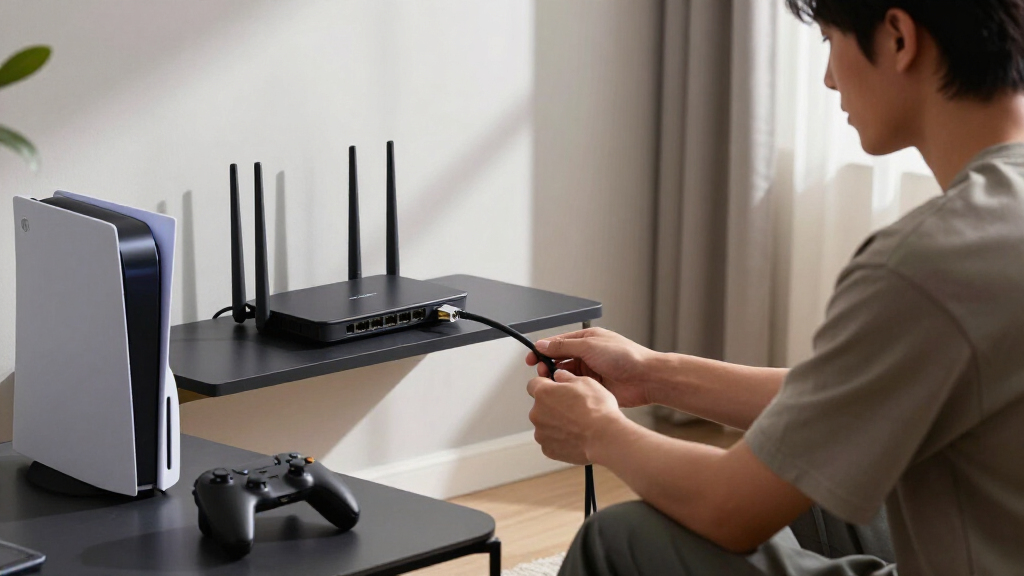
Ethernet backhaul explained for gaming mesh networks starts with one simple change: the mesh nodes exchange traffic through network cables instead of Wi‑Fi. Your console may still connect wirelessly to a nearby node, but the node-to-router leg becomes wired, removing one variable radio hop from every match.
Every satellite needs a route back to the primary mesh router or gateway. With wireless backhaul, the satellite talks across the air, sometimes on a dedicated band and sometimes using airtime shared with phones and laptops. Ethernet backhaul connects Wi‑Fi nodes to the router through copper cabling, so walls and radio congestion no longer shape that part of the trip.
Think of the change like replacing a crowded city bus with a private rail line. Both can reach the same station, and neither moves the station closer, but the rail line avoids traffic lights and passengers blocking the aisle. In network language, that usually means less jitter, fewer retransmissions, and steadier delivery rather than a magical collapse in server ping.
Suppose your console sits upstairs beside a mesh satellite while the main router lives two floors below. Over wireless backhaul, the console’s packets cross one Wi‑Fi link to the satellite and another difficult wireless link through the floor. Wiring the satellite removes that second radio journey, leaving only the shorter, cleaner connection inside the room.
Ethernet backhaul is primarily a reliability upgrade. It removes an unpredictable wireless link and preserves airtime for devices that truly need Wi‑Fi.
According to the network guidance from skeldrift.com [1], the biggest gaming gain is usually better behavior under load, not dramatically higher internet speed. Online games often use only a few megabits per second. What hurts is a packet arriving late, twice, or not at all while your match keeps moving.
As an affiliate, we earn on qualifying purchases.
See Where Wired Backhaul Beats a Wireless Link
Ethernet backhaul explained for gaming mesh networks reveals a clear tradeoff: Ethernet provides predictable performance and more free airtime, while wireless backhaul offers easier installation. A strong dedicated wireless link can work well, but its quality still moves with distance, thick walls, interference, and traffic from nearby devices.
| Gaming factor | Ethernet backhaul | Wireless backhaul |
|---|---|---|
| Latency consistency | Usually steady across the local mesh path | Can fluctuate as interference and congestion change |
| Packet loss | Rare on sound cables and correctly negotiated ports | More likely across weak or obstructed links |
| Wireless capacity | Radios can focus mainly on client devices | Backhaul may consume shared airtime |
| Installation | Requires cable runs, wall jacks, or existing Ethernet | Needs power and suitable node placement |
| Placement freedom | Nodes can sit where clients need coverage | Nodes must also maintain a good link to the router |
A wireless mesh may feel flawless at 7 a.m. and wobble at 8 p.m. when televisions stream 4K video, phones sync cloud backups, and neighboring routers fill the channels. Ethernet behaves more like a calm stagehand: it carries traffic behind the curtain without asking the wireless radios to juggle another job.
Imagine two bedrooms separated from the router by a brick chimney. A tri-band mesh with dedicated wireless backhaul might deliver strong performance when the nodes have a clean route around that brick. If the signal must punch straight through it, a humble Cat 5e cable can beat a far newer wireless system for consistency.
Wireless backhaul still makes sense in a rented flat where drilling and cable runs are off the table. A well-placed Wi‑Fi 6E or Wi‑Fi 7 node can supply fast service over a short, open path. For gaming, mesh performance depends less on the logo printed on the box and more on whether packets face a quiet route or a crowded obstacle course.
Ethernet switch for gaming mesh network
As an affiliate, we earn on qualifying purchases.
As an affiliate, we earn on qualifying purchases.
Why Your Ping Number Tells Only Half the Story
Ethernet backhaul explained for gaming mesh networks is really a lesson about latency variation, not headline download speed. Wired backhaul may barely change an idle ping of 40 ms, yet it can prevent that figure from jumping to 120 ms when another person starts a download or video call.
Baseline ping includes distance to the game server, the route chosen by your internet provider, and processing outside your home. Ethernet cannot pull a server in Frankfurt closer to a player in Lisbon. It can clean up the local path, where weak mesh links cause retries, jitter, and packet loss.
Jitter describes how much packet timing varies. A stream of packets arriving every 20 ms feels smooth; packets arriving after 18, 22, 95, and 30 ms feel like footsteps on broken paving stones. Games may hide small variations with buffering and prediction, but large spikes produce rubber-banding, delayed shots, broken voice chat, or brief disconnects.
Take a family using one remote satellite. A teenager plays a competitive shooter while a parent joins a video meeting and a television starts a high-bitrate stream. If all three devices share wireless airtime with the satellite’s backhaul, the radio must keep taking turns, and gaming packets can wait behind much larger bursts of data.
Wiring that satellite lets the mesh radios spend more time serving nearby devices. The improvement may appear modest in a speed test, perhaps the same 300 Mb/s before and after, while an under-load ping test shows the real gain: fewer sudden peaks and a narrower spread between the fastest and slowest results.
A stable 40 ms connection usually feels better than one bouncing between 20 and 140 ms. Average ping can hide the spikes that ruin a match.
Ethernet cannot repair a poor Wi‑Fi link between your console and its node. If the console sits behind a metal television cabinet with one faint signal bar, move the node or wire the console too. Each wireless hop has its own weather, and backhaul removes only one storm from the route.
Cat 6 Ethernet cable for home networking
As an affiliate, we earn on qualifying purchases.
As an affiliate, we earn on qualifying purchases.
Build a Wired Mesh That Keeps Packets Moving
A reliable wired mesh places the primary router between the modem and every satellite, with an optional LAN-side switch distributing connections. The clean path is modem or ONT, primary mesh router, switch, and then satellites or gaming devices. This layout keeps routing duties clear and avoids accidental network loops.
- Check support before cabling. Confirm that your mesh model supports Ethernet backhaul, mixed wired and wireless nodes, and the topology you plan to use.
- Update every node. Compatible firmware reduces the chance that one older satellite fails to recognize the wired link.
- Connect the internet side correctly. Run the modem or ONT into the primary unit’s WAN port unless the manufacturer specifies another arrangement.
- Add satellites on the LAN side. Connect them to the primary router or to a supported downstream Ethernet switch.
- Verify the connection in the app. Each wired satellite should report Ethernet backhaul rather than a wireless link.
- Check negotiated port speed. A damaged cable may connect at 100 Mb/s when you expect 1 Gb/s.
- Test idle and busy conditions. Measure latency alone, then repeat while saturating downloads and uploads.
For example, a three-story home might place the primary router beside the fiber ONT in a ground-floor office. A small unmanaged switch can send one cable upstairs to a mesh node and another to the lounge, where a second node and console connect. The cables become the building’s quiet spine, while each node supplies local Wi‑Fi.
Most systems accept a star layout, where every satellite returns to the same router or switch. Some permit daisy-chaining, such as router to first node to second node, but manufacturer support varies. Never create two Ethernet paths between the same nodes unless the equipment explicitly handles loops; a loop can flood the network until ordinary traffic barely moves.
If your gaming PC or console stays in one place, wire it to the primary router, a wired satellite, or the same downstream switch. That removes both the client Wi‑Fi hop and the wireless backhaul hop. When running a cable to the gaming device is impractical, wiring the nearby satellite remains a meaningful second choice.
If the mesh app still shows wireless backhaul, swap the cable and switch port before changing advanced settings. Then reboot the satellite, confirm the correct LAN or WAN port role, and review the supported topology. A single bent connector tab can make a polished installation behave like nothing was wired at all.
As an affiliate, we earn on qualifying purchases.
Choose Cable and Port Speeds Without Overspending
Gigabit Ethernet is enough for nearly every online gaming session because games usually move only a few megabits per second. Choose multi-gig backhaul for internet service above 1 Gb/s, heavy local transfers, or many fast clients, not because a 2.5 Gb/s label automatically cuts game latency.
Cat 5e generally carries 1 Gb/s for up to 100 metres when the cable and terminations meet the specification. It often supports 2.5 Gb/s under suitable conditions as well. According to Ethernet cabling specifications associated with IEEE 802.3 links [2], cable length, termination quality, and negotiated speed matter more than extravagant packaging.
For a new permanent run, Cat 6 offers a sensible balance for home networking and multi-gig upgrades. Cat 6A fits reliable 10 Gb/s service over longer runs, though it is thicker and less pleasant to bend through a tight wall box. Cat 7 and Cat 8 usually add cost and stiffness without helping an ordinary gaming mesh.
Suppose you have a 600 Mb/s fiber plan, two consoles, and three people streaming at night. A gigabit switch and existing Cat 5e wiring have ample room for that traffic. Replacing everything with 10 Gb/s hardware would resemble widening a driveway to eight lanes when only three bicycles use it.
Multi-gig becomes more useful when a gaming PC downloads from a fast local NAS, a media server feeds several rooms, or Wi‑Fi 6E and Wi‑Fi 7 clients collectively push past one gigabit. Even then, inspect the complete path. A mesh unit advertised with one 2.5 Gb/s port may reserve it for WAN, leaving gigabit ports for satellites.
- Use an unmanaged gigabit switch for a straightforward home layout.
- Choose 2.5 Gb/s switching when several relevant ports and devices can use it.
- Check every cable’s reported link rate after installation.
- Replace faulty terminations before replacing an entire cable run.
A managed switch can add VLANs, traffic monitoring, loop protection, and link aggregation. Those controls help experienced network owners, but a bad VLAN or spanning-tree setting may stop node discovery. For most homes, the plain switch that quietly passes packets is the better gaming companion.
Fix the Lag Ethernet Backhaul Cannot Touch
Ethernet backhaul cannot fix bufferbloat, distant servers, poor ISP routing, or double NAT. If latency shoots upward whenever the internet connection fills, queue management at the gateway may help more than a faster cable. Treat backhaul as one piece of the route, not a universal cure for lag.
Bufferbloat appears when a router holds too many packets during a saturated upload or download. New gaming packets wait behind a bulky queue, like an ambulance trapped behind a mile of delivery vans. A connection can show excellent throughput while under-load latency climbs by 100 ms or more.
Smart Queue Management using algorithms such as CAKE or FQ-CoDel controls those queues and gives interactive traffic room to breathe. Availability depends on the router and firmware, and a branded gaming mode may use a different method. According to skeldrift.com’s guidance [1], independent latency tests under load reveal more than maximum-speed marketing.
Run one latency test while the network is idle, then repeat it during a large upload and download. If the wired mesh stays smooth locally but internet ping balloons under load, configure Smart Queue Management or sensible bandwidth limits. Setting managed throughput slightly below the connection’s real maximum often lets the router control the queue before the modem or provider equipment does.
Double NAT creates another kind of trouble. It occurs when an ISP gateway and your mesh both act as routers, placing your devices behind two layers of address translation. Games may still run, but port forwarding, peer-to-peer hosting, console NAT reports, remote access, and some voice tools can become awkward.
You can place the ISP gateway in bridge or passthrough mode, run the mesh in access-point mode, or keep the ISP unit as the only router. Each choice affects features: access-point mode may disable some parental controls, security tools, or QoS functions. Ethernet backhaul does not create double NAT; the routing arrangement does.
Imagine that your wired console reports a strict NAT type while every speed test looks healthy. Replacing cables will not solve that configuration problem. Follow the route from modem to router, identify which devices perform routing, and leave one clear traffic officer directing the network.
Place Each Node Where Your Gaming Device Can Breathe
Wired backhaul gives you more freedom to place mesh nodes near the devices they serve, but it does not increase radio range by itself. Keep each node open, elevated, and away from metal, thick electronics, and heat-producing appliances so the remaining client Wi‑Fi hop stays clean.
A wireless satellite often sits halfway between the router and a dead zone because it must hear both sides. Once Ethernet carries the return traffic, you can move that node into the room where coverage is needed. It is like giving a lamp its own power outlet instead of placing it where an extension cord barely reaches.
Avoid hiding a node inside a cabinet or behind a television, where wood, cables, and a broad metal panel swallow signal. Keep it off the floor and away from microwave ovens. In a gaming room, a shelf at desk height often beats the darker, tidier corner behind the console.
More nodes can make performance worse when their coverage overlaps too heavily. Devices may cling to a farther access point, while nearby radios compete on the same channels. In a small flat, two carefully placed nodes can outperform four units blinking from every room.
Mesh systems may use 802.11k, 802.11v, and 802.11r to help clients discover and move between access points. The client still decides when to roam, so Ethernet backhaul cannot promise a seamless handoff. A stationary console should stay attached to one suitable node, while roaming matters more for a handheld or cloud-gaming tablet carried from kitchen to bedroom.
Wi‑Fi 6E adds the 6 GHz band, which offers wide, less crowded channels but loses strength faster through walls. Wi‑Fi 7 adds wider channels, 4K-QAM, and Multi-Link Operation on compatible hardware. Those features can make wireless backhaul faster, yet brick, distance, and shared airtime still get a vote.
For example, a Wi‑Fi 7 satellite across an open hallway may perform beautifully without cabling. Move it behind two concrete walls, and Ethernet can become the steadier route again. Performance also varies by mesh firmware and client platform, so check current device support rather than treating a Wi‑Fi generation badge as a guarantee.
Turn Your Test Results Into the Right Upgrade
The best upgrade follows the location of the problem: wire the gaming device for a weak client link, add Ethernet backhaul for an unstable inter-node link, and use queue management for congestion at the internet gateway. Testing each segment stops you from buying fast hardware that attacks the wrong bottleneck.
Start beside the primary router with a wired laptop or console and record idle latency, under-load latency, download speed, and packet loss. Repeat the test at the satellite using Ethernet, then over Wi‑Fi from the gaming position. The changing numbers show where the road turns rough.
If wired tests at the primary router remain steady but Wi‑Fi tests near a satellite spike, inspect node placement and backhaul first. Connect that satellite by Ethernet and repeat the same test at the same time of day. A drop in jitter or packet loss points to the former wireless backhaul as the weak link, even if peak speed barely changes.
If every test suffers only when a large upload runs, Ethernet backhaul is not the main repair. Turn to Smart Queue Management, QoS, or bandwidth control. If problems occur only on one distant game server, try a closer regional server before changing the home network.
Here is a concrete Saturday-night test. Start a console match near the upstairs node, run a cloud backup from a downstairs PC, and stream a 4K film on the television. Compare several minutes of ping, jitter, and packet-loss readings before and after wiring the node; a stable graph matters more than one spectacular minimum.
- Baseline ping stays high: check server region, ISP route, and modem path.
- Ping spikes only under internet load: tune queue management.
- Results worsen at one satellite: inspect or wire its backhaul.
- Only one device struggles: improve that device’s Wi‑Fi link or connect it by cable.
- Link reports 100 Mb/s: test the cable, connectors, and ports.
This method separates evidence from the temptation to replace everything. Your network tells a story through repeated tests: where delay begins, when packets disappear, and which change quiets the noise. Follow that trail, and the upgrade becomes smaller, cheaper, and far more effective.
Frequently Asked Questions
Does Ethernet backhaul reduce gaming ping?
Ethernet backhaul can reduce local delay, jitter, and sudden latency spikes, especially when the former wireless link crossed walls or shared busy airtime. It usually makes only a small change to baseline ping when most delay comes from the ISP route or distant game server.
Should I wire my console or only the mesh nodes?
Wire both when possible. Wiring the console removes its Wi‑Fi hop, while wiring the satellite removes the inter-node wireless hop. If you can run only one cable and the console must remain mobile, Ethernet backhaul still improves the longer mesh path.
Is Gigabit Ethernet fast enough for gaming mesh backhaul?
Yes, 1 Gb/s is enough for online gaming and most households because game traffic uses little bandwidth. Multi-gig backhaul earns its cost when you have internet above 1 Gb/s, large NAS transfers, several high-speed clients, or heavy simultaneous traffic.
Can I connect mesh nodes through an Ethernet switch?
Most mesh systems support a LAN-side unmanaged switch between the primary router and satellites, but check the model’s current documentation. Managed-switch VLAN or spanning-tree settings can block discovery, and multiple cable paths may create a network loop.
Why does my mesh app still report wireless backhaul?
Common causes include a damaged cable, incorrect port, unsupported topology, outdated firmware, or a switch placed on the wrong side of the router. Swap the cable and port, reboot the node, and check whether the connection negotiated at 1 Gb/s before changing advanced settings.
Conclusion
Remove the weakest wireless hop first. If your gaming device can use Ethernet, wire it; if it must stay on Wi‑Fi, wire the nearby mesh satellite and test latency under real household load. Pair that layout with sound node placement, one clear router, and effective queue management, and you address the causes that speed-test headlines miss.
The result may not be a dazzling new ping number. It is something better: the match stays smooth when a film starts downstairs, a backup wakes up, and every phone in the house begins chattering. Your network should feel like solid flooring beneath your feet—quiet, steady, and forgotten once the game begins.
Fall Picks
fall essentials
As an affiliate, we earn on qualifying purchases.