For most PC gamers, the Meta Quest 3 512GB is the best overall VR headset here: it combines wireless standalone play with PC VR support, so it can serve more than one purpose. The Pimax Crystal Light stands out for high-resolution PC gaming, while the Valve Index remains a dedicated SteamVR option for buyers who value its PC-first setup. The main tradeoffs are image detail, comfort, tracking, wired versus wireless play, and how much headset you need beyond PC gaming. Older or renewed headsets may suit tighter budgets, but they bring more uncertainty around condition, support, and feature longevity. Read on for how all 14 options compare and which fits your setup.

Play games on Amazon Luna for your game nights, included with Prime
- A rotating selection of games, no download needed
- Play on TV, laptop or phone
- Fast, free delivery for your gear, too
Complete the kit

Key Takeaways
- Meta Quest 3 is the most flexible pick: its standalone and PC VR use make it less limited to a gaming PC than the dedicated Pimax, Index, and DPVR models.
- Pimax separates itself through resolution: Crystal Light and Crystal Super target buyers who want detailed PC visuals, with the Super’s stated 140° field of view appealing to those who prioritize immersion over a simpler, more versatile setup.
- Wireless-capable does not mean wireless PC VR is always the right choice: the VIVE Focus Vision bundle explicitly offers DisplayPort streaming, giving wired-PC buyers a distinct alternative to relying on wireless streaming.
- Meta Quest 3S models trade display refinement for accessibility: they retain standalone versatility, but buyers focused on a sharper PC VR image should compare them closely with Quest 3 and dedicated PC headsets.
- Older and renewed models need a condition-and-compatibility check: Quest 2, Rift S, renewed Quest units, and the renewed Valve Index can still match particular needs, but their age and product condition matter more than headline features alone.
| Meta Quest 3 512GB VR Headset with GOLF+ |  | Best Overall for Flexible PC and Standalone Gaming | Storage: 512 GB | Memory: 8 GB RAM | Processor: Snapdragon XR2 Gen 2 | VIEW LATEST PRICE | See Our Full Breakdown |
| Pimax Crystal Light PC VR Headset with 2880 × 2880 Resolution per Eye |  | Best Value for High-Resolution PC VR | Platform: PC VR | Display: QLED with local dimming and HDR | Resolution: 2880 × 2880 per eye | VIEW LATEST PRICE | See Our Full Breakdown |
| Pimax Crystal Super PC VR Headset with 3840 × 3840 Resolution per Eye and 140° Field of View |  | Best Premium PC VR for Simulators | Display: QLED with Mini-LED | Resolution: 3840 × 3840 per eye | Field of view: 140 degrees | VIEW LATEST PRICE | See Our Full Breakdown |
| Meta Quest 3 512GB Mixed Reality VR Headset (Renewed Premium) |  | Best Renewed Pick for Wireless Flexibility | Condition: Renewed Premium | Storage: 512 GB | Processor: Snapdragon XR2 Gen 2 | VIEW LATEST PRICE | See Our Full Breakdown |
| Meta Quest 2 128GB All-in-One VR Headset with Silicone Cover and Adjustable Controller Straps |  | Best Entry Point for PC VR Beginners | Storage: 128 GB | Display: LCD; 1832 × 1920 pixels per eye | Refresh rate: 90 Hz | VIEW LATEST PRICE | See Our Full Breakdown |
| HTC VIVE Focus Vision Mixed Reality and PC VR Headset with Controllers |  | Best for DisplayPort PC VR and Mixed Reality | Resolution: 2448 × 2448 pixels per eye | Display: LCD | Refresh rate: 90 Hz | VIEW LATEST PRICE | See Our Full Breakdown |
| DPVR E4 PC VR Headset with 120Hz Display and 6DoF Tracking |  | Best for High-Refresh-Rate PC VR | Resolution: 3664 × 1920 | Display: Fast LCD | Refresh rates: 72 Hz, 90 Hz, and 120 Hz | VIEW LATEST PRICE | See Our Full Breakdown |
| HTC Vive XR Elite Mixed Reality and PC VR Headset with Deluxe Pack | 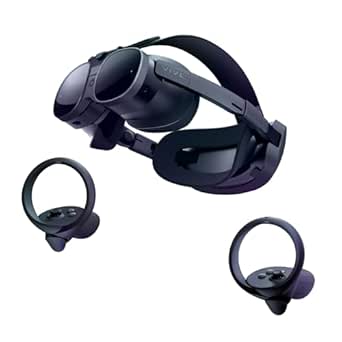 | Best for Adjustable Fit and Convertible Use | Resolution: 3840 × 1920 combined | Display: LCD | Refresh rate: 90 Hz | VIEW LATEST PRICE | See Our Full Breakdown |
| HTC VIVE Focus Vision Wired XR Headset Bundle with DisplayPort PC VR Streaming |  | Best for Wired PC VR and Expandable Storage | Resolution: 2448 × 2448 pixels per eye | Refresh rate: 90 Hz | Field of view: Up to 120° | VIEW LATEST PRICE | See Our Full Breakdown |
| Meta Quest 3S 128GB Standalone VR Headset with GOLF+ |  | Best for PC VR Beginners | Storage: 128 GB | Memory: 8 GB RAM | Processor: Snapdragon XR2 Gen 2 | VIEW LATEST PRICE | See Our Full Breakdown |
| Oculus Rift S PC-Powered VR Gaming Headset |  | Best for Sensor-Free PC VR | Platform: PC VR | Operating system: Windows | Display: LCD | VIEW LATEST PRICE | See Our Full Breakdown |
| Valve Index VR Headset for PC and SteamVR, Renewed |  | Best for SteamVR Refresh Rate | Platform: PC / Windows / SteamVR | Display: OLED | Display resolution: 1440 × 1600 | VIEW LATEST PRICE | See Our Full Breakdown |
| Meta Quest 3S 128GB Standalone VR Headset (Renewed Premium) |  | Best for Wireless PCVR Flexibility | Condition: Renewed Premium | Storage: 128 GB | Processor: Snapdragon XR2 Gen 2 | VIEW LATEST PRICE | See Our Full Breakdown |
| Meta Quest 3S 256GB Wireless VR Headset |  | Best for Standalone Storage | Platform: Standalone | Storage: 256 GB | Processor: Snapdragon XR2 Gen 2 | VIEW LATEST PRICE | See Our Full Breakdown |
| VR headsets for PC gaming | Display | Refresh rate | Connectivity | Field of view |
|---|---|---|---|---|
| Meta Quest 3 512GB VR Headset | LCD; 2064 × 2208 pixels per eye | Up to 120 Hz | — | — |
| Pimax Crystal Light PC VR Head | QLED with local dimming and HDR | Up to 120 Hz | HDMI | — |
| Pimax Crystal Super PC VR Head | QLED with Mini-LED | Up to 90 Hz | Wired; DisplayPort and USB | 140 degrees |
| Meta Quest 3 512GB Mixed Reali | 4K+; refresh rate up to 120 Hz | — | Wi-Fi | 110 degrees |
| Meta Quest 2 128GB All-in-One | LCD; 1832 × 1920 pixels per eye | 90 Hz | USB Type-C | 110 degrees |
| HTC VIVE Focus Vision Mixed Re | LCD | 90 Hz | DisplayPort, USB, Wi-Fi | Up to 120° |
| DPVR E4 PC VR Headset with 120 | Fast LCD | — | DisplayPort 1.2 or later; USB 3.0 Type-A | Up to 116° |
| HTC Vive XR Elite Mixed Realit | LCD | 90 Hz | USB Type-C | Up to 110° |
| HTC VIVE Focus Vision Wired XR | — | 90 Hz | DisplayPort, USB, Wi-Fi | Up to 120° |
| Meta Quest 3S 128GB Standalone | LCD | 60 Hz | — | 110° |
| Oculus Rift S PC-Powered VR Ga | LCD | — | — | 110 degrees |
| Valve Index VR Headset for PC | OLED | 120 Hz | USB | — |
| Meta Quest 3S 128GB Standalone | LCD | 90 Hz | — | 96 degrees |
| Meta Quest 3S 256GB Wireless V | — | 60 Hz | Wi-Fi | — |
More Details on Our Top Picks
Meta Quest 3 512GB VR Headset with GOLF+
The Meta Quest 3 is my most flexible pick for PC gamers who also want a capable headset away from the computer. Its 120 Hz display and 2064 × 2208 pixels per eye make it a stronger standalone starting point than the older Quest 2, while PC connection adds access to compatible computer VR games. Unlike the Pimax Crystal Light, it does not need a PC for every session, and its full-color passthrough adds mixed-reality play. The tradeoff is that PC use is only one part of its appeal: buyers focused on maximum image detail for simulators may prefer the Crystal Light’s higher per-eye resolution. Battery life is about 2.2 hours, so longer wireless sessions may need a break or charging. This bundle also includes GOLF+ and in-game credits, with some content claimed during setup.
Pros:- Can be used standalone or with a compatible PC, giving it more flexibility than PC-only headsets such as the Pimax Crystal Light.
- 2064 × 2208 resolution per eye and refresh rates up to 120 Hz support detailed, fluid gameplay.
- Full-color passthrough supports mixed-reality experiences alongside conventional VR.
- Includes GOLF+ and 1,800 in-game credits.
Cons:- Approximately 2.2 hours of battery life limits extended wireless sessions.
- Its resolution per eye is lower than the Pimax Crystal Light’s 2880 × 2880, which may matter in detailed simulator scenes.
- Some included GOLF+ content must be claimed during headset setup.
Best for: PC gamers who want one headset for compatible computer VR, wireless standalone play, and mixed-reality experiences.
Not ideal for: Simulation enthusiasts who prioritize the highest possible PC image resolution, or players who need long untethered sessions without recharging.
- Storage:512 GB
- Memory:8 GB RAM
- Processor:Snapdragon XR2 Gen 2
- Display:LCD; 2064 × 2208 pixels per eye
- Maximum resolution:4128 × 2208 pixels
- Refresh rate:Up to 120 Hz
- Battery life:Approximately 2.2 hours
- Platform:Meta Quest; Meta Horizon OS
- Included content:GOLF+ and 1,800 in-game credits
Our verdict“Choose the Quest 3 if you want a versatile headset for PC VR and standalone play rather than a PC-only simulator specialist.”
Pimax Crystal Light PC VR Headset with 2880 × 2880 Resolution per Eye
The Pimax Crystal Light is aimed squarely at PC players who want fine visual detail without stepping up to the Crystal Super. Its 2880 × 2880 resolution per eye, QLED panels, local dimming, and HDR support are a compelling mix for reading cockpit instruments or spotting detail at a distance. Glass aspheric lenses are designed to keep clarity more consistent across the view. Compared with the Pimax Crystal Super, it gives up resolution and field of view, but its refresh rate can reach 120 Hz rather than the Super’s 90 Hz ceiling. It is still a substantial, 815 g wired headset, and it requires a Windows PC; this is not the convenient all-purpose choice that the Meta Quest 3 is. Its strengths pay off most when a gaming PC and a seated or room-scale PC VR setup are already part of the plan.
Pros:- 2880 × 2880 resolution per eye reveals fine detail in PC games and simulator cockpits.
- QLED display with local dimming and HDR supports contrast-rich scenes.
- Glass aspheric lenses are designed for clarity across more of the viewing area.
- Refresh rate reaches up to 120 Hz, higher than the Crystal Super’s stated 90 Hz maximum.
Cons:- Requires a compatible Windows PC and is not a standalone gaming headset.
- At approximately 815 g, it is heavier than many buyers may want for long sessions.
- Its resolution and 140-degree field of view are below the Pimax Crystal Super’s specifications.
Best for: PC VR players, especially flight and driving simulator fans, who want high display detail and can accommodate a wired headset.
Not ideal for: Buyers seeking standalone wireless play, a lightweight headset, or the widest and highest-resolution view available from the Pimax Crystal Super.
- Platform:PC VR
- Display:QLED with local dimming and HDR
- Resolution:2880 × 2880 per eye
- Refresh rate:Up to 120 Hz
- Lens technology:Glass aspheric
- Tracking:Inside-out camera tracking
- Connectivity:HDMI
- Weight:Approximately 815 g
- Compatibility:Personal computer; SteamVR; Windows
Our verdict“Pick the Crystal Light if detailed PC visuals and a refresh rate up to 120 Hz matter more than standalone use or the Crystal Super’s broader view.”
Pimax Crystal Super PC VR Headset with 3840 × 3840 Resolution per Eye and 140° Field of View
For a PC gamer putting visual immersion ahead of convenience, the Pimax Crystal Super is the standout specialist in this group. Its 3840 × 3840 resolution per eye, QLED and Mini-LED display, and 140-degree field of view target players who want detailed scenes with more peripheral coverage. Eye tracking, adjustable IPD, and inside-out tracking add useful setup and tracking flexibility. Compared with the Pimax Crystal Light, the Super offers substantially higher stated resolution and a wider field of view, but its refresh rate tops out at 90 Hz rather than 120 Hz. It also requires a wired DisplayPort and USB connection to a Windows PC, so it gives up the Quest 3’s wireless freedom and standalone mode. Integrated spatial audio and a noise-canceling microphone make the package more self-contained, but the PC requirement makes this a focused choice rather than a general-purpose headset.
Pros:- 3840 × 3840 resolution per eye targets exceptionally detailed PC VR imagery.
- QLED with Mini-LED and a 140-degree field of view suit immersive simulator and wide-scene gaming.
- Eye tracking, adjustable IPD, and inside-out tracking provide useful fit and tracking features.
- Integrated spatial audio and a noise-canceling microphone reduce reliance on separate audio gear.
Cons:- Wired DisplayPort and USB connections restrict movement compared with the wireless Meta Quest 3.
- The refresh rate is limited to up to 90 Hz, below the Crystal Light’s stated 120 Hz maximum.
- Requires a PC running Windows 10 and is not designed for standalone use.
Best for: PC simulator players and visual-detail enthusiasts with a Windows 10-compatible computer, DisplayPort, and room for a wired setup.
Not ideal for: Buyers who want standalone or wireless gaming, or players who value refresh rates above 90 Hz over resolution and field of view.
- Display:QLED with Mini-LED
- Resolution:3840 × 3840 per eye
- Field of view:140 degrees
- Refresh rate:Up to 90 Hz
- Lens technology:Aspherical
- Tracking:Inside-out; eye tracking
- IPD:Adjustable
- Connectivity:Wired; DisplayPort and USB
- Compatibility:PC; Windows 10
Our verdict“Choose the Crystal Super for high-resolution, wide-view PC VR if you accept a wired setup and a 90 Hz refresh-rate ceiling.”
Meta Quest 3 512GB Mixed Reality VR Headset (Renewed Premium)
This Renewed Premium Quest 3 offers the same core appeal as the standard Quest 3: a headset that can play standalone and connect to a compatible PC for PC VR. Its 4K+ display, 120 Hz refresh rate, and color passthrough make it a more capable mixed-reality option than the older Quest 2, while 512 GB of storage leaves room for standalone games alongside PC use. Compared with the Pimax Crystal Light, it trades the Pimax’s higher per-eye resolution and PC-focused display features for wireless standalone play and a simpler all-in-one setup. The central buying distinction is condition: this is a renewed unit, not a new Quest 3, though the listing specifies a one-year warranty. Battery life is up to 2.2 hours, and PC use still depends on a compatible computer. Buyers who want a new unit or a headset built exclusively for high-end PC visuals should look elsewhere.
Pros:- Supports standalone play as well as connection to a compatible PC.
- 4K+ display and refresh rates up to 120 Hz offer a capable general-purpose VR experience.
- Color passthrough supports mixed-reality use beyond conventional PC VR.
- 512 GB storage and a stated one-year warranty are included with the renewed listing.
Cons:- Renewed Premium condition may not suit buyers who require a new device.
- Battery life is up to approximately 2.2 hours.
- The Pimax Crystal Light provides higher stated resolution per eye for PC-focused visual detail.
Best for: Buyers open to a renewed headset who want Quest 3 features for wireless standalone gaming and occasional PC VR.
Not ideal for: Shoppers who require a new headset, want long untethered sessions, or prioritize high-resolution PC visuals over standalone flexibility.
- Condition:Renewed Premium
- Storage:512 GB
- Processor:Snapdragon XR2 Gen 2
- Memory:8 GB RAM
- Display:4K+; refresh rate up to 120 Hz
- Field of view:110 degrees
- Battery life:Up to 2.2 hours
- Connectivity:Wi-Fi
- Warranty:1 year
Our verdict“Choose this renewed Quest 3 if you want wireless versatility and accept a renewed device instead of a new headset or PC-only specialist.”
Meta Quest 2 128GB All-in-One VR Headset with Silicone Cover and Adjustable Controller Straps
The Meta Quest 2 makes sense for newcomers who want to try standalone VR before connecting to a gaming PC. It works without a computer for supported standalone games, and can also provide PC VR compatibility with a compatible gaming PC and a separately sold Oculus Link cable. That flexibility is useful, but its 1832 × 1920 resolution per eye and 90 Hz refresh rate sit below the newer Quest 3’s 2064 × 2208 per-eye resolution and 120 Hz ceiling. The result is a more basic visual proposition for PC play, especially in scenes with small text or fine detail. This bundle’s silicone grip covers and knuckle straps add practical controller protection and security, but do not change the headset’s older display hardware. Setup requires wireless internet and the Oculus app, and the listing also specifies a Facebook account requirement.
Pros:- Standalone headset can play supported VR games without a PC or console.
- Can connect to a compatible gaming PC for PC VR.
- 90 Hz refresh rate and 1832 × 1920 resolution per eye provide a functional entry-level VR display.
- Included silicone grip covers and adjustable knuckle straps add controller protection and security.
Cons:- PC VR requires a compatible gaming PC and a separately sold Oculus Link cable.
- Resolution and refresh rate are lower than the Meta Quest 3’s stated specifications.
- Setup requires wireless internet, the Oculus app, and a Facebook account according to the product details.
Best for: First-time VR buyers who want standalone play and a way to try PC VR with a compatible computer and separate Link cable.
Not ideal for: PC gamers seeking newer display specifications, a cable-free PC connection, or a setup without the listed account and app requirements.
- Storage:128 GB
- Display:LCD; 1832 × 1920 pixels per eye
- Refresh rate:90 Hz
- Field of view:110 degrees
- Connectivity:USB Type-C
- Compatibility:Standalone VR and PC VR
- Sensors:Gyroscope, accelerometer, magnetometer
- Included accessories:Silicone controller covers and adjustable PU knuckle straps
- Setup requirements:Wireless internet and Oculus app
Our verdict“Pick the Quest 2 bundle as an introductory route into standalone and wired PC VR if you accept older display specs and extra setup requirements.”
HTC VIVE Focus Vision Mixed Reality and PC VR Headset with Controllers
The VIVE Focus Vision suits PC players who want a wired DisplayPort connection as well as standalone mixed reality. Its 2448 × 2448 resolution per eye and field of view up to 120° give it a broad, detailed presentation, while eye and hand tracking add options beyond the standard controller setup. Compared with the DPVR E4, it is more versatile: the DPVR is a dedicated PC headset with a 120 Hz mode, while this VIVE adds standalone use and a hot-swappable battery. The tradeoff is a lower listed refresh rate of 90 Hz, and wireless PC streaming calls for a direct Ethernet connection between the PC and router. Some tracking capabilities also depend on compatible accessories, and expandable storage requires a separate MicroSD card. I’d pick it for flexibility, not for the highest refresh rate.
Pros:- DisplayPort PC VR and standalone mixed-reality support in one headset
- 2448 × 2448 pixels per eye with a field of view up to 120°
- Built-in eye and hand tracking, with support for compatible trackers
- Hot-swappable battery and MicroSD expansion support
Cons:- Refresh rate is 90 Hz, below the DPVR E4’s listed 120 Hz mode
- Wireless PC streaming requires the PC to connect directly to the router by Ethernet
- MicroSD card and some tracking accessories are separate
Best for: PC VR players who want DisplayPort connectivity, standalone mixed-reality use, eye tracking, and room to expand storage.
Not ideal for: Players focused on high-refresh-rate PC VR, or those who want wireless PC streaming without a wired network setup.
- Resolution:2448 × 2448 pixels per eye
- Display:LCD
- Refresh rate:90 Hz
- Field of view:Up to 120°
- Tracking:Eye and hand tracking
- Connectivity:DisplayPort, USB, Wi-Fi
- Memory and storage:12 GB RAM; 128 GB storage
- Expandable storage:Up to 2 TB via MicroSD card
- Battery:Hot-swappable main battery with reserve front battery
Our verdict“Choose the VIVE Focus Vision if you want one headset for DisplayPort PC VR and standalone mixed reality, and can accept its 90 Hz ceiling and setup requirements.”
DPVR E4 PC VR Headset with 120Hz Display and 6DoF Tracking
The DPVR E4 is the most straightforward PC-gaming pick here for players who value refresh rate over standalone versatility. Its 120 Hz mode can make fast movement feel smoother than on the 90 Hz HTC VIVE Focus Vision or VIVE XR Elite, and inside-out 6DoF tracking avoids the need for external base stations. The flip-up design is a practical extra when a game session is interrupted, though it does not make the headset wireless or standalone. You’ll need a compatible Windows PC with DisplayPort and USB 3.0, so it is less flexible than the Meta Quest 3S for casual untethered play. Fresnel lenses are another tradeoff; buyers who prioritize newer lens designs or standalone mixed reality should look elsewhere. I’d shortlist it for a dedicated PC setup and games that benefit from higher refresh rates.
Pros:- Refresh-rate options include 120 Hz for smoother fast-moving PC games
- Inside-out 6DoF tracking without external base stations
- Flip-up design makes brief real-world interruptions easier
- Adjustable IPD and head strap support fit customization
Cons:- Requires a compatible Windows PC, DisplayPort, and USB 3.0 connection
- Fresnel lenses may be less appealing to buyers seeking other lens designs
- Does not offer standalone gaming or mixed-reality use
Best for: PC gamers with a compatible Windows desktop who want 6DoF tracking, a 120 Hz option, and quick access to the room between sessions.
Not ideal for: Buyers seeking standalone or wireless VR, or players whose PC lacks DisplayPort and USB 3.0.
- Resolution:3664 × 1920
- Display:Fast LCD
- Refresh rates:72 Hz, 90 Hz, and 120 Hz
- Field of view:Up to 116°
- Tracking:Inside-out 6DoF
- Lens technology:Fresnel
- Connectivity:DisplayPort 1.2 or later; USB 3.0 Type-A
- Compatibility:PC and SteamVR; 64-bit Windows 10/11
- Design:Flip-up headset with adjustable head strap
Our verdict“Pick the DPVR E4 for a PC-only setup where 120 Hz and inside-out tracking matter more than wireless play or standalone flexibility.”
HTC Vive XR Elite Mixed Reality and PC VR Headset with Deluxe Pack
The VIVE XR Elite Deluxe Pack makes the most sense for PC players who want a convertible headset that can also handle standalone and mixed-reality sessions. Its stepless IPD and diopter adjustments let users tune the view, including some glasses wearers who might otherwise need corrective lenses in the headset. The included deluxe strap and face accessories make this bundle more ready to wear than the VIVE Focus Vision, but its PC connection is via USB-C and the streaming cable is sold separately. Resolution is 3840 × 1920 combined with a 90 Hz refresh rate, so the DPVR E4 is the stronger fit if 120 Hz is your priority. The hot-swappable battery helps with interruptions, but listed battery life is up to two hours. I’d choose this for fit flexibility and convertible use, not long untethered sessions.
Pros:- Supports standalone VR, mixed reality, and base-station-free PC VR
- Stepless IPD and diopter adjustments allow fine fit tuning
- Deluxe Pack includes a face gasket, strap, temple clips, and mixed-reality gasket
- Hot-swappable and replaceable battery
Cons:- Battery life is listed as up to two hours
- VIVE USB Streaming Cable is sold separately
- 90 Hz refresh rate is lower than the DPVR E4’s 120 Hz option
Best for: PC VR players who want a convertible standalone headset, adjustable diopter settings, and included fit accessories for varied users.
Not ideal for: Players who want long wireless sessions, a 120 Hz display, or a PC streaming cable included in the bundle.
- Resolution:3840 × 1920 combined
- Display:LCD
- Refresh rate:90 Hz
- Field of view:Up to 110°
- Tracking:Inside-out optical tracking with four wide-field-of-view tracking cameras
- Adjustments:Stepless IPD and diopter adjustment
- Connectivity:USB Type-C
- Battery life:Up to 2 hours
- Included accessories:Face Gasket 2.0, Deluxe Strap, Temple Clips, and MR Gasket
Our verdict“Choose the VIVE XR Elite Deluxe Pack if adjustable optics and included comfort accessories matter more than extended battery life or high-refresh PC gaming.”
HTC VIVE Focus Vision Wired XR Headset Bundle with DisplayPort PC VR Streaming
This VIVE Focus Vision wired bundle is aimed at players who want a direct DisplayPort route to PC VR while keeping standalone mixed reality available. Its 5K total resolution, up-to-120° field of view, and built-in eye and hand tracking make it more feature-rich than the PC-only DPVR E4. The Focus Vision’s 90 Hz refresh rate is the compromise: the DPVR offers a 120 Hz mode, which may better suit fast-paced games. This listing also emphasizes a wired PC setup, so it is a less natural fit for buyers who want to roam wirelessly between the headset and PC. A hot-swappable battery and MicroSD expansion support longer or larger standalone libraries, though the card is not included. I’d select this bundle when DisplayPort streaming and tracking options outrank maximum refresh rate.
Pros:- Supports DisplayPort PC VR as well as standalone mixed-reality use
- 5K total resolution and field of view up to 120°
- Built-in eye and hand tracking with support for additional trackers
- Hot-swappable battery and MicroSD expansion up to 2 TB
Cons:- 90 Hz refresh rate trails the DPVR E4’s 120 Hz mode
- DisplayPort PC VR requires a direct connection to a compatible PC
- MicroSD storage and some tracking accessories are not included
Best for: PC VR players who prefer DisplayPort streaming and also want standalone mixed reality, eye tracking, and expandable local storage.
Not ideal for: Players prioritizing 120 Hz gameplay, or buyers who want a fully wireless PC setup with minimal network or cable planning.
- Resolution:2448 × 2448 pixels per eye
- Refresh rate:90 Hz
- Field of view:Up to 120°
- Memory:12 GB RAM
- Connectivity:DisplayPort, USB, Wi-Fi
- Tracking:Eye and hand tracking; supports face, body, and full-body trackers
- Audio:Open-back dual-driver speakers, noise- and echo-cancelling microphones, and 3.5 mm audio jack
- Battery:Detachable hot-swappable battery with reserve front battery
- Fit:Auto-IPD adjustment, rear adjustment dial, top strap, and glasses accommodation
Our verdict“Choose this wired Focus Vision bundle if you want DisplayPort PC VR with standalone flexibility and tracking features, rather than the DPVR E4’s higher refresh rate.”
Meta Quest 3S 128GB Standalone VR Headset with GOLF+
The Meta Quest 3S is the easiest entry point in this group for buyers who want wireless VR first and PC gaming as a secondary possibility. Its standalone design avoids the DisplayPort and Windows-PC requirements of the DPVR E4, while the Snapdragon XR2 Gen 2 processor supports native Quest games without a computer. That convenience comes with a clear PC-gaming limitation: the supplied specs describe standalone and wireless connectivity, not a DisplayPort PC connection, so it is not the direct wired choice that the VIVE Focus Vision is. The listed 1832 × 1920 resolution per eye and 60 Hz refresh rate also make it a less compelling pick for players focused on high-refresh PC VR. The 128 GB storage and 2.5-hour battery call for some library and session planning. I’d choose it for approachable wireless play, not as a PC-first headset.
Pros:- Standalone wireless design does not require a gaming PC for native VR games
- Snapdragon XR2 Gen 2 processor supports standalone gaming
- Mixed-reality experiences blend virtual content with the physical environment
- Includes GOLF+ with in-game credits
Cons:- Supplied connectivity details do not list a DisplayPort PC connection
- Listed refresh rate is 60 Hz, below the DPVR E4 and HTC VIVE options
- Battery life is listed as 2.5 hours and storage is limited to 128 GB
Best for: New VR buyers who want an untethered standalone headset for Quest games and occasional wireless PC VR experimentation.
Not ideal for: PC-first players seeking DisplayPort streaming, high refresh rates, or a headset built around wired SteamVR use.
- Storage:128 GB
- Memory:8 GB RAM
- Processor:Snapdragon XR2 Gen 2
- Display:LCD
- Resolution:1832 × 1920 per eye
- Refresh rate:60 Hz
- Field of view:110°
- Battery life:2.5 hours
- Platform and connectivity:Meta Quest; standalone and wireless
Our verdict“Pick the Quest 3S if you want an approachable wireless standalone headset and treat PC VR as secondary rather than the main use.”
Oculus Rift S PC-Powered VR Gaming Headset
The Rift S is a straightforward pick for PC gamers who want room-scale play without setting up external tracking stations. Its Oculus Insight tracking and included Touch controllers make movement and hand interaction accessible, while the 2560 × 1440 LCD and 110-degree field of view give it a defined PC-focused setup. Compared with the Valve Index, it avoids a more involved SteamVR tracking arrangement, but it does not offer the Index’s listed 120 Hz refresh rate. The tradeoffs are also practical: this headset requires a Windows PC and a Facebook account, and it cannot deliver the untethered play of either Quest 3S model. I’d choose it for a dedicated PCVR space, not for buyers seeking a current wireless all-in-one headset.
Pros:- Room-scale Oculus Insight tracking works without external sensors.
- 2560 × 1440 LCD resolution and next-generation optics are intended to reduce the screen-door effect.
- 110-degree field of view supports an expansive view in PC games.
- Adjustable Halo headband and Touch controllers support a stable fit and intuitive hand interaction.
Cons:- Requires a Windows PC, limiting use away from a computer.
- A Facebook account is required to log in.
- Unlike the Valve Index, the listed specs do not include a 120 Hz refresh rate.
Best for: PC gamers who want room-scale tracking without external sensors and are comfortable using a Windows PC and Facebook account.
Not ideal for: Players who want wireless standalone VR, do not want a Facebook login, or prioritize a higher listed refresh rate.
- Platform:PC VR
- Operating system:Windows
- Display:LCD
- Maximum resolution:2560 × 1440
- Field of view:110 degrees
- Tracking:Oculus Insight; room-scale tracking without external sensors
- Controllers:Oculus Touch
- Account requirement:Facebook account required
Our verdict“Choose the Rift S if you want sensor-free room-scale PCVR and accept its Windows and account requirements.”
Valve Index VR Headset for PC and SteamVR, Renewed
For PC players whose library centers on SteamVR, the renewed Valve Index stands out for its 120 Hz refresh rate and adjustable headset fit. Its 1440 × 1600 OLED displays and adjustable optics offer a different emphasis from the Rift S: the Rift S lists a wider 110-degree field of view and sensor-free Insight tracking, while this Index listing is aimed squarely at SteamVR. There are important caveats before choosing it. The package is described as headset and cable only, so buyers should verify what tracking hardware and controllers they already have rather than assume a complete kit. The listing also gives conflicting warranty terms—one year and 90 days—and its 4-pound listed weight may be a concern for long sessions. I’d favor it for an existing SteamVR setup, not a first-time plug-and-play buyer.
Pros:- Listed 120 Hz refresh rate is a distinguishing spec compared with the Rift S.
- OLED displays and adjustable optics provide a configurable PCVR viewing setup.
- Adjustable head strap and face gasket allow fit adjustments.
- Designed for PC, Windows, and SteamVR compatibility.
Cons:- The listing says only the headset and cable are included, so a complete setup may require additional hardware.
- Warranty information conflicts between a stated CPS one-year warranty and a 90-day limited warranty.
- Listed item weight is 4 pounds, which may not suit buyers sensitive to headset weight.
Best for: SteamVR PC gamers who already have compatible tracking hardware and controllers and want a headset with a listed 120 Hz refresh rate.
Not ideal for: First-time VR buyers who need a complete ready-to-play kit or want clear, consistent warranty terms.
- Platform:PC / Windows / SteamVR
- Display:OLED
- Display resolution:1440 × 1600
- Refresh rate:120 Hz
- Screen size:6 inches
- Connectivity:USB
- Included components:Headset and cable
- Warranty:Listing states CPS one-year warranty and also lists a 90-day limited warranty
Our verdict“Pick this renewed Index for a SteamVR system you already own, after confirming included hardware and warranty coverage.”
Meta Quest 3S 128GB Standalone VR Headset (Renewed Premium)
The renewed Quest 3S makes the most sense for buyers who want a standalone headset first and the option to use it alongside a PCVR setup. Its wireless design frees room-scale play from a headset cable, while the XR2 Gen 2 processor, 8GB of RAM, Touch controllers, and hand tracking support its broader standalone use. That is a different proposition from the Rift S, which is built around a Windows PC and lists a 110-degree field of view; this Quest 3S lists 96 degrees and is not a dedicated PC headset. Its 128GB storage can also constrain a large installed library, and the listed battery life is up to three hours. Compared with the 256GB Quest 3S, this renewed model offers less space and carries a renewed condition, so I’d choose it when wireless flexibility matters more than storage headroom.
Pros:- Standalone wireless design supports untethered play.
- Snapdragon XR2 Gen 2 processor and 8GB of RAM support standalone VR and mixed-reality use.
- Dual RGB passthrough cameras provide full-color passthrough.
- Supports both hand tracking and Touch controllers.
Cons:- 128GB storage offers less room than the 256GB Quest 3S.
- Listed battery life is up to three hours, limiting long sessions away from charging.
- Its 96-degree field of view is narrower than the Rift S listing’s 110 degrees.
Best for: Buyers seeking a renewed wireless standalone headset for mixed reality and gaming, with the option to use PCVR features and a moderate game library.
Not ideal for: PCVR purists who want a headset designed specifically around a wired Windows setup, or players who need ample storage for many installed games.
- Condition:Renewed Premium
- Storage:128 GB
- Processor:Snapdragon XR2 Gen 2
- RAM:8 GB
- Display:LCD
- Maximum resolution:2064 × 2208 pixels
- Refresh rate:90 Hz
- Field of view:96 degrees
- Battery life:Up to 3 hours
Our verdict“Choose this renewed Quest 3S if you want wireless standalone VR and accept limited storage and battery life over a dedicated PC headset.”
Meta Quest 3S 256GB Wireless VR Headset
This Quest 3S is the practical choice in this group for buyers who want wireless standalone play and more room for games than the 128GB renewed Quest 3S. Both use the Snapdragon XR2 Gen 2 processor, 8GB of RAM, and dual RGB cameras, so the larger capacity is the clearest differentiator here—not a claim of stronger PC gaming performance. Its standalone format contrasts with the Valve Index, which is designed for PC and SteamVR, and the listed 60 Hz refresh rate is a substantial limitation for buyers focused on smooth PCVR play. The product data also says battery life is more than two hours, which still calls for charging breaks during longer sessions. I’d choose this version for a cordless, mixed-reality headset with more storage, but not as a first pick for PC gaming specifically.
Pros:- 256GB storage provides more room than the 128GB Quest 3S.
- Wireless standalone design avoids a tether during play.
- Dual RGB cameras support full-color passthrough for mixed-reality use.
- Includes Touch Plus controllers, AA batteries, a facial interface, and a glasses spacer.
Cons:- The listed 60 Hz refresh rate is lower than the Rift S’s listed PC-focused display experience and the Valve Index’s 120 Hz.
- Battery life is listed as more than two hours, limiting extended play away from power.
- Standalone platform is less suited to buyers seeking a dedicated SteamVR headset.
Best for: Standalone VR players who want 256GB of storage for a larger game library and value wireless movement and color passthrough.
Not ideal for: PCVR-focused buyers who prioritize a high refresh rate, a PC-connected headset, or long sessions without charging.
- Platform:Standalone
- Storage:256 GB
- Processor:Snapdragon XR2 Gen 2
- RAM:8 GB
- Display resolution:1832 × 1920 per eye
- Display type:OLED
- Refresh rate:60 Hz
- Connectivity:Wi-Fi
- Battery life:More than 2 hours
Our verdict“Choose this Quest 3S for wireless standalone gaming and extra storage, but look to a PC-focused headset if refresh rate is your priority.”
How We Picked
I ranked these VR headsets for PC gaming by how well they serve a PC player, not by standalone features alone. I weighed display resolution and field of view, PC connection options, tracking approach, comfort and fit, and whether the headset’s design suits long gaming sessions. I also considered versatility: a model that can play standalone and connect to a PC has a different kind of value from a headset designed mainly for PC VR.
The order reflects those tradeoffs. I placed the Quest 3 first for its balance of PC access and broader use, then gave dedicated high-resolution options such as the Pimax Crystal Light and Crystal Super distinct appeal for image-focused buyers. Headsets with narrower use cases, older designs, or renewed condition rank lower unless their particular strength—such as a wired PC connection, SteamVR focus, or a more accessible entry point—matches a buyer’s priorities. Product names and listed specifications guide this comparison; individual PC compatibility, included accessories, and renewed condition should be checked before purchase.
Factors to Consider When Choosing VR Headsets For PC Gaming
Before choosing a headset, I would match the device to the PC, games, and play habits already in place. A high-resolution panel can be wasted if the graphics card cannot drive it well, while a standalone headset may be more useful than a PC-only model for someone who wants room-scale play without a tether. These factors help separate a genuine fit from a tempting spec sheet.
Match Resolution to Your Graphics Card
Higher resolution can make distant details and text easier to read, but it also asks more from the graphics card. Before paying for a high-resolution headset, check the recommended PC specifications for both the headset and the games you play. A headset that your system cannot drive smoothly may force lower render settings, reducing the visual benefit you paid for. Check whether your most-played titles support the headset’s resolution and refresh options well. If your GPU is already near its limit, a more balanced headset can deliver steadier play than the sharpest panel on the list. Treat resolution as a match between headset, PC, and game settings—not a standalone measure of quality.
Decide Whether You Want a Cable
Wired PC VR can provide a direct connection and avoid dependence on wireless network conditions, but a cable can catch or restrict movement. Wireless PC streaming gives more freedom to turn and move, yet it depends on a capable network and may add compression or latency. Standalone-capable headsets offer another choice: use the headset without a PC for compatible games, then connect to a gaming PC when its library is the priority. A common mistake is buying wireless primarily for PC play without checking the home router, room coverage, and streaming setup. If you want a predictable wired link, focus on models and bundles that specify their PC connection method. Choose based on where you play and how much setup you will tolerate.
Look Beyond the Headset’s Headline Specs
Comfort, weight distribution, face interface, and the ability to adjust the fit affect how long a session feels manageable. A headset with impressive display figures can still be a poor match if it presses uncomfortably or needs frequent adjustment. Check what is included in the package, including controllers, straps, facial interfaces, and any required connection accessories. Do not assume that bundles with similar names contain the same items. If possible, review how the headset fits glasses and whether replacement face pads or other wear parts are available. For PC gaming, comfort matters especially during long sessions when the headset’s extra weight and cable are harder to ignore.
Check Tracking and Game Compatibility
Headset tracking and controller tracking shape how reliably games translate real movement into play. Confirm that the games you care about support the headset’s tracking method and controllers, particularly if you play rhythm, fitness, or precision-heavy titles. PC VR software compatibility can differ from standalone compatibility, so a headset working with its own store does not guarantee an identical experience on your PC. Check the current requirements for SteamVR or any other platform you plan to use, along with the PC’s available ports. Buyers of older models should pay extra attention to operating-system support and the availability of replacement controllers or cables. Compatibility is a practical part of the purchase, not a detail to leave until setup day.
Weigh New Versatility Against Renewed-Model Risk
A renewed or older headset can make sense when its particular PC VR strengths fit your games and the seller provides clear condition and return details. The tradeoff is that battery health, wear, missing accessories, and future parts support may be less predictable than with a new model. Compare the complete setup cost, including any replacement facial interface, cable, or controller, rather than focusing only on the headset. Newer standalone-capable models can offer more flexibility, while dedicated PC headsets may better suit someone who never plans to play away from a computer. Do not choose a renewed headset simply because it resembles a newer one: confirm the exact generation and included components. The right choice depends on how much risk you accept for a specific feature or platform.
Frequently Asked Questions
Can I use a standalone Meta Quest headset for PC VR gaming?
Yes, compatible Quest models can connect to a gaming PC for PC VR, but the connection method and experience depend on the headset and setup. Wireless play needs a suitable network, while wired play requires the appropriate cable and port support. Check the specific model’s current PC compatibility guidance and the requirements of the games you want to run. Also confirm that your PC meets the headset and game requirements; headset compatibility alone does not guarantee smooth performance. If you expect to play mostly PC VR, compare the convenience of Quest with a headset designed around a direct PC connection.
Should I choose Pimax Crystal Light or Crystal Super for PC gaming?
Start with your priorities and PC hardware rather than choosing from resolution figures alone. The Crystal Light’s listed resolution targets detailed PC visuals, while the Crystal Super adds a higher stated resolution and a 140° field of view for buyers seeking a broader, more immersive view. Those specifications can demand more from a PC, and the experience also depends on game settings and compatibility. Compare the connection, fit, and system requirements for each exact model before deciding. If your graphics card cannot comfortably support the headset’s demands, the added display capability may not translate into better play.
Is a wired headset better than wireless PC VR?
Neither connection is better for every player. A wired setup can offer a direct PC link and sidestep wireless network limitations, which suits seated play or games where a consistent connection matters most. Wireless play removes the cable from your movement path, but it relies on a capable network and can involve streaming compromises. Some headsets support more than one way to play, allowing you to choose based on the room and game. Before buying, verify the exact connection options and any required accessories rather than assuming every PC-capable headset supports the same modes.
Is a renewed VR headset a sensible choice for PC gaming?
It can be, especially if a particular older headset’s PC features match the games and setup you already use. The added risk is the unit’s condition: batteries, cables, controllers, and face interfaces may show wear or be absent from the package. Check the seller’s condition description, return terms, included accessories, and availability of replacement parts before purchase. For PC-only models, also confirm current software and operating-system compatibility. If you want a headset for several years of mixed standalone and PC use, a newer model may be the more flexible choice.
What should I check before buying a PC VR headset for my current gaming PC?
Check the headset’s current minimum and recommended PC specifications against your processor, graphics card, memory, and available ports. Then look up the requirements for the specific VR games you intend to play, since demanding titles may need more power than the headset’s baseline compatibility requires. Confirm which connection method you plan to use and whether your PC supports it. Higher headset resolution can add GPU load, so do not assume a headset will run at its maximum settings on any VR-ready computer. If possible, leave room for settings adjustments rather than choosing a model that only meets the bare minimum.
Conclusion
For the best overall, I recommend the Meta Quest 3 512GB for its mix of PC VR and standalone flexibility. The best premium image-focused choice is the Pimax Crystal Super for buyers with a PC capable of supporting its ambitious display specifications; the Crystal Light is a strong alternative for high-resolution PC play without the Super’s stated 140° field of view. For beginners and value-minded buyers, I would compare the Quest 3S models first, while checking whether the Quest 3’s display and broader positioning better suit regular PC VR use. Choose the VIVE Focus Vision wired bundle if a specified DisplayPort PC connection is central to your setup, and consider the Valve Index or older renewed models only after checking compatibility, condition, and included parts. In short, buy for the connection and games you will actually use—not the largest specification on the page.