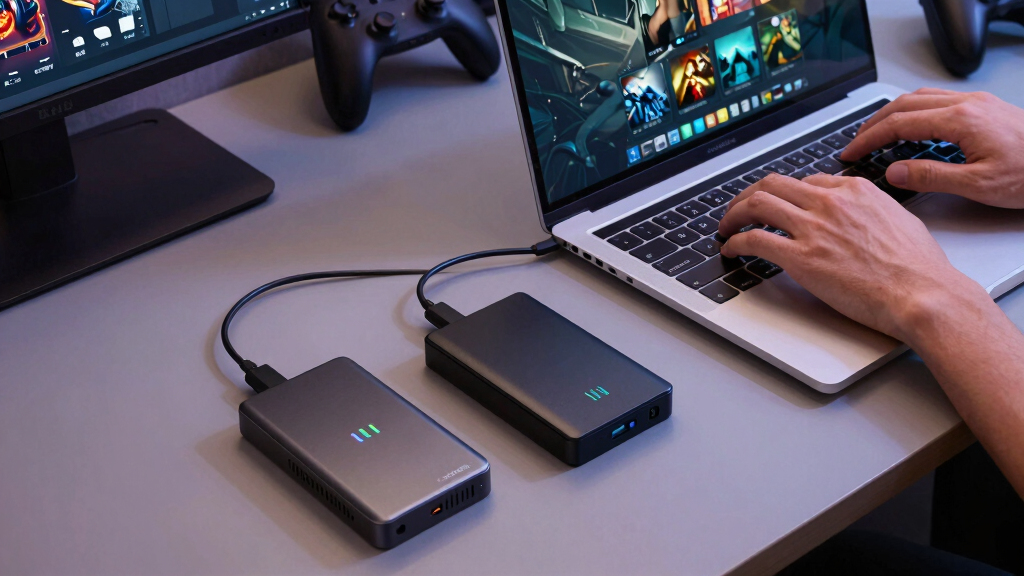

The Samsung T7 Portable SSD is my best overall pick among the best external SSDs for Steam Deck games because it hits the sweet spot: fast enough for the Deck’s USB-C port, small enough for a case, and often priced below newer 2,000MB/s drives. The SanDisk Extreme Portable SSD is the stronger travel choice thanks to its IP65-rated shell, while the Samsung T9 makes more sense if the same drive will also serve a gaming PC or laptop. The main tradeoffs are speed you can actually use on the Steam Deck, ruggedness, cable clutter, heat, and whether 1TB is enough for your library. I rank the drives by how well they fit Steam Deck gaming rather than by peak benchmark numbers alone. Keep reading for the full breakdown of who should buy each SSD and who should skip it.

Play games on Amazon Luna for your game nights, included with Prime
- A rotating selection of games, no download needed
- Play on TV, laptop or phone
- Fast, free delivery for your gear, too
Key Takeaways
- Samsung T7 earns Best Overall because its 1,050MB/s class speed matches the Steam Deck use case better than pricier 2,000MB/s models.
- Samsung T9 and SanDisk Extreme PRO are better PC-and-Deck crossover drives than pure Deck buys; their peak speed is useful off the Deck, less so during handheld play.
- SanDisk Extreme Portable SSD separates itself from the basic SanDisk Portable with IP65 protection, which matters if the drive lives in a travel bag.
- Western Digital P40 is the only 2TB option here, so it wins for docked libraries, but its RGB body and price make it less practical for minimalist handheld setups.
- Lexar D70E and Lexar ES3 are convenience-first choices; I rank them lower because direct-connect or multi-device appeal does not beat cable security and proven Deck fit.
| Lexar D70E 1TB Dual Drive External SSD |  | Best Cable-Free Pick | Capacity: 1TB | Read Speed: Up to 2000MB/s | Write Speed: Up to 1800MB/s | VIEW LATEST PRICE | See Our Full Breakdown |
| SanDisk 1TB Extreme Portable SSD (Old Model) |  | Best Rugged Value | Capacity: 1TB | Read Speed: Up to 1050MB/s | Write Speed: Up to 1000MB/s | VIEW LATEST PRICE | See Our Full Breakdown |
| SanDisk Extreme PRO Portable SSD 1TB | 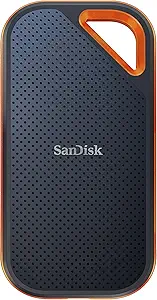 | Best Premium Rugged Drive | Capacity: 1TB | Read/Write Speed: Up to 2000MB/s | Interface: USB-C | VIEW LATEST PRICE | See Our Full Breakdown |
| SanDisk 1TB Portable SSD with USB-C and USB 3.2 Gen 2 |  | Best Simple Starter Drive | Capacity: 1TB | Read Speed: Up to 800MB/s | Interface: USB-C | VIEW LATEST PRICE | See Our Full Breakdown |
| Samsung T9 Portable SSD 1TB (MU-PG1T0B/AM) |  | Best for Sustained Speed | Model Number: MU-PG1T0B/AM | Capacity: 1TB | Interface: USB 3.2 Gen 2×2 | VIEW LATEST PRICE | See Our Full Breakdown |
| Samsung T7 Portable SSD, 1TB External Solid State Drive |  | Best Everyday Pick | Capacity: 1TB | Read Speed: Up to 1,050 MB/s | Write Speed: Up to 1,000 MB/s | VIEW LATEST PRICE | See Our Full Breakdown |
| Lexar ES3 1TB External SSD, USB 3.2 Gen2 Portable SSD |  | Best Lightweight Value | Capacity: 1TB | Read Speed: Up to 1,050 MB/s | Write Speed: Up to 1,000 MB/s | VIEW LATEST PRICE | See Our Full Breakdown |
| Western Digital 2TB P40 Game Drive SSD with RGB Lighting |  | Best High-Capacity Gaming Pick | Capacity: 2TB | Read Speed: Up to 2,000 MB/s | Interface: USB 3.2 Gen2x2 | VIEW LATEST PRICE | See Our Full Breakdown |
More Details on Our Top Picks
Lexar D70E 1TB Dual Drive External SSD
I rank the Lexar D70E as the easiest drive here for players who move Steam Deck games between devices, because its built-in USB-C and USB-A connectors remove the cable problem. Compared with the SanDisk Extreme PRO and Samsung T9, its 2000MB/s read rating looks competitive, though the Steam Deck will not take full advantage of every bit of that ceiling. The real appeal is convenience: it can plug into a Deck, laptop, or desktop without hunting for an adapter. The tradeoff is shape and durability focus. It has a metal body and lanyard loop, but it lacks the IP65 rating found on the SanDisk rugged models, and the stick-style design may be easier to bump while connected.
Pros:- Dual USB-C and USB-A connectors reduce adapter and cable clutter
- Fast 2000MB/s read and 1800MB/s write ratings give it plenty of headroom
- Compact 55g metal housing is easy to carry with a Steam Deck case
- Lexar app support adds automatic backup features beyond game storage
Cons:- No listed IP water or dust resistance for rough travel
- Stick-style connector can be more exposed while plugged into the Steam Deck
- Steam Deck users will not fully benefit from the highest advertised speed ceiling
Best for: Steam Deck owners who often shuttle games or media between a Deck, desktop PC, laptop, and older USB-A machines.
Not ideal for: Players who want the most rugged travel drive, because it lacks the listed water, dust, and drop ratings of the SanDisk Extreme models.
- Capacity:1TB
- Read Speed:Up to 2000MB/s
- Write Speed:Up to 1800MB/s
- Connectivity:USB-C and USB-A
- USB Standard:USB 3.2 Gen 2
- Weight:55g / 1.94 oz
- Dimensions:3.13 x 1.19 x 0.31 inches
- Housing:Metal body with lanyard loop
Bottom line: This is the drive I would choose for cable-free game transfers across mixed USB-C and USB-A devices.
SanDisk 1TB Extreme Portable SSD (Old Model)
I see the SanDisk Extreme Portable SSD as the practical middle ground for Steam Deck owners who care more about durability and price discipline than chasing the fastest spec sheet. Its 1050MB/s read and 1000MB/s write ratings are lower than the Samsung T9 and SanDisk Extreme PRO, but that gap matters less for many Steam Deck game loads than it does for huge file transfers. What it adds is travel confidence: IP65 resistance, 3-meter drop protection, encryption, and a carabiner loop. The main catch is the “Old Model” label. Newer drives may offer better sustained speed or software support, so I would pick this when rugged storage at a sensible price matters more than owning the newest version.
Pros:- IP65 water and dust resistance suits backpacks, docks, and travel setups
- Up to 1050MB/s read and 1000MB/s write speeds are strong enough for Steam Deck game storage
- 3-meter drop protection adds more confidence than basic portable SSDs
- 256-bit AES hardware encryption helps protect non-game files on the same drive
Cons:- Old Model status may mean newer alternatives offer better speed or value
- Slower than 2000MB/s options for large library moves
- Peak performance depends on host device and cable support
Best for: Steam Deck players who travel often and want a tough 1TB game drive without paying for premium 2000MB/s hardware.
Not ideal for: Buyers who want the newest SanDisk platform or the fastest large transfer speeds, since the Extreme PRO and Samsung T9 sit above it on performance.
- Capacity:1TB
- Read Speed:Up to 1050MB/s
- Write Speed:Up to 1000MB/s
- Interface:USB-C
- USB Standard:USB 3.2 Gen 2
- Durability Rating:IP65 water and dust resistance
- Drop Protection:Up to 3 meters
- Encryption:256-bit AES hardware encryption
- Warranty:5-year limited warranty
Bottom line: This is the rugged value pick I would favor when protection matters more than premium transfer speed.
SanDisk Extreme PRO Portable SSD 1TB
I place the SanDisk Extreme PRO above the standard SanDisk Extreme for buyers who want both rugged hardware and a higher performance ceiling. The 2000MB/s rating makes it better suited to moving a large Steam library from a gaming PC before docking the Deck, while the aluminum chassis helps manage heat during longer transfers. Compared with the Samsung T9, it leans harder into outdoor-friendly durability with IP65 resistance, 3-meter drop protection, and a carabiner loop. The tradeoff is value. Steam Deck gameplay will not always reflect the premium speed rating, and USB 3.2 Gen 2×2 support is needed to hit peak numbers on compatible systems. It is a strong pick, but only if its speed plus protection mix matches how I store and move games.
Pros:- Up to 2000MB/s read/write speeds help with large game library transfers on compatible hosts
- IP65 water and dust resistance is stronger than basic portable drives
- Aluminum chassis doubles as a heatsink for longer copy sessions
- 256-bit AES hardware encryption adds value for mixed personal and game storage
Cons:- Premium price is harder to justify for Steam Deck-only use
- Needs USB 3.2 Gen 2×2 support to reach advertised peak speed
- Sustained heavy transfers can still generate heat
Best for: Steam Deck users who also move large game folders from a high-speed PC and want a rugged drive for frequent travel.
Not ideal for: Budget-focused handheld players, because much of its premium speed ceiling can be wasted when used only with the Steam Deck.
- Capacity:1TB
- Read/Write Speed:Up to 2000MB/s
- Interface:USB-C
- USB Standard:USB 3.2 Gen 2×2
- Durability Rating:IP65 water and dust resistance
- Drop Protection:Up to 3 meters
- Weight:2.72 oz
- Dimensions:4.36 x 2.28 x 0.41 inches
- Encryption:256-bit AES hardware encryption
Bottom line: This is the premium rugged choice I would pick when the same drive serves both a Steam Deck and a fast desktop gaming setup.
SanDisk 1TB Portable SSD with USB-C and USB 3.2 Gen 2
I would slot the SanDisk 1TB Portable SSD as the simplest entry point for Steam Deck storage expansion. It does not chase the 2000MB/s numbers of the Samsung T9 or SanDisk Extreme PRO, but its 800MB/s read speed is still well beyond what many portable game setups need for storing and launching titles. Compared with the rugged SanDisk Extreme, this model is plainer: it has 2-meter drop protection and a rubber hook, but no listed IP65 rating, no stated write speed, and no hardware encryption in the supplied data. That makes it easier to recommend for a docked desk setup or a spare library drive than for harsh travel. I like it most when low fuss matters more than advanced protection.
Pros:- Up to 800MB/s read speed is enough for many external Steam Deck game libraries
- USB-C and USB 3.2 Gen 2 support keep setup simple
- Two-meter drop protection is better than bare-minimum portable storage
- Rubber hook makes it easier to attach to a bag or case
Cons:- Write speed is not listed, making large install transfer expectations less clear
- No IP water or dust rating in the provided specs
- Less compelling for power users than 1000MB/s or 2000MB/s alternatives
Best for: New Steam Deck owners who want a straightforward 1TB external library drive for a dock, desk, or travel pouch.
Not ideal for: Buyers who regularly copy huge game libraries or need weather-resistant storage, since faster and tougher SanDisk models are available.
- Capacity:1TB
- Read Speed:Up to 800MB/s
- Interface:USB-C
- USB Standard:USB 3.2 Gen 2
- Drop Protection:Up to 2 meters
- Carrying Feature:Rubber hook
- Form Factor:Portable external SSD
Bottom line: This is the low-fuss starter SSD I would choose for expanding a Steam Deck library without paying for enthusiast extras.
Samsung T9 Portable SSD 1TB (MU-PG1T0B/AM)
I rank the Samsung T9 as the strongest choice for Steam Deck owners who also use the same SSD for PC gaming, capture work, or frequent large transfers. Like the SanDisk Extreme PRO, it reaches up to 2000MB/s, but Samsung’s angle is thermal control: Dynamic Thermal Guard is meant to keep performance steadier during long copy jobs. That matters when moving a big Steam library before a trip. Compared with the Lexar D70E, it is less convenient because it still depends on the right cable and host support, but it brings better drive management through Magician Software. The downside is clear: the Steam Deck alone will not show the full benefit of USB 3.2 Gen 2×2 speed, and the price makes less sense for a single-purpose handheld drive.
Pros:- Up to 2000MB/s read speed is excellent for large transfers on compatible systems
- Dynamic Thermal Guard supports steadier performance during long copy sessions
- Magician Software helps with firmware, drive health, and encryption management
- Broad compatibility includes desktops, cameras, gaming consoles, and iPhone 15 Pro
Cons:- Requires compatible USB 3.2 Gen 2×2 hosts and cables for peak speed
- Higher price than standard 1TB portable SSDs
- No rugged IP rating or drop rating listed in the supplied specs
Best for: Players who split time between Steam Deck and a gaming PC and want one fast SSD for game libraries, video files, and backups.
Not ideal for: Steam Deck-only buyers on a tight budget, because its high-speed and thermal features are more useful across multiple devices.
- Model Number:MU-PG1T0B/AM
- Capacity:1TB
- Interface:USB 3.2 Gen 2×2
- Read Speed:Up to 2000MB/s
- Color:Black
- Thermal Management:Dynamic Thermal Guard, maintains under 140°F
- Compatibility:Desktops, cameras, gaming consoles, iPhone 15 Pro
- Mode Support:UASP mode
- Software:Samsung Magician Software
Bottom line: This is the speed-focused pick I would buy when an external SSD needs to serve the Steam Deck and a faster main machine.
Samsung T7 Portable SSD, 1TB External Solid State Drive
I rank the Samsung T7 Portable SSD as the best everyday pick because it hits the Steam Deck sweet spot: 1TB of space, fast USB 3.2 Gen 2 transfers, and a small aluminum body that is easy to pack with the handheld. It is not as fast on paper as the SanDisk Extreme PRO Portable SSD or the WD_BLACK P40 Game Drive SSD, but the Deck does not need 2,000MB/s storage for most game loading. Compared with the Lexar ES3, the T7 feels like the safer mainstream choice thanks to Samsung’s established portable SSD line. The tradeoff is value: it costs more than basic portable SSDs, and this standard T7 skips built-in password protection, so it is less appealing if secure file storage matters alongside games.
Pros:- Fast USB 3.2 Gen 2 speeds are more than enough for Steam Deck game transfers and general loading
- Compact aluminum unibody is easy to carry with a Deck case or dock setup
- Shock resistance up to 6 feet gives it better travel durability than a basic desktop drive
- Strong fit for mixed use across PC, mobile devices, and handheld gaming
Cons:- Pricier than traditional hard drives and some budget portable SSDs
- No built-in encryption or password protection on this standard model
- Only 1TB, so larger Steam libraries may fill it quickly
Best for: Steam Deck owners who want a fast, compact, reliable 1TB drive for carrying a medium-sized game library.
Not ideal for: Buyers who want hardware-backed privacy features or the lowest possible price per terabyte.
- Capacity:1TB
- Read Speed:Up to 1,050 MB/s
- Write Speed:Up to 1,000 MB/s
- Interface:USB 3.2 Gen 2
- Storage Technology:PCIe NVMe
- Material:Aluminum unibody
- Shock Resistance:Up to 6 feet
- Compatibility:PC and mobile devices
Bottom line: This is the pick I would steer most Steam Deck buyers toward if they want dependable speed without paying for specs the Deck may not fully use.
Lexar ES3 1TB External SSD, USB 3.2 Gen2 Portable SSD
The Lexar ES3 1TB External SSD earns its place as the lightweight value option. On paper, its 1,050MB/s read and 1,000MB/s write speeds match the Samsung T7, but Lexar adds 256-bit AES software encryption and a thinner 42g design. That makes it better suited to buyers who carry one drive between a Steam Deck, laptop, phone, and console. Compared with the SanDisk Extreme Portable SSD, though, the ES3 is less rugged because there is no listed IP65 water or dust rating. It also lacks the proven gaming-focused branding of the WD_BLACK P40. I see it as a practical pick for portable libraries, not the most battle-ready travel drive or the flashiest gaming accessory.
Pros:- Very light 42g body is easy to carry with a Steam Deck setup
- USB 3.2 Gen 2 speeds line up well with common portable SSD performance
- 256-bit AES DataShield software adds a privacy feature missing from the Samsung T7
- Broad compatibility covers phones, laptops, cameras, consoles, and PCs
Cons:- No listed water or dust resistance rating
- Performance may drop on systems that do not support USB 3.2 Gen 2
- MagSafe support is not included in this version
Best for: Steam Deck users who want a light 1TB SSD for game storage, file transfers, and multi-device use without paying premium gaming-drive prices.
Not ideal for: Outdoor travelers or rough-bag commuters who need a published water and dust resistance rating.
- Capacity:1TB
- Read Speed:Up to 1,050 MB/s
- Write Speed:Up to 1,000 MB/s
- Interface:USB 3.2 Gen 2
- Weight:42g
- Thickness:10.5mm
- Security:Lexar DataShield 256-bit AES encryption software
- Included Cable:Type-C cable
- Compatibility:iPhone 17 series, Android devices, laptops, cameras, Xbox Series X|S, PS4, PS5, and PCs
Bottom line: This is the best fit if I wanted a slim, affordable-feeling Steam Deck companion that can also handle phone and laptop storage duties.
Western Digital 2TB P40 Game Drive SSD with RGB Lighting
The WD_BLACK P40 Game Drive SSD is the most gaming-focused option in this group, mainly because it pairs 2TB of storage with a rugged body and up to 2,000MB/s speeds. For Steam Deck owners with a large library, that capacity matters more than the RGB lighting. Compared with the Samsung T7 and Lexar ES3, it gives twice the space and much higher peak speed, making it better for frequent PC-to-drive transfers before taking games on the Deck. The catch is that its USB 3.2 Gen2x2 speed headroom may be wasted on many setups, and RGB customization is Windows-only. Against the Samsung T9 or SanDisk Extreme PRO, this pick feels more gamer-styled than minimalist, which may or may not suit a portable handheld setup.
Pros:- 2TB capacity holds far more Steam Deck games than the 1TB Samsung T7 or Lexar ES3
- Up to 2,000MB/s speed is useful for large transfers on compatible PCs
- Shock-resistant build is rated for drops up to 2 meters
- Cross-platform support covers major consoles plus PC and Mac
Cons:- Steam Deck users may not benefit from the full USB 3.2 Gen2x2 speed ceiling
- RGB customization is limited to Windows
- Larger 2.5-inch form factor is less pocket-friendly than slimmer 1TB drives
Best for: Steam Deck players who keep a large installed library and also move games from a Windows gaming PC.
Not ideal for: Minimalist handheld users who want the smallest, plainest drive or Mac-first buyers who care about RGB control.
- Capacity:2TB
- Read Speed:Up to 2,000 MB/s
- Interface:USB 3.2 Gen2x2
- Form Factor:2.5-inch
- Lighting:Customizable RGB lighting
- RGB Software Support:Windows only
- Drop Resistance:Up to 2 meters
- Compatibility:PlayStation 5, Xbox Series X|S, PC, and Mac
Bottom line: This is the drive I would pick for a bigger Steam Deck library, especially if game transfers often start on a Windows PC.
How We Picked
I ranked these SSDs by Steam Deck fit first, then raw specs. The Deck can benefit from fast USB-C storage, but game loading and shader-heavy play rarely reward a 2,000MB/s drive as much as a laptop file transfer does. I gave extra weight to steady USB 3.2 Gen 2 performance, compact size, cable sanity, heat control, ruggedness, capacity, and street-price logic. I also treated portability differently for handheld and docked play: a tiny drive can be convenient, but a stick-style design that hangs from the Deck’s USB-C port can be easier to bump than a cabled SSD. That is why a balanced 1TB model like the Samsung T7 can rank ahead of faster premium drives.
The ranking also separates single-device Steam Deck buyers from people who want one SSD for a Deck, gaming PC, console, phone, or laptop. The SanDisk Extreme Portable SSD rises because its rugged build has a clear travel benefit, while the Samsung T9 and SanDisk Extreme PRO are ranked as premium crossover options rather than default Deck picks. The WD P40 Game Drive gets credit for 2TB capacity and a gaming-focused design, yet it is more compelling in a docked setup than clipped to a handheld. Lexar’s D70E and ES3 stay in the list for convenience and compatibility angles, but they need a more specific buyer than the higher-ranked drives.
Factors to Consider When Choosing Best External SSDs For Steam Deck Games
Choosing from the best external SSDs for Steam Deck games is less about buying the fastest number on the box and more about matching the drive to how the Deck is used. I weigh real Deck usefulness above spec-sheet bragging: speed, cable behavior, capacity, ruggedness, and price all matter, but not equally for every player.
Match Speed to the Steam Deck’s USB-C Limit
For Steam Deck games, 1,000MB/s-class SSDs already sit in the sweet spot because the Deck’s USB-C connection and real game workloads limit how much extra speed you feel. That is why I favor the Samsung T7 and SanDisk Extreme Portable SSD over faster drives for most buyers. A 2,000MB/s model such as the Samsung T9, SanDisk Extreme PRO, or WD P40 can still make sense if the same SSD handles large transfers on a PC. On the Deck alone, the upgrade usually buys headroom more than shorter load screens. I would pay for the faster tier only when the drive has a second job beyond Steam Deck storage.
Choose Capacity by Library Style
A 1TB external SSD is the safer default for most Steam Deck owners because it gives room for several large games without making the drive expensive. The WD P40’s 2TB capacity changes the decision for players who keep massive games installed, but its cost and gaming styling are harder to justify if the Deck is your only target. I treat 1TB drives as better everyday picks for portable play, especially when the internal SSD or microSD card already holds indie and smaller games. Bigger external storage is more useful when the Deck spends time docked to a TV or monitor. If your library includes many 100GB-plus games, capacity may matter more than chasing peak speed.
Think About Handheld Versus Docked Play
The best external SSD setup changes depending on whether the Deck is mostly handheld or docked. For handheld use, a short cable and light enclosure matter because the drive needs somewhere safe to sit while you play. That gives cabled compact drives like the Samsung T7 and SanDisk Extreme Portable an advantage over designs that can put strain near the USB-C port. For docked use, the calculus shifts: a larger drive such as the WD P40 can stay on a desk and its RGB lighting becomes less distracting. I would avoid buying a tiny direct-connect SSD only because it looks neat; one awkward bump can make a game session feel fragile.
Pay for Ruggedness Only When It Changes How You Carry the Drive
Rugged features are worth paying for only when they match how the drive will travel. The SanDisk Extreme Portable SSD earns its place because IP65 resistance and a grippy shell help when the drive shares a bag with chargers, cases, and cables. The basic SanDisk Portable SSD is more appealing when the drive mostly stays indoors and price matters more than weather sealing. Samsung’s T7 is compact and tidy, but it is not the same kind of outdoor-ready choice as the rugged SanDisk models. I would spend more on durability for travel, shared bags, and commute setups, not for a drive that lives beside a dock.
Check Format, Power, and Cable Details Before You Buy
Before choosing any SSD, I would check the included cable, the connector shape, and how the drive will be formatted for the Steam Deck. A USB-C cable in the box is useful, but cable length and stiffness can affect where the drive sits during play. If you plan to swap the SSD between Steam Deck and Windows, file system choices can become a bigger hassle than drive speed. SteamOS can format external storage, but a drive used across multiple systems may need extra setup and a little restraint about unplugging it mid-session. Models like the Lexar ES3 can appeal to multi-device buyers, while simpler single-purpose drives are easier for players who just want expanded Deck storage.
Frequently Asked Questions
Will a 2,000MB/s SSD make Steam Deck games load much faster?
For most Steam Deck games, I would not buy a 2,000MB/s external SSD expecting a night-and-day load-time jump. The Deck’s USB-C bandwidth, game engine behavior, shader caching, and CPU work can limit the payoff. Faster models like the Samsung T9 and SanDisk Extreme PRO still have value if the same SSD moves big files on a gaming PC. If the drive is only for Deck play, a 1,050MB/s-class option is the smarter spend. Put the saved money toward more capacity or a better case setup.
Is an external SSD better than a microSD card for Steam Deck games?
An external SSD can be faster than a microSD card, especially when installing large games, moving files, or handling heavy updates. The tradeoff is physical: microSD storage stays inside the Deck, while an external SSD adds a cable or attached drive. I prefer an SSD for docked play, big AAA games, and players who want storage they can also use with a PC. I still see microSD as cleaner for handheld travel because it has no dangling hardware. The best setup for many players is a microSD card for smaller games and an external SSD for large installs.
Should I choose 1TB or 2TB for a Steam Deck external SSD?
I would choose 1TB if the SSD is mainly a portable add-on for a rotating set of games. It keeps cost, size, and buyer regret lower while still leaving room for several large installs. A 2TB drive like the WD P40 makes more sense for a docked Deck, a shared gaming PC setup, or a library full of 100GB-plus games. The extra space is useful only if you actually keep those games installed instead of archiving them. For most players, 1TB is the better value point, while 2TB is a convenience upgrade.
Are rugged SSDs worth it for Steam Deck travel?
Rugged SSDs are worth the premium when the drive leaves the house often. The SanDisk Extreme Portable SSD is a stronger travel pick than the basic SanDisk Portable because its shell and IP65 rating give it a clearer role. That protection does not make the cable or Steam Deck port invincible, so I would still use a case and avoid playing with the drive hanging loose. If the SSD mostly sits next to a dock, ruggedness drops below capacity and price in my ranking. For commuter bags and trips, though, durability beats decorative extras.
Can I use the same external SSD for Steam Deck, PS5, Xbox, and PC?
You can often use the same model across systems, but I would not treat one formatted drive as a friction-free shared game library. A console may require its own format, SteamOS may format the drive for Deck storage, and Windows file access can depend on the file system you choose. The Lexar ES3 and drives like the Samsung T7 are appealing because they work across many USB-C devices, yet compatibility is not the same as effortless swapping. If you want one drive for every machine, I would decide which device gets priority before formatting it. For the least hassle, keep a Steam Deck-dedicated SSD and use separate storage for console libraries.
Conclusion
My final recommendation is simple: choose the Samsung T7 Portable SSD if you want the best overall Steam Deck pick, because it balances useful speed, pocketable size, and price better than the faster drives. It is also my pick for beginners because it has the fewest awkward tradeoffs. Choose the SanDisk 1TB Portable SSD for best value if the lowest sensible price matters and the drive will stay mostly indoors. Pick the Samsung T9 as the best premium choice when the SSD will also serve a gaming PC, and pick the SanDisk Extreme PRO if you want premium speed with a more rugged angle. The SanDisk Extreme Portable SSD is my travel pick for players who carry the Deck often. The WD P40 2TB is the docked-library choice for players who want more capacity and do not mind paying for gaming styling. The Lexar ES3 fits multi-device shoppers, while the Lexar D70E is the compact convenience pick for people who value pocket size above the most secure handheld setup.
Fall Picks
fall essentials
As an affiliate, we earn on qualifying purchases.