For arcade fight sticks for gaming, I’d start with the HORI Fighting Stick Alpha as the best overall choice for PS5, PS4, and PC players who want a dedicated console-focused stick. The MAYFLASH F700 stands out for wireless play and broad platform support, while the Qanba Sapphire S1 offers a leverless layout for players who prefer buttons over a joystick. The main tradeoffs are compatibility, wired versus wireless play, full-size versus compact designs, and joystick versus all-button controls. A model that works across several platforms may still require a wired connection or an adapter for particular systems. Read on for the full breakdown and advice on matching a stick to your setup.

Play games on Amazon Luna for your game nights, included with Prime
- A rotating selection of games, no download needed
- Play on TV, laptop or phone
- Fast, free delivery for your gear, too
Complete the kit



Key Takeaways
- The lineup splits by control style: the Qanba Sapphire S1 and 8BitDo All-Button Controller are leverless choices, while most of the other models use a joystick.
- Platform fit matters more than a long compatibility list: the HORI Alpha is aimed at PlayStation and PC, while several MAYFLASH models cover a wider mix of systems with different connection requirements.
- The MAYFLASH F700 is the standout for wireless flexibility, but buyers should weigh its connection options against the straightforward wired setup of models such as the Qanba Drone 2.
- Compact models trade room and portability for playing space: the HORI Fighting Stick Mini takes less room, while larger formats are generally better suited to extended sessions and lap or desk use.
- There is no single best route for every player: the HORI Alpha leads for a dedicated PlayStation setup, the MAYFLASH F300 and F101 cover budget-conscious multi-platform use, and 8BitDo’s Switch models suit players already centered on Nintendo and Windows.
| Qanba Sapphire S1 Street Fighter 6 Juri Edition Leverless Arcade Controller |  | Best Leverless Pick | Platforms: PlayStation 5, PlayStation 4, PC | Controller layout: Leverless | Button count: 18 | VIEW LATEST PRICE | See Our Full Breakdown |
| HORI Fighting Stick Alpha Arcade Fightstick for PS5, PS4, and PC |  | Best for Customization | Platforms: PlayStation 5, PlayStation 4, PC | Joystick and buttons: HAYABUSA joystick and matte high-speed buttons | Button quantity: 17 | VIEW LATEST PRICE | See Our Full Breakdown |
| 8Bitdo Arcade Stick for Xbox Series X|S, Xbox One, and Windows 10+ (Black) |  | Best Wireless Pick for Xbox | Platforms: Xbox Series X|S, Xbox One, Windows 10 or later | Connectivity: 2.4G wireless, USB wired | Button quantity: 8 | VIEW LATEST PRICE | See Our Full Breakdown |
| Qanba Drone 2 Wired Joystick for PlayStation 5, PlayStation 4, and PC |  | Best Portable PlayStation Stick | Platforms: PC, PlayStation 4, PlayStation 5 | Controls: Qanba 30 mm B30 buttons and OV7 OMRON switch joystick | Connectivity: USB | VIEW LATEST PRICE | See Our Full Breakdown |
| MAYFLASH F101 Arcade Fighting Stick for Switch, PC, PS3, Android, and Retro Consoles |  | Best for Multi-System Retro Gaming | Platforms: Nintendo Switch, PC, PlayStation 3, Android | Additional compatible systems: NeoGeo mini, SEGA Mega Drive mini, SEGA Genesis mini | Connectivity: USB | VIEW LATEST PRICE | See Our Full Breakdown |
| Saitake Wireless Arcade Fight Stick with Bluetooth, 2.4 GHz, and Wired Connectivity |  | Best for Multi-Device Wireless Play | Model: T01 | Compatible devices: Windows PC, Android, iOS, Nintendo Switch 1/2, PlayStation 3/4 | Connectivity: Bluetooth, 2.4 GHz receiver, USB wired | VIEW LATEST PRICE | See Our Full Breakdown |
| HORI Fighting Stick Mini for PlayStation 5, PlayStation 4, and PC | 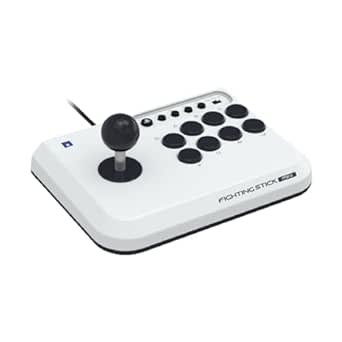 | Best Compact Stick for Beginners | Model: Fighting Stick Mini (SPF-038U) | Compatible devices: PC, PlayStation 4, PlayStation 5 | Connectivity: USB | VIEW LATEST PRICE | See Our Full Breakdown |
| MAYFLASH F700 Wireless Arcade Stick for PS5, PS4, Nintendo Switch, PC, and More |  | Best Premium Customizable Wireless Stick | Model: F700 | Compatible platforms: PS5, PS4, PS3, Nintendo Switch, Switch 2, Windows, Apple devices, Android, supported mini consoles | Connectivity: Bluetooth, 2.4G receiver, wired USB | VIEW LATEST PRICE | See Our Full Breakdown |
| MAYFLASH F300 Arcade Fight Stick for Switch, PlayStation, Xbox, PC, Mac, and Steam Deck |  | Best Value for Broad Wired Compatibility | Model: F300 | Compatible devices: Switch, PS4, PS3, Xbox Series S/X, Xbox One, Xbox 360, Windows PC, macOS, Steam Deck, Android, selected retro consoles | Connectivity: USB wired | VIEW LATEST PRICE | See Our Full Breakdown |
| 8BitDo All-Button Arcade Controller for Switch and Windows, N Edition |  | Best Leverless Pick for Switch and PC | Model: N Edition | Compatible devices: Nintendo Switch, Nintendo Switch 2 with latest firmware, Windows PC | Layout: Leverless, all-button | VIEW LATEST PRICE | See Our Full Breakdown |
| Nonbliep Wired Arcade Stick for PS5, PS4, PC, and Android |  | Best for Programmable Inputs | Compatibility: PS5, PS4, PC, Android | Connectivity: Wired USB | Cable length: 9.8 ft | VIEW LATEST PRICE | See Our Full Breakdown |
| MAYFLASH F500 Universal Arcade Fighting Stick |  | Best for Multi-Platform Setups | Model: F500 | Connectivity: USB | Compatible platforms: Nintendo Switch/Switch 2, Xbox Series X/S, Xbox One, Xbox 360, PS4, PS3, Windows, macOS, Android, Raspberry Pi, Steam Deck, PS Classic, NEOGEO Mini, SEGA Mega Drive/Genesis | VIEW LATEST PRICE | See Our Full Breakdown |
| 8Bitdo Arcade Stick for Nintendo Switch and Windows |  | Best for Wireless Switch and PC Play | Compatible devices: Nintendo Switch, personal computer | Connectivity: Bluetooth, 2.4G receiver, wired USB-C | Buttons: 16 | VIEW LATEST PRICE | See Our Full Breakdown |
| Subsonic Arcade Stick Controller for PS4, Xbox Series X/S, Xbox One, PC, and PS3 |  | Best Simple Wired Pick | Model: SA5662 | Compatible devices: PC, PlayStation 3, PlayStation 4, Xbox One, Xbox Series X/S | Connectivity: USB | VIEW LATEST PRICE | See Our Full Breakdown |
| 8Bitdo Retro Wireless Arcade Fight Stick for Switch, Switch 2, PC and Windows | 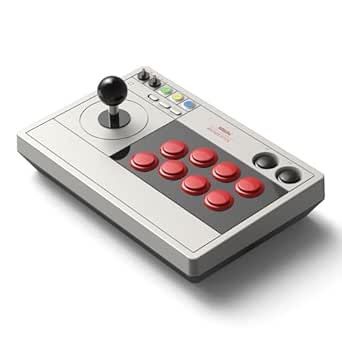 | Best for Long Wireless Sessions | Compatible platforms: Nintendo Switch, PC/Windows | Connectivity: Bluetooth, 2.4 GHz wireless, wired USB-C | Buttons: 12 | VIEW LATEST PRICE | See Our Full Breakdown |
| arcade fight sticks for gaming | Connectivity | Weight | Dimensions |
|---|---|---|---|
| Qanba Sapphire S1 Street Fight | USB | 3.7 lbs | 14.41 x 10.24 x 1.18 inches |
| HORI Fighting Stick Alpha Arca | USB | 1500 g | 18.9 x 6.5 x 14.37 inches |
| 8Bitdo Arcade Stick for Xbox S | 2.4G wireless, USB wired | — | 9.45 x 13.39 x 5.51 inches |
| Qanba Drone 2 Wired Joystick f | USB | 4 pounds | 14 x 8.7 x 4.6 inches |
| MAYFLASH F101 Arcade Fighting | USB | 3 pounds | 12.13 x 9.37 x 4.96 inches |
| Saitake Wireless Arcade Fight | Bluetooth, 2.4 GHz receiver, USB wired | — | 11.61 x 0.71 x 7.68 inches |
| HORI Fighting Stick Mini for P | USB | 467 g | 5.91 x 8.27 x 3.43 inches |
| MAYFLASH F700 Wireless Arcade | Bluetooth, 2.4G receiver, wired USB | 3.3 kg | 14.72 x 9.69 x 2.48 inches |
| MAYFLASH F300 Arcade Fight Sti | USB wired | 2 kg | — |
| 8BitDo All-Button Arcade Contr | Bluetooth, 2.4 GHz wireless, USB wired | 80 g | — |
| Nonbliep Wired Arcade Stick fo | Wired USB | — | — |
| MAYFLASH F500 Universal Arcade | USB | 2.97 kg | 14.17 x 2.4 x 9.17 inches |
| 8Bitdo Arcade Stick for Ninten | Bluetooth, 2.4G receiver, wired USB-C | 4.6 pounds | 11.93 x 4.37 x 7.99 inches |
| Subsonic Arcade Stick Controll | USB | 760 g | 9.84 x 6.89 x 1.89 inches |
| 8Bitdo Retro Wireless Arcade F | Bluetooth, 2.4 GHz wireless, wired USB-C | 2.44 kg | — |
More Details on Our Top Picks
Qanba Sapphire S1 Street Fighter 6 Juri Edition Leverless Arcade Controller
Best for players ready to switch to leverless controls, the Qanba Sapphire S1 replaces a joystick with 18 adjustable-throw buttons, giving each direction its own button. That layout can suit players who want precise, customizable inputs, but it asks for different muscle memory than the traditional stick controls on the HORI Fighting Stick Alpha or Qanba Drone 2. Cherry MX switch compatibility and customizable mapping with saved profiles make it adaptable as preferences change. The detachable memory foam wrist rest adds support for longer sessions, while the officially licensed Juri artwork gives this model a distinct Street Fighter 6 identity. Its PS5, PS4, and PC support makes it a focused choice for those platforms. The tradeoffs are its 3.7-pound weight and the learning curve for joystick players; it is less suited to anyone who wants a familiar arcade lever.
Pros:- 18 adjustable-throw buttons support a customizable leverless layout.
- Cherry MX switch compatibility allows switch customization.
- Mapping and multiple saved profiles let players tailor controls.
- Detachable memory foam wrist rest adds support, and the licensed Juri artwork gives it a distinctive theme.
Cons:- The leverless layout can require a substantial adjustment for players used to a joystick.
- At 3.7 pounds, it is heavier than a typical portable controller.
- Compatibility is limited to PS5, PS4, and PC.
Best for: Street Fighter 6 players on PS5, PS4, or PC who want an all-button layout, adjustable switches, and customizable profiles.
Not ideal for: Traditional joystick players who want familiar lever controls, or buyers seeking a lighter controller for frequent travel.
- Platforms:PlayStation 5, PlayStation 4, PC
- Controller layout:Leverless
- Button count:18
- Switch compatibility:Cherry MX
- Connectivity:USB
- Weight:3.7 lbs
- Dimensions:14.41 x 10.24 x 1.18 inches
- Power:USB powered
Our verdict“Choose the Sapphire S1 if you want a feature-rich leverless controller for PlayStation or PC and are ready to learn a button-only layout.”
HORI Fighting Stick Alpha Arcade Fightstick for PS5, PS4, and PC
The HORI Fighting Stick Alpha is the strongest fit here for players who want a conventional joystick and room to modify their setup. Its HAYABUSA joystick and matte high-speed buttons provide a familiar arcade-style control scheme, while the case opens for maintenance and the top-panel artwork is replaceable. That serviceable design sets it apart from the more compact Qanba Drone 2, which is positioned for portability rather than extensive customization. Four profiles, a tournament lock, touchpad, and onboard audio and mic controls add useful options for console play. The 10-foot USB cable gives some flexibility around a gaming setup, but this remains a wired controller, and its large 18.9-inch width takes meaningful storage space. Pick it for a customizable PlayStation or PC stick; skip it if compactness or wireless play matters more.
Pros:- HAYABUSA joystick and matte high-speed buttons provide traditional arcade-style controls.
- The case opens for maintenance and the top-panel artwork can be replaced.
- Four custom profiles support different games or control preferences.
- Includes a touchpad, tournament lock, and onboard audio and mic controls.
Cons:- The large case is less convenient to store or carry than the Qanba Drone 2.
- USB-only connectivity requires a wired connection during play.
- Its stated platform compatibility does not include Xbox or Nintendo Switch.
Best for: PS5, PS4, and PC fighting-game players who want a full-size joystick, serviceable case, replaceable artwork, and multiple control profiles.
Not ideal for: Players with limited desk or storage space, or anyone who needs a wireless fight stick.
- Platforms:PlayStation 5, PlayStation 4, PC
- Joystick and buttons:HAYABUSA joystick and matte high-speed buttons
- Button quantity:17
- Connectivity:USB
- Cable length:10 ft
- Profiles:Four custom profiles
- Weight:1500 g
- Dimensions:18.9 x 6.5 x 14.37 inches
Our verdict“Choose the Fighting Stick Alpha if you want a customizable, full-size PlayStation or PC arcade stick and have room for its large wired case.”
8Bitdo Arcade Stick for Xbox Series X|S, Xbox One, and Windows 10+ (Black)
For Xbox and Windows players who want to move away from a fixed cable, this 8Bitdo is the wireless-focused choice in the lineup. It connects over 2.4G or USB, so players can use a wired setup when preferred and keep the battery option for less clutter. The stated maximum play time is up to 30 hours, and the included 3.5 mm headphone jack with volume control keeps basic audio adjustments within reach. Ultimate Software supports button mapping and profiles, adding flexibility that the simpler wired Qanba Drone 2 does not emphasize. Compatibility is the key dividing line: this model is specified for Xbox Series X|S, Xbox One, and Windows 10 or later, not PlayStation or Switch. Its four-hour charge time and platform limits make it a poor universal pick, but a compelling match for its supported systems.
Pros:- Offers both 2.4G wireless and USB wired connections.
- Ultimate Software supports custom button mapping and profiles.
- A 3.5 mm headphone jack and volume control add convenient audio access.
- Specified battery life is up to 30 hours per charge.
Cons:- Compatibility is limited to Xbox consoles and Windows 10 or later.
- A full charge takes four hours.
- Wireless use depends on the rechargeable battery.
Best for: Xbox Series X|S or Xbox One players who also game on Windows and want wireless 2.4G play, wired USB, and configurable profiles.
Not ideal for: PlayStation or Nintendo Switch owners, and buyers who need one stick explicitly compatible across several console families.
- Platforms:Xbox Series X|S, Xbox One, Windows 10 or later
- Connectivity:2.4G wireless, USB wired
- Button quantity:8
- Customization:Button mapping and profiles through 8BitDo Ultimate Software
- Audio:3.5 mm headphone jack and volume control
- Maximum play time:Up to 30 hours
- Charging time:4 hours
- Dimensions:9.45 x 13.39 x 5.51 inches
Our verdict“Choose this 8Bitdo if Xbox or Windows is your main platform and wireless play matters more than broad console compatibility.”
Qanba Drone 2 Wired Joystick for PlayStation 5, PlayStation 4, and PC
The Qanba Drone 2 suits PlayStation and PC players who want a traditional joystick in a more transport-minded format than the large HORI Fighting Stick Alpha. Its full-size 30 mm buttons and OV7 joystick preserve an arcade-style control feel, while the touchpad and microphone mute button cover useful console functions. USB wiring keeps setup straightforward, but it ties play to cable reach and rules out wireless convenience. Although it is described as portable, the listed weight is 4 pounds, so it is better understood as a smaller-format stick than an especially light travel controller. Compared with the MAYFLASH F101, its platform list is narrower, but it is explicitly compatible with PS5, PS4, and PC. This is a practical fit for players who prioritize familiar controls and Sony support over extensive customization or broad system coverage.
Pros:- Full-size Qanba buttons and an OV7 joystick provide traditional arcade-style controls.
- Supports PS5, PS4, and PC.
- Touchpad and microphone mute button suit PlayStation play.
- Smaller dimensions make it less cumbersome to store than the HORI Fighting Stick Alpha.
Cons:- USB wiring limits use to the cable’s reach.
- At 4 pounds, it is not especially light despite its portable design.
- Its listed compatibility is narrower than the MAYFLASH F101’s range of systems.
Best for: PS5 and PS4 players who want a traditional joystick and full-size buttons in a smaller-format wired controller for home or occasional transport.
Not ideal for: Players seeking wireless play, a very light travel stick, broad console compatibility, or a large case suited to extensive modification.
- Platforms:PC, PlayStation 4, PlayStation 5
- Controls:Qanba 30 mm B30 buttons and OV7 OMRON switch joystick
- Connectivity:USB
- Additional controls:Touchpad and microphone mute button
- Audio input:3.5 mm microphone input
- Weight:4 pounds
- Dimensions:14 x 8.7 x 4.6 inches
- Warranty:1 year
Our verdict“Choose the Drone 2 if you want a straightforward wired joystick for PS5, PS4, or PC without the footprint of a larger arcade stick.”
MAYFLASH F101 Arcade Fighting Stick for Switch, PC, PS3, Android, and Retro Consoles
The MAYFLASH F101 stands out for system coverage: it supports Switch, PC, PS3, Android, and several mini retro consoles, giving it a different purpose from the PlayStation-focused Qanba Drone 2. XInput and DirectInput modes help it work with a range of PC games, while adjustable Turbo settings add a control option that the Qanba does not list. Its USB connection keeps the setup simple but means there is no wireless play. Buyers interested in upgrading the feel can fit separately purchased Sanwa Denshi buttons; that flexibility is useful, though the extra parts are not included. The F101 makes more sense as a versatile entry point for mixed-platform gaming than as a premium, ready-to-modify stick. Its broad compatibility is the draw; its wired design and optional-button upgrade are the compromises.
Pros:- Supports Switch, PC, PS3, Android, and listed mini retro consoles.
- XInput and DirectInput modes provide PC input flexibility.
- Adjustable Turbo settings offer added control options.
- Compatible with separately purchased Sanwa Denshi buttons for customization.
Cons:- USB-only connectivity does not support wireless play.
- Sanwa Denshi buttons are sold separately.
- PS5 and Xbox compatibility are not listed.
Best for: Players who want one USB arcade stick for Switch, PC, PS3, Android, and supported mini retro systems, especially those open to later button upgrades.
Not ideal for: PS5 or Xbox players who need stated native compatibility, wireless users, or buyers who expect Sanwa Denshi buttons to come included.
- Platforms:Nintendo Switch, PC, PlayStation 3, Android
- Additional compatible systems:NeoGeo mini, SEGA Mega Drive mini, SEGA Genesis mini
- Connectivity:USB
- Button quantity:16
- PC input modes:XInput, DirectInput
- Additional features:Turbo functionality and switchable joystick modes
- Weight:3 pounds
- Dimensions:12.13 x 9.37 x 4.96 inches
Our verdict“Choose the F101 if broad Switch, PC, Android, PS3, and retro-system support matters more than wireless play or premium buttons out of the box.”
Saitake Wireless Arcade Fight Stick with Bluetooth, 2.4 GHz, and Wired Connectivity
The Saitake T01 makes the most sense for players who move between platforms and want a choice of Bluetooth, 2.4 GHz, or wired USB instead of being tied to one connection. Its listed compatibility spans Windows, mobile devices, Switch, and PS3/PS4, giving it broader reach than the HORI Fighting Stick Mini, which is wired and limited to PC and PlayStation. A rechargeable battery, receiver storage compartment, and adjustable lighting add convenience for changing setups; the display, turbo modes, and macros offer extra control options. Those features also make it less straightforward than a simpler stick, and the 1000 mAh battery has no stated runtime. PlayStation support stops at PS4 in the supplied specifications, so this is a better fit for a mixed-device setup than a current-PlayStation-only one.
Pros:- Bluetooth, 2.4 GHz receiver, and USB wired connection options
- Broad compatibility across PC, mobile, Nintendo Switch, and PS3/PS4
- Turbo settings, adjustable lighting, and macros supporting up to 18 keystrokes
- Rechargeable battery with a compartment for storing the wireless receiver
Cons:- The 1000 mAh battery capacity is listed without an estimated playtime
- No compatibility with newer PlayStation consoles is specified
- The many settings may be unnecessary for players seeking a simple plug-in stick
Best for: Players who switch among PC, mobile devices, Nintendo Switch, and older PlayStation consoles and want both wireless and wired connections.
Not ideal for: PS5 players or anyone who needs a published battery runtime; the listed PlayStation compatibility covers PS3 and PS4 only, and battery life is unspecified.
- Model:T01
- Compatible devices:Windows PC, Android, iOS, Nintendo Switch 1/2, PlayStation 3/4
- Connectivity:Bluetooth, 2.4 GHz receiver, USB wired
- Battery capacity:1000 mAh
- Macro capacity:Up to 18 keystrokes
- Headphone jack:3.5 mm
- Dimensions:11.61 x 0.71 x 7.68 inches
- Warranty:1 year
Our verdict“Choose the Saitake T01 if broad platform coverage and flexible wireless connections matter more than confirmed PS5 support or a stated battery runtime.”
HORI Fighting Stick Mini for PlayStation 5, PlayStation 4, and PC
The HORI Fighting Stick Mini is the straightforward pick for someone trying an arcade layout without making room for a full-size controller. Its eight-button layout and micro-switch joystick provide familiar inputs for fighting games, while its low weight and rubberized feet suit small desks and occasional travel. Compared with the larger, wireless MAYFLASH F700, this HORI gives up platform breadth, customization, and connection choices in exchange for a compact USB setup that is easier to store. The 8-foot cable offers useful reach, but the small surface leaves less room for hands than a full-size stick. It also lacks a touch pad, which can limit access to some PlayStation controls. This is a sensible entry point for PS5, PS4, or PC players who value simplicity over expansion.
Pros:- Compact, lightweight design is easy to store and carry
- Eight-button layout and micro-switch joystick suit arcade and fighting games
- Rubberized feet help keep the stick steady on smooth surfaces
- Eight-foot USB cable provides reach without wireless setup
Cons:- Small surface offers less room than a full-size fight stick
- No touch pad is included
- USB-only connection and limited compatibility compared with the MAYFLASH F700
Best for: New arcade-stick players with limited desk or storage space who mainly play fighting games on PS5, PS4, or PC.
Not ideal for: Players who want a full-size control surface, wireless play, broad console compatibility, or a touch pad for PlayStation functions.
- Model:Fighting Stick Mini (SPF-038U)
- Compatible devices:PC, PlayStation 4, PlayStation 5
- Connectivity:USB
- Buttons:8
- Cable length:8 ft
- Weight:467 g
- Dimensions:5.91 x 8.27 x 3.43 inches
- Touch pad:Not included
Our verdict“Pick the HORI Fighting Stick Mini for a compact, simple first stick on PlayStation or PC, but skip it if you need a full-size layout or wireless play.”
MAYFLASH F700 Wireless Arcade Stick for PS5, PS4, Nintendo Switch, PC, and More
The MAYFLASH F700 is the most feature-rich conventional stick in this group for players who want wireless freedom without giving up a route to hardware upgrades. It offers Bluetooth, 2.4 GHz, and wired USB, plus compatibility across PlayStation, Switch, PC, mobile, and supported mini consoles. Its support for compatible Sanwa Denshi buttons and joystick gives it a longer upgrade path than the more compact HORI Fighting Stick Mini. The F700 also adds turbo settings, receiver storage, and wired headset audio and chat on specified systems. Its size and 3.3 kg weight make it less portable than the Mini, and its PS5 support is limited to fighting games. It also does not support Xbox consoles, so players seeking one stick for Xbox and PlayStation should look elsewhere.
Pros:- Bluetooth, 2.4 GHz receiver, and wired USB connectivity
- Compatible with Sanwa Denshi buttons and joystick for customization
- Wired headset audio and chat support on PS5, PS4, and PC XInput
- Receiver storage and adjustable turbo settings are built in
Cons:- PS5 support is limited to fighting games
- Not compatible with Xbox One or Xbox Series S/X
- At 3.3 kg, it is less portable than the HORI Fighting Stick Mini
Best for: Fighting-game players who want wireless and wired options, broad non-Xbox compatibility, headset support, and the ability to upgrade controls.
Not ideal for: Xbox players, people seeking one stick for multiple game genres on PS5, or buyers prioritizing a light and easy-to-carry controller.
- Model:F700
- Compatible platforms:PS5, PS4, PS3, Nintendo Switch, Switch 2, Windows, Apple devices, Android, supported mini consoles
- Connectivity:Bluetooth, 2.4G receiver, wired USB
- Weight:3.3 kg
- Dimensions:14.72 x 9.69 x 2.48 inches
- Customization:Compatible with Sanwa Denshi buttons and joystick
- Headset support:Wired audio and chat on PS5, PS4, and PC XInput
- Warranty:Lifetime
Our verdict“Choose the F700 if you want a wireless-capable, upgradeable stick for fighting games across PlayStation, Switch, and PC, and do not need Xbox support.”
MAYFLASH F300 Arcade Fight Stick for Switch, PlayStation, Xbox, PC, Mac, and Steam Deck
The MAYFLASH F300 stands out for players who would rather accept a cable than maintain separate sticks for different systems. Its wired USB connection supports a notably wide range of consoles and computers, including Xbox systems, which the wireless F700 does not support. On PC, XInput and DirectInput give players options for older and newer game setups, while compatible Sanwa Denshi controls allow upgrades. Turbo settings add another adjustment without changing the basic plug-in design. The tradeoff is that PS5 use requires a separately specified MAYFLASH adapter or converter; the F700 offers direct PS5 fighting-game support instead. The supplied data also lists only four buttons, so buyers should confirm the intended layout suits their games. Its short 90-day warranty is another drawback beside the F700’s listed lifetime warranty.
Pros:- Wide compatibility includes Xbox, PlayStation 3/4, Switch, PC, Mac, and Steam Deck
- XInput and DirectInput modes support varied PC setups
- Compatible with Sanwa Denshi buttons and joystick
- Adjustable turbo speed settings are included
Cons:- PS5 compatibility requires a separately purchased specified adapter or converter
- Wired USB connection does not offer wireless play
- Listed warranty is 90 days, shorter than the F700’s lifetime warranty
Best for: Players with a mix of Xbox, PlayStation 3/4, Switch, PC, Mac, or Steam Deck setups who are comfortable using a wired stick.
Not ideal for: PS5 players who want to connect without an additional adapter, or anyone who needs wireless play and a longer listed warranty.
- Model:F300
- Compatible devices:Switch, PS4, PS3, Xbox Series S/X, Xbox One, Xbox 360, Windows PC, macOS, Steam Deck, Android, selected retro consoles
- Connectivity:USB wired
- PC input modes:XInput and DirectInput
- Buttons:4 (as listed)
- Weight:2 kg
- PS5 compatibility:Requires MAYFLASH Magic-S Ultimate adapter or MagicBoots-S5 Converter
- Warranty:90 days
Our verdict“Choose the F300 for broad, wired compatibility across older consoles and PC, but budget for a PS5 adapter if that console is part of your setup.”
8BitDo All-Button Arcade Controller for Switch and Windows, N Edition
This 8BitDo is a different kind of arcade controller: its leverless, all-button layout replaces the joystick with low-profile mechanical switches. That format may suit players who prefer directional buttons, and its 16 hot-swappable Kailh Wizard switches let them tailor the feel more than the conventional joystick-based MAYFLASH F300. Four programmable buttons and an independent control panel add room for personalized input setups, while Bluetooth, 2.4 GHz, and USB provide flexible connection choices. The tradeoff is a narrow platform list: it supports Switch and Windows, not the PlayStation and Xbox systems covered by the F300. Switch 2 support requires the latest firmware, and the leverless layout will not suit players who want a traditional joystick. Its listed 80 g weight is notably light, but the thin profile is not a substitute for a broad, substantial stick surface.
Pros:- Leverless layout uses 16 hot-swappable low-profile mechanical switches
- Bluetooth, 2.4 GHz wireless, and USB wired connections
- Four programmable buttons support customized inputs
- Thin profile is easy to carry and store
Cons:- All-button layout is unsuitable for players who prefer a joystick
- Compatibility is limited to Nintendo Switch and Windows
- Switch 2 support requires the latest firmware
Best for: Switch and Windows players who prefer leverless directional inputs and want wireless options plus hot-swappable switches.
Not ideal for: Players who want a traditional joystick layout or need compatibility with PlayStation, Xbox, or platforms beyond Switch and Windows.
- Model:N Edition
- Compatible devices:Nintendo Switch, Nintendo Switch 2 with latest firmware, Windows PC
- Layout:Leverless, all-button
- Connectivity:Bluetooth, 2.4 GHz wireless, USB wired
- Switches:16 Kailh Wizard low-profile mechanical switches
- Programmable buttons:P1, P2, P3, P4
- Weight:80 g
- Thickness:1.6 cm
Our verdict“Pick the 8BitDo N Edition if you want a portable leverless controller for Switch or Windows, but choose a conventional stick if you need a joystick or wider console support.”
Nonbliep Wired Arcade Stick for PS5, PS4, PC, and Android
The Nonbliep is a focused pick for players who want programmable shortcuts without giving up a traditional stick-and-button layout. Its three programmable buttons can each store up to 16 commands, while standard and auto-turbo modes offer extra ways to handle repeated inputs. Compared with the MAYFLASH F500, it has a narrower platform list and less emphasis on hardware customization, but its stated PS5 compatibility does not call for a separately specified adapter. The weighted body is intended to stay put during play, and the 9.8-foot braided USB cable gives room to position it away from the console. The tradeoffs are its fighting-game focus and a setup requirement: PS5 play requires the communication method to be set to USB cable.
Pros:- Three programmable buttons can each store up to 16 commands.
- Standard and auto-turbo modes support different input preferences.
- Weighted construction is designed to resist shifting during play.
- Braided 9.8-foot cable and built-in storage compartment make cable management easier.
Cons:- Designed specifically for fighting-game genres, limiting its appeal for general gaming.
- PS5 use requires setting the communication method to USB cable.
- Wired connectivity offers no wireless play option.
Best for: Fighting-game players on PS5, PS4, PC, or Android who want programmable command buttons and a stable wired setup.
Not ideal for: Players seeking a wireless stick, broad retro-console support, or a controller suited to many game genres.
- Compatibility:PS5, PS4, PC, Android
- Connectivity:Wired USB
- Cable length:9.8 ft
- Cable type:Braided
- Turbo modes:Standard and auto-turbo
- Programmable buttons:3, each storing up to 16 commands
- Cable storage:Built-in compartment
- Color:White
Our verdict“Choose the Nonbliep if programmable inputs and a planted wired setup matter more than broad platform coverage or wireless play.”
MAYFLASH F500 Universal Arcade Fighting Stick
The F500 earns its place for players who move between consoles, computers, and retro systems: its listed compatibility spans Switch, Xbox, PlayStation, PC, macOS, Android, Steam Deck, and several classic platforms. That breadth makes it a more flexible shared stick than the platform-specific 8Bitdo Arcade Stick for Nintendo Switch and Windows. Its Sanwa Denshi-compatible controls also give modders a clear upgrade path, while XInput and DInput support help it fit different PC games. The 2.97 kg body is substantial, which may help keep it steady but makes it less convenient to carry. PS5 support is not plug-and-play; it requires a specified MAYFLASH adapter or converter. Headset audio and chat are limited to supported Xbox and PS4 systems, so the broad compatibility claim does not mean every feature works everywhere.
Pros:- Supports a broad range of current systems, computers, handheld PCs, and retro consoles.
- Sanwa Denshi-compatible joystick and buttons allow hardware customization.
- XInput and DInput modes provide useful PC compatibility.
- Turbo functions offer adjustable speed settings.
Cons:- PS5 use requires a separately specified MAYFLASH adapter or converter.
- Headset audio and chat are specified only for supported Xbox and PS4 systems.
- At 2.97 kg, it is less convenient to transport than lighter options.
Best for: Players with several current and retro systems who want one wired stick and the option to install compatible Sanwa parts.
Not ideal for: PS5-only buyers who want direct connection, or players who need wireless play and universal headset support.
- Model:F500
- Connectivity:USB
- Compatible platforms:Nintendo Switch/Switch 2, Xbox Series X/S, Xbox One, Xbox 360, PS4, PS3, Windows, macOS, Android, Raspberry Pi, Steam Deck, PS Classic, NEOGEO Mini, SEGA Mega Drive/Genesis
- PC input modes:XInput and DInput
- Buttons:12
- Weight:2.97 kg
- Dimensions:14.17 x 2.4 x 9.17 inches
- Customization:Compatible with Sanwa Denshi buttons and joystick
- PS5 compatibility:Requires MAYFLASH Magic-S Ultimate adapter or MagicBoots for PS4 and PS5 Converter
Our verdict“Pick the F500 if one customizable stick needs to serve many platforms, but budget for an adapter if PS5 play is part of the plan.”
8Bitdo Arcade Stick for Nintendo Switch and Windows
This 8Bitdo is the wireless-focused choice among these five: Bluetooth, a 2.4G receiver, and wired USB-C let players choose convenience or a cable connection. Its 16-button layout and Ultimate Software support for remapping and macros offer more layout control than the simpler Subsonic SA5662. A universal mounting plate that supports Sanwa arcade sticks also gives it room to grow for players who want to modify the lever. The receiver stores in a hidden compartment, reducing the chance of losing a small accessory between sessions. Its main limit is platform reach: the listed compatibility is Nintendo Switch and Windows, far short of the MAYFLASH F500’s extensive system support. At 4.6 pounds, it is also less portable than its wireless connections might suggest.
Pros:- Connects through Bluetooth, a 2.4G receiver, or wired USB-C.
- Button remapping and macros are available through 8Bitdo Ultimate Software.
- Universal mounting plate supports Sanwa arcade sticks.
- Hidden receiver compartment helps keep the wireless adapter with the stick.
Cons:- Listed compatibility is limited to Nintendo Switch and Windows PCs.
- At 4.6 pounds, it may be cumbersome for frequent transport.
- A 2.4G receiver is included, but wireless play still depends on managing the receiver or using Bluetooth.
Best for: Nintendo Switch and Windows players who want wireless connection choices, software-based button customization, and a mod-friendly layout.
Not ideal for: Players who need Xbox or PlayStation compatibility, or those looking for a lightweight stick to carry regularly.
- Compatible devices:Nintendo Switch, personal computer
- Connectivity:Bluetooth, 2.4G receiver, wired USB-C
- Buttons:16
- Customization:Button mapping and macros via Ultimate Software
- Mounting plate:Universal; supports Sanwa arcade sticks
- Power source:Battery powered
- Weight:4.6 pounds
- Dimensions:11.93 x 4.37 x 7.99 inches
- Included components:Arcade stick, 2.4G receiver
Our verdict“Choose this 8Bitdo for customizable wireless play on Switch or Windows, not for a multi-console setup or frequent travel.”
Subsonic Arcade Stick Controller for PS4, Xbox Series X/S, Xbox One, PC, and PS3
The Subsonic keeps the setup straightforward: a wired USB connection, eight action buttons, a steel joystick, and Auto and Combo functions cover the main controls without software-based customization. Its 760 g weight and compact listed dimensions make it easier to move than the much heavier MAYFLASH F500, though that lighter build may feel less anchored during vigorous play. A 3-meter cable gives some room to sit away from the system, while the soft-touch finish and rubberized wrist rest add comfort around longer sessions. Compared with the Nonbliep, it has fewer programmable controls and does not list Android compatibility, but its specified platform range includes Xbox systems. The tradeoffs are a cord-only connection and a compatibility list that excludes Switch and newer PS5 play.
Pros:- Heavy-duty steel joystick and eight microswitch action buttons are designed for responsive control.
- Auto and Combo functions add options for repeated or programmed inputs.
- Three-meter USB cable provides useful reach from the gaming system.
- Soft-touch coating and rubberized wrist rest add contact comfort.
Cons:- USB-only connection rules out wireless play.
- Compatibility is limited to the listed PC, PlayStation 3/4, and Xbox One/Series systems.
- Its eight action buttons offer less layout flexibility than the 12- and 16-button alternatives.
Best for: Players on supported PS3, PS4, Xbox One, Xbox Series X/S, or PC systems who want a compact, uncomplicated wired stick.
Not ideal for: Players seeking wireless freedom, Switch or PS5 support, or extensive button remapping and hardware customization.
- Model:SA5662
- Compatible devices:PC, PlayStation 3, PlayStation 4, Xbox One, Xbox Series X/S
- Connectivity:USB
- Buttons:8 action buttons
- Special functions:Auto, Combo
- Cable length:3 meters
- Weight:760 g
- Dimensions:9.84 x 6.89 x 1.89 inches
- Color:Red
Our verdict“Choose the Subsonic for a light, straightforward wired stick on its supported systems, but skip it if you need wireless play or broader compatibility.”
8Bitdo Retro Wireless Arcade Fight Stick for Switch, Switch 2, PC and Windows
This 8Bitdo pairs a broad range of connection choices with a substantial battery claim: up to 40 hours over 2.4 GHz or 30 hours over Bluetooth. That makes it a better fit for extended untethered sessions than the wired Nonbliep or Subsonic, while USB-C remains available when a cable is preferred. Its interchangeable arcade buttons, universal joystick mounting plate, button mapping, and macro support give players more room to tailor the controls than the basic Subsonic. The layout also switches between Nintendo Switch and PC modes. This is not a universal-console stick, though: its listed platform coverage is Switch and PC/Windows, unlike the MAYFLASH F500. At 2.44 kg, it is notably weighty, so its wireless convenience does not make it an especially portable option.
Pros:- Bluetooth, 2.4 GHz wireless, and wired USB-C provide three connection options.
- Button mapping, macro support, and dedicated macro buttons allow personalized inputs.
- Interchangeable 30 mm/24 mm arcade buttons and a universal joystick plate support customization.
- Battery life is stated as up to 40 hours on 2.4 GHz and 30 hours on Bluetooth.
Cons:- Listed compatibility is limited to Nintendo Switch and PC/Windows.
- At 2.44 kg, it is heavy for players who frequently carry their stick.
- Battery-life figures are maximum stated runtimes and can vary with use.
Best for: Switch and PC players who want customizable controls, wireless play, and long stated battery life for extended sessions.
Not ideal for: Players using Xbox or PlayStation systems, or anyone prioritizing a light stick for travel.
- Compatible platforms:Nintendo Switch, PC/Windows
- Connectivity:Bluetooth, 2.4 GHz wireless, wired USB-C
- Buttons:12
- Customization:Button mapping, macro support, dedicated macro buttons
- Button and joystick modification:Interchangeable 30 mm/24 mm arcade buttons; universal joystick mounting plate
- Battery life:Up to 40 hours on 2.4 GHz; up to 30 hours on Bluetooth
- Power source:Battery powered
- Weight:2.44 kg
- Color:N Edition
Our verdict“Pick this 8Bitdo for customizable, long-running wireless sessions on Switch or PC, provided its weight and limited platform range suit your setup.”
How We Picked
I ranked these arcade fight sticks for gaming by how well each one fits a clear buyer need, rather than treating the longest feature list as an automatic win. The main criteria were stated platform compatibility, control layout, connection options, ease of setup, physical size, and the practical tradeoffs implied by each design. A stick that is easy to match to a specific console can rank ahead of a more versatile option if its intended use is clearer and simpler.
The order favors useful fit and flexibility over novelty. The HORI Fighting Stick Alpha leads as a focused PlayStation and PC option; the MAYFLASH F700 ranks highly for players who want more connection and platform flexibility; and the leverless models earn distinct places for buyers who specifically want button-based movement. Compact, entry-level, and broadly compatible models follow according to their strengths, with tradeoffs such as smaller controls, wired-only play, or the need to confirm system support made visible rather than glossed over.
Factors to Consider When Choosing Arcade Fight Sticks For Gaming
Before choosing a stick, I’d narrow the decision to your actual console, preferred control layout, and where you plan to play. Features that sound versatile can add setup steps, while a simpler model may be the better fit if it matches one system well.
Match Compatibility to Your Exact Setup
Start with the console and game platform you use now, then check whether the stick supports that system directly. Compatibility labels can describe different connection methods, and support for one console generation does not automatically mean support for another. If you play on both console and PC, check whether both are listed and whether each requires a different mode, cable, or adapter. A broad platform claim is useful only when it covers the games and hardware you actually own. I would choose a clearly supported single-platform stick over a more universal one if the latter’s setup depends on accessories I do not already have.
Choose Joystick or Leverless Controls by Feel
A traditional joystick offers the familiar arcade layout and suits players who want to practice with a lever. A leverless controller replaces that stick with buttons, changing how directional inputs are made rather than simply making the same layout smaller. Neither format is automatically easier: comfort, hand position, and the games you play all affect the choice. If you are new to fight sticks, try the control style before buying when possible, or pick a model with a return policy that lets you reassess fit. Avoid paying for a control layout you do not intend to learn just because it is less common.
Decide Whether Wireless Play Is Worth the Setup
Wireless models reduce cable clutter and can make a shared living-room setup easier to arrange. Wired sticks avoid charging and wireless pairing steps, which can be appealing for regular practice or play at a desk. Some wireless options also provide wired or alternate wireless connections, but each mode may work differently across platforms. Check what the product requires for your console before treating wireless support as universal. If you mostly play in one place, a straightforward wired stick can be a better match than extra connection options you rarely use.
Balance Compact Size Against Playing Comfort
A smaller stick is easier to store and carry, but limited surface area can affect how comfortably your hands and wrists rest during longer sessions. Full-size designs take up more room and may be awkward to bring to gatherings, yet can feel more settled on a desk or lap. Think about where the controller will live between games, not only how it looks in a product listing. Buyers with limited storage may value a compact model more than a large enclosure, while frequent players may prefer the space of a bigger unit. Do not assume portability is a benefit if a cramped layout makes play less comfortable.
Treat Modifiability as a Long-Term Tradeoff
Some buyers want to change buttons, artwork, or internal parts over time; others would rather use a stick as supplied. A design with easier access can make maintenance and customization less involved, but it may add bulk or cost more than a basic model. Before choosing based on upgrade potential, check which parts can actually be replaced and whether the required components are available for that model. Beginners often gain more from a clear, comfortable layout than from modification options they may never use. If you already know you want to personalize a stick, prioritize documented access and parts compatibility rather than assuming every arcade-style enclosure is easy to alter.
Set Your Priorities Before Comparing Extra Features
It is easy to focus on connectivity lists, branded artwork, or special editions when the bigger questions are platform fit and control preference. Write down your must-haves first: for example, PS5 support, a joystick layout, wireless use, or a compact footprint. Then compare only models that meet those needs, and treat any remaining features as bonuses. Paying more makes sense when it addresses a real need, such as a preferred layout or a simpler fit for your console; it makes less sense when you are buying flexibility you will not use. This approach helps separate a genuinely suitable stick from one that merely appears to offer more.
Frequently Asked Questions
Will an arcade fight stick work on my console without an adapter?
That depends on the exact model and console generation, so I would check the manufacturer’s stated compatibility before buying. A stick listed for PlayStation 4 is not automatically supported on PlayStation 5, and broad multi-platform labels can involve different connection modes. Confirm support for the system you plan to play on and check whether any adapter is required. If you also play on PC, verify that the stick supports both setups rather than assuming console compatibility carries over. Matching the product listing to your exact hardware is more reliable than choosing by brand alone.
Should I choose a leverless controller or a joystick fight stick?
Choose based on the control layout you want to practice with, not on the assumption that one style is universally better. Joystick models follow the familiar arcade format, while leverless designs use buttons for directional inputs. The difference changes hand placement and input habits, so a player moving from a standard gamepad may prefer one layout over the other for personal reasons. If you are unsure, try both formats in person or look for a purchase option that allows a return after checking comfort. The Qanba Sapphire S1 and 8BitDo All-Button Controller are the leverless entries in this lineup; most other picks use a joystick.
Is a wireless fight stick a good choice for competitive play?
Wireless can make a home setup neater, but competitive suitability depends on the connection mode, game, and event rules. Some tournaments specify which controllers or connection types are allowed, so check their rules before relying on a wireless model. A stick that also supports a wired connection may give you another option, but verify how that mode works with your platform. For play at home, convenience may matter most; for organized competition, compatibility and permitted connections should lead the decision. Do not assume every wireless feature works on every console.
Is a compact fight stick suitable for long gaming sessions?
It can work well if portability and storage matter more to you than a roomy control surface. Compact models such as the HORI Fighting Stick Mini take up less space, but smaller dimensions may feel restrictive depending on your hand position and how you play. If possible, compare the size and layout with a full-size stick before committing. Frequent long sessions make comfort a higher priority than easy storage, while occasional play or travel may justify a smaller design. The right choice depends on where you play and how much room you want for your hands.
Do I need a multi-platform fight stick if I play on just one system?
Not necessarily. A focused model that supports your one console directly may be simpler to set up than a broadly compatible stick with several modes or connection options. Multi-platform support is valuable if you expect to switch between systems or want one controller for console and PC. It can be less useful if you will never use those extra connections, particularly when they involve adapters or additional setup. In this roundup, the HORI Fighting Stick Alpha is a clear PlayStation and PC-focused pick, while several MAYFLASH models cater to broader platform needs. Choose flexibility when you will use it, not just because it appears on a feature list.
Conclusion
For a dedicated PlayStation and PC setup, I’d choose the HORI Fighting Stick Alpha as the best overall pick. Buyers who want wireless flexibility across several platforms should look at the MAYFLASH F700, while the MAYFLASH F300 is a strong value-minded route for a broader compatibility mix and the F101 is another wired option to investigate. For beginners, I’d start with a joystick model that directly supports their console, such as the Qanba Drone 2 for PlayStation and PC, rather than buying extra features they may not need. The Qanba Sapphire S1 and 8BitDo All-Button Controller suit players specifically seeking leverless controls; the HORI Mini is the compact pick, and the 8BitDo Retro Wireless fits Nintendo and Windows-focused setups. There is no universal winner: I’d let platform compatibility and preferred control style decide first, then use size, wireless play, and customization as tie-breakers.