
The best gaming desk lights and decor balance atmosphere, useful illumination, and a footprint that suits your setup. Govee RGBIC Gaming Light Bars H6047 are my best overall pick for flexible smart lighting, while the Divoom Pixoo LED Pixel Display Panel adds customizable pixel art and the MITO Infinity Mirror Light makes a more sculptural statement. The main tradeoff is between app-controlled lighting that can sync with a room and simpler decorative pieces that are easy to place and operate. Desk space, cable routing, control method, and whether you want light for play or decoration matter as much as color effects. Continue reading for the full breakdown and guidance on choosing a setup that fits your needs.

Play games on Amazon Luna for your game nights, included with Prime
- A rotating selection of games, no download needed
- Play on TV, laptop or phone
- Fast, free delivery for your gear, too
Complete the kit



Key Takeaways
- Smart light bars lead for adaptable ambience: Govee RGBIC H6047 combines app-based control with effects that can shape a broader gaming setup, while simpler USB bars favor straightforward accent lighting.
- Decorative impact comes in different forms: MITO’s infinity-mirror cube is a sculptural centerpiece; the Divoom Pixoo and 32×32 pixel display are better for changeable, personalized visuals.
- Music sync is not the same as useful task lighting: Several bars react to audio, but buyers who need light for reading or work should check brightness and placement rather than choosing by effects alone.
- Small themed lamps suit tighter budgets and spaces: Gamepad-shaped lamps and the PlayStation Icons Light add recognizable gaming motifs, but they offer less flexibility than app-controlled products.
- Mounting and desk function separate practical picks from pure decor: Wall lights and bars can preserve desk surface, while the RGB table light with a headphone holder adds utility but claims space where it sits.
| Govee RGBIC Gaming Light Bars H6047 with Smart Controller |  | Best Overall for Connected Gaming Setups | Lighting: RGBIC LED; multicolor | Color options: 16.8 million | Scene modes: 60+ | VIEW LATEST PRICE | See Our Full Breakdown |
| MITO Infinity Mirror Light Dodecahedron RGBW Cube Light Decor for Gaming |  | Best Statement Piece for a Gaming Desk | Shape: Dodecahedron | Mounting: Tabletop | Materials: Acrylic base and shade | VIEW LATEST PRICE | See Our Full Breakdown |
| Govee Glide Wall Lights Smart Gaming Light Bar (2-Panel Set) |  | Best for Wall-Mounted RGB Effects | Model: H610A | Panel configuration: 2 panels, 3 sections per panel | Dimensions: 37.6 × 3.2 × 2.6 cm per strip | VIEW LATEST PRICE | See Our Full Breakdown |
| Gamepad 3D LED Night Light with Remote and Touch Control |  | Best Game-Themed Accent for Beginners | Design: Gamepad-shaped acrylic panel | Dimensions: 3.5 × 5 × 8.5 in | Weight: 8 oz | VIEW LATEST PRICE | See Our Full Breakdown |
| DAYBETTER 360° Smart LED Light Bars with Music and Scene Modes |  | Best for Freestanding Ambient Coverage | Model: JZM006 | Number of light bars: 2 | Mounting: Freestanding | VIEW LATEST PRICE | See Our Full Breakdown |
| Attivolife Gamepad 3D Illusion Lamp with Remote Control and Timer |  | Best for Gamepad-Themed Accent Lighting | Brand: Attivolife | Model: FS-2810-9999 | Materials: Acrylic, ABS | VIEW LATEST PRICE | See Our Full Breakdown |
| 32×32 LED Pixel Art Display, USB-Powered Gaming Desk Décor with App |  | Best for Custom Pixel Art | Brand: vaettlo | Model: QHYK-3232X | Pixel grid: 32×32 | VIEW LATEST PRICE | See Our Full Breakdown |
| Paladone PlayStation Icons Light with 3 Modes |  | Best for PlayStation Fans | Brand: Paladone | Model: PP4140PSV2 | Dimensions: 12 in wide x 4 in tall | VIEW LATEST PRICE | See Our Full Breakdown |
| Divoom Pixoo LED Pixel Display Panel |  | Best Compact Pixel Display | Brand: Divoom | Model: Pixoo | Display: 16 x 16 pixels | VIEW LATEST PRICE | See Our Full Breakdown |
| Glooglitter Video Game Table Lamp for Bedroom Decor Gaming Bedside Lamps |  | Best for Soft Bedside Lighting | Style: Video game, spider design | Materials: Linen shade | Shade color: White | VIEW LATEST PRICE | See Our Full Breakdown |
| TECKNET RGB Light Bar (2-Pack) with Music Sync and App Control |  | Best for Flexible Controls | Brand: TECKNET | Model: DX21005 | Quantity: 2 light bars | VIEW LATEST PRICE | See Our Full Breakdown |
| RGB LED Table Light with Detachable Headphone Holder | 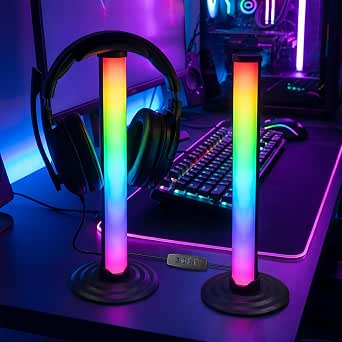 | Best for Headphone Storage | Lighting type: RGB LED | Features: Color changing; detachable headphone holder | Power source: USB | VIEW LATEST PRICE | See Our Full Breakdown |
| Video Game Table Lamp with 16 RGB Colors |  | Best for a Themed Desk Lamp | Light source: LED | Bulb base: E26 | Power: Corded electric | VIEW LATEST PRICE | See Our Full Breakdown |
| IC+RGBW USB-Powered LED Light Bars with App and Remote Control, 2-Pack |  | Best for USB-Powered Ambient Lighting | Quantity: Two light bars | Lighting: IC+RGB and white LED | Power: 5V USB | VIEW LATEST PRICE | See Our Full Breakdown |
| Gamepad-Shaped LED Neon Sign |  | Best for Wall Decor | Brand: Ethereal Lomoer | Color and shape: Blue; gamepad | Materials: Acrylic and silicone | VIEW LATEST PRICE | See Our Full Breakdown |
| gaming desk lights and decor | Power | Controls |
|---|---|---|
| Govee RGBIC Gaming Light Bars | Corded electric; 3 watts | App, touch, voice, and desktop dial |
| MITO Infinity Mirror Light Dod | — | — |
| Govee Glide Wall Lights Smart | Corded electric; 36 watts | — |
| Gamepad 3D LED Night Light wit | USB or 3 AA batteries; batteries not included | Infrared remote and touch-sensitive base |
| DAYBETTER 360° Smart LED Light | Corded electric; 5 watts | App, remote control, and onboard buttons |
| Attivolife Gamepad 3D Illusion | USB or 3 AAA batteries (not included) | Remote control, touch, timer |
| 32×32 LED Pixel Art Display | USB | Mobile app |
| Paladone PlayStation Icons Lig | USB or 3 AAA batteries | — |
| Divoom Pixoo LED Pixel Display | Battery powered | — |
| Glooglitter Video Game Table L | Corded electric | — |
| TECKNET RGB Light Bar | Corded electric | Bluetooth app, IR remote, inline control box |
| RGB LED Table Light with Detac | — | — |
| Video Game Table Lamp with 16 | Corded electric | Wireless remote and cord buttons |
| IC+RGBW USB-Powered LED Light | 5V USB | App, remote control, inline button |
| Gamepad-Shaped LED Neon Sign | 5V USB | — |
More Details on Our Top Picks
Govee RGBIC Gaming Light Bars H6047 with Smart Controller
For a gaming desk that needs configurable ambience rather than a decorative centerpiece, these Govee RGBIC light bars offer the broadest control mix in this group. They combine Wi-Fi and Bluetooth, more than 60 scene modes, audio response, voice control, and a desktop dial, so switching effects does not have to mean reaching for a phone. Razer Synapse 3 support also makes them a closer fit for a coordinated PC setup than the music-reactive MITO Infinity Mirror, which is more of a standalone tabletop feature.
The tradeoff is that these bars do not sample screen colors: there is no camera and no screen color picking, so the lighting cannot automatically match on-screen action. Their plastic, indoor-only construction also rules out damp spaces. I’d choose them for flexible desk and room effects, not screen mirroring.
Pros:- RGBIC effects offer 16.8 million colors and more than 60 scene modes.
- Audio-reactive lighting can respond to sound from speakers and headphones.
- Desktop dial, app, touch, and voice controls give several ways to adjust effects.
- Razer Synapse 3 compatibility suits coordinated PC gaming setups.
Cons:- No camera or screen color-picking feature for matching lighting to on-screen content.
- Plastic construction and lack of water resistance limit placement to dry indoor spaces.
Best for: PC gamers who want app, voice, dial, and audio-reactive control, especially those already using Razer Synapse 3.
Not ideal for: Players seeking automatic screen-matched lighting or lights for a damp or outdoor setup; these have neither screen color picking nor water resistance.
- Lighting:RGBIC LED; multicolor
- Color options:16.8 million
- Scene modes:60+
- Connectivity:Wi-Fi and Bluetooth
- Controls:App, touch, voice, and desktop dial
- Voice assistants:Alexa and Google Assistant
- Gaming integration:Razer Synapse 3
- Power:Corded electric; 3 watts
- Screen color picking:Not supported
Our verdict“Choose these Govee bars for versatile, connected gaming-desk lighting, but skip them if screen-synced colors are a priority.”
MITO Infinity Mirror Light Dodecahedron RGBW Cube Light Decor for Gaming
The MITO Infinity Mirror Dodecahedron is the most sculptural pick here: its acrylic, many-sided form adds a distinct tabletop focal point instead of spreading light around the desk like the Govee RGBIC Gaming Light Bars. With 258 customizable effects and music response, it can shift from a steady accent to a more animated display, while adjustable brightness and speed offer some control over how much attention it draws.
That shape and tabletop role come with a practical limit. Its single LED light source is less suited to broad workspace illumination than the two freestanding DAYBETTER bars, and the available details do not specify a brightness output. It is USB-powered and portable, but not waterproof, so I’d keep it in a dry spot. Pick it for atmosphere and visual character, not as your main desk light.
Pros:- Dodecahedron acrylic design gives the desk a distinctive decorative focal point.
- Offers 258 customizable effects with adjustable brightness and speed.
- Music-reactive effects add movement without requiring a wall-mounted setup.
- USB power supports portable tabletop placement.
Cons:- A single LED source is less suited to lighting a broad desk than a pair of light bars.
- Not waterproof, so placement should stay in dry indoor spaces.
Best for: Gamers who want a compact, music-reactive tabletop centerpiece to add ambient character beside a monitor.
Not ideal for: Anyone who needs bright, broad desk illumination or plans to use a light in a humid area; this is a single-source accent lamp without water resistance.
- Shape:Dodecahedron
- Mounting:Tabletop
- Materials:Acrylic base and shade
- Light source:One LED source
- Effects:258 customizable effects
- Lighting adjustment:Adjustable brightness and speed
- Power and connectivity:USB
- Wattage:5 watts
- Water resistance:Not water resistant
Our verdict“Choose the MITO for a music-reactive desk centerpiece, not for task lighting or wide room coverage.”
Govee Glide Wall Lights Smart Gaming Light Bar (2-Panel Set)
If desk space is scarce, the Govee Glide two-panel set moves the lighting onto the wall, creating a larger visual accent without occupying the desktop. Its RGBIC layout can show multiple colors at once, and the set pairs app and voice control with 11 music-sync modes and more than 64 dynamic scenes. Compared with the freestanding DAYBETTER bars, the Glide is the better fit for a planned wall display; DAYBETTER is simpler to reposition around the desk.
The installation choice is less flexible once placed: each panel is rigid, so the set cannot bend around corners, and it must remain in a dry indoor area. The product also calls for connecting all bars before plugging in power, a setup detail that can complicate rearranging. I’d choose it when wall-mounted ambience matters more than portability.
Pros:- Wall mounting keeps the desktop clear while adding a prominent lighting accent.
- RGBIC effects support multiple simultaneous colors and extensive customization.
- Includes 11 music-sync modes and more than 64 dynamic scene modes.
- Works with Wi-Fi, Bluetooth, Alexa, Google Assistant, and SmartThings.
Cons:- Rigid panels cannot curve around corners or adapt to irregular placements.
- Requires connecting all bars before plugging in power, which can make setup less forgiving.
- Not water resistant and limited to dry indoor use.
Best for: Gamers with an open wall beside or behind their monitor who want multicolor effects without using desktop surface area.
Not ideal for: Renters or frequent setup rearrangers who need flexible, movable lighting, or anyone wanting bars that curve around corners.
- Model:H610A
- Panel configuration:2 panels, 3 sections per panel
- Dimensions:37.6 × 3.2 × 2.6 cm per strip
- Mounting:Wall mount
- Lighting:RGBIC LED, multicolor
- Power:Corded electric; 36 watts
- Connectivity:Wi-Fi and Bluetooth
- Control:App and voice control
- Water resistance:Not water resistant
Our verdict“Pick the Govee Glide for a colorful, space-saving wall display, but choose freestanding bars if you need easy repositioning.”
Gamepad 3D LED Night Light with Remote and Touch Control
This gamepad-shaped lamp is the most literal gaming decor option in the group: its engraved acrylic panel creates a 3D-style effect that reads as a themed accent even when the light is off. Sixteen colors, four modes, and dimming from 10% to 100% allow more adjustment than a fixed-color novelty light. Remote and touch controls also make it straightforward to change the look without app setup, unlike the more connected Govee RGBIC Gaming Light Bars.
Its appeal is mainly decorative. The acrylic panel is not a general-purpose task lamp, so it should not be the only light for a work or gaming area. USB power is convenient, while battery operation adds placement flexibility but requires three AA batteries that are not included. I’d choose this for a small themed desk accent rather than immersive room lighting.
Pros:- Gamepad silhouette and engraved acrylic panel make the gaming theme immediately clear.
- Sixteen colors, four modes, and dimming offer useful visual adjustment.
- Remote and touch controls avoid reliance on a phone app.
- USB or battery power allows more placement options.
Cons:- Acrylic panel is primarily decorative and is not a general-purpose desk lamp.
- Three AA batteries are required for battery use and are not included.
Best for: Younger gamers or fans of gamepad-themed decor who want a simple, low-fuss accent light for a desk or bedside table.
Not ideal for: Buyers seeking broad workspace illumination, music-reactive effects, or app-connected lighting; this is a decorative acrylic panel with basic controls.
- Design:Gamepad-shaped acrylic panel
- Dimensions:3.5 × 5 × 8.5 in
- Weight:8 oz
- Light source:LED
- Colors:16
- Lighting modes:Flash, strobe, fade, and smooth
- Brightness:Dimmable from 10% to 100%
- Controls:Infrared remote and touch-sensitive base
- Power:USB or 3 AA batteries; batteries not included
Our verdict“Choose this lamp for an easy, recognizable gaming accent, but not as your main source of desk lighting.”
DAYBETTER 360° Smart LED Light Bars with Music and Scene Modes
The DAYBETTER 360° light bars suit gamers who want a pair of ambient lights that can stand beside a monitor without wall mounting. Their 360-degree illumination and sound-reactive effects make them a more coverage-oriented choice than the MITO Infinity Mirror, which is a single tabletop accent. The DAYBETTER pair also offers app, remote, and onboard-button control, giving buyers a practical fallback if they would rather not use an app for every adjustment.
These bars prioritize placement flexibility and broad visual effects over advanced ecosystem integration. The supplied details list RGB, dynamic scenes, and sound activation, but do not name specific voice-assistant or gaming-software compatibility. They are Type-C powered, so the right power connection needs to be available, and the plastic construction is less substantial than a decorative acrylic piece. I’d choose them for freestanding ambience, not a polished wall installation.
Pros:- Pair of freestanding bars is easy to position around a desk or entertainment setup.
- 360-degree illumination is designed to spread light beyond a narrow forward-facing strip.
- Sound-reactive effects and dynamic scenes add movement for games, music, and films.
- App, remote, and onboard buttons provide three control options.
Cons:- Requires a Type-C power connection, which may not suit every existing setup.
- Plastic construction may feel less substantial than acrylic decorative lighting.
- Listed features do not specify voice-assistant or gaming-software compatibility.
Best for: Gamers who want two movable, sound-reactive accent bars for a desk, TV, or entertainment setup and value multiple control methods.
Not ideal for: Buyers who need wall-mounted lighting, metal construction, or documented voice-assistant and gaming-software integration.
- Model:JZM006
- Number of light bars:2
- Mounting:Freestanding
- Lighting:RGB, sound activated, dynamic effects
- Color options:16 million
- Controls:App, remote control, and onboard buttons
- Power connector:Type-C
- Power:Corded electric; 5 watts
- Material:Plastic
Our verdict“Choose DAYBETTER for movable, sound-reactive ambient coverage, but look elsewhere for wall mounting or named gaming integrations.”
Attivolife Gamepad 3D Illusion Lamp with Remote Control and Timer
The gamepad illusion design gives this lamp a more focused gaming identity than the customizable pixel art of the vaettlo 32×32 display. Its engraved acrylic panel creates a dimensional-looking graphic, while 16 colors, dimming, and a timer let you tailor the glow to a desk or bedside setup. Remote and touch controls make it easier to change the effect without moving the lamp. The tradeoff is that this is primarily decorative accent lighting, not a lamp for illuminating a work surface. USB power suits a fixed desk, while AAA batteries allow more flexible placement, but batteries are not included. The acrylic panel also needs care to avoid scratches, and the lamp is for dry indoor use only.
Pros:- Gamepad graphic creates a distinctive 3D-style gaming accent
- 16 color choices, dimming, and a timer offer flexible ambient settings
- Remote and touch controls provide two ways to adjust the lamp
- USB or AAA battery power supports fixed or more flexible placement
Cons:- Decorative glow is not a substitute for a bright desk task lamp
- AAA batteries are not included
- Acrylic panel can scratch and is not water-resistant
Best for: Gamers who want a compact gamepad motif with adjustable ambient color for a desk or bedside table
Not ideal for: Buyers who need bright task lighting, outdoor placement, or a scratch-resistant display surface
- Brand:Attivolife
- Model:FS-2810-9999
- Materials:Acrylic, ABS
- Light source:LED
- Color options:16
- Controls:Remote control, touch, timer
- Power:USB or 3 AAA batteries (not included)
- Mounting:Tabletop
Our verdict“Choose this for adjustable gamepad-themed accent lighting, but pick a pixel display or functional desk lamp if you need more than decoration.”
32×32 LED Pixel Art Display, USB-Powered Gaming Desk Décor with App
This display is the strongest pick here for buyers who want their desk decor to change with their interests: its 32×32 pixel grid supports app-based templates, editable text, animations, and a clock. That gives it more room for custom graphics than the Divoom Pixoo’s 16×16 display, making the vaettlo a better fit for larger, more legible designs. It can sit on a desk or mount on a wall, so it can add color without taking up much workspace. The main limitation is power: it needs a continuous USB connection, which restricts placement near a port or adapter. It is also a compact display rather than a room-lighting solution, so buyers seeking broad illumination should look at the Govee light bars instead.
Pros:- 32×32 grid offers more pixel detail than the Divoom Pixoo’s 16×16 panel
- App supports templates, editable text, animations, and a pixel clock
- Tabletop and wall-mount options allow flexible placement
- USB power supports continuous operation without batteries
Cons:- Must stay connected to USB power
- Small display adds visual detail but does not illuminate a room
- App-based control may not suit buyers who prefer simple physical controls
Best for: Gamers and pixel-art fans who want a customizable display for a desk or wall and have nearby USB power
Not ideal for: People seeking room-filling lighting or a display they can place far from a USB power source
- Brand:vaettlo
- Model:QHYK-3232X
- Pixel grid:32×32
- Dimensions:5.81 x 5.55 inches
- Material:ABS
- Light type:LED
- Controls:Mobile app
- Mounting:Tabletop or wall mount
- Power:USB
Our verdict“Pick this over the Divoom Pixoo if you want a denser pixel grid and have a convenient USB power point.”
Paladone PlayStation Icons Light with 3 Modes
For a fan who wants recognizable console decor without app setup, this officially licensed PlayStation light makes the most direct statement. Its 12-inch width gives the familiar symbols more presence than the compact Attivolife gamepad lamp, while three modes—standard, color phasing, and sound-reactive—add some variety. The sound mode can bring a little movement to a gaming setup, though it is less customizable than the app-driven animations on the vaettlo 32×32 display. USB power is convenient for a permanent desk spot, and the included cable means there is no need to source one separately. Its plastic tabletop form is still a simple decorative light, not a task lamp, and battery operation requires three AAA batteries that are not included.
Pros:- Official PlayStation symbols make the theme immediately recognizable
- Standard, color-phasing, and sound-reactive modes add variety
- USB or AAA battery power offers placement flexibility
- USB cable is included
Cons:- Three AAA batteries are not included
- Plastic tabletop design is decorative rather than task-focused
- Sound-reactive mode offers less design control than app-based pixel displays
Best for: PlayStation fans who want a recognizable licensed accent light with simple modes and USB power
Not ideal for: Buyers who want app-created graphics, detailed pixel art, or useful illumination for reading and desk work
- Brand:Paladone
- Model:PP4140PSV2
- Dimensions:12 in wide x 4 in tall
- Material:Plastic
- Lighting modes:Standard, color phasing, sound-reactive
- Power:USB or 3 AAA batteries
- Included:USB cable
- Mounting:Tabletop
- Use:Indoor
Our verdict“Choose this for licensed PlayStation decor and easy lighting modes; choose the vaettlo display if custom graphics matter more.”
Divoom Pixoo LED Pixel Display Panel
The Pixoo is a compact 16×16 pixel display for buyers who want animated art without giving a desk corner over to a larger light. Through the Divoom app, you can create or upload designs, browse a gallery, and sync effects to music. Compared with the vaettlo 32×32 display, the Pixoo’s lower-resolution grid is better suited to simple icons and compact animations than fine detail; in return, it is a straightforward square accent for a desk or shelf. Its battery-powered operation avoids a permanent USB cable, although the available product information does not specify battery runtime or charging details. App reliance is another tradeoff: buyers who want a physical-control lamp, such as the Paladone PlayStation Icons Light, may prefer that simpler approach.
Pros:- Compact square panel fits desks and shelves
- App supports custom designs, uploads, and gallery art
- Animated RGB effects can sync with music
- Battery power avoids a required USB cable
Cons:- 16×16 resolution limits fine detail compared with the vaettlo 32×32 display
- App is needed to create or manage designs
- Battery runtime and charging details are not specified
Best for: Gamers who want a small, app-managed pixel-art accent that can sit on a desk or shelf
Not ideal for: Buyers who need high-detail graphics, physical controls, or clearly specified battery runtime
- Brand:Divoom
- Model:Pixoo
- Display:16 x 16 pixels
- Lighting:RGB, color-changing, animated
- Light source:LED
- Power:Battery powered
- Wattage:10 watts
- Materials:Metal, polycarbonate
- Weight:0.86 kg
Our verdict“Choose the Pixoo for compact, cable-free pixel decor, but choose the vaettlo if you prioritize a higher-resolution grid.”
Glooglitter Video Game Table Lamp for Bedroom Decor Gaming Bedside Lamps
Unlike the Attivolife and Paladone lights, which emphasize colored gaming symbols, the Glooglitter pairs a spider-themed base with a linen shade and three white-light settings. Warm, warm-white, and cool-white options make it the more practical choice here for a bedside table or a desk where softer illumination matters more than animated effects. At about 11 inches tall, it stays compact, though its corded power means placement depends on a nearby outlet. The available description calls the brightness adjustable but does not provide lumen output, so I would treat it as a small ambient or bedside lamp rather than rely on it for demanding task work. Its playful design may suit a child’s room, but it is less neutral than the pixel displays for a more understated gaming setup.
Pros:- Spider design adds a playful gaming-room accent
- Three brightness levels and white-light tones suit different bedside settings
- Linen shade softens the light compared with exposed decorative LEDs
- Compact tabletop form fits many nightstands and desks
Cons:- Corded electric power limits placement to areas near an outlet
- No stated lumen output, so task-lighting performance is unclear
- Design may feel too playful for minimalist or adult-focused setups
Best for: Gamers or parents seeking a compact, playful bedside lamp with adjustable white-light tones
Not ideal for: Buyers who want RGB animations, app control, battery operation, or a neutral-looking desk lamp
- Style:Video game, spider design
- Materials:Linen shade
- Shade color:White
- Height:11.02 inches
- Dimensions:9.25 in D x 6.69 in W x 6.69 in H
- Light source:LED
- Power:Corded electric
- Brightness:3 levels
- Available colors:Black, green, yellow, pink, orange
Our verdict“Pick this for soft, themed bedside lighting; choose a pixel display or color-effect lamp if animated gaming decor is your priority.”
TECKNET RGB Light Bar (2-Pack) with Music Sync and App Control
I’d choose the TECKNET two-bar set for a desk or monitor area where changing the lighting should be easy from more than one place. Bluetooth app control suits detailed color and mode changes, while the IR remote and inline control box give you alternatives when reaching for a phone feels inconvenient. Its microphone-based music sync adds a reactive effect, a feature shared with the IC+RGBW USB light bars, but TECKNET relies on a wall outlet rather than USB. That may be a better fit for a fixed setup with a nearby outlet, but less convenient if you want to move the bars around. The plastic construction and corded power keep this from being the most flexible choice, and the longer warranty requires registration.
Pros:- App, IR remote, and inline controls offer several ways to adjust the lighting.
- Music synchronization adds reactive color effects to a gaming setup.
- Two bars and 16 million color options allow broad ambient coverage and customization.
- Registered users can access a 36-month warranty.
Cons:- Corded electric power limits placement to areas near an outlet.
- Access to the 36-month warranty requires registration.
- Plastic construction may feel less substantial than a metal-based desk lamp.
Best for: Gamers with a permanent desk setup who want two ambient light bars, music sync, and both app and physical controls.
Not ideal for: People who need USB-powered placement or want a setup that can be moved without locating a power outlet.
- Brand:TECKNET
- Model:DX21005
- Quantity:2 light bars
- Light source:LED
- Color options:16 million colors
- Controls:Bluetooth app, IR remote, inline control box
- Power:Corded electric
- Included components:Two light bars, two vertical mounting bases, IR remote, user manual
- Warranty:36 months for registered users
Our verdict“Choose TECKNET if you want two music-sync light bars with multiple control options and have a convenient outlet nearby.”
RGB LED Table Light with Detachable Headphone Holder
This pick combines mood lighting and headphone storage in one desk accessory, so it makes more sense for a crowded gaming surface than a standalone decorative lamp. Its detachable holder gives headphones a designated spot, while USB power can simplify setup beside a computer or compatible power source. Compared with the TECKNET light bars, it occupies a more defined spot on the desk and adds a practical storage function instead of spreading ambient light around the monitor. The tradeoff is that the listing provides little detail on lighting controls, color selection, or construction beyond color-changing RGB and plastic. I’d choose it for the space-saving combination, not for fine-grained lighting customization or a particularly substantial build.
Pros:- Combines an RGB table light with a detachable headphone holder.
- USB power can make setup convenient near a computer or USB adapter.
- Color-changing light provides an ambient accent for gaming or bedroom decor.
Cons:- Requires an available USB power source.
- Plastic construction may feel lightweight.
- The supplied details do not specify brightness levels, lighting modes, or control methods.
Best for: Desk gamers who keep headphones on the work surface and want a single USB-powered accessory for storage and color-changing light.
Not ideal for: Buyers seeking detailed control over lighting modes or a sturdy, substantial-feeling desk lamp.
- Lighting type:RGB LED
- Features:Color changing; detachable headphone holder
- Power source:USB
- Stated uses:Gaming and bedroom decor
- Construction:Plastic
- Holder:Detachable headphone holder
Our verdict“Pick this light if headphone storage matters as much as adding a simple RGB accent to your desk.”
Video Game Table Lamp with 16 RGB Colors
Unlike the TECKNET and IC+RGBW light bars, this is a recognizable table lamp with a controller-patterned shade, making it the more decor-forward choice for a gaming bedroom or nightstand. Its 16 colors, 10 brightness levels, and four modes provide more specified lighting control than the RGB headphone-holder light, while the remote and cord buttons give you two ways to adjust it. The compact footprint helps it fit beside a monitor, but the 10.5-inch height and themed shade create a visible style statement rather than subtle backlighting. It also needs a corded outlet, and the plastic shade may not suit buyers who want a neutral or more understated room accent.
Pros:- Offers 16 colors, 10 brightness levels, and four lighting modes.
- Remote and cord buttons provide alternative control methods.
- Compact 3.8-inch base diameter suits desks and nightstands.
- Metal base adds a contrasting material to the plastic shade.
Cons:- The controller-patterned shade may clash with rooms that have understated decor.
- Corded electric power requires a nearby outlet.
- Its lamp format takes up desk surface space rather than providing separate monitor backlighting.
Best for: Gamers who want a compact, controller-themed lamp for a desk or nightstand with defined color and brightness settings.
Not ideal for: Buyers who prefer discreet monitor lighting, a neutral decor style, or USB-powered placement.
- Light source:LED
- Bulb base:E26
- Power:Corded electric
- Wattage and voltage:5 watts; 110 volts
- Lighting:16 RGB colors, 10 brightness levels, four modes
- Controls:Wireless remote and cord buttons
- Dimensions:3.8 × 5 × 10.5 inches (D × W × H)
- Cord length:64 inches
- Materials:Plastic shade and metal base
Our verdict“Choose this lamp for a compact gaming-themed accent with more specified brightness control than the other decorative desk lights.”
IC+RGBW USB-Powered LED Light Bars with App and Remote Control, 2-Pack
I’d rank these light bars ahead of the TECKNET set for buyers who need USB power and white-light capability alongside RGB effects. The 5V USB connection makes placement easier around a computer or USB power source, while app, remote, and inline controls cover different ways of changing the setup. More than 64 patterns, music sync, and dimming from 1% to full brightness offer broad adjustment, including a low-light option that the provided TECKNET specs don’t detail. The compromise is a tabletop design rather than a stated wall-mounting system, and the bars are not waterproof, so they belong indoors and away from spills. Choose this set for adaptable desk ambience, not outdoor or wet-area use.
Pros:- USB power offers flexible placement near a computer or USB supply.
- RGB and white lighting support both colorful effects and a less saturated option.
- App, remote, and inline controls provide several adjustment methods.
- Music sync, over 64 patterns, and 1%-to-full dimming allow varied lighting effects.
Cons:- Not waterproof, so the bars need protection from spills and moisture.
- Requires a suitable 5V USB power source.
- Tabletop mounting may not suit buyers who want a specified wall or monitor mount.
Best for: PC gamers who want two USB-powered tabletop bars with RGB and white lighting, music sync, and multiple control options.
Not ideal for: Anyone who needs waterproof lighting, or who wants bars with a specified wall-mounting system.
- Quantity:Two light bars
- Lighting:IC+RGB and white LED
- Power:5V USB
- Controls:App, remote control, inline button
- Connectivity:Bluetooth
- Music sync:Built-in music sensor
- Lighting patterns:64+
- Brightness:Dimmable from 1% to full brightness
- Cord length and mounting:60 inches; tabletop
Our verdict“Choose this set over TECKNET if USB placement, white light, and wide-ranging dimming matter more than a wall-outlet connection.”
Gamepad-Shaped LED Neon Sign
For a setup that needs a clear gaming motif more than adjustable task lighting, this blue gamepad-shaped sign is the most decor-focused option here. Its acrylic and silicone construction, pre-drilled mounting design, and included hooks give it a wall-display role unlike the TECKNET and IC+RGBW bars, which are aimed at ambient lighting around a desk. USB power also allows use with a compatible USB port, and the sign can sit on a desk if wall mounting isn’t convenient. Its simplicity is also its limitation: no brightness adjustment or lighting controls are specified, and the product details give no dimensions for judging fit. I’d treat it as a fixed decorative accent, not a flexible light source.
Pros:- Gamepad silhouette adds an unmistakable gaming-themed accent.
- Can be wall-mounted or displayed on a desk.
- 5V USB power supports use with a compatible USB source.
- Acrylic and silicone construction is specified, along with a stated lifespan of at least 50,000 hours.
Cons:- No brightness adjustment or other lighting controls are specified.
- Only blue is listed, with no stated color-changing options.
- Dimensions are not provided, making it difficult to plan wall or desk placement.
Best for: Gamers decorating a bedroom or game room who want a blue gamepad motif for a wall or desk display.
Not ideal for: Buyers who need adjustable brightness, multiple colors, detailed lighting controls, or exact dimensions before planning a display.
- Brand:Ethereal Lomoer
- Color and shape:Blue; gamepad
- Materials:Acrylic and silicone
- Mounting:Wall mount; can also be placed on a desk
- Power:5V USB
- USB cord length:5.9 ft (1.8 m)
- Estimated lifespan:At least 50,000 hours
- Included component:USB cord
- Recommended uses:Game rooms, parties, holiday events, and clubs
Our verdict“Choose this sign for a simple, fixed blue gaming accent, but pick one of the light bars if adjustable ambient effects are the priority.”

How We Picked
I compared these 15 options as gaming desk lights and decor, not as interchangeable lamps. My criteria included the kind of light each product provides, how it is controlled, how much room or mounting effort it needs, and whether its design adds a distinctive visual feature or practical function. I also considered the likely setup: a compact desk, a room-wide lighting scheme, a themed bedroom, or a display-focused station.
The ranking favors products that balance useful placement, flexible lighting, and a clear role in a gaming setup. App-enabled bars place higher for buyers seeking adjustable ambience; pixel displays and statement lights earn their place through personalization or visual character. Simpler lamps rank lower because they are easier to understand and can suit beginners, but offer less control or versatility. A specialized feature such as a headphone holder matters most when it solves a real desk problem, not just because it adds another feature.
Factors to Consider When Choosing Gaming Desk Lights And Decor
Before choosing a light, decide what job it needs to do. Ambient lighting, task lighting, and decorative display are different goals, and one product may not handle all three well. These broader checks can help prevent a striking-looking purchase from becoming awkward in your actual setup.
Choose the lighting job before the color effects
Start by asking whether you want to reduce a dark monitor-and-wall contrast, light a work surface, or add a decorative glow. Colorful light bars and neon-style signs tend to create atmosphere, while a table lamp may be easier to position for general nearby illumination. A product with many colors is not automatically suited to reading or detail work. If you need both functions, plan for a separate neutral task light rather than expecting a decorative RGB fixture to do everything. This distinction helps avoid buying based on a dramatic product image that does not match how you use the desk.
Map the footprint and mounting route
Measure the available space behind and beside your monitor, not just the open desk surface. A pair of bars may need room for stable placement and access to cables, while wall-mounted panels can free the desk but call for a suitable surface and careful positioning. Decorative cubes, signs, and lamps also need a spot where they will not block the screen or get knocked over. Check where the power cable will run before settling on a location; a tidy light can still create a messy setup if its lead crosses the keyboard area. For small desks, preserving usable surface often matters more than adding another centerpiece.
Match controls to how often you will adjust them
App control gives more ways to set scenes and colors, but it can add setup steps and dependence on a phone or compatible connection. A remote or touch control may be more convenient for a single decorative lamp, especially if you expect to switch it on and off rather than fine-tune scenes. Music-reactive modes are appealing for active setups, though they may be less useful when you want calm, consistent lighting. Think about who will use the light and whether they will enjoy adjusting settings or prefer one simple control. A feature-rich product can be a poor fit if its controls make everyday use feel like a chore.
Check compatibility before buying into a lighting ecosystem
Do not assume that products with app control will work together or respond to the same commands. Look for explicit details about supported apps, connection requirements, and any smart-home compatibility you rely on. If you are combining several lights, mismatched controls can mean managing separate apps, remotes, and scene settings. A standalone USB light may be easier for a single accent, while a coordinated group benefits from consistent control. Treat ecosystem fit as a practical requirement, not a bonus feature inferred from similar product names.
Balance visual novelty against long-term flexibility
A fixed gaming motif can make a setup feel personal immediately, while pixel displays offer a changing visual canvas that can suit different themes over time. The tradeoff is that a highly specific design may be less adaptable if you change your room style or desk layout. Consider whether the item should blend in when switched off, since decorative lights remain visible even without illumination. If you expect to update your setup often, favor adjustable scenes or changeable artwork over a single permanent look. If the theme is central to the room, a dedicated character or console-inspired lamp may feel more intentional.
Decide when an added feature earns its space
Combination products can be useful when an extra function replaces something already occupying your desk. A light with a headphone holder, for example, makes more sense if you need a reliable place to park headphones and have enough room for its base. Otherwise, a separate compact hook may preserve more flexibility. The same test applies to displays and novelty lamps: ask what object or function they replace, if any. Add-ons are most valuable when they solve a recurring setup problem, not when they simply increase the feature list.
Frequently Asked Questions
Should I choose light bars or a decorative gaming lamp?
Choose light bars if you want adjustable accent lighting around a monitor or across a wider setup, especially when app control and changing scenes matter to you. A decorative lamp is a better fit when you want a recognizable object with a simpler place and purpose. Bars can take more setup and cable planning, while a lamp may use desk space and illuminate a smaller area. Neither format should be assumed to replace a dedicated task light. Decide whether the priority is room atmosphere or a themed focal point.
Will music-sync lights work well for quiet gaming or work?
Music sync is an optional effect rather than a requirement for everyday use. Many products in this roundup also offer static colors, scenes, or other control modes, but the exact options vary by model. If you prefer steady light while working or playing, check that the product can hold a fixed setting without reacting to sound. A microphone-based mode may also respond to room noise, which can be distracting in a shared space. Choose music sync for occasional atmosphere, not as your only reason to buy a light.
Can these products provide enough light for reading or desk work?
Do not assume that an RGB accent light is a task lamp. Bars, signs, and pixel displays are primarily suited to visual ambience or decoration, and product color effects do not tell you how well they illuminate paper or a keyboard. Look for stated brightness, light direction, and adjustment options if work lighting matters. A separate neutral desk lamp can complement a gaming setup without requiring every accent light to serve two roles. Place decorative lighting so it does not shine directly into your eyes or reflect sharply off the monitor.
Is app control worth choosing over a remote or touch control?
An app makes the most sense if you plan to change colors often, build scenes, or coordinate lighting settings. A remote or touch control is simpler for a lamp that will usually stay on one setting or be switched on occasionally. App-based products may involve extra setup and can add another control system to manage. Check the connection and compatibility details before purchase rather than assuming every smart light works with your existing setup. For a single accent, ease of access can matter more than the number of available effects.
How do I avoid making a small desk feel crowded?
Prioritize lighting that sits behind the monitor or mounts to a wall, and measure the footprint of any lamp or display before committing to a location. Keep space clear for your mouse, keyboard, and the cable path; a light that fits on paper may still obstruct everyday movement. Pixel displays and decorative signs can also be placed on nearby shelves if their power leads can reach safely. A headphone-holder lamp is useful only if its base and hanging position fit your routine. For a compact setup, one distinctive accent often works better than several competing pieces.
Conclusion
For the broadest balance of adjustable ambience and gaming-friendly placement, I recommend Govee RGBIC Gaming Light Bars H6047 as the best overall choice. The IC+RGBW USB light bars or TECKNET RGB Light Bar are worth comparing as value-oriented accent options when you want a simpler two-bar setup, while the MITO Infinity Mirror Light is my premium-style pick for buyers who want a sculptural centerpiece rather than broad room lighting. Beginners who prefer recognizable decor and straightforward controls may be happier with the Paladone PlayStation Icons Light or a gamepad-shaped lamp. For specific needs, choose the Divoom Pixoo or 32×32 display for customizable pixel visuals, the Govee Glide for wall-focused lighting, or the RGB table light with a headphone holder when desk organization matters. Match the pick to the space and job you need it to do; effects alone are a weak reason to choose.