
The best 2TB external SSDs for Steam libraries should balance fast installs, steady update writes, port compatibility, and enough toughness to live beside a gaming laptop or Steam Deck. My best overall pick is the Samsung T9 Portable SSD 2TB because it combines 2,000MB/s-class USB 3.2 Gen 2×2 performance with a gamer-friendly size and broad brand support. The Samsung T7 Shield 2TB is the safer rugged choice for travel, while the Corsair EX400U Survivor 2TB is the speed play for newer USB4 PCs. The main tradeoff is that many Steam users will feel no gain from paying for USB4 or 20Gbps drives if their laptop, dock, handheld, or motherboard only has ordinary 10Gbps USB-C. Keep reading for the full breakdown of which drive fits your setup, library size, budget, and tolerance for heat, cable clutter, and older product listings.
Key Takeaways
- I rank the Samsung T9 first because it hits the best middle ground: faster than 10Gbps drives, less niche than USB4, and more gaming-friendly than bare-budget models.
- The Corsair EX400U Survivor and SanDisk Extreme PRO are speed leaders, but their advantage depends on ports; on a 10Gbps USB-C port, they can behave much closer to the T7-class drives.
- For a Steam Deck, laptop bag, or shared family setup, the Samsung T7 Shield is easier to recommend than a plain slim drive because drops, dust, and cable strain matter as much as peak read speed.
- The two Lexar ES3 2TB listings overlap heavily, so I would treat them as a price-and-availability call rather than two truly different performance tiers.
- The SanDisk 2TB Portable SSD earns its keep only when priced well below the faster 1,050MB/s options; otherwise, the Samsung T7 or Lexar ES3 make more sense for Steam moves and updates.
| Samsung T9 Portable SSD 2TB |  | Best Overall for Fast Steam Library Moves | Capacity: 2TB | Interface: USB 3.2 Gen 2×2 | Read Speed: Up to 2,000MB/s | VIEW LATEST PRICE | See Our Full Breakdown |
| SanDisk 2TB Portable SSD |  | Best Budget-Friendly Steam Library Drive | Capacity: 2TB | Interface: USB 3.2 Gen 2 | Connector: USB-C | VIEW LATEST PRICE | See Our Full Breakdown |
| Lexar 2TB ES3 External SSD |  | Best USB-C and USB-A Compatibility Pick | Capacity: 2TB | Interface: USB-C and USB-A | Read Speed: 1,050MB/s | VIEW LATEST PRICE | See Our Full Breakdown |
| Samsung T7 Portable SSD 2TB |  | Best Mainstream Pick for Most Steam Users | Model: T7 Portable SSD | Capacity: 2TB | Interface: USB 3.2 Gen 2 | VIEW LATEST PRICE | See Our Full Breakdown |
| SanDisk Extreme Portable SSD 2TB |  | Best Rugged Pick for Portable Steam Libraries | Capacity: 2TB | Interface: USB-C, USB 3.2 Gen 2 | Read Speed: Up to 1,050MB/s | VIEW LATEST PRICE | See Our Full Breakdown |
| Lexar ES3 2TB External SSD |  | Best Lightweight Steam Library Drive | Capacity: 2 TB | Connectivity: USB 3.2 Gen 2 | Read Speed: Up to 1050 MB/s | VIEW LATEST PRICE | See Our Full Breakdown |
| SanDisk Extreme PRO Portable SSD 2TB | 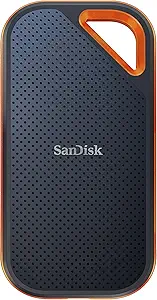 | Best Rugged High-Speed Pick | Capacity: 2 TB | Interface: USB-C, USB 3.2 Gen 2×2 | Read Speed: Up to 2000 MB/s | VIEW LATEST PRICE | See Our Full Breakdown |
| Samsung T7 Shield 2TB Portable SSD |  | Best Mainstream Rugged Choice | Capacity: 2 TB | Interface: USB 3.2 Gen 2 | Read Speed: Up to 1050 MB/s | VIEW LATEST PRICE | See Our Full Breakdown |
| Corsair EX400U Survivor 2TB USB4 External SSD |  | Best Premium USB4 Performance Pick | Capacity: 2 TB | Interface: USB4 / Thunderbolt 4 / USB-C 3.2 | Read Speed: Up to 4000 MB/s | VIEW LATEST PRICE | See Our Full Breakdown |
More Details on Our Top Picks
Samsung T9 Portable SSD 2TB
Samsung T9 gets my top spot because its USB 3.2 Gen 2×2 speed ceiling gives it the most headroom in this batch for moving a packed Steam library between PCs. Compared with the Samsung T7 and Lexar ES3, its up-to-2,000MB/s read speed is the cleaner fit for buyers who regularly copy huge game folders rather than only launching games from the drive. The Dynamic Thermal Guard also matters for long transfers, where cheaper-feeling drives can slow down as heat builds. The tradeoff is that many PCs lack Gen 2×2 ports, so real speed may drop closer to T7-class performance. It also costs more, making it less sensible if the drive will stay plugged into one desktop and rarely move large installs.
Pros:- Very high up-to-2,000MB/s read speed for large game transfers
- Dynamic Thermal Guard helps maintain performance during long copy sessions
- Broad compatibility across PCs, consoles, cameras, and iPhone 15 Pro
- Magician Software adds firmware updates, health checks, and encryption
Cons:- Needs a compatible USB 3.2 Gen 2×2 host to show its biggest speed advantage
- Higher 2TB price than more mainstream USB 3.2 Gen 2 drives
- Best performance depends on using the included SSD cable
Best for: PC gamers who often move large Steam installs between machines and have a USB 3.2 Gen 2×2 port
Not ideal for: Budget-focused players using older USB ports, since they may pay for speed their setup cannot use
- Capacity:2TB
- Interface:USB 3.2 Gen 2×2
- Read Speed:Up to 2,000MB/s
- Thermal Management:Dynamic Thermal Guard, under 140°F
- Compatibility:Desktops, cameras, gaming consoles, iPhone 15 Pro
- Software:Samsung Magician with firmware updates and encryption
- Color:Black
Bottom line: This is the pick I would rank highest for Steam users who want the fastest library shuffling and have the ports to match.
SanDisk 2TB Portable SSD
The SanDisk 2TB Portable SSD makes sense lower in the ranking because it prioritizes simple extra storage over max performance. Its up-to-800MB/s read speed is slower than the Samsung T7, Lexar ES3, and SanDisk Extreme, but for a secondary Steam library it can still cut load and transfer times far ahead of a hard drive. I like it most for players who want a compact 2TB drive for installed games, screenshots, mods, and backups without paying for rugged extras or 2,000MB/s hardware. The drawback is that write speed is not highlighted the same way, which matters when installing or moving big games onto the drive. It also lacks the stronger weather resistance of the SanDisk Extreme, so it is less appealing for travel-heavy setups.
Pros:- Good up-to-800MB/s read speed for a lower-cost 2TB SSD
- Very light 1.44-ounce build for laptop bags and small desks
- Two-meter drop protection adds useful everyday durability
- Rubber hook helps keep the drive attached during travel
Cons:- Slower than 1,050MB/s and 2,000MB/s options in this lineup
- Write speed is less clearly positioned than read speed
- No stated IP water or dust rating in the provided data
Best for: Steam users who want affordable 2TB external storage for a laptop or secondary gaming PC
Not ideal for: Players who frequently copy 100GB-plus games and want the fastest possible install migration speeds
- Capacity:2TB
- Interface:USB 3.2 Gen 2
- Connector:USB-C
- Read Speed:Up to 800MB/s
- Drop Protection:2 meters
- Weight:1.44 ounces
Bottom line: This is the value pick for Steam players who want SSD responsiveness without chasing the fastest spec sheet.
Lexar 2TB ES3 External SSD
Lexar ES3 earns its role by solving a common Steam-library problem: mixed ports across old desktops, newer laptops, and handheld-adjacent setups. Its 2-in-1 USB-C/USB-A cable gives it a practical advantage over drives that feel cleaner on paper but need extra adapters. Performance sits close to the Samsung T7, with 1,050MB/s reads and 1,000MB/s writes, so it is fast enough for moving modern game folders without stepping up to the pricier Samsung T9. The graphite heat dissipation is useful for sustained transfers, though it does not have the IP65 rating of the SanDisk Extreme. I would also treat the cable as part of the package rather than a bonus, since losing it weakens the drive’s main compatibility appeal.
Pros:- Includes USB-C and USB-A connectivity for mixed gaming setups
- Strong 1,050MB/s read and 1,000MB/s write speed class
- Graphite sheets help with heat during larger game transfers
- Two-meter drop resistance adds protection for portable use
Cons:- No IP water or dust rating listed
- Main compatibility benefit depends on keeping the included cable
- Does not match the Samsung T9 or SanDisk Extreme PRO speed tier
Best for: Gamers who share one Steam library drive between older USB-A desktops and newer USB-C laptops
Not ideal for: Travel-heavy users who want rated water and dust protection instead of basic drop resistance
- Capacity:2TB
- Interface:USB-C and USB-A
- Read Speed:1,050MB/s
- Write Speed:1,000MB/s
- Drop Resistance:2 meters
- Heat Management:Built-in graphite sheets
- Compatibility:PC, Mac, iPhone 15/16, tablets
- Color:Silver
Bottom line: This is the practical pick for Steam users who need one 2TB SSD to work cleanly across several generations of ports.
Samsung T7 Portable SSD 2TB
The Samsung T7 sits just below the T9 because it gives most Steam players the speed they can actually use. Its USB 3.2 Gen 2 interface and up-to-1,050MB/s reads line up well with common gaming laptops, desktops, and consoles, while the T9 needs Gen 2×2 support to pull away. Compared with the SanDisk 2TB Portable SSD, the T7 offers a stronger performance class and includes both USB-C-to-C and USB-C-to-A cables, which helps when swapping between machines. Its aluminum unibody is slim and tough enough for desk-to-bag use, but it lacks the IP65 protection found on the SanDisk Extreme. It is also still pricier than a hard drive, so it is best bought for speed and compactness, not raw dollars per terabyte.
Pros:- Fast 1,050MB/s read and 1,000MB/s write speeds fit mainstream gaming hardware well
- Includes USB-C-to-C and USB-C-to-A cables
- Compact aluminum unibody with shock resistance up to 6 feet
- Broad compatibility with PCs, Macs, Android devices, and gaming consoles
Cons:- Cannot match the Samsung T9 speed ceiling on compatible ports
- No listed IP water or dust resistance
- Max speed requires a USB 3.2 Gen 2 host device
Best for: Most PC gamers who want a dependable 2TB Steam library SSD for common USB 3.2 Gen 2 systems
Not ideal for: Outdoor or rough-travel users who need rated water and dust resistance
- Model:T7 Portable SSD
- Capacity:2TB
- Interface:USB 3.2 Gen 2
- Read Speed:Up to 1,050MB/s
- Write Speed:Up to 1,000MB/s
- Shock Resistance:Up to 6 feet / 1.8 meters
- Included Cables:USB Type-C to C and USB Type-C to A
- Color:Gray
Bottom line: This is the safest mainstream choice if I want fast Steam storage without paying for speed many ports cannot use.
SanDisk Extreme Portable SSD 2TB
SanDisk Extreme Portable SSD is the one I would separate from the rest for players who move their Steam library between home, campus, work trips, and handheld docking setups. Its IP65 water and dust resistance gives it a tougher profile than the Samsung T7 and Lexar ES3, while its 1,050MB/s read and 1,000MB/s write speeds keep it in the same useful performance band for large installs. The carabiner loop is not just decoration; it makes the drive easier to secure in a bag where loose cables and accessories pile up. The catch is that this is the old model, so buyers chasing newer firmware features may prefer a current SanDisk option or the Samsung T9. It can also be priced close to faster drives, which hurts its value if ruggedness is not the main reason to buy.
Pros:- IP65 water and dust resistance suits travel and rougher bags
- 1,050MB/s read and 1,000MB/s write speeds are strong for game transfers
- Carabiner loop makes the drive easier to secure on the go
- 256-bit AES encryption adds protection for files beyond games
Cons:- Old model may miss newer firmware or feature refinements
- Often priced like a premium drive despite not reaching 2,000MB/s
- Rugged design matters less for a drive that stays on a desk
Best for: Steam users who carry a 2TB library between locations and want weather-resistant storage
Not ideal for: Desk-only gamers who can buy a faster or cheaper drive because rugged protection will go unused
- Capacity:2TB
- Interface:USB-C, USB 3.2 Gen 2
- Read Speed:Up to 1,050MB/s
- Write Speed:Up to 1,000MB/s
- Durability Rating:IP65 water and dust resistance
- Security:256-bit AES encryption
- Portability:Carabiner loop
- Model Status:Old model
Bottom line: This is the rugged Steam-library pick when portability and protection matter more than chasing the highest transfer speed.
Lexar ES3 2TB External SSD
I’d place the Lexar ES3 2TB high for players who move a Steam library between a laptop, desktop, and console without wanting a bulky drive in the bag. Its 1050MB/s read and 1000MB/s write speeds match the Samsung T7 Shield on paper, but it is much lighter at 42g, making it the easier travel pick. Compared with the SanDisk Extreme PRO and Corsair EX400U Survivor, it gives up peak transfer speed, so it is less exciting for constantly cloning huge folders. For actual game launching and everyday Steam installs, though, USB 3.2 Gen 2 is still a sensible tier. The tradeoff is port dependence: on older USB systems, speeds can drop, and iPhone 14-or-older owners lose part of the advertised compatibility story.
Pros:- Very light 42g body is easy to keep in a laptop bag
- 1050MB/s read and 1000MB/s write speeds are strong for USB 3.2 Gen 2 Steam storage
- Broad compatibility across PCs, Macs, PS5, Xbox Series X|S, and newer smartphones
- Lexar DataShield 256-bit AES encryption adds useful protection for mixed work and game storage
Cons:- Peak speed is lower than SanDisk Extreme PRO and far below Corsair EX400U Survivor on compatible ports
- Performance falls back on systems without USB 3.2 Gen 2 support
- No MagSafe support and no compatibility with iPhone 14 or older models
Best for: PC gamers who carry a 2TB Steam library between a gaming laptop, desktop, and console and want the smallest practical drive.
Not ideal for: Players with older USB ports or iPhone 14-and-older devices, since they will miss some speed or compatibility benefits.
- Capacity:2 TB
- Connectivity:USB 3.2 Gen 2
- Read Speed:Up to 1050 MB/s
- Write Speed:Up to 1000 MB/s
- Weight:42g
- Dimensions:3.96 in L x 0.41 in W x 1.97 in T
- Compatibility:iPhone 17 series, Mac, PS5, Xbox Series X|S, laptops, PCs
- Encryption:256-bit AES via Lexar DataShield
Bottom line: Pick this if portability matters more than chasing the fastest possible file-copy benchmark.
SanDisk Extreme PRO Portable SSD 2TB
The SanDisk Extreme PRO Portable SSD is the one I’d rank above standard USB 3.2 Gen 2 drives for players who frequently move massive Steam folders rather than just launch games from external storage. Its USB 3.2 Gen 2×2 interface can reach 2000MB/s read and write speeds, roughly double the Lexar ES3 and Samsung T7 Shield when the host port supports it. That makes library migration, backup, and reinstall cleanup feel less punishing. The forged aluminum body, IP65 rating, and 3-meter drop protection also make it tougher than the Lexar. The catch is value: many laptops and desktops lack Gen 2×2 support, and the Corsair EX400U Survivor is faster again on USB4. The Memory Zone app may help file management, but needing software for full feature access will not appeal to everyone.
Pros:- Up to 2000MB/s read and write speeds can cut large Steam library transfers
- Forged aluminum chassis helps manage heat during sustained file movement
- IP65 water and dust resistance plus 3-meter drop protection suit travel
- 256-bit AES hardware encryption helps protect mixed personal and game files
Cons:- Costs more than standard 1050MB/s-class drives like Lexar ES3 and Samsung T7 Shield
- Needs USB 3.2 Gen 2×2 support to reach its headline speed
- Full feature access depends on installing SanDisk Memory Zone
Best for: Steam users who often transfer large game folders and want a rugged 2TB drive for a gaming laptop setup.
Not ideal for: Mac users and desktop owners without USB 3.2 Gen 2×2 ports, since they may pay for speed their system cannot use.
- Capacity:2 TB
- Interface:USB-C, USB 3.2 Gen 2×2
- Read Speed:Up to 2000 MB/s
- Write Speed:Up to 2000 MB/s
- Water & Dust Resistance:IP65 rating
- Drop Protection:Up to 3 meters
- Encryption:256-bit AES hardware encryption
- Weight:0.17 lb
Bottom line: Choose this when ruggedness and fast library transfers matter more than getting the lowest cost per terabyte.
Samsung T7 Shield 2TB Portable SSD
The Samsung T7 Shield 2TB makes the most sense when I want a safer all-round recommendation for a Steam library rather than the fastest spec sheet. Its 1050MB/s read and 1000MB/s write speeds are in the same class as the Lexar ES3, but the Shield earns its place through IP65 protection and 9.8-foot drop resistance. That gives it a durability edge for players who keep their drive plugged into a handheld PC dock, console, or laptop on a desk that gets bumped around. It is not as fast as the SanDisk Extreme PRO for big transfers, and it lacks the USB4 ceiling of the Corsair EX400U Survivor. The listed lack of an included cable also hurts convenience, since Steam users may need a quality USB-C cable before setup feels painless.
Pros:- Balanced 1050MB/s and 1000MB/s speeds are enough for most external Steam libraries
- IP65 water and dust resistance adds confidence for travel and desk use
- 9.8-foot drop resistance is stronger than many slim portable SSDs
- Works across PC, Mac, Android, and gaming consoles
Cons:- Slower than SanDisk Extreme PRO and Corsair EX400U Survivor for large game-folder transfers
- Higher price than basic portable SSDs with less rugged protection
- Cable is not listed as included, so setup may require an extra purchase
Best for: Steam players who want a familiar, durable 2TB external SSD for a PC, Mac, Android device, or gaming console.
Not ideal for: Speed-focused users who regularly move hundreds of gigabytes and have USB 3.2 Gen 2×2 or USB4 ports available.
- Capacity:2 TB
- Interface:USB 3.2 Gen 2
- Read Speed:Up to 1050 MB/s
- Write Speed:Up to 1000 MB/s
- IP Rating:IP65 water and dust resistant
- Drop Resistance:Up to 9.8 ft / 3 meters
- Compatibility:PC, Mac, Android, gaming consoles
Bottom line: This is the sensible rugged pick for most players who care more about reliability than extreme transfer speed.
Corsair EX400U Survivor 2TB USB4 External SSD
The Corsair EX400U Survivor 2TB is the performance-first choice in this group, mainly because its USB4 and Thunderbolt 4 support pushes far beyond the 1050MB/s tier of the Lexar ES3 and Samsung T7 Shield. With up to 4000MB/s read and 3600MB/s write speeds, it is built for players who also edit video, capture gameplay, or shuffle huge Steam libraries between machines. Even the SanDisk Extreme PRO looks more moderate beside it. For launching installed games, that extra ceiling may not feel four times better, so I would not rank it as the value pick. The other tradeoff is hardware fit: without a USB4 or Thunderbolt 4 port, it falls back, and the rugged housing is heavier than simpler portable drives.
Pros:- Up to 4000MB/s read and 3600MB/s write speeds are the fastest in this batch
- USB4, Thunderbolt 4, and USB-C 3.2 support give it broad modern-port coverage
- IP55 rugged housing adds dust and water resistance
- Single-cable plug-and-play setup keeps desktop and laptop use simple
Cons:- Requires USB4 or Thunderbolt 4 to reach its best performance
- Heavier than standard external SSDs, making it less pocket-friendly than Lexar ES3
- Extra speed may be wasted if the drive is used mainly for launching already-installed Steam games
Best for: PC gamers with USB4 or Thunderbolt 4 systems who also move large media files or frequently relocate massive Steam libraries.
Not ideal for: Budget buyers or users with older USB-C ports, since they will not get the speed that makes this drive special.
- Capacity:2 TB
- Interface:USB4 / Thunderbolt 4 / USB-C 3.2
- Read Speed:Up to 4000 MB/s
- Write Speed:Up to 3600 MB/s
- Durability:IP55-rated rugged housing
- Compatibility:PC, Mac, iPadOS 13+, USB-C devices
- Connectivity:Single USB-C cable plug-and-play
- Backward Compatibility:Supports USB 3.2 systems
Bottom line: Buy this for a high-end USB4 setup where Steam storage shares space with heavy file-transfer work.
How We Picked
I ranked these drives around Steam library behavior rather than raw spec bragging: game launch reads, patch writes, moving 100GB-plus installs, heat during long transfers, and the USB ports most gaming laptops, desktops, docks, and handhelds actually expose. I treated 2TB capacity as the baseline, then separated the list into 10Gbps USB-C, 20Gbps USB 3.2 Gen 2×2, and USB4 classes. I also weighed cable practicality, enclosure toughness, warranty reputation, and whether a drive gives buyers a clear reason to pay more than the cheapest 2TB option.
The order favors the Samsung T9 because it gives Steam users a speed bump over common 1,050MB/s drives without leaning on the narrower USB4 upgrade path. The Corsair EX400U Survivor and SanDisk Extreme PRO rank as premium choices because they are faster on the right hardware, but I place them behind broader-fit picks when their port needs or price weaken the case for a normal Steam library. I used advertised specs and product positioning, then checked current external-SSD coverage from PC Gamer, TechRadar, and Digital Camera World to keep the USB4, Gen 2×2, and 10Gbps speed classes grounded.
Factors to Consider When Choosing Best 2TB External SSDs For Steam Libraries
Picking a 2TB external SSD for Steam is less about chasing the biggest number on the box and more about matching the drive to your ports, your update habits, and where you play. I would start with the machine first: a desktop with USB4, a laptop with USB 3.2 Gen 2×2, and a Steam Deck dock do not reward the same purchase. From there, the real choice is between speed headroom, rugged build, and price discipline.
Match The Drive To Your USB Port
The number on the box only pays off when your PC can feed the drive. A USB 3.2 Gen 2 port usually caps real-world use around the 1,000MB/s class, which puts the Samsung T7, T7 Shield, Lexar ES3, and SanDisk Extreme Portable in the same broad lane. A USB 3.2 Gen 2×2 port gives the Samsung T9 and SanDisk Extreme PRO more room, but many laptops skip that mode. USB4 gives drives like the Corsair EX400U Survivor the highest ceiling, yet docks and cables can quietly force slower modes. I would check the exact port labels on the PC, motherboard, handheld dock, and cable before paying for premium speed. If the hardware path is unclear, a proven 10Gbps or Gen 2×2 drive is usually the cleaner buy for Steam.
Think About Steam Updates, Not Just Launch Times
Steam does more than read a game file when you click Play. Large updates can unpack, rewrite, verify, and shuffle data, so sustained writes and heat behavior matter when a 120GB game patches. A drive with a high short-burst rating can still slow after its cache fills, which is why I favor balanced models like the Samsung T9 over speed claims alone. Fast external storage will not fix shader compilation, CPU limits, or a slow internet connection, so buyers should not expect every stutter to vanish. The real win is shorter moves, fewer re-downloads, and less friction when keeping several giant games installed. If your library is mostly smaller indie games, this section matters less than price and reliability.
Decide How Portable The Library Really Needs To Be
A Steam library that never leaves a desk has different needs from one that rides with a laptop or handheld. Slick metal drives such as the Samsung T7 and some slim Lexar listings are easy to tuck behind a monitor, but they are not the obvious choice for rough travel. Rugged options like the Samsung T7 Shield, SanDisk Extreme Portable, and Corsair Survivor-style designs make more sense when the drive shares space with chargers, controllers, and a dock. IP ratings do not make a drive careless-proof, yet they add useful margin against dust, rain, and desk spills. I would also factor in the cable loop, grip texture, and whether the drive lies flat without pulling on the port. For a living-room PC or Steam Deck dock, a slightly tougher shell can be worth more than a tiny size win.
Know When A Cheaper 10Gbps Drive Is Enough
The best value play is not always the cheapest drive; it is the cheapest drive that still avoids buyer regret. For many Steam libraries, a 1,050MB/s-class SSD is plenty, which keeps the Samsung T7, T7 Shield, Lexar ES3, and SanDisk Extreme Portable in the hunt. I would only pick the basic SanDisk 2TB Portable SSD if its price sits clearly below those faster options. The duplicate Lexar ES3 listings also deserve a price check, since the cheaper listing may be the same practical purchase under different retail wording. Spending more makes sense if you often move huge games, maintain multiple PCs, or want premium ruggedness. If the drive is just overflow storage for games you play occasionally, value should beat headline speed.
Check Format, Library Setup, And Power Habits
External Steam storage works best when the format and connection plan are settled before the library grows. A Windows-only Steam library is easiest on NTFS, while a drive shared with Linux-based handheld workflows may call for a different format choice. exFAT is broad for file moving, but it is not always the smoothest long-term Steam library format for every platform. I would avoid letting the drive hang from a short cable during play, especially on handhelds, because connector strain can cause disconnects at the worst moment. Power-saving settings can also put some external drives to sleep, which may interrupt downloads or updates. Saves are often in Steam Cloud, but not every game handles cloud sync cleanly, so the external library should not be treated as the only copy of anything rare.
Frequently Asked Questions
Will Games Run Slower From A 2TB External SSD Than An Internal SSD?
Yes, some games may load slower from an external SSD than from a strong internal NVMe drive, but the gap is often smaller than the jump from a hard drive. A 10Gbps USB-C SSD such as the Samsung T7 or T7 Shield is already fast enough for many Steam games, especially older, indie, strategy, and single-player titles. The Samsung T9 and faster premium drives help more when moving large installs, verifying files, or handling games with lots of small assets. I would keep the most demanding competitive or open-world games on internal storage if your PC has a fast internal NVMe slot. For overflow storage, a good external SSD is a practical way to avoid uninstalling games every week.
Is USB4 Worth Paying For Just For A Steam Library?
USB4 is worth paying for when your PC actually has USB4 or Thunderbolt-class ports and you often move very large games between systems. The Corsair EX400U Survivor is the clearest fit for that buyer because the interface gives it room above ordinary 10Gbps drives. If you mostly launch games that are already installed, USB4 can feel like an expensive way to shave time from a task you do only once. Cable quality and dock support also matter, because a weak cable can pull a premium drive down to slower modes. For most readers, I would choose Samsung T9 or T7 Shield before paying extra for USB4.
Which Pick Makes The Most Sense For Steam Deck?
For Steam Deck, I would favor a rugged 10Gbps drive over a peak-speed model because the handheld setup is more exposed to bumps, cable tugging, and dock limitations. The Samsung T7 Shield is the cleanest fit from this list, with the SanDisk Extreme Portable as a deal-dependent alternative. A USB4 drive can work through compatible gear, but it will not turn the Deck into a USB4 gaming rig. If you play handheld away from a dock, internal storage or a microSD card is often less awkward than a cable-hung SSD. An external 2TB SSD makes the most sense for docked play, transfers, backups, and keeping a large library ready at a desk.
Should I Choose Samsung T9 Or Samsung T7 Shield?
I would choose the Samsung T9 if the drive will spend most of its time on a desktop or gaming laptop with a fast USB-C port. It gives more headroom than the Samsung T7 Shield for big Steam moves and large patch cycles, especially on systems with USB 3.2 Gen 2×2. The T7 Shield is the better pick when the drive travels often or sits in a bag with a handheld, charger, dock, and cables. On a plain 10Gbps port, the speed gap shrinks, so the Shield’s rugged shell can matter more than the T9’s higher ceiling. If prices are close and the drive will stay at a desk, I lean T9; if durability leads the decision, I lean T7 Shield.
Are The Two Lexar ES3 2TB Listings Actually Different Choices?
The two Lexar ES3 2TB entries appear to occupy the same basic lane: slim USB 3.2 Gen 2 storage with up to 1,050MB/s-class speeds. I would treat them as separate listings, not separate buying tiers, unless the SKU, warranty, included cable, or seller page shows a clear difference. If one listing is much cheaper, that one becomes the stronger value pick for a secondary Steam library. If pricing is close to Samsung T7 or T7 Shield, I would lean Samsung for the broader software ecosystem and longer track record in portable SSDs. This is the one part of the roundup where the ranking depends heavily on live pricing rather than product character.
Conclusion
My buyer map is simple: best overall is Samsung T9 Portable SSD 2TB for the widest mix of speed, polish, and real Steam usefulness. Best value is Lexar ES3 2TB when one of its listings undercuts Samsung and SanDisk by a clear margin, while best for beginners is Samsung T7 Shield 2TB because it is simple, sturdy, and fast enough for most ports. Best premium goes to Corsair EX400U Survivor 2TB for USB4 PCs, with SanDisk Extreme PRO 2TB close behind when discounted. For specific needs, I would use Samsung T7 for a tidy desktop setup, SanDisk Extreme Portable for a rugged legacy deal, and SanDisk 2TB Portable SSD only as low-cost overflow. That leaves the T9 as my default answer, but the right buy changes quickly once port speed, travel use, and sale pricing enter the decision.