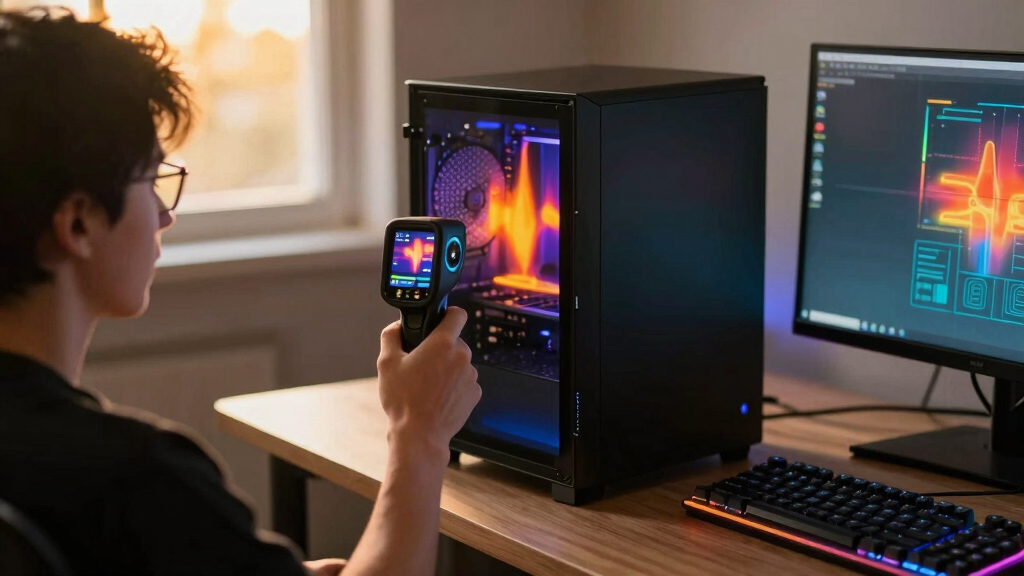

For PC troubleshooting, my top pick is the FLIR TG165-X Thermal Imaging Camera because it gives a clearer, more practical view of hot zones than basic infrared thermometers or low-cost phone thermal add-ons. A phone module can be cheaper and smaller, and a higher-end lab thermal imager can reveal finer board-level detail, but the TG165-X sits in the middle: standalone, rugged, easy to aim, and strong enough for power supplies, GPU exhaust paths, VRM areas, laptop chassis hot spots, and rack airflow checks.
The main tradeoff is precision versus cost. This is not the cheapest way to spot heat, and its 4,800-pixel thermal resolution is not meant for microscopic PCB failure analysis. Still, compared with a single-point IR thermometer, it shows heat patterns instead of isolated numbers. Compared with very expensive thermal imagers, it keeps the buying decision simpler. For my ranking, I put the FLIR TG165-X first because it offers the strongest balance of diagnostic usefulness, durability, and ease of interpretation for PC work.
Key Takeaways
- The FLIR TG165-X is my best overall pick because it shows usable heat patterns without needing a phone, app, or separate display.
- Its MSX-enhanced imaging helps make PC hot spots easier to interpret than plain low-resolution thermal blobs.
- The bullseye laser is useful when checking PSUs, vents, laptop surfaces, and server racks, but it is less helpful for tiny PCB components.
- The main drawback is price: casual builders may get enough value from cheaper phone-based thermal cameras or basic IR thermometers.
- This is a strong troubleshooting tool for airflow, enclosure heat, and electrical diagnostics, but not the right choice for micro-soldering analysis.
| FLIR TG165-X Thermal Imaging Camera with Bullseye Laser | 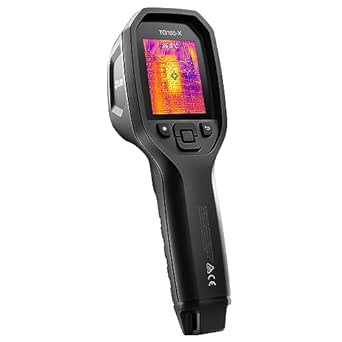 | Best Overall Thermal Camera for PC Troubleshooting | Temperature Range: -25°C to 300°C (-13°F to 572°F) | IR Resolution: 4,800 pixels | Image Enhancement: FLIR MSX technology | VIEW LATEST PRICE | See Our Full Breakdown |
More Details on Our Top Picks
FLIR TG165-X Thermal Imaging Camera with Bullseye Laser
The FLIR TG165-X is my best overall pick because it bridges the gap between a basic infrared thermometer and a much pricier professional thermal imager. For PC troubleshooting, that middle ground matters. A single-point IR thermometer can tell me that one spot is hot, but it cannot show whether heat is pooling around a GPU backplate, drifting from a PSU exhaust, building near VRMs, or getting trapped behind a cramped front panel. The TG165-X gives a visible thermal pattern, which makes it better suited to diagnosing airflow and enclosure heat than a point-and-shoot temperature gun.
The biggest reason this model stands out is its MSX-enhanced thermal image. With low-resolution thermal tools, hot zones can blur into vague blobs, especially when looking at a dense desktop interior or a laptop chassis with several overlapping heat sources. MSX adds visual structure, so edges and object shapes are easier to read. Compared with cheaper phone thermal add-ons, the TG165-X is less pocketable, but it also feels more purpose-built for repeat checks because it has its own screen, battery, storage, and bullseye laser targeting.
That bullseye laser is useful for PC work, but with limits. It helps when I am checking a PSU housing, server rack vent, laptop keyboard deck, mini PC casing, wall adapter, UPS, or the rear I/O area of a desktop. It is less suited to tiny component-level work, where the heat source may be smaller than the camera can resolve. Compared with a high-resolution lab thermal camera, the 4,800-pixel IR image will not be my choice for tracing heat through individual SMD parts. I would treat this as a practical diagnostic camera for systems, enclosures, and electrical gear rather than a microscope replacement.
The -25°C to 300°C range is broader than most PC users will need, yet that range gives the camera extra value outside a single desktop build. It can handle hot power equipment, HVAC checks, and general electrical diagnostics, which helps justify the premium price. The downside is that buyers who only want to compare CPU cooler contact or locate one warm SSD may be paying for durability and field capability they will rarely use. A cheaper USB-C thermal module may be enough for occasional hobby use, even if it is less convenient as a standalone shop tool.
Durability is another reason I rank it first. The IP54-rated body and commercial-grade design make more sense for IT technicians, repair shops, managed service providers, and anyone moving between job sites than for someone who keeps every tool in a drawer beside one gaming PC. The long detector coverage is reassuring because the thermal sensor is the heart of the device. Still, the rugged build adds cost and bulk, so buyers who want the smallest possible thermal tool should skip this and choose a phone-connected model instead.
My verdict is that the FLIR TG165-X is the best choice here for buyers who want a standalone thermal camera that can make PC heat problems easier to see without jumping into high-end lab pricing. It is not the most detailed option for board repair and not the cheapest option for casual checks, but it has the strongest all-around case for PC troubleshooting, especially when the job includes airflow, hot enclosures, power gear, and repeat documentation.
Pros:- MSX-enhanced imaging makes heat patterns easier to interpret than basic thermal blobs.
- Standalone design avoids relying on a phone, app, or separate display.
- Rugged IP54-rated body fits repair benches, equipment rooms, and field work.
- Large image storage capacity supports before-and-after troubleshooting records.
Cons:- Costs more than casual PC builders may want to spend.
- Thermal resolution is useful for system-level checks, not fine board-level diagnosis.
- Field-focused durability and broad temperature range may be more than a desk-only user needs.
Best for: IT technicians, repair shops, PC builders, and advanced hobbyists who want a standalone thermal camera for airflow, enclosure, PSU, laptop, and rack diagnostics.
Not ideal for: Buyers who only need a cheap occasional heat check or technicians who need high-magnification thermal detail for tiny PCB components.
- Temperature Range:-25°C to 300°C (-13°F to 572°F)
- IR Resolution:4,800 pixels
- Image Enhancement:FLIR MSX technology
- Targeting:Bullseye laser
- Durability Rating:IP54 dust and water resistance
- Battery Type:Rechargeable Li-ion
- Image Storage Capacity:Up to 50,000 images
- Warranty:2 years parts and labor, 10 years detector coverage
Bottom line: The FLIR TG165-X is my best overall pick because it makes PC heat patterns easier to read while staying simpler and more practical than lab-grade thermal imagers.
How We Picked
I ranked this guide around the way a thermal camera helps with PC troubleshooting, not around general building inspection. That means I gave more weight to readable heat patterns, practical temperature range, quick targeting, ruggedness, and simple standalone use than to features aimed only at HVAC or home energy audits. A camera that works well on walls is not automatically the right fit for a desktop build, laptop shell, server cabinet, PSU exhaust, or GPU backplate.
I also looked at what each feature changes for the buyer. Thermal resolution affects whether a hot area looks like a useful shape or an ambiguous smear. Temperature range matters because PC parts can move from mildly warm idle surfaces to very hot exhaust and power delivery zones. Image storage matters if I want to compare before-and-after cable routing, fan curve changes, thermal paste replacement, or rack airflow fixes. Durability matters less for a desk-only hobbyist, but more for IT staff moving between benches, offices, and equipment rooms.
Because this roundup has one reviewed product, the ranking logic is simple: the FLIR TG165-X earns the top spot by being the most rounded pick in this shortlist. I weighed it against common alternatives such as cheap IR thermometers, phone-connected thermal modules, and higher-resolution professional imagers. Those alternatives may beat it on price, pocketability, or fine detail, but the TG165-X has the best mix for buyers who want one dependable thermal camera for PC diagnostics and related electrical checks.
Factors to Consider When Choosing Best Thermal Cameras For PC Troubleshooting
A thermal camera for PC troubleshooting should help me answer one practical question: where is heat building up, and what should I change next?Thermal Resolution
Thermal resolution controls how much shape I can see in a heat pattern. For PC work, that matters more than the spec sheet may suggest. A low-detail image can show that something is warm, but it may not separate GPU exhaust, motherboard heat soak, PSU warmth, and case airflow in a useful way. The FLIR TG165-X has enough resolution for system-level troubleshooting, especially when paired with MSX enhancement, but it is not the right class for microscopic board repair.
If I am checking a tower case, laptop shell, NAS enclosure, mini PC, UPS, or server rack, the TG165-X makes sense. If I am trying to identify one failing capacitor among tightly packed parts, I would want a more specialized, higher-resolution thermal setup with close-focus support. This is the clearest line between PC troubleshooting and electronics lab diagnosis.
Standalone Versus Phone-Based
A standalone thermal camera is easier to grab, aim, and use around hardware because it does not depend on phone battery life, connector compatibility, or an app. That is the TG165-X advantage. It behaves like a dedicated tool, which is helpful when checking several machines or documenting changes after cleaning fans, adjusting fan curves, or replacing thermal paste.
Phone-based thermal cameras can still be a smart buy for casual use. They are smaller and often cheaper, and some are good enough for quick checks. The tradeoff is workflow. I would choose the FLIR TG165-X when repeatability and durability matter, and a phone module when budget and pocket size matter more than tool-like handling.
Targeting And Distance
The bullseye laser helps connect what the camera sees with the physical spot I am checking. Around PCs, that can be useful for larger targets: rear exhaust vents, laptop hot zones, PSU housings, battery backup units, power bricks, and rack equipment. It reduces guesswork when multiple warm objects sit close together.
For tiny parts on a motherboard, targeting has limits. A laser can point at an area, but it does not make the thermal sensor resolve microscopic details. That is why I see the TG165-X as a strong tool for system heat mapping, not as a replacement for close-up electronics diagnostics.
Temperature Range
Most PC troubleshooting does not need a huge temperature ceiling, but the -25°C to 300°C range gives the TG165-X room to handle more than gaming PCs. It can cover warm laptops, hot exhaust, overloaded power adapters, rack gear, and general electrical checks. That wider use case makes the price easier to defend for people who work on more than one machine.
For a casual desktop owner, the broad range may be unused headroom. The buyer who only wants to see whether a GPU backplate is warmer than expected can spend less. The buyer who checks PCs, power equipment, HVAC-adjacent spaces, and field hardware gets more value from the commercial-grade range.
Image Storage
Image storage is easy to overlook, but it changes how useful a thermal camera is during troubleshooting. With the TG165-X storing up to 50,000 images, I can document a baseline, make a change, then compare the result. That is helpful after dust removal, fan replacement, case reconfiguration, laptop repasting, or moving equipment inside a rack.
This matters less for a one-time check. If I only want a quick temperature snapshot, storage is not a major reason to pay more. For repair work, IT notes, client documentation, and repeat diagnostics, saved images turn a thermal camera from a novelty into a record-keeping tool.
Durability
The IP54 rating is more relevant for technicians than casual hobbyists. Dust and water resistance, plus a rugged body, matter when a tool moves between benches, garages, offices, equipment rooms, and job sites. The TG165-X is built with that kind of movement in mind.
That durability comes with cost. If my camera will live beside one home PC, I may not need a field-ready shell. If it will be used by a repair shop, IT team, or builder who handles many systems, the tougher design is easier to justify.
Frequently Asked Questions
Is The FLIR TG165-X Good For PC Troubleshooting?
Yes, the FLIR TG165-X is a strong fit for PC troubleshooting when the goal is to spot heat patterns around a system rather than inspect microscopic components. It is useful for checking airflow, laptop chassis heat, GPU exhaust paths, PSU warmth, server rack hot spots, and power adapters. I would not pick it as a dedicated board-repair camera, but for broader thermal diagnostics around PCs, it makes a lot of sense.
Can A Thermal Camera Diagnose CPU Or GPU Problems?
A thermal camera can help reveal symptoms, but it does not directly diagnose every CPU or GPU fault. With the FLIR TG165-X, I can see whether heat is collecting around a cooler, backplate, exhaust path, or case zone. That can point toward airflow problems, dust buildup, poor fan layout, or an overloaded enclosure. It will not replace software temperature sensors for internal die readings, so I would pair thermal imaging with BIOS data, monitoring software, and physical inspection.
Is Thermal Resolution More Important Than Temperature Range?
For most PC troubleshooting, thermal resolution matters more than an extreme temperature range because the problem is usually about identifying where heat is collecting. A wider range is useful for power equipment and electrical work, but a clearer image helps me separate one warm area from another. The TG165-X balances both, though its resolution is best suited to system-level work rather than tiny component analysis.
Should I Buy A Phone Thermal Camera Instead?
A phone thermal camera can be the better buy if price and portability are the main priorities. It is usually easier to carry and may be enough for occasional PC checks. I would choose the FLIR TG165-X instead when I want a standalone tool with its own battery, screen, storage, laser targeting, and rugged body. The difference is less about raw convenience and more about whether thermal checks are a rare task or part of a regular workflow.
Can The FLIR TG165-X Find Bad Components On A Motherboard?
The FLIR TG165-X may help flag an unusually hot area on a motherboard, but it is not the ideal tool for pinpointing tiny failed components. Its strength is reading larger heat patterns across a PC, laptop, PSU housing, or rack device. For close PCB work, I would look for a higher-resolution thermal camera with close-focus capability. For general PC troubleshooting, though, the TG165-X gives a much more useful view than a basic IR thermometer.
Conclusion
My recommendation is simple: choose the FLIR TG165-X if you want the best overall thermal camera in this shortlist for PC troubleshooting, especially if you work on more than one system or need clear records of heat problems. It is the strongest match for IT technicians, repair benches, PC builders, and advanced users who want to see airflow and enclosure heat instead of chasing single-point readings.
Casual buyers should be more cautious. If I only needed to check one gaming PC once or twice a year, I would look at a cheaper phone-based thermal camera or even a basic IR thermometer first. For board-level repair specialists, I would move in the other direction and buy a higher-resolution close-focus thermal system. The FLIR TG165-X lands between those extremes, which is exactly why it earns my top spot here.