
TL;DR

Play games on Amazon Luna for your game nights, included with Prime
- A rotating selection of games, no download needed
- Play on TV, laptop or phone
- Fast, free delivery for your gear, too
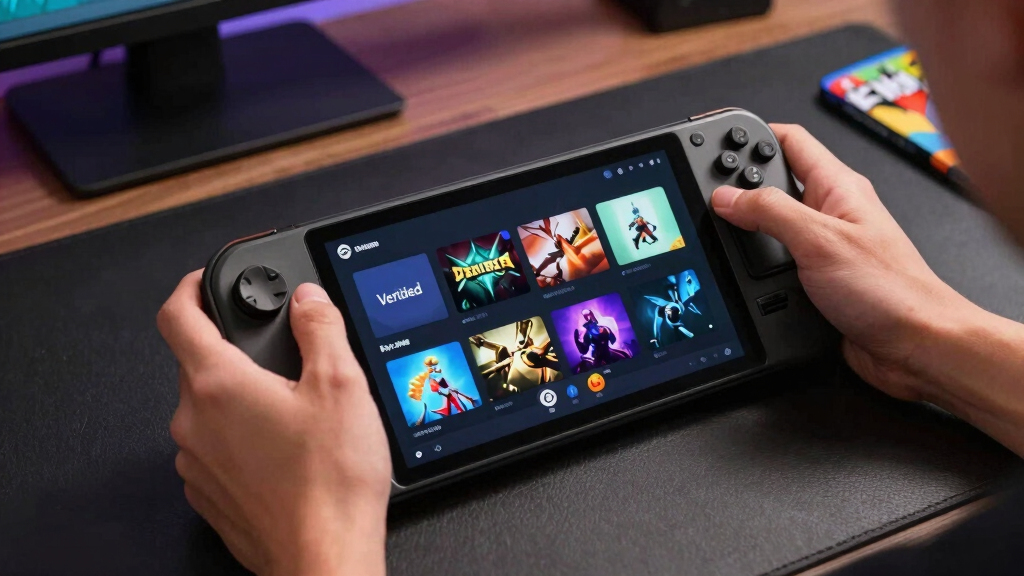
On June 11, 2026, this Steam Deck Verified Status snapshot covers four top and new Steam games: Burglin’ Gnomes, Lost Castle 2, Dreamstranded, and Witchspire. None are fully Verified in this briefing; Burglin’ Gnomes, Lost Castle 2, and Dreamstranded are Playable, while Witchspire is Unsupported, so treat it as a desktop-first buy unless fresh Deck reports prove otherwise.
The green checkmark is missing today, and that absence saves you from a very specific kind of disappointment: sitting down with a warm Steam Deck, hearing the fan spin up, and finding out the game wanted a keyboard, a launcher, or a desktop PC all along.
This June 11, 2026 briefing gives you the Steam Deck Verified Status for four top and new Steam games: Burglin’ Gnomes, Lost Castle 2, Dreamstranded, and Witchspire. You will see what each badge means, which Playable game looks safest to try first, and where Witchspire’s Unsupported label should slow your hand before checkout.
If an old AI result says its knowledge cutoff in October 2023, it will not have specific information about these 2026 labels. A general overview of what such badges mean helps, but a dated game-by-game snapshot helps you buy smarter.
- Burglin’ Gnomes — Playable
- Lost Castle 2 — Playable
- Dreamstranded — Playable
- Witchspire — Unsupported
Steam Deck compatibility for current top & new games, as of 2026-06-11.
Key Takeaways
- On June 11, 2026, none of the four listed top and new Steam games are fully Steam Deck Verified.
- Burglin’ Gnomes, Lost Castle 2, and Dreamstranded are Playable, which means they may work after small setup steps.
- Witchspire is Unsupported despite strong Steam review numbers, so Deck-first buyers should wait or test on another PC.
- Lost Castle 2 is the most practical first test because its 2D action and short-run roguelite structure fit handheld play.
- Always read the badge details, not just the label, because Playable can hide menu, launcher, text, or control friction.
Steam Deck compatible game controller
As an affiliate, we earn on qualifying purchases.
As an affiliate, we earn on qualifying purchases.
What Today’s Badges Mean Before You Buy
Steam Deck Verified Status is Valve’s shorthand for how much work a game should take on Deck. According to Steam, Verified means it works well out of the box, Playable means you may tweak controls or tap through a launcher, and Unsupported means the game is not functional on Deck right now [1].
| Badge | What It Means | What You Should Do |
|---|---|---|
| Verified | Runs well on Steam Deck without extra setup. | Install first if you want a low-friction couch or travel game. |
| Playable | Works, but may need manual steps like controller layout changes, touchscreen input, or settings tweaks. | Check compatibility details before you buy, then test early. |
| Unsupported | Steam says it is not functional on Deck at the time of review. | Wait, play on desktop, or buy only if you accept the risk. |
| Unknown | Steam has not checked it yet. | Look for recent hands-on Deck reports before spending. |
For example, a Playable game might launch fine but ask you to tap a tiny login box with the touchscreen before the controller works. An Unsupported game might get past the menu, then lose input, crash, or require anti-cheat support that is not working on Deck.
Think of the badge like a small label on a trail map. Verified is the paved path, Playable is the muddy shortcut where you may still reach the view, and Unsupported is the locked gate with a note saying the road is closed. If you have 20 minutes before bed, that difference matters more than a flashy trailer.
handheld gaming console accessories
As an affiliate, we earn on qualifying purchases.
As an affiliate, we earn on qualifying purchases.
The June 11 List Gives You Three Maybes And One Stop Sign
Steam Deck Verified Status on June 11, 2026 is a cautious snapshot: three of the four listed games are Playable, one is Unsupported, and none are fully Verified. That split matters if you want a couch-ready download tonight instead of a settings session with tiny text and fan noise.
- Burglin’ Gnomes is Playable. Its Steam page lists a coming-soon release, a downloadable demo, online co-op, and a Rating Pending label, with content text mentioning censored nudity and brutal deaths [2]. A good test would be the first co-op setup: can you invite friends, read prompts, craft, and move cleanly without reaching for a keyboard?
- Lost Castle 2 is Playable. It released on July 24, 2024, has 85 Steam achievements, and shows 91% positive English reviews from 913 English reviews on its Steam page [2]. Picture a ten-minute run during lunch: if the menus, attacks, dodges, and loot choices behave on the built-in controls, that Playable badge may be a small nuisance rather than a dealbreaker.
- Dreamstranded is Playable. It released on June 10, 2026, supports 18 interface/subtitle languages, and had no user reviews shown during the page check [2]. Try the opening loop like a checklist: gather one resource, cook one item, place one building piece, and save before assuming it belongs in your travel library.
- Witchspire is Unsupported. Its Steam page lists Early Access, online co-op, 70 achievements, and an 82% positive user score from 230 reviews, but the Deck badge still says stop [2]. That is the game you buy for your desk first, not the one you trust for a hotel room with only a Deck charger in your bag.
A simple example: if you are loading games before a flight, Lost Castle 2 and Dreamstranded deserve a quick install-and-test. Witchspire should stay in the wishlist unless you also plan to play on desktop.
As an affiliate, we earn on qualifying purchases.
Which Playable Game Is Safest To Try First?
The safest Playable pick is usually the one with the least friction between your thumbs and the screen, and in this group Lost Castle 2 looks like the most Deck-shaped bet. It is a 2D beat-’em-up roguelite with controller-friendly action, Steam Cloud, and co-op options on its Steam page [2].
Lost Castle 2 also gives you the most public signal. The Steam page shows thousands of total reviews across languages, 85 achievements, and a structure built around short runs, loot, bosses, and repeated attempts. That fits the Deck nicely: one dungeon push on the sofa, one boss retry on the train, then sleep mode.
Think of the ideal Deck test as a five-minute shakedown. Start a run, swing, dodge, pick up loot, open the map, change a setting, suspend the Deck, wake it back up, and see whether the game still feels natural in your hands. Lost Castle 2 is the clearest candidate for that kind of test because its fun should show up quickly.
Dreamstranded is the softer pick. You gather, craft, cook, build, and run a tavern, which sounds lovely on a handheld with warm evening light on the screen. The catch is freshness: it launched on June 10, 2026, and no user reviews were shown at the check, so you get less community texture.
Burglin’ Gnomes is the wild card. Online co-op with up to 5 friends, tiny-house chaos, crafting, and a 5 GB storage listing sound fun, but the page still says coming soon. Try the demo first, especially if you plan to play with friends using voice chat and Deck controls.
portable gaming controller for Steam Deck
As an affiliate, we earn on qualifying purchases.
As an affiliate, we earn on qualifying purchases.
Why Witchspire Looks Tempting But Needs A Deck Check
Steam Deck Verified Status puts Witchspire in the Unsupported lane today, even though its Steam page looks warm and inviting: co-op, creature bonding, colorful magic, and 82% positive user reviews from 230 reviews as of the page check [2]. Treat the badge like a red lamp on a dashboard.
The temptation is obvious. Witchspire sells the fantasy of calling up forests, bonding with familiars, building a sanctuary, and roaming a bright open world with friends. On a desktop, that can sound like a soft blanket with lightning stitched into it.
Here is the practical risk: your friends may be ready for a co-op night, but your Deck could be the one machine that cannot join cleanly. Maybe the game needs a launcher click the controller cannot handle, maybe the first Early Access patch changes performance, or maybe online invites work on desktop while the Deck session stalls before the fun begins.
On Deck, the label says no for now. The Steam page also lists Early Access, which means patches may reshape the game over time. Any claim that a brand-new patch secretly fixes Deck play should be treated as unconfirmed until the Steam badge changes or reliable hands-on reports line up.
For younger players, the displayed Brazilian rating is 6 ANOS, with fantasy violence and online interactivity listed [2]. That rating does not solve the Deck issue, though. It only helps you judge content, not handheld compatibility.
Check A Deck Badge In Under A Minute
Steam Deck Verified Status can change after patches, Proton updates, and SteamOS work, so you should check the badge near the moment you buy or install. Use the same platform you plan to play on: Steam Deck LCD or OLED on your current SteamOS build.
- Open the Steam store page for the game on your Deck or desktop.
- Find the Deck Compatibility badge near the purchase area or compatibility details.
- Read the reason text, not just the badge color. Playable can mean tiny text, launcher input, or a controller layout issue.
- Scan recent reviews and filter for players who mention Steam Deck when possible.
- Test early if you buy it. Run the tutorial, open menus, suspend and resume, and try the first real gameplay loop.
For a concrete test, pretend you are already on the train. Can you start the game without a keyboard, read the first quest from arm’s length, change volume with the controls, pause quickly, and resume after closing the case? If one of those steps feels awkward in the first 15 minutes, the badge has done its job by warning you early.
According to Steam, tested titles keep the same rating across Steam Deck LCD and OLED models [1]. That does not promise the same battery life or frame pacing on every SteamOS build, but it does mean the compatibility badge is shared across both Deck models.
If a search blurb says I can provide a general overview, use it for definitions, not date-stamped buying choices. For this topic, the date matters because Steam reviews games again as Proton, game patches, and SteamOS builds move forward [1].
What You Should Do With Playable And Unsupported Games
You should treat Playable as a yellow light, Unsupported as a planned desktop session, and Unknown as homework. The badge is a trail marker, not the trail itself: it points you toward likely friction before you spend money, storage, and your small pocket of free time.
Buy for the device you will actually use tonight, not the device you hope the game supports later.
- For Playable games: Buy only when you are comfortable adjusting controls, tapping through menus, or lowering settings.
- For Unsupported games: Wishlist first if your Steam Deck is your only gaming PC.
- For new releases: Give the community a day or two to surface issues with launchers, text size, cloud saves, and sleep mode.
- For co-op games: Check online features, chat, and invite flow before your group night starts.
- For rumors and leaks: Treat claims about secret Deck fixes as unconfirmed until Steam’s badge or solid hands-on reports match them.
Put it into a real evening. If you have 30 minutes before bed, a Playable roguelite like Lost Castle 2 is worth a quick trial because you can learn fast whether the controls feel right. If you are hosting friends on voice chat, Burglin’ Gnomes needs a demo run before everyone arrives. If your only gaming device this weekend is the Deck, Witchspire is the one to leave alone until the evidence changes.
Here is the practical version. If you are packing for a weekend away, install Lost Castle 2 first, sample Dreamstranded if you want cozy crafting, keep Burglin’ Gnomes as a demo test, and leave Witchspire for desktop until its Deck story changes.
Frequently Asked Questions
Are any of today’s games Steam Deck Verified?
No. In this June 11, 2026 briefing, 0 of 4 listed games are fully Verified. Three are Playable and one is Unsupported.
Does Playable mean a game runs badly on Steam Deck?
No. Playable means the game can run, but Steam expects some friction, such as manual controller setup, touchscreen use, small text, or a launcher step. For a game like Lost Castle 2, that may still be fine if the main action feels good under your thumbs.
Can Witchspire still work even if Steam says Unsupported?
It might after future patches, but today’s badge says you should not count on it for Deck play. Treat any claim that it runs perfectly on Deck as unconfirmed unless the Steam label changes or recent hands-on testing backs it up.
Do Steam Deck LCD and OLED get different compatibility ratings?
According to Steam, tested titles keep their Deck compatibility ratings for both Steam Deck LCD and Steam Deck OLED models [1]. Battery life, heat, and settings can still vary by game and SteamOS build.
Where can you check the labels yourself?
[1] Steam Deck Verified program page: https://www.steamdeck.com/en/verified. [2] Steam store pages checked: https://store.steampowered.com/app/3844970/, https://store.steampowered.com/app/2445690/, https://store.steampowered.com/app/3326670/Dreamstranded/, and https://store.steampowered.com/app/2679100/Witchspire/.Conclusion
The crisp takeaway is simple: today’s list is not a green-check shopping spree. Treat the three Playable games as test candidates and Witchspire as a wait-and-watch title if your Steam Deck is your main machine.
Your best move is quiet and practical: check the badge, install small, test fast, and let your Deck earn its place in your hands before the weekend slips away.
Fall Picks
fall essentials
As an affiliate, we earn on qualifying purchases.