The best Xbox gaming accessories depend on what your setup lacks: the Xbox Elite Wireless Controller Series 2 is my best overall pick for players who want extensive control customization, while the GameSir G7 SE is a strong wired alternative and the RIG 800 PRO HX stands out for wireless audio with a charging base. The lineup also includes thumbstick upgrades, chat keyboards, media remotes, and console cooling products, each aimed at a different problem. The main tradeoffs are customization versus simplicity, wireless convenience versus wired use, and adding specialized hardware versus keeping your setup uncluttered. I ranked these options by how clearly they serve their intended buyer, along with usability, compatibility, and practical drawbacks. Read on for the full breakdown and help matching an accessory to your Xbox setup.

Play games on Amazon Luna for your game nights, included with Prime
- A rotating selection of games, no download needed
- Play on TV, laptop or phone
- Fast, free delivery for your gear, too
Complete the kit



Key Takeaways
- The Elite Series 2 earns the overall lead through customization, while the GameSir G7 SE offers a wired route for players who want another controller without the same emphasis on premium adjustments.
- KontrolFreek’s thumbstick options serve different preferences: Galaxy sticks add height for aiming leverage, while the Aim Boost Kit and Precision Rings focus on modifying feel and input control.
- Headset choice depends on your setup priorities: the RIG 800 PRO HX pairs wireless audio with a base station, the Stealth 500 targets multiplatform use, and the Xbox Wireless Headset keeps things centered on Xbox.
- Chatpads and a media remote solve different convenience problems: choose a keyboard for controller-based text entry, but a remote for navigating entertainment without reaching for a gamepad.
- Cooling accessories are specialized, not automatic upgrades: the MENEEA and G-STORY models add airflow-related features and lighting, but buyers should first check console fit, placement, and whether extra hardware suits their setup.
| MoKo RGB Backlit Wireless Chatpad Keyboard for Xbox Controllers |  | Best for In-Game Messaging | Compatibility: Xbox One, One S, Series S, Series X, Elite, Elite 2 controllers; Windows 11; not Xbox One X | Keys and layout: 47-key QWERTY | Connectivity: 2.4 GHz wireless with included receiver | VIEW LATEST PRICE | See Our Full Breakdown |
| KontrolFreek Precision Rings for Gaming Controllers, 6 Count |  | Best for Adjustable Aim Resistance | Quantity: 6 rings | Resistance levels: Soft, medium, and hard | Compatible devices: PS4, PS5, Xbox One, Xbox Series X|S, Switch Pro, and Scuf controllers | VIEW LATEST PRICE | See Our Full Breakdown |
| KontrolFreek FPS Freek Galaxy Black Performance Thumbsticks for Xbox One and Xbox Series X |  | Best for Mixed-Height Thumbstick Control | Compatible devices: Xbox One and Xbox Series X | Quantity: 2 thumbsticks | High-rise height increase: 10.0 mm | VIEW LATEST PRICE | See Our Full Breakdown |
| GameSir G7 SE Wired Controller for Xbox Series X|S, Xbox One & Windows 10/11 – White |  | Best Wired Controller Upgrade | Compatibility: Xbox Series X|S, Xbox One, and Windows 10/11 | Connectivity: Wired USB | Joysticks and triggers: Hall effect | VIEW LATEST PRICE | See Our Full Breakdown |
| RIG 800 PRO HX Wireless Gaming Headset with Multi-Function Base Station for Xbox |  | Best for Wireless Headset Charging | Compatibility: Xbox Series X|S, Xbox One, and PC | Connectivity: 2.4 GHz wireless | Wireless range: Up to 30 feet | VIEW LATEST PRICE | See Our Full Breakdown |
| Xbox Elite Wireless Controller Series 2, Black | 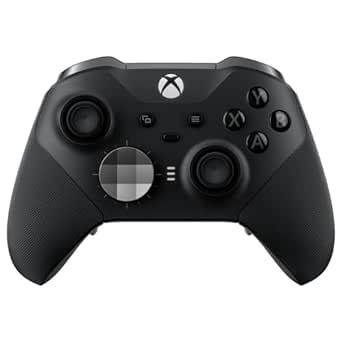 | Best Premium Controller Upgrade | Connectivity: Xbox Wireless, Bluetooth, USB-C | Battery life: Up to 40 hours | Profiles: Up to 3 customizable profiles | VIEW LATEST PRICE | See Our Full Breakdown |
| KontrolFreek FPS Freek Galaxy Purple Performance Thumbsticks for Xbox One and Xbox Series X |  | Best for FPS Aim and Grip | Compatible devices: Xbox One and Xbox Series X controllers | Quantity: 2 thumbsticks | Height configuration: 1 high-rise (10 mm) and 1 mid-rise (6.5 mm) | VIEW LATEST PRICE | See Our Full Breakdown |
| MENEEA Cooling Fan and Dust Cover for Xbox Series X with Colorful Lighting |  | Best Series X Console Add-On | Compatible device: Xbox Series X | Model number: XSX34 | Fan speeds: 3 | VIEW LATEST PRICE | See Our Full Breakdown |
| Media Remote Control for Xbox One and Xbox Series X|S, Black |  | Best for Xbox Media Playback | Compatible devices: Xbox One, Xbox Series X|S | Connectivity: Infrared | Maximum range: 10 meters | VIEW LATEST PRICE | See Our Full Breakdown |
| Turtle Beach Stealth 500 Wireless Multiplatform Gaming Headset for Xbox |  | Best Wireless Headset for Multi-Device Play | Connectivity: 2.4GHz wireless, Bluetooth 5.2 | Battery life: Up to 40 hours | Drivers: 40mm amplified | VIEW LATEST PRICE | See Our Full Breakdown |
| KontrolFreek Aim Boost Kit for Xbox One and Xbox Series X Controllers, Black Galaxy Edition |  | Best for Adjustable Aim Control | Brand: KontrolFreek | Compatible controllers: Xbox One and Xbox Series X | Included components: Performance thumbsticks and precision rings | VIEW LATEST PRICE | See Our Full Breakdown |
| TiMOVO Green Backlight Keyboard for Xbox Gaming Controllers, Black |  | Best for Controller-Based Chat | Compatible devices: Xbox One, Xbox One S, Xbox One Elite, Xbox One Elite 2, Xbox Series X and S controllers; Windows 10 | Compatibility note: Not compatible with Xbox One X | Number of keys: 47 | VIEW LATEST PRICE | See Our Full Breakdown |
| Xbox Wireless Gaming Headset – Carbon Black |  | Best Overall Wireless Headset | Driver size: 40 mm | Frequency response: 20 Hz–20 kHz | Battery life: Up to 20 hours | VIEW LATEST PRICE | See Our Full Breakdown |
| G-STORY Cooling Fan for Xbox Series S with Temperature Display and RGB Lighting |  | Best Series S Cooling Add-On | Compatible device: Xbox Series S | Fan speeds: 1500, 1750, or 2000 RPM | Temperature display: LED | VIEW LATEST PRICE | See Our Full Breakdown |
| Xbox gaming accessorie | Connectivity |
|---|---|
| MoKo RGB Backlit Wireless Chat | 2.4 GHz wireless with included receiver |
| KontrolFreek Precision Rings f | — |
| KontrolFreek FPS Freek Galaxy | — |
| GameSir G7 SE Wired Controller | Wired USB |
| RIG 800 PRO HX Wireless Gaming | 2.4 GHz wireless |
| Xbox Elite Wireless Controller | Xbox Wireless, Bluetooth, USB-C |
| KontrolFreek FPS Freek Galaxy | — |
| MENEEA Cooling Fan and Dust Co | — |
| Media Remote Control for Xbox | Infrared |
| Turtle Beach Stealth 500 Wirel | 2.4GHz wireless, Bluetooth 5.2 |
| KontrolFreek Aim Boost Kit for | — |
| TiMOVO Green Backlight Keyboar | 2.4 GHz wireless receiver |
| Xbox Wireless Gaming Headset | Xbox Wireless, Bluetooth 5.3, Bluetooth LE Audio |
| G-STORY Cooling Fan for Xbox S | — |
More Details on Our Top Picks
MoKo RGB Backlit Wireless Chatpad Keyboard for Xbox Controllers
The MoKo chatpad is the most direct fix for slow controller typing: its 47-key QWERTY layout attaches to a compatible controller, so messaging and text entry don’t require reaching for a separate keyboard. The three RGB lighting modes can help make keys easier to see in a dim room, while the 3.5 mm jack offers a wired headset connection at the controller. Compared with the TiMOVO Green Backlight Keyboard, also in this roundup, the MoKo specifies multiple lighting modes and a stated wireless range of up to 10 meters. The tradeoff is added setup: it uses a separate receiver and pairing process, and it draws power from the controller. Compatibility is also limited—the listing excludes Xbox One X—so check your controller model before choosing it.
Pros:- Attaches to the controller for faster message and text entry during play
- Three RGB backlight modes provide lighting choices for dark rooms
- Built-in 3.5 mm audio jack supports wired headphones or headsets
- Stated wireless range reaches up to 10 meters
Cons:- Not compatible with Xbox One X
- Requires a separate receiver and pairing process
- Powered by the controller, which the product notes should have more than 20% charge
Best for: Xbox players who regularly type messages or search text and own a listed compatible controller other than Xbox One X
Not ideal for: Xbox One X owners or players who want a keyboard that works without a receiver, pairing, or drawing power from the controller
- Compatibility:Xbox One, One S, Series S, Series X, Elite, Elite 2 controllers; Windows 11; not Xbox One X
- Keys and layout:47-key QWERTY
- Connectivity:2.4 GHz wireless with included receiver
- Wireless range:Up to 10 meters
- Backlighting:RGB: rainbow breathing, trichrome, and monochrome modes
- Audio jack:3.5 mm
- Power source:Xbox controller
- Dimensions:5.59 × 2.13 × 1.65 inches
Our verdict“Choose the MoKo if you frequently type on Xbox and have a compatible controller, but skip it if your console setup depends on an Xbox One X controller.”
KontrolFreek Precision Rings for Gaming Controllers, 6 Count
These rings change how a thumbstick feels rather than adding height, making them a distinct option for players who want more resistance while aiming. The six-piece set includes soft, medium, and hard strengths, so you can try different levels instead of committing to one feel. That flexibility sets the rings apart from the KontrolFreek FPS Freek Galaxy Black thumbsticks, which alter stick height with one high-rise and one mid-rise attachment. The rings may help reduce overshooting, but added resistance can slow or disrupt inputs until your hands adapt; the strongest option may not suit every game or player. The listed compatibility covers Xbox One and Xbox Series X|S alongside several other controllers, though it doesn’t name every specific controller model. Check fit before buying.
Pros:- Six rings offer soft, medium, and hard resistance options
- Designed to add control and reduce thumbstick overshooting
- Flexible moisture-wicking material is described as resisting oils
- Material is designed to return to its shape after use
Cons:- Added resistance can take time to adjust to and may not suit every game
- Compatibility information does not list every controller model
- Unlike the FPS Freek Galaxy Black thumbsticks, the rings do not provide a stated change in stick height
Best for: Xbox players who overshoot targets with standard sticks and want to compare several levels of aiming resistance
Not ideal for: Players who prefer a light, unrestricted stick feel or need confirmed fit for a specific controller model not named in the compatibility list
- Quantity:6 rings
- Resistance levels:Soft, medium, and hard
- Compatible devices:PS4, PS5, Xbox One, Xbox Series X|S, Switch Pro, and Scuf controllers
- Material:Rubber
- Color:Black, purple, and green
- Brand:KontrolFreek
- Model number:4005-MIX
Our verdict“Pick the Precision Rings if you want to tune stick resistance for aiming, but choose a height-raising thumbstick set instead if that is the change you’re after.”
KontrolFreek FPS Freek Galaxy Black Performance Thumbsticks for Xbox One and Xbox Series X
The Galaxy Black set pairs one high-rise stick for aiming with one mid-rise stick for movement, giving each thumb a different job without replacing the controller. The taller stick is intended to offer finer aiming control, while the shorter one keeps movement closer to the familiar feel of a standard thumbstick. Compared with the KontrolFreek Precision Rings, which add resistance, this set changes reach and height instead; choose based on whether your aim needs a different lever feel or more stick friction. Its concave rubber tops are designed to improve grip and help protect the original sticks from wear. The main limitation is compatibility: the supplied list names Xbox One and Xbox Series X, not Series S or other controller models, so confirm your hardware before ordering.
Pros:- High-rise and mid-rise sticks serve different aiming and movement needs
- Non-slip rubber material is designed to improve grip
- Added height may reduce thumb and hand fatigue
- Attachments help shield original thumbsticks from wear
Cons:- Compatibility is listed for Xbox One and Xbox Series X only
- Fixed heights may not suit players who want matching sticks or adjustable resistance
- The altered stick reach can take adjustment
Best for: Xbox One and Xbox Series X players who want a taller aiming stick paired with a less elevated movement stick
Not ideal for: Xbox Series S owners or players seeking adjustable resistance rather than a fixed mixed-height setup
- Compatible devices:Xbox One and Xbox Series X
- Quantity:2 thumbsticks
- High-rise height increase:10.0 mm
- Mid-rise height increase:6.5 mm
- Stick shape:Concave
- Material:Rubber
- Color:Black
- Model number:BLA-2807-XBX
Our verdict“Choose Galaxy Black if you want separate stick heights for aiming and movement on a listed Xbox controller, and skip it if you need broader compatibility or resistance tuning.”
GameSir G7 SE Wired Controller for Xbox Series X|S, Xbox One & Windows 10/11 – White
The GameSir G7 SE is the only pick here that replaces the controller itself, making it a more substantial upgrade than the Galaxy Black thumbsticks, which modify a controller you already own. Its Hall effect joysticks and triggers are designed for precise input and long service life, while the wired USB connection avoids wireless setup and works as plug-and-play on supported Xbox and Windows systems. The textured, laser-engraved grip and built-in 3.5 mm audio jack add practical comfort and headset access. That wired link is also the key compromise: you stay tethered rather than getting the freedom of a wireless controller such as the Xbox Elite Wireless Controller Series 2 in this roundup. The product data also lists only one customizable back button, which may feel limiting to players who want extensive button remapping.
Pros:- Hall effect joysticks and triggers are designed for precise control and longevity
- Wired USB setup is plug-and-play and requires no additional drivers
- Textured ergonomic grip is designed to resist slipping
- Built-in 3.5 mm jack allows a wired headset connection
Cons:- Wired connection limits movement compared with wireless controllers
- Only one customizable back button may not meet players’ remapping needs
- Heavier and more involved as an upgrade than adding thumbstick attachments
Best for: Xbox Series X|S, Xbox One, or Windows players who prefer a wired controller with Hall effect sticks and triggers
Not ideal for: Players who need wireless freedom or want several customizable rear buttons
- Compatibility:Xbox Series X|S, Xbox One, and Windows 10/11
- Connectivity:Wired USB
- Joysticks and triggers:Hall effect
- Audio jack:3.5 mm
- Feedback:Dual vibration
- Weight:420 g
- Dimensions:8.27 × 4.53 × 2.56 inches
- Power source:Corded electric
Our verdict“Choose the G7 SE if you want a complete wired controller upgrade with Hall effect controls, but opt for a wireless controller if freedom from a cable matters more.”
RIG 800 PRO HX Wireless Gaming Headset with Multi-Function Base Station for Xbox
The RIG 800 PRO HX stands out for pairing a 2.4 GHz wireless headset with a multi-function charging base, giving it a more organized home setup than a headset that relies on a cable for charging. Its flip-to-mute microphone and on-ear controls keep common adjustments close at hand, while the self-adjusting head strap and over-ear design are aimed at longer gaming sessions. Compared with the Turtle Beach Stealth 500 Wireless Multiplatform Headset in this roundup, the RIG’s defining distinction is the included base station and removable USB transmitter. The major caveat is battery information: the product details list up to 60 hours, while the description says 24 hours, so I can’t treat the runtime as settled. Dolby Atmos also requires compatible hardware, the Dolby Access app, and a Microsoft account.
Pros:- Charging base and removable USB transmitter support a tidy, flexible setup
- Wireless range is listed up to 30 feet
- Flip-to-mute noise-cancelling microphone and on-ear controls simplify common adjustments
- Self-adjusting head strap and dual-material ear cushions are designed for comfort
Cons:- Battery life conflicts between the listed 60 hours and 24 hours in the description
- Dolby Atmos requires a compatible device, Dolby Access app, and Microsoft account
- Four-hour charging time may be inconvenient when the headset needs a quick top-up
Best for: Xbox players who want a wireless over-ear headset with a dedicated charging base and convenient flip-to-mute controls
Not ideal for: Buyers who need a clearly stated battery runtime or want to use Dolby Atmos without meeting its app and account requirements
- Compatibility:Xbox Series X|S, Xbox One, and PC
- Connectivity:2.4 GHz wireless
- Wireless range:Up to 30 feet
- Drivers:40 mm
- Battery life:Conflicting listing: up to 60 hours in product details and 24 hours in description
- Battery charge time:4 hours
- Microphone:Flexible noise-cancelling, flip-to-mute
- Included accessories:Multi-function base station, USB-A wireless transmitter, USB-C charging cable
Our verdict“Choose the RIG 800 PRO HX if a charging base and wireless convenience matter most, but look elsewhere if dependable battery-life information is a priority.”
Xbox Elite Wireless Controller Series 2, Black
Customization is the reason to choose the Elite Series 2. Adjustable thumbstick tension, three-step hair trigger locks, and swappable paddles and D-pads let players tailor the controller to different games, while three saved profiles make those setups easier to switch between. Compared with the GameSir G7 SE, this controller offers wireless play and a broader included component kit, but it is a less straightforward choice for buyers who want a simple wired controller. Up to 40 hours of rechargeable battery life and Xbox Wireless, Bluetooth, and USB-C connections suit play across Xbox and compatible PCs. The tradeoff is that some app features depend on device and operating-system support, and battery life varies with use. I’d pick it for players who will make regular use of its control adjustments; casual players may get more than they need.
Pros:- Adjustable thumbstick tension and three-step hair trigger locks
- Includes interchangeable thumbsticks, paddles, and D-pads
- Up to 40 hours of rechargeable battery life
- Supports Xbox Wireless, Bluetooth, and USB-C connections
Cons:- Some app features and compatibility depend on supported devices and operating-system versions
- Battery life varies with usage and accessories
Best for: Competitive Xbox players who want adjustable controls, paddles, and saved setups for different games
Not ideal for: Casual players seeking a simple controller, or buyers who do not plan to use the interchangeable parts and custom profiles
- Connectivity:Xbox Wireless, Bluetooth, USB-C
- Battery life:Up to 40 hours
- Profiles:Up to 3 customizable profiles
- Compatible devices:Xbox Series X|S, Xbox One, Windows PC, and supported cloud gaming devices
- Audio jack:3.5 mm
- Included accessories:Carrying case, 6 thumbsticks, 4 paddles, 2 D-pads, adjustment tool, charging dock, and USB-C cable
- Color:Black
Our verdict“Choose the Elite Series 2 if you’ll use its extensive control adjustments and wireless flexibility, rather than a simpler wired option like the GameSir G7 SE.”
KontrolFreek FPS Freek Galaxy Purple Performance Thumbsticks for Xbox One and Xbox Series X
This two-stick set is a focused way to change controller feel without replacing the controller. Its high-rise right stick gives the aiming thumb more travel, while the mid-rise left stick keeps movement closer to the original feel. That split makes it more specialized than the all-in-one customization of the Xbox Elite Wireless Controller Series 2, which also lets players adjust tension and add paddles. The Galaxy sticks’ concave rubber surfaces can add grip and help shield the controller’s original sticks from wear. At just 5.67 g, they add little weight, but their benefit depends on liking the added height; players accustomed to stock sticks may need time to adapt. I’d choose these for an FPS player who wants a modest, reversible aiming change, not someone looking for a complete control overhaul.
Pros:- Mixed heights pair a high-rise aiming stick with a mid-rise movement stick
- Concave rubber surface offers added grip
- Can help protect the controller’s original thumbsticks from wear
Cons:- Added height may feel unfamiliar to players used to stock thumbsticks
- Packaging compatibility information may be outdated
Best for: Xbox One and Xbox Series X FPS players who want a higher right stick for aiming and a grippier surface
Not ideal for: Players who prefer the original stick height, or buyers seeking controller-wide customization like paddles and trigger adjustments
- Compatible devices:Xbox One and Xbox Series X controllers
- Quantity:2 thumbsticks
- Height configuration:1 high-rise (10 mm) and 1 mid-rise (6.5 mm)
- Shape:Concave
- Material:Rubber
- Color:Purple
- Item weight:5.67 g
Our verdict“Pick the Galaxy thumbsticks for a small, FPS-oriented control change; choose the Elite Series 2 instead if you want broader controller customization.”
MENEEA Cooling Fan and Dust Cover for Xbox Series X with Colorful Lighting
The MENEEA combines several console-side extras: a three-speed top fan, dust protection, colorful lighting, and two USB ports. That makes it a broader add-on than the G-STORY Cooling Fan for Xbox Series S, which is aimed at a different console and includes a temperature display. For Series X owners, the MENEEA’s USB 3.0 data port and USB 2.0 charging port add utility, though the latter is for charging only. Touch controls let players change fan speed and lighting, but this accessory needs sensible use: the dust cover should be removed while the console is running to support heat dissipation. I’d consider it for someone who wants a combined fan, dust-control, and lighting accessory, not for a buyer seeking a simple dust cover or an excuse to enclose the console during operation.
Pros:- Combines a cooling fan, dust protection, lighting, and USB ports
- Three fan speed settings
- Includes USB 3.0 data and USB 2.0 charging ports
- Touch controls adjust fan speed and lighting
Cons:- Dust cover should be removed during console operation for better heat dissipation
- USB 2.0 port is for charging only
Best for: Xbox Series X owners who want a top-mounted fan, dust protection, lighting, and extra USB connections in one accessory
Not ideal for: Xbox Series S owners, or Series X users who want a dust cover left on during gameplay
- Compatible device:Xbox Series X
- Model number:XSX34
- Fan speeds:3
- USB ports:1 USB 3.0 data port and 1 USB 2.0 charging port
- Lighting:6 monochrome options and 1 mixed-color option
- Included accessories:2 dust cover sets and silicone dust plugs
Our verdict“Choose this multi-function add-on for a Series X setup that needs fan controls and extra ports, but remove its dust cover while gaming.”
Media Remote Control for Xbox One and Xbox Series X|S, Black
This compact infrared remote is for media control, not gaming. Its 16 buttons handle navigation and playback, with motion-activated backlighting that can make controls easier to find in a dim room. Compared with the MoKo RGB Backlit Wireless Chatpad Keyboard, it is better suited to couch-based viewing than typing messages or entering text. The remote also offers TV power, volume, and mute controls, but those functions may not work with every TV, so I wouldn’t buy it as a guaranteed replacement for a television remote. Its 10-meter stated range suits typical living-room use, while two AAA batteries are required and not included. I’d choose it for someone who regularly watches media through an Xbox and wants simpler navigation; players looking for full console control should use a controller.
Pros:- Motion-activated backlighting helps locate buttons in a dark room
- Compact design with 16 buttons for navigation and playback
- Includes TV volume, mute, and power controls for compatible models
Cons:- Two AAA batteries are required but not included
- TV controls may not work with all models
- Does not control all gaming functions
Best for: Xbox One and Xbox Series X|S owners who regularly use their console for streaming or media playback
Not ideal for: Players who need full gaming controls, or buyers who require guaranteed compatibility with their TV’s power and volume functions
- Compatible devices:Xbox One, Xbox Series X|S
- Connectivity:Infrared
- Maximum range:10 meters
- Button quantity:16
- Battery requirement:2 AAA batteries (not included)
- Dimensions:6 × 1.6 × 0.7 inches
- Weight:0.05 kg
- Additional features:Motion-activated backlighting, ergonomic design
Our verdict“Get this remote for easier Xbox media playback, but choose a controller for gaming or a chatpad when text entry matters more.”
Turtle Beach Stealth 500 Wireless Multiplatform Gaming Headset for Xbox
Dual wireless connections give the Stealth 500 its clearest advantage. Low-latency 2.4GHz wireless serves Xbox gaming, while Bluetooth 5.2 adds a connection option for mobile devices; the QuickSwitch button is designed to make moving between them easier. That flexibility sets it apart from the Xbox Wireless Gaming Headset in this roundup, while the stated up to 40-hour battery life also suits long sessions between charges. Its 40mm amplified drivers, flip-to-mute microphone, and lightweight build cover the core needs for game audio and chat. The tradeoff is that some advanced audio features work only over 2.4GHz, and using the 10-band EQ or other advanced settings requires the Swarm II app on PC or mobile. I’d choose it for cross-device players, not anyone seeking full audio customization without an app.
Pros:- 2.4GHz wireless and Bluetooth 5.2 support connections to multiple device types
- Up to 40 hours of battery life
- Lightweight design with memory foam cushions
- Flip-to-mute microphone and 40mm amplified drivers
Cons:- Some advanced audio features are available only in 2.4GHz wireless mode
- Advanced EQ and settings require the Swarm II app on PC or mobile
Best for: Xbox players who also want to connect a headset to a PC or mobile device and value long battery life
Not ideal for: Buyers who want every advanced audio feature available over Bluetooth or prefer to adjust EQ without an app
- Connectivity:2.4GHz wireless, Bluetooth 5.2
- Battery life:Up to 40 hours
- Drivers:40mm amplified
- Microphone:Omni-directional, flip-to-mute
- Compatibility:Xbox Series X|S, Xbox One, PC, iOS, Android
- Audio features:Superhuman Hearing, 10-band EQ
- Software support:Swarm II app
- Controls:QuickSwitch button
Our verdict“Choose the Stealth 500 if you want one headset for Xbox and mobile or PC connections, and are comfortable using its app for advanced EQ.”
KontrolFreek Aim Boost Kit for Xbox One and Xbox Series X Controllers, Black Galaxy Edition
I’d choose the Aim Boost Kit for players who want to tune stick resistance rather than simply add height. Its mixed-height thumbsticks offer a different feel for each thumb, while the three strengths of precision rings let you add resistance to support controlled aiming at higher sensitivities. Compared with the separate KontrolFreek FPS Freek Galaxy Black Performance Thumbsticks, this kit gives you rings as well as sticks, so it offers more ways to adjust your setup. That flexibility comes with a learning curve: the added resistance may feel unfamiliar, and the rings may not suit players who prefer a quick, unimpeded stick response. I’d pick this over a standalone thumbstick set when aim tuning is the main goal, but skip it if you want a simple, no-adjustment upgrade.
Pros:- Mixed-height thumbsticks offer distinct control and reach for each thumb.
- Three precision-ring strengths allow different resistance levels.
- Designed to improve comfort and reduce thumb fatigue.
- Adds both thumbsticks and precision rings, unlike a standalone stick set.
Cons:- Precision rings can take time to get used to.
- Added resistance may feel restrictive to players who favor fast, unrestricted stick movement.
Best for: Xbox One and Xbox Series X players who want to experiment with added aiming resistance and mixed-height thumbsticks.
Not ideal for: Players who prefer stock stick resistance or want a simple thumbstick swap without time to adapt.
- Brand:KontrolFreek
- Compatible controllers:Xbox One and Xbox Series X
- Included components:Performance thumbsticks and precision rings
- Precision ring strengths:3
- Color:Black
- Enclosure material:Rubber
- Model number:6204-XBX
Our verdict“Choose this kit if you want to tune aiming resistance alongside thumbstick feel; choose standalone Galaxy thumbsticks for a simpler upgrade.”
TiMOVO Green Backlight Keyboard for Xbox Gaming Controllers, Black
The TiMOVO 47-key chatpad is for Xbox players who send messages often and would rather type than navigate an on-screen keyboard. Its 2.4 GHz wireless receiver connects the compact QWERTY keyboard, while the backlight can help with typing in a dim room and switches to power-saving mode after 10 seconds of inactivity. A built-in 3.5 mm audio jack adds headset connectivity at the controller, and the chatpad draws power from the controller. Compared with the MoKo RGB Backlit Wireless Chatpad Keyboard in this roundup, this model’s backlight is limited to green rather than RGB. Its compatibility list also has a notable gap: it does not work with Xbox One X. I’d shortlist it for frequent chat, but not for buyers who need broad console compatibility or customizable lighting.
Pros:- Physical QWERTY keys make messages easier to enter than with an on-screen keyboard.
- Green backlight supports typing in low-light rooms.
- Built-in 3.5 mm audio jack connects a headset at the chatpad.
- Draws power from the connected controller.
Cons:- Not compatible with Xbox One X.
- Backlight is green only, unlike the RGB lighting offered by the MoKo chatpad.
- Requires a 2.4 GHz receiver rather than a direct wireless console connection.
Best for: Xbox One, Xbox One S, Elite, Elite 2, Series X, and Series S players who frequently message friends while gaming.
Not ideal for: Xbox One X owners, or buyers who want multicolor backlighting and do not want to check controller compatibility.
- Compatible devices:Xbox One, Xbox One S, Xbox One Elite, Xbox One Elite 2, Xbox Series X and S controllers; Windows 10
- Compatibility note:Not compatible with Xbox One X
- Number of keys:47
- Keyboard layout:QWERTY
- Connectivity:2.4 GHz wireless receiver
- Backlight:Green, single color; power-saving mode after 10 seconds of inactivity
- Audio jack:3.5 mm
- Power source:Connected controller
- Dimensions and weight:5.79 × 2.09 × 1.57 in; 2.5 oz
Our verdict“Pick the TiMOVO chatpad if your controller is compatible and you type messages often; skip it if you own an Xbox One X or want RGB lighting.”
Xbox Wireless Gaming Headset – Carbon Black
I’d rank the Xbox Wireless Gaming Headset as the most versatile audio pick here because it connects directly to Xbox Wireless and also supports Bluetooth 5.3. That pairing makes it easier to hear game audio while staying connected to another Bluetooth device. Support for Dolby Atmos, Windows Sonic, and DTS Headphone:X gives buyers spatial-audio options, while the Xbox Accessories app allows EQ adjustment to suit different games and listening preferences. Compared with the RIG 800 PRO HX, this model’s listed strengths include Bluetooth 5.3 and app-based sound customization; the RIG’s included base station may suit someone seeking a different charging setup. The Xbox headset’s main compromise is wireless-only operation: it has no wired fallback or detachable cable. I’d favor it for flexible console and Bluetooth listening, not for players who require a wired option.
Pros:- Connects through Xbox Wireless and Bluetooth 5.3.
- Supports Dolby Atmos, Windows Sonic, and DTS Headphone:X.
- Up to 20 hours of rechargeable battery life.
- Dual boom microphones feature an LED indicator and auto-mute.
Cons:- No wired or detachable cable option.
- Requires recharging for continued wireless use.
Best for: Xbox players who want native wireless console audio, Bluetooth connectivity, spatial-audio choices, and adjustable EQ.
Not ideal for: Players who need wired listening as a backup or specifically want a headset with a detachable cable.
- Driver size:40 mm
- Frequency response:20 Hz–20 kHz
- Battery life:Up to 20 hours
- Connectivity:Xbox Wireless, Bluetooth 5.3, Bluetooth LE Audio
- Spatial audio support:Dolby Atmos, Windows Sonic, DTS Headphone:X
- Microphones:Dual boom mics with LED indicator and auto-mute
- Design features:Adjustable headband, plush earcups, volume/chat balance dials
Our verdict“Choose this headset for flexible Xbox and Bluetooth wireless audio with spatial-sound support, but look elsewhere if wired playback is a requirement.”
G-STORY Cooling Fan for Xbox Series S with Temperature Display and RGB Lighting
The G-STORY cooling fan is a console-specific add-on for Xbox Series S owners who want visible temperature information and the option to control fan speed. It can run in automatic mode or at one of three manual settings, and its LED display and RGB indicators make operating status easy to see. At a stated 17.8 dB, it is designed for low-noise operation. Unlike the MENEEA Cooling Fan and Dust Cover for Xbox Series X, this model is made for the Series S, so it is not a pick for owners of the larger console. Another limitation is that automatic mode stops the fan below 35°C; buyers seeking continuous airflow may prefer manual control. I’d choose it for its display and adjustable operation, not as a universal Xbox accessory.
Pros:- Automatic mode adjusts fan speed based on temperature.
- Three manual speed settings offer more direct control.
- LED temperature display and RGB indicators provide visible status.
- Designed for easy placement and USB-powered installation.
Cons:- Compatible only with Xbox Series S.
- Automatic mode stops the fan below 35°C.
- Adds an external cooling accessory rather than serving as a general-purpose Xbox upgrade.
Best for: Xbox Series S owners who want a temperature display and automatic or manual supplemental fan control.
Not ideal for: Xbox Series X owners, or Series S users who want the fan to run continuously in automatic mode below 35°C.
- Compatible device:Xbox Series S
- Fan speeds:1500, 1750, or 2000 RPM
- Temperature display:LED
- Fan control:Automatic and manual modes
- Noise level:17.8 dB
- Power connector and voltage:3-pin; 12 V
- Dimensions:5.91 × 1.38 × 5.91 in
- Materials:Aluminum, copper, and plastic
Our verdict“Choose this fan if you own an Xbox Series S and value visible temperature readings with adjustable airflow; skip it if you own a Series X.”
How We Picked
I compared each accessory by the job it performs: improving control, adding communication or media convenience, providing audio, or changing console airflow. Within each group, I considered compatibility, ease of use, practical feature value, and the tradeoffs created by the design—including wired versus wireless use, added bulk, reliance on a base station, and how narrowly useful an accessory may be. I gave more weight to products with a clear benefit for a recognizable buyer than to accessories whose appeal depends mainly on appearance or a specialized feature.
The ranking reflects usefulness across common Xbox setups, not a claim that every player needs all 14 items. The Elite Series 2 leads as a flexible controller upgrade; the GameSir G7 SE and headset choices rank for more specific priorities. Thumbsticks, rings, keyboards, remotes, and cooling add-ons follow according to how directly they address narrower needs. I also distinguish products with overlapping roles so the list helps readers choose between them rather than treating similar options as interchangeable.
Factors to Consider When Choosing Best Xbox Gaming Accessories
Before choosing an accessory, start with the problem you want to solve—not the feature list. These options range from core equipment such as controllers and headsets to small add-ons that make a particular habit more convenient. My guide focuses on the decisions that affect fit, usefulness, and whether an accessory earns a place in your setup.
Match the accessory to a specific frustration
Write down what interrupts or limits your play before shopping: awkward aiming, difficult text entry, uncomfortable communication, or juggling a controller during media use. A thumbstick attachment cannot improve headset comfort, and a chatpad is only useful if you regularly type messages or search from the console. One targeted upgrade often beats several loosely related add-ons because it addresses a problem you notice every session. Avoid buying a feature simply because it sounds performance-oriented; the benefit may depend on your game and play style. If you cannot name when you would use the accessory, leave it off the shortlist.
Check console and platform compatibility
Xbox One, Xbox Series X|S, and Windows support can vary by accessory and by connection method. Read the compatibility details for the exact model rather than assuming that an Xbox-branded product works with every generation or setup. Multiplatform support matters most when you switch devices; for a single-console setup, it may be less valuable than straightforward Xbox pairing. Also check whether the accessory attaches to a controller, connects by cable, or requires a separate base or console-specific fit. That small check can prevent buying an item that suits a different device than the one you own.
Choose control changes you can comfortably adapt to
Controller upgrades and thumbstick accessories affect how familiar your hands feel with a game. Extra customization can help players who want to adjust controls, but additional settings and attachments may add a learning curve or change grip comfort. Height and resistance are personal preferences, not universal improvements, so consider whether you want more leverage, a different feel, or simply a replacement controller. Start with one change at a time; combining several modifications makes it harder to tell which one helps. Players who value a standard, uncomplicated feel may be better served by a conventional controller.
Balance wireless convenience against charging and connection needs
Wireless headsets reduce cable clutter, while a wired controller avoids depending on a wireless connection and keeps charging out of the equation. A headset base can make storage and charging more convenient, but it also takes up desk or shelf space and adds another component to manage. Think about where you play and how you store gear, not just whether a product is wireless. Check the connection options and battery or charging arrangements before committing, especially if you share the console or move between rooms. The best fit is the setup you can use and put away without friction.
Treat cooling add-ons as placement-dependent accessories
Cooling fans and dust covers are not substitutes for sensible console placement. Give the console open space around its vents and avoid trapping it in a tight cabinet; an add-on cannot compensate for blocked airflow. Fit and clearance should come before lighting or display features, particularly when an accessory sits directly on or around the console. Check that the model is designed for your Xbox Series X or Series S, since their shapes differ. If your console already has suitable ventilation and your concern is mostly cosmetic, a cooling accessory may add clutter without solving a clear need.
Prioritize long-term comfort over a feature checklist
Headsets, controller grips, and attached keyboards all affect comfort in ways that specifications alone cannot settle. Consider weight, how your hands rest on the controller, whether you wear a headset for short or extended sessions, and whether added controls feel accessible. More buttons and features can mean more adjustment rather than more comfort. A compact accessory may be easier to store, while a larger base or attachment can make a dedicated setup more convenient. When you are unsure, favor the design that fits your routine and leaves room to remove or reposition the accessory.
Frequently Asked Questions
Which accessory should I buy first if I only want one upgrade?
Start with the part of your setup that causes the most friction. For a controller-focused player seeking broad customization, the Xbox Elite Wireless Controller Series 2 is the strongest first upgrade in this roundup. If your main issue is audio, choose among the headsets based on wireless needs, platform use, and whether you want a base station. Players who are already happy with their controller and headset may get more everyday convenience from a media remote or chat keyboard. A single accessory that solves a frequent annoyance is a better first choice than a bundle of niche add-ons.
Should I choose the Elite Series 2 or the GameSir G7 SE?
Choose the Elite Series 2 if you want a controller centered on extensive customization and are willing to manage a more feature-rich device. The GameSir G7 SE makes more sense if you prefer a wired controller and want a distinct alternative without prioritizing the same premium customization focus. Think about whether wireless use matters in your room and whether you actually plan to adjust controller settings. The better choice is the one whose controls and connection fit your habits, not simply the model with more features. Check the current compatibility details for your console and any other platform you intend to use.
Are thumbstick attachments worth buying for every game?
No; their value depends on the games you play, your grip, and whether you like the changed stick height or feel. The Galaxy thumbsticks emphasize a height change that may appeal to players seeking more aiming leverage, while Precision Rings and the Aim Boost Kit alter control feel in different ways. Adding an attachment can take time to get used to and may not suit every genre or hand position. Try one type of modification at a time rather than stacking accessories before you know what feels comfortable. If you prefer the controller as designed, there is no need to add one.
Do I need a separate headset if I already own the Xbox Wireless Headset?
Not necessarily. The RIG 800 PRO HX may suit someone who wants wireless audio paired with a multifunction base, while the Turtle Beach Stealth 500 is aimed at buyers who value multiplatform use. The Xbox Wireless Headset is the more direct choice when you want an Xbox-focused wireless option without choosing a separate base-station setup. Compare connection needs, where you will store or charge the headset, and whether you use multiple devices. Replace or add a headset only when it solves a real limitation, such as platform flexibility or the way you manage charging.
Will a cooling fan or dust cover fix an Xbox console that runs hot?
An add-on fan should not be the first response to a console that seems too warm. Check that the console has open space around its vents, sits in a suitable location, and is not surrounded by dust or obstructed objects. The MENEEA accessory is made for Series X, while the G-STORY model is designed for Series S, so model fit matters. Do not assume that lighting or a temperature display proves better cooling; those features do not replace good placement. If the console continues to behave unusually after you improve ventilation, consult Xbox support rather than relying on an accessory to address a possible hardware issue.
Conclusion
My best overall pick is the Xbox Elite Wireless Controller Series 2 for players who want a flexible controller upgrade. For a wired controller alternative, the GameSir G7 SE is my best value-style choice in this lineup, while the RIG 800 PRO HX is my best premium-style audio pick for buyers drawn to wireless use and a multifunction base. Beginners who want to keep their setup simple should start with the Xbox Wireless Headset if audio is the problem, or make no upgrade until they can name a specific need. For specific needs, choose KontrolFreek accessories for controller feel, a MoKo or TiMOVO chatpad for controller-based typing, the media remote for entertainment control, and a console-matched cooling accessory only when its fit and placement make sense. Pick the category that solves your most frequent annoyance, then compare options within that role.
Fall Picks
fall essentials
As an affiliate, we earn on qualifying purchases.