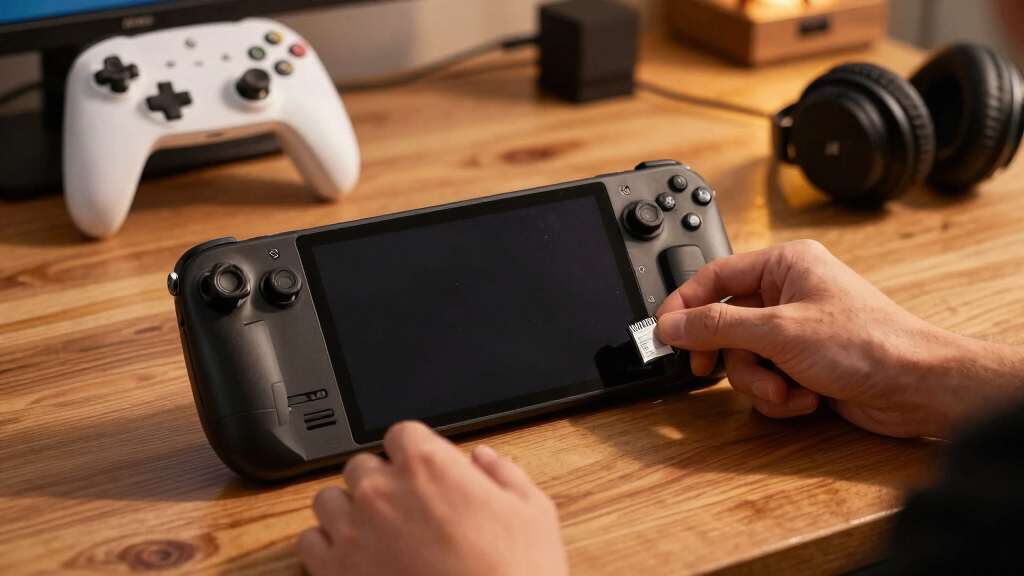
The best high capacity microSD card for Steam Deck in this lineup is the Lexar 1TB Play, because it balances a large game library, Steam Deck-friendly UHS-I performance, and strong app-rated specs without paying for speed the Deck cannot fully use. The SanDisk 1.5TB Ultra is the better choice if sheer storage matters most, while the Samsung EVO Select 512GB makes more sense for buyers who want a lower-cost, lower-risk upgrade. The main tradeoff is capacity versus value: 1TB cards are the sweet spot, 1.5TB gives more room but usually costs more per usable convenience, and 512GB cards are easier on the budget but fill faster. I also weigh whether premium specs, A2 ratings, and newer formats like microSD Express actually help on Steam Deck, since not every headline speed turns into better handheld gaming. Keep reading for the full breakdown of which card fits which kind of Steam Deck owner.

Play games on Amazon Luna for your game nights, included with Prime
- A rotating selection of games, no download needed
- Play on TV, laptop or phone
- Fast, free delivery for your gear, too
Key Takeaways
- Lexar 1TB Play is my best overall pick because it hits the Steam Deck sweet spot: big capacity, A2 app performance, and UHS-I speeds that make sense for the hardware.
- SanDisk 1.5TB Ultra wins on pure storage, but it is better for players who hoard large games than for buyers chasing the fastest load times.
- Lexar 512GB Play PRO microSD Express has the highest advertised speeds here, yet the Steam Deck cannot take full advantage of microSD Express bandwidth, making it a niche premium pick rather than the default choice.
- Samsung EVO Select 512GB is the safest budget-minded option because it keeps the useful Steam Deck specs, but its smaller capacity makes it less appealing for modern AAA libraries.
- 1TB cards separated themselves from 512GB cards because they reduce game juggling without jumping into the higher cost and weaker Deck-specific payoff of the largest or fastest options.
| Lexar 1TB Play Micro SD Card |  | Best Overall for Steam Deck | Capacity: 1TB | Card Type: microSDXC | Interface: UHS-I | VIEW LATEST PRICE | See Our Full Breakdown |
| Lexar 512GB Play PRO microSD Express Card |  | Best Future-Ready Speed Pick | Capacity: 512GB | Card Type: microSDXC Express | Speed Class: C10, U3, V30 | VIEW LATEST PRICE | See Our Full Breakdown |
| Lexar 1TB Blue microSDXC UHS-I Memory Card |  | Best Durable 1TB Pick | Capacity: 1TB | Card Type: microSDXC | Interface: UHS-I | VIEW LATEST PRICE | See Our Full Breakdown |
| SanDisk 1.5TB Ultra microSDXC UHS-I Memory Card |  | Best Maximum Capacity Pick | Capacity: 1.5TB | Card Type: microSDXC | Interface: UHS-I | VIEW LATEST PRICE | See Our Full Breakdown |
| Samsung EVO Select 512GB microSDXC Memory Card |  | Best Budget 512GB Pick | Capacity: 512GB | Card Type: microSDXC | Interface: UHS-I | VIEW LATEST PRICE | See Our Full Breakdown |
| Samsung PRO Plus Sonic The Hedgehog 1TB microSDXC Card with Adapter |  | Best Durable 1TB Pick | Capacity: 1TB | Read Speed: Up to 180MB/s | Write Speed: Up to 130MB/s | VIEW LATEST PRICE | See Our Full Breakdown |
More Details on Our Top Picks
Lexar 1TB Play Micro SD Card
Lexar 1TB Play takes my top slot because it balances 1TB capacity, A2 app performance, and faster advertised writes than most standard UHS-I cards here. For a Steam Deck library, that means room for many large games without leaning too hard on internal SSD space. Compared with the Lexar 1TB Blue, this Play card has a higher stated read ceiling and much stronger listed write speed, which makes it the better gaming-first pick. The tradeoff is that its peak 205MB/s read speed depends on the right reader, so Steam Deck owners should not buy it expecting every number on the box. The SanDisk Ultra gives more space at 1.5TB, but this card feels better balanced for speed-sensitive game storage.
Pros:- 1TB capacity is a practical sweet spot for a large Steam Deck library
- A2 rating is better suited to game and app loading than A1 cards
- Higher listed write speed than the Lexar Blue and Samsung EVO Select
- Strong U3 and V30 ratings for large game files and media use
Cons:- Peak 205MB/s reads require compatible hardware outside typical Steam Deck use
- Costs more than slower 512GB cards
- Not the highest-capacity card in the lineup
Best for: Steam Deck owners who want a roomy 1TB card with stronger gaming-oriented speed ratings than basic storage cards
Not ideal for: Buyers who need the single largest library possible on one card, since the SanDisk Ultra offers 1.5TB
- Capacity:1TB
- Card Type:microSDXC
- Interface:UHS-I
- Speed Class:C10, U3, V30
- Application Class:A2
- Max Read Speed:Up to 205MB/s
- Max Write Speed:Up to 140MB/s
- Warranty:5 years
Bottom line: This is my pick for Steam Deck buyers who want the best mix of capacity, speed ratings, and gaming focus.
Lexar 512GB Play PRO microSD Express Card
Lexar 512GB Play PRO is the speed outlier in this group, with microSD Express ratings far beyond the standard UHS-I cards. That makes it more of a forward-looking buy than a pure Steam Deck value pick. Compared with the Lexar 1TB Play, it gives up half the storage but claims much faster read and write speeds on compatible devices. For Steam Deck use, its backward compatibility matters, but the Deck will not be the place where this card’s biggest speed claims shine. I would rank it lower than the 1TB options for a Steam Deck-only buyer, yet higher for someone also using a Nintendo Switch 2 or ASUS ROG Ally. The drawback is simple: you pay for speed headroom before many Steam Deck owners can fully use it.
Pros:- Very high listed read and write speeds on compatible hardware
- Backward compatible with UHS-I devices
- Good fit for multi-device handheld gaming setups
- Dust-proof and lightweight design
Cons:- 512GB capacity is modest beside the 1TB and 1.5TB options
- Steam Deck users may not benefit from the headline Express speeds
- Likely pricier than standard UHS-I cards with more storage
Best for: Handheld gamers who use Steam Deck plus newer devices that can benefit from microSD Express speeds
Not ideal for: Steam Deck-only buyers trying to maximize installed games per dollar, since 512GB fills faster than the 1TB and 1.5TB picks
- Capacity:512GB
- Card Type:microSDXC Express
- Speed Class:C10, U3, V30
- Read Speed:Up to 900MB/s
- Write Speed:Up to 600MB/s
- Compatibility:Nintendo Switch 2, ASUS ROG Ally, Steam Deck
- Backward Compatibility:UHS-I devices
- Weight:9 grams
Bottom line: This is the card I would choose for speed headroom across newer handhelds, not for the largest Steam Deck library.
Lexar 1TB Blue microSDXC UHS-I Memory Card
Lexar 1TB Blue makes sense when I want a Steam Deck card that feels less gaming-branded and more like a reliable everyday storage workhorse. It matches the 1TB capacity of the Lexar Play, keeps the useful A2 rating, and adds a longer 10-year warranty with broad durability claims. Compared with the Lexar 1TB Play, though, its 160MB/s read speed is lower and the listed sustained media speed is less aggressive, so I would not rank it as the faster game-library choice. Its advantage is peace of mind: drop, magnetic, temperature, X-ray, and wear protection make it more appealing for users who swap cards between cameras, tablets, and the Deck. It is less compelling if the card will live permanently inside one Steam Deck.
Pros:- 1TB capacity gives plenty of room for large PC game installs
- A2 rating suits apps and game data better than A1 cards
- Broad protection against drops, magnets, temperature, X-rays, and wear
- 10-year limited warranty is longer than the Lexar Play warranty
Cons:- Lower advertised read speed than the Lexar 1TB Play
- No listed high write ceiling like the Lexar Play card
- Durability benefits matter less if the card stays inside the Steam Deck
Best for: Steam Deck owners who also move the same 1TB card between cameras, tablets, and travel devices
Not ideal for: Players chasing the quickest listed Steam Deck-oriented card, since the Lexar Play has stronger advertised speed ceilings
- Capacity:1TB
- Card Type:microSDXC
- Interface:UHS-I
- Speed Class:C10, U3, V30
- Application Class:A2
- Read Speed:Up to 160MB/s
- Protection:Drop, magnetic, temperature, wear, and X-ray proof
- Warranty:10-year limited warranty
Bottom line: This is the safer-feeling 1TB pick for buyers who value durability and warranty coverage over maximum listed speed.
SanDisk 1.5TB Ultra microSDXC UHS-I Memory Card
SanDisk 1.5TB Ultra is the card I would point to first for buyers who care most about one huge Steam Deck library. Its 1.5TB capacity beats every reviewed card here, including the Lexar 1TB Play and Lexar 1TB Blue, so it is the easiest way to reduce game shuffling. The tradeoff is that this is more of a capacity-first card than a performance-first one. Its A1 rating trails the A2 cards from Lexar and Samsung, and its 150MB/s read speed is lower than the faster 160MB/s to 205MB/s UHS-I picks. For big RPGs, indies, and backlog storage, that compromise can still make sense. For users who care more about snappy app behavior and stronger speed ratings, I would move back to the Lexar Play.
Pros:- Largest capacity in this batch at 1.5TB
- Good choice for keeping many large games installed at once
- Includes adapter for use with laptops and other devices
- Broad compatibility with Android devices, Chromebooks, and Windows laptops
Cons:- A1 rating is weaker than the A2 cards in this lineup
- Read speed trails the Lexar 1TB Play and Samsung EVO Select
- Not compatible with Nintendo Switch 2
Best for: Steam Deck players with very large libraries who want fewer deletions and reinstalls
Not ideal for: Performance-focused buyers who prefer A2-rated cards for app and game-loading behavior
- Capacity:1.5TB
- Card Type:microSDXC
- Interface:UHS-I
- Read Speed:Up to 150MB/s
- Application Class:A1
- Compatibility:Android smartphones, tablets, Chromebooks, Windows laptops
- Included Accessory:SD adapter
Bottom line: This is the right pick when storage space matters more than chasing the strongest speed class mix.
Samsung EVO Select 512GB microSDXC Memory Card
Samsung EVO Select 512GB is the sensible lower-capacity pick for Steam Deck owners who want dependable specs without paying for 1TB or Express-class hardware. Its A2 rating, U3/V30 classes, and 160MB/s read speed line up well for a secondary game library, especially for indie games or a focused set of larger titles. Compared with the Lexar 512GB Play PRO, it lacks the dramatic Express speed claims, but it is a cleaner match for buyers who only need standard UHS-I storage. Against the SanDisk 1.5TB Ultra, it gives up a huge amount of room while offering a stronger app performance class. The main drawback is capacity: modern PC games can eat 512GB quickly, so this is better as a value card than a set-and-forget Steam Deck upgrade.
Pros:- A2 rating gives it a stronger app-performance class than the SanDisk Ultra
- U3 and V30 ratings suit large files and 4K media use
- Durable design with water, temperature, X-ray, magnetic, and drop protection
- Includes SD adapter and 10-year warranty
Cons:- Half the capacity of the 1TB Lexar cards
- Far less storage than the 1.5TB SanDisk Ultra
- Does not offer the future-facing speed ceiling of the Lexar Play PRO
Best for: Steam Deck owners building a smaller, budget-conscious game rotation with strong standard UHS-I ratings
Not ideal for: Players who install many large AAA games at once, since 512GB can fill up fast
- Capacity:512GB
- Card Type:microSDXC
- Interface:UHS-I
- Speed Class:C10, U3, V30
- Application Class:A2
- Read Speed:Up to 160MB/s
- Protection:Water, temperature, X-ray, magnetic, and drop proof
- Warranty:10 years
Bottom line: This is my value-minded 512GB choice for Steam Deck owners who keep a curated library instead of everything installed.
Samsung PRO Plus Sonic The Hedgehog 1TB microSDXC Card with Adapter
Samsung PRO Plus Sonic The Hedgehog 1TB makes the most sense for Steam Deck owners who want a high-capacity card with stronger durability claims than most value picks. Its 180MB/s read and 130MB/s write ratings sit behind the Lexar 1TB Play on paper, but ahead of slower everyday cards like the Lexar 1TB Blue, which makes it better suited to large game downloads, shader updates, and moving files between devices. Compared with the SanDisk 1.5TB Ultra, the tradeoff is clear: Samsung gives up extra storage for faster rated writes and a tougher build. The Sonic branding is fun, but I would treat that as a bonus, not the reason to buy. Skip it if maximum capacity matters most, or if the Lexar 1TB Play is much cheaper.
Pros:- 1TB capacity gives the Steam Deck room for a large game library
- Fast rated read and write speeds help with downloads, transfers, and 4K media
- A2 rating is useful for app-style random access on handheld gaming devices
- Durability protections and 10-year warranty add reassurance for portable use
Cons:- Lexar 1TB Play has higher listed peak speeds
- SanDisk 1.5TB Ultra offers more storage for very large libraries
- Steam Deck UHS-I limits mean headline speeds may not be fully reached
Best for: Steam Deck owners who want a fast 1TB UHS-I card with strong durability protections for travel, swaps, and mixed-device use.
Not ideal for: Players who want the largest possible Steam library on one card, since the SanDisk 1.5TB Ultra offers more room.
- Capacity:1TB
- Read Speed:Up to 180MB/s
- Write Speed:Up to 130MB/s
- Interface:UHS-I
- Video Speed Class:V30
- Speed Class:C10, U3, A2
- Durability:Waterproof, temperature-proof, X-ray proof, magnetic-proof, drop-proof
- Warranty:10-year limited warranty
Bottom line: Pick this if you want a tough, fast 1TB Steam Deck card and value durability more than having the absolute largest capacity.
How We Picked
I ranked these cards around what matters on a Steam Deck microSD upgrade: usable capacity, UHS-I performance, A1 or A2 app behavior, write speed class, brand reliability, and price logic. I gave less weight to extreme advertised read speeds when the Steam Deck is unlikely to use them fully, because a card that looks faster on paper can be a poorer buy than a slower card with the right capacity and rating. That is why the Lexar 1TB Play sits above the faster Lexar 512GB Play PRO microSD Express.
I also treated capacity as a quality-of-life feature, not just a spec. A 1TB card gives enough room for a mix of indie games, emulation, and larger PC titles, while 512GB models work better as budget or secondary-library cards. The SanDisk 1.5TB Ultra ranks highly for players who hate deleting games, but I place it behind the best 1TB option because larger capacity alone does not always mean better value for Steam Deck owners.
Factors to Consider When Choosing Best High Capacity MicroSD Cards For Steam Deck
Choosing the best high capacity microSD card for Steam Deck is less about buying the fastest label and more about matching storage size, card class, and price to how the Deck actually reads games. I focus on the differences that change daily use: how many games fit, how often downloads need to be managed, and whether the card’s performance rating is useful on this handheld.
Capacity Matters More Than Peak Speed
For most Steam Deck owners, capacity changes the experience more than headline read speed. A 512GB card can work well for indie games, emulators, and a smaller rotation, but it gets tight once 80GB to 150GB PC games enter the mix. A 1TB microSD card is the best middle ground because it holds a broad library without the cost jump of the largest cards. The SanDisk 1.5TB Ultra makes sense if deleting games is the main frustration, but it is not automatically the best buy for everyone. I would treat 1.5TB as a convenience upgrade, not a performance upgrade. The common mistake is paying for maximum capacity when a well-priced 1TB card would solve the same problem for less money.
Do Not Overpay For Speeds The Deck Cannot Use
The Steam Deck’s microSD slot is built around UHS-I performance, so giant advertised speeds can be misleading. A card like the Lexar 512GB Play PRO microSD Express looks dramatic on paper, but its best speeds depend on devices that support the newer format. On Steam Deck, the practical benefit may be far smaller than the spec sheet suggests. That does not make the card bad; it means it is better for buyers who also plan to use it in newer compatible handhelds. For Steam Deck alone, I would rather spend on more capacity or better value than chase lab-speed numbers. The smarter question is whether the card can load and install games smoothly within the Deck’s limits.
A2 Ratings Help, But They Are Not Magic
An A2 app performance rating is useful because Steam Deck games involve lots of small file reads and writes, not only large sequential transfers. Cards such as the Lexar 1TB Play, Lexar 1TB Blue, and Samsung EVO Select carry specs that fit this kind of handheld use. Still, A2 is not a guarantee that every game will load like it is on the internal SSD. Shader caching, game engine behavior, file size, and download conditions can all affect the feel. I see A2 as a tie-breaker when capacity and price are close. It matters most when choosing between otherwise similar UHS-I cards.
Brand And Warranty Reduce Upgrade Anxiety
Steam Deck storage gets rewritten often through game installs, patches, shader updates, and file transfers, so I favor established storage brands over mystery bargains. Lexar, SanDisk, and Samsung all have strong name recognition in this category, which matters when the card may hold hundreds of dollars of downloaded games and save-related files. The Samsung PRO Plus Sonic The Hedgehog 1TB has a fun design, but its real appeal should still come from the PRO Plus positioning, not the artwork. I would not pay a large premium just for themed branding unless the underlying card specs and warranty still make sense. Counterfeit cards are another risk, especially with high-capacity models. Buying from a trusted retailer is part of the value calculation, not an afterthought.
Match The Card To Your Library Style
The right pick depends on how the Steam Deck is used. If the Deck is a main gaming PC, a 1TB or 1.5TB card is much easier to live with than 512GB. If it is mostly for indies, emulation, and travel games, the Samsung EVO Select 512GB can be the more sensible purchase. Players who rotate only a few big games at a time may not need the largest card, while collectors who keep everything installed should prioritize raw space. The Lexar 1TB Blue fits buyers who want a practical 1TB alternative without the gaming-branded angle of the Play line. I would pick based on library habits first, then use speed class and price to break the tie.
Frequently Asked Questions
Is 1TB Enough For A Steam Deck, Or Should I Buy 1.5TB?
For most buyers, 1TB is the better balance because it holds a large Steam library without pushing into the highest price tier. It gives enough room for several big PC games plus a healthy mix of smaller titles. The SanDisk 1.5TB Ultra is better if the main goal is keeping as many games installed as possible. I would choose 1.5TB for a shared family Deck, a travel-heavy setup, or a player who dislikes managing downloads. For everyone else, a strong 1TB card such as the Lexar 1TB Play is easier to justify.
Does A microSD Express Card Make Steam Deck Games Load Faster?
A microSD Express card can advertise much higher speeds, but the Steam Deck is not the ideal device for using that extra bandwidth. The Lexar 512GB Play PRO microSD Express makes more sense if the same card will also be used in newer compatible handhelds. On Steam Deck alone, its peak speed is less valuable than its spec sheet suggests. Game loading is shaped by the Deck’s card reader, the game itself, shader behavior, and storage access patterns. I would not buy microSD Express only for Steam Deck unless the price is close to a normal UHS-I card or cross-device use matters.
Is 512GB Too Small For Steam Deck In 2026?
512GB is not too small, but it changes how often storage needs to be managed. It works well for lighter libraries, indie-heavy setups, retro games, and buyers who mainly want extra space beside the internal SSD. The Samsung EVO Select 512GB is the strongest fit here because it keeps useful UHS-I, U3, V30, and A2-style performance at a lower entry cost. The drawback is that a few large games can eat the card quickly. I would pick 512GB only if budget matters more than keeping a broad modern library installed.
Should I Choose Lexar, SanDisk, Or Samsung For Steam Deck?
All three brands can make sense, but they fill different roles in this roundup. Lexar has the strongest Steam Deck-focused balance here, especially with the Lexar 1TB Play. SanDisk is the capacity play because the 1.5TB Ultra gives more room than the rest. Samsung is appealing for buyers who want familiar reliability, with the EVO Select as the value choice and the PRO Plus Sonic model as the more premium 1TB option. I would choose by role first rather than brand loyalty alone.
Do I Need A V30 Or A2 Card For Steam Deck?
A V30 rating is a good baseline because it signals stronger sustained write performance than lower-tier cards, which helps with downloads, installs, and large file transfers. An A2 rating is also useful because games often rely on many small reads rather than one simple file stream. That said, these labels do not turn a microSD card into an internal SSD replacement. They are most helpful when choosing between cards at the same capacity and price. For Steam Deck, I would avoid bargain high-capacity cards without clear speed and app-performance ratings.
Conclusion
My best overall pick is the Lexar 1TB Play, because it gives Steam Deck owners the right mix of capacity, UHS-I performance, and app-rated usefulness. The best value choice is the Samsung EVO Select 512GB if the budget is tighter and a smaller game rotation is fine. For maximum storage, the SanDisk 1.5TB Ultra is the pick I would choose for players who want fewer deletions and more installed games at once. The best premium or cross-device option is the Lexar 512GB Play PRO microSD Express, but only when its newer-format speed can be used outside the Steam Deck too. For beginners, I would keep the decision simple: buy the Lexar 1TB Play if the price is reasonable, or step down to the Samsung EVO Select 512GB when cost matters most.
Fall Picks
fall essentials
As an affiliate, we earn on qualifying purchases.