Finding the best hitbox controller for Steam fighting games comes down to three things: PC compatibility you can trust, a button layout that matches your games, and a price that reflects what you will actually use. After comparing eight of the most popular leverless options, my top pick is the Sehawei Haute42 T16 Pro V2, a 16-key all-button controller with Gamerfinger-style low-profile switches, per-key RGB, and wide platform support at a mid-range price. The MAYFLASH F500 FLAT Elite is the standout alternative for players who split time between Steam and consoles, thanks to its Sanwa buttons and broad platform coverage. Budget-minded players should look at the JZW-Shop Haute42 P12, which keeps the core leverless experience intact for far less money. The main tradeoffs in this category are key count versus portability, plastic versus metal shells, and PC-only value versus multi-platform flexibility. Read on for the full breakdown of all eight picks.
Complete the kit



Key Takeaways
- The Haute42 T16 Pro V2 takes the top spot because it is the only pick that combines 16 remappable keys, a refined second-generation layout, and a mid-range price with no meaningful weakness for Steam play.
- Seven of the eight picks come from the same Haute42/Sehawei family, so key count, shell material, and size are the real decision points — switches, firmware, and PC detection are shared across them.
- Every controller works plug-and-play with Steam, which pushes the real separator to console support: only the MAYFLASH F500 FLAT Elite covers Xbox alongside PlayStation and Switch.
- Turbo functions and per-key RGB come standard on even the cheapest board here, so neither feature is a reason to pay more in 2026.
- Spending more buys exactly two upgrades — an all-metal shell or extra macro keys; everything else on the spec sheet is refinement rather than a performance jump.
| Sehawei Haute42 T16 Pro V2 All-Button Arcade Stick |  | Best Overall | Buttons: 16 all-button layout with M1/M2 custom keys | Switches: Gamerfinger, hot-swappable | Rated Delay: 1ms | VIEW LATEST PRICE | See Our Full Breakdown |
| Haute42 R16 Leverless Arcade Controller |  | Best for Customization | Layout: 16-button leverless | Dimensions: 296 × 196 × 12.5 mm | Weight: 780 g | VIEW LATEST PRICE | See Our Full Breakdown |
| Sehawei Haute42 R16 All-Button Arcade Controller | 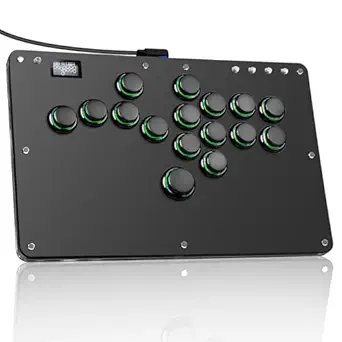 | Best Value | Buttons: 16, crystal switches | Lighting: RGB, 5 modes and 14 colors | Interface: USB Type-C | VIEW LATEST PRICE | See Our Full Breakdown |
| JZW-Shop Haute42 P12 All-Button Arcade Controller |  | Best Compact | Buttons: 12 all-button layout | Dimensions: 207 × 140 × 13 mm | Weight: 390 g | VIEW LATEST PRICE | See Our Full Breakdown |
| Sehawei Haute42 All Metal Arcade Stick (13 Keys) |  | Best Premium Build | Buttons: 13 | Material: CNC aluminum alloy with acrylic RGB top | Rated Delay: 1ms | VIEW LATEST PRICE | See Our Full Breakdown |
| Sehawei Haute42 16-Key All-Button Arcade Controller |  | Best Overall | Compatibility: Windows 10+, Steam Deck, PS3, PS4, Switch, Raspberry Pi, MiSTer, Android, Linux, iPadOS, macOS | Button Count: 16 | Connection: Wired | VIEW LATEST PRICE | See Our Full Breakdown |
| MAYFLASH F500 FLAT Elite Fight Stick Arcade Controller |  | Best Premium | Compatibility: PS4, PS3, Xbox Series S/X, Xbox One, Xbox 360, Switch, PC, macOS, Android, Raspberry Pi, Steam, Steam Deck | Buttons: 15 Sanwa OBSF buttons | Connection: Wired | VIEW LATEST PRICE | See Our Full Breakdown |
| Sehawei Haute42 13-Key All-Button Arcade Controller |  | Best Compact | Compatibility: Windows 10+, Steam Deck, PS3, PS4, Switch, Raspberry Pi, MiSTer, Android, Linux, iPadOS, macOS | Button Count: 13 | Connection: USB-C (wired) | VIEW LATEST PRICE | See Our Full Breakdown |
| hitbox controllers for Steam fighting game | Compatibility | Buttons | Lighting |
|---|---|---|---|
| Sehawei Haute42 T16 Pro V2 All | Windows 10+, Steam Deck, PS3/PS4, Switch, Android, Linux, macOS, Raspberry Pi, MiSTer | 16 all-button layout with M1/M2 custom keys | — |
| Haute42 R16 Leverless Arcade C | Windows 10+, Steam Deck, PS3, PS4 (adapter required), Switch | — | Customizable RGB |
| Sehawei Haute42 R16 All-Button | Windows 10+, Steam Deck, PS3/PS4, Switch, Raspberry Pi, MiSTer, Android, Linux, macOS | 16, crystal switches | RGB, 5 modes and 14 colors |
| JZW-Shop Haute42 P12 All-Butto | Windows 10+, Steam Deck, PS3/PS4, Switch, Raspberry Pi, Android, Linux, macOS | 12 all-button layout | — |
| Sehawei Haute42 All Metal Arca | Windows 10+, Steam Deck, PS3/PS4, Switch, Raspberry Pi, MiSTer, Android, Linux, macOS | 13 | — |
| Sehawei Haute42 16-Key All-But | Windows 10+, Steam Deck, PS3, PS4, Switch, Raspberry Pi, MiSTer, Android, Linux, iPadOS, macOS | — | Customizable RGB |
| MAYFLASH F500 FLAT Elite Fight | PS4, PS3, Xbox Series S/X, Xbox One, Xbox 360, Switch, PC, macOS, Android, Raspberry Pi, Steam, Steam Deck | 15 Sanwa OBSF buttons | — |
| Sehawei Haute42 13-Key All-But | Windows 10+, Steam Deck, PS3, PS4, Switch, Raspberry Pi, MiSTer, Android, Linux, iPadOS, macOS | — | Customizable RGB |
More Details on Our Top Picks
Sehawei Haute42 T16 Pro V2 All-Button Arcade Stick
The T16 Pro V2 earns the top spot because it covers nearly everything a Steam fighting game player needs without a single glaring weakness. The Gamerfinger switches are hot-swappable, so a worn or disliked switch is a cheap fix rather than a dead controller, and the 16-button layout gives you dedicated M1/M2 custom keys that the smaller P12 simply doesn’t have room for. Its 1ms rated delay and native Steam Deck support mean it behaves on PC the way a good leverless should: inputs register clean, with no adapter hassle. Against the all-metal Haute42 13-key model, it trades premium heft for a lighter acrylic shell and more buttons. The tradeoff is complexity — the web configuration and EXT port are aimed at tinkerers, and PS4 setup needs manual work.
Pros:- Gamerfinger switches are hot-swappable for easy repairs and tuning
- 16-button layout with M1/M2 custom keys for macros and training shortcuts
- 1ms rated delay and native Steam Deck support, no adapter needed on PC
- Broadest compatibility in the lineup, from Raspberry Pi to PS4
Cons:- PS4/PS5 connection requires manual configuration out of the box
- Feature set (EXT port, web config) can confuse first-time leverless buyers
- Acrylic build lacks the planted heft of the all-metal model
Best for: PC and Steam Deck players who want one leverless controller that covers every platform and button layout they’ll ever need
Not ideal for: Complete leverless beginners who’d be overwhelmed by web configuration, EXT ports, and manual PS4 setup
- Buttons:16 all-button layout with M1/M2 custom keys
- Switches:Gamerfinger, hot-swappable
- Rated Delay:1ms
- Compatibility:Windows 10+, Steam Deck, PS3/PS4, Switch, Android, Linux, macOS, Raspberry Pi, MiSTer
- Material:Transparent acrylic with RGB lighting
- Configuration:Embedded web configuration, button layout swap
- Extras:Turbo functions, EXT port, multiple controller modes
Our verdict“The default choice for most Steam fighting game players — maximum buttons, maximum compatibility, minimal fuss on PC.”
Haute42 R16 Leverless Arcade Controller
Where the T16 Pro V2 aims to be the safe pick for everyone, the Haute42 R16 is the one I’d hand to someone who plans to mod. It ships with a switch puller, spare button caps, and anti-slip pads in the box, which tells you exactly who it’s built for: players who will pop switches out and experiment. The 12.5mm-thin, 780g body sits flatter on a desk than the chunkier Sehawei R16 crystal model, and firmware update support keeps SOCD behavior current as rules evolve. The catch is platform friction — PS4 requires an adapter, which the T16 Pro V2 avoids entirely. If your fighting games live on Steam, that’s a non-issue; if you split time between PC and console, budget for the extra dongle.
Pros:- Ships with switch puller, spare button caps, and anti-slip pads
- Hot-swappable switches make experimentation tool-free
- Slim 12.5mm profile sits flat and stable on a desk
- Firmware update support keeps SOCD rules and compatibility current
Cons:- PS4/PS5 connection requires a separate adapter
- Little published information on long-term button durability
- Initial setup can be complex for players new to leverless controllers
Best for: Tinkerers who plan to swap switches, adjust firmware, and tune their setup rather than play stock
Not ideal for: PS4/PS5-first players — it needs an adapter where rivals in this list connect directly
- Layout:16-button leverless
- Dimensions:296 × 196 × 12.5 mm
- Weight:780 g
- Switches:Hot-swappable
- Compatibility:Windows 10+, Steam Deck, PS3, PS4 (adapter required), Switch
- Lighting:Customizable RGB
- Included Accessories:USB cable, switch puller, button caps, anti-slip pads, manual
- Firmware:Update support
Our verdict“The right pick if you intend to mod and tweak your controller over time, less so if you split your hours with a PS4.”
Sehawei Haute42 R16 All-Button Arcade Controller
The Sehawei Haute42 R16 is my value pick because it delivers the core leverless experience — 16 buttons, hot-swappable crystal switches, turbo, web-based configuration — without making you pay for the T16 Pro V2’s extras like M1/M2 custom keys. Compared with the JZW-Shop P12, it gives you four more buttons and a roomier layout, which matters in games that map macros to extra inputs. The RGB system with 5 modes and 14 colors is genuinely flexible rather than a gimmick. What you give up is polish: the acrylic build feels closer to the P12 than to the all-metal 13-key Haute42, and PS4/PS5 setup involves manual configuration that can trip up first-time leverless buyers. For Steam play, though, it’s plug-in-and-go.
Pros:- Full 16-button layout with hot-swappable crystal switches
- RGB lighting with 5 modes and 14 colors, deeper than most at this tier
- Wide compatibility including Steam Deck, Switch, and PS3/PS4
- Turbo functions and web configuration included, not paywalled behind a Pro model
Cons:- PS4/PS5 setup requires manual configuration
- Acrylic construction feels less premium than the all-metal option
- Extension port has strict usage rules that confuse new owners
Best for: Budget-conscious Steam players who want the full 16-button leverless layout without paying for Pro-tier extras
Not ideal for: Players who want a premium metal chassis or a plug-and-play console experience
- Buttons:16, crystal switches
- Lighting:RGB, 5 modes and 14 colors
- Interface:USB Type-C
- Material:Acrylic
- Compatibility:Windows 10+, Steam Deck, PS3/PS4, Switch, Raspberry Pi, MiSTer, Android, Linux, macOS
- Key Features:Hot-swappable, turbo functions, web configuration, button swap, extension port
Our verdict“Everything a Steam player actually needs from a leverless controller, at the cost of Pro-tier extras and premium materials.”
JZW-Shop Haute42 P12 All-Button Arcade Controller
At 207 × 140mm and 390g, the JZW-Shop Haute42 P12 is the only controller in this lineup that disappears into a laptop sleeve — the R16 models are roughly twice its footprint and the all-metal 13-key is heavier still. For Steam Deck owners who travel, that size difference is the whole story. It still packs SOCD cleaning modes, turbo, and hot-swappable buttons, so you’re not sacrificing competitive features for portability. The compromises are physical: 12 buttons instead of 16 means fewer dedicated macro keys than the T16 Pro V2, larger hands may feel cramped on long sessions, and the lightweight body can slide on a desk during aggressive play. It’s a specialist, and a good one.
Pros:- Only 390g and small enough for a laptop sleeve
- Retains SOCD cleaning modes and turbo despite the size
- Hot-swappable buttons for easy maintenance on the road
- Wide platform compatibility including Steam Deck and Switch
Cons:- 12 buttons limit macro options versus 16-button rivals
- Light body can skate across a desk during aggressive play
- Cramped layout for larger hands over long sessions
Best for: Steam Deck owners and frequent travelers who need a leverless that fits in a laptop bag
Not ideal for: Players with large hands, or anyone whose setups rely on 16-button macro layouts
- Buttons:12 all-button layout
- Dimensions:207 × 140 × 13 mm
- Weight:390 g
- Connectivity:USB
- Compatibility:Windows 10+, Steam Deck, PS3/PS4, Switch, Raspberry Pi, Android, Linux, macOS
- Key Features:SOCD cleaning modes, turbo, hot-swappable buttons, firmware updates, RGB
Our verdict“Buy it for the bag space it saves; skip it if your hands or your macros need more room.”
Sehawei Haute42 All Metal Arcade Stick (13 Keys)
Every other pick here is acrylic; the Sehawei Haute42 All Metal is CNC aluminum alloy, and that changes how it plays. The added mass keeps it planted on a desk during mash-heavy strings where the 390g P12 would skate around, and the chassis should shrug off years of use that might crack a plastic shell. Feature-wise it keeps pace — 1ms delay, SOCD cleaning, turbo, web configuration — so you’re paying for materials, not missing out. Against the T16 Pro V2, though, you drop from 16 buttons to 13, losing the M1/M2 custom keys some players rely on for training-mode shortcuts. The heavier, bulkier body also makes it the worst travel companion here, and PS4 setup still needs manual configuration.
Pros:- CNC aluminum alloy chassis built for long-term durability
- Added weight keeps it planted during mash-heavy play
- 1ms rated delay with SOCD cleaning modes for tournament-legal inputs
- Full feature set: RGB, turbo, button layout swap, web configuration
Cons:- Heavy and bulky — the worst option here for travel
- Only 13 buttons versus 16 on the T16 Pro V2 and R16 models
- Sparse information on included accessories
Best for: Desk-bound players who want a controller that stays planted during aggressive play and survives years of use
Not ideal for: Frequent travelers, and players who need more than 13 buttons for macros or custom mappings
- Buttons:13
- Material:CNC aluminum alloy with acrylic RGB top
- Rated Delay:1ms
- Compatibility:Windows 10+, Steam Deck, PS3/PS4, Switch, Raspberry Pi, MiSTer, Android, Linux, macOS
- Key Features:SOCD cleaning modes, turbo, button layout swap, embedded web configuration
- Controller Modes:Multiple modes with firmware update support
Our verdict“A buy-it-once chassis for a permanent desk setup, not for players on the move.”
Sehawei Haute42 16-Key All-Button Arcade Controller
The Sehawei Haute42 16-Key is the option I’d point most Steam fighting game players toward first. Where the Haute42 13-Key covers the standard leverless layout, this model adds three extra buttons that can be mapped to training-mode shortcuts, L3/R3, or platform-specific functions — useful when a game on Steam expects more inputs than a bare-bones layout provides. The hot-swappable switches mean a worn key is a cheap fix rather than a dead controller, and the embedded web configuration handles remapping without installing sketchy software. The tradeoff is complexity: the same feature depth that makes it flexible also means more time in menus, and PS4 setup requires manual configuration. Compared with the MAYFLASH F500 FLAT Elite, it skips arcade-grade Sanwa buttons but costs less and takes up less desk space.
Pros:- 16 buttons leave room for training shortcuts, L3/R3, and platform functions beyond the standard layout
- Hot-swappable switches make repairs and feel tweaks cheap and tool-free
- Embedded web configuration handles remapping without extra software
- Broad compatibility covers PC, Steam Deck, consoles, and even Raspberry Pi and MiSTer
Cons:- Feature depth means more menu time before it’s set up the way you want
- PS4 connection requires manual configuration out of the box
- Long-term durability and build quality are not well documented
Best for: Steam players who want one leverless controller that covers every platform they own, with spare buttons for training-mode shortcuts and system functions
Not ideal for: First-time leverless buyers who want plug-and-play simplicity — the feature depth means real configuration time before the first match
- Compatibility:Windows 10+, Steam Deck, PS3, PS4, Switch, Raspberry Pi, MiSTer, Android, Linux, iPadOS, macOS
- Button Count:16
- Connection:Wired
- Lighting:Customizable RGB
- Key Switches:Hot-swappable
- Configuration:Embedded web configuration
- Extra Functions:Turbo, multiple controller modes
- Expansion:Extension port
Our verdict“The safest first choice for most Steam fighting game players who want maximum layout flexibility in a single controller.”
MAYFLASH F500 FLAT Elite Fight Stick Arcade Controller
The MAYFLASH F500 FLAT Elite is the pick for buyers who want genuine Sanwa OBSF buttons — the same parts found in Japanese arcade cabinets — rather than the gamer-style switches on the Haute42 16-Key. That hardware choice changes the feel of every input: shorter, crisper presses that many players find more consistent for tight links in Steam fighters. The bigger chassis also gives your palms room, and the removable acrylic top plate makes artwork swaps painless. Headset support is a rare bonus for online sets. The compromises are real, though: console play requires a wired controller passthrough, PS5 needs extra adapters, and the larger footprint is less desk-friendly than either Haute42 model. This pick makes the most sense for players who prioritize feel over convenience.
Pros:- Genuine Sanwa OBSF buttons deliver arcade-cabinet feel and consistency
- Headset support handles game audio and chat for online play
- Five SOCD modes keep inputs legal across different games and rulesets
- Removable acrylic top plate makes custom artwork swaps painless
Cons:- Requires a wired controller passthrough for PS4 and Xbox consoles
- PS5 play needs extra adapters not included in the box
- Larger chassis eats more desk and bag space than the Haute42 models
Best for: Players raised on arcade cabinets who want genuine Sanwa button feel plus headset chat for long online sessions
Not ideal for: Desk-bound Steam players short on space, or anyone unwilling to deal with controller passthrough and adapters on consoles
- Compatibility:PS4, PS3, Xbox Series S/X, Xbox One, Xbox 360, Switch, PC, macOS, Android, Raspberry Pi, Steam, Steam Deck
- Buttons:15 Sanwa OBSF buttons
- Connection:Wired
- Console Requirement:Wired controller passthrough for PS4/Xbox
- SOCD Modes:5
- Audio:Headset support for game audio and chat
- Customization:Macro programming, button mapping, removable acrylic top plate
- Extra Functions:Turbo
Our verdict“Worth the premium and the passthrough hassle if arcade-grade Sanwa feel matters more to you than convenience.”
Sehawei Haute42 13-Key All-Button Arcade Controller
The Sehawei Haute42 13-Key covers the classic leverless layout — four directions plus eight attack buttons — at 0.59 kg, making it the easiest controller in this lineup to slide into a bag for locals or travel. Compared with the Haute42 16-Key, it drops the extra function buttons, which matters less than it sounds: most Steam fighting games only need the core twelve, and the standard layout keeps muscle memory intact. Hot-swappable keys and USB-C keep maintenance and cabling simple. The tradeoffs: it demands firmware updates before it behaves its best, the initial mode setup can confuse first-time leverless buyers, and the extension port is off-limits for consoles. Players who want headset support or arcade-grade buttons should look at the MAYFLASH F500 FLAT Elite instead.
Pros:- Lightest option here at 0.59 kg — genuinely easy to carry to locals
- Standard 13-key layout preserves muscle memory from other leverless controllers
- Hot-swappable keys make repairs and switch swaps quick
- USB-C and broad mode support cover PC, Steam Deck, and consoles
Cons:- Needs firmware updates before it performs its best
- Mode setup can trip up first-time leverless buyers
- Extension port can’t be used to connect consoles, limiting expansion
Best for: Travelers and locals regulars who need a lightweight, bag-friendly leverless with the standard fighting game layout
Not ideal for: Players who want headset support, arcade-grade Sanwa parts, or a controller that performs perfectly out of the box with no firmware updates
- Compatibility:Windows 10+, Steam Deck, PS3, PS4, Switch, Raspberry Pi, MiSTer, Android, Linux, iPadOS, macOS
- Button Count:13
- Connection:USB-C (wired)
- Weight:0.59 kg
- Controller Modes:X-input, Switch, PS3, D-input, PS4, Keyboard
- Key Switches:Hot-swappable
- Lighting:Customizable RGB
- Power Source:Corded electric
Our verdict“The right pick if portability and a standard layout matter more to you than extra buttons or premium parts.”
How We Picked
I judged every controller in this roundup through one lens: how well it serves a PC player buying for Steam fighting games. Native PC compatibility and reliable XInput detection carried the most weight, followed by button layout and key count, switch feel and build quality, SOCD cleaning options for tournament-legal play, and portability for Steam Deck and laptop setups. Price was weighed against what each extra dollar actually buys — more keys, a metal shell, or broader console support.
The ranking favors versatility per dollar over raw spec sheets. The T16 Pro V2 leads because it covers the widest range of players and games without a real weakness, while the R16 and P12 models rank on value and the All Metal and MAYFLASH entries rank on specialization. Near-duplicate siblings were ordered by who each one suits better, not by trivial spec differences.
| hitbox controllers for Steam fighting game | Compatibility | Lighting |
|---|---|---|
| Sehawei Haute42 T16 Pro V2 All | Windows 10+, Steam Deck, PS3/PS4, Switch, Android, Linux, macOS, Raspberry Pi, MiSTer | — |
| Haute42 R16 Leverless Arcade C | Windows 10+, Steam Deck, PS3, PS4 (adapter required), Switch | Customizable RGB |
| Sehawei Haute42 R16 All-Button | Windows 10+, Steam Deck, PS3/PS4, Switch, Raspberry Pi, MiSTer, Android, Linux, macOS | RGB, 5 modes and 14 colors |
| JZW-Shop Haute42 P12 All-Butto | Windows 10+, Steam Deck, PS3/PS4, Switch, Raspberry Pi, Android, Linux, macOS | — |
| Sehawei Haute42 All Metal Arca | Windows 10+, Steam Deck, PS3/PS4, Switch, Raspberry Pi, MiSTer, Android, Linux, macOS | — |
| Sehawei Haute42 16-Key All-But | Windows 10+, Steam Deck, PS3, PS4, Switch, Raspberry Pi, MiSTer, Android, Linux, iPadOS, macOS | Customizable RGB |
| MAYFLASH F500 FLAT Elite Fight | PS4, PS3, Xbox Series S/X, Xbox One, Xbox 360, Switch, PC, macOS, Android, Raspberry Pi, Steam, Steam Deck | — |
| Sehawei Haute42 13-Key All-But | Windows 10+, Steam Deck, PS3, PS4, Switch, Raspberry Pi, MiSTer, Android, Linux, iPadOS, macOS | Customizable RGB |
Factors to Consider When Choosing Best Hitbox Controllers For Steam Fighting Games
A hitbox-style controller looks simple — buttons where the lever used to be — but the differences between models decide how comfortable your sessions are and whether the board grows with you. These are the factors I would weigh before spending anything, including the mistakes buyers make most often in this category.Key Count Matters More Than Brand Names
The single biggest difference between these controllers is how many buttons you get, and the gap between 12 and 16 keys is bigger than it looks. A 12-key layout like the JZW-Shop P12 covers the essentials: four direction buttons and eight attack buttons, which is everything a game like Street Fighter 6 or Tekken 8 strictly needs. Step up to 13 keys and you typically gain an extra thumb or option button that makes menus and training shortcuts less awkward. The 16-key models — the T16 Pro V2, the R16 boards, and the dedicated 16-key Haute42 — add macro buttons that shine in training mode, where recording, position resets, and frame-data shortcuts live on extra inputs. Modern Steam fighters also let you bind drive rush, throws, or multi-button commands to single keys, so spare buttons are never wasted if you play competitively. A common mistake is buying the largest layout out of fear of missing out, then never mapping the top row. If you play one or two titles casually, 12 or 13 keys is plenty; if you lab combos daily or rotate between games with different macros, the 16-key boards earn their footprint.
Switch Feel and Shell Material Change How Sessions Feel
Most of these controllers use low-profile mechanical switches marketed as Gamerfinger-style, with short travel and a light, fast actuation that suits rapid directional taps. The MAYFLASH F500 FLAT Elite goes the other way with full-size Sanwa OBSF buttons, which have deeper travel and a softer bottom-out that arcade veterans tend to prefer. Neither is objectively better; low-profile switches reward speed, while Sanwa-style buttons reward deliberate, rhythmic inputs. Shell material is the other half of the equation. Plastic Haute42 shells are light and easy to carry but can shift on your lap during aggressive play, while the All Metal 13-key model stays planted and feels denser under the wrists. Hot-swap switch sockets, common across the Haute42 range, let you change the feel later without soldering, which quietly extends the life of a cheaper board.
PC Compatibility and SOCD Cleaning
Every controller in this roundup connects to PC over USB and is detected by Steam without extra drivers, but the details still matter. XInput mode gives the smoothest plug-and-play experience in modern fighters, while older titles sometimes prefer DInput, so a controller that can switch modes saves headaches. Steam Input adds another layer, letting you remap any button per game, which pairs well with the extra keys on the 16-button models. SOCD cleaning — how the controller resolves opposite directions like left plus right — is handled in firmware, and most of these boards ship with tournament-legal modes such as last-input priority. If you ever plan to enter offline brackets, check that your pick’s firmware supports the cleaning mode your events require, since Capcom Pro Tour rules are strict about simultaneous opposite directions. Firmware update support also separates brands: boards with active update channels age far better than frozen ones.
Size, Weight, and Portability
Leverless controllers are already more travel-friendly than lever sticks, but size still splits this lineup in two. The R16 and P12 models are slim, sub-kilo boards that slide into a laptop sleeve next to a Steam Deck, which makes them the natural pick for locals, commutes, or cramped desks. The T16 Pro V2 and the F500 FLAT Elite are wider, giving your wrists more resting room during long ranked sessions at a desk. Weight interacts with how you play: lap players benefit from heavier shells that resist sliding, while desk players can go as light as they like. Cable and port placement are easy to overlook — a recessed USB-C port survives bag travel far better than an exposed one. Match the board’s footprint to where you actually play, not where you imagine playing.
When Paying More Actually Buys You Something
Price gaps in this category are meaningful only in three places. Paying more for an all-metal shell buys stability and durability you can feel every session, which is why the metal Haute42 justifies its premium for desk-bound players. Paying more for multi-platform support buys freedom: the F500 FLAT Elite covers PlayStation, Xbox, and Switch alongside PC, so one board serves a household with consoles. Paying more for extra keys buys training-mode speed and macro flexibility. What extra money does not buy here is turbo functions or RGB lighting — those are standard even on the cheapest pick. The most common overspend is buying console compatibility a Steam-only player will never touch; the most common underspend is buying a 12-key board and outgrowing it within a season. Spend on the two or three features your routine actually uses, and the rest of the spec sheet is decoration.
Frequently Asked Questions
Are hitbox-style controllers legal in fighting game tournaments?
In most cases, yes, but the firmware matters more than the hardware. Major circuits like the Capcom Pro Tour require that opposite directions never register simultaneously, so the controller must clean inputs like left plus right into a defined result. The Haute42 boards in this roundup run configurable firmware with tournament-legal SOCD modes, including last-input priority and neutral resolution, and the MAYFLASH F500 FLAT Elite handles cleaning on its own board. Before entering an event, set your controller to the cleaning mode the rules specify, because a board that defaults to allowing both directions can get you disqualified even if the hardware itself is fine. For pure Steam play at home, none of this affects you — every pick here works as-is.
Will these controllers work with a Steam Deck?
Yes. Every controller here connects over USB and presents itself as a standard PC gamepad, which the Steam Deck reads natively in both desktop and gaming mode. Docked play is the smoothest route since you can use a full-size USB-A port or hub, but a USB-C connection direct to the Deck works too. Steam Input lets you remap buttons per game, which is handy on the 16-key models where you might want different macros per title. The slim R16 and P12 are the most natural Deck companions because they pack flat in the same bag, while the All Metal model adds noticeable weight to a travel kit.
Is a hitbox controller actually better than a fight stick or pad for Steam fighting games?
Better depends on what slows you down. Replacing the lever with direction buttons removes lever travel time, so dashes, charge motions, and instant air dashes come out faster and more consistently once the layout clicks. Players who struggle with missed inputs on a pad’s analog stick or d-pad often see the biggest jump, because each direction is a distinct digital button. Traditional stick players with years of arcade muscle memory may lose that advantage while relearning, so switching only pays off if you commit to a few weeks of awkward inputs. Modern pads remain genuinely competitive — if your execution is already clean, a leverless board is a refinement, not a revelation.
How hard is it to learn an all-button layout coming from a pad or stick?
The first week feels strange, the second week feels playable, and most players report the layout clicking within two to four weeks of regular play. The biggest adjustment is your left hand: up moves to a thumb or ring-finger button, which rewires how you think about jumping. Short, deliberate practice beats marathon sessions — ten minutes in training mode drilling dashes and quarter-circles daily builds the motion faster than ranked grinding. Starting on a smaller layout like the P12 or the 13-key models reduces finger travel while you build habits. If you plateau, remapping a button or two is normal, and every board here makes that easy.
What is the difference between the Haute42 T16, R16, P12, and 13-key models?
The naming tracks the button count: the P12 carries 12 keys, the 13-key models add an extra button, and the R16 and T16 carry 16. Beyond count, the differences are shell size, material, and price — the underlying switches, firmware, and PC compatibility are shared across the family. The R16 is the slim traveler, the T16 Pro V2 is the roomier flagship revision with the most refined layout, and the P12 is the stripped-down budget entry. The All Metal variant swaps the plastic shell for aluminum, which changes feel and stability rather than function. Choose by how many macro buttons your games reward and how much desk or bag space you have; everything else is the same core board.
Conclusion
After weighing all eight against the needs of a PC fighting game player, the lineup sorts itself cleanly by buyer type. Most players should buy the Sehawei Haute42 T16 Pro V2 — its 16 remappable keys, refined layout, and mid-range price cover everything Steam fighters ask of a controller without a real weak point. If money is the deciding factor, the JZW-Shop Haute42 P12 delivers the same core leverless experience for the least cash, and the Sehawei Haute42 R16 all-button model is the value sweet spot for players who want 16 keys without the flagship price. Lap players and anyone who wants a board that feels permanent should spend up for the Haute42 All Metal 13-key, the premium pick that trades extra buttons for a shell that never moves. Beginners are best served by the 13-key Haute42, which keeps the layout simple while leaving room to grow. Players who split time between Steam and consoles — especially Xbox owners — should go straight to the MAYFLASH F500 FLAT Elite, and frequent travelers should grab the slim Haute42 R16 Leverless for the bag. Whichever route you take, every pick here plugs into Steam and works, so the real choice is matching the board to your hands, your games, and your budget.