
For the best computers, tablets & components in 2026, my top overall pick is the Apple iPad 11-inch with A16 Chip because it offers the strongest mix of speed, app support, display quality, and long-term appeal in this group. The QAZIPO 2-in-1 Laptop Tablet is the better choice if you want a Windows device with a keyboard included, while the Fusion5 WIN PRO Rugged Windows 11 Tablet stands out for buyers who need a tougher work tablet. The main tradeoff is simple: iPadOS feels faster and cleaner for everyday use, Windows gives you desktop software, and Android usually wins on lower-cost media use. Storage, accessory support, processor class, and renewed-device risk separate the strong picks from the filler. Continue reading for the full breakdown of which model fits each buyer type.

Play games on Amazon Luna for your game nights, included with Prime
- A rotating selection of games, no download needed
- Play on TV, laptop or phone
- Fast, free delivery for your gear, too
Key Takeaways
- The Apple iPad 11-inch with A16 Chip earns best overall because it combines the quickest everyday feel, the broadest tablet app ecosystem, and a display that suits both work and media.
- The QAZIPO 2-in-1 and Fusion5 Helios 12 look similar on paper, but the QAZIPO leans toward laptop replacement while the Helios is more appealing for stylus-first Windows use.
- Large numbers like 12GB RAM and 512GB SSD help multitasking and file storage, yet CPU class still limits how far the budget Windows tablets can go.
- The renewed iPad 7th Generation and Surface Go 2 can save money, but older chips, smaller drives, and battery uncertainty keep them below newer options.
- For Android buyers, the Samsung Galaxy Tab A11+ feels like the safer mainstream pick, while the URAO X109 is more of a spec-sheet gamble because update support and real RAM behavior are harder to judge.



More Details on Our Top Picks
Apple iPad 11-inch with A16 Chip, Liquid Retina Display, and Blue Color
I rank the Apple iPad 11-inch highest because it gives the cleanest balance of speed, display quality, app support, and long battery life. Compared with the QAZIPO 2-in-1 Laptop Tablet, it is less laptop-like out of the box, but the A16 chip makes it the stronger pick for polished everyday performance, creative apps, video calls, and long-term software support. The Liquid Retina screen also feels more refined than the lower-resolution URAO X109 display. The tradeoff is cost after accessories: Apple Pencil and keyboard add-ons are separate, and the 128GB base storage is fixed. This pick makes most sense if I want a tablet that feels fast, stable, and broadly useful rather than the cheapest Windows-style setup.
Pros:- A16 chip gives it stronger everyday performance than most budget Windows and Android tablets here
- Liquid Retina display with True Tone is well suited to reading, streaming, drawing, and photo work
- 12MP front and rear cameras make it a better video-call choice than many low-cost tablets
- All-day battery life fits school, travel, and couch use better than shorter-runtime Windows tablets
Cons:- Keyboard and Apple Pencil are sold separately, raising the real setup cost
- 128GB base storage is limiting for large media libraries or creative files
- Less flexible for desktop Windows software than the QAZIPO and Fusion5 Helios models
Best for: Students, creators, and families who want a fast mainstream tablet with strong apps, a refined screen, and long software life
Not ideal for: Buyers who need laptop-style productivity included in the box, since the keyboard and Apple Pencil cost extra
- Display:11-inch Liquid Retina with True Tone
- Processor:Apple A16 chip
- Storage:128GB
- Cameras:12MP front and 12MP back with 4K video
- Connectivity:Wi-Fi 6
- Battery Life:All-day battery life
- Weight:1.05 pounds
- Color:Blue
Bottom line: This is the tablet I would choose first for a polished all-around device, as long as Windows software and included accessories are not priorities.
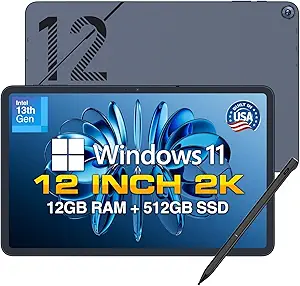
Fusion5 Helios 12 Windows 11 Tablet – 12″ 2K Display, 12GB DDR5 RAM, 512GB SSD, Stylus Pen Included
The Fusion5 Helios 12 earns its place as my Windows pick for buyers who care more about ports, stylus input, and sustained workloads than tablet simplicity. Compared with the QAZIPO 2-in-1 Laptop Tablet, it has the more serious connectivity setup, including dual USB-C, USB 3.0, HDMI, and a headphone jack, plus a stylus in the box. The 12GB DDR5 RAM and built-in fan also make it better suited to heavier multitasking than the 10.1-inch Windows tablet. The catch is mobility: battery life is only about four hours under load, and there is no physical keyboard included. I would pick it for a desk-to-meeting Windows tablet, not as the easiest travel companion.
Pros:- 12GB DDR5 RAM supports smoother multitasking than entry-level Windows tablets
- Active cooling helps manage heavier workloads better than fanless budget models
- Dual USB-C, USB 3.0, HDMI, and audio jack make it the most connection-friendly pick in this group
- Stylus is included, which helps with notes, markup, and sketching
Cons:- Average four-hour battery life is short beside the 10.1-inch Windows tablet and iPad
- No physical keyboard is included, limiting laptop replacement value
- Expandable storage options are limited
Best for: Windows users who need stylus input, full-size connectivity, and stronger multitasking in a tablet-first form
Not ideal for: Travelers or students who need long battery life and a keyboard included without buying another accessory
- Display:12-inch IPS
- Resolution:2000 x 1200 pixels
- Processor:Intel 13th Gen CPU
- RAM:12GB DDR5
- Storage:512GB SSD
- Battery Life:4 hours average
- Ports:2 x USB-C, USB 3.0, HDMI, 3.5mm jack
- Weight:690 grams / 1.52 pounds
- Operating System:Windows 11 Home
Bottom line: Choose this one if Windows flexibility and ports matter more than battery life or an included keyboard.
QAZIPO 2-in-1 Laptop Tablet with Magnetic Keyboard, 12″ 2K IPS Touchscreen, 12GB RAM, 512GB SSD, Intel Pentium Gold 6500Y Processor, Windows 11
The QAZIPO 2-in-1 Laptop Tablet is the most practical middle ground here because it includes the magnetic keyboard, Windows 11, a roomy 512GB SSD, and a sharp 12-inch 2K touchscreen. Compared with the Fusion5 Helios 12, it is less appealing for port-heavy setups and sustained high-load work, but it is easier to justify if I want a ready-to-type device without adding a keyboard later. It also offers more laptop-style storage than the Apple iPad 11-inch at this level. The limiting factor is the Intel Pentium Gold 6500Y: it is fine for documents, browser tabs, classes, and light creative work, but not ideal for demanding editing or heavy multitasking.
Pros:- Keyboard is included, giving it stronger laptop value than tablet-only picks
- 12-inch 2K IPS touchscreen with 100% sRGB supports sharper text and better color than basic HD panels
- 12GB RAM and 512GB SSD are generous for school, office, and travel use
- Office 365 one-year subscription adds useful productivity value out of the box
Cons:- Intel Pentium Gold processor is weaker than the iPad A16 and Fusion5 Helios 13th Gen CPU
- Limited port selection may require adapters for monitors and accessories
- Windows tablet ergonomics are less polished than iPadOS for pure touch use
Best for: Students and remote workers who want a portable Windows tablet that can act like a small laptop right away
Not ideal for: Power users running demanding creative apps, large spreadsheets, or heavy browser workloads for long sessions
- Display:12-inch 2K FHD IPS touchscreen
- Color Coverage:100% sRGB
- Processor:Intel Pentium Gold 6500Y, up to 3.4GHz
- RAM:12GB
- Storage:512GB SSD
- Operating System:Windows 11 Home
- Ports:USB-C, Micro HDMI, headphone jack
- Weight:1.4 pounds / 0.63 kg
- Included Software:Office 365 one-year subscription
Bottom line: This is the smart value pick if I want a compact Windows laptop-tablet setup with the keyboard already included.
10.1″ Windows 11 Tablet with 6GB RAM, 128GB Storage, Intel Processor
This 10.1-inch Windows 11 Tablet stands out because it trades raw performance for longer battery life and easy portability. Compared with the Fusion5 Helios 12, it has less RAM, less storage, and a less premium build, but the claimed 6000mAh battery life of up to 12 hours makes it better for note-taking, travel, and light work away from a charger. Against the QAZIPO 2-in-1 Laptop Tablet, it is less convincing as a laptop replacement because no keyboard is listed and the display details are less ambitious. I would treat it as a low-cost Windows companion: useful for web apps, streaming, email, and files, but not a machine for demanding Windows workloads.
Pros:- Up to 12 hours of battery life beats the shorter-running Fusion5 Helios 12
- Compact 10.1-inch size is easier to carry than the 12-inch Windows models
- MicroSD expansion gives it more storage flexibility than fixed-storage tablets
- Windows 11 support keeps it compatible with familiar desktop-style apps
Cons:- 6GB RAM and 128GB storage are modest beside the QAZIPO and Fusion5 Helios models
- Plastic shell may feel less durable or premium
- Display resolution and camera quality are not clearly specified
Best for: Budget-focused Windows users who need a small tablet for travel, classes, email, streaming, and light document work
Not ideal for: Buyers who want a premium display, metal build, included keyboard, or enough power for heavy multitasking
- Display:10.1 inches
- Operating System:Windows 11 Home
- Processor:Intel processor
- RAM:6GB
- Storage:128GB
- Expandable Storage:Up to 408GB with microSD
- Battery:6000mAh
- Connectivity:Wi-Fi, USB 3.0, Micro HDMI, Bluetooth 5.0
Bottom line: Pick this if long unplugged use matters more than speed, screen quality, or laptop-style hardware.
URAO X109 10.1″ Android 16 Tablet with Octa-core Processor, 30GB RAM, 128GB ROM
The URAO X109 is the Android value play in this set, aimed at buyers who want streaming, browsing, kids’ apps, and expandable storage without paying iPad money. Compared with the Apple iPad 11-inch, it cannot match the A16 chip, Liquid Retina display, or app ecosystem polish, but it offers 1TB TF card expansion, Wi-Fi 6, Bluetooth 5.4, and fast charging at a lower-spec tier. The claimed 30GB RAM needs a careful read because it combines 6GB physical memory with 24GB virtual memory, so it should not be treated like true high-end RAM. Its 1280×800 screen is also behind the QAZIPO and Fusion5 2K displays. I would pick it for casual Android use, not productivity-heavy computing.
Pros:- Expandable storage up to 1TB is useful for offline videos, photos, and downloaded files
- Wi-Fi 6 and Bluetooth 5.4 give it newer wireless support than many budget tablets
- 8-hour mixed-use battery and 1.5-hour fast charge fit casual daily use
- Low blue light IPS display is better suited to long reading sessions than harsh basic panels
Cons:- 1280×800 resolution is much lower than the 2K screens on QAZIPO and Fusion5 Helios
- 30GB RAM figure includes virtual RAM, so real performance expectations should stay modest
- No built-in GPS limits travel and location-based use
Best for: Casual Android buyers who want a low-cost tablet for streaming, web browsing, kids’ apps, and large microSD media storage
Not ideal for: Creative users, productivity buyers, or anyone expecting iPad-level speed, display quality, or accessory support
- Display:10.1-inch HD IPS
- Resolution:1280 x 800
- Processor:2GHz Allwinner octa-core
- RAM:30GB total, 6GB physical plus 24GB virtual
- Storage:128GB ROM
- Expandable Storage:Up to 1TB via TF card
- Battery Life:8 hours mixed use; 1.5-hour fast charge
- Cameras:5MP front, 8MP rear
- Wireless:Wi-Fi 6 and Bluetooth 5.4
Bottom line: This is the right pick if I want an inexpensive Android tablet for casual media and expandable storage, not a true laptop or iPad rival.
Apple iPad 7th Generation 10.2-Inch Wi-Fi 32GB Space Gray Renewed
I rank the Apple iPad 7th Generation as the safest low-cost iPad pick here because it keeps the familiar iPadOS app library, a 10.2-inch display, Touch ID, and solid A10 Fusion performance without the price of the newer Apple iPad 11-inch with A16. Compared with the Samsung Galaxy Tab A11+, it has less storage and an older front camera, so it is weaker for media-heavy families and video calls. Its real advantage is software polish: school apps, note-taking tools, streaming services, and accessory support are easy to understand. The tradeoff is that 32GB fills quickly, especially with games, downloads, or shared family use, and Wi-Fi-only limits travel flexibility.
Pros:- Lowest-risk route into the iPad ecosystem
- 10.2-inch screen gives more room than smaller budget tablets
- Touch ID adds simple, familiar security
- A10 Fusion chip is still suitable for basic apps and streaming
Cons:- 32GB storage is tight for modern apps and media
- No cellular option for buyers who need always-on access
- Older 1.2MP front camera is weak for frequent video calls
Best for: Students, casual streamers, and iPadOS buyers who want an affordable tablet for apps, browsing, notes, and light schoolwork.
Not ideal for: Families storing lots of games, offline videos, or creative files, since 32GB leaves little room after apps and system storage.
- Brand:Apple
- Model:iPad 7th Generation
- Display:10.2-inch
- Storage:32GB
- Connectivity:Wi-Fi
- Rear Camera:8MP
- Front Camera:1.2MP FaceTime HD
- Battery Life:Up to 10 hours
- Warranty:90 days limited
Bottom line: This is the iPad I would pick for low-cost app access, not for storage-heavy or camera-heavy use.
Samsung Galaxy Tab A11+ 6GB RAM 128GB Storage
The Samsung Galaxy Tab A11+ earns its place as the best value Android tablet because it balances a larger 11-inch 90Hz display, 6GB of RAM, expandable 128GB storage, and Dolby Atmos quad speakers at a practical level. Against the Apple iPad 7th Generation, it gives buyers far more storage room and smoother scrolling, making it better for streaming, multitasking, and shared household use. Compared with the Fusion5 WIN PRO Rugged, it is less worksite-ready and lacks full Windows software, but it is friendlier for couch browsing, kids’ content, and Android apps. The catches are real: the battery rating is vague, and buyers need a separate 25W charger to get the fast-charging benefit.
Pros:- Large 11-inch display with smoother 90Hz motion
- 128GB expandable storage is generous for the price class
- 6GB RAM helps with app switching and everyday multitasking
- Quad speakers with Dolby Atmos improve movie and video sound
Cons:- Fast charging needs a separately purchased 25W wall charger
- Battery capacity is not clearly listed
- Android app support will not replace Windows desktop software
Best for: Android users and families who want a roomy screen, expandable storage, and strong speakers for streaming and everyday multitasking.
Not ideal for: Windows software users or field workers who need desktop apps, rugged protection, or clearly stated battery capacity.
- RAM:6GB
- Storage:128GB expandable
- Screen Size:11-inch
- Refresh Rate:Up to 90Hz
- Speakers:Quad speakers with Dolby Atmos
- Front Camera:5MP
- Charging:Fast charging support
- Warranty:2 years
Bottom line: This is the strongest everyday Android pick for buyers who value screen size, sound, and storage over desktop software.
Fusion5 WIN PRO Rugged Windows 11 Tablet 12GB RAM 512GB SSD Intel 13th Gen
I put the Fusion5 WIN PRO Rugged in the specialist slot because it solves a different problem than the Apple iPad 7th Generation or Samsung Galaxy Tab A11+: it is built for Windows work in rougher settings. The Intel N100 processor, 12GB RAM, 512GB SSD, and Windows 11 Pro make it better suited to desktop apps, field forms, inventory tools, and light office workflows than Android or iPadOS tablets. Compared with the Microsoft Surface Go 2, it trades a lighter, sleeker body for shockproof and dustproof durability, a brighter 500-nit display, and accidental damage coverage. The downside is portability: it is heavier than standard tablets, and its rugged build is overkill for buyers who only need streaming, email, or school notes.
Pros:- Rugged shockproof and dustproof design suits demanding work sites
- 12GB RAM and 512GB SSD give it stronger productivity headroom
- Windows 11 Pro supports desktop workflows and business tools
- Two-year warranty includes accidental damage coverage
Cons:- Heavier than standard consumer tablets
- Higher price makes less sense for casual media use
- 10.1-inch screen may feel cramped for long desktop-style sessions
Best for: Field teams, warehouse users, contractors, and mobile workers who need Windows 11 Pro in a tougher tablet body.
Not ideal for: Casual tablet buyers who want the lightest device for reading, streaming, or travel.
- Brand:Fusion5
- Operating System:Windows 11 Pro
- Processor:Intel 13th Gen Alder Lake N100
- RAM:12GB
- Storage:512GB SSD, MicroSD expandable
- Display:10.1-inch Full HD IPS, 500 nits
- Battery:6000mAh with 30W Type-C fast charger
- Connectivity:Dual-band Wi-Fi, Bluetooth 5.0
- Warranty:2 years including accidental damage
Bottom line: This is the pick I would choose for rugged Windows work, not for lightweight entertainment or simple home use.
Microsoft Surface Go 2 10.5-Inch Touch-Screen Laptop Intel Core m3 8GB RAM 128GB SSD Windows 11 Pro Platinum Renewed
The Microsoft Surface Go 2 is the most portable Windows choice in this group, and I rank it above bulkier Windows tablets for buyers who care about carry weight, screen sharpness, and a more polished hybrid design. Compared with the Fusion5 WIN PRO Rugged, it has less storage and no rugged protection, but its 1.15 lb body and 10.5-inch PixelSense display make it easier to slip into a bag for meetings, school, or travel. It also feels more laptop-like than the Samsung Galaxy Tab A11+ because it runs Windows 11 Pro, though the Type Cover being sold separately weakens the value. The 128GB SSD is workable for documents and cloud storage, but cramped for large apps or media libraries.
Pros:- Very light 1.15 lb design is easy to carry daily
- PixelSense display is sharper than many budget tablets
- Windows 11 Pro supports desktop productivity tools
- USB-C and MicroSDXC add useful flexibility for a compact device
Cons:- Type Cover and accessories are sold separately
- 128GB SSD can fill quickly with Windows apps and files
- Renewed condition may not appeal to buyers wanting brand-new hardware
Best for: Traveling students, mobile professionals, and Windows users who want a very light tablet-first device for documents, web apps, and meetings.
Not ideal for: Buyers who expect a complete laptop bundle, since the keyboard cover and accessories are separate purchases.
- Display:10.5-inch PixelSense touch
- Resolution:1920 x 1280, 216 ppi
- Processor:Intel Core m3 up to 3.4Hz
- RAM:8GB
- Storage:128GB SSD
- Operating System:Windows 11 Professional
- Weight:Starting at 1.15 lbs
- Battery Life:Up to 9 hours
- Ports:USB-C, headphone jack, Surface Connect, MicroSDXC reader
Bottom line: This is the compact Windows pick for buyers who value portability and polish more than storage, ruggedness, or bundled accessories.
How We Picked
I ranked these products by how clearly each one solves a buyer problem inside a mixed computers, tablets & components roundup. The biggest factors were real-world performance headroom, operating system fit, display quality, input support, storage, portability, and value for the likely buyer. I gave the highest placement to devices that can handle everyday productivity without forcing too many compromises, which is why the A16 iPad sits above the lower-power Windows and Android models. Windows tablets moved up when they included a keyboard, stylus, larger SSD, or rugged build that makes them more useful than a simple media tablet. Renewed and ultra-budget picks moved down when age, storage limits, or uncertain support made them harder to recommend as a main device.
The order also reflects category fit: a device had to feel credible as a computer, tablet, or work-ready component of a portable setup. I favored balanced usability over raw spec claims, since a 512GB SSD or high RAM figure matters less if the processor, software, or accessories hold the device back. Compared with the QAZIPO and Fusion5 Helios, the Surface Go 2 benefits from Windows Pro and a familiar design, but its renewed status and smaller SSD make it less future-friendly. Compared with the Android models, the iPad earns its lead by pairing faster silicon with stronger creative, productivity, and education apps. That ranking logic puts reliable daily-use choices first and niche or compromise-heavy devices later.
Factors to Consider When Choosing Best Computers, Tablets & Components
Choosing between these picks starts with the job you want the device to replace. I would sort the lineup by software needs, input style, portability, and support risk before reacting to the biggest spec number. A tablet that feels excellent for reading and streaming may be the wrong buy for Windows-only office software, while a Windows slate can be awkward if you mostly want a polished touch-first experience.
Choose The Operating System Before The Spec Sheet
iPadOS, Windows 11, and Android solve different problems, so I would start there before comparing RAM numbers. The Apple iPad is strongest when the buyer wants a fast touch interface, polished apps, and low maintenance for school, travel, media, and creative work. The QAZIPO, Fusion5 Helios, Fusion5 WIN PRO, and Surface Go 2 make more sense when desktop Windows software is part of the job, even if they feel less fluid as pure tablets. Android models such as the Samsung Galaxy Tab A11+ and URAO X109 are better for streaming, browsing, family use, and lighter productivity at a friendlier price. A common mistake is buying a Windows tablet because it sounds like a laptop, then using it mostly for couch media where Android or iPadOS would feel cleaner. The reverse mistake is buying an iPad and later needing a specific Windows app that has no tablet-friendly substitute.
Do Not Let RAM Hide A Weak Processor
RAM and storage matter, but they do not tell the whole story in this lineup. A 12GB RAM, 512GB SSD Windows tablet can feel generous for browser tabs, documents, downloads, and offline files, yet a low-power Intel chip still caps heavier workloads. The Apple A16 chip gives the iPad a clear speed advantage for everyday app switching, creative apps, and longer software life compared with older renewed hardware. The Surface Go 2’s Core m3 is useful for light Windows tasks, but it is not the same class as newer chips or a full laptop processor. Be careful with huge Android memory claims, especially when part of the number may include virtual RAM pulled from storage rather than true physical memory. For a main work device, I would rather have a balanced processor, enough RAM, and reliable storage than chase the biggest single number on the box.
Match The Input Tools To The Work
The most productive device is often the one with the right input setup, not the one with the flashiest spec line. The QAZIPO 2-in-1 is appealing because the magnetic keyboard turns it into a more practical writing and spreadsheet machine from day one. The Fusion5 Helios 12 shifts the value toward notes, forms, markup, and sketching because the stylus is included. The iPad may be better for apps and speed, but keyboard and pencil-style accessories can raise the real price if they are not bundled. The Surface Go 2 has a familiar small-laptop feel when paired with the right cover, though renewed listings may vary by included accessories. If the device will live on a desk, pay for typing comfort; if it will travel between meetings or classes, stylus support and quick wake behavior may matter more.
Size And Durability Should Follow The Use Case
A larger 12-inch screen is better for split-screen work, reading documents, and using Windows menus without constant zooming. That helps the QAZIPO, Fusion5 Helios, and Fusion5 WIN PRO feel more capable than the smaller 10.1-inch budget tablets for productivity. The tradeoff is weight and hand fatigue, especially if the tablet is used while standing or moving around. The Fusion5 WIN PRO Rugged is the specialist here because the rugged build is useful for field work, workshops, travel-heavy jobs, and shared workspaces. For couch use, kids, or bags with limited space, the Samsung Galaxy Tab A11+, URAO X109, or renewed iPad may be easier to carry. I would only pay for rugged hardware if drops, dust, rough handling, or job-site use are realistic risks.
Be Careful With Renewed And Ultra-Budget Deals
Renewed devices can be smart buys, but they move more risk onto the buyer. The Apple iPad 7th Generation keeps the iPad experience at a lower price, yet 32GB storage is tight once apps, media, and system files stack up. The Microsoft Surface Go 2 has the appeal of Windows Pro and a compact design, but battery health, accessory availability, and older performance are harder to predict than with a new model. Ultra-budget Windows tablets can work for forms, email, web tools, and light document edits, but 6GB RAM and 128GB storage leave less breathing room. Android budget tablets are usually safer for entertainment than for long software support or heavy productivity. I would spend more when the device will be used daily for work, school, or travel, and save money only when the job is light and the risks are acceptable.
Frequently Asked Questions
Should I Buy The Apple iPad 11-Inch Or A Windows Tablet From This List?
Buy the Apple iPad 11-inch with A16 Chip if you want the smoothest everyday tablet, strong app quality, and better long-term appeal for school, media, drawing, and general productivity. Pick a Windows tablet such as the QAZIPO 2-in-1 or Fusion5 Helios if your work depends on desktop apps, file management, browser extensions, or a laptop-like workflow. The iPad is easier to recommend as the best all-around device, but it will not replace every Windows program. Windows gives more flexibility, yet budget chips and touch ergonomics can make it feel less refined. The choice comes down to whether software compatibility or tablet polish matters more to you.
Is 12GB RAM Enough For A Windows 11 Tablet?
12GB RAM is enough for typical Windows tablet use such as web apps, Microsoft Office, video calls, cloud storage, and light multitasking. It helps the QAZIPO, Fusion5 Helios, and Fusion5 WIN PRO feel more flexible than 6GB budget models. The catch is that RAM cannot fully offset a lower-power processor, so heavier photo editing, large spreadsheets, coding tools, or lots of background apps may still feel constrained. 512GB storage also matters because it gives Windows more room for updates, downloads, and offline files. If you want a tablet as a main work computer, look at processor class and accessory support alongside memory.
Are Renewed Picks Like The Surface Go 2 Or iPad 7th Generation Worth It?
They can be worth it when the price is low and the task list is modest. The Surface Go 2 is attractive for buyers who need compact Windows Pro access, while the iPad 7th Generation keeps Apple apps and accessories within reach. The drawback is that renewed devices add uncertainty around battery health, cosmetic condition, warranty length, and how many years of smooth updates remain. The iPad’s 32GB storage is the bigger practical limit for apps and media, while the Surface Go 2’s older processor limits heavier Windows work. I would buy renewed only when the seller policy is clear and the device is not expected to be the sole daily machine for years.
Which Option Is Best For Students Or Beginners?
For most students and beginners, the Apple iPad 11-inch is the easiest recommendation because it pairs speed with a clean app library and strong accessory ecosystem. It works well for notes, reading, video, light creative work, and general coursework without much setup friction. If the budget is tighter or Android is preferred, the Samsung Galaxy Tab A11+ is a simpler choice than the more spec-heavy URAO X109. Students who need Windows-only software should move toward the QAZIPO 2-in-1 or Surface Go 2 instead of forcing an iPad to act like a PC. The right pick depends on school software first, then keyboard comfort and storage.
When Does The Fusion5 WIN PRO Rugged Make Sense?
The Fusion5 WIN PRO Rugged makes sense when durability is part of the job, not just a nice extra. It is better suited to field service, stockroom work, workshops, job sites, travel-heavy teams, or shared devices that may be handled roughly. Compared with the Fusion5 Helios or QAZIPO, it trades a sleeker consumer feel for a tougher body and newer Intel hardware. That tradeoff is worthwhile if breakage would cost more than the device itself. If the tablet will mostly sit on a sofa, desk, or classroom table, a lighter iPad, Samsung, or standard Windows tablet is easier to justify.
Conclusion
My best overall choice is the Apple iPad 11-inch with A16 Chip because it has the strongest blend of performance, app quality, display polish, and everyday usability. The QAZIPO 2-in-1 Laptop Tablet is my best value pick for buyers who want Windows 11, a keyboard, 12GB RAM, and 512GB storage without moving into full laptop pricing. For a more specialized premium pick, the Fusion5 WIN PRO Rugged is the right call when durability and newer Intel hardware matter more than slim design. Beginners should start with the iPad if budget allows, or the Samsung Galaxy Tab A11+ if they want a simpler Android tablet for media and light tasks. The Fusion5 Helios is the better stylus-focused Windows choice, the Surface Go 2 is the compact renewed Windows option, and the older iPad 7th Gen or basic 10.1-inch Windows tablet should stay on the shortlist only for very light use.
Fall Picks
fall essentials
As an affiliate, we earn on qualifying purchases.