For most flight-sim pilots, I rank the TrackIR 5 with TrackClip PRO as the best overall choice because its active infrared clip supports reliable, precise tracking without requiring a cap-mounted reflector. The standard TrackIR 5 system takes second place, but it is the better-value route for buyers who want the same core 6DOF camera and can live without the powered clip.

Play games on Amazon Luna for your game nights, included with Prime
- A rotating selection of games, no download needed
- Play on TV, laptop or phone
- Fast, free delivery for your gear, too
The choice is less about raw tracking specifications than the two product titles suggest. Both packages center on the same TrackIR 5 optical platform, which translates yaw, pitch, roll, and three positional axes into cockpit camera movement. The real divide is the accessory arrangement: the premium bundle includes the wired TrackClip PRO, while the base package leaves buyers without that upgrade.
I would choose the PRO bundle for a dedicated flight-sim station, especially when quick target scanning and consistent tracking matter more than cable simplicity. I would choose the base model for a lower-cost setup, occasional flying, or a buyer who prefers passive tracking hardware. Neither option suits console pilots, webcam-only shoppers, or anyone who wants a fully wireless system.
Complete the kit



Key Takeaways
- Both products use TrackIR 5 and provide 6DOF tracking, so the TrackClip PRO accessory is the main reason to pay more.
- The TrackIR 5 with TrackClip PRO ranks first for dedicated flight-sim cockpits because its active infrared markers support dependable tracking.
- The standard TrackIR 5 is the better-value pick when lower cost and fewer headset cables matter more than having the PRO clip.
- Both options require Windows, compatible simulator support, profile setup, and a clear optical path between the camera and tracking markers.
- Neither package is a natural fit for console flying, fully wireless setups, or buyers who dislike wearing tracking hardware.
| TrackIR 5 Head Tracking System with TrackClip PRO |  | Best Overall | Type: Head tracking system | Tracking Technology: Infrared optical motion tracking | Degrees of Freedom: 6DOF: yaw, pitch, roll, X, Y, Z | VIEW LATEST PRICE | See Our Full Breakdown |
| TrackIR 5 Head Tracking System | 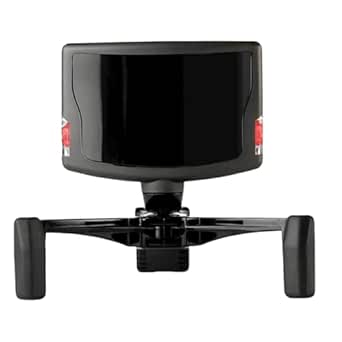 | Best Value | Degrees of Freedom: 6DOF | Sensor Type: USB optical | Field of View: 51.7 degrees | VIEW LATEST PRICE | See Our Full Breakdown |
| head trackers for flight sim | Degrees of Freedom | Connectivity | Platform | Type |
|---|---|---|---|---|
| TrackIR 5 Head Tracking System | 6DOF: yaw, pitch, roll, X, Y, Z | USB | Windows PC | Head tracking system |
| TrackIR 5 Head Tracking System | 6DOF | USB | Windows Vista or newer | — |
More Details on Our Top Picks
TrackIR 5 Head Tracking System with TrackClip PRO
I rank the TrackIR 5 with TrackClip PRO first because it is the more complete package for a dedicated flight-sim cockpit. The camera captures six degrees of freedom, allowing ordinary head movements to control looking, leaning, and shifting within the virtual cockpit. That matters when checking a six-o’clock position, moving around a canopy obstruction, reading a small gauge, or lining up a runway while keeping both hands on flight controls.
Its advantage over the standard TrackIR 5 listing is not a faster camera or a wider tracking specification. Both products rely on the same basic TrackIR platform. The difference is the included TrackClip PRO, which uses active infrared markers and mounts to a compatible headset. Compared with a passive reflector arrangement, this makes the bundle better suited to pilots who already wear headphones and want a purpose-built tracking target rather than a clip attached to headwear.
The optical system offers precise, low-latency movement, but useful tracking is not merely about speed. Flight sims need adjustable response curves because a monitor cannot surround a pilot like a real canopy. TrackIR software profiles let a small physical turn produce a larger on-screen view change, while dead zones can help keep the view steady during instrument work. Compared with the base package, the software experience is broadly the same; the higher ranking comes from the accessory package and its fit for sustained simulator use.
There are real costs to that completeness. The TrackClip PRO is wired, so a pilot using a wired headset may have another cable running from the head area to the PC. Its headset mounting also makes less sense for someone who flies through speakers or dislikes wearing anything beyond a lightweight passive marker. Setup can take patience because camera placement, room lighting, curves, and simulator bindings all affect the result. A buyer expecting plug-and-forget behavior may find the initial calibration fussy.
I would pay the premium when the bundle costs only moderately more than the standard system. It avoids a likely later accessory purchase and gives headset users a clear path to active tracking. If the price gap is large, however, the second-ranked model delivers the same fundamental 6DOF TrackIR camera experience. This is the better package, but it is not a wholly different generation of tracker.
Pros:- Includes the TrackClip PRO active infrared accessory
- Captures yaw, pitch, roll, and X, Y, Z movement
- Low-latency optical tracking suits rapid cockpit scanning
- Customizable profiles support different aircraft and viewing preferences
Cons:- TrackClip PRO adds a wire and must attach to a compatible headset
- Camera position and software curves may require patient setup
- Limited to Windows PC simulation and supported applications
Best for: Dedicated Windows flight-sim pilots who wear a compatible headset and want an active infrared tracking clip included.
Not ideal for: Pilots who want a wireless wearable, use speakers instead of a headset, fly on consoles, or strongly dislike cable clutter.
- Type:Head tracking system
- Tracking Technology:Infrared optical motion tracking
- Degrees of Freedom:6DOF: yaw, pitch, roll, X, Y, Z
- Included Tracking Accessory:TrackClip PRO
- Connectivity:USB
- Platform:Windows PC
- Mounting:Magnetic camera base with adjustable legs
- Primary Uses:Flight, racing, and combat simulators
Our verdict“My top pick for serious flight-sim stations combines proven 6DOF TrackIR tracking with the more capable included clip, though buyers must accept extra wiring.”
TrackIR 5 Head Tracking System
The standard TrackIR 5 Head Tracking System earns my value position because it supplies the core optical tracker without charging for the TrackClip PRO bundle. Its 6DOF tracking covers rotational and positional movement, giving flight-sim pilots far more control than a basic three-axis tracker. The ability to lean forward toward a radio stack or shift sideways during a landing can make cockpit interaction feel more natural.
Performance is the strongest reason to choose it over cheaper tracker categories. The listed 9 ms response time supports responsive view movement, while the 51.7-degree field of view gives the sensor room to follow ordinary seated motion. Customizable profiles allow sensitivity changes for different aircraft or simulator styles. A fast combat jet may benefit from more aggressive curves, while an airliner pilot may prefer slower movement and a steadier center region.
Against the first-place bundle, however, this model has no camera-level advantage. It is the same basic route into the TrackIR ecosystem, and the listing explicitly does not include TrackClip PRO. That makes it appealing only when the price saving is meaningful or when the buyer prefers a passive tracking configuration. If a headset-mounted active clip is already part of the plan, buying the complete bundle is usually cleaner than sourcing the accessory later.
The magnetic monitor mount makes camera placement relatively simple, but optical tracking still needs line of sight. Strong infrared light, awkward sensor angles, or markers leaving the camera view can interrupt tracking. Software profiles also need tuning before head turns feel natural. Compared with the PRO package, the absence of the powered clip can reduce cable clutter, yet the alternative tracking arrangement may require suitable headwear or another compatible marker setup.
I see this as the sensible choice for budget-aware PC pilots who want established TrackIR software and can accept a less complete package. It also works as a replacement purchase for someone who already owns compatible tracking hardware. New buyers should compare the total cost carefully: once a TrackClip PRO is added separately, the value advantage may disappear. Its second-place rank reflects package completeness, not weaker stated camera performance.
Pros:- Provides full 6DOF tracking through the established TrackIR platform
- Listed 9 ms response time supports fluid cockpit viewing
- Software profiles allow sensitivity and curve adjustments
- Magnetic monitor mount supports convenient camera positioning
Cons:- TrackClip PRO is not included
- Optical tracking depends on placement, lighting, and clear line of sight
- Windows-only support excludes console and Mac-focused pilots
Best for: Budget-focused Windows pilots, occasional sim users, and existing TrackIR owners who already have a compatible clip or marker setup.
Not ideal for: First-time buyers who already know they want active headset-mounted tracking or anyone seeking console support.
- Degrees of Freedom:6DOF
- Sensor Type:USB optical
- Field of View:51.7 degrees
- Response Time:9 ms
- Connectivity:USB
- Platform:Windows Vista or newer
- Dimensions:8.82 x 7.4 x 2.13 inches
- Listed Weight:0.15 pounds
- Enclosure Material:Plastic
Our verdict“I recommend the base TrackIR 5 when its lower package price matters and the buyer does not need the PRO clip included.”
How We Picked
I ranked these systems around the needs of a flight-sim pilot rather than treating head tracking as a generic gaming feature. My highest priority was full 6DOF control, since looking around a cockpit involves more than turning left and right. Leaning toward instruments, shifting sideways around a canopy frame, and moving closer to a panel all depend on positional tracking as well as yaw, pitch, and roll.
I also gave weight to tracking consistency and latency. Small delays or lost tracking can be distracting during formation flying, aerial refueling, dogfighting, and approaches that demand frequent glances between instruments and the outside view. The stated 9 ms response time and optical tracking design place both packages on equal ground at the camera level, so accessory differences carry more weight in my ranking.
Setup burden shaped the order as well. I compared mounting, wearable hardware, cabling, software profiles, and platform limits. The TrackClip PRO bundle earns first place because the included active clip makes more sense for a permanent simulator station, though its cable can add clutter. The base system ranks second because it preserves the main TrackIR experience at a potentially lower price, but buyers may later want the accessory that the higher-ranked bundle already includes.
Finally, I judged value by what each package changes for the buyer. I did not award the top position simply for including more hardware. Instead, I asked whether the extra component improves the core flight-sim task. Here it does: the TrackClip PRO directly affects tracking configuration, making the bundle more complete for headset-wearing pilots. Pricing can vary, so I would compare current totals before buying, especially if the two listings are close in cost.
| head trackers for flight sim | Platform |
|---|---|
| TrackIR 5 Head Tracking System | Windows PC |
| TrackIR 5 Head Tracking System | Windows Vista or newer |
Factors to Consider When Choosing Best Head Trackers For Flight Sims
I would base this decision on the tracking accessory, cockpit arrangement, and tolerance for setup work. Since both listings use TrackIR 5 technology, comparing only headline claims such as 6DOF can hide the package difference that matters most.
Six Degrees of Freedom and Why They Matter
I favor 6DOF tracking for flight sims because it captures three rotations and three positions. Yaw turns the view left or right, pitch moves it up or down, and roll tilts it. X, Y, and Z tracking add sideways, vertical, and forward movement. Those positional axes help a pilot peer around cockpit structures, move closer to instruments, and adjust the sightline during taxiing or landing. Both products provide this full movement set, so neither gains a ranking advantage here.
TrackClip PRO Versus the Base Package
The TrackClip PRO is the deciding feature between these listings. It mounts to a compatible headset and presents active infrared points to the camera. I prefer the bundle for a permanent simulator setup because the needed accessory arrives with the tracker. The tradeoff is another wire and a dependence on headset mounting. The base model can cost less and may suit passive-marker users, but adding the PRO clip later can erase the initial saving.
Camera Placement, Lighting, and Line of Sight
Optical tracking works best when the camera has a clear view of the markers. I would mount the sensor near the center of the display and check that normal head turns remain inside its viewing area. Direct sunlight and some infrared sources can compete with tracking points, while an ultrawide or multi-monitor cockpit may require more careful camera placement. Neither package removes these optical limits, though the active PRO clip may provide a stronger tracking target in a well-arranged room.
Profiles, Curves, and Simulator Support
I would budget time for profile tuning. A one-to-one head turn is impractical when the pilot must keep looking at a physical monitor, so software curves multiply movement. Higher sensitivity makes rearward checks easier but can make gauges harder to read; a small center dead zone steadies the forward view but may feel sticky if set too wide. TrackIR works only with supported Windows software, so I would verify the intended simulator and preferred integration method before ordering either version.
Price and Upgrade Math
I would compare the live price of the full bundle with the combined cost of the base tracker and a separately purchased clip. The base model wins on value only when its saving survives that calculation or when the buyer never plans to add TrackClip PRO. If the listings are priced close together, the first-ranked bundle offers the stronger package. A steep premium makes the standard tracker more attractive because the underlying camera capabilities remain closely matched.
Frequently Asked Questions
Is TrackIR 5 worth it for flight simulators?
I think TrackIR 5 makes the most sense for pilots who frequently scan instruments, traffic, runways, or combat airspace while keeping their hands on a joystick and throttle. It adds natural cockpit viewing without the weight and hardware demands of a VR headset. Buyers who mostly fly from fixed external views, use occasional mouse-look controls, or want console compatibility may get less value from it.
What is the difference between TrackIR 5 and TrackIR 5 with TrackClip PRO?
The core TrackIR 5 camera platform is the same; the bundle adds the TrackClip PRO active infrared accessory. I rank that package higher because it is ready for headset-mounted active tracking, while the base listing leaves that upgrade out. The PRO clip adds a cable and requires a compatible mounting point, so a buyer who prefers passive markers may reasonably choose the cheaper standard system.
Does TrackIR 5 work with every flight simulator?
No. I would check the intended title against current TrackIR support and integration options before buying. Compatibility can involve native support, software profiles, or simulator-specific configuration, and both products are aimed at Windows PCs. A 6DOF hardware specification does not guarantee that every game will recognize all six axes or provide the same quality of cockpit-camera behavior.
Can TrackIR replace a VR headset?
TrackIR can replace VR for a buyer who wants hands-free view control on a monitor, but the experiences are different. A monitor tracker preserves access to physical controls, keyboards, notes, and high-resolution displays, while VR provides stereoscopic depth and a surrounding view. I favor TrackIR for long sessions and elaborate hardware cockpits; I would favor VR when visual presence matters more than seeing real controls.
Does head tracking require a lot of setup?
The physical installation is fairly compact, but I would expect to adjust camera position, marker visibility, sensitivity curves, and center behavior. A good profile should allow broad virtual movement without forcing an uncomfortable physical turn away from the screen. Once saved, profiles can reduce repeated work, though changes in seating position, lighting, monitor placement, or wearable hardware may call for recalibration.
Conclusion
For a dedicated Windows cockpit, I recommend the TrackIR 5 with TrackClip PRO. It ranks first because the included active clip makes the package more complete for pilots who already wear a headset, and the 6DOF system supports both rapid scanning and fine positional movement.
For a tighter budget, occasional simulator use, or an existing supply of compatible tracking hardware, I would choose the standard TrackIR 5. It retains the central camera and software benefits, but its value depends on a meaningful price gap. If the buyer expects to purchase TrackClip PRO soon afterward, I would skip the piecemeal route and buy the first-ranked bundle. Console pilots and anyone demanding a fully wireless wearable should skip both.
Halloween Picks
halloween
As an affiliate, we earn on qualifying purchases.