The best gaming equipment depends on what your setup lacks: the HyperX Cloud III S Wireless is my best overall pick for a dedicated gaming headset, while the Logitech G502 HERO offers a straightforward wired mouse option and the FIFINE AmpliGame AM8T adds USB/XLR flexibility for voice chat and streaming. This roundup also includes microphones, a desk, and all-in-one bundles, so the right choice may be a single upgrade rather than a full setup. The main tradeoffs are wireless convenience versus wired simplicity, specialized components versus starter kits, and extra features versus desk space and setup effort. I compare each option by its intended use, practical features, and likely limitations. Continue reading for the full breakdown and guidance on matching equipment to your play style and space.

Play games on Amazon Luna for your game nights, included with Prime
- A rotating selection of games, no download needed
- Play on TV, laptop or phone
- Fast, free delivery for your gear, too
Complete the kit


Key Takeaways
- The lineup is strongest in audio and communication: it includes several standalone microphones and three headsets, but only two individual mice and one desk.
- The HyperX Cloud III S Wireless fills the dedicated headset role, while the Razer BlackShark V2 X and NUBWO G06 give buyers wired and wireless alternatives to weigh against it.
- The FIFINE AM8T stands apart for connection flexibility: USB/XLR support gives it a different upgrade path from the USB-focused microphone kits.
- The Logitech G502 HERO is the wired mouse pick; the Logitech G PRO X2 SUPERSTRIKE Wireless is the option for buyers who want a wireless mouse rather than a multi-button wired design.
- Bundles trade component choice for convenience: the Orzly and DGG combos supply several peripherals at once, while the ODK desk addresses workspace needs instead of replacing gaming gear.
| HyperX Cloud III S Wireless Gaming Headset | 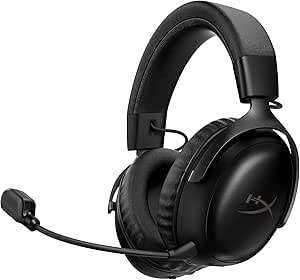 | Best for Long-Session Wireless Play | Connectivity: 2.4GHz wireless and Bluetooth 5.0 | Battery life: Up to 120 hours on 2.4GHz; up to 200 hours on Bluetooth | Driver size: 53 mm angled drivers | VIEW LATEST PRICE | See Our Full Breakdown |
| Logitech G PRO X2 SUPERSTRIKE Wireless Gaming Mouse |  | Best for Competitive Click Customization | Sensor: HERO 2 | Maximum DPI: Description lists 44,000 DPI; specifications list 26,000 DPI | Polling rate: Up to 8 kHz | VIEW LATEST PRICE | See Our Full Breakdown |
| FIFINE AmpliGame KS5 Gaming Microphone and Audio Mixer Bundle |  | Best for Streaming with Hardware Audio Controls | Microphone type: Dynamic | Microphone connectivity: USB and XLR | Mixer channels: 4 | VIEW LATEST PRICE | See Our Full Breakdown |
| MAONO DGM20S USB Gaming Microphone with Boom Arm |  | Best Beginner Streaming Mic Kit | Microphone type: Condenser | Connectivity: USB and USB-C | Pickup pattern: Unidirectional cardioid | VIEW LATEST PRICE | See Our Full Breakdown |
| ODK 53-Inch Reversible L-Shaped Gaming Desk with Shelves, LED Lighting, and Outlets |  | Best for a Feature-Packed Corner Setup | Shape: L-shaped | Dimensions: 53.15 x 39.37 x 58.27 inches | Weight: 46.1 pounds | VIEW LATEST PRICE | See Our Full Breakdown |
| Logitech G502 HERO Wired Gaming Mouse |  | Best for Button-Rich Control | Connectivity: USB wired | Sensor: Optical HERO | Maximum sensitivity: 25,600 DPI | VIEW LATEST PRICE | See Our Full Breakdown |
| FIFINE AmpliGame A6T USB Gaming Microphone Kit |  | Best Starter Streaming Microphone Kit | Connectivity: USB | Microphone pattern: Unidirectional cardioid | Frequency response: 60 Hz–18 kHz | VIEW LATEST PRICE | See Our Full Breakdown |
| NUBWO G06 Wireless Gaming Headset with Mic (Orange) |  | Best for Long Wireless Sessions | Connectivity: 2.4GHz wireless, Bluetooth 5.3, and 3.5 mm wired | Battery life: Up to 100 hours | Battery capacity: 1200 mAh | VIEW LATEST PRICE | See Our Full Breakdown |
| FIFINE AmpliGame AM8T Dynamic USB/XLR Gaming Microphone Kit with Boom Arm |  | Best for a Growing Streaming Setup | Microphone type: Dynamic | Connectivity: USB and XLR | Polar pattern: Cardioid (unidirectional) | VIEW LATEST PRICE | See Our Full Breakdown |
| Orzly Hornet RX-250 4-in-1 Wired Gaming Bundle with RGB Keyboard, Mouse, Headset, and Mouse Pad |  | Best Complete Starter Bundle | Included items: Keyboard, mouse, headset, and mouse pad | Connectivity: Wired | Keyboard: Full-size 104-key QWERTY membrane | VIEW LATEST PRICE | See Our Full Breakdown |
| Razer BlackShark V2 X Wired Gaming Headset |  | Best Lightweight Wired Headset | Driver size: 50 mm | Connectivity: 3.5 mm audio jack | Compatibility: PC, Mac, PS4, Xbox One, Nintendo Switch | VIEW LATEST PRICE | See Our Full Breakdown |
| DGG Gaming Keyboard, Mouse, Headset, and Mouse Pad Combo | 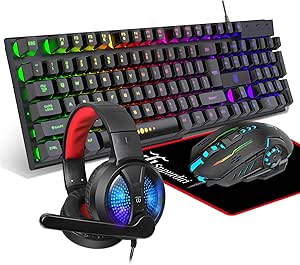 | Best Starter Gaming Bundle | Included items: Keyboard, mouse, headset, mouse pad | Keyboard: 104 keys; floating-key design; three lighting modes | Mouse: Seven-color breathing LED lighting | VIEW LATEST PRICE | See Our Full Breakdown |
| FIFINE AmpliGame AM8PROT Gaming Microphone Kit |  | Best USB/XLR Upgrade Microphone | Microphone type: Dynamic | Connectivity: USB, XLR | Polar pattern: Unidirectional (cardioid) | VIEW LATEST PRICE | See Our Full Breakdown |
| TONOR TC310+ USB Gaming Microphone Kit with Boom Arm and RGB | 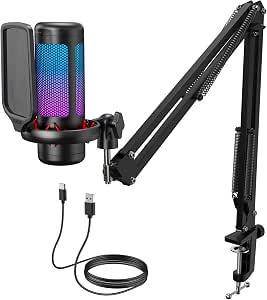 | Best Complete USB Mic Setup | Model: TC310+ | Connectivity: USB-A | Polar pattern: Unidirectional | VIEW LATEST PRICE | See Our Full Breakdown |
| FIFINE AmpliGame A6V USB Gaming Microphone |  | Best Compact USB Mic | Microphone type: Condenser | Connectivity: USB | Polar pattern: Bidirectional | VIEW LATEST PRICE | See Our Full Breakdown |
| gaming equipment | Connectivity |
|---|---|
| HyperX Cloud III S Wireless Ga | 2.4GHz wireless and Bluetooth 5.0 |
| Logitech G PRO X2 SUPERSTRIKE | LIGHTSPEED wireless and USB |
| FIFINE AmpliGame KS5 Gaming Mi | — |
| MAONO DGM20S USB Gaming Microp | USB and USB-C |
| ODK 53-Inch Reversible L-Shape | — |
| Logitech G502 HERO Wired Gamin | USB wired |
| FIFINE AmpliGame A6T USB Gamin | USB |
| NUBWO G06 Wireless Gaming Head | 2.4GHz wireless, Bluetooth 5.3, and 3.5 mm wired |
| FIFINE AmpliGame AM8T Dynamic | USB and XLR |
| Orzly Hornet RX-250 4-in-1 Wir | Wired |
| Razer BlackShark V2 X Wired Ga | 3.5 mm audio jack |
| DGG Gaming Keyboard | Plug and play; no driver required |
| FIFINE AmpliGame AM8PROT Gamin | USB, XLR |
| TONOR TC310+ USB Gaming Microp | USB-A |
| FIFINE AmpliGame A6V USB Gamin | USB |
More Details on Our Top Picks
HyperX Cloud III S Wireless Gaming Headset
The Cloud III S Wireless is my pick for players who want one headset to move between a gaming PC, PlayStation, Switch, and phone without frequent charging. Its 2.4GHz and Bluetooth connectivity suit low-latency play and everyday listening, while the stated battery life reaches 120 hours on 2.4GHz or 200 hours on Bluetooth. Compared with the NUBWO G06 Wireless Gaming Headset, this HyperX offers more clearly specified connectivity options and cross-device support, including PlayStation and Switch.
Memory foam cushioning, a detachable boom mic, DTS Headphone:X, and an aluminum frame make it better equipped for extended sessions than a basic headset. The tradeoffs are its 356 g weight and lack of Xbox compatibility. The removable earcup plates are sold separately, so customization adds an extra purchase rather than coming in the box.
Pros:- 2.4GHz and Bluetooth support let you switch between gaming and mobile audio
- Long stated battery life: up to 120 hours on 2.4GHz or 200 hours on Bluetooth
- Memory foam ear cushions and an aluminum frame suit extended use
- Detachable boom microphone and DTS Headphone:X spatial audio
Cons:- Not compatible with Xbox consoles
- At 356 g, it may feel heavy for players who prefer lightweight headsets
- Removable earcup plates are sold separately
Best for: PC, PlayStation, and Switch players who want a comfortable wireless headset that can also pair with a phone and go long stretches between charges
Not ideal for: Xbox players, or anyone prioritizing a lighter headset over the Cloud III S’s listed 356 g weight
- Connectivity:2.4GHz wireless and Bluetooth 5.0
- Battery life:Up to 120 hours on 2.4GHz; up to 200 hours on Bluetooth
- Driver size:53 mm angled drivers
- Microphone:Detachable 10 mm boom mic with LED mute indicator
- Weight:356 g
- Compatibility:PC, PS5, PS4, Nintendo Switch, Mac, and mobile
- Spatial audio:DTS Headphone:X
- Frame:Aluminum
Our verdict“Choose the Cloud III S if long battery life and multi-platform wireless use matter more than Xbox support or a particularly light fit.”
Logitech G PRO X2 SUPERSTRIKE Wireless Gaming Mouse
The G PRO X2 SUPERSTRIKE targets competitive players who want to tune click behavior, not just adjust pointer sensitivity. Its customizable actuation, rapid trigger, and haptic feedback offer more click control than the straightforward Logitech G502 HERO Wired Gaming Mouse, while LIGHTSPEED wireless and a 61 g body suit fast, deliberate movements. The HERO 2 sensor, up to 8 kHz polling, and stated 60–90-hour battery life round out a setup aimed at players who will make use of fine-grained controls.
The main compromise is complexity: advanced settings require Logitech G HUB, and POWERPLAY 2 charging is separate. There is also a specification discrepancy: the description lists 44,000 DPI, while the specifications list 26,000 DPI. I would choose this for its trigger features rather than rely on the higher DPI figure; its right-handed shape and PC/Mac compatibility also limit its audience.
Pros:- Customizable actuation and rapid trigger provide control over click response
- Haptic feedback adds configurable tactile click cues
- 61 g weight and LIGHTSPEED wireless support quick, unrestricted movement
- Up to 8 kHz polling and stated 60–90-hour battery life
Cons:- Advanced features require Logitech G HUB software
- The listed maximum DPI conflicts between the description and specifications
- POWERPLAY 2 wireless charging system is sold separately
Best for: Right-handed PC or Mac esports players who want to tune click actuation and trigger response and are comfortable configuring settings in G HUB
Not ideal for: Left-handed players, console users, or buyers who want a simple plug-and-play mouse or unambiguous sensor specifications
- Sensor:HERO 2
- Maximum DPI:Description lists 44,000 DPI; specifications list 26,000 DPI
- Polling rate:Up to 8 kHz
- Weight:61 g
- Battery life:60–90 hours
- Connectivity:LIGHTSPEED wireless and USB
- Buttons:5
- Compatibility:PC and Mac
Our verdict“Pick the G PRO X2 SUPERSTRIKE for competitive PC play if adjustable click response matters more to you than simplicity or clear-cut DPI specifications.”
FIFINE AmpliGame KS5 Gaming Microphone and Audio Mixer Bundle
The FIFINE AmpliGame KS5 bundle is the most control-oriented choice here for a streamer who wants a microphone and mixer together. Its four-channel mixer adds physical faders, channel controls, and headphone monitoring, making it a better fit for managing multiple audio sources than the simpler MAONO DGM20S USB Gaming Microphone. The included dynamic mic supports both USB and XLR, so a USB setup can start simply while XLR offers another connection route for compatible equipment.
That flexibility has a catch: the mic’s mute, gain, monitoring, and headphone controls work over USB only. Switching to XLR means giving up those onboard controls, so the connection choice affects day-to-day operation. At 1.48 kg for the listed bundle, it also takes more desk space and setup effort than a standalone mic. I would favor the MAONO for a compact plug-and-play setup; this bundle earns its place when hands-on mixing matters more than minimalism.
Pros:- Microphone and four-channel mixer are included together
- Microphone supports USB and XLR connections
- Mixer provides channel controls, volume faders, and headphone monitoring
- Multiple sound modes and RGB lighting allow setup customization
Cons:- Microphone mute, gain, monitoring, and headphone controls are available over USB only
- The mixer bundle takes more desk space and setup effort than a standalone USB mic
Best for: Streamers and podcasters who want a dynamic mic plus physical channel and headphone controls for managing several audio sources
Not ideal for: Players seeking a small, simple USB microphone, or XLR users who expect the microphone’s onboard mute and gain controls to remain available
- Microphone type:Dynamic
- Microphone connectivity:USB and XLR
- Mixer channels:4
- Audio inputs:XLR and USB
- Mixer controls:Channel controls, volume faders, and headphone monitoring
- Sound modes:Multiple modes
- RGB lighting:5 lighting effects
- Item weight:1.48 kg
Our verdict“Choose the KS5 if you need a bundled mixer for hands-on audio management and can work around the microphone controls being USB-only.”
MAONO DGM20S USB Gaming Microphone with Boom Arm
The MAONO DGM20S is my beginner-friendly mic pick for players who want a complete desktop setup without a separate mixer. The package includes an adjustable boom arm, shock mount, and pop filter, while one-touch mute, gain adjustment, and zero-latency headphone monitoring keep common recording controls close at hand. Compared with the FIFINE AmpliGame KS5, it gives up the four-channel mixer and XLR option, but takes a simpler USB approach that better suits a single-mic gaming or streaming desk.
Its cardioid pickup pattern focuses on sound from in front of the mic, and the listed noise-reduction feature offers another tool for managing room noise. The tradeoffs are its Xbox incompatibility and Windows-only noise-cancellation software. This is a more contained choice than the KS5, but it is not the right one for buyers building an XLR audio chain or gaming on an Xbox.
Pros:- Boom arm, shock mount, pop filter, and mounting hardware are included
- One-touch mute and adjustable gain simplify common mic adjustments
- Zero-latency headphone monitoring supports live checks
- USB plug-and-play compatibility with PC, Mac, PS4, and PS5
Cons:- Not compatible with Xbox
- Noise-cancellation software is available only for Windows
- USB-only connectivity is less flexible than the XLR-and-USB FIFINE KS5
Best for: New PC, Mac, PS4, or PS5 streamers who want a USB mic with an included boom arm and accessible mute and gain controls
Not ideal for: Xbox players, XLR-focused creators, or buyers who need the noise-cancellation software on macOS
- Microphone type:Condenser
- Connectivity:USB and USB-C
- Pickup pattern:Unidirectional cardioid
- Frequency response:50 Hz–20 kHz
- Signal-to-noise ratio:78 dB
- Channels:1
- Compatibility:PC, laptop, Mac, PS4, and PS5; not Xbox
- Included accessories:Metal boom arm, shock mount, pop filter, USB/USB-C cable, and desktop clamp
Our verdict“Choose the DGM20S for a ready-to-mount USB streaming setup on PC, Mac, PS4, or PS5, but skip it if you need Xbox or XLR support.”
ODK 53-Inch Reversible L-Shaped Gaming Desk with Shelves, LED Lighting, and Outlets
The ODK 53-inch L-shaped desk is the furniture pick for gamers who need room to organize a multi-device setup and want power access built into the desk. Its reversible layout lets the side modules go on the left or right, unlike a fixed arrangement, while two shelves, a CPU stand, an accessory hook, and a storage bag help clear the main work surface. The three AC outlets and two USB ports also reduce the need to reach for a separate power strip. Compared with the Orzly Hornet RX-250 4-in-1 Wired Gaming Bundle, this is a workstation choice rather than a set of entry-level gaming peripherals.
The tradeoff is a substantial footprint: the listed dimensions are 53.15 x 39.37 x 58.27 inches, and assembly is required. Engineered wood and a steel frame are rated to support up to 300 pounds, but the product information lists the desk height inconsistently. I would check the available space and confirm fit before buying, especially if desk height is a deciding factor.
Pros:- Reversible side modules allow left- or right-side configuration
- Three AC outlets, two USB ports, and cable management support a tidier setup
- Two shelves, a CPU stand, an accessory hook, and a storage bag provide dedicated storage
- Steel frame and engineered wood top have a listed 300-pound capacity
Cons:- Large L-shaped footprint may not suit compact rooms
- Assembly is required
- Desk height is listed inconsistently in the product information
Best for: Gamers setting up a corner station who need reversible side storage, integrated power access, and space for a PC and accessories
Not ideal for: Small rooms, buyers who need a desk with clearly verified height dimensions, or anyone who wants a no-assembly setup
- Shape:L-shaped
- Dimensions:53.15 x 39.37 x 58.27 inches
- Weight:46.1 pounds
- Maximum weight capacity:300 pounds
- Materials:Engineered wood top and alloy steel frame
- Storage:Two shelves, CPU stand, accessory hook, and storage bag
- Power access:Three AC outlets and two USB ports
- LED lighting:10 color presets, 8 brightness levels, 10 dynamic modes, and memory function
- Assembly:Required
Our verdict“Choose the ODK if you have corner space for a full gaming station and value reversible storage and built-in power over easy assembly or compact dimensions.”
Logitech G502 HERO Wired Gaming Mouse
I’d choose the Logitech G502 HERO for players who want many commands within reach and the option to tune mouse balance. Its 11 programmable buttons can make ability-heavy games and custom shortcuts easier to manage, while five removable weights let players adjust how the mouse feels. Compared with the included mouse in the Orzly Hornet RX-250 bundle, the G502 offers far more control customization; Orzly is the simpler route if you also need a keyboard, headset, and pad. The G502’s wired connection avoids battery upkeep, but it limits placement and can add cable drag. Its right-handed shape also rules it out for some players, and RGB synchronization requires Logitech Gaming Software. I’d favor it over an all-in-one bundle when the mouse itself is the priority.
Pros:- Eleven programmable buttons support custom game commands and shortcuts
- Five removable weights let players adjust balance
- Optical HERO sensor offers sensitivity up to 25,600 DPI
- Dual-mode scroll wheel supports both controlled scrolling and fast navigation
Cons:- Wired connection limits placement flexibility and may create cable drag
- Right-handed design is not suited to every grip or hand orientation
- RGB synchronization requires Logitech Gaming Software
Best for: Right-handed PC players who want programmable controls, adjustable weight, and a wired mouse for games with many commands
Not ideal for: Left-handed players or anyone who prioritizes a wireless setup, minimal software, or a complete gaming kit
- Connectivity:USB wired
- Sensor:Optical HERO
- Maximum sensitivity:25,600 DPI
- Programmable buttons:11
- Adjustable weights:Five 3.6 g weights
- Scroll wheel:Dual-mode hyper-fast
- Lighting:Customizable LIGHTSYNC RGB
- Hand orientation:Right-handed
Our verdict“Choose the G502 HERO if programmable control and adjustable weight matter more than wireless freedom or a full set of peripherals.”
FIFINE AmpliGame A6T USB Gaming Microphone Kit
The FIFINE AmpliGame A6T is the straightforward pick for a new streamer who wants a mic and positioning hardware in one kit. Its plug-and-play USB connection, touch mute, and on-mic volume knob keep common adjustments close at hand instead of requiring a separate mixer. The included boom arm, shock mount, and pop filter give it a more complete starter setup than the FIFINE AmpliGame AM8T, which is the stronger choice for someone planning to add XLR equipment later. The A6T uses a single cardioid pickup pattern, so it is designed around one speaker rather than varied recording setups. Its long cable can crowd a small desk, and the RGB may be unwelcome in a subdued workspace. I’d pick it for accessible streaming, not recording flexibility.
Pros:- Plug-and-play USB setup requires no driver installation
- Included boom arm, shock mount, and detachable pop filter support desk positioning
- Touch mute and microphone volume knob allow quick adjustments
- Works with desktop and laptop computers, PS4, and PS5
Cons:- Single cardioid pattern offers less recording flexibility than multi-pattern microphones
- The 2.5 m cable may be cumbersome on a small desk
- Customizable RGB lighting may distract in low-light or professional setups
Best for: First-time streamers or PC and console players who want a USB mic with an included boom arm and quick mute control
Not ideal for: Creators who need multiple pickup patterns, XLR connectivity, or a compact cable setup
- Connectivity:USB
- Microphone pattern:Unidirectional cardioid
- Frequency response:60 Hz–18 kHz
- Signal-to-noise ratio:70 dB
- Cable:8.2 ft (2.5 m) USB-C to USB-A/C
- Stand:Boom arm with C-clamp and 180° rotation
- On-mic controls:Touch mute button and volume knob
- Included accessories:Shock mount and detachable pop filter
Our verdict“Choose the A6T for an accessible USB streaming setup with included mounting accessories, but pick the AM8T if XLR expansion matters.”
NUBWO G06 Wireless Gaming Headset with Mic (Orange)
The NUBWO G06 suits players who want to charge less often and keep a phone connected while gaming. Its stated 100-hour battery life and support for 2.4GHz wireless, Bluetooth 5.3, and wired audio make it more flexible across devices than a single-connection setup. The simultaneous console-and-mobile connection is especially useful for taking calls or listening to a second device without swapping headsets. Compared with the wired Razer BlackShark V2 X, the G06 gives more freedom of movement and a much longer-use wireless option; the Razer avoids battery management. The G06’s 23 ms latency is aimed at responsive play, but Xbox Series consoles only support it through a 3.5 mm cable. Noise cancellation is not listed, and its orange finish is a distinct style choice.
Pros:- Stated battery life of up to 100 hours reduces charging interruptions
- 2.4GHz wireless and Bluetooth 5.3 support flexible device connections
- Can connect to a console and mobile device simultaneously
- 3.5 mm wired mode adds compatibility with Xbox and Switch
Cons:- Xbox Series consoles support only the wired 3.5 mm connection
- Active noise cancellation is not specified
- The orange color may not suit players seeking a less conspicuous headset
Best for: Multi-device players who want long battery life, wireless console audio, and a phone connection at the same time
Not ideal for: Xbox players seeking wireless compatibility, or gamers who need specified active noise cancellation
- Connectivity:2.4GHz wireless, Bluetooth 5.3, and 3.5 mm wired
- Battery life:Up to 100 hours
- Battery capacity:1200 mAh
- Charge time:4 hours
- Driver size:50 mm
- Latency:23 ms
- Bluetooth range:10 meters
- Compatibility:PS5, PS4, PC, mobile, and tablet; Xbox and Switch via wired connection
Our verdict“Choose the G06 if you want extended wireless use and multi-device connections, but skip it if Xbox wireless support is a requirement.”
FIFINE AmpliGame AM8T Dynamic USB/XLR Gaming Microphone Kit with Boom Arm
I’d steer creators toward the FIFINE AmpliGame AM8T if they want to start with USB and leave room for an XLR setup later. Its USB and XLR connections give it a growth path that the USB-only FIFINE AmpliGame A6T does not offer, while the AM8T’s gain, headphone volume, and real-time monitoring controls keep useful adjustments on the microphone. The included metal boom arm and windscreen help form a ready-to-position gaming setup. That flexibility comes with a setup caveat: an XLR cable is not included, so an XLR connection requires an additional cable and compatible audio equipment. The desk clamp also fits desktops under two inches thick, which may exclude some desks. I’d pick the AM8T for expandable audio, not for the simplest possible USB-only kit.
Pros:- USB and XLR connectivity support both simple and expanded audio setups
- On-mic gain, mute, headphone volume, and monitoring controls aid live adjustments
- Included boom arm, C-clamp, and windscreen provide mounting accessories
- Customizable RGB lighting can be turned off
Cons:- XLR cable is not included
- Desk clamp fits desktops less than two inches thick
- XLR use requires compatible audio equipment beyond the microphone
Best for: Streamers who want USB convenience now and the option to connect an XLR microphone setup later
Not ideal for: Buyers who need an XLR cable included or whose desk is two inches thick or more
- Microphone type:Dynamic
- Connectivity:USB and XLR
- Polar pattern:Cardioid (unidirectional)
- Frequency response:50 Hz–16 kHz
- Signal-to-noise ratio:80 dB
- Included accessories:Boom arm, C-clamp, windscreen, and 8.2 ft USB-to-USB-C cable
- XLR cable:Not included
- Desk clamp compatibility:Desktops less than 2 in thick
Our verdict“Choose the AM8T if you want a gaming microphone that can grow from USB use to an XLR setup and your desk fits its clamp.”
Orzly Hornet RX-250 4-in-1 Wired Gaming Bundle with RGB Keyboard, Mouse, Headset, and Mouse Pad
The Orzly Hornet RX-250 is my bundle pick for a new PC or console player who needs the basic desk setup at once: keyboard, mouse, headset, and mouse pad. The keyboard’s 19-key rollover and anti-ghosting support multiple simultaneous inputs, while drainage channels add a measure of spill resistance. Its ambidextrous mouse suits more hand orientations than the right-handed Logitech G502 HERO, but offers only four DPI settings and lacks the G502’s programmable-button depth and adjustable weights. The included headset and pad make Orzly a more complete starting point than buying a single premium peripheral, though the tradeoff is that all four components are wired. The membrane keyboard also lacks the feel and switch choice of mechanical designs. I’d choose this for coverage and simplicity, not individual component upgrades.
Pros:- Includes four core gaming accessories in one bundle
- Keyboard has 19-key rollover, anti-ghosting, and spill-resistant drainage
- Ambidextrous mouse has four selectable DPI settings
- Compatible with Windows, macOS, Linux, PS5, PS4, Xbox, and handheld gaming systems
Cons:- All components require wired connections
- Full-size keyboard uses membrane switches
- Included mouse has fewer customization options than the Logitech G502 HERO
Best for: New PC or console gamers who need a keyboard, mouse, headset, and mouse pad in one compatible wired set
Not ideal for: Players seeking wireless peripherals, mechanical keyboard switches, or a highly customizable mouse
- Included items:Keyboard, mouse, headset, and mouse pad
- Connectivity:Wired
- Keyboard:Full-size 104-key QWERTY membrane
- Keyboard features:RGB backlighting, 19-key rollover, anti-ghosting, and spill-resistant drainage
- Mouse:Ambidextrous optical, 90 g
- Mouse DPI settings:1200, 1600, 2400, and 3200
- Headset:Stereo with foldable microphone and in-line volume controls
- Compatible systems:Windows, macOS, Linux, PS5, PS4, Xbox Series X/S, Xbox One, Steam Deck, and ROG Ally
Our verdict“Choose the Hornet RX-250 to outfit a gaming setup in one purchase, but look elsewhere if wireless use or mechanical switches are priorities.”
Razer BlackShark V2 X Wired Gaming Headset
The BlackShark V2 X is the headset pick for players who want a simple, lightweight setup rather than wireless convenience or a bundle of peripherals. At 240 g, with breathable foam cushions and closed earcups, it’s designed for longer sessions while offering passive noise isolation. Its 50 mm drivers and cardioid microphone give it a more focused gaming role than the headset included with the DGG Gaming Keyboard, Mouse, Headset, and Mouse Pad Combo, which is bundled for convenience but has less driver detail in its product information.
The tradeoff is a wired 3.5 mm connection, and its software-enabled 7.1 surround sound is limited to Windows 10 64-bit. Xbox One players may also need a separately sold stereo adapter. I’d choose it for a comfortable, straightforward headset, not for wireless play or platform-independent surround sound.
Pros:- Lightweight 240 g design with breathable foam cushions
- 50 mm drivers are tuned across highs, mids, and lows
- 3.5 mm connection supports several listed PC and console platforms
- Closed earcups provide passive noise isolation
Cons:- 7.1 virtual surround sound requires software and is limited to Windows 10 64-bit
- Wired connection offers less freedom of movement than the HyperX Cloud III S Wireless Gaming Headset
- Xbox One stereo adapter may be needed and is sold separately
Best for: PC and console players who want a lightweight over-ear headset with a standard 3.5 mm connection and do not need wireless operation.
Not ideal for: Players seeking wireless freedom, or Xbox One owners who want to connect without checking whether they need a separate stereo adapter.
- Driver size:50 mm
- Connectivity:3.5 mm audio jack
- Compatibility:PC, Mac, PS4, Xbox One, Nintendo Switch
- Surround sound:7.1 virtual; software-enabled on Windows 10 64-bit
- Microphone:Razer HyperClear cardioid
- Fit:Over-ear
- Weight:240 g
- Warranty:2 years
Our verdict“Choose the BlackShark V2 X if a light, wired headset matters more than wireless freedom or surround sound across every platform.”
DGG Gaming Keyboard, Mouse, Headset, and Mouse Pad Combo
The DGG combo is the most direct way in this group to assemble a basic gaming station from one package: it supplies a 104-key keyboard, mouse, headset, and mouse pad. Plug-and-play keyboard and mouse setup across Windows, Mac, and Linux also makes it approachable for someone who would rather start playing than match separate peripherals. Compared with the Orzly Hornet RX-250 4-in-1 Wired Gaming Bundle, this is another all-in-one route, while the individual Razer headset and FIFINE microphone picks offer more specific audio features.
The bundle’s appeal is breadth, not detailed tuning. The description gives little information about the mouse pad or the mouse’s performance, and some headset connections may need an extra adapter. I’d treat it as a convenient starter set, not as the choice for buyers prioritizing precise peripheral specifications or a dedicated streaming microphone.
Pros:- Includes a 104-key keyboard, mouse, headset, and mouse pad
- Keyboard has three lighting modes and a floating-key design
- Keyboard and mouse are plug-and-play on Windows, Mac, and Linux
- Headset includes a microphone and padded ear cushions
Cons:- Some headset connections may require an additional adapter or converter
- Product information gives limited detail about mouse and mouse pad performance
- A bundled headset is less specialized than the Razer BlackShark V2 X
Best for: New PC gamers or families setting up a first gaming station who want a keyboard, mouse, headset, and pad together.
Not ideal for: Players who already own some peripherals, want detailed performance specifications, or need a dedicated microphone for streaming.
- Included items:Keyboard, mouse, headset, mouse pad
- Keyboard:104 keys; floating-key design; three lighting modes
- Mouse:Seven-color breathing LED lighting
- Headset:40 mm drivers; microphone; padded ear cushions; retractable headband
- Connectivity:Plug and play; no driver required
- Keyboard and mouse compatibility:Windows 2000/Vista/7/8/10, Mac, Linux
- Headset compatibility:PS4, PS4 Pro, Xbox One/S/X, Nintendo Switch, Windows PC, laptops, tablets, mobile devices
- Adapters:Some devices may require an additional interface or converter
Our verdict“Pick this bundle to cover basic gaming peripherals in one purchase, but choose individual gear if audio or input performance is your priority.”
FIFINE AmpliGame AM8PROT Gaming Microphone Kit
The FIFINE AmpliGame AM8PROT is the most flexible microphone option here for a gamer who may start with USB and later move to an XLR setup. It pairs a dynamic cardioid mic with a boom arm, windscreen, and USB cable, so the desk setup is largely accounted for. USB mode adds tap-to-mute, monitoring, mix control, and app-based EQ and lighting customization—more control than the USB-only FIFINE AmpliGame A6V provides in its listed feature set.
That flexibility has boundaries: the mix control and RGB features work only over USB, so an XLR connection does not retain every convenience. Buyers who only want a simple USB microphone may find the TONOR TC310+’s included pop filter and shock mount a better fit. I’d choose this kit for a streamer planning a gradual audio setup upgrade, rather than someone who wants the fewest controls and connections.
Pros:- USB and XLR connectivity support different setup stages
- Includes a boom arm, windscreen, and USB cable
- USB mode offers tap-to-mute, monitoring, and mix controls
- FIFINE Genie app supports EQ and lighting customization
Cons:- Mix control and RGB features are available only over USB
- Requires a corded connection rather than wireless operation
- More control options may be unnecessary for players seeking a simple plug-and-play mic
Best for: Streamers and gamers who want USB controls now, an included boom arm, and the option to connect through XLR later.
Not ideal for: Buyers who only need a basic USB mic, or who expect RGB and mix controls to work while using XLR.
- Microphone type:Dynamic
- Connectivity:USB, XLR
- Polar pattern:Unidirectional (cardioid)
- Audio resolution:48 kHz/24-bit
- Frequency response:20 Hz–20 kHz
- Maximum SPL:115 dB
- Compatible devices:Laptop, PC, PS4, PS5
- Boom arm extension:Up to 30 in
- USB cable length:8.2 ft
Our verdict“Choose the AM8PROT if you want a supplied boom arm and USB convenience without giving up the option of an XLR setup.”
TONOR TC310+ USB Gaming Microphone Kit with Boom Arm and RGB
The TONOR TC310+ suits players who want a ready-to-mount USB microphone kit without assembling its support accessories separately. The package includes a metal boom arm, desk clamp, pop filter, and shock mount, while tap-to-mute and a rotating gain control make quick adjustments accessible during a game or stream. Against the FIFINE AmpliGame A6V, which uses a tripod stand, the TONOR’s boom arm is the stronger match for a desk where keeping the mic off the play area matters.
Its tradeoff is a fixed USB-focused setup: unlike the FIFINE AmpliGame AM8PROT, it does not list XLR connectivity. Desk fit also needs checking—the clamp supports surfaces up to 2.36 inches thick, and the Type-C plug must be fully connected to a USB 2.0 or 3.0 port. I’d pick it for a dedicated gaming desk, not for a buyer needing a future XLR upgrade path.
Pros:- Includes metal boom arm, clamp, pop filter, and shock mount
- Tap-to-mute and rotating gain control provide direct mic adjustments
- Four RGB modes have adjustable brightness
- USB setup is designed for plug-and-play use
Cons:- USB-only connectivity lacks the XLR option offered by the FIFINE AM8PROT
- Desk clamp supports a maximum thickness of 2.36 inches
- Requires a USB 2.0 or 3.0 port and a fully connected Type-C plug
Best for: PC and PlayStation gamers who want a boom-mounted USB mic with mute and gain controls and have a compatible desk edge.
Not ideal for: Creators seeking XLR connectivity or users with a desk thicker than 2.36 inches.
- Model:TC310+
- Connectivity:USB-A
- Polar pattern:Unidirectional
- Audio sensitivity:10 dB
- Signal-to-noise ratio:78 dB
- Channels:1
- Compatible devices:Desktop computer, laptop, PS4, PS5
- Included components:Microphone, pop filter, mic stand, shock mount, USB cable, manual
- Boom arm clamp capacity:Desk thickness up to 2.36 in
Our verdict“Choose the TC310+ for an all-in-one boom-arm USB setup if your desk fits its clamp and you do not need XLR.”
FIFINE AmpliGame A6V USB Gaming Microphone
The FIFINE AmpliGame A6V is the straightforward desktop-mic pick for gamers who want useful controls and basic acoustic accessories without a boom arm. Its tripod stand, shock mount, and pop filter provide a compact starting setup, while tap-to-mute and a gain knob put routine adjustments within reach. Unlike the boom-arm-focused TONOR TC310+, this kit is better suited to a desk where a freestanding mic is easier to place than a clamp-mounted arm.
The main compromise is its bidirectional pickup pattern, which may capture sound from more than the front—a potential issue in a shared or noisy room. It also needs a wired USB connection and does not offer the USB/XLR flexibility of the FIFINE AmpliGame AM8PROT. I’d favor it for a compact PC or PlayStation setup, provided the mic can sit close to the speaker in a controlled space.
Pros:- Includes shock mount, pop filter, tripod stand, and detachable USB cable
- Tap-to-mute and gain control are built into the microphone
- Works with PCs and PlayStation consoles without extra software
- Cycling RGB lighting adds a visual customization option
Cons:- Bidirectional pickup may capture sound from more than the front
- Requires a wired USB connection
- Tripod placement takes desk space and lacks the reach of the TONOR TC310+ boom arm
Best for: PC, PS4, and PS5 gamers who want a compact USB microphone with onboard mute and gain controls and a tripod stand.
Not ideal for: Players in noisy shared rooms who need narrowly focused pickup, or creators who want XLR connectivity or a boom arm.
- Microphone type:Condenser
- Connectivity:USB
- Polar pattern:Bidirectional
- Signal-to-noise ratio:70 dB
- Frequency response:60 Hz–18 kHz
- Channels:1
- Compatible devices:PC, laptop, PS4, PS5
- Included accessories:Shock mount, pop filter, tripod stand, USB cable
- USB cable length:6.6 ft
Our verdict“Choose the A6V for a compact, ready-to-use USB mic when a tripod fits your desk and bidirectional pickup suits your room.”
How We Picked
I organized the lineup by what each product helps a buyer solve: headset audio, mouse control, voice capture, workspace, or a starter bundle. I weighed the features most tied to those uses, including wired or wireless connection, microphone and audio options, adjustment potential, included accessories, setup demands, and how much room a product may take. A feature mattered most when it changed the buying decision—for example, USB/XLR connectivity offers a different growth path from a USB-only microphone, while an all-in-one bundle can reduce setup work but limits component-by-component choice.
The ranking logic favors products with a clear role and useful flexibility, then distinguishes them from alternatives by their likely tradeoffs. The HyperX headset leads the individual audio choices; the FIFINE AM8T earns a distinct place for connection options; and the Logitech mice serve different preferences rather than competing as identical picks. Bundles and the desk are included for buyers building a setup from scratch, but they rank as situational choices because their broad scope may not suit someone who wants to select every component separately.
Factors to Consider When Choosing Best Gaming Equipment
Before choosing equipment, I would start with the problem you want to solve rather than the number of features on a box. A headset, microphone, mouse, desk, and bundle answer different needs, and an upgrade in one area may matter more than replacing an entire setup.
Choose the Upgrade That Fixes Your Biggest Friction
Identify the part of your current setup that regularly gets in the way: unclear voice chat, uncomfortable headset use, limited mouse control, or a cramped work surface. Buying a bundle can feel efficient, but it may duplicate gear you already like or leave you with components you soon want to replace. A focused purchase, such as a headset or microphone, makes more sense when the rest of your setup already works. If you are starting with little or no equipment, a bundle can reduce the number of separate choices and connections to manage. I would list what you own before comparing features, then set aside space for the equipment you actually need. This keeps a broad shopping category from turning into an unnecessary full-room rebuild.
Match the Connection to Your Setup and Habits
Wireless gear can reduce cable clutter and make a setup easier to move around, but it introduces charging and connection management. Wired devices avoid battery upkeep and can be simpler to connect, though their cables need a clear route across a desk. Microphone connections call for a different decision: USB tends to suit a direct computer setup, while USB/XLR options leave more room to connect through audio equipment later. Do not pay for connection flexibility if you have no plans to use it, but do not overlook it if you expect your recording setup to grow. Check which devices your platform supports before buying, especially if you move between a PC and a console. Compatibility and cable reach can matter more day to day than an extra mode on the feature list.
Treat Voice Chat and Streaming as Different Audio Needs
For casual team chat, a headset microphone may be enough and keeps the desk clear. A separate microphone can make sense when voice capture is a larger part of your setup, but it needs a suitable position and may pick up keyboard or room noise. Boom arms help place a microphone near the speaker without taking up the same desk area as a stand, yet they need a stable mounting point and space to swing. Before buying, consider who else shares the room and whether background noise is a regular issue. A more elaborate microphone kit cannot fix poor placement or a noisy environment by itself. Choose the simplest microphone arrangement that fits how often you speak or record.
Measure the Whole Workspace, Not Just the Desk Surface
Desk fit involves more than whether the listed width fits along a wall. Account for chair movement, monitor stands, microphone arms, cable access, and the space needed to reach shelves or outlets. An L-shaped design can separate gaming and general-use areas, but the return side and room layout need to work together. Lighting and built-in power can reduce add-on clutter, although they do not replace checking outlet access and cable routing. Measure the available floor area and mark the desk outline before committing to a larger workspace product. Also check how your existing peripherals will sit on the surface; a roomy desk helps only if its shape suits your setup.
Decide Whether a Bundle’s Convenience Is Worth the Compromise
Starter bundles can bring a keyboard, mouse, headset, and pad together, which is useful when you need a complete basic setup at once. Their tradeoff is limited choice: one included part may not match your preferred feel, size, sound, or layout. A bundle is a better fit when you are new to PC gaming or outfitting a spare setup than when you already know which components you want. Check what is actually included and whether the connection types work with your device; bundle names alone do not tell you how each part will suit your habits. If one component matters most to you, compare the bundle with buying that item separately. A convenient starting point should not lock you into keeping every piece.
Pay for Useful Headroom, Not Features You Will Ignore
Spending more makes sense when a feature solves a real limitation or gives you a useful path for future changes. A microphone with USB/XLR connections may suit someone planning to add audio equipment, while a simpler USB model may be easier for a single-device setup. Likewise, wireless freedom is valuable when cable movement bothers you, but less compelling if your gear stays in one place and you prefer a direct connection. Extra buttons, lighting, or bundled accessories are only useful when they fit your play style and workspace. Think about the next year of use rather than the longest feature list. I would prioritize comfort, compatibility, and practical placement before cosmetic additions.
Frequently Asked Questions
Should I buy a headset with a microphone or a separate gaming microphone?
A headset microphone is the simpler choice when you mainly need clear team chat and want to avoid adding equipment to your desk. A separate microphone is a better fit when voice capture is a central part of streaming, recording, or regular communication. It also needs room for placement and may capture more surrounding sound if positioned poorly. Think about how often you speak and whether you can place a mic close to you without blocking your workspace. If convenience matters most, start with a headset; add a standalone microphone when your voice setup becomes a priority.
When is a USB/XLR gaming microphone worth choosing over a USB model?
A USB/XLR microphone makes sense if you may connect it to audio equipment later or want more than one connection route. A USB-only model is usually the more direct fit for someone who plans to plug into a computer and begin using it without a separate audio setup. The added connection option is not automatically useful if you do not own compatible equipment or expect to buy any. Before deciding, check what other hardware you would need for the XLR connection. Choose based on your likely setup, not just the possibility of upgrading someday.
Is a gaming bundle a better first purchase than choosing each peripheral separately?
A bundle can be a sensible first step when you need several basic items at once and do not yet have strong preferences. It also reduces the work of selecting and connecting each component individually. The compromise is that you cannot tailor every part to your preferred shape, sound, or controls. If you already own a headset or mouse you like, a bundle may include pieces you do not need. Compare the included items with your actual gaps before choosing convenience over customization.
Should I choose a wired or wireless gaming mouse?
Choose wireless if you value a less cluttered desk or want to move the mouse without managing a cable. Wired models avoid charging and can suit a fixed setup where a cable does not interfere with play. The decision also depends on the mouse design: the G502 HERO and G PRO X2 SUPERSTRIKE Wireless represent different approaches, so connection type is not the only distinction. Check the shape, button layout, and how you grip a mouse before treating wireless as an automatic upgrade. A comfortable control layout matters more than cutting one cable.
What should I check before buying a gaming desk with built-in shelves and power?
Measure the full floor area the desk will occupy, including the return of an L-shaped design and the room your chair needs. Check that the shelf positions suit your monitor, speakers, or other equipment rather than assuming every layout will fit. Built-in outlets can help with access, but you still need a safe route to the room’s power source and enough cable length. Consider where a microphone arm or other clamps will attach, since shelves and desk edges can limit placement. A desk that fits the room and your equipment is more useful than one chosen for add-ons alone.
Conclusion
For a dedicated headset upgrade, I would start with the HyperX Cloud III S Wireless as the best overall pick in this lineup. Buyers who want a wired mouse can look to the Logitech G502 HERO as the value-oriented choice, while the FIFINE AmpliGame AM8T is my premium-leaning pick for those who want USB/XLR flexibility. Beginners outfitting several parts at once should compare the Orzly Hornet RX-250 and DGG combo, accepting less control over individual components in exchange for a bundled starting point. For a workspace-specific need, consider the ODK L-shaped desk only after measuring the room and checking the fit of its shelves and layout. If your main requirement is wireless mouse control, the Logitech G PRO X2 SUPERSTRIKE Wireless is the focused alternative; if it is a simple USB microphone, compare the FIFINE and TONOR kits by placement, included hardware, and connection needs. Choose the item that addresses your clearest setup problem rather than buying equipment just because it belongs in a gaming setup.
Halloween Picks
halloween
As an affiliate, we earn on qualifying purchases.