
TL;DR

Play games on Amazon Luna for your game nights, included with Prime
- A rotating selection of games, no download needed
- Play on TV, laptop or phone
- Fast, free delivery for your gear, too
A motherboard chipset is the traffic controller for your gaming PC, shaping which CPUs, RAM, SSDs, GPUs, USB ports, Wi-Fi, and overclocking features your board can support. For most gamers, a mid-range chipset gives the best value; high-end chipsets make sense when you need stronger expansion, CPU overclocking, more PCIe 5.0 support, or several fast drives.
The chipset can quietly decide whether your shiny new gaming build feels roomy and flexible, or boxed in before the first Steam download finishes.
You do not need to memorize every Intel and AMD model name. You need to know what the chipset controls, which features actually affect a gaming PC, and where spending more turns into paying for ports you will never touch.
This guide gives you motherboard chipsets explained for gaming PC builders in plain English, with real buying scenarios, tradeoffs, and the small details that keep a build from turning into a late-night parts-return headache.
Choose the Board That Lets Your Gaming PC Breathe
A motherboard chipset is the traffic controller for your build. It shapes which CPUs, RAM, SSDs, GPUs, USB ports, networking, and overclocking features your motherboard can support. It rarely raises FPS by itself, but it can decide whether your system feels roomy or boxed in.
The right chipset buys freedom around your CPU and GPU, not magic frames.
Plain-English buying ruleMost gaming builds land best on a mid-range chipset with enough M.2, USB, networking, and BIOS support.
PCIe 5.0 doubles PCIe 4.0 raw transfer rate, but PCIe 4.0 remains enough for current gaming GPUs.
Slots, ports, storage lanes, networking, firmware support, and tuning options.
The GPU and CPU drive frame rate; the chipset shapes the platform around them.
Socket, chipset list, RAM type, and firmware version all need checking before purchase.
More M.2 slots, stronger I/O, overclocking, premium networking, and upgrade runway.
The Chipset Is Your Board’s Feature Map
Think of the PC as a busy train station. The CPU dispatches work, the GPU is the express line, and SSDs, USB devices, audio, network gear, and expansion cards all need clean tracks. The chipset helps define how many tracks exist and what standards they use.
CPU, socket, and BIOS
The chipset must support your processor generation, but the exact board model and BIOS version still matter. Always read the CPU support list.
PCIe, M.2, and slots
Two boards can fit the same GPU while offering very different storage layouts, lane sharing rules, and room for capture cards or extra drives.
USB, Wi-Fi, and Ethernet
Rear I/O, front-panel headers, Wi-Fi 6E, 2.5GbE, Thunderbolt support, and audio features are often tier-dependent.
Most Gamers Should Start in the Middle
Budget chipsets save money but trim expansion. High-end chipsets add lanes, ports, overclocking support, and premium networking that many players never use. Mid-range is usually where practical gaming value lives.
| Chipset tier | Best fit | Gaming value | Typical tradeoff | Overclocking |
|---|---|---|---|---|
| Budget | Single-GPU gaming, one or two drives, no CPU overclocking. | ~ Good if tight | Fewer M.2 slots, fewer fast USB ports, limited tuning. | ✗ Often limited |
| Mid-range | Most gaming PCs with modern SSDs, 32GB RAM, and clean upgrade room. | ✓ Best default | May skip premium networking, extra PCIe 5.0 lanes, or heavy tuning features. | ~ Depends |
| High-end | Overclocking, several NVMe drives, fast I/O, creator work mixed with gaming. | ~ Worth when used | Higher price, and some features may sit idle for a pure gaming build. | ✓ Strong |
Buying rule: spend up for the whole board, not just the chipset name. A strong mid-range model with good VRMs, two or three M.2 slots, enough USB, and stable BIOS support can beat a flashy board with ports you will never touch.
PCIe 5.0 Sounds Huge, But Context Matters
PCIe 5.0 doubles PCIe 4.0’s raw transfer rate from 16 GT/s to 32 GT/s per lane. That is real headroom, especially for future storage, but current gaming GPUs and most play-focused SSD workloads remain comfortable on PCIe 4.0.
Raw lane speed
Where faster lanes help
PCIe 5.0 matters most for very fast NVMe storage, large file transfers, high-bitrate capture workflows, and future expansion. For frame rate today, the GPU, CPU, memory setup, game engine, and settings usually matter more.
Pick Parts in the Right Sequence
The cleanest chipset choice starts with the CPU platform, then moves through socket, BIOS, RAM type, storage, and expansion. This prevents the classic late-night parts-return headache.
Choose CPU
Pick Intel or AMD first, then choose the generation you are actually building around.
Match socket
Confirm the exact motherboard socket fits the processor. Similar names are not enough.
Check BIOS
Verify the board maker lists your CPU, especially for newer chips on older boards.
Choose RAM
DDR4 and DDR5 are not interchangeable. Match the board before buying memory.
Count devices
Plan GPU, M.2 drives, capture cards, USB devices, networking, and future upgrades.
What High-End Chipsets Really Buy
Premium chipsets earn their keep when you need CPU overclocking, stronger memory tuning, more high-speed storage, richer rear I/O, better networking, and a longer upgrade path. Otherwise, they can become expensive decoration.
Feature density rises with chipset tier
Choose high-end when your build needs the expansion. For a single GPU, one 2TB NVMe SSD, 32GB RAM, and wired Ethernet, a sensible mid-range board can feel perfect for years.
Small Details That Save the Build
A chipset name tells you the family. The individual motherboard page tells you the truth. Read the spec sheet line by line before you buy.
Confirm socket, chipset compatibility, and the board maker’s CPU support list.
Choose DDR4 or DDR5 deliberately. Saved RAM money can sometimes buy a better GPU.
Count usable NVMe slots and check whether installing drives disables other ports.
Make sure you have enough fast USB, audio, Ethernet, Wi-Fi, and front-panel headers.
How a Chipset Choice Reaches Your Desk
The chipset decision starts as a platform choice, then quietly affects cables, ports, storage, upgrades, and whether your gaming setup stays flexible.
Processor
Generation and socket narrow the board list.
Memory
DDR4 or DDR5 must match the board.
Graphics
PCIe slot support keeps the card fed.
Storage
M.2 lanes decide drive room and speed.
Ports
USB, audio, Wi-Fi, and Ethernet shape daily use.
Upgrade
Extra headroom keeps the build useful longer.
Buy the Motherboard Around the Build You Actually Have
For most gaming PC builders, the best chipset is not the most expensive one. It is the one that supports your CPU, memory, storage plan, USB needs, networking, and realistic upgrade path without charging you for ports and lanes you will never use.
A chipset controls features and compatibility; it usually does not raise FPS by itself.
Mid-range chipsets are the value default for single-GPU gaming builds with modern SSDs.
High-end chipsets make sense for overclocking, several fast drives, premium I/O, or mixed creator workloads.
Always verify socket, chipset support, BIOS version, DDR4 or DDR5 support, and the exact board’s port layout.
Key Takeaways
- A chipset controls motherboard features and compatibility; it usually does not raise FPS by itself.
- Most gaming PC builders get the best value from a mid-range chipset with enough M.2 slots, USB, networking, and BIOS support.
- PCIe 5.0 doubles PCIe 4.0’s raw transfer rate, but PCIe 4.0 remains enough for current gaming GPUs and most SSD use [2].
- CPU socket, chipset support, BIOS version, and DDR4 or DDR5 memory support must be checked before you buy.
- High-end chipsets make sense when you need overclocking, several fast drives, premium I/O, or a longer upgrade path.
As an affiliate, we earn on qualifying purchases.
What Your Chipset Actually Does for Your Games
Motherboard chipsets explained for gaming PC builders starts with one plain idea: the chipset decides what your motherboard can connect, support, and tune. It manages the board’s feature map, including CPU compatibility, memory support, PCIe slots, M.2 storage, USB ports, networking, and overclocking options [1].
Think of your PC as a busy train station. Your CPU is the dispatcher, your GPU is the roaring express train, and your SSDs, USB devices, audio, and network gear all need clean tracks. The chipset helps decide how many tracks exist, how fast they run, and which platforms can use them.
For instance, two motherboards may both accept the same graphics card, yet one gives you two M.2 slots, basic USB, and no CPU overclocking, while another adds faster rear USB ports, Wi-Fi 6E, stronger tuning support, and more storage room. In games, both may hit similar FPS with the same CPU and GPU, but the second board feels less cramped when you add a capture card, a second NVMe drive, and a wireless headset dongle.
Key idea: a chipset rarely makes a game faster by itself. It decides how much hardware freedom your gaming PC has around the CPU and GPU.
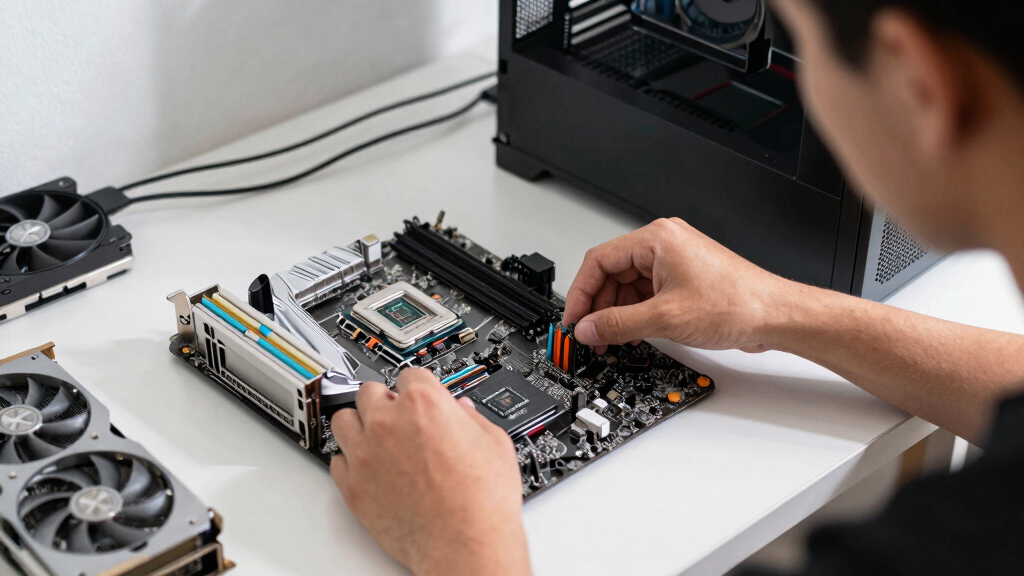
Gaming motherboard with DDR5 RAM support
As an affiliate, we earn on qualifying purchases.
As an affiliate, we earn on qualifying purchases.
How to Pick the Right Chipset Without Overspending
Choose your CPU first. Pick Intel or AMD, then match the motherboard socket and chipset to that processor generation.
Decide how many upgrades you want. Count your GPU, M.2 SSDs, capture cards, USB devices, and networking needs before you shop.
Pay for tuning only if you will use it. Intel Z-series boards and AMD X-series boards usually target heavier overclocking and expansion [1].
Check RAM support before buying. Some chipset families support DDR5, while older or value boards may use DDR4.
Read the motherboard spec page line by line. The chipset name matters, but the exact board model decides the final port layout.
The right chipset is the one that supports your CPU, your memory, your storage plan, and your upgrade path without charging you for showpiece features. For gaming, that often means a mid-range chipset, a good VRM design, two or three M.2 slots, enough USB, and stable BIOS support.
Say you are building around a single GPU, one 2TB NVMe SSD, 32GB of RAM, and a wired Ethernet connection. A sensible mid-range board can feel perfect: quiet, tidy, and ready for years of Steam sales. Now change the scene: you stream, capture console footage, run three NVMe drives, use Wi-Fi 6E, and want CPU overclocking. That is when a higher-end chipset starts earning its keep.
Motherboard for overclocking Intel CPUs
As an affiliate, we earn on qualifying purchases.
As an affiliate, we earn on qualifying purchases.
Which Chipset Tier Gives You the Best Gaming Value
Motherboard chipsets explained for gaming PC builders often leads to this answer: most players should start in the mid-range tier. Budget chipsets save cash but trim expansion and tuning, while high-end chipsets add lanes, ports, overclocking support, and premium networking that many builds never use [1].
| Chipset tier | Best fit | Typical tradeoff |
|---|---|---|
| Budget | Single-GPU gaming, one or two drives, no CPU overclocking | Fewer M.2 slots, fewer fast USB ports, limited tuning |
| Mid-range | Most gaming PCs with modern SSDs, 32GB RAM, and clean upgrade room | May skip premium networking, extra PCIe 5.0 lanes, or heavy overclocking features |
| High-end | Overclocking, multiple NVMe drives, fast I/O, creator work mixed with gaming | Higher price, features can sit unused |
A good mid-range board is like a well-packed desk: your keyboard, mouse, monitor, headset, and coffee all fit without clutter. You may not have a drawer full of exotic adapters, but your everyday setup works smoothly.
For a practical example, a player building a 1440p PC with one powerful GPU will usually see more benefit from spending extra on the graphics card than jumping from a solid mid-range motherboard to a luxury board. The luxury board may look sharp under RGB lighting, but the GPU still does the heavy lifting in Cyberpunk 2077, Starfield, Baldur’s Gate 3, or whatever fills your weekend.
Mid-range gaming motherboard with multiple M.2 slots
As an affiliate, we earn on qualifying purchases.
As an affiliate, we earn on qualifying purchases.
Why CPU and RAM Compatibility Come Before Everything Else
Your chipset must match your CPU platform and memory type before any gaming feature matters. Intel and AMD chipsets serve different processor families, and motherboard sockets, BIOS support, DDR4, and DDR5 support can turn a promising parts list into a dead build if you mix the wrong pieces [1].
This is the classic kitchen-table build mistake. You lay out the motherboard, CPU, RAM sticks, and cooler like puzzle pieces, then notice the CPU will not fit the socket or the board needs a BIOS update for that processor. The room suddenly feels very quiet.
DDR4 versus DDR5 also deserves a sober look. DDR5 brings higher bandwidth and a longer runway for new platforms, but DDR4 can still make sense for cost-focused builds where the saved money buys a better GPU or larger SSD. For gaming, that trade can matter more than a bigger memory number on the box.
- Check the socket: match the CPU to the exact motherboard socket.
- Check the chipset support list: confirm the processor generation appears on the board maker’s CPU list.
- Check the RAM type: DDR4 and DDR5 are not interchangeable.
- Check BIOS notes: some boards need a firmware update for newer CPUs.
When PCIe 5.0 Helps and When It Just Sounds Fast
PCIe 5.0 is a faster expansion standard that mainly gives your gaming PC more headroom for future GPUs and very fast NVMe storage. For current games, PCIe 4.0 remains enough for modern graphics cards and SSDs, so PCIe 5.0 should be a buying bonus, not a panic purchase [1].
According to PCI-SIG, PCIe 5.0 doubles the raw transfer rate of PCIe 4.0 from 16 GT/s to 32 GT/s per lane [2]. That number looks dramatic, like widening a highway from four lanes to eight. But if your game traffic is already moving cleanly, the extra lanes do not always make your frame rate jump.
Where PCIe 5.0 can matter is storage-heavy use. If you record high-bitrate gameplay, move huge video files, or run a library full of massive open-world installs, a fast PCIe 5.0 NVMe drive can feel sharp during large transfers. In normal play, your GPU, CPU, game engine, and settings still matter more.
Practical rule: do not buy a high-end chipset only because the box says PCIe 5.0. Buy it because the whole board gives you the lanes, slots, ports, and upgrade room you will actually use.
What Overclocking Support Really Buys You
Motherboard chipsets explained for gaming PC builders also means separating tuning from wishful thinking. Overclocking support lets you push CPU and memory settings beyond stock behavior, but the gains depend on your processor, cooling, board power delivery, BIOS options, and the game you play [1].
Intel Z-series chipsets are the familiar choice for unlocked Intel CPU overclocking, while AMD’s higher-tier boards, such as X-series models, tend to target stronger tuning and expansion. Mid-range AMD boards can also be surprisingly capable, depending on the model. The chipset sets the door; the exact motherboard decides how wide it opens.
Imagine a compact case under your desk, fans humming softly, GPU air warming the side panel, and a tower cooler fighting a summer room. A heavy overclock may add heat and noise for a small gain. For many players, enabling a stable memory profile and leaving the CPU near stock feels better than chasing a few extra frames with louder fans.
- Worth it: you enjoy tuning, have strong cooling, and play CPU-sensitive games.
- Skip it: you want quiet operation, simple setup, and predictable stability.
- Middle path: use memory profiles and motherboard auto-tuning carefully, then test stability.
How Ports, M.2 Slots, and Networking Shape Daily Play
Motherboard connectivity matters because it shapes the daily feel of your gaming PC. M.2 slots decide how many fast NVMe drives you can install, USB ports decide how cleanly your gear plugs in, and Ethernet or Wi-Fi options decide how stable multiplayer feels [1].
This is where the spec sheet becomes physical. Your headset dongle sticks out of one USB port, your controller cable uses another, your webcam grabs a third, and your external capture drive wants a fast rear connection. Suddenly, “enough USB” no longer sounds boring.
For storage, two M.2 slots can be fine for a lean build: one 1TB or 2TB boot/game drive now, another later. Three or four slots suit players with giant libraries, modded games, footage, and work files sitting side by side. Watch for lane sharing, because some boards disable a SATA port or reduce a slot’s behavior when every connector is filled.
Networking deserves the same practical eye. Wired Ethernet is still the cleanest choice for ranked matches where a dropped packet feels like a door slamming shut. Wi-Fi 6E can be excellent on supported routers, but walls, distance, and crowded apartments can still dull the shine.
What Steam and Steam Deck Players Should Know
PC, Steam, and Steam Deck players should treat chipset advice differently because the hardware path changes. A desktop gaming PC lets you choose motherboard features, while Steam Deck performance depends on Valve’s fixed handheld hardware and software updates, not a swappable motherboard chipset.
On a desktop, you can plan around PCIe lanes, M.2 slots, DDR5, and future CPUs. On Steam Deck, you focus on game settings, storage size, Proton behavior, and Valve’s compatibility status. Steam Deck Verified labels can change by game version and SteamOS update, so treat any performance claim as platform- and version-specific.
For example, if you play mostly on Steam Deck but build a desktop for 1440p multiplayer, do not overspend on a motherboard because a handheld game stutters in a busy city scene. That stutter may come from the Deck’s APU limits, game patch behavior, shader compilation, or settings. Your desktop chipset choice will not fix the handheld.
Age ratings still matter when you build around family play. The motherboard will not care whether a game is rated E, T, or M, but your living-room setup might. A shared PC with easy controller pairing, clean account separation, and enough front USB ports can make family gaming less messy.
A Simple Buyer Checklist You Can Use in the Store
The safest way to buy a motherboard chipset is to match the board to your real parts list before you fall for a feature badge. Start with CPU support, then confirm memory type, storage slots, expansion lanes, networking, rear I/O, BIOS support, and the price difference versus a better GPU or SSD.
- CPU: Does the board support your exact processor and socket?
- RAM: Are you buying the correct DDR4 or DDR5 kit?
- GPU slot: Does the main PCIe slot fit your card and case layout?
- Storage: Do you have enough M.2 slots for today and one future drive?
- USB: Can you plug in your headset, controller, webcam, capture device, and external drive?
- Networking: Do you need wired Ethernet, Wi-Fi 6E, or both?
- Overclocking: Will you tune the CPU, or only enable a memory profile?
- Budget: Would the chipset upgrade steal money from the GPU, monitor, or SSD?
Use this in a real shopping moment: you are staring at two boards, one $170 and one $290. If the cheaper board supports your CPU, DDR5 kit, GPU, two NVMe drives, and enough USB, the extra $120 may work harder as a larger SSD or quieter CPU cooler. That is not boring. That is a cleaner build.
Frequently Asked Questions
What is a motherboard chipset in simple terms?
A motherboard chipset is the feature controller for your motherboard. It helps decide which CPUs, RAM, PCIe slots, M.2 drives, USB ports, networking features, and overclocking options the board can support.
Do motherboard chipsets affect gaming FPS?
A chipset rarely changes FPS by itself when the CPU and GPU stay the same. It affects the features around performance, such as CPU support, memory tuning, storage speed, expansion, and overclocking options.
Is PCIe 5.0 necessary for a gaming PC?
PCIe 5.0 is not necessary for most current gaming PCs. PCIe 4.0 is still enough for modern GPUs and common NVMe SSDs, while PCIe 5.0 works best as future headroom or for very fast storage builds.
Should I buy a high-end chipset for gaming?
Buy a high-end chipset if you need CPU overclocking, multiple NVMe drives, premium USB, faster networking, or a broader upgrade path. If you use one GPU, one or two SSDs, and stock CPU settings, a mid-range chipset is usually the smarter buy.
Can I upgrade my Steam Deck motherboard chipset?
No. Steam Deck uses fixed handheld hardware, so chipset shopping applies to desktop gaming PCs, not the Deck. For Steam Deck, check game settings, SteamOS version, storage, Proton behavior, and the current Steam Deck Verified status for each game.
Conclusion
Remember this: buy the chipset for the PC you are actually building, not the fantasy spec sheet glowing on the box. A balanced gaming PC feels fast because the CPU, GPU, memory, storage, cooling, and motherboard all make sense together.
Choose the board that gives your parts room to breathe, then spend the rest where you will feel it every night: smoother frames, faster loads, quieter fans, and a desktop that disappears behind the game.
Evergreen bestsellers Picks
bestsellers
As an affiliate, we earn on qualifying purchases.