If you are searching for the best single-board computers in 2026, I would put the Raspberry Pi 5 8GB at the top for most buyers because it balances speed, software support, accessories, and long-term availability better than the rest of this lineup. The NVIDIA Jetson Orin Nano Super Developer Kit is the stronger choice for on-device AI and robotics, while the Libre Computer Sweet Potato 2GB makes more sense when price and basic Linux projects matter more than raw power. The main tradeoffs are ecosystem versus specs, ARM simplicity versus x86 compatibility, and low upfront board cost versus the real cost of power supplies, storage, cooling, and cases. Some Orange Pi and Radxa boards offer appealing hardware for the money, but I rank them lower when software maturity or documentation raises the effort level. Keep reading for the full breakdown of which board fits beginners, compact builds, AI work, media use, and budget tinkering.

Play games on Amazon Luna for your game nights, included with Prime
- A rotating selection of games, no download needed
- Play on TV, laptop or phone
- Fast, free delivery for your gear, too
Key Takeaways
- I rank Raspberry Pi 5 8GB as the best overall pick because it pairs strong performance with the easiest software, accessory, and support path.
- I see Jetson Orin Nano Super as the premium AI choice, but it is too specialized and too setup-heavy for basic Linux learning.
- I treat LattePanda 3 Delta as the clear x86 choice when Windows or Intel-only software matters, though it costs more and has a smaller maker ecosystem.
- I would use Orange Pi Zero 3 for compact value builds, especially in higher-RAM versions; the 1GB board is best kept to single-purpose services.
- I keep Orange Pi 4 Pro, Radxa Rock 2A, Libre Computer Sweet Potato, and Raspberry Pi 3 B+ in narrower lanes because each gives up ecosystem depth, speed, memory headroom, or modern I/O.
| Libre Computer Sweet Potato AML-S905X-CC-V2 2GB |  | Best Low-Power Media and Server Board | Processor: ARM S905X-CC | RAM: 2GB | Storage: eMMC, microSD, or USB; not included | VIEW LATEST PRICE | See Our Full Breakdown |
| Orange Pi 4 Pro 6GB Single Board Computer with AI NPU, Wi-Fi 6 & Bluetooth 5.4 |  | Best for On-Device AI Projects | CPU: 8-core; 2x Cortex-A76 plus 6x Cortex-A55 | CPU Speed: Up to 2.0GHz | RAM: 6GB LPDDR5 | VIEW LATEST PRICE | See Our Full Breakdown |
| Radxa Rock 2A Single Board Computer (RK3528A Quad-Core CPU, 4K HDMI) |  | Best Wired Project Board with PoE | CPU: RK3528A quad-core ARM Cortex-A5 | Processor Speed: 2GHz | RAM: 4GB LPDDR4 | VIEW LATEST PRICE | See Our Full Breakdown |
| Raspberry Pi 5 8GB Single-Board Computer |  | Best Overall | Processor: Quad-core ARM | Processor Speed: 2.4GHz | RAM: 8GB LPDDR4X | VIEW LATEST PRICE | See Our Full Breakdown |
| Orange Pi Zero 3 1G Single Board Computer |  | Best Compact Budget Board | Processor: Allwinner H618 quad-core Cortex-A53 | Processor Speed: 1.2GHz | RAM: 1GB LPDDR4 | VIEW LATEST PRICE | See Our Full Breakdown |
| Raspberry Pi 3 Model B+ Board with 1GB RAM |  | Best Budget Raspberry Pi | RAM: 1GB LPDDR3 | Processor: Broadcom Cortex quad-core | Processor Speed: 1.4GHz | VIEW LATEST PRICE | See Our Full Breakdown |
| LattePanda 3 Delta x86 Single Board Computer with Intel N5105, 8GB RAM, 64GB eMMC for IoT and Robotics |  | Best x86 SBC for Windows Projects | RAM: 8GB DDR4 | Storage: 64GB eMMC | Processor: Intel N5105 quad-core | VIEW LATEST PRICE | See Our Full Breakdown |
| NVIDIA Jetson Orin Nano Super Developer Kit | 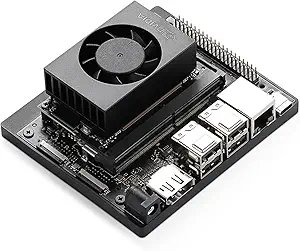 | Best for Edge AI Development | AI Performance: Up to 67 TOPS | RAM: 8GB | GPU: NVIDIA Ampere | VIEW LATEST PRICE | See Our Full Breakdown |
| Orange Pi Zero 3 Single Board Computer with 1GB/1.5GB/2GB/4GB RAM, WiFi 5.0 & Bluetooth 5.0 |  | Best Compact Value Board | CPU: Allwinner H618 quad-core Cortex-A53 | CPU Speed: 1.5GHz | GPU: Mali G31 MP2 | VIEW LATEST PRICE | See Our Full Breakdown |
More Details on Our Top Picks
Libre Computer Sweet Potato AML-S905X-CC-V2 2GB
I would place the Libre Computer Sweet Potato AML-S905X-CC-V2 high for buyers who care more about efficiency and reliable Linux support than raw speed. Its 1W idle draw makes it a better always-on pick than the Orange Pi 4 Pro, and its 4K H.265/VP9 playback gives it a clearer media-server angle than the Orange Pi Zero 3. The tradeoff is headroom: 2GB RAM limits heavier desktop use, containers, and multitasking, while the lack of built-in Wi-Fi or Bluetooth adds cost and setup work. Compared with the Raspberry Pi 5 8GB, this is less flexible as a main project board, but it makes more sense for a quiet, wired, low-draw appliance.
Pros:- Very low 1W idle power draw for always-on projects
- Broad Linux and CoreELEC support
- Hardware-accelerated 4K H.264, H.265, and VP9 playback
- PoE capability through a mezzanine add-on
Cons:- 2GB RAM leaves little room for heavier multitasking
- No built-in Wi-Fi or Bluetooth
- External USB hard drives may need their own power supply
Best for: Home lab users building a low-power media player, DNS box, lightweight file service, or wired remote node.
Not ideal for: Beginners who want wireless connectivity and accessories included, or makers running memory-heavy desktop workloads.
- Processor:ARM S905X-CC
- RAM:2GB
- Storage:eMMC, microSD, or USB; not included
- Operating Systems:Fedora 42, Debian 13, Ubuntu 24.04 LTS, CoreELEC
- Connectivity:GPIO, USB 3.0, PoE via mezzanine
- Power Consumption:1W idle
- Video Support:H.264, H.265, and VP9 4K at 60FPS
Bottom line: This is the board I would choose for a quiet, wired, always-on media or server project where low power matters more than expansion.
Orange Pi 4 Pro 6GB Single Board Computer with AI NPU, Wi-Fi 6 & Bluetooth 5.4
The Orange Pi 4 Pro 6GB earns its spot because it shifts the buying question from basic tinkering to local AI and robotics work. Compared with the Raspberry Pi 5 8GB, it offers less mainstream accessory comfort, but its 3 TOPS NPU, octa-core CPU, LPDDR5 memory, Wi-Fi 6, and Bluetooth 5.4 make it better suited to camera inference, recognition tasks, and connected automation. It also has much more compute ambition than the Libre Computer Sweet Potato, which is calmer and cheaper for appliance-style use. The price and setup curve are the catch. I would not treat this as a first SBC unless the buyer is ready to work through board-specific images, community documentation, and power planning.
Pros:- Octa-core CPU gives it stronger compute headroom than basic SBCs
- 3 TOPS NPU supports local AI inference workloads
- 6GB LPDDR5 memory helps with multitasking and development stacks
- Wi-Fi 6 and Bluetooth 5.4 reduce the need for extra adapters
Cons:- Setup can demand more technical effort than Raspberry Pi boards
- Higher price than simpler Linux or media boards
- Portable builds may be limited by power draw and battery runtime
Best for: Developers building edge AI, robotics, computer vision, or industrial-control prototypes that need local inference and modern wireless.
Not ideal for: First-time SBC buyers who mainly want tutorials, plug-and-play cases, and the largest accessory ecosystem.
- CPU:8-core; 2x Cortex-A76 plus 6x Cortex-A55
- CPU Speed:Up to 2.0GHz
- RAM:6GB LPDDR5
- AI Accelerator:3 TOPS NPU
- NPU Data Types:INT8, FP16, BF16
- Wireless:Wi-Fi 6 and Bluetooth 5.4
- OS Support:Android, Debian, Ubuntu, OpenHarmony
- Form Factor:Single-board computer
Bottom line: This is the pick I would steer toward AI-minded builders who need more than a general hobby board but are comfortable with extra setup work.
Radxa Rock 2A Single Board Computer (RK3528A Quad-Core CPU, 4K HDMI)
The Radxa Rock 2A sits between the tiny budget boards and the more expensive performance picks. I like its role for wired embedded projects: Gigabit Ethernet, PoE support, 4K HDMI, and 4GB LPDDR4 give it a cleaner install story than the Orange Pi Zero 3 when a project will live on a shelf, wall, kiosk, or workbench. It has more memory than the Libre Computer Sweet Potato, but Libre’s wider OS list and lower idle draw make that board a better appliance choice. The Rock 2A’s weakness is ecosystem fit. Debian support is useful, yet buyers who want polished beginner guides, smart-home certification, or broad accessory availability may find the Raspberry Pi 5 easier to build around.
Pros:- 4GB LPDDR4 RAM is more comfortable than 1GB or 2GB boards
- Gigabit Ethernet and PoE support suit permanent wired installs
- 4K HDMI output works for dashboard and media-display projects
- RP5-compatible FPC connector adds expansion potential
Cons:- Debian is the only listed operating system
- Not compatible with smart-home platforms as listed
- Accessory ecosystem is less familiar than Raspberry Pi
Best for: Makers building wired kiosks, classroom boards, PoE-connected controllers, or embedded Debian projects.
Not ideal for: Smart-home buyers or beginners who want the broadest tutorials, cases, add-ons, and prebuilt software images.
- CPU:RK3528A quad-core ARM Cortex-A5
- Processor Speed:2GHz
- RAM:4GB LPDDR4
- Networking:Gigabit Ethernet with PoE support
- Display:4K HDMI
- USB:Multiple USB ports
- Operating System:Debian
- Dimensions:3.5 x 3.5 x 0.5 inches
Bottom line: This is the board I would pick for a wired Debian project where PoE and 4GB RAM matter more than beginner polish.
Raspberry Pi 5 8GB Single-Board Computer
The Raspberry Pi 5 8GB is my overall pick because it balances performance, documentation, accessories, and community support better than the rest of this batch. The Orange Pi 4 Pro has a stronger AI story on paper, but the Raspberry Pi 5 is easier to recommend for mixed use: coding, camera projects, light desktop work, 4K display output, and classroom builds. Its 8GB LPDDR4X memory gives it far more breathing room than the Libre Computer Sweet Potato or Orange Pi Zero 3. It is not the cheapest path, though. Cooling, storage, power, case, and cables can push the final cost up, and buyers who only need a simple always-on server may be overspending.
Pros:- 8GB LPDDR4X RAM supports heavier project workloads
- Large Raspberry Pi software, tutorial, and accessory ecosystem
- 4K display support works for desktop, kiosk, and media projects
- Built-in Wi-Fi and Bluetooth reduce setup friction
Cons:- Needs extra parts for a complete build
- No built-in cooling system
- Can cost more than basic SBCs once accessories are added
Best for: Students, educators, hobbyists, and makers who want the safest all-around SBC platform for many project types.
Not ideal for: Buyers building the lowest-power headless node or anyone who needs a complete kit without buying storage, cooling, and power separately.
- Processor:Quad-core ARM
- Processor Speed:2.4GHz
- RAM:8GB LPDDR4X
- Operating System:Raspberry Pi OS
- Wireless:802.11ac Wi-Fi and Bluetooth
- Display:4K displays via HDMI
- USB Ports:4
- Compatible Devices:Raspberry Pi Camera Module V2 and HDMI 4K displays
Bottom line: This is the board I would recommend first for most buyers because it has the strongest mix of capability, guidance, and upgrade paths.
Orange Pi Zero 3 1G Single Board Computer
The Orange Pi Zero 3 1G is the value-minded miniature board in this group. I would choose it when small size, low cost, and built-in wireless matter more than heavy multitasking. Against the Libre Computer Sweet Potato, it gives buyers Wi-Fi 5 and Bluetooth 5.0 out of the box, plus Android, Debian, and Ubuntu options. Against the Raspberry Pi 5 8GB, though, it feels much more constrained: 1GB RAM limits desktop comfort, browser use, and larger services. Its 4K Micro-HDMI output and Mali-G31 GPU are useful for compact displays or light media work, but this is still a tinkerer’s board. The missing power supply and case also make the low entry price less complete than it first appears.
Pros:- Compact and budget-friendly for small projects
- Wi-Fi 5, Bluetooth 5.0, Ethernet, and USB are built in
- Supports Android, Debian, and Ubuntu images
- 4K Micro-HDMI output adds display flexibility
Cons:- 1GB RAM is tight for desktop and multitasking workloads
- Power supply and case are not included
- Warranty details are not clearly specified
Best for: Budget builders making compact network tools, lightweight media displays, small automation projects, or experimental Linux nodes.
Not ideal for: Buyers who need smooth desktop use, large containers, heavy development tools, or an included enclosure and power setup.
- Processor:Allwinner H618 quad-core Cortex-A53
- Processor Speed:1.2GHz
- RAM:1GB LPDDR4
- GPU:Arm Mali-G31 MP2
- Connectivity:Wi-Fi 5, Bluetooth 5.0, Ethernet, USB 2.0
- Display:4K via Micro-HDMI
- Operating Systems:Android 12, Debian 11/12, Ubuntu 20.04/22.04
- Expansion:3 USB ports, 13-pin and 26-pin expansion ports
Bottom line: This is the board I would buy for a cheap, compact, wireless project where expectations stay light and focused.
Raspberry Pi 3 Model B+ Board with 1GB RAM
Raspberry Pi 3 Model B+ earns its place as the familiar low-cost pick for buyers who want broad OS support, easy accessory matching, and enough power for learning, light servers, and controller projects. Compared with the Raspberry Pi 5 8GB, it is much less capable for desktop-style use, but it also keeps the setup simpler and cheaper. Against the Orange Pi Zero 3, the Pi 3 B+ gives up RAM flexibility and 4K output, while gaining the comfort of a larger Raspberry Pi software and project ecosystem. The main limit is 1GB of RAM, which narrows it to modest workloads. I would treat this as a dependable starter board, not a compact workstation.
Pros:- Strong Raspberry Pi software and accessory ecosystem
- Dual-band Wi-Fi and Ethernet give flexible network options
- Four USB ports make keyboard, mouse, storage, and dongle setups easier
- Good fit for learning Linux, GPIO, and basic server projects
Cons:- 1GB RAM limits browsing, containers, and heavier desktop use
- Older platform trails newer boards in CPU, memory, and media performance
- Return terms may include a short window and possible restocking fees
Best for: Students, hobbyists, and makers who want a low-cost Raspberry Pi for GPIO projects, Pi-hole, retro tinkering, or lightweight Linux experiments.
Not ideal for: Buyers planning desktop multitasking, AI work, or memory-heavy containers, since 1GB RAM becomes a hard ceiling quickly.
- RAM:1GB LPDDR3
- Processor:Broadcom Cortex quad-core
- Processor Speed:1.4GHz
- Wireless:Dual-band Wi-Fi 802.11ac
- Bluetooth:Bluetooth 4.2/BLE
- Ethernet:Wired Ethernet
- USB Ports:4
- Smart Home Compatibility:Not smart home compatible
Bottom line: Choose this if Raspberry Pi familiarity matters more than raw speed or memory headroom.
LattePanda 3 Delta x86 Single Board Computer with Intel N5105, 8GB RAM, 64GB eMMC for IoT and Robotics
LattePanda 3 Delta sits apart from the ARM-heavy boards here because it runs Windows 10/11 and Linux natively. That matters if a project depends on x86 apps, drivers, or development tools that would be awkward on the Raspberry Pi 5 8GB or NVIDIA Jetson Orin Nano Super Developer Kit. The built-in Arduino Leonardo coprocessor also gives robotics and sensor projects a cleaner control path than a plain mini PC. Its tradeoff is complexity: dual M.2 slots, 2.5GbE, Wi-Fi 6, and triple display support are powerful, but they add setup decisions that beginners may not want. The 64GB eMMC is usable, yet serious Windows or edge projects will likely need NVMe expansion.
Pros:- Native Windows and Linux support avoids many ARM compatibility issues
- Integrated Arduino coprocessor helps with real-time hardware control
- Dual M.2 slots support NVMe storage and 5G expansion
- Wi-Fi 6 and 2.5GbE suit fast edge networking
Cons:- Costs far more than entry-level Raspberry Pi or Orange Pi boards
- Advanced expansion options can overwhelm new users
- 64GB eMMC may feel tight for Windows, datasets, or larger deployments
Best for: Developers building Windows-based kiosks, robotics controllers, industrial prototypes, or edge systems that need x86 software compatibility.
Not ideal for: First-time SBC buyers who mainly want guided tutorials and simple Linux projects, since the feature set adds cost and setup complexity.
- RAM:8GB DDR4
- Storage:64GB eMMC
- Processor:Intel N5105 quad-core
- Max Processor Speed:2.9GHz
- Networking:Wi-Fi 6 and 2.5GbE Ethernet
- Expansion:Dual M.2, M Key NVMe and B Key SATA/5G
- Operating Systems:Windows 10/11 and Linux
- USB Ports:5
- Hardware Coprocessor:ATmega32U4 Arduino Leonardo compatible
Bottom line: Pick this when x86 compatibility and hardware control matter more than the lowest possible SBC price.
NVIDIA Jetson Orin Nano Super Developer Kit
NVIDIA Jetson Orin Nano Super Developer Kit is the specialist pick in this group, built for buyers who care less about general SBC tinkering and more about local AI inference. Compared with the LattePanda 3 Delta, it does not win on x86 software compatibility, but its 67 TOPS AI rating and NVIDIA stack make it better suited to vision models, robotics perception, and compact AI demos. The Orange Pi 4 Pro offers an AI NPU, yet Jetson has the stronger software path through Isaac, DeepStream, and Riva. The catch is that this board asks more from the buyer: camera setup, model deployment, power planning, and Linux work all raise the learning curve. It is overkill for basic servers or media playback.
Pros:- 67 TOPS AI performance suits demanding edge inference
- 8GB module gives more room for AI workloads than entry boards
- NVIDIA software ecosystem supports vision, speech, and robotics workflows
- Compact developer kit includes a carrier board for prototyping
Cons:- Costs more than general-purpose starter SBCs
- Requires more Linux, AI, and hardware setup knowledge
- Less attractive for buyers who need native Windows or broad x86 app support
Best for: AI developers, robotics builders, and computer-vision teams who need compact on-device inference with NVIDIA software support.
Not ideal for: Casual makers who only need GPIO, media playback, or a small Linux server, since the AI hardware and setup effort would be wasted.
- AI Performance:Up to 67 TOPS
- RAM:8GB
- GPU:NVIDIA Ampere
- CPU:6-core ARM
- Camera Connectors:2 MIPI CSI with 4-lane support
- Software Stack:Isaac, DeepStream, Riva
- Kit Type:Developer kit with carrier board
- Listed Price:$249
Bottom line: Choose this when edge AI capability is the main reason for buying an SBC.
Orange Pi Zero 3 Single Board Computer with 1GB/1.5GB/2GB/4GB RAM, WiFi 5.0 & Bluetooth 5.0
Orange Pi Zero 3 is the small-board value play: it gives buyers a compact 50mm x 55mm footprint, up to 4GB LPDDR4 RAM, Gigabit Ethernet, Wi-Fi 5, Bluetooth 5.0, and 4K@60 output. Compared with the Raspberry Pi 3 Model B+, it offers more memory choices and stronger media specs, which helps for lightweight displays, network appliances, and embedded dashboards. The tradeoff is the ecosystem: Raspberry Pi support is broader, while Orange Pi projects can demand more comfort with images, forums, and board-specific quirks. Compared with the larger Orange Pi 4 Pro, this is easier to tuck into tight builds, but less suitable for complex expansion or AI-focused work. I see it as a practical compact SBC for confident budget builders.
Pros:- Very compact 50mm x 55mm board fits tight enclosures
- Up to 4GB LPDDR4 RAM gives more headroom than many small SBCs
- 4K@60 micro HDMI output supports sharp display projects
- Wi-Fi 5, Bluetooth 5.0, and Gigabit Ethernet cover common connectivity needs
Cons:- Only 16MB onboard SPI flash, so projects rely on microSD storage
- Micro HDMI and CVBS outputs may require adapters
- Smaller board limits room for elaborate peripheral layouts
Best for: Budget-minded makers building compact network tools, lightweight media displays, embedded dashboards, or small Linux/Android projects.
Not ideal for: Buyers who want the broadest beginner tutorials or complex multi-accessory builds, since the tiny layout and software support can add friction.
- CPU:Allwinner H618 quad-core Cortex-A53
- CPU Speed:1.5GHz
- GPU:Mali G31 MP2
- Memory Options:1GB, 1.5GB, 2GB, or 4GB LPDDR4
- Storage:16MB SPI Flash and microSD card slot
- Connectivity:Wi-Fi 5, Bluetooth 5.0, Gigabit Ethernet
- Video Output:Micro HDMI 4K@60fps and TV-Out CVBS
- Expansion:26-pin and 13-pin GPIO headers, USB 2.0 ports
- Dimensions:50mm x 55mm
Bottom line: Pick this for a compact, low-cost SBC when memory flexibility and networking matter more than Raspberry Pi-level guidance.

How We Picked
I weighted usable performance first: CPU class, RAM, storage paths, thermals, and whether the board can grow beyond a basic microSD setup. I cross-checked published specs and setup notes where manufacturer pages were available, including Raspberry Pi 5, Jetson Orin Nano, LattePanda 3 Delta, and Radxa Rock 2A. I then gave heavy weight to software maturity, because a slightly slower board with stable images, active forums, and easy accessories can beat a faster board that leaves buyers debugging kernels. I also scored connection mix and project fit: GPIO, camera/display options, wireless, Ethernet, AI acceleration, Windows/Linux support, and physical size. Price mattered after those basics, since the cheapest board can cost more in wasted time if the OS image, power supply, or add-ons are awkward.
The ranking favors boards that solve the broadest buyer problems with the least friction. That is why the Raspberry Pi 5 8GB leads, the Jetson Orin Nano Super earns the premium AI slot, and the LattePanda 3 Delta ranks highly for buyers who need x86 software rather than another ARM Linux board. Compact and budget picks sit lower because they are narrower tools; the Orange Pi Zero 3 models, Radxa Rock 2A, and Raspberry Pi 3 Model B+ can be smart buys, but each asks the buyer to accept clearer limits in performance, memory, support, or upgrade headroom. I place Libre Computer Sweet Potato ahead of some faster budget alternatives when low price, 4K-friendly media use, and basic Linux tinkering matter more than current-generation speed.
Factors to Consider When Choosing Best Single-board Computers
I would choose a single-board computer by starting with the project shape, then narrowing by software, I/O, power, and upgrade path. The trap is buying the fastest-looking board and discovering later that the kernel, camera stack, case, or storage setup is the real bottleneck. In this category, ecosystem fit often beats isolated specs, while specialized hardware only pays off when the project can use it.
Start With the Workload
I start by separating general computing, edge AI, media playback, and headless IoT because they reward different boards. A desktop-style Linux project wants RAM, browser speed, USB bandwidth, and smooth updates, which favors Raspberry Pi 5 over smaller Zero-class boards. A camera or robotics AI build cares more about GPU or NPU toolchains and model support, which is why Jetson sits in a different lane from Orange Pi 4 Pro despite both mentioning AI hardware. For simple sensors, a smaller board can be better because heat, power draw, and case size matter more than peak CPU speed. The common mistake is buying a premium board for a job that spends most of its life waiting on network traffic. I would only pay for extra compute when the workload is local, constant, and hard enough to expose the weaker boards.
Treat Software Support as a Feature
I give software support almost as much weight as the processor because SBC projects often live or die by images, forums, drivers, and update cadence. Raspberry Pi 5 wins here because its ecosystem lowers the chance that a display, HAT, camera, or tutorial will send a buyer into a dead end. Orange Pi and Radxa boards can offer more adventurous hardware, but they ask for more patience when images, kernels, or accessory guides lag behind the hardware. Jetson is strong when the project uses NVIDIA’s AI stack, yet it is less friendly for a buyer who only wants a quiet home server or a first Linux board. I treat older boards differently: Raspberry Pi 3 Model B+ has broad legacy material, but its age limits modern desktop comfort. The best software choice is the board that leaves the fewest hidden chores between the box and a working project.
Budget for the Complete Build
The board price is only the first line of the total build cost, and cheap boards can lose their advantage once storage, power, cooling, adapters, and enclosures are added. Raspberry Pi 5 often needs a proper USB-C power supply and active cooling, while Jetson benefits from NVMe storage for models, datasets, and containers. A compact Orange Pi Zero 3 can stay inexpensive for a small service, but the math changes if the project needs many USB devices or a clean enclosure. LattePanda costs more up front, yet it may save work when a Windows app or x86 Linux package is non-negotiable. I also price the cost of mistakes: boards with thinner documentation may cost less in dollars and more in evenings. For buyers on a strict budget, I favor simple Linux targets, known accessories, and RAM that matches the job over chasing the highest spec line.
Check I/O Before Benchmarks
I/O decides whether an SBC fits the build more often than raw CPU power does. A board for a NAS-like project needs fast storage and dependable networking; a camera robot needs camera lanes, wireless stability, and enough power headroom for sensors and motors. Raspberry Pi 5 gains ground through PCIe expansion and accessory support, while LattePanda gains ground through x86-friendly ports and onboard storage. Smaller boards like Orange Pi Zero 3 trade ports for size, so they suit tucked-away services better than cable-heavy benches. The Radxa Rock 2A and Libre Computer Sweet Potato can make sense for focused HDMI or embedded work, but buyers should map every connector before checkout. I would rather buy a modest board with the right ports than a faster board that immediately needs a chain of adapters.
Know When Specialized Hardware Pays Off
Special hardware is valuable only when the software stack can use it. The Jetson Orin Nano Super earns its premium because CUDA, TensorRT, camera pipelines, and robotics tools give its AI hardware a clear path into real projects. The Orange Pi 4 Pro has attractive AI and wireless specs, but buyers need to verify that their preferred framework and image support the exact acceleration path they expect. The LattePanda 3 Delta is specialized in another way: its x86 platform helps when a project depends on Windows, legacy drivers, or desktop Linux packages built for Intel chips. For media playback, a board’s video decoder can matter more than its benchmark score; for always-on automation, idle power can matter more than either. I would pay extra only when the project has a clear reason to use the special feature on day one.
Frequently Asked Questions
Should I choose Raspberry Pi 5 even if some rivals have stronger specs?
Yes, I rank the Raspberry Pi 5 8GB as the safest overall pick because SBC value is not just silicon. Compared with Orange Pi 4 Pro or Radxa Rock 2A, it has a stronger mix of software images, accessory support, tutorials, and long-term availability. Its drawback is that the full setup can cost more once a good power supply, cooling, storage, and case are added. Buyers chasing maximum AI acceleration or x86 app support should move to Jetson or LattePanda instead. For most makers, classrooms, and general projects, the reduced setup friction is worth more than a spec-sheet win.
Should I pay for the NVIDIA Jetson Orin Nano Super if I am only learning Linux?
I would not buy the Jetson Orin Nano Super just to learn Linux or run a light server. Its value comes from edge AI, robotics, camera workloads, and NVIDIA’s developer stack, not from being the easiest beginner board. It also asks for more planning around storage, power, thermal behavior, and software setup than Raspberry Pi 5. If the project includes local vision models, robot perception, or CUDA-based work, the premium makes sense. If the goal is basic coding, GPIO lessons, or a dashboard, Raspberry Pi 5 or Raspberry Pi 3 Model B+ is the cleaner starting point.
Which Orange Pi Zero 3 Version Should I Buy?
I would treat the Orange Pi Zero 3 1G as the leanest compact option and the configurable Orange Pi Zero 3 as the better buy when more RAM is available at a fair price. The hardware family is similar, but RAM changes what feels realistic: 1GB fits light services, while 2GB or 4GB gives more breathing room for containers, dashboards, and heavier Linux images. Compared with Raspberry Pi 5, both are narrower tools because they trade accessory depth and horsepower for small size and low cost. The risk is buying the cheapest 1GB board and then asking it to behave like a desktop. I would pick the higher-RAM version unless the project is a single-purpose node with tight power and size limits.
When does an x86 board like the LattePanda 3 Delta make more sense than ARM?
The LattePanda 3 Delta makes sense when the project depends on Windows, Intel-only drivers, x86 containers, or desktop Linux packages that are awkward on ARM. Compared with Raspberry Pi 5, it can reduce software friction for PC-like workloads, kiosks, industrial panels, and robotics tools built around x86 assumptions. The tradeoff is price, power, cooling, and a smaller hobbyist ecosystem than Raspberry Pi. It is also overkill for simple GPIO lessons or lightweight network services. I would choose it when compatibility saves more time than the board costs.
Should I still buy a Raspberry Pi 3 Model B+ in 2026?
The Raspberry Pi 3 Model B+ can still make sense for education, legacy projects, and low-demand services, especially when guides or add-ons were built around that generation. I would not buy it as a primary desktop board when Raspberry Pi 5 is in the same comparison, because the performance gap changes daily comfort. Its strength is familiarity: a huge library of older tutorials, low power draw, and enough GPIO support for many classroom tasks. Its weakness is headroom, especially for browsers, heavier Linux images, and multitasking. If the price is close to a newer board, I would move up; if it is already on hand, it remains useful.
Conclusion
My final buyer map is straightforward: choose the Raspberry Pi 5 8GB as the best overall SBC and the best starting point for beginners, the Libre Computer Sweet Potato 2GB as the best value pick for basic Linux builds, and the NVIDIA Jetson Orin Nano Super Developer Kit as the premium choice for edge AI and robotics. For x86 software, LattePanda 3 Delta is the cleanest fit; for compact nodes, Orange Pi Zero 3 is the practical pick, with the higher-RAM version favored over the 1GB-only listing. Orange Pi 4 Pro is for spec-hungry tinkerers who accept more setup work, while Radxa Rock 2A fits focused 4K or embedded builds better than broad beginner use. Raspberry Pi 3 Model B+ is best treated as a legacy or classroom board rather than a new all-purpose buy. That split is why I rank ecosystem breadth first, specialized power second, and ultra-low cost only when the project is narrow enough to benefit from it.
Fall Picks
fall essentials
As an affiliate, we earn on qualifying purchases.